Amazon Kinesis Data Streams vs MSK: Real-Time Streaming Decision Guide
Quick summary: Kinesis Data Streams and Amazon MSK both handle real-time streaming on AWS, but they serve different architectures. Here is how to choose between them for your workload.
Key Takeaways
- Kinesis Data Streams and Amazon MSK both handle real-time streaming on AWS, but they serve different architectures
- On AWS, two services dominate this space: Amazon Kinesis Data Streams and Amazon MSK (Managed Streaming for Apache Kafka)
- If you have Kafka producers, consumers, or tooling already, use Amazon MSK
- What Each Service Is Amazon Kinesis Data Streams Kinesis Data Streams is AWS's proprietary streaming service
- It predates the Kafka era on AWS and was designed from the ground up for tight AWS service integration
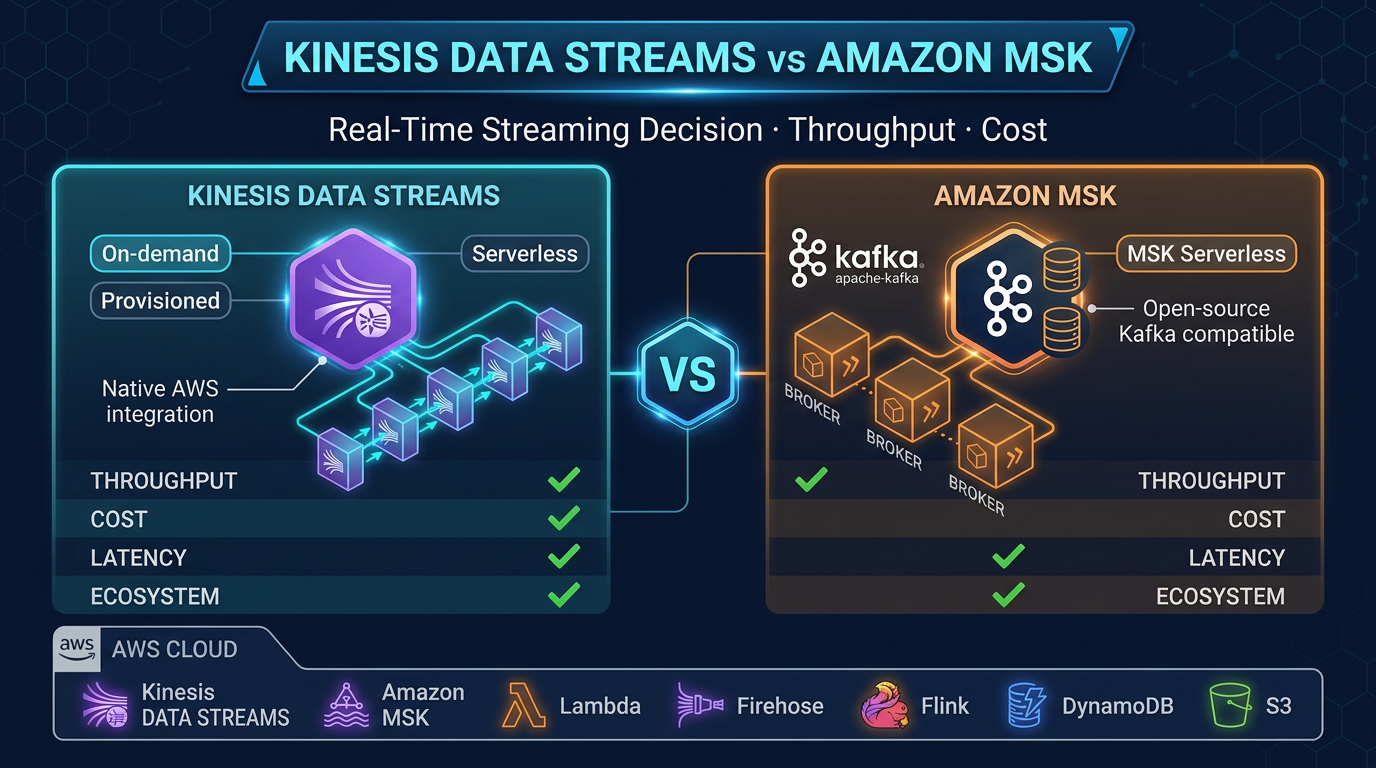
Table of Contents
Real-time streaming is no longer an edge concern — it is a core requirement for modern data architectures. Whether you are processing clickstreams, propagating events between microservices, ingesting IoT telemetry, or building CDC (Change Data Capture) pipelines, you need a streaming backbone that can handle scale without becoming a maintenance burden.
On AWS, two services dominate this space: Amazon Kinesis Data Streams and Amazon MSK (Managed Streaming for Apache Kafka). Both handle real-time event streaming at scale. Both are managed services. But they are built on different foundations, serve different use cases, and carry different operational and cost profiles.
This guide cuts through the noise and gives you a concrete decision framework.
The Short Answer
| Criterion | Choose Kinesis Data Streams | Choose Amazon MSK |
|---|---|---|
| Protocol | AWS-native only | Kafka protocol (full compatibility) |
| Operational overhead | Minimal (especially On-demand) | Low, but more configuration choices |
| Kafka ecosystem (Connect, Streams) | Not supported | Fully supported |
| Lambda integration | Native event source mapping | Supported, slightly more setup |
| Sustained high throughput (>500 MB/s) | Expensive at scale | More cost-efficient with Reserved Instances |
| Variable/bursty workloads | On-demand mode ideal | MSK Serverless handles this |
| Existing Kafka codebase | Requires producer/consumer rewrite | Drop-in replacement |
| Schema Registry | Not built in | Supported (AWS Glue Schema Registry or Confluent) |
Default recommendation: If you are building net-new on AWS and have no Kafka dependencies, start with Kinesis Data Streams On-demand. If you have Kafka producers, consumers, or tooling already, use Amazon MSK.
What Each Service Is
Amazon Kinesis Data Streams
Kinesis Data Streams is AWS’s proprietary streaming service. It predates the Kafka era on AWS and was designed from the ground up for tight AWS service integration.
Architecture: Data is organized into streams, which are divided into shards. Each shard provides:
- 1 MB/s write throughput
- 2 MB/s read throughput (standard consumers)
- Up to 5 read transactions per second
In Provisioned mode, you specify the number of shards. In On-demand mode (the default for new deployments), Kinesis scales shards automatically based on traffic — you never think about shard count.
Recent capability increases (2025):
- Up to 50 enhanced fan-out consumers per stream (increased November 2025), each getting a dedicated 2 MB/s read pipe — critical for architectures with many independent consumers
- Maximum record size increased to 10 MiB (increased October 2025, up from 1 MiB), enabling larger payloads without external chunking
- Retention up to 365 days
Enhanced fan-out is a key differentiator: each registered consumer gets its own dedicated 2 MB/s throughput pipe via HTTP/2 push, eliminating the shared 2 MB/s limit of standard consumers. With 50 fan-out consumers now supported, Kinesis handles very wide fan-out patterns.
Amazon MSK (Managed Streaming for Apache Kafka)
Amazon MSK is managed Apache Kafka. AWS provisions, patches, and monitors the Kafka brokers, ZooKeeper (or KRaft in newer versions), and the underlying infrastructure — but the Kafka protocol is unchanged.
Deployment modes:
- Provisioned: You choose broker instance types (kafka.m5.large through kafka.m5.4xlarge, plus Graviton-based broker types), broker count, and storage. Full control, best price-performance at scale.
- MSK Serverless: No cluster sizing. Scales automatically up to 200 MBps write and 400 MBps read per cluster. TLS encryption is mandatory — MSK Serverless enforces TLS-only communication with no option to disable it.
Kafka ecosystem support:
- Kafka Streams (stateful stream processing, JoinStreams, windowed aggregations)
- MSK Connect (managed Kafka Connect, fully serverless connector scaling)
- Schema Registry via AWS Glue Schema Registry or self-managed Confluent Schema Registry on EC2
- Consumer groups with independent offset tracking
- Kafka admin APIs (topic creation, partition reassignment, consumer group management)
- Support for Kafka versions up to 3.7.x (check the MSK console for current supported versions)
How They Compare
| Feature | Kinesis Data Streams | Amazon MSK |
|---|---|---|
| Protocol | Kinesis API (AWS SDK) | Apache Kafka protocol |
| Scaling unit | Shard (1 MB/s write, 2 MB/s read) | Broker instance + partition count |
| Auto-scaling | On-demand mode: fully automatic | MSK Serverless: automatic; Provisioned: manual or via Auto Scaling |
| Consumer model | KCL, Lambda ESM, enhanced fan-out (up to 50) | Consumer groups with independent offsets, unlimited consumers |
| Retention | 24 hours default, up to 365 days | Configurable, tied to storage (no hard cap) |
| Latency | ~200ms typical (enhanced fan-out: ~70ms) | ~5ms typical (Kafka protocol) |
| Kafka Connect | Not supported | MSK Connect (fully managed) |
| Kafka Streams | Not supported | Fully supported |
| Schema Registry | Not built-in (use Glue separately) | Glue Schema Registry integration |
| Lambda integration | Native ESM, automatic scaling | Supported as Lambda event source |
| Encryption at rest | KMS (configurable) | KMS (configurable) |
| Encryption in transit | TLS (configurable) | TLS always required for MSK Serverless; configurable for Provisioned |
| IAM auth | Native IAM | IAM auth supported (alongside mTLS, SASL/SCRAM) |
| Multi-region replication | Not built-in | MSK Replicator (cross-region Kafka replication) |
| Pricing model | On-demand: per GB in/out; Provisioned: per shard-hour | Provisioned: per broker-hour + storage; Serverless: per throughput-hour |
When to Choose Kinesis Data Streams
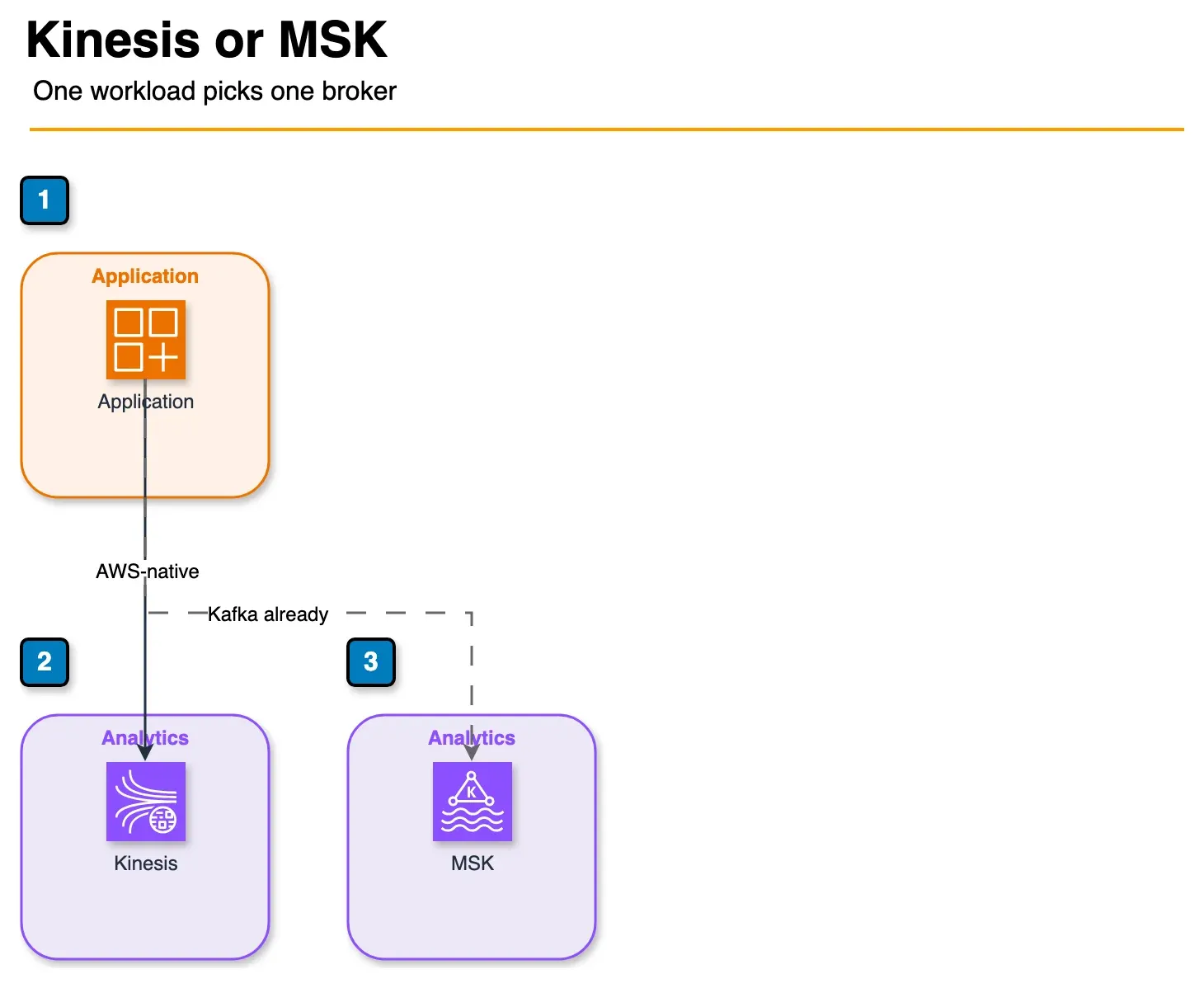
Figure: these are alternatives. Kinesis is the AWS-native path with less cluster work. MSK is the path when producers, consumers, or Kafka Connect are already Kafka. Open the draw.io source.
1. You are building AWS-native
If your producers are Lambda functions, API Gateway endpoints, or AWS services — and your consumers are also Lambda functions, DynamoDB, or other AWS services — Kinesis is the natural choice. The AWS SDK integration is seamless, IAM authentication just works, and there is nothing to install or configure at the Kafka layer.
2. Low operational overhead is the priority
Kinesis On-demand means zero infrastructure decisions. You create a stream, start writing records, and AWS handles the rest. There are no broker types to choose, no partition counts to calculate, no replication factors to set. For teams without dedicated data engineering expertise, this is decisive.
3. Variable throughput patterns
If your ingestion rate swings significantly — bursty web traffic, periodic batch-style streaming, or unpredictable event volumes — Kinesis On-demand auto-scales without any intervention. MSK Provisioned requires manual scaling or configuration of MSK Auto Scaling policies for storage.
4. You need enhanced fan-out at scale
With up to 50 enhanced fan-out consumers per stream, Kinesis supports architectures where dozens of independent consumers each need dedicated, low-latency reads. Each consumer gets its own 2 MB/s pipe. MSK can support many consumers, but independent offset management requires proper consumer group configuration.
5. No Kafka ecosystem dependency
If your workload does not require Kafka Connect for data movement, Kafka Streams for stateful processing, or Kafka-protocol compatibility with existing tools, there is no reason to absorb the Kafka operational model.
When to Choose Amazon MSK
1. You have existing Kafka producers or consumers
This is the single strongest reason to choose MSK. If you have any application already producing or consuming from Kafka — on-premises, on EC2, or on another cloud — MSK is a drop-in replacement. Change the bootstrap servers to your MSK cluster endpoint. No code changes required.
2. You need Kafka Connect (MSK Connect)
MSK Connect is a fully managed Kafka Connect service. It lets you run connectors — prebuilt integrations for S3, DynamoDB, OpenSearch, Redshift, PostgreSQL (via Debezium CDC), and many others — without managing the Connect workers. Connectors scale automatically.
This is particularly valuable for CDC pipelines: Debezium on MSK Connect can stream database changes from RDS MySQL or PostgreSQL directly into Kafka topics with millisecond latency, feeding downstream consumers in real time.
3. You need Kafka Streams for stateful processing
Kafka Streams enables stateful stream processing — joins, windowed aggregations, table-stream joins — entirely within the Kafka client library. If your pipeline uses KTable, GlobalKTable, or any windowed operations, you need Kafka protocol compatibility. MSK gives you that without running your own Kafka cluster.
4. You need multiple independent consumer groups
Kafka’s consumer group model lets multiple independent applications consume the same topic from different positions, each tracking their own offset. This is more flexible than Kinesis’s checkpointing model for complex fan-out architectures with heterogeneous consumers.
5. Sustained high throughput at scale
For workloads sustaining >500 MB/s of ingestion, MSK provisioned clusters with Reserved Instances become significantly more cost-effective than Kinesis On-demand. The per-GB pricing of Kinesis adds up quickly at sustained high volume.
6. You need Kafka audit logs and schema enforcement
MSK integrates with AWS Glue Schema Registry for Avro, JSON Schema, and Protobuf schema enforcement at the producer level. Kafka broker logs are available in CloudWatch. For compliance-heavy workloads requiring producer audit trails and schema versioning, MSK provides the tooling.
Amazon Data Firehose: The Bridge
No streaming architecture discussion is complete without mentioning Amazon Data Firehose (renamed from Kinesis Data Firehose in February 2024). Amazon Data Firehose works with both streaming services as part of a delivery pipeline:
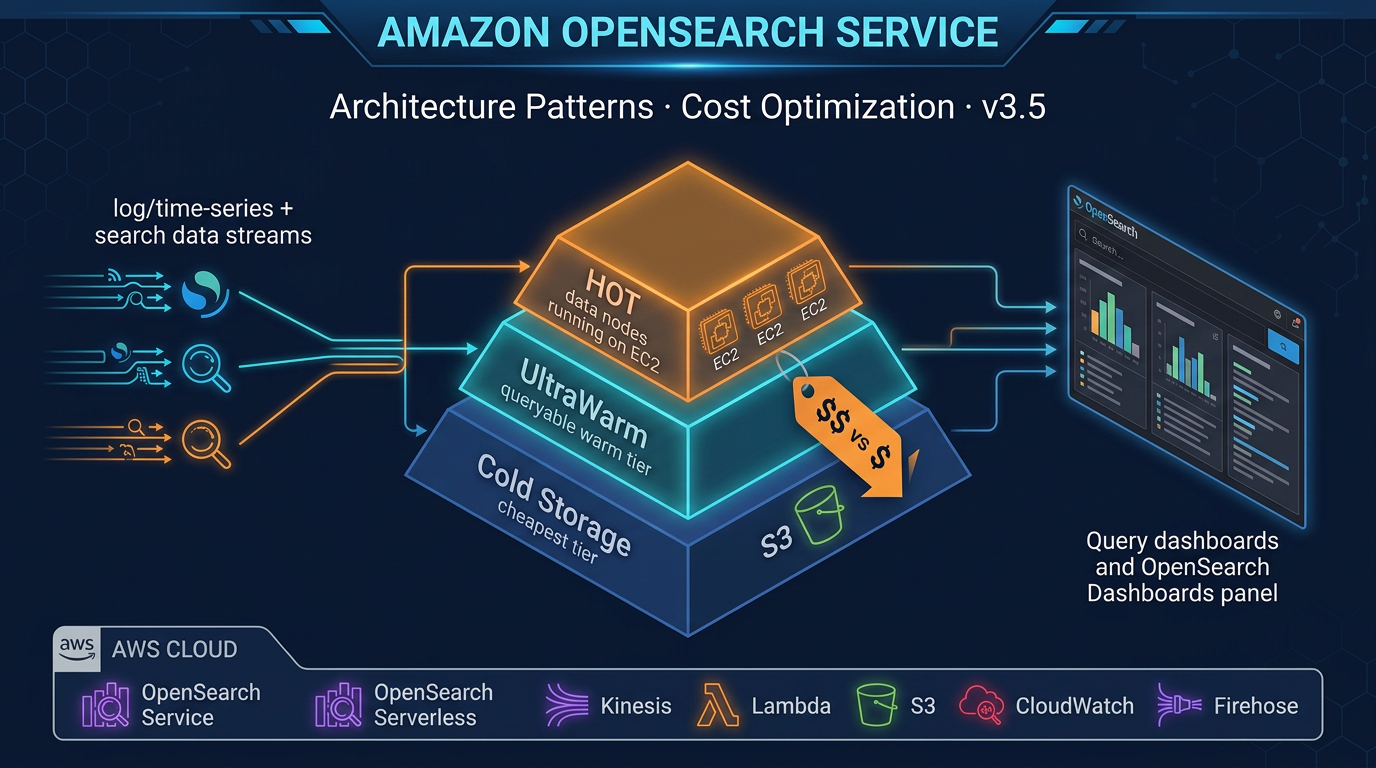
With Kinesis Data Streams: Use Kinesis Data Streams as the source for an Amazon Data Firehose delivery stream. Firehose reads from the Kinesis stream and delivers to S3, Amazon Redshift, or Amazon OpenSearch Service — with optional transformation via Lambda. This is the simplest path from a Kinesis stream to a data lake.
Standalone: Amazon Data Firehose can ingest directly from producers (HTTP endpoint, Kinesis Agent, AWS services) without an upstream Kinesis stream.
With MSK: MSK does not directly integrate with Amazon Data Firehose as a source, but MSK Connect connectors (S3 Sink, OpenSearch Sink, Redshift Sink) achieve the same delivery outcomes.
Cost Comparison: Real Scenarios
The following estimates are based on us-east-1 pricing as of early 2026. Prices vary by region — always verify on the AWS pricing page before making architecture decisions.
Scenario: 100 GB/day ingestion, 200 GB/day consumed (2:1 fan-out), running 24/7
Kinesis Data Streams On-demand
- Ingestion: 100 GB/day ×
$0.08/GB = **$8/day** - Retrieval (standard): 200 GB/day ×
$0.013/GB = **$2.60/day** - Total:
$10.60/day ($320/month)
Enhanced fan-out adds ~$0.015/GB retrieved per consumer — for 5 enhanced fan-out consumers, retrieval cost increases meaningfully.
Kinesis Data Streams Provisioned
At 100 GB/day (~1.16 MB/s average), you need approximately 2 shards to handle typical bursts. At ~$0.015/shard-hour:
- 2 shards × 24 hours × 30 days × $0.015 = ~$21.60/month (shard cost)
- Plus payload units (PUTs): $0.014 per million 25 KB units = roughly $35–50/month depending on record size
- Total: ~$55–70/month — much cheaper than On-demand at this throughput
MSK Serverless
MSK Serverless pricing is based on cluster hours and throughput:
- Cluster:
$0.75/hour × 24 × 30 = **$540/month** (cluster cost alone) - Plus per-throughput-hour charge for actual data movement
MSK Serverless carries a meaningful baseline cost. It makes sense when you need Kafka compatibility with variable load, but at 100 GB/day sustained it is more expensive than both Kinesis options.
MSK Provisioned (kafka.m5.large, 3 brokers)
- 3 brokers ×
$0.21/hour × 24 × 30 = **$453/month** (broker cost) - Storage: 100 GB × 30 days at $0.10/GB/month = ~$300/month
- Total: ~$750/month
At this throughput level, MSK provisioned is expensive. The economics flip above ~1 TB/day sustained, where Reserved Instances (41–76% discount) make MSK provisioned significantly cheaper than Kinesis On-demand per GB.
Bottom line: Kinesis Provisioned beats all options for moderate sustained throughput. Kinesis On-demand is convenient but gets expensive at high volume. MSK provisioned with Reserved Instances wins at very high, sustained throughput.
Architecture Patterns
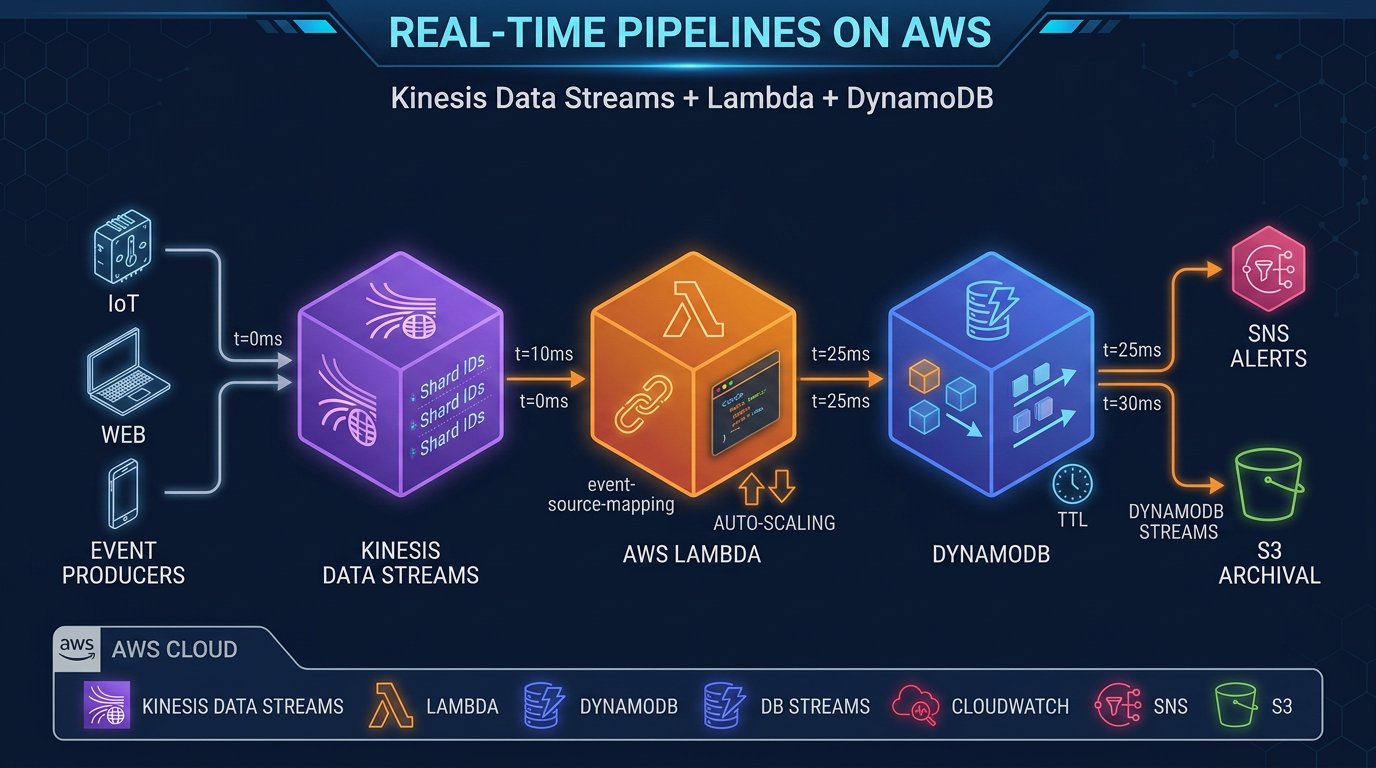
Pattern 1: Kinesis + Lambda + DynamoDB (Event-Driven Microservices)
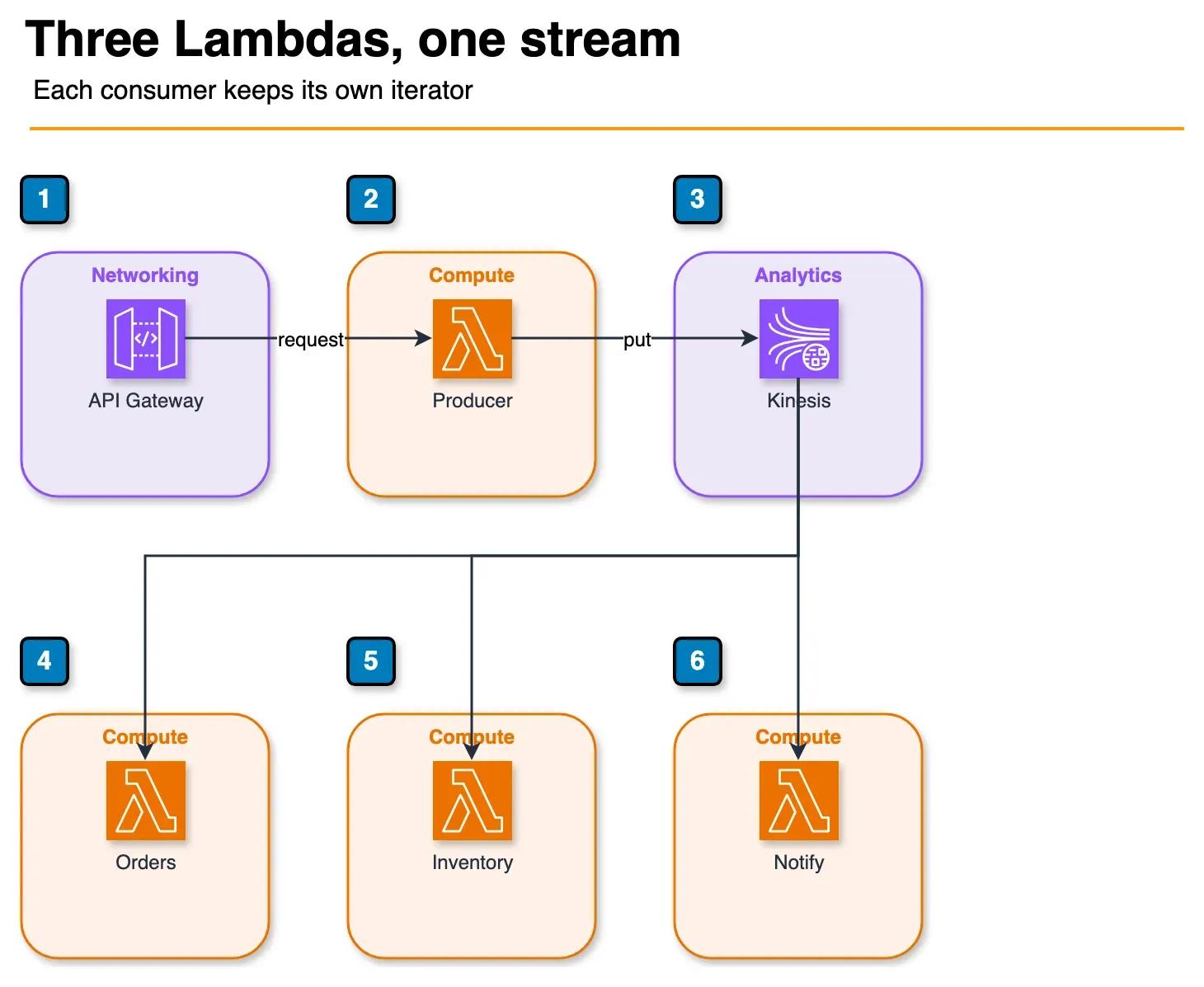
Figure: pattern 1. The producer writes once. Orders, inventory, and notify read in parallel, each with its own iterator. Orders and inventory write DynamoDB; notify sends through SNS. Those sinks are not drawn as a chain. Open the draw.io source.
API Gateway → Lambda (producer) → Kinesis Data Streams
                                         │
                              ┌──────────┼──────────┐
                              ↓          ↓          ↓
                           Lambda     Lambda    Lambda
                        (orders)   (inventory) (notify)
                              ↓          ↓          ↓
                           DynamoDB  DynamoDB    SNS/SES
This is the canonical AWS-native event-driven pattern. Lambda event source mapping handles checkpointing, retry, and scaling automatically. Each Lambda function has its own shard iterator position. Enhanced fan-out ensures each consumer gets dedicated throughput.
Pattern 2: MSK + MSK Connect + S3 (Data Lake Ingestion)
Microservices → MSK Cluster (Kafka topics)
                      │
               MSK Connect Workers
                      │
              ┌───────┼────────┐
              ↓       ↓        ↓
             S3    OpenSearch  Redshift
          (Parquet) (logs)   (analytics)
MSK Connect’s S3 Sink connector writes Kafka records to S3 in configurable formats (JSON, Avro, Parquet with schema registry). This pattern is common for organizations migrating from on-premises Kafka to AWS, maintaining producer compatibility while landing data in a cloud-native lake.
Pattern 3: Kinesis Data Streams → Amazon Data Firehose → S3 (Simplest Data Lake)
Producers → Kinesis Data Streams → Amazon Data Firehose → S3 (Parquet/ORC)
                                                   │
                                            Lambda Transform
                                         (enrichment, filtering)
This is the lowest-complexity path from streaming ingestion to a queryable data lake. Amazon Data Firehose handles batching, format conversion (JSON → Parquet), and delivery with automatic retry. Athena queries S3 directly. No additional infrastructure to manage.
Making the Decision
Work through this flowchart:
Step 1: Do you have existing Kafka producers, consumers, or Kafka-based tooling? → Yes: Use Amazon MSK. The migration cost of rewriting Kafka clients exceeds any benefit of Kinesis. → No: Continue to Step 2.
Step 2: Do you need Kafka Connect for data movement (CDC, sink connectors)? → Yes: Use Amazon MSK (MSK Connect). → No: Continue to Step 3.
Step 3: Do you need Kafka Streams for stateful stream processing? → Yes: Use Amazon MSK. → No: Continue to Step 4.
Step 4: Is your throughput sustained above 500 MB/s with 24/7 load? → Yes: Evaluate MSK Provisioned with Reserved Instances for cost. → No: Continue to Step 5.
Step 5: Is your throughput highly variable or unpredictable? → Yes: Use Kinesis Data Streams On-demand (zero shard management). → No: Use Kinesis Data Streams Provisioned (cheaper at moderate sustained throughput).
Final check: Do you need >50 independent consumers with dedicated throughput? → If you hit this edge case: evaluate MSK consumer groups (no per-consumer throughput limit).
For the majority of net-new AWS workloads — especially those using Lambda, DynamoDB, and S3 — Kinesis Data Streams is the simpler, faster path to production. For organizations with Kafka DNA, existing tooling, or high-throughput sustained pipelines, Amazon MSK is the right foundation.
Working With Both Services
It is also worth noting that Kinesis and MSK are not mutually exclusive in a large data platform. Some organizations use Kinesis Data Streams for real-time event streaming from AWS services (where Lambda integration is key) and MSK for data pipelines that feed into internal analytics platforms with Kafka expertise in-house. The two can coexist, with Amazon Data Firehose bridging delivery to shared storage layers like S3 or Amazon Redshift.
If you are starting fresh and have a small team, start with Kinesis On-demand and avoid the cluster configuration overhead. As your streaming requirements grow — more consumers, more throughput, more ecosystem tooling — revisit MSK.
If you want help designing a streaming architecture for your specific workload, the FactualMinds data engineering team works with both services across production deployments and can help you make the right call before you are locked in.
Related: For how Kafka-shaped thinking competes with SQS, EventBridge, and Amazon MQ (RabbitMQ) when ordering, fan-out, and operational headcount differ, see Event-Driven Boundaries on AWS: Async vs Sync, MSK vs MQ, and When SQS Wins. For throughput ceilings and cost-cliff math across SQS, Kinesis, MSK, and Flink, see High-Throughput Event Processing tier selection.
Related reading
- Amazon Redshift Serverless vs Provisioned: Which Is Right for Your Workload?
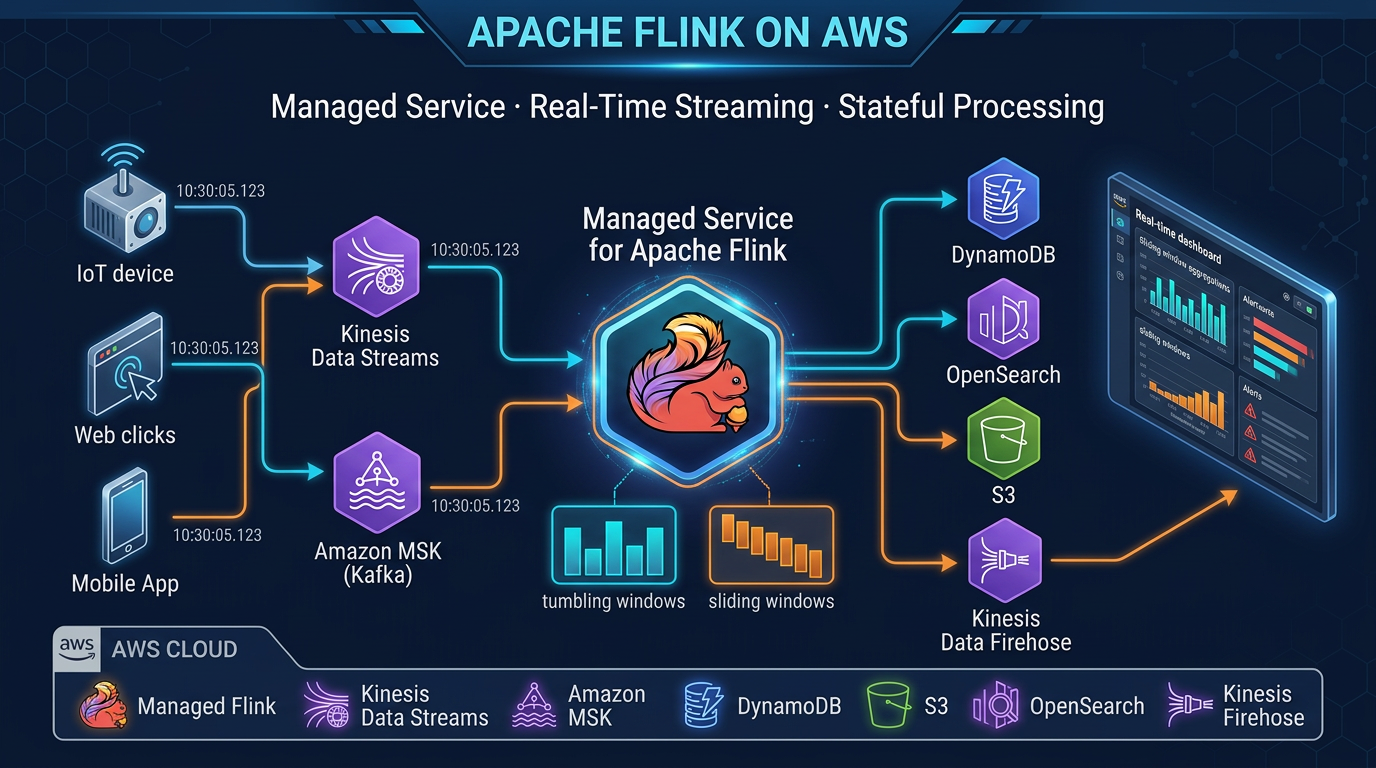
- Real-Time Stream Processing with Amazon Managed Service for Apache Flink
- Amazon Athena Cost Optimization: Partition Pruning, Compression, and Iceberg Tables
- AWS EMR: Serverless vs EC2 vs EKS — When to Use Each
- AWS Glue 5: Modern ETL with Apache Iceberg — Tables, Time Travel, and Lakehouse Patterns
- AWS Glue vs dbt on AWS: Data Transformation Decision Guide for 2026
- Virtual Data Modeling on AWS: Architecture, Trade-offs, and When Not to Use It
- How to Build a Serverless Data Pipeline with AWS Glue and Athena
Frequently asked questions
What is the main difference between Kinesis Data Streams and Amazon MSK?
Which is cheaper — Kinesis Data Streams or Amazon MSK?
Does Amazon MSK support Kafka Connect?
What is the maximum retention period for Kinesis Data Streams?
Can I use Amazon MSK Serverless without managing clusters?
How does Kinesis Data Streams handle backpressure?
Which service is better for event-driven microservices?
Is Amazon MSK HIPAA eligible?

AWS Cloud Architect & AI Expert
AWS-certified cloud architect and AI expert with deep expertise in cloud migrations, cost optimization, and generative AI on AWS.