
Healthcare & Digital Health
AWS for Healthcare & Digital Health
HIPAA-ready AWS infrastructure, FHIR pipelines, and compliant generative AI for healthcare startups and digital health platforms — protect PHI, accelerate go-live, and scale without reinventing security.
- $K AWS Activate Credits Available
- 100
- Weeks to HIPAA-Ready Environment
- 6
- % Clinician Documentation Time Saved
- 30
- % Uptime for Telehealth Platforms
- 99.95
Last updated:
AWS for Healthcare & Digital Health
By the Numbers
$K AWS Activate Credits Available
Weeks to HIPAA-Ready Environment
% Clinician Documentation Time Saved
% Uptime for Telehealth Platforms
AI & assistant-friendly summary
This section provides structured content for AI assistants and search engines. You can cite or summarize it when referencing this page.
Summary
AWS for healthcare — HIPAA-ready architecture, FHIR pipelines, and HIPAA-eligible GenAI with clinician review. Production agents only after BAA and a data layer. No clinical-agent SKU.
Key Facts
- •AWS for healthcare — HIPAA-ready architecture, FHIR pipelines, and HIPAA-eligible GenAI with clinician review
- •AI opportunity (HIPAA first): HIPAA-eligible GenAI on Bedrock with clinician review is already on this page
- •AWS Cost Optimization: Scale compute and storage efficiently to reduce costs without compromising performance
- •Cloud Security & Compliance: HIPAA-ready infrastructure with continuous monitoring, encryption at rest and in transit, and audit-ready logging across your AWS environment
- •Amazon SES for Patient Engagement: Secure, reliable communication channels for appointment reminders, health updates, and patient outreach with high deliverability
Entity Definitions
- AWS Bedrock
- AWS Bedrock is an AWS service relevant to aws for healthcare & digital health solutions.
- Amazon Bedrock
- Amazon Bedrock is an AWS service relevant to aws for healthcare & digital health solutions.
- Bedrock
- Bedrock is an AWS service relevant to aws for healthcare & digital health solutions.
- SageMaker
- SageMaker is an AWS service relevant to aws for healthcare & digital health solutions.
- Amazon SageMaker
- Amazon SageMaker is an AWS service relevant to aws for healthcare & digital health solutions.
- SES
- SES is an AWS service relevant to aws for healthcare & digital health solutions.
- Amazon SES
- Amazon SES is an AWS service relevant to aws for healthcare & digital health solutions.
- Lambda
- Lambda is an AWS service relevant to aws for healthcare & digital health solutions.
- S3
- S3 is an AWS service relevant to aws for healthcare & digital health solutions.
- RDS
- RDS is an AWS service relevant to aws for healthcare & digital health solutions.
- Aurora
- Aurora is an AWS service relevant to aws for healthcare & digital health solutions.
- DynamoDB
- DynamoDB is an AWS service relevant to aws for healthcare & digital health solutions.
- CloudFront
- CloudFront is an AWS service relevant to aws for healthcare & digital health solutions.
- CloudWatch
- CloudWatch is an AWS service relevant to aws for healthcare & digital health solutions.
- IAM
- IAM is an AWS service relevant to aws for healthcare & digital health solutions.
Related Content
- AI opportunity (HIPAA first)— AWS service for this industry
- AWS Cost Optimization— AWS service for this industry
- Data Pipelines & AI Readiness— AWS service for this industry
- Cloud Security & Compliance— AWS service for this industry
- Amazon SES for Patient Engagement— AWS service for this industry
- Accelerating Real-Time Analytics with Amazon QuickSight and SPICE— Related case study
- Amazon Q Business Case Study: Accelerating Developer Productivity with AI-Powered Coding Assistance— Related case study
- AWS SES Case Study: Scaling Email Delivery to 200M+ Messages Per Month— Related case study
AWS lifecycle notice (June 30, 2026) — Amazon Chime SDK Carrier Voice Focus reached end of support on June 30, 2026. Use Chime SDK Voice or a HIPAA-eligible third-party telephony stack for new telehealth video. Full matrix: lifecycle roundup.
What’s New (March 2026) — Amazon HealthLake’s CCDA-to-FHIR R4 transformation agent (preview) converts Consolidated CDA files through a synchronous API or bulk import with patient-identifier reconciliation. Prefer it over a custom Glue FHIR parser when you have two or more clinical sources. Announcement.
AI opportunity — compliance before the agent
Healthcare GenAI is already a published practice here: HIPAA-compliant AI on Bedrock, cyber-led AI, and clinician review on generated output. That is not the same as a production AI agent.
An agent that can call tools against PHI is a later step. BAA in place, PHI scoped to a dedicated account, de-identification where the model should not see identifiers, and a human on anything that reaches a patient. We will not invent a clinical-documentation agent to sell this page. The HIPAA telehealth case study is architecture and security — not agent results.
Why Healthcare Startups Choose AWS
Healthcare startups face a unique challenge: you need to move fast, but you can’t afford compliance mistakes. AWS is the dominant platform for digital health because it combines compliance infrastructure with the scalability and pay-as-you-grow pricing startups need.
Key advantages for healthcare startups:
- AWS Activate program — Eligible healthcare startups receive up to $100,000 in AWS credits (covering the first 12-24 months of infrastructure costs)
- Compliance-as-code — AWS Config, CloudFormation Guard, and Service Control Policies automate HIPAA controls so you’re compliant by default, not by accident
- Serverless scalability — Lambda and DynamoDB let you launch with minimal infrastructure and scale from 10 to 10 million users without architectural redesign
- HIPAA-eligible managed services — RDS, S3, Bedrock, and others handle encryption and audit logging for you, reducing your compliance engineering burden
- Pre-built data pipeline services — Glue, Kinesis, and Athena simplify building FHIR data pipelines, clinical data lakes, and healthcare analytics without custom engineering
Healthcare organizations face some of the most demanding cloud infrastructure requirements of any industry. Protecting sensitive patient data and research records is not just a best practice but a legal obligation under HIPAA and other regulatory frameworks. A single misconfiguration can lead to data breaches, compliance violations, and significant financial penalties. At the same time, rising infrastructure costs threaten the viability of digital health platforms, telehealth applications, and clinical research initiatives that depend on scalable cloud resources.
Scaling healthcare data pipelines and AI workloads on AWS introduces additional complexity. Clinical data arrives in diverse formats, from electronic health records to medical imaging, and must be processed, stored, and analyzed within strict compliance boundaries. Building data lakes that are both performant and HIPAA-compliant requires careful architectural decisions around encryption, access controls, and audit logging.
Modern AWS Healthcare Services
Beyond foundational infrastructure, AWS now offers purpose-built services for healthcare that accelerate time-to-value.
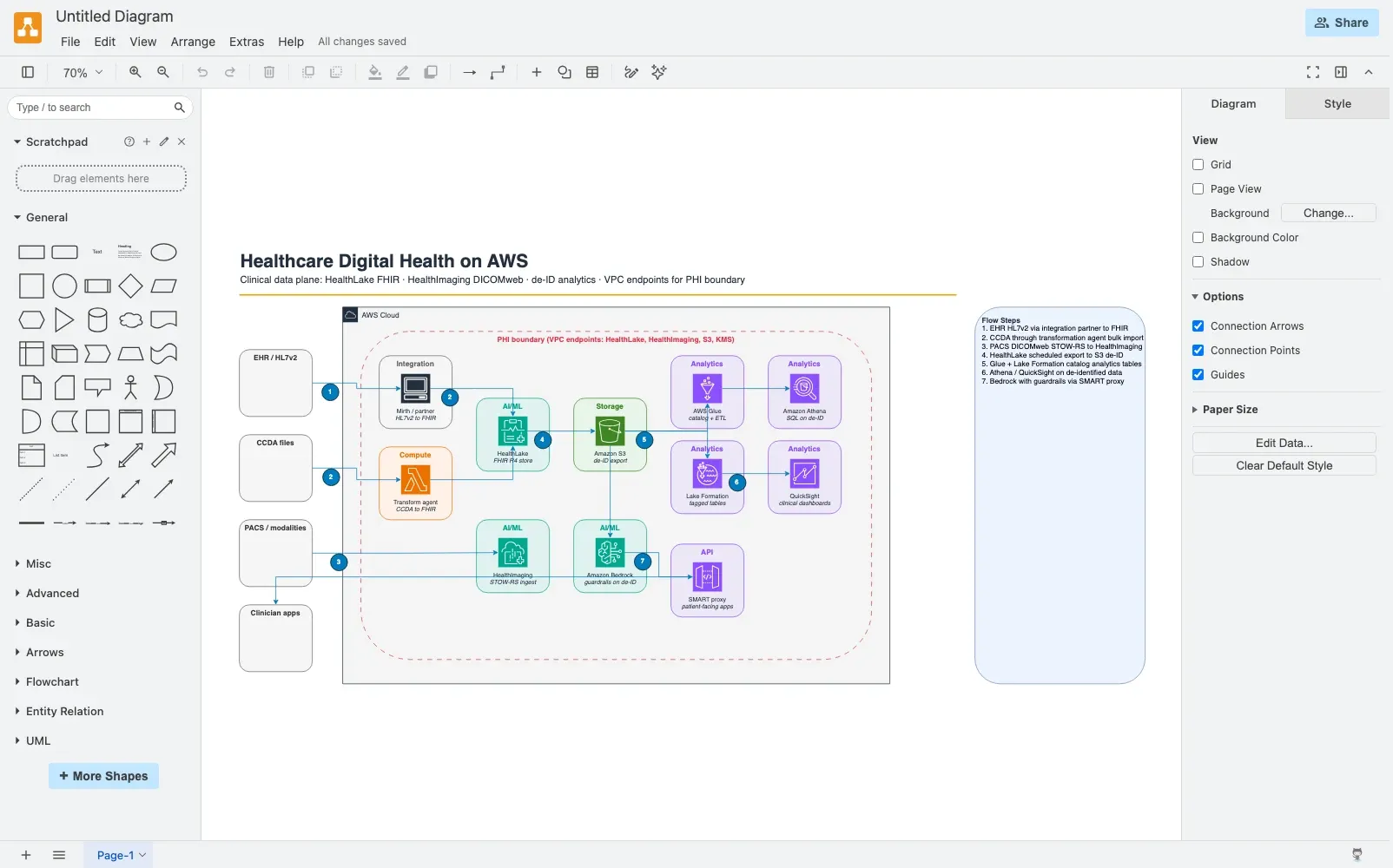
Figure: Clinical ingest (HealthLake FHIR), imaging (HealthImaging), and de-identified analytics tiers. Open draw.io
Amazon HealthLake
HIPAA-eligible, FHIR R4 data store purpose-built for healthcare. It handles the complexity of storing, indexing, and querying patient data in standard FHIR format — ideal for building interoperable health platforms without custom data models. The March 2026 CCDA transformation agent (preview) returns FHIR Bundles from a synchronous conversion API and reconciles patients on bulk import.
- FHIR-native API — Standard REST endpoints that EHR systems and apps recognize
- Built-in NLP — Extract clinical entities (diagnoses, medications, procedures) from unstructured clinical notes
- Compliance built-in — Multi-tenancy isolation, encryption, audit logging
- Startup use case: Build a patient engagement app that pulls data from multiple EHRs without custom HL7/FHIR parsing
Amazon Comprehend Medical
NLP service that extracts medical entities and relationships from clinical text — diagnoses (ICD-10 codes), medications (RxNorm), procedures (CPT codes), and more.
- Automate clinical documentation review
- Extract structured data from radiology reports, discharge summaries
- Build NLP pipelines for clinical research de-identification
- Startup use case: Auto-tag patient data for clinical research, reducing manual chart review effort
AWS HealthImaging
Purpose-built service for storing, querying, and viewing medical images (X-rays, CT, MRI scans) with DICOM standard support.
- Compress medical images by 90% (cost reduction) without loss of diagnostic quality
- DICOM-compliant viewer for clinicians
- Secure role-based access control
- Startup use case: Build a teleradiology platform or imaging repository without managing DICOM servers
CMS Interoperability & Patient Access APIs
New CMS regulations require healthcare providers to expose patient data via standard APIs. AWS provides blueprints and managed services to comply:
- Secure patient access endpoints (USCDI v2 requirements)
- FHIR-compliant REST APIs
- Token-based authentication (OAuth 2.0)
- Patient authorization controls
- Startup use case: If you’re building B2B healthcare software, ensure API interoperability from day one
HIPAA Compliance Architecture on AWS
HIPAA (Health Insurance Portability and Accountability Act) compliance is not a feature you add; it’s a foundational architectural requirement. The HIPAA Security Rule defines technical safeguards that directly map to AWS services and configuration patterns.
Core HIPAA Technical Safeguards on AWS
Access Control
- Enforce multi-factor authentication (AWS Identity Center, Cognito) on all user access
- Implement least-privilege IAM policies — users only access systems they need
- Use temporary credentials (STS assume role) instead of long-lived access keys
- Maintain audit logs of all access attempts (CloudTrail)
- AWS Services: IAM, Identity Center, Cognito, CloudTrail
Encryption
- Encrypt data at rest using AWS KMS (Key Management Service) with customer-managed keys
- Never use AWS-managed keys for PHI; only customer-managed keys allow audit logging of key usage
- Encrypt data in transit using TLS 1.2+ for all connections (APIs, database replication)
- Encrypt backups and archived data the same as live data
- AWS Services: KMS, RDS with encrypted storage, S3 with SSE-KMS, EBS encryption
Data Integrity and Authenticity
- Implement message authentication codes (HMAC) for critical data (AWS Signature v4)
- Use database transaction logs to detect unauthorized changes
- Enable RDS backup retention (minimum 30 days) and test recovery procedures quarterly
- AWS Services: RDS with automated backups, AWS Backup, VPC Flow Logs
Audit Controls
- Log all API calls and data access (CloudTrail)
- Monitor database activity (RDS Enhanced Monitoring, RDS Performance Insights)
- Implement CloudWatch Insights queries to detect suspicious access patterns
- Generate monthly access reports for compliance audits
- AWS Services: CloudTrail, CloudWatch, Config, Security Hub
Transmission Security
- Use VPNs or AWS PrivateLink for all healthcare data connections
- Disable unencrypted protocols (HTTP, SMTP); enforce HTTPS and SMTPS only
- Implement network segmentation using VPC security groups and network ACLs
- Use AWS WAF to block malicious traffic before it reaches your applications
- AWS Services: VPC, Security Groups, VPC Endpoints, AWS WAF
HIPAA as Code: Automated Compliance
The most effective approach is to encode HIPAA requirements into infrastructure automation. Rather than relying on manual audits, use AWS tools to enforce compliance by default:
- AWS Config Rules — Automatically flag non-HIPAA resources (unencrypted RDS, public S3 buckets, missing CloudTrail logs)
- CloudFormation Guard — Define HIPAA templates once, enforce them across all deployments
- Service Control Policies (SCPs) — Prevent developers from creating non-compliant resources at the AWS account level (e.g., deny unencrypted EBS volumes, deny public S3 access)
- AWS Security Hub — Centralized compliance dashboard across accounts and regions
This “shift-left” approach catches compliance issues before they reach production, reducing audit risk and remediation costs.
HIPAA Compliance Timeline & Cost
For a startup building from scratch:
- Initial audit & assessment: 3-4 weeks, identifies gaps in architecture
- Implementation with FactualMinds: 6-8 weeks to build compliant infrastructure (faster than 12 weeks because we reuse proven patterns)
- BAA signature: Once architecture is HIPAA-ready, AWS signs Business Associate Agreement (BAA) with your organization (AWS handles this directly — FactualMinds assists with readiness)
- Ongoing compliance: Maintain audit logs, test backups, annual compliance review
- Cost: Initial setup $15,000-$25,000 (FactualMinds assist); ongoing AWS infrastructure 10-15% higher cost due to encryption/logging overhead; AWS Activate credits cover most startup costs
Read our detailed guide: HIPAA on AWS: Complete Compliance Checklist
For a 2026 clinical data-plane reference architecture — HealthLake FHIR ingest, HealthImaging DICOMweb, de-ID analytics tiers, and PHI boundary checklists — see Healthcare Digital Health on AWS (2026).
Healthcare Industry Verticals on AWS
Different healthcare segments have distinct AWS architectural needs:
Digital Health & Telehealth Platforms
Mobile/Web App → CloudFront → API Gateway → Lambda/Fargate (containerized):
    ├→ Video Service (Chime SDK Voice / WebRTC)
    ├→ Patient Service (RDS with encryption, DynamoDB for real-time)
    ├→ Notification Service (SES for email, SNS for SMS)
    └→ Analytics (Kinesis → S3 → Athena)

[All data encrypted at rest with KMS, in transit with TLS 1.2+]
[All API calls logged to CloudTrail]
[VPC with private subnets, NAT gateways for outbound access]
Startup considerations:
- Real-time video conferencing — Amazon Chime SDK Voice (HIPAA-eligible) or a third-party WebRTC stack on Lambda. Do not start new work on Carrier Voice Focus (end of support 30 June 2026).
- Patient data storage — RDS Aurora (encrypted, automated backups) or DynamoDB (pay-per-request for variable load)
- Prescription management — SES for delivery, SNS for SMS notifications
- Telemedicine platforms — Serverless architecture scales from 100 to 1M concurrent users without redesign
Electronic Health Records (EHR) Integration
External EHR System → Secure API Endpoint (API Gateway + WAF) → Queue (SQS) → Lambda (validate) → Data Lake (S3 + HealthLake)
                                                                                                    ↓
Analytics (Glue → Athena)- Integrate with legacy EHR systems using industry-standard protocols (HL7 v2, HL7 FHIR)
- Use AWS API Gateway with API keys and IP whitelisting for EHR vendor endpoints
- Store HL7 messages in SQS for asynchronous processing (decouples ingest from processing)
- Use Amazon HealthLake to normalize FHIR data from multiple EHRs
- Key challenge: EHR vendors often lack cloud expertise; provide them with secure integration guides
Clinical Research Data Lakes
Data Sources (EHRs, wearables, devices) → S3 (raw data) → AWS Glue (ETL) → S3 (standardized FHIR/Parquet)
                                                                                    ↓
                                                                    Athena (queries) / Redshift (analytics) / SageMaker (ML)
                                                                    ↓
                                                                    De-identification Pipeline (Comprehend Medical)
                                                                    ↓
Researcher Access (QuickSight dashboards)- Aggregate patient data from multiple sources (hospitals, clinics, wearables, research devices)
- Use AWS Glue for ETL to standardize diverse data formats (HL7, JSON, CSV) into FHIR
- Store in S3 Parquet format or Amazon HealthLake for cost-effective analytics
- Implement de-identification pipelines using Comprehend Medical (removes patient identifiers before research use)
- Support machine learning workflows (SageMaker for predictive models on anonymized data)
- Comply with 21 CFR Part 11 for research data integrity
Medical Device IoT & Wearables
Patient Monitors → AWS IoT Core → MQTT Message Router → Lambda (validation) → DynamoDB (real-time data)
                                                                                    ↓
                                                                            TimeStream (time-series analytics)
SNS (alert if thresholds breached)- Collect sensor data from patient monitors, wearables, connected medical devices
- Use AWS IoT Core for secure MQTT endpoints and device credential management
- Process real-time alerts (e.g., abnormal vital signs) via Lambda functions
- Store time-series data in Amazon Timestream for efficient analytics (vs. traditional databases)
- Ensure all data encrypted and access logged for HIPAA audit trail
- Startup use case: Remote patient monitoring platform that triggers alerts to care coordinators
Building Your First HIPAA-Compliant Product
For startups, the path from MVP to HIPAA-compliant platform is achievable in 6-8 weeks with the right architecture:
Minimum Viable HIPAA Architecture
1. IAM & Access Control
   - Multi-factor authentication enforced
   - Least-privilege IAM roles
   - CloudTrail logging enabled

2. Encryption
   - Customer-managed KMS keys
   - S3 with SSE-KMS enabled
   - RDS with encrypted storage

3. Network
   - VPC with private subnets
   - No public database access
   - Security groups for least-privilege

4. Monitoring & Audit
   - CloudTrail for all API calls
   - CloudWatch Logs for application errors (encrypted)
   - AWS Config for compliance monitoring
This baseline takes 4-6 weeks to implement correctly. Additional components (EHR integration, data lakes, AI) build on top of this foundation.
AWS Activate Program
Eligible healthcare startups receive:
- Up to $100,000 in AWS credits for your first 2 years
- AWS Well-Architected Review (free guidance from AWS Solutions Architects)
- Priority support (technical guidance, not just ticket triage)
- No upfront commitment or credit card required for the first year
Typical timeline: Apply for Activate → Approval within 2 weeks → Credits in account within 5 business days. Most healthcare startups use Activate credits to cover 12-18 months of AWS infrastructure costs while focusing on product.
Compliance-by-Design vs. Compliance-Retrofit
| Approach | Timeline | Cost | Risk |
|---|---|---|---|
| Compliance-by-design | Build HIPAA-compliant from day 1 | Initial: $15-25K (FactualMinds assist); ongoing: normal AWS costs | Low — no audit surprises, no re-architecture |
| Compliance-retrofit | Launch without compliance, audit later | Initial: $0; audit: $20-40K (external auditor); remediation: $50-100K (re-engineering) | High — compliance gaps discovered late, expensive fixes, potential data breach exposure |
The startup advantage: Start small and compliant, then scale. You never have to explain why patient data wasn’t encrypted.
HIPAA-Compliant Generative AI on AWS
Healthcare organizations increasingly want to deploy AI on patient data:
- AI-powered diagnostic assistance (radiology image analysis)
- Clinical decision support (treatment recommendations)
- Administrative automation (prior authorization, billing code assignment)
- Clinical documentation (auto-generate summaries from notes)
Critical consideration: Bedrock, SageMaker, and other AI services must handle PHI (Protected Health Information) in HIPAA-compliant ways:
- Amazon Bedrock: HIPAA-eligible for compliance workloads (use Bedrock with customer-managed CMK); supports Claude, Llama, and other models
- Amazon SageMaker: HIPAA-eligible; ensures all training data encrypted and encrypted models stored
- Data anonymization: Always de-identify patient data before training AI models (use Comprehend Medical to remove identifiers)
- Model output governance: AI-generated clinical summaries must be reviewed by a clinician before use
This opens possibilities for healthcare providers to build AI-driven diagnostics, quality improvement, and personalized treatment plans securely.
Read: Running HIPAA-Compliant AI on AWS Bedrock
Common HIPAA Pitfalls to Avoid
Even with AWS’s infrastructure, mistakes happen. We’ve seen dozens of projects go wrong in the same ways:
1. Signing a BAA Doesn’t Make You Compliant
A Business Associate Agreement (BAA) between you and AWS is necessary but not sufficient. AWS signs a BAA to acknowledge it’s responsible for its infrastructure; you’re still responsible for architecture and configuration.
Example: You set up S3 with SSE-S3 (AWS-managed keys) and think you’re compliant. You’re not — HIPAA requires customer-managed keys (SSE-KMS) for audit logging.
2. Using AWS-Managed Keys Instead of Customer-Managed Keys
AWS-managed KMS keys are convenient but problematic for PHI:
- You can’t see who accessed the key (no audit trail)
- You can’t set key rotation policies
- You can’t implement key policies that prevent certain uses
Solution: Always use AWS KMS customer-managed keys for S3, RDS, EBS, and DynamoDB. The cost difference is negligible ($1/month per key), but the compliance benefit is huge.
3. Storing PHI in CloudWatch Logs Without Encryption
Developers log application errors to CloudWatch, including patient names or medical codes. CloudWatch Logs aren’t encrypted by default.
Solution: Enable CloudWatch Logs encryption with KMS, then redact PHI from all log statements (e.g., replace patient names with IDs).
4. Assuming Cognito (or Any Single Tool) Handles All Access Control
Cognito handles user authentication well, but HIPAA also requires:
- Audit logging of who accessed what data (CloudTrail + database activity logging)
- Fine-grained authorization (which doctors can see which patients)
- Automatic session termination after inactivity (not just Cognito timeouts)
- Multi-factor authentication for high-risk operations
Solution: Layer multiple controls — Cognito for authentication + IAM for service-level access + database row-level security for data-level access + API Gateway throttling for DDoS protection.
5. Neglecting VPC Network Architecture
A common mistake: database accessible from the internet because it’s in a public subnet.
Correct approach:
Internet → CloudFront (caching) → API Gateway (in public subnet)
                                    ↓
                                NAT Gateway (private subnet exit point)
                                    ↓
                                Lambda (in private subnet, no internet access)
                                    ↓
                                RDS (in private subnet, accessible only from Lambda security group)
This multi-layer approach ensures data never crosses the internet unencrypted.
How FactualMinds Enables Healthcare Innovation
FactualMinds specializes in building HIPAA-compliant AWS environments that healthcare organizations can trust. We help you:
- Implement end-to-end HIPAA architecture — encryption, access controls, audit logging, BAA-ready from day one
- Navigate healthcare data integration — EHR integration, HL7/FHIR protocols, Amazon HealthLake setup, secure patient data exchange
- Build clinical data lakes — aggregate multi-source health data with de-identification pipelines, enable analytics and research without replicating sensitive data
- Deploy HIPAA-compliant AI — Bedrock for generative AI, SageMaker for predictive models, Comprehend Medical for NLP, all with PHI protection
- Reduce infrastructure costs — AWS cost optimization strategies (RI/Savings Plans, serverless right-sizing) that maintain compliance
- Accelerate AWS Activate — Help startups apply for and maximize AWS Activate credits (up to $100K)
We help you implement end-to-end encryption, granular access controls, and continuous compliance monitoring so your patient data stays secure. Our cost optimization strategies reduce infrastructure spend without sacrificing the performance your clinical applications demand. Whether you are building AI-powered diagnostic tools, scaling a telehealth platform, or improving patient engagement through reliable email communications, we bring the AWS expertise needed to innovate safely and efficiently in healthcare.
Recent healthcare wins:
- Telehealth startup: built HIPAA-compliant platform serving 200K patients with 99.95% uptime (used AWS Activate credits to cover first 18 months)
- Healthcare enterprise: migrated legacy EHR integration to AWS, reduced integration costs by 50% with event-driven serverless architecture
- Digital health company: deployed Bedrock for AI-powered clinical summaries, reduced provider documentation time by 30% while maintaining HIPAA compliance
AWS for Healthcare & Digital Health
Our Services for This Industry
AI opportunity (HIPAA first)
HIPAA-eligible GenAI on Bedrock with clinician review is already on this page. A production agent is a later step — BAA, de-identification, and a human on any output that reaches a patient. Not a clinical-agent SKU.
AWS Cost Optimization
Scale compute and storage efficiently to reduce costs without compromising performance. Eliminate waste across healthcare data workloads.
Data Pipelines & AI Readiness
Build secure data lakes and FHIR data pipelines for clinical research, diagnostics, and healthcare analytics. Prepare your organization for AI-driven insights.
Cloud Security & Compliance
HIPAA-ready infrastructure with continuous monitoring, encryption at rest and in transit, and audit-ready logging across your AWS environment.
Amazon SES for Patient Engagement
Secure, reliable communication channels for appointment reminders, health updates, and patient outreach with high deliverability.
Serverless Architecture
Event-driven, serverless healthcare platforms that scale from zero to millions of users. Pay only for what you use — ideal for startups with variable workloads.
DevOps & CI/CD
Automated deployment pipelines with compliance gates, security scanning, and audit trails for healthcare environments.
Related Case Studies
Real AWS engagements from our delivery team.
Accelerating Real-Time Analytics with Amazon QuickSight and SPICE
Configured Amazon QuickSight with SPICE in-memory engine to deliver near real-time campaign analytics, eliminating reporting lag and reducing Aurora database overhead.
Amazon Q Business Case Study: Accelerating Developer Productivity with AI-Powered Coding Assistance
Deployed Amazon Q for Developers across multiple IDEs to streamline code documentation, unit test generation, and refactoring — achieving full developer adoption in 44 days.
AWS SES Case Study: Scaling Email Delivery to 200M+ Messages Per Month
Leveraged Amazon SES to scale email operations to over 200 million emails per month with improved deliverability, compliance, and sender reputation.
AWS for Healthcare & Digital Health
Frequently Asked Questions
Does AWS sign a HIPAA Business Associate Agreement (BAA)?
How long does it take to build a HIPAA-compliant AWS environment?
Can we use Amazon Bedrock or SageMaker with patient data?
What is the difference between HIPAA-eligible and HIPAA-compliant?
How much does HIPAA-compliant AWS infrastructure cost for a startup?
Do we need a separate AWS account for PHI workloads?
Do you have a clinical AI agent product?
Ship healthcare on AWS without the compliance gamble.
Pre-built HIPAA controls, FHIR-ready data pipelines, and clinician-aware AI — delivered by an AWS Select Tier Partner.