Real-Time Data Pipelines on AWS: Kinesis Data Streams + Lambda + DynamoDB
Quick summary: Kinesis Data Streams combined with Lambda and DynamoDB is the simplest path to a real-time data pipeline on AWS. Here is the complete architecture, code patterns, and operational guidance.
Key Takeaways
- Kinesis Data Streams combined with Lambda and DynamoDB is the simplest path to a real-time data pipeline on AWS
- On AWS, the most direct path to this architecture is Amazon Kinesis Data Streams + AWS Lambda + Amazon DynamoDB
- Lambda processes records without managing servers
- DynamoDB serves results at single-digit millisecond latency with virtually unlimited scale
- Together, they cover the three core concerns of any streaming pipeline — collect, process, serve — while remaining entirely serverless
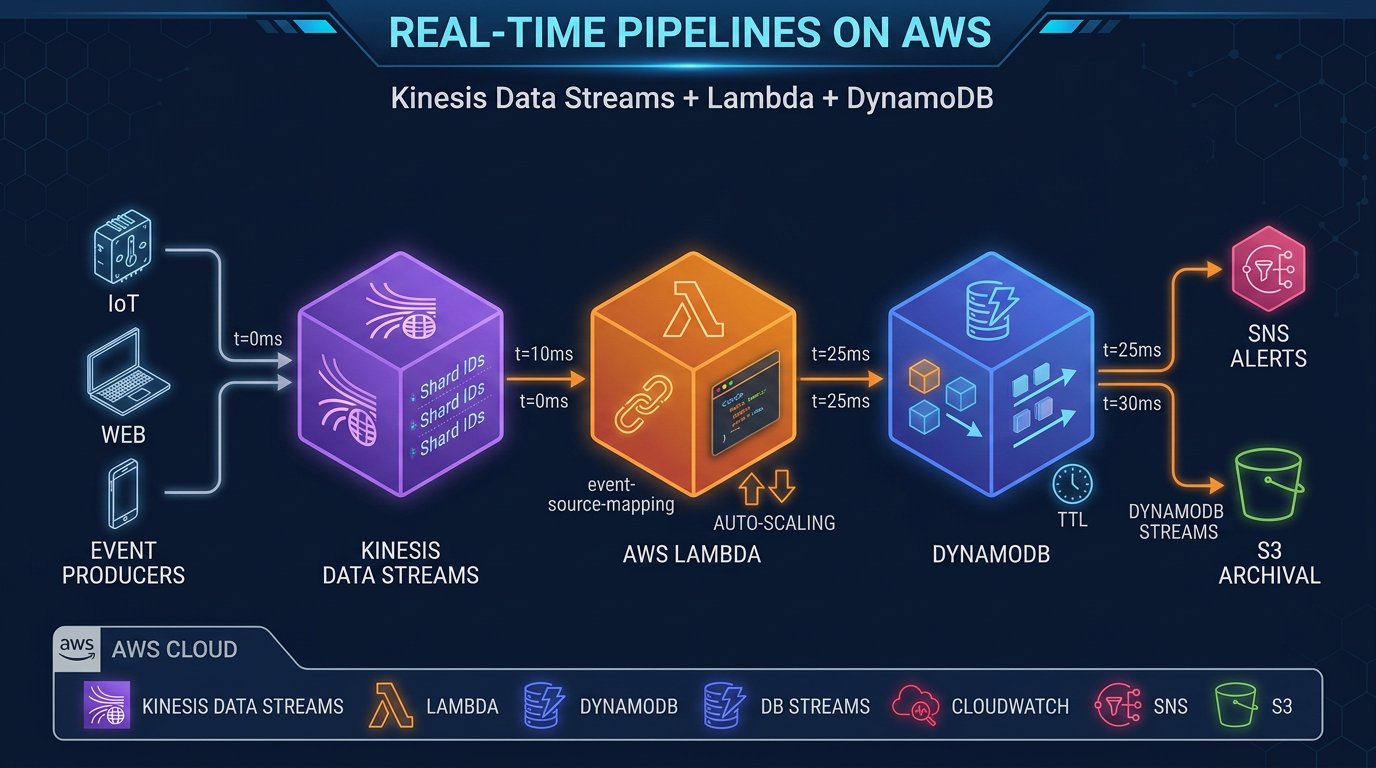
Table of Contents
When an IoT sensor fires, a user clicks a button, or an e-commerce order lands, your application needs to react in milliseconds — not minutes. Batch ETL pipelines built around nightly Glue jobs or hourly Redshift loads cannot meet that bar. Real-time data pipelines require a fundamentally different architecture: one that ingests events continuously, processes them as they arrive, and writes results to a low-latency store.
On AWS, the most direct path to this architecture is Amazon Kinesis Data Streams + AWS Lambda + Amazon DynamoDB. Kinesis handles durable, ordered ingestion. Lambda processes records without managing servers. DynamoDB serves results at single-digit millisecond latency with virtually unlimited scale. Together, they cover the three core concerns of any streaming pipeline — collect, process, serve — while remaining entirely serverless.
This post covers the complete architecture: how each component works, how to configure them for production, how to handle errors correctly, and how to estimate costs. Code examples are in Python (boto3 / AWS SDK for Python).
Why This Architecture Works
Before diving into configuration details, it helps to understand why these three services fit together naturally.
Kinesis Data Streams is a durable, ordered, partitioned log. Producers write records to named shards. Consumers read from shards in order, at their own pace, without affecting other consumers. Records are retained for 24 hours by default (extendable to 365 days). This decoupling is the key property: your Lambda function can fall behind and catch up without losing data, and multiple consumers (Lambda, Amazon Data Firehose, analytics applications) can read the same stream independently.
Lambda event source mapping is how Lambda connects to Kinesis. Lambda polls the stream on your behalf, batches records, and invokes your function. This is operationally simpler than managing a Kinesis consumer application (KCL) yourself — no EC2 instances, no checkpointing logic to write, no consumer group management. The tradeoff is that Lambda imposes a maximum concurrency limit per shard.
DynamoDB is the write target of choice when you need results available for application queries in real time. Its write throughput scales to millions of requests per second with on-demand capacity mode. For use cases where the processed event needs to be immediately queryable — user activity feeds, leaderboards, inventory counters, session state — DynamoDB is the right target. For archival or analytics, route data to S3 via Amazon Data Firehose instead (covered in the optional extensions section).
Architecture Overview
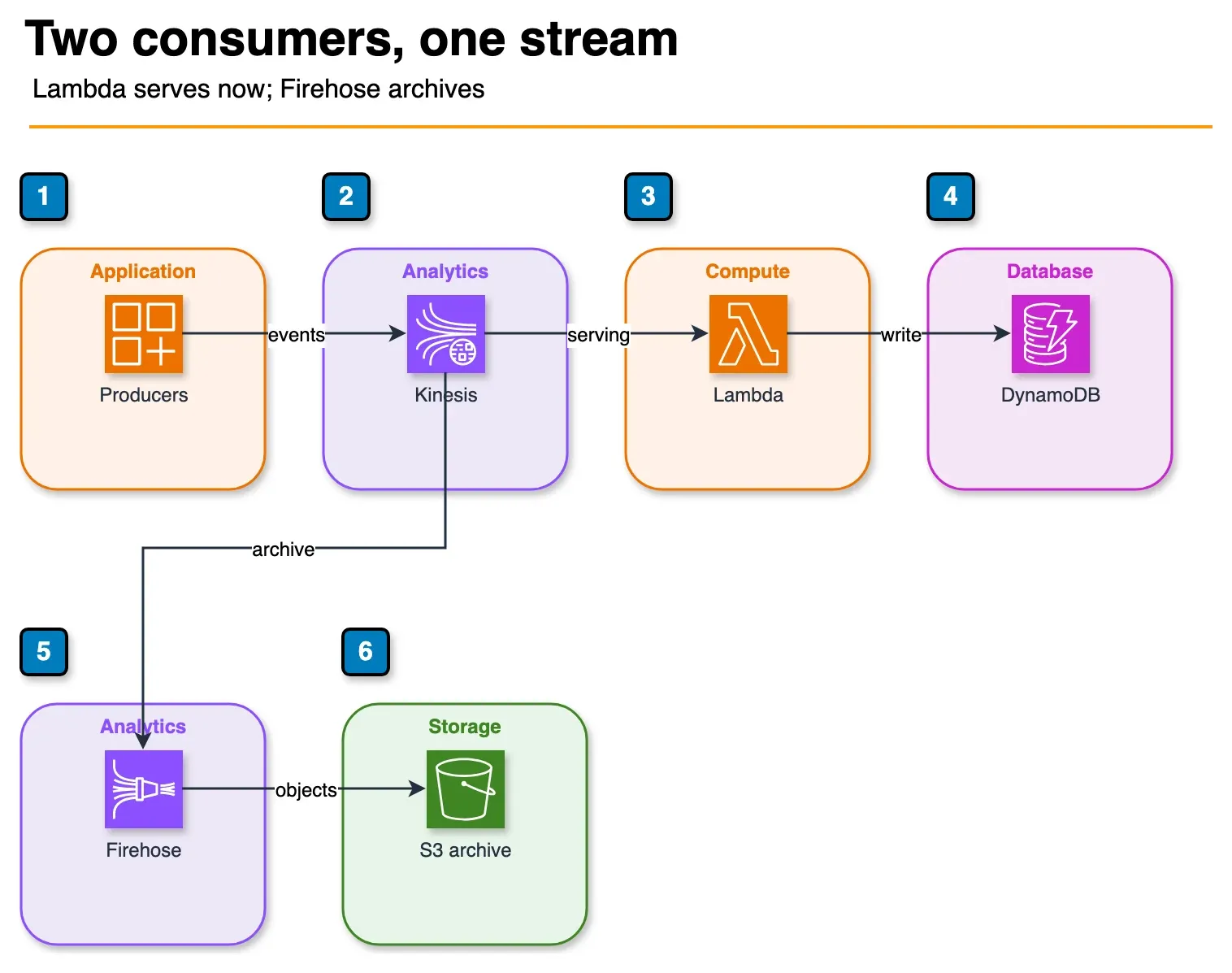
Figure: both consumers read the same stream and keep their own position. Lambda writes the serving table. Firehose writes the archive. One path does not wait on the other. Open the draw.io source.
Producers (IoT / app events / clickstream)
        │
        ▼
Amazon Kinesis Data Streams
        │
        ├──── Lambda (event source mapping) ──────► DynamoDB (real-time serving)
        │
        └──── Amazon Data Firehose ───────────────► S3 (archival / data lake)
The two consumer paths run in parallel from the same Kinesis stream. Lambda handles the real-time path. Amazon Data Firehose handles the archival path. Neither path affects the other’s progress — each consumer maintains its own position in the stream.
Setting Up Kinesis Data Streams
On-Demand vs Provisioned Mode
Kinesis Data Streams offers two capacity modes:
Provisioned mode: You specify the number of shards. Each shard provides 1 MB/s write (or 1,000 records/s, whichever comes first) and 2 MB/s read. Scale by adding or removing shards. Best when you have predictable, steady throughput.
On-demand mode (On-demand Advantage, launched November 2025): Kinesis automatically scales shard count based on incoming traffic. You pay per GB ingested and per GB retrieved. Handles spikes up to 10 GB/s or 10 million events/second per stream without any capacity planning. Best for variable or unpredictable traffic, or when you are starting a new workload and don’t yet know the throughput profile.
For most new workloads, start with on-demand mode. Switch to provisioned once you have stable throughput data and can benefit from the lower per-GB cost of provisioned capacity.
Shard Count Estimation for Provisioned Mode
If you do choose provisioned mode, estimate shards as follows:
Shards needed = max(
    incoming_MB_per_second / 1,          # write throughput limit
    incoming_records_per_second / 1000    # records per second limit
)
Example: 5 MB/s of incoming data with 3,000 records/second → need 5 shards (throughput-limited). Add a 20% buffer for spikes: 6 shards.
Enhanced Fan-Out
By default, all consumers share the 2 MB/s read limit per shard. If you have multiple independent consumers — for example, Lambda for real-time processing plus a separate analytics application — each competing for that 2 MB/s, you will see consumer lag.
Enhanced fan-out gives each registered consumer its own dedicated 2 MB/s per shard, regardless of how many other consumers exist. Enable it via the Kinesis RegisterStreamConsumer API. Lambda event source mappings can use enhanced fan-out by setting StartingPosition with the consumer ARN. Up to 20 registered consumers per stream (soft limit, can be raised).
Use enhanced fan-out when you have two or more consumers that each need full read throughput and cannot tolerate shared bandwidth.
Data Retention
Default retention is 24 hours. Extended retention options:
- 7 days: Available with extended data retention (additional cost per shard-hour)
- Up to 365 days: Long-term retention (higher cost, useful for replaying historical data)
For most real-time pipelines, 24 hours is sufficient. Extend retention when you need the ability to replay the full stream for debugging or backfilling a new downstream consumer.
Lambda Event Source Mapping Configuration
The event source mapping is the bridge between Kinesis and Lambda. Configure it carefully — these settings determine throughput, latency, and error behavior.
Key Parameters
Batch size (1–10,000 records): How many records Lambda includes in a single invocation. Larger batches improve throughput but increase per-invocation latency. Start with 100–500 for most use cases.
Batch window (0–300 seconds): Lambda waits up to this many seconds to accumulate a full batch before invoking. Use a small window (5–30 seconds) if you need near-real-time processing. Use 0 for minimum latency (Lambda invokes as soon as records are available).
Parallelization factor (1–10): Number of concurrent Lambda executions per shard. Normally, one Lambda execution processes one shard at a time (maintaining record order within the shard). With a parallelization factor of 2–10, Lambda splits each shard’s records into multiple concurrent batches. This increases throughput but breaks strict ordering within the shard. Use only when processing order does not matter for your use case.
Starting position:
TRIM_HORIZON: Start from the oldest available records in the stream. Use when onboarding a new consumer that needs to process all historical data.LATEST: Start from new records only. Use when you only care about events from now forward.AT_TIMESTAMP: Start from a specific timestamp.
IAM Permissions for Lambda
Your Lambda execution role needs these Kinesis permissions:
{
  "Effect": "Allow",
  "Action": [
    "kinesis:GetRecords",
    "kinesis:GetShardIterator",
    "kinesis:DescribeStream",
    "kinesis:ListShards",
    "kinesis:ListStreams"
  ],
  "Resource": "arn:aws:kinesis:REGION:ACCOUNT:stream/YOUR_STREAM_NAME"
}
For DynamoDB writes:
{
  "Effect": "Allow",
  "Action": ["dynamodb:BatchWriteItem", "dynamodb:PutItem", "dynamodb:UpdateItem"],
  "Resource": "arn:aws:dynamodb:REGION:ACCOUNT:table/YOUR_TABLE_NAME"
}
Error Handling: Do Not Skip This
The default error behavior is to retry the entire batch indefinitely until records expire. This means a single bad record (a “poison pill”) can block an entire shard for hours. Configure these settings on every production event source mapping:
- Bisect on error: When enabled, Lambda splits a failing batch in half and retries each half separately. This isolates the offending record(s) within a few retries rather than blocking the entire batch.
- Destination on failure: Route failed batches to an SQS queue or SNS topic for inspection and manual remediation. Without this, failed records are silently dropped after max retries.
- Maximum retry attempts: Set a finite limit (e.g., 3–5 retries) rather than the default indefinite.
- Maximum record age: Discard records older than this threshold (e.g., 3600 seconds / 1 hour). Prevents Lambda from retrying very old records that are no longer actionable.
Example AWS CLI setup for an event source mapping with error handling:
aws lambda create-event-source-mapping \
  --function-name my-kinesis-processor \
  --event-source-arn arn:aws:kinesis:us-east-1:123456789:stream/my-stream \
  --batch-size 200 \
  --maximum-batching-window-in-seconds 10 \
  --starting-position LATEST \
  --bisect-batch-on-function-error \
  --maximum-retry-attempts 3 \
  --maximum-record-age-in-seconds 3600 \
  --destination-config '{"OnFailure":{"Destination":"arn:aws:sqs:us-east-1:123456789:kinesis-dlq"}}'
Writing to DynamoDB
Lambda Function Pattern
A minimal Lambda function that processes Kinesis records and writes to DynamoDB:
import json
import base64
import boto3
from boto3.dynamodb.conditions import Attr

dynamodb = boto3.resource('dynamodb')
table = dynamodb.Table('events')

def handler(event, context):
    # Group records into batches of 25 (BatchWriteItem limit)
    records = event['Records']
    batch = []

    for record in records:
        # Kinesis records are base64-encoded
        payload = base64.b64decode(record['kinesis']['data']).decode('utf-8')
        item = json.loads(payload)

        # Add sequence number for idempotency checks
        item['sequenceNumber'] = record['kinesis']['sequenceNumber']
        item['approximateArrivalTimestamp'] = str(
            record['kinesis']['approximateArrivalTimestamp']
        )
        batch.append({'PutRequest': {'Item': item}})

        if len(batch) == 25:
            write_batch(batch)
            batch = []

    if batch:
        write_batch(batch)

def write_batch(batch):
    response = dynamodb.batch_write_item(
        RequestItems={'events': batch}
    )
    # Handle unprocessed items (DynamoDB may return partial results under throttling)
    unprocessed = response.get('UnprocessedItems', {})
    if unprocessed:
        # Retry with exponential backoff in production
        dynamodb.batch_write_item(RequestItems=unprocessed)
Idempotency with Conditional Writes
Kinesis guarantees at-least-once delivery. Your Lambda function may be invoked with the same records more than once during retry scenarios. Prevent duplicate writes with DynamoDB conditional expressions:
import boto3
from botocore.exceptions import ClientError

table = boto3.resource('dynamodb').Table('events')

def put_item_idempotent(item):
    try:
        table.put_item(
            Item=item,
            ConditionExpression='attribute_not_exists(pk)'
        )
    except ClientError as e:
        if e.response['Error']['Code'] == 'ConditionalCheckFailedException':
            # Item already exists — this is a duplicate, skip it
            pass
        else:
            raise
The condition attribute_not_exists(pk) ensures the write only succeeds if no item with that partition key exists. Use the Kinesis sequence number or a unique event ID as the partition key for deduplication.
DynamoDB Capacity Mode and Partition Key Design
On-demand capacity mode is the right default for most real-time pipelines. It scales automatically with traffic, has no throttling under normal conditions, and eliminates capacity planning. The cost is higher per write request unit than provisioned capacity — acceptable for variable workloads, but worth revisiting if you sustain millions of writes per hour.
Partition key design matters at high write rates. DynamoDB distributes data across partitions by hashing the partition key. If all writes go to a single partition key (a “hot key”), you hit per-partition throughput limits even in on-demand mode. Spread writes across many distinct partition keys. For time-series data, combine a device ID or user ID with a time bucket:
import time

partition_key = f"{device_id}#{int(time.time() // 3600)}"  # hour bucket
This distributes load while keeping related records queryable together.
Error Handling Patterns in Detail
Poison Pill Isolation with Bisect-on-Error
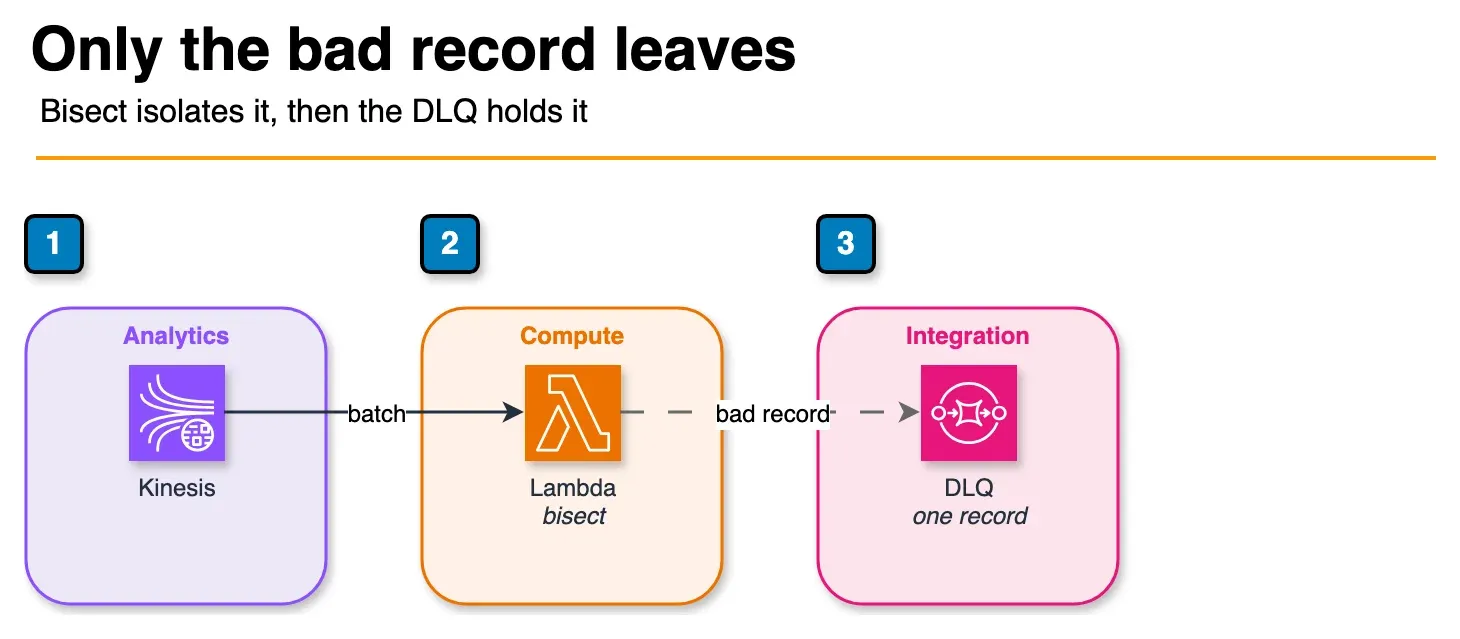
Figure: with bisect on error, Lambda halves the failed batch until one record remains. That record goes to the SQS DLQ. The rest of the batch is processed. Open the draw.io source.
Without bisect-on-error, a single malformed record stops the entire shard:
- Lambda invokes with batch of 200 records
- Record #147 has a schema error → Lambda raises an exception
- Lambda retries the full 200-record batch
- Record #147 still fails → retries continue until records expire
With bisect-on-error enabled:
- Lambda invokes with batch of 200, fails
- Lambda retries records 1–100, succeeds
- Lambda retries records 101–200, fails
- Lambda retries records 101–150, succeeds
- Lambda retries records 151–200, fails
- Continues halving until the single bad record is isolated and sent to the DLQ
The bad record goes to your SQS DLQ for manual inspection. All other records process successfully.
Dead-Letter Queue Processing
Monitor your DLQ with a separate Lambda function or a CloudWatch alarm on ApproximateNumberOfMessagesVisible. For each failed batch in the DLQ:
def dlq_handler(event, context):
    for message in event['Records']:
        failed_batch = json.loads(message['body'])
        # failed_batch contains: requestContext, responseContext, records[]
        for record in failed_batch.get('records', []):
            payload = base64.b64decode(record['data'])
            # Log for manual inspection or re-drive to a repair queue
            print(f"Failed record: {payload}")
Cost Model
The following are rough cost estimates for 1 million events per day (approximately 12 events/second average). These are illustrative estimates — actual costs depend on record size, region, and exact configuration. Always validate with the AWS Pricing Calculator.
Assumptions: average record size 1 KB, DynamoDB on-demand, us-east-1 region.
| Component | Usage | Estimated Monthly Cost |
|---|---|---|
| Kinesis On-demand | ~30 GB/month in, ~30 GB/month out | ~$6–$10 |
| Lambda | 30M invocations, ~200ms avg, 256 MB | ~$2–$4 |
| DynamoDB On-demand writes | 30M write request units | ~$18–$22 |
| CloudWatch Logs | 10 GB/month | ~$5 |
| Total estimate | ~$31–$41/month |
At 100 million events per day (10x scale), costs scale roughly linearly: $300–$400/month. DynamoDB writes dominate at high volume. If cost becomes a concern, evaluate switching to DynamoDB provisioned capacity with reserved capacity pricing, or routing archival events to S3 via Amazon Data Firehose instead of writing every event to DynamoDB.
Optional Extensions
Parallel Archival with Amazon Data Firehose
Add Amazon Data Firehose as a second consumer on the same Kinesis stream to archive all events to S3 for your data lake:
Kinesis Data Streams
    ├── Lambda → DynamoDB (real-time serving)
    └── Amazon Data Firehose → S3 (archival → Athena / Glue ETL)
Configure Firehose to convert records to Parquet using a Glue schema, partition by date (YYYY/MM/DD/), and compress with Snappy. This gives you a queryable historical archive in Athena at near-zero marginal cost compared to already-ingested Kinesis data.
Real-Time Search with OpenSearch
For use cases that need full-text search on processed events — log analysis, product search, anomaly detection — route a subset of Lambda-processed records to an Amazon OpenSearch Service domain:
from opensearchpy import OpenSearch, RequestsHttpConnection
from requests_aws4auth import AWS4Auth

# In your Lambda function, after DynamoDB write:
opensearch_client.index(
    index='events',
    body=processed_item,
    id=processed_item['eventId']
)
Multi-Stage Processing with Step Functions
For complex processing workflows — enrichment from RDS, ML inference from SageMaker, conditional routing — replace the single Lambda with an AWS Step Functions state machine triggered by the Kinesis event source mapping Lambda:
Kinesis → Lambda (trigger) → Step Functions → [Enrich → Validate → Route → DynamoDB]Step Functions provides built-in retry logic, parallel execution branches, and full execution history for debugging.
Operations and Monitoring
CloudWatch Alarms to Configure on Day One
Kinesis:
GetRecords.IteratorAgeMilliseconds > 60000(60 seconds lag): Your Lambda consumer is falling behind. Scale up Lambda concurrency, increase parallelization factor, or reduce Lambda duration.WriteProvisionedThroughputExceeded > 0(provisioned mode only): You are hitting shard write limits. Add shards or switch to on-demand mode.
Lambda:
Errors / Invocations > 0.01(>1% error rate): Your function is failing. Check CloudWatch Logs for the error pattern.Throttles > 0: Lambda is hitting the account concurrency limit. Request a limit increase or implement reserved concurrency.Duration > 50% of timeout: Your function is approaching the timeout. Optimize processing or increase the timeout.
DynamoDB:
ThrottledRequests > 0(on-demand mode): Rare, but DynamoDB on-demand can throttle during extreme spikes. Use exponential backoff in the Lambda retry logic.ConsumedWriteCapacityUnits / ProvisionedWriteCapacityUnits > 0.8(provisioned mode): Approaching capacity. Scale up.
X-Ray Tracing
Enable active X-Ray tracing on the Lambda function to get end-to-end visibility across Kinesis → Lambda → DynamoDB:
# In your Lambda function, import the X-Ray SDK patches
from aws_xray_sdk.core import xray_recorder, patch_all
patch_all()  # Automatically instruments boto3 calls
In the Lambda console, set Tracing: Active. X-Ray will show you the full trace: time spent polling Kinesis, function execution time, DynamoDB write latency, and any downstream calls — all in a single service map.
Log Structuring for Operational Clarity
Structured JSON logs are far easier to query in CloudWatch Logs Insights than plain text:
import json

def log(level, message, **kwargs):
    print(json.dumps({
        'level': level,
        'message': message,
        'shardId': kwargs.get('shard_id'),
        'batchSize': kwargs.get('batch_size'),
        'sequenceNumber': kwargs.get('sequence_number'),
        **kwargs
    }))
Query in CloudWatch Logs Insights:
fields @timestamp, message, batchSize, shardId
| filter level = 'ERROR'
| sort @timestamp desc
| limit 100
Production Readiness Checklist
Before going live with a Kinesis + Lambda + DynamoDB pipeline, verify:
- Bisect-on-error enabled on the event source mapping
- On-failure SQS destination configured and monitored
- Maximum retry attempts set to a finite value
- Idempotent write logic in the Lambda function (conditional expressions)
- DynamoDB partition key designed to avoid hot key scenarios
- CloudWatch alarms on IteratorAge, Errors, Throttles, and DynamoDB ThrottledRequests
- X-Ray tracing enabled
- KMS encryption on Kinesis stream and DynamoDB table
- Lambda execution role follows least-privilege (only the specific table and stream ARNs)
- Load test at 2x expected peak to validate error handling behavior
When to Choose a Different Architecture
This architecture excels at: high-throughput event ingestion with real-time serving, use cases where processed results need to be immediately queryable, and teams that want zero infrastructure management.
Consider alternatives when:
- You need sub-10ms end-to-end latency: Kinesis + Lambda has typical end-to-end latency of 100ms–1s depending on batch window configuration. For lower latency, consider direct API Gateway → Lambda → DynamoDB (bypassing Kinesis entirely) or ElastiCache for serving.
- You need complex stateful stream processing (windowing, joins across streams): Amazon Managed Service for Apache Flink is the right tool. It handles stateful operations natively; Lambda does not.
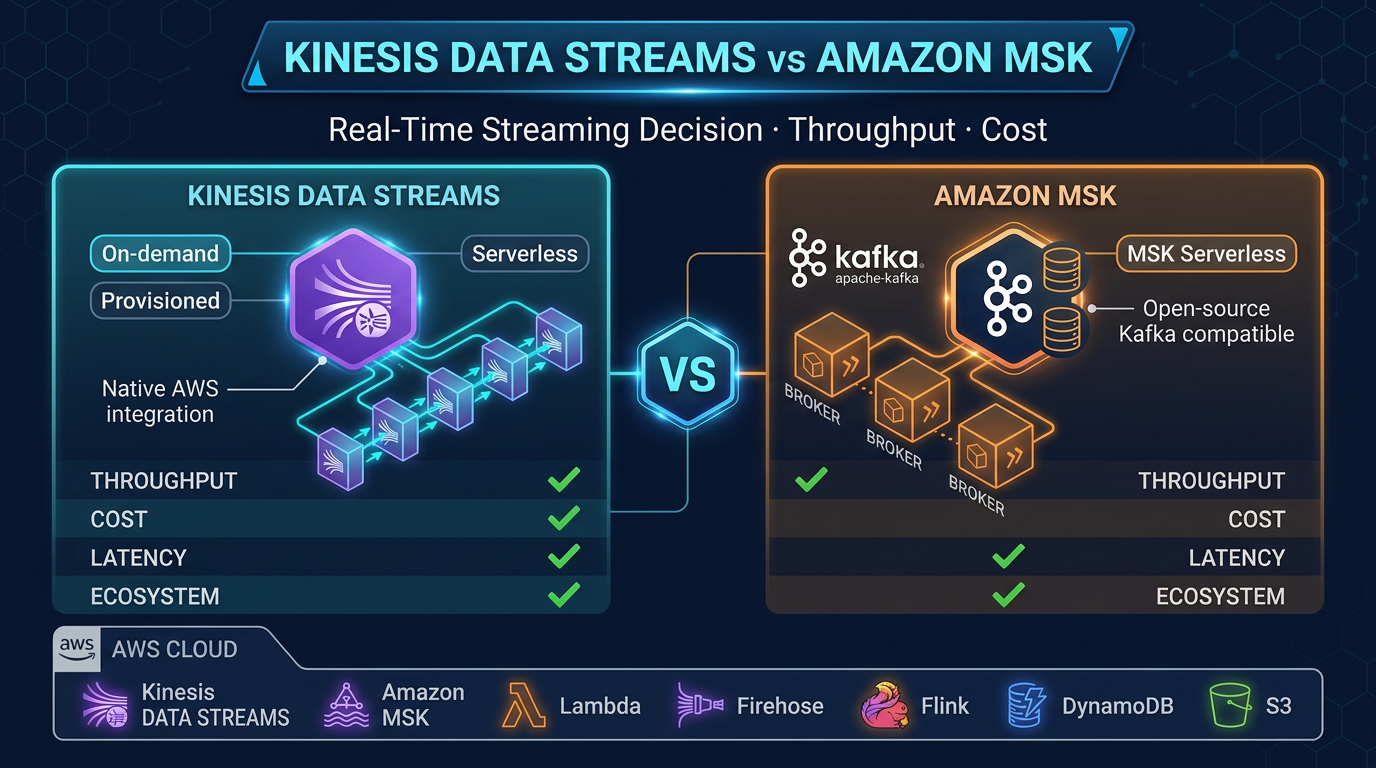
- Your throughput is very high and cost is critical: At billions of events per day, the per-GB Kinesis cost adds up. Evaluate Amazon MSK (Managed Streaming for Apache Kafka) with your own consumer if you need Kafka semantics and finer cost control.
For the vast majority of real-time event processing workloads — IoT telemetry, clickstream analytics, order processing, activity feeds — Kinesis + Lambda + DynamoDB remains the fastest path from zero to production on AWS.
FactualMinds helps engineering teams design and implement real-time data architectures on AWS. If you are evaluating Kinesis, Kafka, or Flink for your streaming use case, speak with our team.
Related reading
- Amazon Redshift Serverless vs Provisioned: Which Is Right for Your Workload?
- Real-Time Stream Processing with Amazon Managed Service for Apache Flink
- Amazon Athena Cost Optimization: Partition Pruning, Compression, and Iceberg Tables
- AWS EMR: Serverless vs EC2 vs EKS — When to Use Each
- AWS Glue 5: Modern ETL with Apache Iceberg — Tables, Time Travel, and Lakehouse Patterns
- AWS Glue vs dbt on AWS: Data Transformation Decision Guide for 2026
- Virtual Data Modeling on AWS: Architecture, Trade-offs, and When Not to Use It
- How to Build a Serverless Data Pipeline with AWS Glue and Athena
Frequently asked questions
How does Lambda consume records from Kinesis Data Streams?
What happens if my Lambda function fails to process a Kinesis record?
How do I write to DynamoDB efficiently from a Lambda function?
What is the maximum throughput for a Kinesis Data Streams shard?
Can I use Kinesis Data Streams with Amazon Data Firehose for archival?
How do I handle duplicate records in Kinesis + Lambda pipelines?
What monitoring should I set up for a Kinesis + Lambda pipeline?
Is this architecture HIPAA compliant?

AWS Cloud Architect & AI Expert
AWS-certified cloud architect and AI expert with deep expertise in cloud migrations, cost optimization, and generative AI on AWS.