Amazon OpenSearch Service: Architecture Patterns and Cost Optimization
Quick summary: Amazon OpenSearch Service powers search, log analytics, and time-series workloads on AWS. Here are the architecture patterns and cost levers that matter most in production.
Key Takeaways
- Amazon OpenSearch Service powers search, log analytics, and time-series workloads on AWS
- Amazon OpenSearch Service is the AWS-managed search and analytics platform used for full-text search, log analytics, security event correlation, time-series metrics, and observability workloads
- Getting OpenSearch right in production means understanding the deployment model, shard design, storage tiers, and the ingestion patterns that feed data into your cluster
- OpenSearch Service vs OpenSearch Serverless — Choosing Your Deployment Model Before designing an OpenSearch architecture, you need to choose between two fundamentally different deployment models
- x (up to 2.19), and Elasticsearch 7.10 for legacy domains
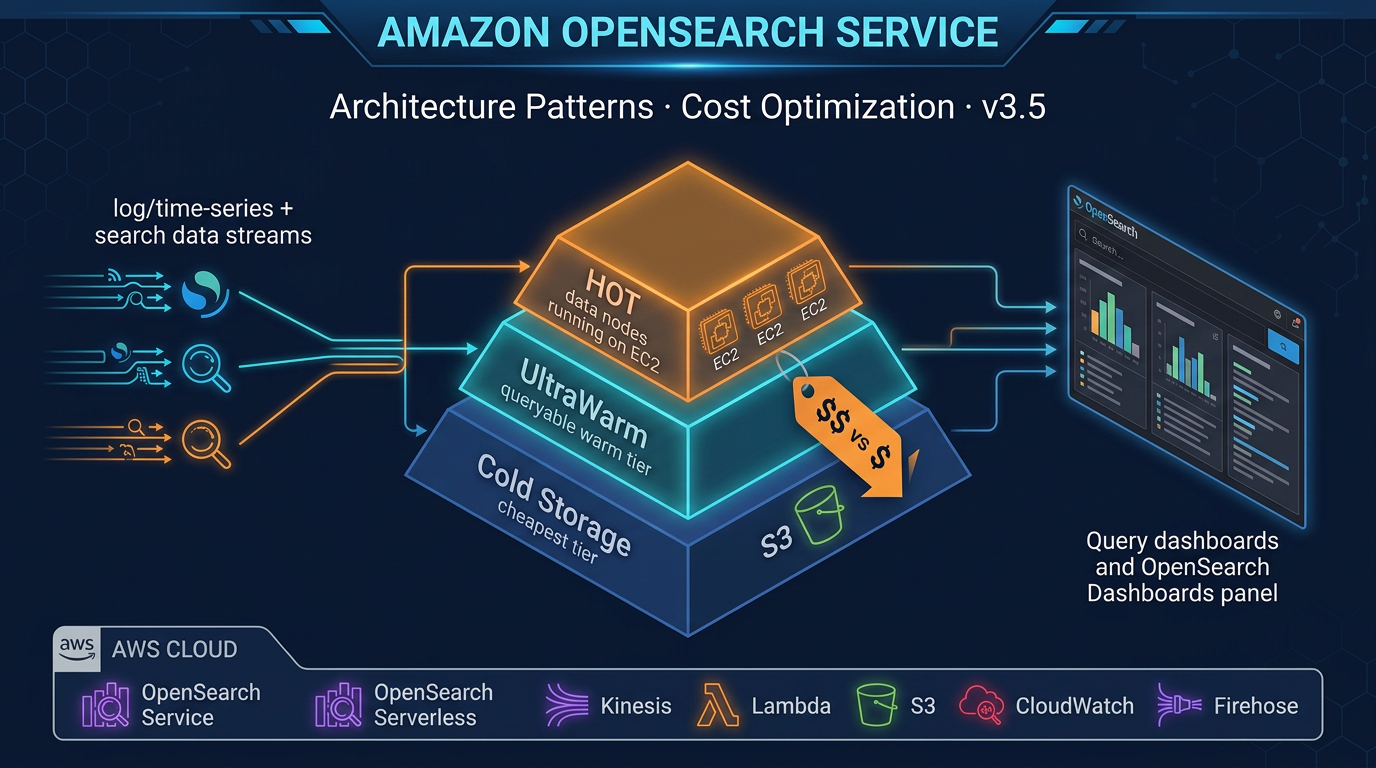
Table of Contents
Amazon OpenSearch Service is the AWS-managed search and analytics platform used for full-text search, log analytics, security event correlation, time-series metrics, and observability workloads. It is one of the more architecturally complex services in the AWS data portfolio — the same domain can run hot SSD storage for real-time queries, warm S3-backed storage for older data, and cold archival storage for compliance retention, all behind a single endpoint.
Getting OpenSearch right in production means understanding the deployment model, shard design, storage tiers, and the ingestion patterns that feed data into your cluster. Getting it wrong means either a performance cliff when your hot tier fills up or a cost overrun from over-provisioned instances.
This guide covers the architecture decisions and cost levers that matter most.
OpenSearch Service vs OpenSearch Serverless — Choosing Your Deployment Model
Before designing an OpenSearch architecture, you need to choose between two fundamentally different deployment models.
Managed Domains (Amazon OpenSearch Service)
Managed domains give you a provisioned OpenSearch cluster with explicit control over:
- Node instance types and counts (data, master, UltraWarm, coordinator nodes)
- Shard count and replica count per index
- Storage tier configuration (hot, UltraWarm, Cold Storage)
- WLM and search/indexing resource allocation
- Fine-Grained Access Control (FGAC) with document- and field-level security
- Custom domain endpoint and HTTPS certificate
Current supported versions: OpenSearch 3.5 (latest), OpenSearch 2.x (up to 2.19), and Elasticsearch 7.10 for legacy domains. New workloads should target OpenSearch 3.5 — it brings significant improvements to neural search, hybrid query scoring (BM25 + k-NN combined), and ingestion throughput.
Managed domains are the right choice for:
- Workloads where cost predictability matters (Reserved Instances available)
- Large log analytics deployments with UltraWarm and Cold Storage requirements
- HIPAA, PCI, or FedRAMP workloads requiring VPC isolation and FGAC
- Workloads already tuned with specific shard configurations and index lifecycle policies
OpenSearch Serverless
OpenSearch Serverless removes the cluster layer entirely. You create a collection (a logical grouping of indices), define access policies, and AWS provisions and scales the underlying compute automatically.
Pricing: Per OCU (OpenSearch Compute Unit) per hour, charged separately for indexing and search. Storage is per GB-month. Minimum 2 OCUs each for indexing and search — 4 OCUs total minimum per production collection.
Collection types:
- Search: Optimized for low-latency, user-facing search queries. Supports full-text and vector search.
- Time series: Optimized for high-volume, sequential ingestion (logs, metrics, traces). Expanded in February 2025 to support 100TB+ time-series workloads per collection.
- Vector search: Dedicated for k-NN and approximate nearest-neighbor workloads (semantic search, RAG pipelines).
Serverless is the right choice for:
- Unpredictable or bursty workloads where cluster sizing is difficult
- Developer and test environments where simplicity matters more than cost optimization
- New search applications without an established traffic baseline
- Time-series workloads at very large scale (100TB+) where Serverless time-series collections now excel
- Vector search for AI/ML applications (RAG, semantic search)
What Serverless does not support (as of early 2026):
- UltraWarm and Cold Storage tiers (no tiered storage — all data is in Serverless-managed storage)
- Custom domain endpoints
- Some fine-grained FGAC features available in managed domains
- SQL querying via PPL (Piped Processing Language) has limited support
For teams with significant data engineering investment in OpenSearch — ISM policies, UltraWarm migration, shard-level tuning — managed domains remain the stronger choice.
Primary Use Cases
Understanding which use case you are building for shapes every downstream architecture decision.
Full-Text Search
E-commerce product search, document search, enterprise search. Workloads that require BM25 relevance ranking, field boosting, fuzzy matching, autocomplete (edge n-grams), and faceted filtering. OpenSearch 3.5 adds improved hybrid search scoring — combining BM25 (keyword relevance) with k-NN (vector similarity) in a single query for semantic-aware product search.
Index design for search: fewer, larger shards; aggressive use of index templates; analyzer configuration per field; replica shards for read scaling.
Log Analytics
Application logs, access logs, VPC flow logs, CloudTrail. High-ingest, time-series data. The dominant OpenSearch use case on AWS. Logs flow from producers (Lambda, ECS, EC2) through Amazon Data Firehose or OpenSearch Ingestion into time-based indices. OpenSearch Dashboards provides visualization. ISM policies manage the index lifecycle.
Time-Series Analytics
IoT sensor data, infrastructure metrics, application performance metrics. Similar patterns to log analytics but often with higher ingest rates and stricter timestamp ordering requirements. Time-series collections in OpenSearch Serverless are purpose-built for this workload at scale.
Security Analytics (SIEM)
CloudTrail, GuardDuty findings, VPC flow logs, application audit events centralized in OpenSearch for threat detection, correlation, and investigation. OpenSearch’s Security Analytics plugin provides out-of-the-box detection rules (Sigma rule format), correlation engine, and threat intelligence feeds.
Observability (Traces and Spans)
Distributed trace data from OpenTelemetry or AWS X-Ray, stored in OpenSearch for analysis. OpenSearch’s Trace Analytics plugin provides waterfall views, service maps, and latency percentile analysis. This integrates with OpenSearch Ingestion (Data Prepper pipelines) for OTel-native ingestion.
Managed Domain Architecture
Node Roles and Types
A production OpenSearch managed domain typically uses three to four node types:
Data nodes (hot tier): Store active indices on local NVMe SSD. Use Graviton3-based instance families for best price-performance in 2026: r6g (memory-optimized), m6g (general purpose), c6g (compute-optimized). For search-heavy workloads, r6g is most common — OpenSearch is memory-intensive.
Dedicated master nodes: For clusters with more than 10 data nodes, dedicated master nodes manage cluster state without competing for resources with data operations. Use m6g.large.search for most clusters; m6g.xlarge.search for very large clusters. Always deploy 3 dedicated master nodes (never 2 or 4) for split-brain avoidance.
UltraWarm nodes: Serve the warm storage tier. Data is stored in S3 and cached on UltraWarm node SSD. Query performance is 5–20x slower than hot storage but cost per GB is typically 90% lower. Use ultrawarm1.medium.search or ultrawarm1.large.search.
Coordinator nodes (optional): In very large clusters, dedicated coordinator nodes handle query distribution and result aggregation, removing this burden from data nodes. Useful when query fan-out across many shards creates CPU pressure on data nodes.
Multi-AZ Deployment
For production domains, always use Multi-AZ with Standby (3 Availability Zones). This requires:
- Data node count divisible by 3 (e.g., 3, 6, 9 data nodes)
- At least 3 dedicated master nodes (one per AZ)
- Replica shard count of at least 1 (so each shard has a copy in a different AZ)
Multi-AZ with Standby provides automatic failover — if an AZ becomes unavailable, OpenSearch promotes replicas and the domain remains available. This is a hard requirement for any production workload.
Shard Sizing and Design
Shard sizing is the single most impactful configuration decision in OpenSearch. Over-sharding is the most common production mistake — it creates excessive overhead without performance benefit.
AWS guidance: Keep individual shard sizes between 10 GB and 50 GB for most workloads. For log and time-series workloads, target 20–40 GB per shard.
Calculating primary shard count:
Expected index size (GB) / target shard size (GB) = primary shard countExample: 200 GB daily log index → 200 / 30 = ~7 primary shards. Round up to a number evenly divisible by your data node count to distribute shards evenly.
Replica shards: Each primary shard should have 1 replica for HA. This doubles effective storage consumption. Factor this into node storage planning.
Total storage = raw data size × (1 + replica count) × 1.1 (overhead buffer)Common shard anti-patterns:
Too many small shards: Each shard has CPU and memory overhead. A cluster with 10,000 shards experiences significant GC pressure and slow cluster state operations even if data volume is modest. Target under 25 shards per GB of JVM heap on data nodes.
Shards that grow without bound: Time-series indices that are never rolled over grow indefinitely. A single index with 500 GB in one shard has poor query parallelism. Use rollover and ISM to cap shard size.
Uneven shard distribution: Shards assigned unevenly across data nodes create hot spots. Use
routing.allocation.total_shards_per_nodeto enforce balance.
Time-Series Index Design
For log and metrics data, use date-based rollover instead of static indices:
PUT _index_template/app-logs-template
{
  "index_patterns": ["app-logs-*"],
  "template": {
    "settings": {
      "number_of_shards": 3,
      "number_of_replicas": 1
    }
  }
}
Then use an ISM rollover policy to create a new index when the current one hits a size or age threshold. Daily rollover is common for log workloads; weekly for lower-volume indices.
Index State Management (ISM) for Cost Control
ISM policies are the primary cost management tool in a managed OpenSearch domain. A well-designed ISM policy keeps your hot tier lean and moves cold data through cheaper storage tiers automatically.
Example ISM policy: hot → UltraWarm → Cold Storage → delete
{
  "policy": {
    "description": "Log data lifecycle: hot 7d, warm 30d, cold 90d, delete",
    "states": [
      {
        "name": "hot",
        "actions": [
          {
            "rollover": {
              "min_doc_count": 10000000,
              "min_size": "30gb",
              "min_index_age": "1d"
            }
          }
        ],
        "transitions": [
          {
            "state_name": "warm",
            "conditions": { "min_index_age": "7d" }
          }
        ]
      },
      {
        "name": "warm",
        "actions": [{ "force_merge": { "max_num_segments": 1 } }, { "warm_migration": {} }],
        "transitions": [
          {
            "state_name": "cold",
            "conditions": { "min_index_age": "30d" }
          }
        ]
      },
      {
        "name": "cold",
        "actions": [{ "cold_migration": { "timestamp_field": "@timestamp" } }],
        "transitions": [
          {
            "state_name": "delete",
            "conditions": { "min_index_age": "90d" }
          }
        ]
      },
      {
        "name": "delete",
        "actions": [{ "delete": {} }]
      }
    ]
  }
}
Note on force merge before UltraWarm: Before transitioning an index to UltraWarm, force-merge it to 1 segment per shard. UltraWarm queries each segment separately — fewer segments means faster warm queries and lower UltraWarm node memory pressure.
Cold Storage detail: Data in Cold Storage is stored only in S3 — no local cache on any node. Querying Cold Storage data requires attaching the index first (a manual or ISM-automated operation). Cold Storage is best for compliance retention requirements where data must be searchable on-demand but rarely actually queried. Cost per GB is significantly lower than UltraWarm.
Ingestion Patterns
Choosing the right ingestion path determines both latency and operational complexity.
Amazon Data Firehose → OpenSearch (Recommended for Log Ingestion)
The simplest, most common pattern for log ingestion:
CloudWatch Logs → Subscription Filter → Lambda → Firehose
                                                     ↓
                                               Data Transform
                                               (Lambda, optional)
                                                     ↓
                                          Amazon OpenSearch Service
Amazon Data Firehose has a built-in OpenSearch destination. It handles batching, retry, and dead-letter queue for failed records. For most log ingestion scenarios, this is the lowest-complexity path. Firehose automatically creates the index and handles index rotation.
Configuration considerations:
- Set buffer size (1 MB to 128 MB) and buffer interval (60s to 900s) — larger buffers = fewer, more efficient index requests
- Enable Lambda transformation if you need field enrichment or filtering before indexing
- Configure DLQ to S3 for failed record inspection
OpenSearch Ingestion (Managed Data Prepper Pipelines)
OpenSearch Ingestion is AWS’s managed pipeline service based on the open-source Data Prepper project. It is the recommended ingestion path for:
- OpenTelemetry traces and metrics (OTel-native ingestion)
- Complex ETL pipelines with multi-step processing
- Cross-index routing based on document content
OTel Collector → OpenSearch Ingestion → OpenSearch Service
                      │
                 Processors:
                 - grok parsing
                 - field renaming
                 - trace/span aggregation
                 - routing (conditional)
OpenSearch Ingestion pipelines scale automatically and are fully managed — no EC2 to maintain. You define the pipeline in YAML, specify the source and sink, and configure processors. This is the most capable ingestion path and the one AWS is actively investing in.
Logstash (Self-Managed)
Logstash running on EC2 or ECS is the legacy approach. It provides a rich plugin ecosystem and is familiar to teams coming from on-premises ELK stacks. However, it requires you to manage infrastructure, handle scaling, and maintain the Logstash version. For new workloads, prefer OpenSearch Ingestion. Use Logstash only if you have existing Logstash pipelines with complex processing logic that you cannot easily replicate in Data Prepper.
Fine-Grained Access Control (FGAC)
FGAC is OpenSearch’s security layer that enables:
- Role-based access control: Create roles with specific index, document, and field permissions
- Document-level security: Filter which documents a user can see based on query conditions
- Field-level security: Include or exclude specific fields from query results
- Audit logging: Log all authentication and authorization events to CloudWatch Logs or S3
FGAC is required for HIPAA and PCI workloads. It must be enabled at domain creation time (cannot be enabled retroactively without recreating the domain).
IAM vs internal user database:
- IAM-based access control is the AWS-native approach — users and roles are IAM identities. Recommended for AWS-native applications where principals are already IAM roles.
- Internal user database lets you create OpenSearch-native users with username/password. Required for tools that do not support IAM signing (Kibana/Dashboards users, some BI tools).
In most production deployments, you use both: IAM roles for application access, internal users for OpenSearch Dashboards access.
VPC deployment: For any workload handling sensitive data, deploy the domain in a VPC. Public access domains expose the OpenSearch endpoint to the internet (even with FGAC — defense in depth requires VPC). VPC deployment means all access goes through private IP addresses within your VPC, with security groups controlling allowed traffic.
OpenSearch Serverless — When It Makes Sense
Bursty Search Workloads
An e-commerce product search that handles 10x traffic on Black Friday compared to average days is a good Serverless candidate. The OCU-based pricing scales with demand, and you avoid paying for peak capacity year-round.
New Projects Without Traffic Baseline
If you are building a new application and do not know what search traffic will look like, Serverless removes the sizing risk. Start with Serverless, observe OCU utilization, and migrate to a managed domain once you have data.
Developer and Test Environments
The cost profile of Serverless (pay per use, no baseline for idle environments) makes it ideal for dev and test collections that are not used 24/7. Eliminate the practice of keeping a provisioned domain running for dev purposes.
Time-Series Workloads at Scale
OpenSearch Serverless time-series collections expanded in February 2025 to support workloads exceeding 100TB of data. For organizations with massive log volumes where the operational complexity of managing UltraWarm and Cold Storage on a managed domain is a burden, Serverless time-series collections are a compelling alternative.
Vector Search for AI/ML Applications
OpenSearch Serverless vector search collections are designed for k-NN workloads — semantic search, RAG (Retrieval-Augmented Generation) pipelines, recommendation systems. The Serverless vector search collection type scales k-NN index operations independently and is the recommended deployment for AI-native search applications.
Cost Optimization Levers
1. UltraWarm for Infrequently Queried Data
UltraWarm is typically 85–90% cheaper per GB than hot storage. For log analytics where only the last 7 days are queried frequently, transitioning data older than 7 days to UltraWarm delivers massive cost reduction without changing query functionality. Data remains fully searchable — just with higher latency.
2. Cold Storage for Archival
Cold Storage costs a fraction of UltraWarm per GB. For data that must be retained for compliance but is rarely queried, Cold Storage with on-demand attach provides the cheapest searchable archival option in OpenSearch.
3. Right-Sizing Instance Types (Graviton3)
Migrate from older instance families (r5, m5, c5) to Graviton3-based equivalents (r6g, m6g, c6g). Graviton3 instances typically offer 10–20% better price-performance for OpenSearch workloads. This is one of the highest-impact, lowest-risk cost optimizations available — instance family migration can be done via a blue-green cluster swap with zero data loss.
4. Reserved Instances for Managed Domains
Reserved Instances are available for managed domain data and master nodes:
- 1-year: approximately 36% discount vs On-Demand
- 3-year: approximately 56% discount vs On-Demand
Reserved Instances do not apply to UltraWarm nodes or OpenSearch Serverless. For domains running 24/7 with a predictable node count, Reserved Instances are the highest-value cost lever available.
5. ISM Delete Policies
Do not retain data indefinitely. Define explicit retention windows in ISM and delete indices that exceed them. The cost of storage that accumulates without a delete policy is one of the most common OpenSearch cost overruns in production. For GDPR or data minimization requirements, ISM delete policies also help enforce retention limits automatically.
6. Replica Count Reduction for Non-Critical Indices
Each replica doubles storage consumption. For dev/test environments or internal indices that do not need HA, set number_of_replicas: 0. For production indices, keep at least 1 replica, but avoid setting 2+ replicas unless you have a specific reason (extremely high read throughput requiring additional read shards).
7. Shard Cleanup and Reindexing
Over time, over-sharded clusters accumulate thousands of small shards from historical indices. Audit your shard count periodically. Use the shrink index API to reduce shard count on existing indices before moving to UltraWarm.
Monitoring OpenSearch
CloudWatch Metrics
Key metrics to watch in CloudWatch:
| Metric | Threshold to Alert On |
|---|---|
ClusterStatus.red | Any value > 0 — immediate alert |
ClusterStatus.yellow | Any value > 0 — warning |
FreeStorageSpace | < 20% of total storage |
IndexingLatency | > 10ms p99 for real-time workloads |
SearchLatency | > 500ms p99 for interactive search |
JVMMemoryPressure | > 80% — risk of GC thrashing |
KibanaHealthyNodes | < total node count — Dashboards degraded |
UltraWarmFreeStorageSpace | < 20% of UltraWarm capacity |
WarmStorageSpaceUtilization | Watch for UltraWarm approaching limits |
A ClusterStatus.red means primary shards are unassigned — this is a data availability event. Page immediately.
OpenSearch Dashboards Monitoring
OpenSearch Dashboards includes built-in Index Management, Anomaly Detection, and Alerting plugins. Use the Index Management UI to visualize ISM policy execution and catch policies that are stuck (common when force-merge takes longer than the ISM check interval).
Alerting: Configure monitors for:
- Query-based monitors (e.g., error rate spike in log data)
- Cluster metric monitors (JVM pressure, red cluster status)
- Destinations: SNS topic → PagerDuty/Slack, or direct Slack webhook
OpenSearch Ingestion Pipeline Metrics
If using OpenSearch Ingestion, monitor pipeline metrics in CloudWatch:
recordsInandrecordsOut— confirm ingestion is flowingrecordsDropped— indicates processing failureslatency— end-to-end pipeline latency
Putting It Together: A Reference Architecture
For a mid-scale log analytics platform on AWS (1 TB/day ingestion, 90-day retention):
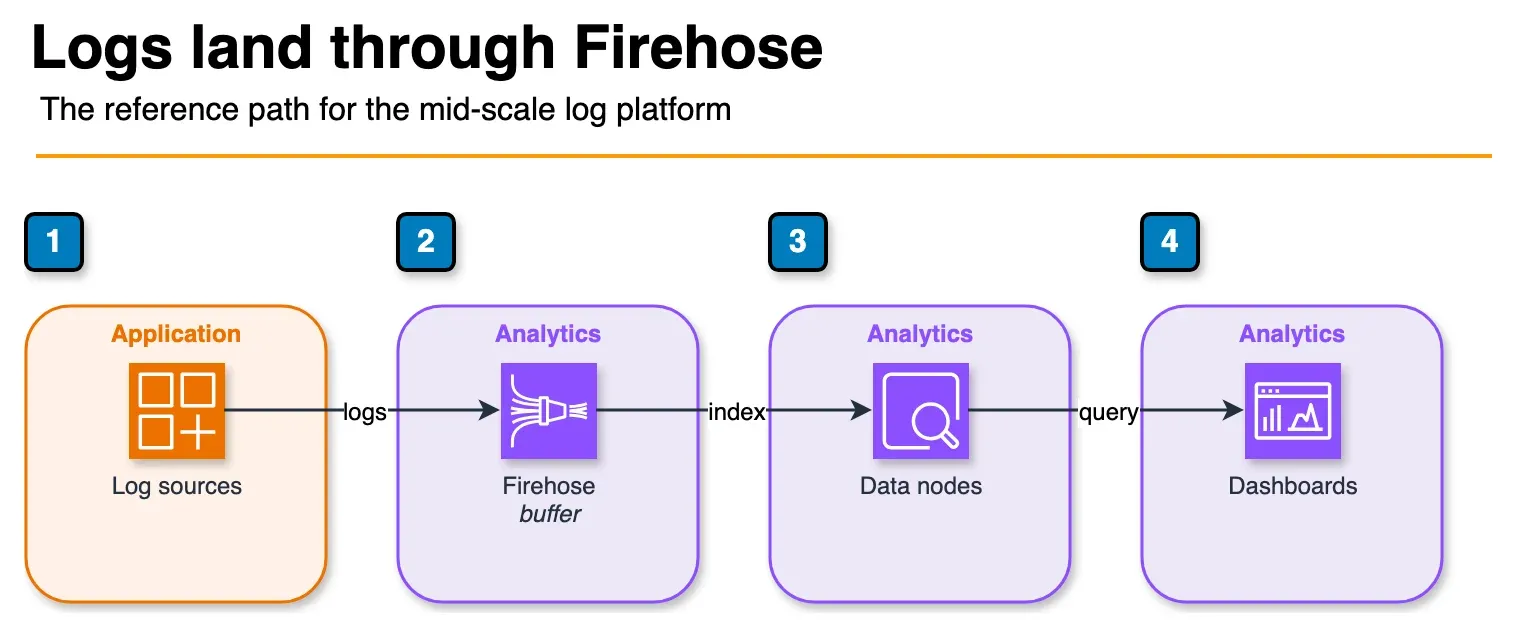
Figure: the reference ingest path. Firehose buffers about 1 MB or 60 seconds, then writes to the OpenSearch domain. Dashboards reads that domain. Instance sizes stay in the article, not on the boxes. Open the draw.io source.
CloudWatch Logs, ECS/EC2 apps, Lambda
              ↓
     Amazon Data Firehose
   (1MB buffer, 60s interval)
              ↓
Amazon OpenSearch Service
  - 3× r6g.2xlarge.search (hot tier)
  - 3× dedicated master (m6g.large)
  - 2× ultrawarm1.large.search
  - Cold Storage enabled
  - Multi-AZ with Standby (3 AZ)
  - VPC deployment, FGAC enabled
              ↓
       ISM Policy:
       Day 0–7: hot (SSD)
       Day 7–30: UltraWarm (S3+cache)
       Day 30–90: Cold Storage (S3 only)
       Day 90+: delete
              ↓
  OpenSearch Dashboards + Alerting
This configuration keeps hot storage at approximately 7 TB (7 days × 1 TB/day) on NVMe SSD for fast query response, uses UltraWarm for days 7–30 (23 TB cached in S3), and Cold Storage for days 30–90 (60 TB in S3 only). The total storage cost is dominated by S3 (UltraWarm and Cold) rather than NVMe SSD, reducing cost significantly compared to keeping all 90 days in hot storage.
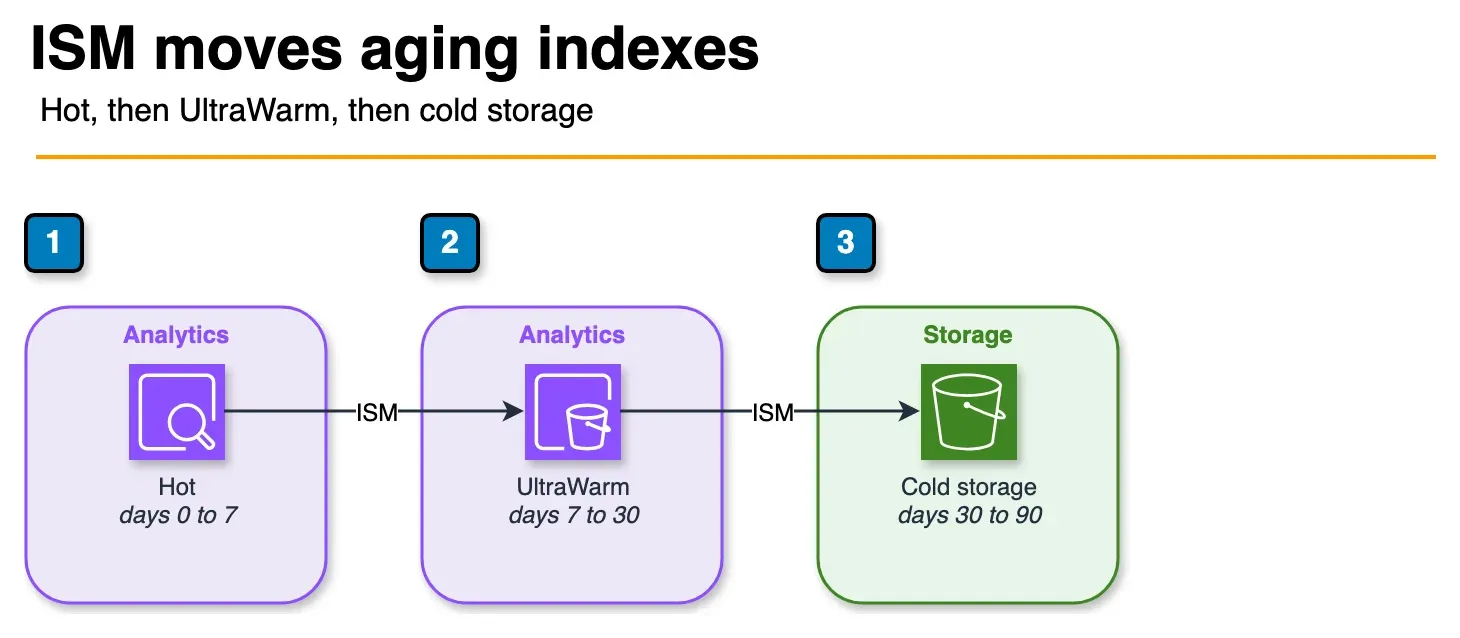
Figure: the ISM policy in the reference architecture. Days 0 to 7 stay on hot data nodes, days 7 to 30 move to UltraWarm, and days 30 to 90 sit in cold storage. Day 90 and after, the policy deletes the index. Open the draw.io source.
When to Engage a Specialist
Amazon OpenSearch Service has more operational depth than most AWS managed services. Shard design mistakes made at index template creation time are difficult to fix without reindexing. ISM policy errors can leave data stranded in hot storage. VPC and FGAC misconfigurations can block application access at launch.
If you are deploying OpenSearch for a production workload — especially in a regulated industry — having an architecture review before go-live catches these issues early. The FactualMinds data engineering team has designed and operated production OpenSearch domains for log analytics, product search, and security analytics workloads and can help you get the shard design, ISM policies, and ingestion architecture right from the start.
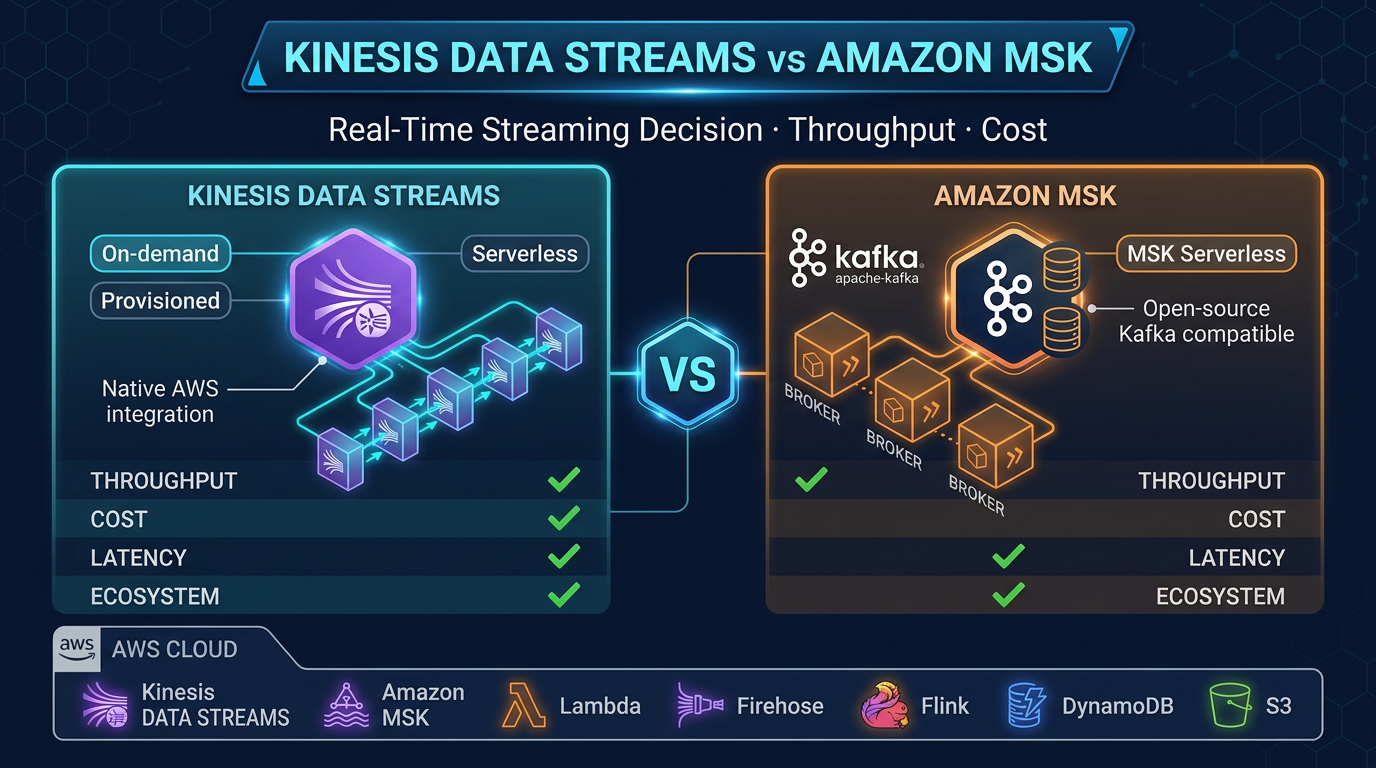
Compare streaming ingestion options in Kinesis Data Streams vs MSK.
Related reading
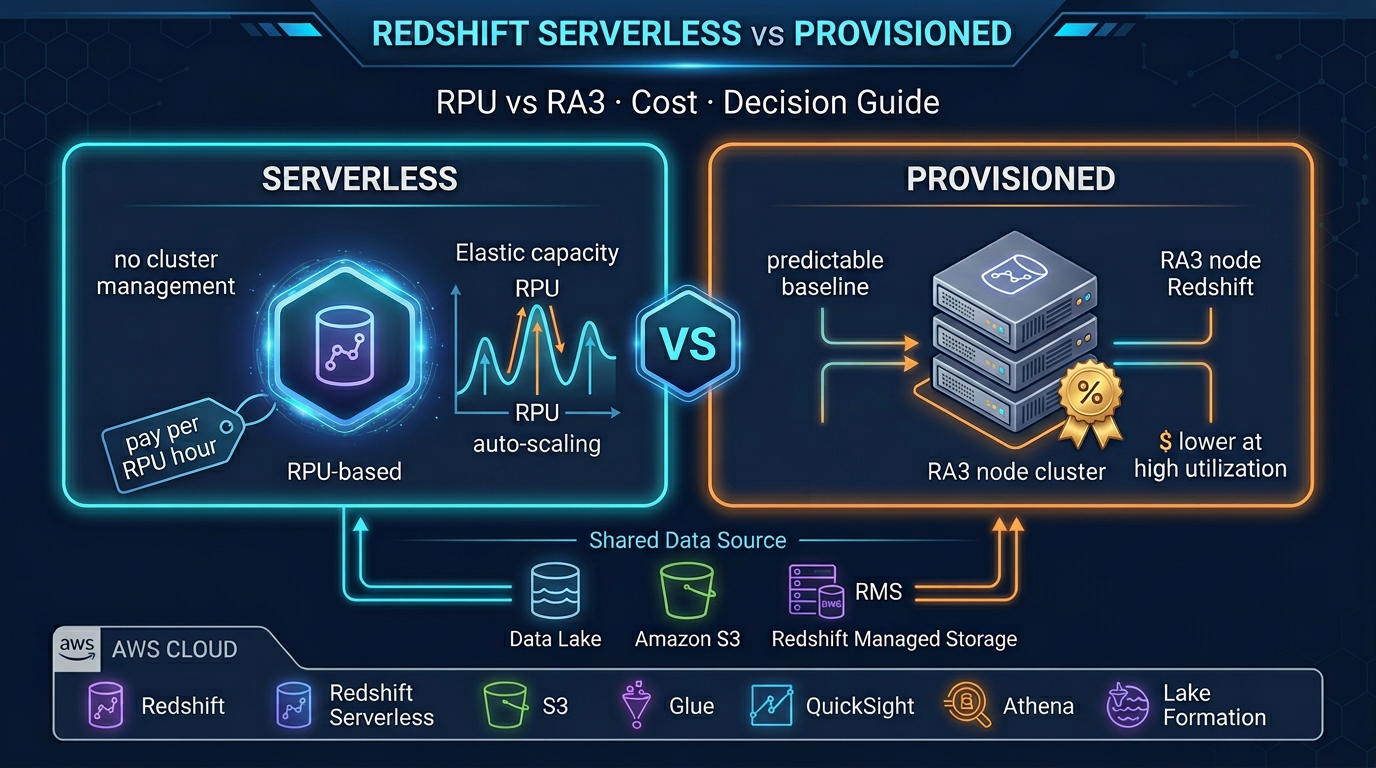
- Amazon Redshift Serverless vs Provisioned: Which Is Right for Your Workload?
- Real-Time Stream Processing with Amazon Managed Service for Apache Flink
- Amazon Athena Cost Optimization: Partition Pruning, Compression, and Iceberg Tables
- AWS EMR: Serverless vs EC2 vs EKS — When to Use Each
- AWS Glue 5: Modern ETL with Apache Iceberg — Tables, Time Travel, and Lakehouse Patterns
- AWS Glue vs dbt on AWS: Data Transformation Decision Guide for 2026
- Virtual Data Modeling on AWS: Architecture, Trade-offs, and When Not to Use It
- How to Build a Serverless Data Pipeline with AWS Glue and Athena
Frequently asked questions
What is the current version of Amazon OpenSearch Service?
What is the difference between Amazon OpenSearch Service and OpenSearch Serverless?
What is UltraWarm storage in Amazon OpenSearch Service?
How do I optimize shard count in Amazon OpenSearch Service?
Is Amazon OpenSearch Service HIPAA eligible?
What replaced Elasticsearch on AWS?
Can I use Amazon OpenSearch Service for log analytics?
What is OpenSearch Serverless OCU pricing?

AWS Cloud Architect & AI Expert
AWS-certified cloud architect and AI expert with deep expertise in cloud migrations, cost optimization, and generative AI on AWS.