Amazon Redshift Serverless vs Provisioned: Which Is Right for Your Workload?
Quick summary: Serverless RPUs vs Provisioned RA3 — still not automatic. July 2026 refresh: base 4–1024 RPUs, Max RPU-hours, AI-driven scaling, when RI wins.
Key Takeaways
- Serverless RPUs vs Provisioned RA3 — still not automatic
- July 2026 refresh: base 4–1024 RPUs, Max RPU-hours, AI-driven scaling, when RI wins
- As of July 2026, Serverless bills RPU-seconds (60-second minimum) with base capacity 4–1024 RPUs, MaxRPU / Max RPU-hours caps, and optional AI-driven scaling
- Provisioned RA3 + Reserved Instances still wins for steady 24/7 warehouses
- Reproduce this: Serverless vs Provisioned matrix The Core Difference Redshift Serverless: Compute is measured in RPUs (Redshift Processing Units)
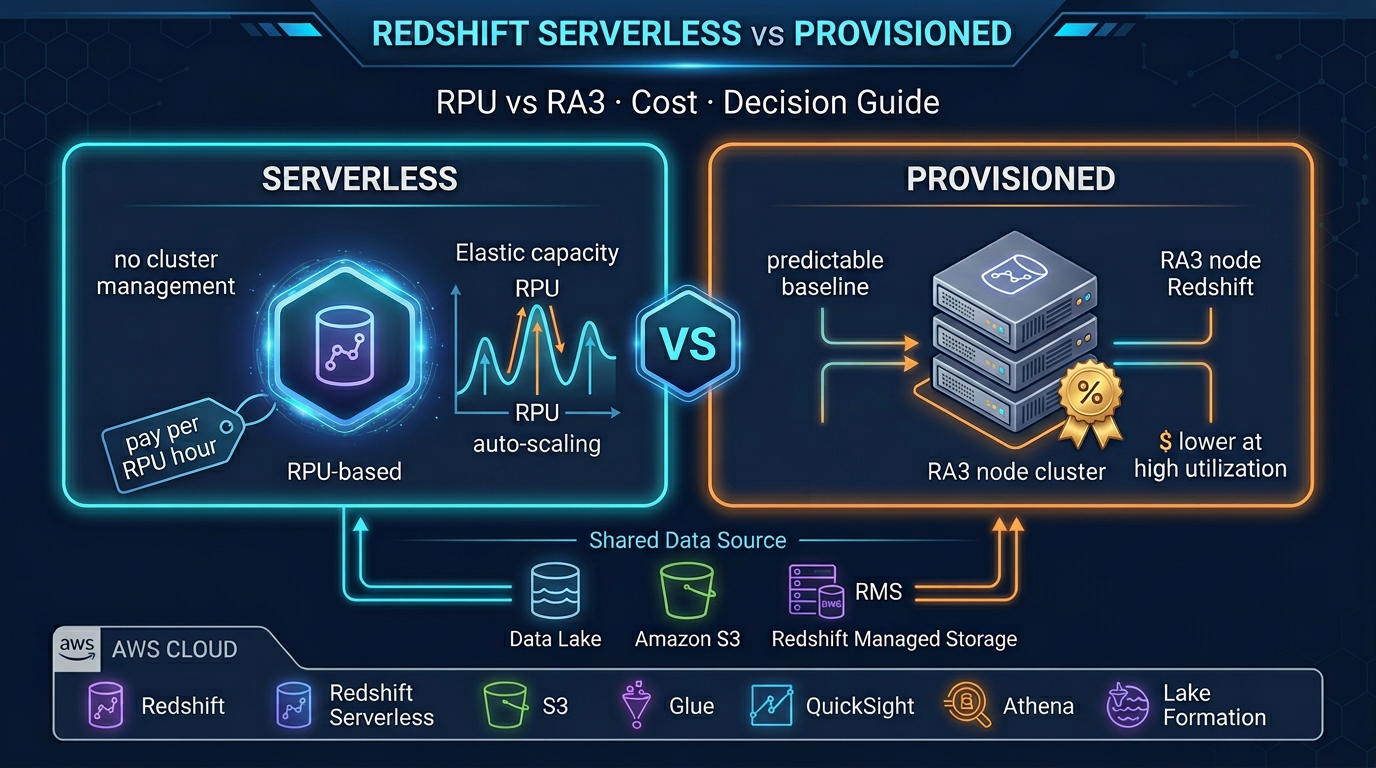
Table of Contents
Redshift still means two products. As of July 2026, Serverless bills RPU-seconds (60-second minimum) with base capacity 4–1024 RPUs, MaxRPU / Max RPU-hours caps, and optional AI-driven scaling. Provisioned RA3 + Reserved Instances still wins for steady 24/7 warehouses.
Engagement shape (anonymized): B2B SaaS analytics, ~50 TB RMS, BI heavy 09:00–19:00 UTC, near-idle nights — Serverless with 32 base / Max RPU-hours beat always-on ra3.4xlarge On-Demand; RI Provisioned would win if the warehouse went 24/7.
Reproduce this: Serverless vs Provisioned matrix
The Core Difference
Redshift Serverless: Compute is measured in RPUs (Redshift Processing Units). You set a base RPU capacity (always on, determines cold-start performance and baseline concurrency) and a max RPU cap (peak burst limit). AWS auto-scales between these values. You pay per RPU-second of compute time, plus separately for managed storage per GB-month.
Redshift Provisioned: Compute is measured in node instances. You choose a node type (ra3.xlplus, ra3.4xlarge, ra3.16xlarge) and a node count. You pay per node-hour, whether or not queries are running. Storage is managed separately via Redshift Managed Storage (backed by S3, decoupled from compute in RA3). Reserved Instances reduce the per-hour cost by roughly 34–62% for 1- or 3-year commitments.
The fundamental trade-off: Serverless pays only for active compute but at a higher per-unit cost. Provisioned pays for idle time but at a much lower per-unit cost with Reserved Instances.
Amazon Redshift Serverless Deep Dive
RPU Concept
An RPU represents a unit of compute capacity — CPU, memory, and temporary storage. AWS does not publish the exact CPU/memory per RPU, but empirically: 4–8 RPUs handle light concurrency and simple queries; 64 RPUs handles moderate BI workloads; 256–512 RPUs handles complex multi-user analytical workloads.
Base RPU: The number of RPUs always available, even with no active queries. Determines:
- Cold start latency after auto-pause (lower base RPU = more noticeable resume time)
- Maximum supported concurrency at baseline
- Minimum billing floor when the workgroup is active
Max RPU: The ceiling for burst scaling. When query complexity or concurrency demands more capacity, Serverless scales up to max RPU automatically. You are billed for RPUs actually consumed, not the max configured.
Configuring base and max RPU:
- Set base RPU = what your worst concurrent query load needs during normal hours
- Set max RPU = the absolute ceiling you are willing to pay for a burst (controls cost overrun risk)
- For a BI team of 20 analysts: 32 base RPU, 128 max RPU is a reasonable starting point
Billing Model
Redshift Serverless billing has two components, billed separately:
Compute: Per RPU-second. You only pay for seconds where queries are actively running. A workgroup with 64 base RPUs running 8 hours/day costs significantly less than running 24/7.
Managed storage: Per GB-month for data stored in Redshift Managed Storage. This applies regardless of whether queries are running. Storage cost is the same between Serverless and Provisioned RA3 nodes.
Auto-Pause
Serverless workgroups can be configured to auto-pause after a period of inactivity (minimum 5 minutes, up to 24 hours). During pause, no RPU-seconds accrue. Resume on next query — latency is typically a few seconds for light workloads.
For a BI team that works 9am–6pm on weekdays: auto-pause at 30 minutes idle, and you pay for roughly 45 hours of active compute per week instead of 168 hours. That is a 73% reduction in compute hours.
Namespace and Workgroup Architecture
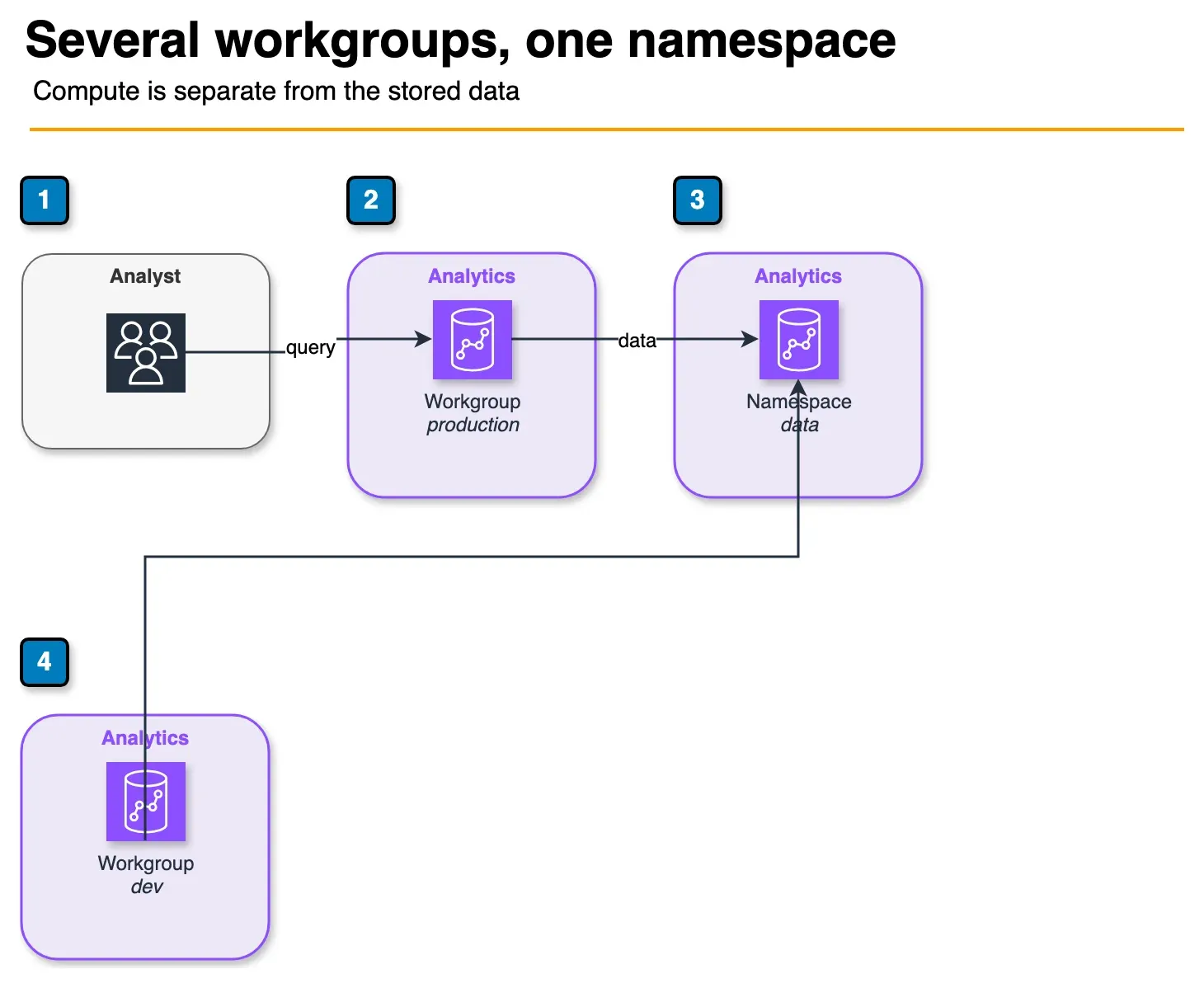
Figure: the Serverless split in the article. The namespace holds the data. Each workgroup is a compute attachment, so a production query and a smaller dev query can use the same data without a second copy. Open the draw.io source.
Serverless is organized around two constructs:
- Namespace: Holds the database objects, users, schemas, and data (the storage layer). One namespace can host multiple workgroups.
- Workgroup: The compute layer — RPU configuration, VPC settings, security groups, IAM roles. A workgroup connects to a namespace and executes queries against its data.
This separation lets you point multiple workgroups (different compute configs) at the same data — for example, a high-RPU workgroup for production BI users and a low-RPU workgroup for dev/test.
Supported Features in Serverless
Redshift Serverless supports:
- Redshift Spectrum (query S3 data via external tables)
- Materialized views (including auto-refresh)
- Stored procedures
- Redshift data sharing (share data across namespaces and accounts)
- Amazon Redshift Federated Query (query RDS, Aurora, and other sources)
- RA3 Managed Storage (same decoupled compute-storage as Provisioned RA3)
- AQUA (Advanced Query Accelerator) — where applicable
- Integration with AWS Glue, Amazon Data Firehose, dbt, Tableau, QuickSight
Weaker / different in Serverless (as of July 2026 — verify feature matrix):
- Classic manual WLM queue configuration — concurrency is largely automatic
- Concurrency scaling knobs (automatic on Serverless; Spectrum/concurrency included in Serverless pricing model)
- Some maintenance-window / node-level controls that only exist on Provisioned clusters
Redshift ML: CREATE MODEL is available on Serverless as well as Provisioned (models deploy as SQL UDFs). Confirm current docs for algorithm limits in your region — do not assume “Provisioned only.”
Amazon Redshift Provisioned Deep Dive
RA3 Node Types
AWS retired the older DC2 node family for new deployments. Current Provisioned Redshift uses RA3 nodes, which decouple compute from storage:
| Node Type | vCPU | RAM | Managed Storage | Use Case |
|---|---|---|---|---|
| ra3.xlplus | 4 | 32 GB | Up to 32 TB | Small to medium workloads |
| ra3.4xlarge | 12 | 96 GB | Up to 128 TB | Medium workloads, balanced cost |
| ra3.16xlarge | 48 | 384 GB | Up to 64 TB per node | Large, compute-intensive workloads |
All RA3 nodes use Redshift Managed Storage — data lives in S3, cached locally on high-speed NVMe SSD. You are not limited by local disk for storage capacity.
Minimum cluster size is 2 nodes (for HA with multi-node). Single-node clusters (ra3.xlplus only) are available for dev/test but lack the cross-node MPP architecture.
Workload Management (WLM)
Provisioned Redshift lets you configure WLM queues manually:
- Define multiple queues with dedicated memory allocation and concurrency slots
- Route queries to specific queues based on user group or query group labels
- Short Query Acceleration (SQA) automatically prioritizes fast queries
- Priority-based WLM (automatic mode) simplifies queue configuration
This fine-grained control is critical for multi-tenant workloads where you need to ensure high-priority queries are never blocked by long-running batch jobs. Serverless handles this automatically but without the same level of user control.
Concurrency Scaling
Provisioned clusters can enable concurrency scaling — when the main cluster is at peak concurrency, AWS automatically adds transient read capacity and routes overflow queries there. You pay per concurrency scaling cluster-second, with 1 hour free per day per cluster.
Reserved Instances
Reserved Instance pricing is only available for Provisioned. Options:
- 1-year, all upfront: ~34% discount vs On-Demand
- 3-year, all upfront: ~62% discount (maximum discount)
At 24/7 operation, Reserved Instances completely change the cost equation. A ra3.4xlarge cluster running 24/7 on On-Demand is approximately 2–3x more expensive than the 3-year Reserved Instance equivalent.
Maintenance Windows, Snapshots, Cross-Region
Provisioned gives you explicit control over:
- Maintenance windows (when version upgrades and patches apply)
- Automated snapshots (every 8 hours, or configurable frequency)
- Manual snapshots (point-in-time, retained indefinitely)
- Cross-region snapshot copy (for disaster recovery)
- Cross-account cluster sharing via data sharing
Serverless has its own snapshot capability, but with less granular control than Provisioned.
Cost Analysis: Real Scenarios
The following cost estimates use us-east-1 pricing as of July 2026. Verify current prices at aws.amazon.com/redshift/pricing — prices vary by region and change over time.
Scenario 1: BI Team, Business Hours Only, 50 TB Data
Workload: 20 analysts, queries running 8 hours/day × 22 work days/month. Data is 50 TB in managed storage.
Redshift Serverless (64 base RPU, 256 max RPU):
- Compute: 64 RPU ×
$0.375/RPU-hour × 8 hrs × 22 days ≈ **$4,224/month** (at full utilization) - Storage: 50 TB × $0.024/GB-month ≈ ~$1,229/month
- Total: ~$5,453/month
With auto-pause during nights and weekends (actual compute hours may be 40% of this): ~$2,100–3,000/month
Redshift Provisioned ra3.4xlarge (2 nodes, On-Demand):
- 2 nodes ×
$3.26/node-hour × 24 × 30 ≈ **$4,694/month** (runs 24/7) - Storage: 50 TB at $0.024/GB-month ≈ ~$1,229/month
- Total: ~$5,923/month
Redshift Provisioned ra3.4xlarge (2 nodes, 1-year Reserved):
- 2 nodes ×
$2.15/node-hour (approx 34% discount) × 24 × 30 ≈ **$3,098/month** - Storage: ~$1,229/month
- Total: ~$4,327/month
Winner for this scenario: Serverless with auto-pause or Provisioned with 1-year Reserved Instance are similar. Serverless wins if actual compute hours stay under 40% of the month; Reserved Provisioned wins for predictable workloads.
Scenario 2: 24/7 Data Warehouse, 200 TB Data, Sustained Analytics
Workload: Reporting pipeline runs continuously, queries 24/7, 200 TB data.
Redshift Serverless (256 base RPU, 512 max RPU):
- Compute: 256 RPU ×
$0.375/RPU-hour × 24 × 30 ≈ **$69,120/month** — prohibitively expensive for 24/7 operation at high RPU - Storage: 200 TB × $0.024/GB-month ≈ ~$4,915/month
Redshift Provisioned ra3.16xlarge (4 nodes, 3-year Reserved):
- 4 nodes × ~$4.96/node-hour (
62% 3-year All Upfront discount from $13.04 on-demand) × 24 × 30 ≈ **$14,271/month** (estimate based on public Reserved Instance pricing — verify current rates) - Storage: ~$4,915/month
- Total: ~$19,186/month
Winner for this scenario: Provisioned with 3-year Reserved Instances — by a large margin. For 24/7 sustained workloads with predictable capacity, Serverless pricing at high RPU is not competitive.
The break-even insight: Serverless pays for itself when utilization is below approximately 60–70% of the equivalent Reserved Instance cost. If your cluster idles for nights, weekends, and holidays — and you do not want to manage stop/start scripts — Serverless wins. If it runs constantly, Reserved Provisioned wins.
When to Choose Serverless
1. Variable or intermittent workloads Dev and test environments, periodic ETL jobs, monthly financial reports, quarterly analytics dashboards — any workload with significant idle time benefits from the auto-pause billing model.
2. New Redshift deployments without usage history If you have no existing workload data to size a cluster against, Serverless removes the risk of over-provisioning. Start with Serverless, watch the RPU utilization graphs, and migrate to Provisioned once patterns are clear.
3. Teams without dedicated database administration expertise Serverless eliminates cluster tuning, WLM queue configuration, and concurrency scaling setup. Analysts and data engineers can focus on queries, not infrastructure.
4. Bursty analytics: monthly reports, quarterly business reviews One-time high-demand events (board reporting, annual audit queries, seasonal analysis) benefit from Serverless auto-scaling to max RPU without you having to resize a provisioned cluster in advance.
5. SaaS analytics with variable tenant load Multi-tenant SaaS analytics, where some tenants are active and others are not, benefits from Serverless auto-scaling. Combine with Redshift data sharing to isolate tenant schemas while sharing the compute layer.
When to Choose Provisioned
1. Steady 24/7 analytical workloads If queries run continuously around the clock, Reserved Instance pricing makes Provisioned dramatically cheaper. There is no idle time for Serverless auto-pause to save money.
2. WLM control requirements Multi-tenant isolation with guaranteed query SLAs, short query acceleration tuning, and priority queue separation require Provisioned WLM configuration that Serverless does not expose.
3. Maximum query performance at scale Large provisioned clusters with multiple ra3.16xlarge nodes and manually tuned WLM, AQUA, and distribution keys can outperform equivalent Serverless configurations for complex multi-table analytical queries. Performance tuning knobs are more accessible in Provisioned.
4. Predictable cost at scale For finance teams that need a fixed monthly Redshift bill, 3-year Reserved Instances on Provisioned provide complete cost predictability. Serverless has variable billing that requires careful max RPU caps to avoid surprises.
Migration Path: Provisioned to Serverless
If you have an existing provisioned cluster and want to evaluate Serverless, the migration is straightforward:
Step 1: Take a manual snapshot In the Redshift console, navigate to your cluster and create a manual snapshot. This is your safety net.
Step 2: Create a Serverless namespace and workgroup Set up VPC configuration, security groups, and IAM roles. Configure base RPU conservatively (start with 32 or 64) and set a max RPU cap.
Step 3: Restore the snapshot to the Serverless namespace Use the “Restore from snapshot” option targeting your Serverless namespace. Redshift migrates the data — this takes time proportional to cluster size.
Step 4: Update connection strings Serverless uses a different endpoint format: <workgroup-name>.<account-id>.<region>.redshift-serverless.amazonaws.com. Update your BI tools, ETL scripts, and application connection strings.
Step 5: Run a parallel testing period Run both environments for 1–2 weeks. Compare query performance, concurrency behavior, and cost. Shut down the Provisioned cluster only after validating Serverless meets your SLAs.
Step 6: Monitor RPU consumption Watch the ComputeSeconds metric in CloudWatch. If RPU usage is consistently near your base RPU, consider lowering it. If queries frequently queue at the max RPU, either increase max RPU or evaluate a Provisioned cluster.
Redshift Spectrum: Works With Both
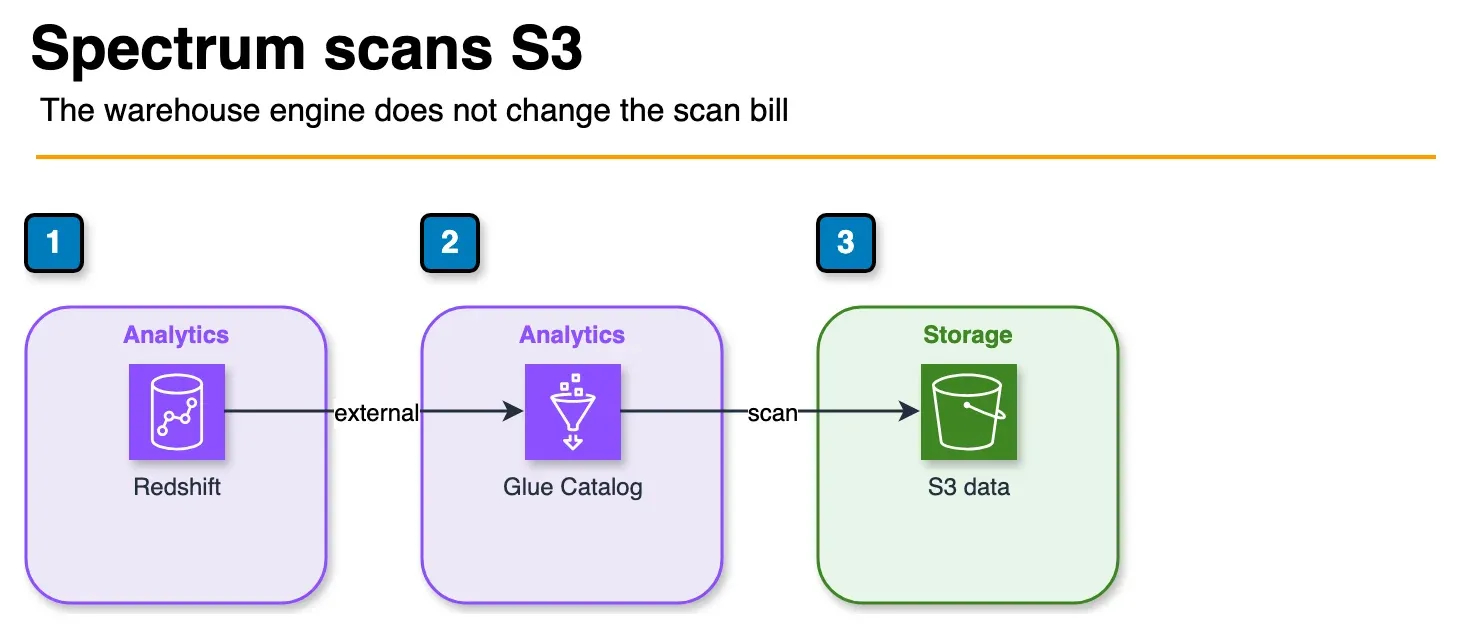
Figure: Spectrum works the same on Serverless and Provisioned. Glue Catalog holds the external table. Spectrum scans the S3 objects, and that scan is billed separately from the warehouse compute. Open the draw.io source.
Redshift Spectrum — the capability to query data stored in S3 directly from Redshift using external tables — works identically in both Serverless and Provisioned. You define external schemas pointing to S3 paths (with Glue Data Catalog as the metadata layer), and Redshift pushes the S3 scan out to Spectrum nodes that scale independently.
Spectrum billing is separate: you pay per TB of S3 data scanned, regardless of whether your Redshift is Serverless or Provisioned. Use columnar formats (Parquet, ORC) and partition pruning to minimize Spectrum scan costs.
Decision Framework
Work through these questions:
Does your workload run 24/7 with few idle periods? → Yes: Use Provisioned with Reserved Instances (3-year if committed, 1-year otherwise). → No: Continue.
Do you have existing workload data to size a cluster? → No: Use Serverless — remove sizing risk, observe usage, migrate later if needed. → Yes: Estimate provisioned cost vs Serverless compute hours; pick the cheaper option.
Do you need fine-grained classic WLM queue configuration (multi-tenant SLA isolation)? → Yes: Use Provisioned. → No: Continue.
Is your team comfortable managing cluster configuration and WLM? → No: Use Serverless — the operational simplicity is worth the cost premium at low utilization. → Yes: Run the cost comparison for your specific throughput and make the call.
When this advice fails
- You already bought 3-year RIs on Provisioned — do not flip to Serverless without modeling sunk commitment.
- Sub-second interactive APIs — wrong product; use OLTP or a cache.
- Tiny SQL on S3 only — Athena may be cheaper than any Redshift mode.
What this post doesn’t cover
Per-region RPU dollar rates — pull live numbers from the Redshift pricing page before finance sign-off.
What to do Monday morning
- Plot query hours/day for 30 days; if idle >> active, model Serverless.
- Set Max RPU-hours + MaxRPU before opening Serverless to analysts.
- If 24/7 high utilization, price RA3 + 1y/3y RI vs Serverless at your base RPU.
- Dual-run snapshot restore for 1–2 weeks before cutover.
- Walk the decision matrix.
- Related: Athena scan costs · dbt vs Glue.
Frequently asked questions
What is an RPU in Amazon Redshift Serverless?
Is Redshift Serverless cheaper than Provisioned?
Can I migrate from Redshift Provisioned to Serverless?
Does Redshift Serverless support all Provisioned features?
What is the maximum RPU for Redshift Serverless?
How does Redshift Serverless handle concurrent queries?
Which Redshift option is better for a SaaS company with variable load?

AWS Cloud Architect & AI Expert
AWS-certified cloud architect and AI expert with deep expertise in cloud migrations, cost optimization, and generative AI on AWS.