AWS IoT Core for Industrial MQTT: Architecture and Scaling Patterns
Quick summary: AWS IoT Core is the managed MQTT broker at the heart of most AWS Industrial IoT architectures. Here is how to design high-throughput, reliable, and secure MQTT connectivity for factory workloads — from device registration to message routing and cost optimization.
Key Takeaways
- AWS IoT Core is the managed MQTT broker at the heart of most AWS Industrial IoT architectures
- AWS lifecycle notice (June 30, 2026) — AWS IoT Device Defender Detect is in maintenance for new customers after August 31, 2026
- Every industrial IoT architecture on AWS routes data through the same central service: AWS IoT Core
- How do you route sensor telemetry to SiteWise, real-time alerts to your on-call team via SNS, and raw data to S3 for archival — all from the same stream of incoming messages
- IoT Core handles all of this at scale, without infrastructure management on your part
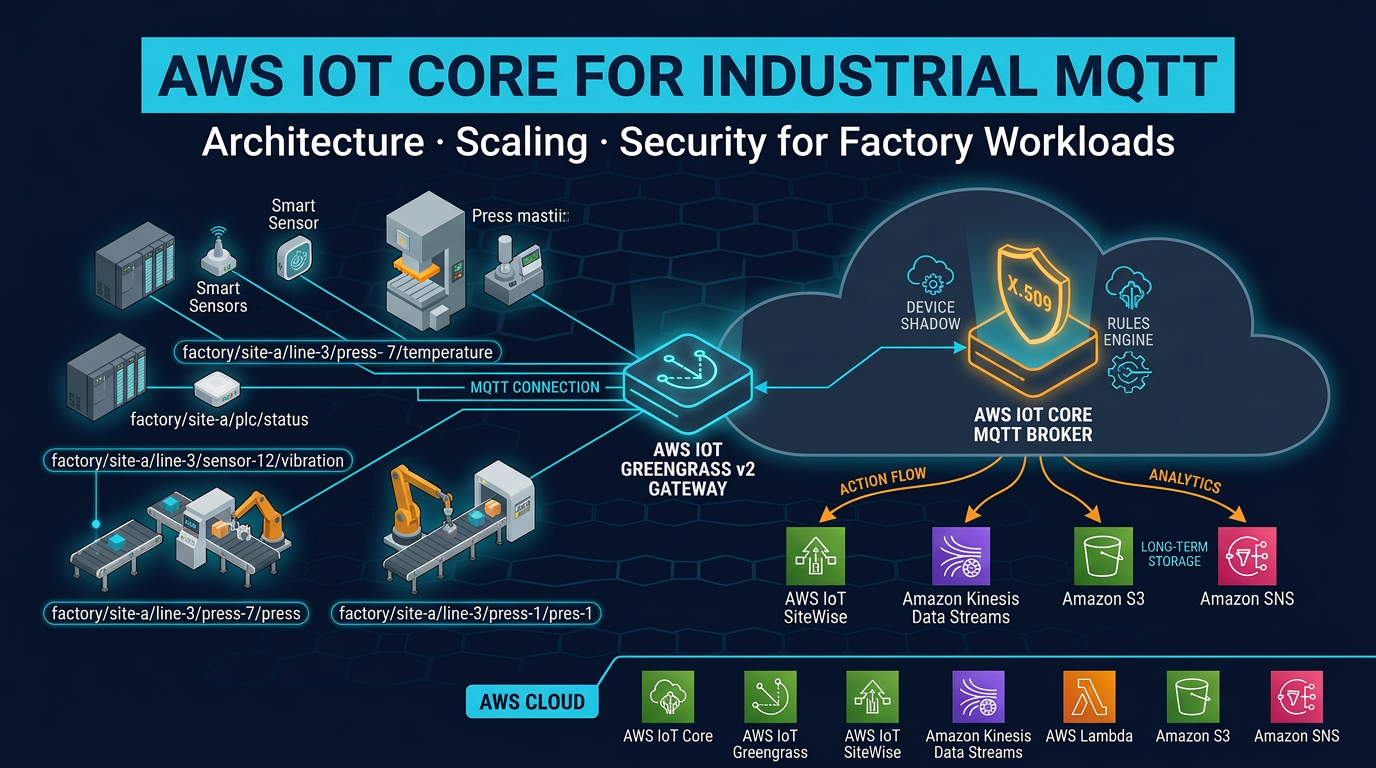
Table of Contents
AWS lifecycle notice (June 30, 2026) — AWS IoT Device Defender Detect is in maintenance for new customers after August 31, 2026. Device Defender Audit remains available for existing customers. Full matrix: lifecycle roundup.
Every industrial IoT architecture on AWS routes data through the same central service: AWS IoT Core. Whether your factory has 50 smart sensors or 50,000, whether your gateways are running AWS IoT Greengrass v2 on industrial PCs or sending data directly from embedded devices — the cloud-side endpoint is IoT Core.
This is not accidental. IoT Core solves a genuinely hard problem: how do you securely authenticate, manage, and route messages from millions of heterogeneous devices without running a broker fleet? How do you handle devices that disconnect and reconnect constantly without losing messages? How do you route sensor telemetry to SiteWise, real-time alerts to your on-call team via SNS, and raw data to S3 for archival — all from the same stream of incoming messages?
IoT Core handles all of this at scale, without infrastructure management on your part. But “just connect your devices to IoT Core” is not an architecture — it is a starting point. The decisions you make about topic structure, authentication patterns, rules routing, and device shadow design determine whether your IoT Core deployment performs cleanly at scale or becomes a tangle of ad-hoc topics, runaway costs, and security gaps.
This post covers the architectural decisions that matter for industrial MQTT workloads on AWS IoT Core.
What IoT Core Replaces
Before IoT Core existed — and in some organizations where IoT Core was not yet in scope — manufacturers ran their own MQTT broker infrastructure. Mosquitto on EC2 was a common choice: an open-source broker that is simple to configure for small deployments. HiveMQ clusters were common for enterprise scale.
Self-managed brokers work. They also require:
- High availability: broker cluster across multiple availability zones, with leader election and failover
- Scaling: adding broker nodes when device count grows, load balancing across the cluster
- Certificate management: CA infrastructure for device certificate issuance and revocation
- Authentication enforcement: writing or configuring authorization logic for topic-level access control
- Monitoring: broker health metrics, connection counts, message rates, dead letter queues
- Patching: OS and broker software updates with downtime planning
IoT Core eliminates all of this. There are no EC2 instances to manage, no broker cluster to size, no CA infrastructure to operate. AWS manages the infrastructure. You configure devices, topics, rules, and policies — and the broker scales transparently.
For a manufacturing organization whose core competency is making things, not running MQTT broker clusters, this trade is almost always the right one.
IoT Core Architecture: Key Components
The MQTT Endpoint
Each AWS account has a unique IoT Core MQTT endpoint in each region: {account-prefix}.iot.{region}.amazonaws.com. Devices connect to this endpoint over MQTT (port 8883, TLS required) or MQTT over WebSockets (port 443).
In industrial deployments, all connections go through port 8883 (MQTT over TLS). Port 443 (WebSocket) is used for browser-based applications or environments where port 8883 is blocked by corporate firewalls — unusual in factory network architectures.
The endpoint is not a single server — it is a managed service that routes connections to the appropriate IoT Core infrastructure automatically. From your device’s perspective, it is a single hostname. From AWS’s perspective, it is a globally distributed, auto-scaling broker layer.
Device Authentication: X.509 Certificates
IoT Core’s default and recommended authentication mechanism is mutual TLS (mTLS) with X.509 certificates. Both sides authenticate: your device presents its certificate, and IoT Core verifies it against the known CA. IoT Core presents the AWS server certificate, and your device verifies it against the expected root CA.
Each device has a unique certificate. This is not a suggestion — it is the design. Shared certificates across multiple devices mean that revoking a compromised device’s access requires revoking all devices sharing that certificate. In a factory with 500 gateways, this is operationally catastrophic.
Certificates are attached to IoT policies — JSON documents that define what MQTT operations the certificate can perform:
{
  "Version": "2012-10-17",
  "Statement": [
    {
      "Effect": "Allow",
      "Action": ["iot:Connect"],
      "Resource": "arn:aws:iot:us-east-1:123456789:client/press-7-chicago-b-l3"
    },
    {
      "Effect": "Allow",
      "Action": ["iot:Publish"],
      "Resource": "arn:aws:iot:us-east-1:123456789:topic/factory/chicago/building-b/line-3/press-7/*"
    },
    {
      "Effect": "Allow",
      "Action": ["iot:Subscribe", "iot:Receive"],
      "Resource": "arn:aws:iot:us-east-1:123456789:topicfilter/factory/chicago/building-b/line-3/press-7/command"
    }
  ]
}
Note what this policy does not allow: publishing to any other device’s topic namespace, subscribing to other devices’ data streams, or connecting with a client ID other than the device’s registered ID. This is least-privilege at the MQTT layer.
IoT Policy Variables: Scaling Policies Across a Fleet
Managing thousands of individual IoT policies is impractical. IoT Core supports policy variables that substitute device-specific values at evaluation time:
"Resource": "arn:aws:iot:us-east-1:123456789:topic/factory/${iot:Connection.Thing.ThingName}/*"The variable ${iot:Connection.Thing.ThingName} is substituted with the connecting device’s registered thing name at runtime. One policy document covers all devices in the fleet — each device can only publish to its own topic namespace.
This pattern is essential for manufacturing deployments where you may have hundreds of gateways that should have identical permissions, scoped to their own device identity.
Fleet Provisioning: Scaling Device Registration
The Manual Provisioning Problem
The traditional approach to IoT device registration: generate a certificate, download it, copy it to the device, register the device in IoT Core, attach a policy. Repeat for every device.
For 10 devices in a pilot, this is manageable. For 1,000 factory gateways across multiple facilities, it requires weeks of manual work and is prone to errors (wrong certificate on the wrong device, policies attached incorrectly, devices registered under incorrect thing types).
Fleet Provisioning Flow
Fleet provisioning solves this with a bootstrap-then-register pattern:
Preparation (done once):
- Create a bootstrap certificate with a single IoT policy that allows only the provisioning actions: connect with a specific bootstrap client ID prefix, call the fleet provisioning API.
- Create a provisioning template that defines what resources to create when a device provisions: a unique X.509 certificate, a thing record (with attributes like factory location, equipment type), and an IoT policy from your standard policy template.
- Embed the bootstrap certificate in your gateway OS image or install it during manufacturing provisioning.
First boot flow (per device):
- Gateway powers on, connects to IoT Core using the bootstrap certificate.
- Gateway calls the
CreateKeysAndCertificateAPI — IoT Core generates a new unique X.509 key pair, signed by the AWS IoT CA. The private key is returned once and only once; the gateway stores it in its secure storage. - Gateway calls
RegisterThingwith its provisioning template name and device-specific parameters (serial number, facility ID, equipment type). - Provisioning template creates: the thing record, a production IoT policy scoped to this device’s topic namespace, and associates the certificate with the thing and policy.
- Gateway disconnects and reconnects with the new production certificate.
- Bootstrap certificate can now be revoked — it has no further use.
From the factory floor technician’s perspective: power on the gateway, wait 60 seconds for provisioning to complete, confirm the green light. No certificate management required.
Provisioning Hooks with Lambda
Between step 3 and 4, IoT Core can invoke a Lambda function (the “pre-provisioning hook”) to validate the device before registration. Your Lambda receives the device parameters and can verify against your asset database: “Is serial number SN-2847 in our authorized device list? Is it assigned to Chicago facility?” If validation fails, Lambda returns allowProvisioning: false and the provisioning is rejected. This prevents unauthorized devices from self-registering into your fleet.
MQTT Topic Design for Industrial Workloads
Topic design is the architectural decision that most affects long-term maintainability and cost of an industrial MQTT deployment. Get it right at the start — refactoring topics after hundreds of IoT Core rules and downstream consumers are built around the existing structure is painful.
Recommended Structure
factory/{site}/{building}/{line}/{asset-id}/{measurement}Example topics from a Chicago facility:
factory/chicago/building-a/line-3/press-7/temperature
factory/chicago/building-a/line-3/press-7/pressure
factory/chicago/building-a/line-3/press-7/vibration-rms
factory/chicago/building-a/line-3/press-7/oee
factory/chicago/building-a/line-3/press-7/anomaly-score
factory/chicago/building-a/line-3/press-7/command
factory/chicago/building-a/line-3/press-7/status
This structure enables precise wildcard subscriptions in rules:
| Rule subscription | What it matches |
|---|---|
factory/+/+/+/+/temperature | All temperature readings across all facilities |
factory/chicago/# | Everything from the Chicago facility |
factory/chicago/building-a/line-3/press-7/# | All data from Press #7 |
factory/+/+/+/+/anomaly-score | All anomaly scores across the fleet |
Topic Design Rules
Use the asset hierarchy, not the sensor hierarchy. The topic should describe where the measurement comes from (the asset), not the sensor model or sensor type. press-7/temperature is better than sensor-type-TH42/press-7/temp — the first is stable over the equipment lifecycle; the second breaks if you replace the sensor model.
Keep measurements as the leaf node. The last element of the topic is the measurement name. This allows wildcard rules to collect all measurements from a device (press-7/#) or all measurements of a specific type across the fleet (+/+/+/+/temperature).
Separate telemetry and command topics. Use distinct topic branches for data flowing up (telemetry) and commands flowing down (control). press-7/temperature is telemetry. press-7/command is for set points and control commands. Mixing them creates authorization complexity — your telemetry consumers should not be able to accidentally subscribe to command topics.
Do not put PII in topics. MQTT topics appear in IoT Core logs, CloudTrail, and any downstream system that receives the raw message. If your factory produces medical devices with patient-associated production data, ensure that data is in the payload (encrypted if needed) — not in the topic string.
Batch multi-measurement payloads under a single topic. A Greengrass gateway reporting 10 measurements from Press #7 can publish one MQTT message with a JSON payload containing all 10 measurements, rather than 10 separate messages on 10 topics. This reduces message count (and cost) by 10x while keeping the data together. Use a batched payload topic: factory/chicago/building-a/line-3/press-7/telemetry.
Payload Design
For batched telemetry payloads, use a consistent structure that includes timestamps (ISO 8601 or Unix milliseconds), measurement names, values, units, and quality codes:
{
  "timestamp": "2026-05-04T14:23:41.000Z",
  "deviceId": "press-7-chicago-a-l3",
  "measurements": [
    { "name": "temperature", "value": 72.4, "unit": "celsius", "quality": "good" },
    { "name": "pressure", "value": 45.2, "unit": "bar", "quality": "good" },
    { "name": "vibration_rms", "value": 3.1, "unit": "mm/s", "quality": "good" },
    { "name": "anomaly_score", "value": 0.23, "unit": "dimensionless", "quality": "good" }
  ]
}
The quality code field (good/bad/uncertain) follows OPC-UA quality conventions and is important for downstream analytics — a value of 0 with quality “bad” should not be treated as a real zero reading.
Keep payloads under 5 KB. IoT Core meters messages in 5 KB increments — a 6 KB payload costs the same as two 5 KB messages. Structure your batched payloads to include as many measurements as possible while staying under 5 KB.
The IoT Core Rules Engine: Industrial Routing Patterns
The rules engine is the fan-out layer for IoT Core messages. Every message that arrives on a subscribed topic is evaluated against all matching rules in real time. Multiple rules can match the same topic, and all matching rules fire simultaneously (in parallel).
Rules are SQL-like queries with action destinations:
SELECT deviceId, measurements, timestamp
FROM 'factory/+/+/+/+/telemetry'
WHERE get(measurements, 0).quality = 'good'
Pattern 1: High-Throughput Telemetry to Kinesis Data Streams
For high-message-volume environments, route all telemetry to Amazon Kinesis Data Streams first, then use Kinesis consumers (Lambda, Amazon Managed Service for Apache Flink) for downstream processing.
Rule action: Kinesis Data Streams
- Partition key:
${deviceId}(ensures all messages from the same device go to the same shard, preserving order) - Stream: your telemetry Kinesis stream
Why Kinesis first rather than processing directly in rules? Rules engine actions are executed at-most-once with limited retry. Kinesis Data Streams provides durability (24-hour to 7-day retention), multiple consumer support, and the ability to replay messages if a downstream consumer has an outage. For critical telemetry, Kinesis is the correct buffer.
Pattern 2: Direct to SiteWise for Asset Property Storage
IoT Core has a native SiteWise action that calls BatchPutAssetPropertyValues for each matching message. This routes telemetry directly to SiteWise asset properties without a Lambda intermediary.
The SiteWise action requires a mapping: how does a field in the MQTT message map to a SiteWise asset ID and property alias? Configure this mapping in the rule definition:
{
  "action": {
    "iotSiteWise": {
      "putAssetPropertyValueEntries": [
        {
          "propertyAlias": "/factory/chicago/building-a/line-3/press-7/temperature",
          "propertyValues": [
            {
              "value": { "doubleValue": "${get(measurements, 0).value}" },
              "timestamp": { "timeInSeconds": "${floor(timestamp / 1000)}" },
              "quality": "GOOD"
            }
          ]
        }
      ]
    }
  }
}
SiteWise property aliases let you use the MQTT topic path as the property identifier, making the mapping intuitive and maintainable.
Pattern 3: Threshold Alerting to SNS
Simple threshold alerts that do not require ML or stream processing can be handled directly in the rules engine SQL WHERE clause:
SELECT deviceId, timestamp,
       get(measurements, 0).value as temperature
FROM 'factory/+/+/+/+/telemetry'
WHERE get(measurements, 0).name = 'temperature'
  AND get(measurements, 0).value > 85.0
  AND get(measurements, 0).quality = 'good'
Rule action: SNS → maintenance team topic → email/SMS delivery.
This pattern is appropriate for simple threshold alarms on a single measurement. For complex alarms that consider multiple measurements together (e.g., temperature AND vibration elevated simultaneously), or for anomaly detection that requires historical context, use Kinesis → Managed Apache Flink or SageMaker for the alert logic.
Pattern 4: Raw Data Archival to S3
Every IoT deployment should archive raw telemetry for post-incident analysis and model training. The most cost-effective path: IoT Core rules → Amazon Data Firehose → S3.
Firehose handles batching (reduces S3 PUT request costs), compression (Snappy or GZIP), and format conversion (JSON → Parquet via Glue schema registry). Configure Firehose with a dynamic partition prefix: factory/{site}/year={year}/month={month}/day={day}/ using Firehose dynamic partitioning. This creates a partitioned S3 layout that Athena queries efficiently.
All four patterns can run simultaneously from the same stream of incoming MQTT messages. A single telemetry message from Press #7 can simultaneously: feed into Kinesis for real-time processing, write to SiteWise for asset property storage, trigger an SNS alert if temperature is elevated, and archive to S3 via Firehose. The rules engine evaluates all rules in parallel.
Device Shadow Patterns for Industrial Control
Equipment State Shadow
The device shadow is IoT Core’s mechanism for asynchronous device state management. For industrial equipment with a Greengrass gateway, the shadow pattern enables control commands that work reliably even when the gateway has intermittent connectivity.
A hydraulic press shadow might look like:
Desired state (set by the MES or operations application):
{
  "state": {
    "desired": {
      "mode": "maintenance",
      "temperature_setpoint": 70
    }
  }
}
Reported state (published by the Greengrass gateway):
{
  "state": {
    "reported": {
      "mode": "running",
      "temperature": 72.4,
      "pressure": 45.2,
      "status": "normal"
    }
  }
}
The delta (difference between desired and reported) is published to the gateway on its shadow delta topic. The gateway’s Greengrass component subscribes to the delta topic and applies the commanded changes to the PLC: write mode=maintenance to the PLC register via OPC-UA, then update the reported state once confirmed.
This pattern decouples the MES from the gateway’s connectivity status. The MES writes a desired state to the shadow and moves on. The gateway applies the change when it is connected. The MES reads the reported state to confirm the change took effect — without needing a synchronous request-response to the gateway.
Named Shadows for Multi-Application Environments
A single piece of equipment may need to maintain state for multiple independent applications:
- Telemetry shadow: current sensor readings for the analytics platform
- Control shadow: set points and operating mode for the MES
- Maintenance shadow: work order status and maintenance schedule for the CMMS
- Quality shadow: production lot data for the quality management system
Each application uses a named shadow. The analytics platform reads from telemetry. The MES writes desired states to control. The CMMS updates maintenance. Each application’s shadow state is independent — the MES cannot accidentally overwrite CMMS data by writing to the wrong shadow.
Named shadows also enable per-application conflict resolution. If two applications simultaneously write different desired temperatures to the same unnamed shadow, the last writer wins. With named shadows, each application owns its own desired state namespace, and the gateway resolves them according to defined priority rules in its component logic.
Cost Optimization for Industrial Workloads
IoT Core pricing is usage-based, which means cost scales directly with message volume and connection duration. For factories with hundreds of sensors and continuous operation, undisciplined data patterns translate directly to budget overruns.
Aggregation at the Edge: The Highest-Impact Optimization
A Greengrass gateway aggregating 100ms samples into 1-second averages before publishing reduces message count by 100x. For a factory with 500 sensors sampling at 100ms:
- Without aggregation: 500 sensors × 10 messages/second × 86,400 seconds/day = 432 million messages/day
- With 1-second aggregation: 500 sensors × 1 message/second × 86,400 seconds/day = 43.2 million messages/day
- Monthly message count: 1.3 billion → 130 million messages
- IoT Core message cost ($1/million): ~$1,300/month → ~$130/month
The 10x reduction from 1-second aggregation alone saves over $1,000/month for this factory. Applying delta encoding (only publish when value changes > 0.5%) on stable measurements like temperatures on steady-state equipment can push the reduction further.
Payload Batching: Reduce Message Count Per Device
Instead of 10 separate MQTT messages for 10 measurements from one device, publish one message with all 10 measurements in a single JSON payload (under 5 KB). One message to IoT Core, one rules engine evaluation, one Kinesis Data Streams record.
For a gateway with 20 sensor measurements sampled at 1 second: 20 messages/second without batching, 1 message/second with batching. At $1/million messages, batching 20 sensors saves $1.6M in annual costs for a fleet of 1,000 gateways (20x reduction × 1,000 gateways × 86,400 seconds × 365 days × $0.000001).
The math is compelling. Implement batched telemetry payloads in your Greengrass components.
QoS Selection: Match Delivery Guarantee to Message Importance
MQTT QoS (Quality of Service) levels define message delivery guarantees:
QoS 0 (at-most-once): Fire and forget. The publisher sends the message once. No acknowledgment. If the connection drops mid-send, the message is lost. IoT Core does not retry QoS 0 messages.
QoS 1 (at-least-once): IoT Core acknowledges receipt. If acknowledgment is not received, the client retries. Messages may be delivered more than once if the network drops after delivery but before acknowledgment. IoT Core stores QoS 1 messages for persistent session subscribers.
For industrial workloads:
- Use QoS 0 for high-frequency telemetry (1-second sensor readings, OEE metrics). A missed reading is acceptable — the next reading arrives in 1 second. QoS 0 is faster and cheaper.
- Use QoS 1 for alarm messages, control commands, and shadow state updates where guaranteed delivery matters. A missed alarm notification or a lost control command has operational consequences.
QoS 1 messages for persistent sessions are stored by IoT Core and delivered when the device reconnects — important for edge gateways that may have intermittent connectivity.
Connection Minute Optimization
IoT Core charges per device per minute of connection. For gateways that connect continuously (typical for factory floor devices), this is a fixed cost you cannot avoid. But for edge devices that only publish data periodically (monthly production reports, daily calibration data), a connect-send-disconnect pattern reduces connection minutes significantly.
The tradeoff: disconnect between sends means the device misses inbound messages (commands, shadow updates) while offline. For devices that need bidirectional communication, persistent connections are the correct choice. For send-only devices with periodic data, intermittent connections save connection costs.
Security Best Practices for Industrial MQTT
Per-device certificates with scoped policies. This is the foundational security requirement. Every device gets a unique certificate. Every certificate has a policy that allows only the topics that device should access. Use IoT policy variables (${iot:Connection.Thing.ThingName}) to enforce per-device topic namespaces in a single reusable policy document.
Disable unused protocol endpoints. IoT Core supports MQTT, MQTT over WebSockets, HTTP, and LoRaWAN. If your factory only uses MQTT over TLS (port 8883), configure your IoT Core endpoint to reject WebSocket and HTTP connections. Reducing the attack surface means fewer protocol-specific vulnerabilities to worry about.
AWS IoT Device Defender for continuous audit. Run Device Defender audits weekly to catch: certificates expiring soon, devices using overly permissive wildcard policies, devices that have not connected in an unexpected period. Configure Device Defender Detect for behavioral anomalies: unusual publish rates, connections from unexpected IP addresses, connections to non-AWS endpoints.
CloudTrail for control plane audit. All IoT Core API calls (creating thing records, modifying policies, revoking certificates) are logged in CloudTrail. Configure CloudWatch alarms on suspicious control plane activity: bulk certificate revocations, policy modifications outside of your deployment windows.
Rotate certificates before expiry. IoT Core certificates have configurable expiration dates. Configure Device Defender to alert when certificates have fewer than 30 days remaining, and use IoT Jobs or automated rotation workflows to replace expiring certificates. A production factory with an expired gateway certificate that cannot connect to IoT Core is an entirely avoidable outage.
Scaling to Production: Quotas and Account Structure
IoT Core has default per-account quotas that apply before production scale. Before deploying your first production factory, review the current limits in your AWS account:
- Concurrent MQTT connections per account per region: default is in the millions, but verify against your planned fleet size
- Messages per second per account: at high factory sensor rates, this may need a quota increase
- IoT Core rules per account: if you have many rules (multiple factories, many measurement types), verify this limit
- Device shadow document size: maximum 8 KB per shadow document; design shadow payloads accordingly
Request quota increases via the AWS Service Quotas console before reaching the limit — increases are typically granted within 24-48 hours for standard requests.
For large manufacturers with multiple independent facilities or business units, consider separate AWS accounts per facility region. Account isolation provides billing clarity (each facility’s IoT costs are visible separately), quota isolation (one facility’s burst traffic does not affect another’s limits), and access control simplicity (each facility’s operations team has IAM access to their account only).
AWS IoT Core is the foundation that every other IoT service — SiteWise, Greengrass, TwinMaker, Device Management — builds on. The investment in getting the topic design, authentication model, and rules routing right pays compound dividends across the entire IoT service stack that depends on it.
AWS Cloud Architect & AI Expert
AWS-certified cloud architect and AI expert with deep expertise in cloud migrations, cost optimization, and generative AI on AWS.