OPC-UA on AWS: SiteWise Edge Gateway Setup and Best Practices
Quick summary: OPC-UA → SiteWise Edge on Greengrass v2. July 2026 refresh — MQTT V3 gateways, correct collector component name, DPP closed to new customers, production hardening checklist.
Key Takeaways
- OPC-UA → SiteWise Edge on Greengrass v2
- July 2026 refresh — MQTT V3 gateways, correct collector component name, DPP closed to new customers, production hardening checklist
- OPC-UA (IEC 62541) is still the bridge SiteWise Edge uses
- Dashboards: Amazon Managed Grafana
- Engagement shape (anonymized): automotive tier-2 plant, ~25 OPC-UA servers, single industrial PC gateway, ~8k tags after filter (from ~40k browsed)
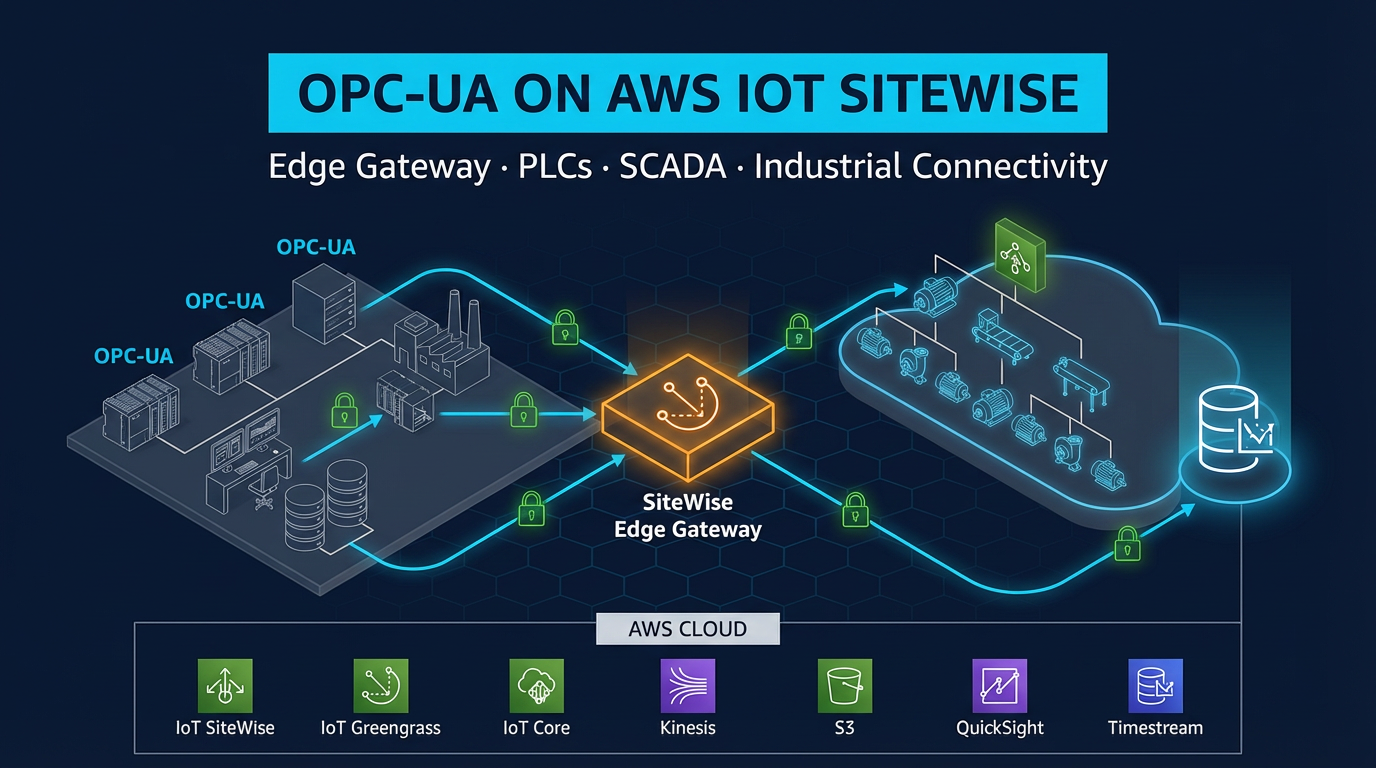
Table of Contents
Every factory has the same connectivity problem: process data locked in PLCs/SCADA on the OT VLAN, while analytics and predictive maintenance live in the cloud.
OPC-UA (IEC 62541) is still the bridge SiteWise Edge uses. As of July 2026, get three facts right before you copy an old blog: the collector is aws.iot.SiteWiseEdgeCollectorOpcua, new self-hosted gateways should prefer MQTT-enabled V3, and the Data Processing Pack is closed to new customers (maintenance since 2025-11-07) — so plan transforms/metrics in cloud SiteWise (or Flink), not new DPP. Dashboards: Amazon Managed Grafana.
Engagement shape (anonymized): automotive tier-2 plant, ~25 OPC-UA servers, single industrial PC gateway, ~8k tags after filter (from ~40k browsed).
Reproduce this: SiteWise Edge gateway checklist · TwinMaker path diagram
OPC-UA: Why It Replaced Everything Else
Industrial communication has a long history of proprietary, siloed protocols. Modbus (1979), PROFIBUS (1989), DeviceNet (1994) — each works well within its vendor ecosystem but requires custom adapters to integrate with anything outside it. OPC-DA (the predecessor to OPC-UA) improved interoperability within Windows environments but relied on Microsoft’s DCOM technology, which is notoriously fragile across networks and cannot traverse firewalls.
OPC-UA addressed all of these limitations:
Vendor-neutral. OPC-UA is governed by the OPC Foundation, not a single vendor. Siemens, Rockwell, Schneider, Beckhoff, Emerson, ABB — all major PLC manufacturers embed OPC-UA servers in their modern controllers. The data model is defined by the OPC Foundation’s specification; any OPC-UA client can read from any OPC-UA server regardless of underlying hardware.
Platform-independent. OPC-DA required Windows. OPC-UA runs on Linux, Windows, embedded RTOS, and any platform with a TCP/IP stack. The Siemens S7-1500 PLC, Allen-Bradley CompactLogix, Beckhoff TwinCAT, and Schneider Modicon M580 all ship with embedded OPC-UA servers running on their proprietary operating systems.
Secure by design. OPC-UA has built-in encryption (TLS) and authentication (X.509 certificates, username/password). Unlike Modbus (which has no security at all) or OPC-DA (which relies on Windows authentication that does not work well across network boundaries), OPC-UA sessions are mutually authenticated and encrypted end-to-end.
Structured data. OPC-UA exposes a typed information model — nodes have data types (double, integer, boolean, string), engineering units, and metadata. The AWS SiteWise Edge collector uses this typed model to correctly store values as SiteWise measurements.
Built for industrial networks. OPC-UA uses standard TCP (port 4840) or HTTPS (port 443 for WebSockets mode). It traverses firewalls, works over VLANs, and does not require special network drivers or COM server registration.
Architecture: From PLC to Amazon Managed Grafana
The complete data path for OPC-UA connectivity to AWS:
Factory Floor (OT VLAN)
─────────────────────────
Siemens S7-1500 (OPC-UA server: opc.tcp://10.0.1.10:4840)
Allen-Bradley CompactLogix (OPC-UA: opc.tcp://10.0.1.11:4840)
SCADA historian (OPC-UA: opc.tcp://10.0.1.12:48010)
        │
        │ OPC-UA (Sign & Encrypt, Basic256Sha256)
        │ Factory VLAN (10.0.1.0/24)
        ▼
Industrial Gateway PC (Ubuntu 22.04 LTS)
  ├── AWS IoT Greengrass v2 (Nucleus 2.16+ TPM / 2.17+ non-root / verify 2.18.x)
  │   ├── aws.iot.SiteWiseEdgeCollectorOpcua (OPC-UA client)
  │   ├── aws.iot.SiteWiseEdgePublisher (cloud uplink)
  │   ├── aws.greengrass.SecretManager (OPC-UA credentials)
  │   └── aws.greengrass.CloudWatch.Agent (gateway metrics)
  └── Local buffer (SSD, 100 GB dedicated partition)
        │
        │ MQTT/TLS 1.3 (port 8883)
        │ WAN / LTE failover
        ▼
AWS IoT Core ──────────────────────→ AWS IoT SiteWise (cloud)
                                              │
                                              ▼
                                    Amazon Managed Grafana
                                    (SiteWise native data source)
The gateway PC sits at the intersection of the OT VLAN and the WAN link. It speaks OPC-UA inward to PLCs and MQTT outward to AWS. No PLC ever connects directly to the internet, and no inbound connection from AWS to the factory is required.
Prerequisites Before You Begin
Before starting the gateway setup, gather the following:
- AWS account with permissions for IoT SiteWise, IoT Core, IoT Greengrass, Secrets Manager, CloudWatch, and IAM
- Gateway hardware running Ubuntu 22.04 LTS (recommended), with Java 11 installed, 2+ GB RAM, 20+ GB disk, and network access to both the OT VLAN and the WAN
- OPC-UA endpoint URLs for each PLC or SCADA system you are connecting (e.g.,
opc.tcp://10.0.1.10:4840) - OPC-UA credentials — username/password or X.509 certificates from each OPC-UA server
- SiteWise asset models already created for your equipment types (or create them as part of this setup)
- IAM role for the Greengrass core device with permissions for SiteWise, S3, Secrets Manager, and CloudWatch
Step 1: Create the SiteWise Asset Model
Before configuring data collection, define the asset model for the equipment you are connecting. This example uses a hydraulic press with four measurements.
In the AWS IoT SiteWise console:
- Navigate to Models → Create model
- Name the model:
Hydraulic Press - Add measurement definitions:
| Property Name | Data Type | Unit |
|---|---|---|
oil_temperature | Double | Celsius |
hydraulic_pressure | Double | bar |
motor_current | Double | Amps |
cycle_count | Integer | cycles/min |
Add transform definitions:
oil_temp_fahrenheit=oil_temperature * 9 / 5 + 32(unit: Fahrenheit)load_ratio_pct=hydraulic_pressure / 250 * 100(unit: %)
Add metric definitions:
avg_oil_temp_1h=avg(oil_temperature, 1h)max_pressure_15m=max(hydraulic_pressure, 15m)
Add attributes:
manufacturer(String),rated_pressure_bar(Double),installation_date(String)
Create the model.
After creating the model, create assets from it — one per physical press:
HydraulicPress_LineA_S1(Line A, Station 1)HydraulicPress_LineA_S2(Line A, Station 2)- etc.
Organize assets into a hierarchy: PlantA → LineA → HydraulicPress_LineA_S1.
Step 2: Install AWS IoT Greengrass v2 on the Gateway
See the full Greengrass v2 installation procedure in our companion guide. In brief:
# Download installer
curl -s https://d2s8p88vqu9w66.cloudfront.net/releases/greengrass-nucleus-latest.zip \
  -o greengrass-nucleus-latest.zip
unzip greengrass-nucleus-latest.zip -d GreengrassInstaller

# Install with automatic IoT thing provisioning
sudo java \
  -Droot="/greengrass/v2" \
  -Dlog.store=FILE \
  -jar ./GreengrassInstaller/lib/Greengrass.jar \
  --aws-region us-east-1 \
  --thing-name SiteWise-Gateway-PlantA \
  --thing-group-name PlantA-SiteWise-Gateways \
  --component-default-user ggc_user:ggc_group \
  --provision true \
  --setup-system-service true \
  --tes-role-name GreengrassV2TokenExchangeRole \
  --tes-role-alias-name GreengrassCoreTokenExchangeRoleAlias

# Verify
sudo systemctl status greengrass.service
The Greengrass IAM role needs additional SiteWise permissions beyond the default AWSGreengrassCorePolicy:
{
  "Effect": "Allow",
  "Action": [
    "iotsitewise:BatchPutAssetPropertyValues",
    "iotsitewise:GetAssetPropertyValue",
    "iotsitewise:DescribeGateway",
    "iotsitewise:DescribeGatewayCapabilityConfiguration",
    "iotsitewise:UpdateGatewayCapabilityConfiguration"
  ],
  "Resource": "*"
}
Also add Secrets Manager read permissions for OPC-UA credentials:
{
  "Effect": "Allow",
  "Action": ["secretsmanager:GetSecretValue", "secretsmanager:DescribeSecret"],
  "Resource": "arn:aws:secretsmanager:us-east-1:*:secret:SiteWise/OpcUa/*"
}
Step 3: Store OPC-UA Credentials in Secrets Manager
Never store OPC-UA usernames and passwords in plaintext on the gateway filesystem. Use AWS Secrets Manager and the Greengrass SecretManager component to inject credentials at runtime.
Create a secret for each OPC-UA server:
aws secretsmanager create-secret \
  --name "SiteWise/OpcUa/HydraulicPressLine" \
  --description "OPC-UA credentials for hydraulic press line PLC" \
  --secret-string '{"username": "sitewise_reader", "password": "YOUR_PASSWORD_HERE"}'
The Greengrass aws.greengrass.SecretManager component, when deployed to your gateway, fetches this secret from Secrets Manager and makes it available to the SiteWise Edge Collector component via the local IPC. Credentials are never stored in plaintext on the gateway. When you rotate the password (quarterly, per IEC 62443 requirements), update the secret in Secrets Manager — Greengrass hot-reloads without restarting the collector.
Step 4: Create the SiteWise Gateway and Deploy Edge Components
Create the gateway in the SiteWise console:
- Navigate to IoT SiteWise → Gateways → Create gateway
- Gateway name:
PlantA-Gateway-01 - Gateway platform: Greengrass V2
- Greengrass core device: select your registered device (
SiteWise-Gateway-PlantA) - Click Create gateway
SiteWise now deploys the aws.iot.SiteWiseEdgeCollectorOpcua and aws.iot.SiteWiseEdgePublisher components to your Greengrass device via a Greengrass deployment. Monitor the deployment status in the Greengrass console (Deployments section). When the deployment completes, both components show status RUNNING.
You can also trigger this manually via the AWS CLI:
aws greengrassv2 create-deployment \
  --target-arn "arn:aws:iot:us-east-1:ACCOUNT_ID:thinggroup/PlantA-SiteWise-Gateways" \
  --components '{
    "aws.iot.SiteWiseEdgeCollectorOpcua": {"componentVersion": "2.3.0"},
    "aws.iot.SiteWiseEdgePublisher": {"componentVersion": "2.3.0"},
    "aws.greengrass.SecretManager": {"componentVersion": "2.3.5"}
  }'
Step 5: Configure OPC-UA Data Sources
With the gateway created and components deployed, configure the OPC-UA data sources.
In the SiteWise console:
- Open your gateway → Data sources tab → Add data source
- Data source type: OPC-UA
- Name:
HydraulicPressLine_OpcUa - Local endpoint:
opc.tcp://10.0.1.10:4840 - Security mode: Sign & Encrypt
- Security policy: Basic256Sha256
- Authentication mode: Username and password
- Secret ARN:
arn:aws:secretsmanager:us-east-1:ACCOUNT_ID:secret:SiteWise/OpcUa/HydraulicPressLine - Node filter prefix:
ns=2;s=HydraulicPressLine - Scan rate:
PT5S(5-second polling interval in ISO 8601 duration format)
Repeat for each OPC-UA server (each PLC or SCADA historian is a separate data source entry).
Understanding the node filter prefix:
OPC-UA nodes are identified by a NodeId — a combination of namespace index and identifier. Common formats:
| Format | Example | Meaning |
|---|---|---|
| Numeric | ns=2;i=1001 | Namespace 2, integer ID 1001 |
| String | ns=2;s=Press1.Temperature | Namespace 2, string identifier |
| GUID | ns=2;g=550e8400-... | Namespace 2, GUID identifier |
The node filter prefix ns=2;s=HydraulicPressLine tells SiteWise Edge to collect all nodes whose node ID starts with ns=2;s=HydraulicPressLine. This includes:
ns=2;s=HydraulicPressLine.Press1.OilTemperaturens=2;s=HydraulicPressLine.Press1.HydraulicPressurens=2;s=HydraulicPressLine.Press2.OilTemperature- etc.
Use OPC-UA client software (UaExpert, Prosys OPC UA Browser, or the free opcua-client CLI) to browse the OPC-UA server address space and identify the correct node ID format and prefix for your PLC.
Step 6: Map OPC-UA Nodes to SiteWise Asset Properties
After adding the data source, map OPC-UA node IDs to SiteWise asset property aliases. This tells SiteWise which OPC-UA node feeds which asset measurement.
In the gateway data source configuration → Property aliases tab:
| OPC-UA Node ID | SiteWise Property Alias |
|---|---|
ns=2;s=HydraulicPressLine.Press1.OilTemperature | /PlantA/LineA/Press1/oil_temperature |
ns=2;s=HydraulicPressLine.Press1.HydraulicPressure | /PlantA/LineA/Press1/hydraulic_pressure |
ns=2;s=HydraulicPressLine.Press1.MotorCurrent | /PlantA/LineA/Press1/motor_current |
ns=2;s=HydraulicPressLine.Press1.CycleCount | /PlantA/LineA/Press1/cycle_count |
Then, in each SiteWise asset’s property configuration, set the property alias to match. SiteWise uses the alias to route incoming data to the correct asset property.
Alternatively, configure the measurement stream mapping in the SiteWise asset directly:
- Open SiteWise asset
HydraulicPress_LineA_S1 - Select measurement
oil_temperature - Set Property alias:
/PlantA/LineA/Press1/oil_temperature - Save
After saving, SiteWise validates the alias format. Once the gateway sends the first data point matching that alias, it appears in the asset property history in the SiteWise console.
OPC-UA Security Configuration: Production Requirements
Security configuration is where many OPC-UA deployments cut corners and should not.
Security Modes Explained
None — no encryption, no message signing. Acceptable only in isolated test environments with no network access. Never use in production.
Sign — messages are digitally signed (integrity check) but not encrypted. An attacker with network access can read process data in plaintext. Acceptable for very low-sensitivity data on an isolated OT network. Not sufficient for IEC 62443 compliance.
Sign & Encrypt — messages are signed and encrypted using the configured security policy. This is the production standard. All SiteWise Edge OPC-UA connections in production environments must use Sign & Encrypt.
Security Policies
| Policy | Algorithm | Recommendation |
|---|---|---|
Basic256Sha256 | RSA-OAEP-2048 + AES-256-CBC | Recommended — widely supported by PLCs |
Aes128-Sha256-RsaOaep | RSA-OAEP-2048 + AES-128-GCM | Use if PLC does not support Basic256Sha256 |
Aes256-Sha256-RsaPss | RSA-PSS-2048 + AES-256-GCM | Highest security, newer PLCs only |
Basic128Rsa15 | RSA-1.5-1024 + AES-128-CBC | Do not use — deprecated, weak key size |
Always use Basic256Sha256 unless your PLC requires a different policy. Siemens S7-1500 (firmware ≥ 2.6), Allen-Bradley CompactLogix (firmware ≥ 33), and Beckhoff TwinCAT 3.1 all support Basic256Sha256.
Authentication
SiteWise Edge supports three OPC-UA authentication methods:
Anonymous — no credential required. Suitable only for read-only data from non-sensitive equipment on isolated networks. Never use where OPC-UA servers expose writable nodes.
Username/Password — store credentials in AWS Secrets Manager (as configured in Step 3). The Greengrass SecretManager component injects the credentials into the SiteWise Collector component at runtime. Rotate passwords quarterly.
X.509 Certificate — the gateway presents a client certificate to the OPC-UA server for mutual authentication. This is the strongest option and is required for IEC 62443 Level 2 compliance. Generate the client certificate, import it into the OPC-UA server’s trusted certificates list, and configure the certificate path in the SiteWise gateway data source settings.
Certificate Trust: Accepting Gateway Certificates on PLCs
In OPC-UA Sign & Encrypt mode, the OPC-UA server (PLC) must trust the client certificate presented by the SiteWise Edge Collector. The Greengrass SiteWise Collector generates its own self-signed certificate on first startup. You must export this certificate and import it into the PLC’s OPC-UA trusted clients list.
For Siemens S7-1500: Use TIA Portal → Device configuration → OPC UA → Trusted Clients → Import certificate.
For Allen-Bradley CompactLogix: Use Studio 5000 or the FactoryTalk Logix Echo OPC-UA configuration panel.
For Beckhoff TwinCAT: Use TwinCAT OPC UA Configurator → Certificate management → Trusted clients.
After importing the certificate, restart the OPC-UA session in the SiteWise gateway configuration and verify the connection status changes from CONNECTION_FAILURE to CONNECTED.
Node Filter Optimization Strategy
Node filter configuration has a direct impact on cost and gateway CPU usage. An unoptimized node filter that collects everything from a large OPC-UA server can generate millions of SiteWise data points per day — far beyond what anomaly detection or dashboards actually need.
Start broad, then narrow:
Discovery phase: Deploy with a broad prefix (e.g.,
ns=2;s=PlantA) and a slow scan rate (PT60S — 60 seconds). Monitor the SiteWise console to see which nodes are flowing in and their data change rates.Identify essential nodes: Determine which nodes feed your asset model measurements, which are status/diagnostic nodes you do not need, and which are configuration registers you should never collect (they rarely change but generate continuous polling overhead).
Configure specific prefixes: Replace the broad prefix with specific prefixes for each machine section. Example: instead of
ns=2;s=PlantA, use separate data source entries for:ns=2;s=PlantA.LineA.Press1(scan rate PT5S)ns=2;s=PlantA.LineA.Press2(scan rate PT5S)ns=2;s=PlantA.Utilities(scan rate PT30S — slower-changing utility data)
Set scan rates by measurement type:
- Vibration / high-frequency signals: PT1S or PT100MS (100ms) — only for SiteWise properties feeding anomaly detection
- Temperature, pressure, current: PT5S to PT15S
- Status flags, mode indicators: PT30S to PT60S
- Configuration / nameplate data: PT300S (5 minutes) or manual collection
Monitor data point costs monthly in Cost Explorer, filtering by SiteWise service. A well-optimized node filter reduces SiteWise data point ingestion costs by 50–80% compared to collecting all available OPC-UA nodes.
Handling Legacy Devices: OPC-DA and Modbus
Not every device on a factory floor speaks OPC-UA. Legacy equipment — older Siemens S7-300, Allen-Bradley SLC-500, many older CNC controllers — uses OPC-DA (the Windows DCOM predecessor), Modbus TCP, or proprietary protocols.
OPC-DA → OPC-UA bridging:
Deploy a software OPC-UA gateway on a Windows machine within the OT network. The software acts as an OPC-DA client (reads from legacy servers using DCOM) and exposes the data via an OPC-UA server that SiteWise Edge can connect to. Common options:
- Matrikon OPC Server for Bridging — mature, widely deployed
- Software Toolbox TOP Server — supports OPC-DA, OPC-UA, Modbus, PROFIBUS, and 150+ other protocols
- Kepware Communications Platform — integrates with Allen-Bradley, Siemens, and other PLCs via native protocols, exposes OPC-UA
Modbus TCP → OPC-UA bridging:
Similar approach — a Modbus-to-OPC-UA converter software or appliance reads Modbus registers from the legacy device and exposes them as OPC-UA nodes. AWS Partner Network has certified converters from Litmus, Inductive Automation (Ignition), and ICONICS that integrate with SiteWise Edge.
Direct Modbus to SiteWise (custom approach):
For simpler deployments, write a custom Greengrass component in Python that polls Modbus TCP registers using the pymodbus library and publishes the values to SiteWise via the BatchPutAssetPropertyValues API (or via the local IPC if using SiteWise Edge local ingestion). This eliminates the need for additional bridge software but requires maintaining custom code.
Configuring Local Data Buffering for Outage Resilience
SiteWise Edge buffers data locally when cloud connectivity is interrupted. Configure buffer settings to match your expected WAN outage duration:
Calculate required buffer size:
Buffer capacity = measurement rate × outage duration × bytes per data point

Example:
  Measurements: 200 properties × 5 seconds = 40 data points/second
  Outage duration: 24 hours (86,400 seconds)
  Bytes per point: ~200 bytes (timestamp + value + property alias)

  Buffer = 40 × 86,400 × 200 = 691,200,000 bytes ≈ 660 MB for 24 hours
Configure the SiteWise Publisher component’s disk buffer in the gateway deployment configuration. Provide a dedicated partition (not the OS partition) with sufficient SSD capacity. SSD is important for buffer reliability — spinning HDD in vibrating factory environments fails prematurely.
When connectivity restores, the SiteWise Publisher replays buffered data to the cloud in chronological order. SiteWise accepts historical data points (with past timestamps) via the batch ingestion API, so no data is lost during outages.
Monitoring Gateway Health in Production
Connection Status Monitoring
The SiteWise console shows connection status per data source (CONNECTED, CONNECTION_FAILURE, DISABLED). Set a CloudWatch alarm on data source disconnection:
aws cloudwatch put-metric-alarm \
  --alarm-name "SiteWise-OpcUa-Disconnected-PlantA" \
  --alarm-description "OPC-UA data source disconnected on PlantA gateway" \
  --namespace "AWS/IoTSiteWise" \
  --metric-name "GatewayDataSourceConnectionStatus" \
  --dimensions Name=GatewayId,Value=YOUR_GATEWAY_ID \
  --statistic Minimum \
  --period 300 \
  --threshold 1 \
  --comparison-operator LessThanThreshold \
  --evaluation-periods 1 \
  --alarm-actions "arn:aws:sns:us-east-1:ACCOUNT_ID:iot-ops-alerts"
Greengrass Component Health
The CloudWatch Agent component publishes component health metrics. Create a dashboard in CloudWatch with:
ComponentStatusper component (SiteWise Collector, SiteWise Publisher, SecretManager)DeploymentStatus— deployment success/failure across the thing group- Data ingestion rate (data points/second published by SiteWise Publisher)
Set alarms on ComponentStatus != RUNNING for the critical SiteWise components.
WAN Connectivity Monitoring
Deploy a lightweight ping monitor as a Greengrass component that sends a CloudWatch custom metric every 30 seconds:
import subprocess
import boto3
import time

cloudwatch = boto3.client('cloudwatch', region_name='us-east-1')

while True:
    result = subprocess.run(['ping', '-c', '1', '8.8.8.8'], capture_output=True)
    connectivity = 1 if result.returncode == 0 else 0

    cloudwatch.put_metric_data(
        Namespace='FactoryGateway/Connectivity',
        MetricData=[{
            'MetricName': 'WanConnectivity',
            'Value': connectivity,
            'Unit': 'Count',
            'Dimensions': [{'Name': 'Gateway', 'Value': 'PlantA-Gateway-01'}]
        }]
    )
    time.sleep(30)
This gives you a CloudWatch time-series of WAN connectivity, useful for correlating SiteWise data gaps with network outage events.
Production Gateway Hardening Checklist
Before signing off on a production SiteWise Edge deployment, verify the following:
- OPC-UA connections use Sign & Encrypt with Basic256Sha256 or stronger
- OPC-UA credentials stored in Secrets Manager — not in gateway config files
- Greengrass running as
ggc_user(non-root service account) - Gateway PC is firewall-isolated: OT VLAN inbound (OPC-UA port 4840 from specific PLC IPs only), WAN outbound (MQTT port 8883 to IoT Core endpoint only)
- TPM 2.0 enabled for Greengrass private key storage (v2.16.0+ — see companion Greengrass guide)
- Local buffer partition on SSD with at least 48 hours of data capacity
- CloudWatch alarms configured for OPC-UA disconnections and component failures
- Deployment rollout policy configured with automatic rollback on failure
- Gateway OS automatic security updates enabled (unattended-upgrades on Ubuntu)
- SSH access via SecureTunneling only — no inbound firewall rules for SSH
When this advice fails
- You need edge transforms/metrics on a brand-new gateway — DPP is closed to new customers; compute in cloud SiteWise or stream processors instead of forcing Classic V2 + DPP.
- PLCs only speak Modbus/EtherNet/IP — use protocol adapters or converters that expose OPC-UA; do not invent a custom MQTT publisher unless you own the asset model mapping.
- Air-gapped plants with no WAN ever — SiteWise cloud ingestion is the wrong primary store; design for local historian + periodic Snow/S3 export.
What this post doesn’t cover
Full TwinMaker scene authoring and SiteWise native anomaly training — see the companion posts in this manufacturing series.
What to do Monday morning
- Create/confirm gateway as MQTT V3 unless you have a documented DPP dependency.
- Verify components:
aws.iot.SiteWiseEdgeCollectorOpcua+aws.iot.SiteWiseEdgePublisherRUNNING. - Enforce Sign & Encrypt + Secrets Manager credentials; kill Anonymous in production.
- Cut node filters to the tags you actually alarm/trend (measure SiteWise ingestion $ before/after).
- Work the production checklist.
- Next: SiteWise native anomaly detection.
AWS Cloud Architect & AI Expert
AWS-certified cloud architect and AI expert with deep expertise in cloud migrations, cost optimization, and generative AI on AWS.