AWS IoT Greengrass v2: Edge Computing for Factory Floors
Quick summary: Greengrass v2 for factory floors. July 2026 refresh — Nucleus 2.18.x line, non-root install (2.17), TPM (2.16), SiteWise collector names, SageMaker Edge Manager EOL.
Key Takeaways
- Greengrass v2 for factory floors
- July 2026 refresh — Nucleus 2
- 18
- x line, non-root install (2
- 17), TPM (2
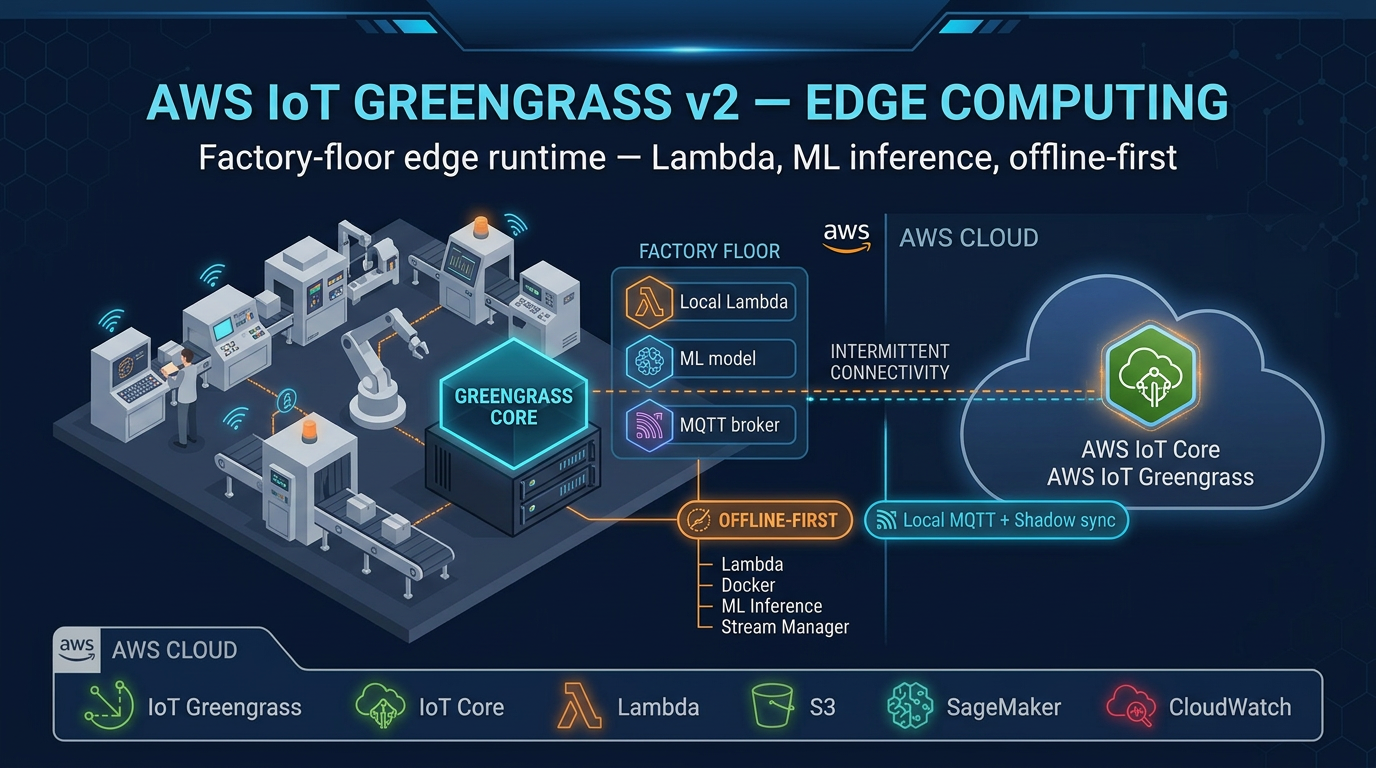
Table of Contents
Factories generate millisecond telemetry. Shipping all of it to the cloud collides with latency, intermittent WAN, and message/transfer cost.
AWS IoT Greengrass v2 keeps decisions local and the cloud as control plane. As of July 2026, pin Nucleus intentionally: 2.16 brought TPM 2.0, 2.17 non-root install, 2.18.x adds connectivity switch capabilities — verify the exact patch in your region before fleet rollout. Greengrass v1 is sunset; SiteWise Edge uses aws.iot.SiteWiseEdgeCollectorOpcua / aws.iot.SiteWiseEdgePublisher.
Engagement shape (anonymized): discrete manufacturing plant, ~40 gateways in DMZ, cellular failover WAN, SiteWise + local quality-gate inference on Jetson for one vision line.
Reproduce this: SiteWise Edge checklist · architecture decision matrix
Why Edge Computing Is Non-Negotiable in Manufacturing
Before examining the technology, it is worth being precise about why cloud-only IoT architectures fall short on factory floors.
Latency. A round-trip from a factory floor in Ohio to us-east-1 and back takes 30–80 ms under normal conditions. For safety-critical control loops, motion coordination, or quality-gate decisions (pass/fail at 600 parts per minute), that latency is not just inconvenient — it is disqualifying. Edge processing keeps the decision local and sub-millisecond.
Connectivity. Factory WAN links are unreliable. Cellular failover, fiber cuts, ISP maintenance windows, and RF interference from industrial equipment all interrupt connectivity. A pure-cloud IoT design stops working when the WAN goes down. Greengrass v2 continues operating and buffers data for later synchronization.
Cost. AWS IoT Core charges $1 per million MQTT messages. A single machine generating 10 sensor readings per second produces 864,000 messages per day — just under the threshold at which costs become meaningful. A 500-machine factory floor produces 432 million messages per day. Edge filtering, aggregation, and local processing reduce cloud message volume by 80–95% in most deployments, cutting IoT Core costs proportionally.
Data gravity. High-resolution vibration data, high-frequency current signatures, and video feeds generate gigabytes per hour. Sending raw streams to S3 is feasible in isolation; doing it for an entire plant across an industrial WAN is not. Edge processing compresses, downsamples, and extracts features locally, sending only the signal (not the raw stream) to the cloud.
AWS IoT Greengrass v2 Architecture
The Nucleus
The Greengrass nucleus is the core runtime process that runs on your factory-floor gateway. It is open-source (Apache 2.0 license, available at aws-greengrass/aws-greengrass-nucleus) and handles:
- Component lifecycle management — downloading, installing, starting, stopping, and monitoring components
- Cloud communication — MQTT connection to AWS IoT Core for deployment instructions and telemetry upload
- Local shadow service — maintains device state locally; synchronizes with cloud when connectivity restores
- Deployment downloads — fetches new component versions from S3 or the Greengrass component store
- IPC server — local inter-process communication bus that components use to publish/subscribe to local topics
The nucleus is itself a Greengrass component (aws.greengrass.Nucleus), versioned and updatable. As of July 2026, treat 2.18.x as the current changelog head, with 2.17 (non-root) and 2.16 (TPM 2.0) as the capability milestones — pin a tested patch per fleet rather than floating latest.
Greengrass Nucleus Lite (introduced in v2.3) is a stripped-down nucleus variant for resource-constrained devices — microcontrollers and embedded Linux devices with as little as 512 MB RAM. It supports a subset of full Nucleus capabilities and is the right choice for sensors and actuators that cannot run a full JVM.
Components
Everything that runs on a Greengrass device is a component. Components are independently versioned, deployable, and managed. Each component is defined by a recipe — a YAML or JSON document specifying:
- Component name and version
- Dependencies (other components this one requires)
- Artifacts (binaries, scripts, model files) stored in S3
- Lifecycle commands:
Install,Run,Startup,Shutdown,Recover - Configuration schema with default values (overridable at deploy time)
AWS provides a catalog of managed components for common tasks:
| Component | Purpose |
|---|---|
aws.greengrass.Nucleus | Core runtime |
aws.greengrass.LocalDebugConsole | SSH-accessible debug dashboard |
aws.iot.SiteWiseEdgeCollectorOpcua | OPC-UA data collection for IoT SiteWise |
aws.iot.SiteWiseEdgePublisher | Publishes buffered industrial data to SiteWise / destinations |
aws.iot.SiteWiseEdgePublisher | Sends SiteWise data to the cloud service |
aws.greengrass.CloudWatch.Agent | Publishes component metrics to CloudWatch |
aws.greengrass.SecureTunneling | Reverse SSH tunnels to factory gateways (no inbound firewall rules) |
aws.greengrass.DockerApplicationManager | Manages Docker containers as components (common for ONNX/vision) |
aws.greengrass.SecretManager | Fetches secrets from AWS Secrets Manager, injects at runtime |
Custom components can be written in Python, Java, C++, shell scripts, or packaged as Docker containers.
Local Communication: The Moquette Broker
Greengrass v2 includes a local MQTT broker (Moquette) that operates independently of cloud connectivity. Devices on the factory LAN publish sensor readings to local MQTT topics. Greengrass components subscribe to those topics, process the data, and either act locally or forward to AWS IoT Core. This architecture means the factory floor continues operating even during a WAN outage — local alarming, control decisions, and data buffering all work without cloud connectivity.
Deployment Architecture for a Factory Floor
A production Greengrass deployment follows a layered network architecture that isolates OT (operational technology) networks from IT and cloud connectivity:
Factory Floor (OT Network)         DMZ / Gateway Host       AWS Cloud (us-east-1)
──────────────────────────         ──────────────────       ──────────────────────
PLC (Siemens S7-1500)              Industrial PC            AWS IoT Core (MQTT/TLS)
  OPC-UA server ──────OPC-UA──→    Greengrass v2 ────────→  IoT SiteWise
SCADA system   ──────OPC-UA──→     ├── SiteWise Collector   Amazon Timestream
Smart sensors  ──────MQTT──→       ├── SiteWise Publisher   Amazon S3
Cameras        ──────HTTP──→       ├── Custom Neo/ONNX ML   CloudWatch
                                   ├── SecureTunneling      Amazon Managed Grafana
                                   └── SecretManager
The gateway PC sits in a DMZ between the OT VLAN and the WAN uplink. It connects inward to PLCs and SCADA via OPC-UA, and outward to AWS IoT Core via MQTT over TLS 1.3 on port 8883. No inbound connections are required from the cloud — Greengrass initiates all cloud connections outbound.
Hardware Selection for Factory Deployments
Greengrass v2 minimum requirements: 1 GB RAM, 500 MB disk, Java 8 or 11, Linux or Windows x86_64 / ARM64 / ARMv7l.
Recommended hardware by use case:
- Standard data collection (OPC-UA, MQTT forwarding): Moxa MC-7200 or Advantech UNO-2484G industrial PCs. These are DIN-rail mounted, rated for -40°C to 70°C operating range, support dual WAN (fiber + LTE failover), and run Ubuntu 22.04 LTS.
- Edge ML inference (camera-based quality inspection): NVIDIA Jetson AGX Orin or Xavier NX. GPU-accelerated inference for TensorFlow Lite or ONNX models. Runs Greengrass v2 on JetPack 5.x (Ubuntu 20.04 base).
- High-availability deployments: Pair two gateway PCs in active-passive configuration. Greengrass supports multiple core devices in a thing group — if the primary gateway goes offline, the secondary continues processing with its local components.
- Resource-constrained sensors: Raspberry Pi 4 (4 GB RAM variant) running Greengrass Nucleus Lite for lightweight data forwarding tasks.
Installing AWS IoT Greengrass v2
The Greengrass installer automates provisioning of the IAM role, X.509 certificate, and IoT thing registration in a single command.
Step 1: Create IAM role for the Greengrass core device.
The role needs policies for: IoTCoreMessageBroker, SiteWise, S3 (for artifact downloads), CloudWatch, and Secrets Manager. AWS provides the managed policy AWSGreengrassCorePolicy as a starting point.
Step 2: Download the Greengrass installer.
curl -s https://d2s8p88vqu9w66.cloudfront.net/releases/greengrass-nucleus-latest.zip \
  -o greengrass-nucleus-latest.zip
unzip greengrass-nucleus-latest.zip -d GreengrassInstaller
Step 3: Run the installer with automatic provisioning.
sudo java \
  -Droot="/greengrass/v2" \
  -Dlog.store=FILE \
  -jar ./GreengrassInstaller/lib/Greengrass.jar \
  --aws-region us-east-1 \
  --thing-name FactoryGateway01 \
  --thing-group-name PlantA-Gateways \
  --component-default-user ggc_user:ggc_group \
  --provision true \
  --setup-system-service true \
  --tes-role-name GreengrassV2TokenExchangeRole \
  --tes-role-alias-name GreengrassCoreTokenExchangeRoleAlias
The --provision true flag creates the IoT thing, generates the X.509 certificate, and attaches the IAM role. The --setup-system-service true flag registers Greengrass as a systemd service that starts automatically on boot.
Step 4: Verify installation.
sudo systemctl status greengrass.service
sudo tail -f /greengrass/v2/logs/greengrass.log
A healthy Greengrass installation shows Active: active (running) and log lines confirming MQTT connection to IoT Core.
Writing a Custom Greengrass Component
Custom components let you run your own business logic at the edge. Here is a complete example: a Python component that reads a temperature value from the local MQTT broker, checks a threshold, and publishes an alert to AWS IoT Core if the threshold is exceeded.
Component recipe (recipe.yaml):
RecipeFormatVersion: '2020-01-25'
ComponentName: com.factualminds.TemperatureMonitor
ComponentVersion: '1.0.0'
ComponentDescription: 'Monitors temperature sensors and triggers alerts'
ComponentPublisher: FactualMinds

ComponentDependencies:
  aws.greengrass.Nucleus:
    VersionRequirement: '>=2.0.0'

ComponentConfiguration:
  DefaultConfiguration:
    alertThreshold: 85.0
    sensorTopic: 'factory/sensors/temperature'
    alertTopic: 'factory/alerts/temperature-high'

Manifests:
  - Platform:
      os: linux
    Lifecycle:
      Install:
        RequiresPrivilege: false
        Script: pip3 install awsiotsdk
      Run:
        Script: >-
          python3 {artifacts:path}/temperature_monitor.py
          --threshold {configuration:/alertThreshold}
          --sensor-topic {configuration:/sensorTopic}
          --alert-topic {configuration:/alertTopic}
    Artifacts:
      - URI: s3://your-bucket/components/temperature_monitor.py
Component code (temperature_monitor.py):
import json
import argparse
from awsiot.greengrasscoreipc import connect
from awsiot.greengrasscoreipc.model import (
    SubscribeToTopicRequest,
    PublishToIoTCoreRequest,
    QOS,
)

def main():
    parser = argparse.ArgumentParser()
    parser.add_argument('--threshold', type=float, default=85.0)
    parser.add_argument('--sensor-topic', required=True)
    parser.add_argument('--alert-topic', required=True)
    args = parser.parse_args()

    ipc_client = connect()

    # Subscribe to local MQTT topic (from sensors on factory LAN)
    subscribe_request = SubscribeToTopicRequest(topic=args.sensor_topic)
    handler = ipc_client.new_subscribe_to_topic()
    handler.activate(subscribe_request)

    print(f"Monitoring {args.sensor_topic}, threshold={args.threshold}°C")

    for event in handler.get_response().result():
        payload = json.loads(event.binary_message.message)
        temp = payload.get('temperature', 0)

        if temp > args.threshold:
            alert = {
                'asset_id': payload.get('asset_id'),
                'temperature': temp,
                'threshold': args.threshold,
                'severity': 'HIGH' if temp > args.threshold + 10 else 'WARNING',
            }
            publish_request = PublishToIoTCoreRequest(
                topic_name=args.alert_topic,
                qos=QOS.AT_LEAST_ONCE,
                payload=json.dumps(alert).encode(),
            )
            ipc_client.new_publish_to_iot_core().activate(publish_request)
            print(f"Alert published: {alert}")

if __name__ == '__main__':
    main()
Deploy this component to a thing group via the Greengrass console or the aws greengrassv2 create-deployment API call.
OPC-UA Integration with AWS IoT SiteWise
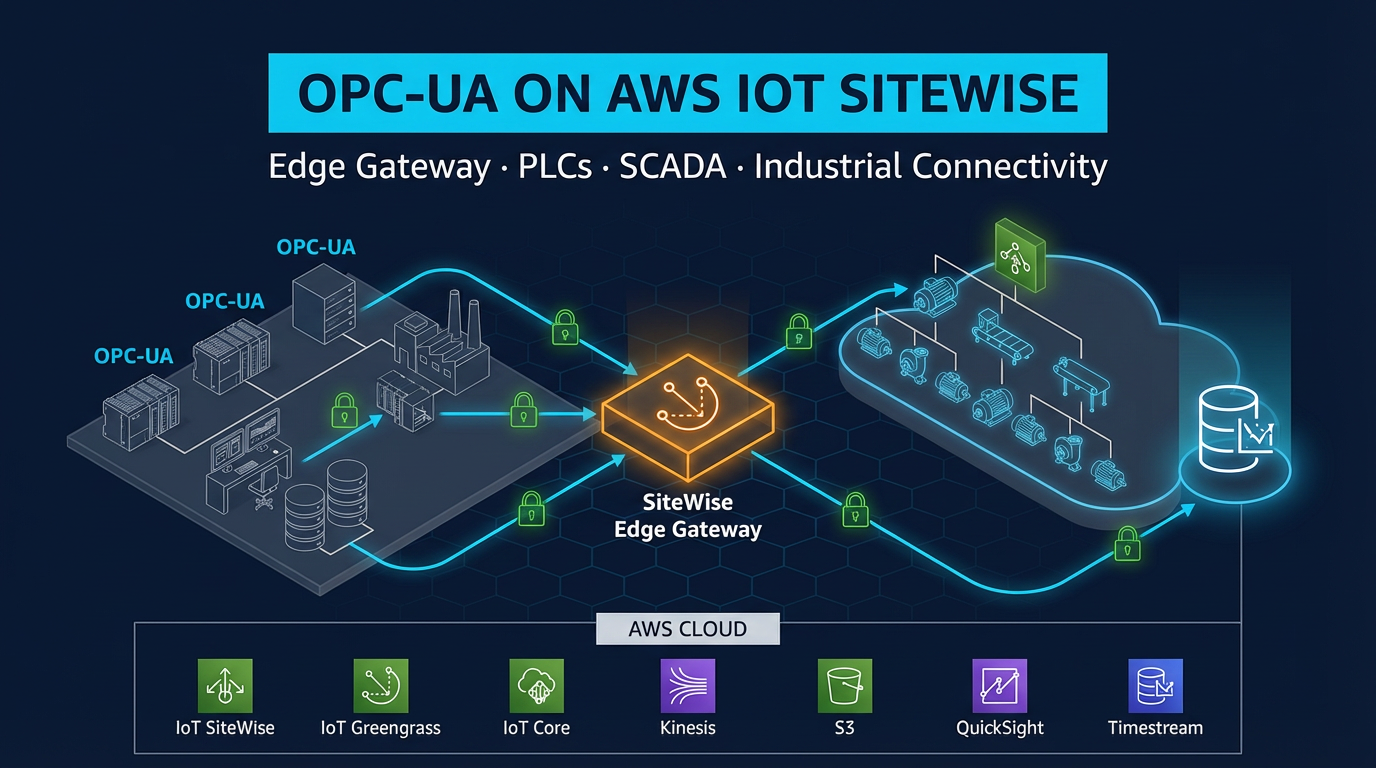
OPC-UA is the dominant protocol for connecting PLCs, SCADA systems, and industrial historians to cloud infrastructure. AWS does not implement OPC-UA in IoT Core — it is implemented in the SiteWise Edge components that run on Greengrass v2.
The two components that work together for SiteWise Edge OPC-UA collection:
aws.iot.SiteWiseEdgeCollectorOpcua— connects to OPC-UA servers, reads node values at configured scan rates, buffers locallyaws.iot.SiteWiseEdgePublisher— takes the collected data and sends it to the cloud IoT SiteWise service
Data flow:
PLC (OPC-UA server)
  ↓ OPC-UA (Sign & Encrypt, Basic256Sha256)
SiteWise Edge Collector component
  ↓ local IPC
SiteWise Publisher component
  ↓ MQTT/TLS to IoT Core
AWS IoT SiteWise (cloud)
  ↓
Amazon Managed Grafana dashboards
Configure the gateway and data sources in the IoT SiteWise console (Gateways section), then deploy the SiteWise components to your Greengrass device group. Node-to-asset-property mappings are configured in SiteWise and pushed to the edge gateway automatically.
Important dashboard note: AWS IoT SiteWise Monitor entered maintenance mode on November 7, 2025 and is no longer available to new customers. For new dashboard deployments, use Amazon Managed Grafana with the native SiteWise data source plugin. Managed Grafana provides equivalent visualization, superior alerting capabilities, and active feature development.
Edge ML Inference for Quality Control
Edge ML inference eliminates the cloud round-trip for time-sensitive decisions. A typical quality control deployment:
Use case: A USB camera mounted at a conveyor belt end-of-line station. The system must classify parts as pass/fail at 600 parts per minute (100ms per part). Cloud inference is too slow; the decision must happen locally.
Architecture:
- Train a binary classification model in Amazon SageMaker (MobileNet V3 or EfficientNet-Lite for ARM efficiency)
- Compile with SageMaker Neo (or export ONNX) for the target hardware
- Package runtime + model as a custom Greengrass component (or Docker component) — do not use SageMaker Edge Manager (discontinued 2024-04-26)
- Capture frames (OpenCV), run local inference, publish pass/fail to IoT Core / local MQTT
- Roll new model versions via thing-group deployments with staging first
Inference performance targets on NVIDIA Jetson AGX Orin (GPU): MobileNet V3 classification at 5ms per frame — well within the 100ms budget. On a CPU-only industrial PC (Intel Core i5), EfficientNet-Lite0 runs at 20–40ms per frame.
TPM 2.0 Hardware Security Module Support (v2.16.0+)
Greengrass v2.16.0 (November 2025) added support for TPM 2.0 hardware security modules, the most significant security enhancement in recent Greengrass history.
In standard deployments, the Greengrass X.509 private key is stored as a file on the gateway filesystem. If an attacker gains OS-level access to the gateway, they can extract the private key and impersonate the device. With TPM 2.0 support, the private key is generated and stored inside the TPM — it never leaves the hardware. All cryptographic operations (signing, key exchange) happen inside the TPM chip.
Configuration uses a PKCS#11 provider in the Greengrass nucleus configuration:
# /greengrass/v2/config/config.yaml (nucleus config)
system:
  certificateFilePath: '/greengrass/v2/thingCert.crt'
  privateKeyPath: 'pkcs11:token=greengrass;object=greengrass-private-key'
  rootCaPath: '/greengrass/v2/rootCA.pem'
  rootpath: '/greengrass/v2'
  thingName: 'FactoryGateway01'
services:
  aws.greengrass.Nucleus:
    configuration:
      cryptography:
        pkcs11Provider: '/usr/lib/x86_64-linux-gnu/pkcs11/tpm2_pkcs11.so'
Industrial PCs from Moxa (MC-7200 series) and Advantech (ARK series) ship with TPM 2.0 chips as standard hardware. Enabling Greengrass TPM 2.0 support is the right call for any deployment where physical gateway security is a concern.
Remote Management via Secure Tunneling
Factory gateways are inside private networks with no inbound firewall openings. The aws.greengrass.SecureTunneling component solves the remote access problem without requiring any inbound firewall rules.
How it works:
- Engineer initiates a secure tunnel session from the AWS console (or API)
- Greengrass SecureTunneling component receives a notification via MQTT from IoT Core
- The component opens an outbound WebSocket connection to the AWS IoT Core secure tunneling endpoint
- The engineer connects their SSH client to the local proxy endpoint
- SSH traffic flows through the tunnel — fully encrypted, audited in CloudTrail, automatically closed when the session ends
This approach satisfies IEC 62443 requirements for remote access: no persistent inbound connections, session-limited access, full audit trail, and credential-based authorization.
Monitoring Greengrass Deployments in Production
CloudWatch metrics published by Greengrass components:
ComponentStatus— per-component health (RUNNING, ERRORED, BROKEN)DeploymentStatus— deployment success/failure per device- Custom metrics published by your components via the CloudWatch Agent component
Recommended CloudWatch alarms:
ComponentStatus != RUNNINGfor critical components (SiteWise Collector, your custom components)- Deployment failure rate > 5% across a thing group
- Custom: local MQTT message rate drops to 0 (sensor disconnection)
Thing group organization: Structure thing groups by plant, line, and machine type. Target deployments at the thing group level — a single deployment document deploys to all gateways in the group simultaneously, with configurable rollout rate and failure thresholds.
Deployment rollout strategy for production:
- Deploy to a
stagingthing group (1–2 devices) — run for 48 hours - Deploy to
production-pilot(10% of devices) — monitor component health for 24 hours - Full rollout to
production-all— configuredeploymentPolicies.failureHandlingPolicy: ROLLBACKso Greengrass automatically reverts if error rate exceeds your threshold
When this advice fails
- Hard real-time PLC control loops — Greengrass is not a safety PLC; keep control in the OT controller, use edge for telemetry/inference/alarms.
- You still have SageMaker Edge Manager recipes — those stopped working after the 2024-04-26 discontinuation; migrate to custom Neo/ONNX components.
- You need DPP edge transforms on a new gateway — DPP is closed to new customers; redesign for cloud compute or custom Greengrass components.
What this post doesn’t cover
Greengrass Nucleus Lite board bring-up and full IEC 62443 certification evidence packs.
What to do Monday morning
- Inventory Nucleus versions across the fleet; plan 2.16+ (TPM) / 2.17+ (non-root) where policy requires it.
- Confirm SiteWise components use
…CollectorOpcua/…EdgePublishernames. - Kill inbound SSH; enable Secure Tunneling for break-glass access.
- Stage → pilot → full deployments with ROLLBACK.
- Work the SiteWise Edge checklist.
- Next: TwinMaker digital twin.
AWS Cloud Architect & AI Expert
AWS-certified cloud architect and AI expert with deep expertise in cloud migrations, cost optimization, and generative AI on AWS.