Amazon Bedrock AgentCore: The Production Guide for Net-New AI Agents on AWS
Quick summary: Harness GA June 17, Agents Classic cutoff July 30, Payments GA August 18, Memory FGAC August 28. Harness vs Runtime, Gateway Policy, and when transacting agents still should not own checkout.
Key Takeaways
- Harness GA June 17, Agents Classic cutoff July 30, Payments GA August 18, Memory FGAC August 28
- AWS lifecycle notice (June 30, 2026) — Amazon Bedrock Agents Classic is now Bedrock Agents Classic, in maintenance for new customers after July 30, 2026
- Net-new agent builds should use Bedrock AgentCore
- On June 17, 2026, AgentCore Harness reached general availability — a managed, config-driven agent loop on the same platform as Runtime, Memory, Gateway, and Identity (What's New)
- First-party signals we reuse here — Gateway canary on a B2B CRM assistant (12 tools, ~8k turns/day): median tool round-trip ~180 ms → ~95 ms after server-side Gateway (Gateway post)
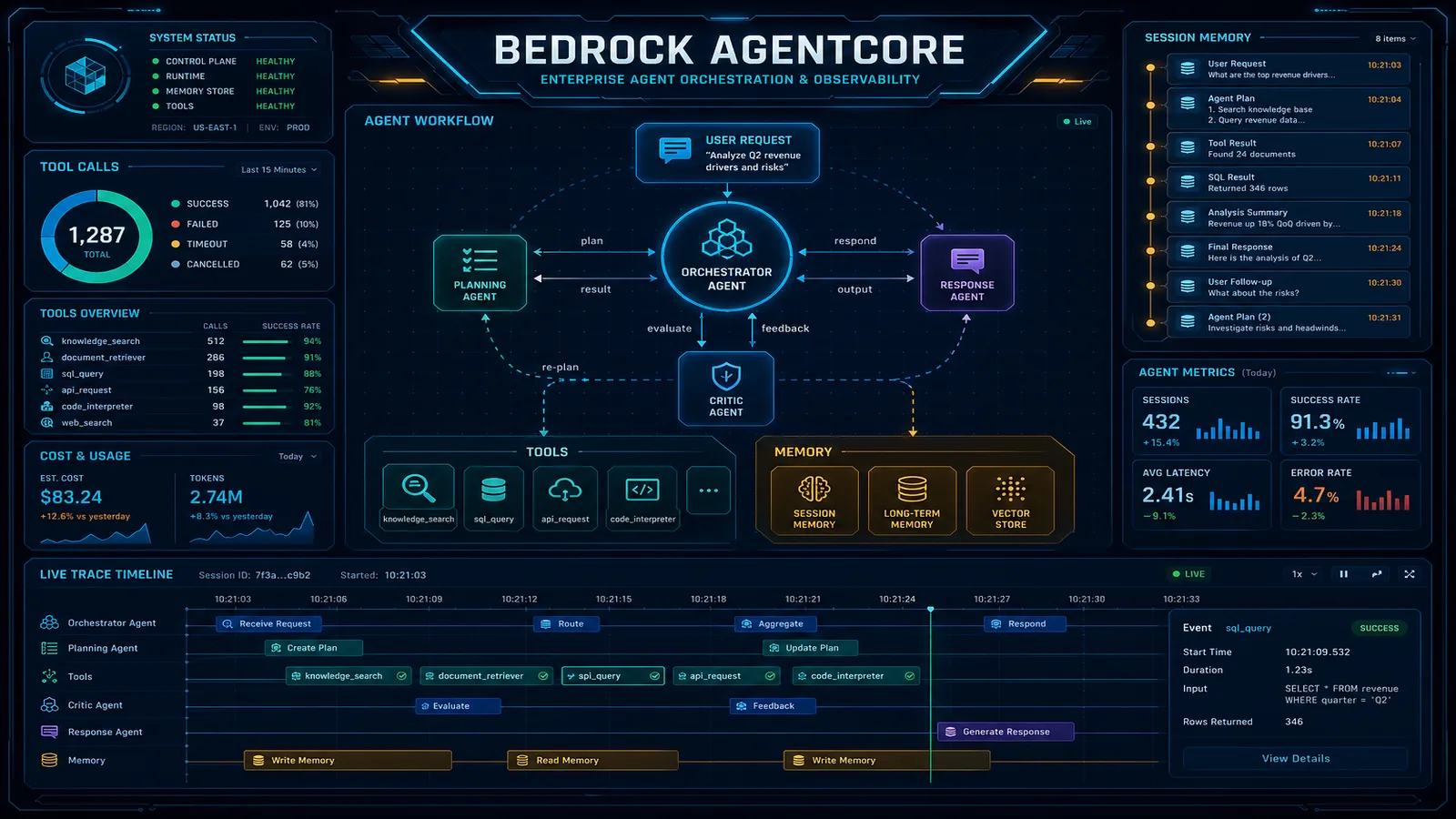
Table of Contents
AWS lifecycle notice (June 30, 2026) — Amazon Bedrock Agents Classic is now Bedrock Agents Classic, in maintenance for new customers after July 30, 2026. Net-new agent builds should use Bedrock AgentCore. Full matrix: lifecycle roundup.
On June 17, 2026, AgentCore Harness reached general availability — a managed, config-driven agent loop on the same platform as Runtime, Memory, Gateway, and Identity (What’s New). Combined with the June 30 lifecycle batch that puts Agents Classic into maintenance for new customers after July 30, 2026, the default path for net-new production agents on AWS is no longer Classic action groups.
This guide is the architecture map for that path: what AgentCore is in late 2026, when to pick Harness vs Runtime, how Memory / Gateway / Identity / Payments fit together, and what an honest Classic cutover looks like. Deep dives on pricing components, Gateway server-side tools, and AgentCore vs Quick Suite TCO stay in their own posts — link out, do not duplicate.
First-party signals we reuse here — Gateway canary on a B2B CRM assistant (12 tools, ~8k turns/day): median tool round-trip ~180 ms → ~95 ms after server-side Gateway (Gateway post). First-party TCO silhouette (July 2026): ~500-employee Quick Suite stack ~$3,580/mo vs AgentCore support-style agent at 50K sessions/mo ~$791/mo platform + Haiku-like inference (decision guide).
Reproduce this — Model platform spend on the AgentCore pricing calculator (list rates as of 2026-07-04, us-east-1). For Gateway cutover shape, use the public artifacts: server-side vs client matrix and Responses Gateway sketch.
What AgentCore Is Now (Not a Classic Wrapper)
Amazon Bedrock AgentCore is a modular agent platform: build, deploy, and operate agents with any supported framework and foundation model, with managed isolation, memory, tools, identity, and observability (AWS overview).
| Service | Role |
|---|---|
| Harness | Config-driven managed loop — model, prompt, tools, memory; microVM sessions with filesystem/shell |
| Runtime | Serverless host for custom agent code (Strands, LangGraph, CrewAI, LlamaIndex, OpenAI Agents SDK, BYO container); MCP/A2A |
| Memory | Short-term + long-term memory with extractable strategies; FGAC via Gateway Cedar (Aug 28, 2026); flexible namespace keys |
| Gateway | APIs, Lambda, and MCP servers as tools; OAuth; Policy interception; customer-configurable rate limits |
| Identity | Workload + user identity; Cognito / Okta / Entra ID; credential brokering |
| Browser | Managed browser for web interaction |
| Code Interpreter | Sandboxed code execution |
| Observability | OTEL-compatible traces into CloudWatch |
| Policy | Cedar (or NL→Cedar) gates on Gateway tool calls |
| Evaluations | Quality scoring on sessions/traces — batch, online, and A/B testing GA (June 2026); skill evaluators (August 2026) |
| Payments | Opt-in microtransactions for paid APIs/MCP/content — GA August 18, 2026; not a checkout replacement |
Mentioned, not covered deep here: Registry (org catalog, including cross-account RAM sharing), Optimization (eval-driven config experiments), Coinbase Marketplace billing for wallet usage. See What this post doesn’t cover.
Opinionated take: treat AgentCore as the paved road for customer-facing and product-embedded agents. Treat Amazon Quick Suite as the paved road for employee permission-aware knowledge work. Hybrid is normal at 200+ employees — not indecision.
Two Entry Paths: Harness vs Runtime
                    ┌─────────────────┐
                    │  Your product   │
                    │  / API layer    │
                    └────────┬────────┘
                             │
              ┌──────────────┴──────────────┐
              ▼                             ▼
     ┌────────────────┐            ┌────────────────┐
     │ AgentCore      │            │ AgentCore      │
     │ Harness        │            │ Runtime        │
     │ (config loop)  │            │ (your code)    │
     └────────┬───────┘            └────────┬───────┘
              │                             │
              └──────────────┬──────────────┘
                             ▼
         Memory · Gateway · Identity · Browser · CI · Observability · Payments
Choose Harness when:
- You want a production agent from configuration in hours, not a framework repo
- Tools are Gateway/MCP/inline and the loop is standard reason→act→observe
- You may later export to Strands on the same platform without re-platforming memory/tools
Choose Runtime when:
- You already ship LangGraph / CrewAI / Strands / custom Python and need AWS isolation + identity
- You need long-running async agents, multi-agent A2A, or a custom container image
- Orchestration logic is the product (complex branching, human-in-the-loop graphs)
What broke — Early 2026 prototype path that treated AgentCore as “enable memory on a Classic agent alias.” The team kept
InvokeAgent+ Classic action groups, then discovered Gateway Policy, Identity JWT inbound, and Harness/Runtime were the documented production surfaces — not Classic aliases. Detection: architecture review against the AgentCore developer guide before a compliance audit. Fix: rebuild tools as Gateway targets and pick Runtime (existing Python agent) instead of forcing Classic. Lesson: lifecycle banners are not a migration recipe; Classic and AgentCore are different control planes.
Memory: Strategies, Not Just a DynamoDB Flag
AgentCore Memory supports short-term (session) and long-term (cross-session) stores. Long-term extraction is driven by strategies — built-in (semantic, summarization, user preference, episodic), overrides, or self-managed pipelines (memory strategies).
Harness can provision managed memory with defaults (semantic + summarization, event expiry) so you are not inventing a summary table on day one. Runtime frameworks integrate via the Memory APIs and SDKs.
Design rules that matter in production:
- Namespace memory by user (or tenant) — never a shared global notebook for multi-tenant SaaS. As of August 28, 2026, AgentCore Memory supports flexible namespace variables (up to five custom keys such as organization, tenant, team, or environment) so you do not duplicate strategies per tenant.
- Enforce isolation at the infrastructure layer. Memory FGAC fronts Memory with a Gateway OAuth target and Cedar policies so each caller only hits their own
actorIdor namespace derived from JWT claims — do not keep that check in agent code. Batch Memory APIs are not covered by FGAC; do not use them as the multi-tenant write path. - Set retention / TTL early — Memory event and retrieval charges compound when facts live forever (pricing guide).
- Keep Knowledge Bases for documents; keep Memory for interaction state. Duplicating PDFs into Memory is a cost and quality bug.
CreateEventnow also accepts ajsonpayload type (up to 100 KB) for non-conversational behavioral events — still not a document store.
Tools: Gateway, MCP, and Policy
Gateway turns OpenAPI, Smithy, Lambda, and existing MCP servers into agent-callable tools with ingress/egress auth. For Responses API server-side execution (discover → select → execute without a client tool loop), see the Gateway server-side tools post — including the ~180 → ~95 ms median tool RTT benchmark on a 12-tool CRM assistant.
Policy sits on Gateway: Cedar (or natural language converted to Cedar) intercepts tool calls before execution — who can call which tool with which arguments. That is the control you want for write tools in finance and healthcare, not a prompt that says “please be careful.” Gateway also supports customer-configurable rate limits scoped to JWT claims, IAM principals, targets, tools, or models — use them for multi-tenant fairness instead of an application-layer token bucket.
Opinionated take: once you cross ~10 tools or need shared OAuth SaaS connectors, prefer Gateway over ad-hoc Lambda wiring in the app. Keep a client confirmation loop only when product requires human approval before every write.
Identity and Session Isolation
Every Runtime/Harness session runs in an isolated microVM. Session A must not leak conversation state or filesystem into Session B.
AgentCore Identity ties the agent workload identity to enterprise IdPs (Cognito, Okta, Entra ID, Auth0). For per-user credential scoping into third-party tools (Google, Slack, etc.), prefer inbound JWT/OAuth on the harness/runtime so Identity can bind tokens to the end user — SigV4 caller paths do not get the same on-behalf-of story today (Harness security).
Scope IAM execution roles per agent. An over-privileged agent role is automated lateral movement with a chat UI.
Observability and Quality
Observability emits OpenTelemetry-compatible telemetry into CloudWatch — step-level visibility across model calls, tools, and memory operations. Forward to Datadog/New Relic/etc. only if that stack speaks OTEL and you accept dual-ingest cost.
Traces tell you what happened. Evaluations tell you whether it was good. Wire evals into CI before you scale session volume. Batch evaluations, online evaluations, and A/B testing are generally available as of June 2026; August 2026 added skill evaluators (Builtin.SkillSelectionAccuracy, Builtin.SkillInstructionFollowing) and managed DeepEval/AutoEval judges. Confirm regional availability before committing a launch gate — do not treat traces alone as a quality number.
Production Reference Architecture
A durable customer-facing assistant on AgentCore typically looks like this:
- Edge — API Gateway / ALB + your auth (or JWT passed through to AgentCore Identity).
- Entry — Harness (
InvokeHarness) or Runtime (InvokeAgentRuntime) — not ClassicInvokeAgentfor net-new. - Memory — user-scoped STM/LTM with TTL and strategies matching the product (preferences vs episodic).
- Gateway — tool catalog (Lambda/OpenAPI/MCP) + Policy for write paths.
- Optional — Browser / Code Interpreter only on turns that need them (always-on burns duration).
- Observability + Evaluations — CloudWatch + nightly/weekly eval suites (GA — not a preview checkbox).
- Payments (opt-in) — only if the agent must settle pay-per-use APIs/MCP/content; session budget + Cedar, never unbounded checkout.
- Model — Bedrock (or OpenAI-compatible / Gemini via Harness provider support) chosen for price-performance; switchable without rewriting tool IAM if Gateway owns tools.
# Conceptual control-plane shape (not a copy-paste SDK pin).
# Confirm field names against the AgentCore API reference for your SDK version.
#
# Path A — Harness: CreateHarness / UpdateHarness / InvokeHarness
#   model + system prompt + tool/Gateway refs + memory config
#
# Path B — Runtime: CreateAgentRuntime + container/framework artifact
#   JWT authorizer (optional) + execution role + VPC config
#
# Shared: Gateway targets, Memory resource, Identity credential providers
# Optional: Payment Manager + session budget (not a checkout replacement)
Payments: GA for Agent-to-API Spend, Not Checkout
Previous approach: transacting agents were a preview control plane (May 2026) and this guide treated Payments as out of scope. Teams either skipped paid APIs or wired a wallet in application code.
What AWS changed: on August 18, 2026, AgentCore Payments reached general availability. It orchestrates x402 (including the upto scheme) and the Machine Payments Protocol (MPP), integrates Coinbase and Stripe Privy wallets, and enforces maxSpendAmount + expiry on each PaymentSession at the infrastructure layer (Payments developer guide). Policy (who may call which paid tool) and payment sessions (how much may be spent) are orthogonal levers.
What this enables: research or browser agents that buy a paywalled API or MCP call inside a budgeted session, with CloudWatch vended logs/spans on every data-plane payment.
When it matters: you already have a Gateway tool catalog and need pay-per-use endpoints without standing up a merchant-of-record wallet.
When it does not: card-on-file checkout, refunds, or any flow where the shopper’s payment instrument must stay on your existing processor. Do not put PAN in Memory. Do not treat Payments GA as permission to let a shopping agent complete an unbounded purchase. eCommerce copilot still assembles a cart and hands off to checkout — see when agents choose products.
Cost Reality (Platform vs Model)
Do not budget AgentCore as “DynamoDB GB-month plus per-invocation.” As of the rates wired into our calculator (2026-07-04, us-east-1):
| Shape | How it meters (list) |
|---|---|
| Runtime / Browser / Code Interpreter | Active vCPU-hour + GB-hour |
| Memory | STM events, LTM events/month, retrievals (per 1k) |
| Gateway | Invokes / search / tools indexed |
Model tokens remain the largest line for most agents. Lean Runtime+Memory deployments often land roughly 1.15× model spend; full Browser+CI+Gateway+Identity stacks closer to 1.4× — directional, not a guarantee. Work the numbers on the AgentCore pricing calculator and the 12-components post.
Classic → AgentCore: Honest Cutover Posture
| Workload | Posture |
|---|---|
| Net-new agent | Build on Harness or Runtime |
| Existing Classic in production | Keep running; no forced rewrite on July 30 |
| New customers after July 30, 2026 | Plan AgentCore; Classic is maintenance for new customers |
| “Flip the alias in a day” | Reject — inventory tools, Gateway/Policy, Memory, Identity first |
Classic tutorials on this site (agentic workflows, Classic tool-use, Classic multi-agent supervisor) remain useful for understanding the old loop. They are not the recommended implementation path for net-new builds. Prefer Gateway + Harness/Runtime; use the multi-agent supervisor post as pattern language, not as Classic CloudFormation you copy into production in Q3 2026.
What to Do This Week
- Decide Harness vs Runtime with one sentence of justification (config vs custom code).
- Inventory tools; if ≥10 or multi-team, draft Gateway targets and Policy for writes.
- Define Memory namespaces + TTL before the first production user. If the agent is multi-tenant, front Memory with Gateway FGAC instead of an in-agent authz check.
- Run the pricing calculator with your sessions × active seconds × peak memory.
- If the agent must pay for tools, set a PaymentSession budget and Cedar deny on
ProcessPaymentfor any role that can raise that budget. If it must not, leave Payments unconfigured. - If you still have a Classic prototype, schedule a cutover design review — not a silent alias rename.
What This Post Doesn’t Cover
- Exact unit prices beyond calculator-as-of dates — always check AWS AgentCore pricing.
- Identity federation deep-dive (token vault, custom claims, multi-IdP) — follow-on post.
- Evaluations CI design and Optimization A/B experiment design — follow-on (the products themselves are GA).
- Payments connector setup (Coinbase Marketplace subscription, Stripe Privy credentials, x402
uptovs MPP choice) — follow-on; this post only covers when to opt in. - Registry (including cross-account RAM sharing) and Optimization product setup.
- EU AI Act classification for autonomous write tools.
- GovCloud / every region matrix — confirm regional availability in AWS docs before procurement language.
We have not re-benchmarked Harness cold-start p95 across every commercial region on the same day as this update — measure in your target Region before committing UX copy that promises “instant” first messages.
Related reading
- AgentCore pricing: 12 components
- When AI agents choose products
- Gateway server-side tool execution
- AgentCore vs Amazon Q / Quick Suite decision guide
- Glossary: Bedrock AgentCore
- AgentCore pricing calculator
- Amazon Bedrock consulting · Generative AI on AWS
Need a production readiness assessment (Harness vs Runtime, Gateway Policy, Memory TTL, cost model)? Contact FactualMinds — AWS Select Tier Partner with AgentCore delivery experience across financial services, healthcare, and SaaS product agents.
AWS Cloud Architect & AI Expert
AWS-certified cloud architect and AI expert with deep expertise in cloud migrations, cost optimization, and generative AI on AWS.