Amazon Bedrock Flows: Visual AI Workflow Orchestration for Enterprise Teams
Quick summary: Build multi-step AI pipelines visually with Amazon Bedrock Flows. We compare it to Step Functions and custom Lambda orchestration with a decision matrix for enterprise teams.
Key Takeaways
- Build multi-step AI pipelines visually with Amazon Bedrock Flows
- We compare it to Step Functions and custom Lambda orchestration with a decision matrix for enterprise teams
- AWS lifecycle notice (June 30, 2026) — Amazon Bedrock Agents Classic is now Bedrock Agents Classic, in maintenance for new customers after July 30, 2026
- Net-new agent builds should use Bedrock AgentCore
- A single model call — send a prompt, get a response — handles roughly 30% of real enterprise AI requirements
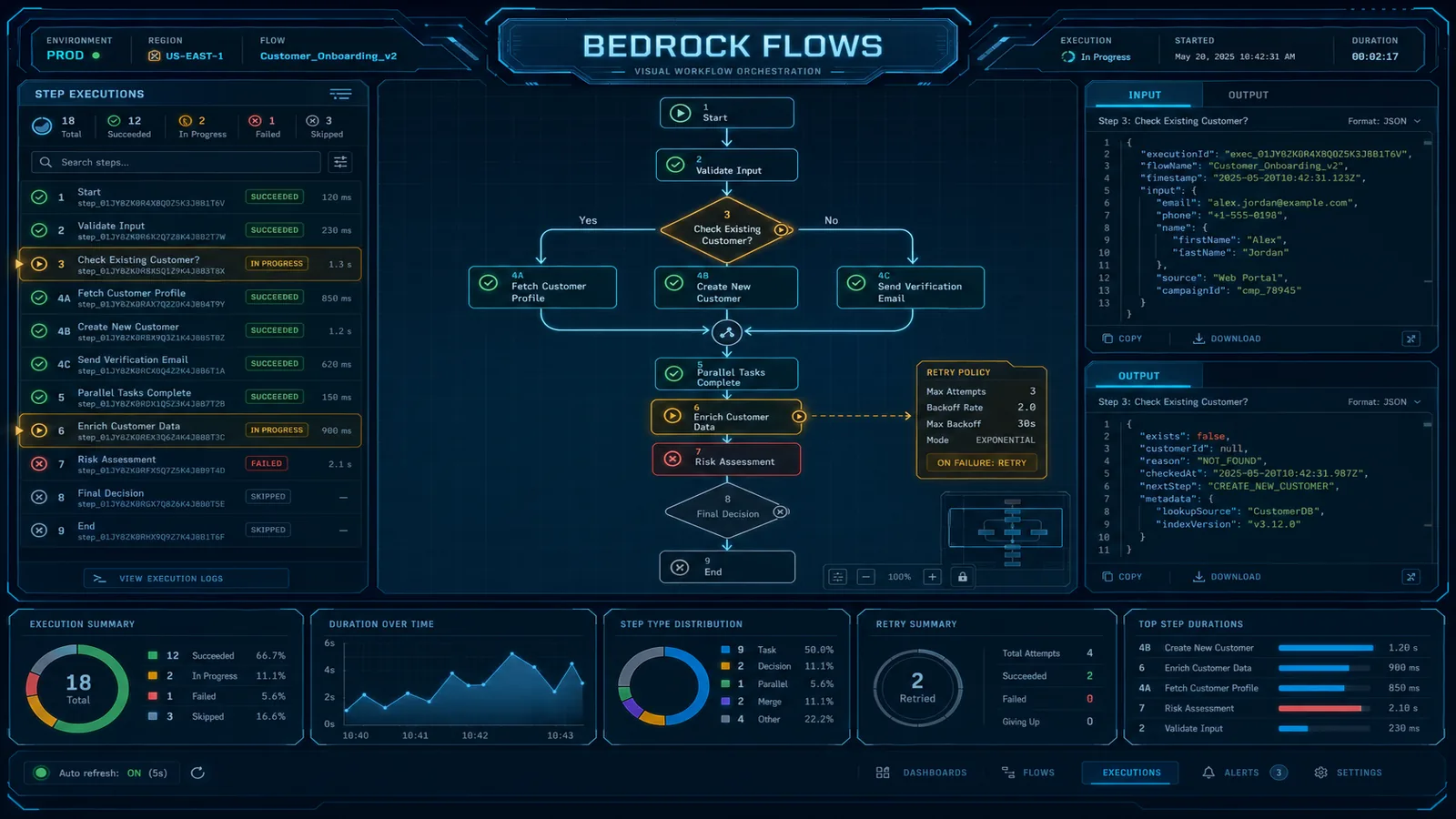
Table of Contents
AWS lifecycle notice (June 30, 2026) — Amazon Bedrock Agents Classic is now Bedrock Agents Classic, in maintenance for new customers after July 30, 2026. Net-new agent builds should use Bedrock AgentCore. Full matrix: lifecycle roundup.
Every AI application eventually needs to do more than one thing. A single model call — send a prompt, get a response — handles roughly 30% of real enterprise AI requirements. The other 70% involves retrieving context before generating, checking quality after generating, routing to different models based on document type, processing arrays of inputs, or writing results to a downstream system.
You have three options for orchestrating these multi-step AI workflows: write Lambda orchestration code that strings together Bedrock API calls, build a Step Functions state machine with Bedrock integrations, or use Bedrock Flows. Each is right for different situations. Getting the choice wrong means either over-engineering a simple pipeline or under-building a complex one.
This guide explains what Bedrock Flows actually is, walks through every node type with practical examples, and gives you a decision matrix for choosing between Flows, Step Functions, and custom Lambda orchestration. We close with a production document processing pattern that illustrates how the pieces fit together.
What Bedrock Flows Is (and What It Isn’t)
Bedrock Flows is a visual builder and execution engine for directed acyclic graphs of AI operations. You define a flow as a graph of typed nodes connected by typed edges. The console provides a drag-and-drop canvas; the underlying representation is a JSON flow definition that you can version-control and deploy via CDK or CloudFormation.
A flow is an AWS resource with its own ARN. You can create versions and aliases — the same versioning model as Lambda — enabling blue/green deployments of workflow logic without changing the downstream caller.
What Flows handles well:
- Multi-step pipelines where every step involves an AI model, a knowledge base, or a Bedrock agent
- Conditional routing between different model calls based on document type, language, or quality score
- Array processing with a map pattern (Iterator → multiple Prompt calls → Collector)
- Rapid iteration on pipeline structure without writing or deploying orchestration code
What Flows does not handle:
- Workflows longer than 15 minutes
- Human approval/review steps with indefinite wait states
- Complex error handling with per-node catch/retry policies (Flows has limited error handling compared to Step Functions)
- Non-AI workflow steps (database transactions, external system orchestration, saga patterns)
- Parallel execution of independent branches within a single flow invocation
The scope boundary is deliberate. Flows is optimized for the AI orchestration layer — it is not attempting to replace Step Functions for general-purpose workflow orchestration.
Flow Building Blocks: Node Types
Input and Output Nodes
Every flow has exactly one Input node and one or more Output nodes. The Input node defines the flow’s input schema — the JSON structure the caller must provide. The Output node defines what the flow returns. These nodes are the contract between your flow and its callers.
// Input node schema: expects a document and a question
{
  "document_text": "string",
  "question": "string"
}

// Output node schema: returns the analysis result
{
  "answer": "string",
  "confidence_score": "number"
}
Prompt Node
The Prompt node invokes a Bedrock foundation model with a configurable prompt template. You select the model (Claude Sonnet 5, Sonnet 4.6, Nova Pro, Llama 3, etc.) and write the prompt template with variable references to upstream node outputs. The node returns the model’s text response.
Prompt template example:
"You are a contract analyst. Review the following clause and identify any
non-standard terms that require legal review.

Clause text: {{document_text}}

Provide your analysis in JSON with fields:
risk_level (low/medium/high),
non_standard_terms (array of strings),
recommended_action (string)"
The {{variable_name}} syntax references outputs from upstream nodes. The Prompt node handles model invocation, token management, and response parsing.
Retrieval Node
The Retrieval node queries a Bedrock Knowledge Base and returns the most relevant passages. You configure the Knowledge Base ID, the number of results to return (top-k), and optionally a metadata filter. The input is a query string from an upstream node; the output is an array of retrieved passages with source metadata.
For RAG pipelines, the standard pattern is: Input (user query) → Retrieval (fetch relevant context) → Prompt (generate answer using context) → Output.
Agent Node
The Agent node invokes a Bedrock Agent — including, optionally, an AgentCore-backed agent. This allows you to embed stateful, tool-calling agent logic as a single step in a larger workflow. The input is the user message; the output is the agent’s final response.
This is how you compose Flows and AgentCore: a Bedrock Flow handles the pipeline orchestration (document intake, pre-processing, post-processing, routing), and an Agent node within the flow delegates the complex reasoning to an AgentCore-backed agent.
Condition Node
The Condition node evaluates a boolean expression against an upstream node’s output and routes to one of two downstream branches. Conditions support standard comparisons (==, !=, >, <, contains), and you can chain multiple conditions with AND/OR logic.
// Route documents to different processing branches based on language
{
  "condition": "detected_language == 'en'",
  "trueConnection": "english_processing_branch",
  "falseConnection": "translation_branch"
}
Iterator and Collector Nodes
The Iterator node takes an array input and emits each element individually to the downstream nodes. The Collector node aggregates the results from an Iterator back into an array. Together they implement a map pattern: process each item in an array through the same pipeline and collect results.
Input (array of 10 contracts)
  → Iterator (emit one contract at a time)
    → Prompt (analyze each contract)
  → Collector (assemble array of 10 analysis results)
→ Output (array of analysis results)
Lambda Node
The Lambda node invokes a Lambda function and passes the upstream node output as the function event. The function return value becomes the output for downstream nodes. Lambda nodes are the escape hatch: anything that Flows nodes don’t natively support — external API calls, database queries, custom data transformations, file format conversions — goes in a Lambda function behind a Lambda node.
Storage Node
The Storage node reads from or writes to S3. An S3 read node fetches a file and emits its content as a string (for text files) or base64-encoded bytes. An S3 write node persists the upstream output to a specified S3 key. This is the primary mechanism for flows that process S3-based documents or write results to a data lake.
Bedrock Flows vs. Step Functions vs. Lambda Orchestration
This is the decision that matters. Each option is genuinely right in different contexts — there is no universal winner.
| Dimension | Bedrock Flows | Step Functions (Express/Standard) | Lambda Orchestration |
|---|---|---|---|
| Development speed for AI pipelines | Very fast — visual authoring, no orchestration code | Medium — requires state machine JSON/YAML | Slow — write, test, deploy orchestration Lambda |
| AI-native features | Native Prompt, Retrieval, Agent nodes | Via SDK integrations (more setup) | Full SDK access (maximum flexibility) |
| Error handling sophistication | Limited — basic retry on Lambda nodes | Excellent — per-state catch/retry/fallback | Custom — you implement what you need |
| Human approval steps | Not supported | Yes (Standard Workflows, Task tokens) | Custom implementation required |
| Execution time limit | 15 minutes | Standard: 1 year; Express: 5 minutes | Lambda: 15 minutes per function |
| Parallel execution | Not native (sequential Iterator) | Yes (Parallel state) | Custom implementation |
| Visual debugging | Yes — node-by-node trace in console | Yes — execution history with state visualization | No native visual tooling |
| Versioning and aliases | Yes (Lambda-style) | Yes (via state machine versions) | Manual (Lambda aliases or deploy tooling) |
| Cost | Free orchestration, pay per node | $0.025/1K state transitions (Express) or $0.00001/state transition (Standard) | Lambda compute cost for orchestrator |
| Team skills required | Low — visual tool, accessible to non-engineers | Medium — ASL JSON/YAML, state machine concepts | High — Lambda code, error handling patterns |
| Best fit | AI pipelines with model/KB/agent nodes, under 15 min | Complex workflows with human steps, parallel branches, long-running processes | Maximum control, non-standard requirements |
The decision rule is straightforward: if every step in your workflow involves a Bedrock model, knowledge base, or agent, and the workflow completes within 15 minutes, use Bedrock Flows. The development speed advantage is real and the visual authoring makes it accessible to ML engineers who are not infrastructure specialists.
Use Step Functions when your workflow needs human approval gates, has parallel branches that must execute concurrently, runs longer than 15 minutes, or involves complex error handling where different failures need different recovery paths.
Use custom Lambda orchestration when you have non-standard requirements that neither Flows nor Step Functions handles natively, or when you need to embed orchestration logic inside an existing Lambda-based application with complex shared state.
Production Pattern: Document Processing Pipeline
Here is a complete production document processing pipeline built as a Bedrock Flow. The use case: processing incoming contract PDFs through a multi-step analysis pipeline with quality gating and conditional routing.
Flow definition (node graph):
[S3 Storage Read] ← Input (s3_key)
        ↓
[Lambda: extract_text] ← Calls Textract or Bedrock Data Automation
        ↓
[Prompt: classify_document] ← Identifies: contract_type, language, page_count
        ↓
[Condition: is_english] ← Routes on language == "en"
    ↓ (true)           ↓ (false)
[Prompt: analyze]   [Lambda: translate_then_analyze]
        ↓                  ↓
[Collector: merge_results]
        ↓
[Prompt: quality_check] ← Scores confidence 1-10
        ↓
[Condition: high_quality] ← Routes on confidence_score >= 7
    ↓ (true)               ↓ (false)
[S3 Storage Write: results/] [SQS via Lambda: manual_review_queue]
        ↓
[Output]
The Condition node after the quality check is the critical routing gate: high-confidence extractions go directly to the results S3 bucket for downstream consumption; low-confidence extractions are routed to a manual review queue via a Lambda node that calls the SQS API. This prevents bad extractions from propagating silently downstream.
Invoking the flow:
import boto3
import json

bedrock_flows_runtime = boto3.client('bedrock-agent-runtime')

def process_contract(s3_key: str, flow_id: str, flow_alias_id: str) -> dict:
    response = bedrock_flows_runtime.invoke_flow(
        flowIdentifier=flow_id,
        flowAliasIdentifier=flow_alias_id,
        inputs=[{
            'nodeName': 'FlowInputNode',
            'nodeOutputName': 'document',
            'content': {
                'document': {
                    's3_key': s3_key
                }
            }
        }]
    )

    # Flows returns a streaming response
    result = {}
    for event in response['responseStream']:
        if 'flowOutputEvent' in event:
            output = event['flowOutputEvent']
            result = output['content']['document']
        elif 'flowCompletionEvent' in event:
            completion_reason = event['flowCompletionEvent']['completionReason']
            if completion_reason != 'SUCCESS':
                raise Exception(f"Flow completed with reason: {completion_reason}")

    return result
Triggering the flow from EventBridge when a new file lands in S3:
{
  "source": ["aws.s3"],
  "detail-type": ["Object Created"],
  "detail": {
    "bucket": { "name": ["incoming-contracts-bucket"] },
    "object": { "key": [{ "suffix": ".pdf" }] }
  }
}
The EventBridge rule invokes a Lambda function that extracts the S3 key from the event and calls invoke_flow. The flow handles everything from text extraction through quality gating.
Monitoring, Versioning, and CI/CD
Versioning: Create a numbered version whenever you make a change you want to promote to production:
bedrock_agent = boto3.client('bedrock-agent')

# Create a new version from the current DRAFT
version_response = bedrock_agent.create_flow_version(
    flowIdentifier='FLOW_ID',
    description='Added quality check gate and SQS routing for low-confidence extractions'
)

version_number = version_response['version']

# Update the production alias to point to the new version
bedrock_agent.update_flow_alias(
    flowIdentifier='FLOW_ID',
    aliasIdentifier='PROD_ALIAS_ID',
    routingConfiguration=[{
        'flowVersion': version_number
    }]
)
This is a blue/green-capable pattern: point the alias to the new version, monitor error rates and latency for 30 minutes via CloudWatch, then either leave it on the new version or roll back by pointing the alias back to the previous version.
CloudWatch alarms for flow health:
cloudwatch = boto3.client('cloudwatch')

# Alert on flow invocation failure rate > 5%
cloudwatch.put_metric_alarm(
    AlarmName='contract-processing-flow-error-rate',
    MetricName='InvocationErrors',
    Namespace='AWS/BedrockFlows',
    Dimensions=[{'Name': 'FlowId', 'Value': 'FLOW_ID'}],
    Statistic='Sum',
    Period=300,
    EvaluationPeriods=2,
    Threshold=5,
    ComparisonOperator='GreaterThanThreshold',
    AlarmActions=['SNS_TOPIC_ARN']
)
CDK deployment: Bedrock Flows has L1 CDK constructs (CfnFlow, CfnFlowAlias, CfnFlowVersion). For teams using CDK pipelines, the deployment sequence is: synthesize flow definition JSON from CDK → deploy CfnFlow (updates DRAFT) → run integration test against DRAFT → deploy CfnFlowVersion → update CfnFlowAlias to new version.
For the Step Functions patterns that complement Bedrock Flows for outer orchestration, see AWS Step Functions Workflow Orchestration Patterns. For the AgentCore runtime that powers the Agent nodes in your Flows, see the Bedrock AgentCore guide. For where Flows fits in the broader 2026 AWS AI service landscape, see the Top 20 AWS AI Services guide.
Need help designing a Bedrock Flows architecture for your document processing or AI pipeline use case? FactualMinds has built production Bedrock Flows pipelines for enterprise clients across financial services, insurance, and healthcare — including the quality gating, versioning, and observability patterns described in this guide. We can accelerate your time from concept to production deployment.
Related reading
AWS Cloud Architect & AI Expert
AWS-certified cloud architect and AI expert with deep expertise in cloud migrations, cost optimization, and generative AI on AWS.