Amazon Bedrock Data Automation: Intelligent Document and Media Processing at Scale
Quick summary: Amazon Bedrock Data Automation replaces fragmented Textract + Comprehend + Lambda pipelines with a managed intelligent document processing service. Production guide.
Key Takeaways
- Amazon Bedrock Data Automation replaces fragmented Textract + Comprehend + Lambda pipelines with a managed intelligent document processing service
- AWS lifecycle notice (June 30, 2026) — Amazon Bedrock Agents Classic is now Bedrock Agents Classic, in maintenance for new customers after July 30, 2026
- Net-new agent builds should use Bedrock AgentCore
- A DynamoDB table to track job state
- Amazon Bedrock Data Automation is the consolidation layer
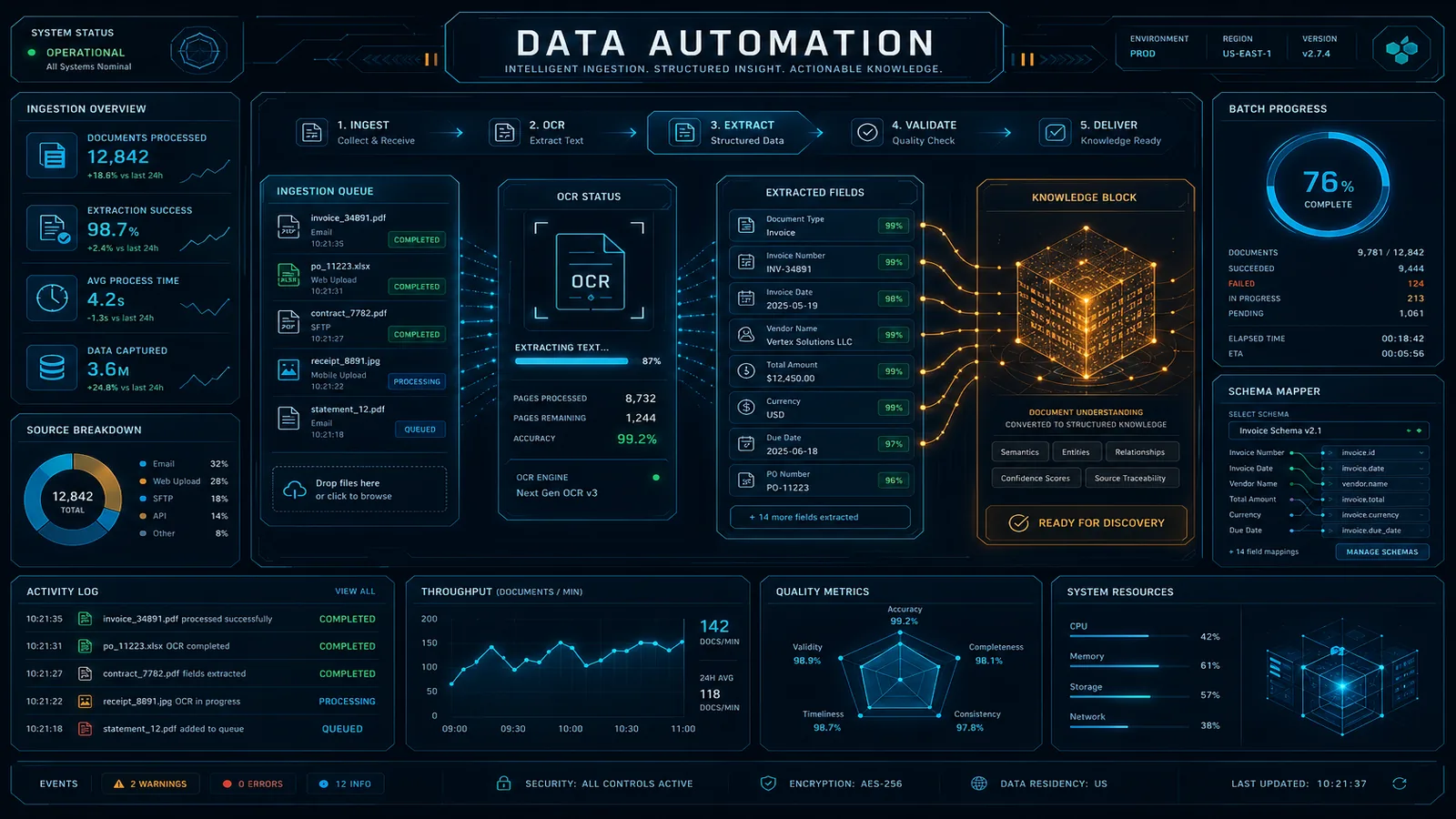
Table of Contents
AWS lifecycle notice (June 30, 2026) — Amazon Bedrock Agents Classic is now Bedrock Agents Classic, in maintenance for new customers after July 30, 2026. Net-new agent builds should use Bedrock AgentCore. Full matrix: lifecycle roundup.
Most enterprise document processing pipelines were not designed — they accumulated. A Textract call here for PDF parsing. A Comprehend NLP job there for entity extraction. A Lambda function to parse the Textract JSON, another to call Comprehend, another to merge the results, another to handle the cases where the merge fails because Textract returns a bounding box coordinate system that does not align with the text offset system Comprehend expects. A Glue job to batch-process the backlog. A DynamoDB table to track job state. An SNS topic per processing stage because the original developer wanted fine-grained notifications.
The result is a distributed system with six separate failure points, three different monitoring setups, and documentation that consists primarily of a Confluence page warning future developers not to touch the Textract page segmentation logic.
Amazon Bedrock Data Automation is the consolidation layer. It is a managed intelligent document processing (IDP) service that handles document intake, extraction, semantic field mapping, and structured output — without requiring you to orchestrate Textract, Comprehend, and Lambda separately. This guide covers the architecture, the critical concepts, integration patterns with existing data pipelines, and the cost model.
The IDP Problem: Why Textract + Comprehend Pipelines Break at Scale
Before understanding what BDA solves, it is worth being specific about where Textract + Comprehend pipelines break. These are concrete engineering problems that manifest at volume, not theoretical concerns.
Per-page Lambda invocations that timeout. Textract’s asynchronous StartDocumentAnalysis API processes a full document and returns results when complete. For synchronous processing with AnalyzeDocument, you can only submit one page at a time. At scale, this means Lambda functions processing a 50-page document invoke AnalyzeDocument 50 times sequentially — a single document can consume an entire Lambda timeout. The workaround (Textract async + polling) adds a job state management layer.
Comprehend entity extraction requires clean, tokenized text. Comprehend operates on plain text strings, not on the JSON output from Textract. Building the bridge requires parsing Textract’s block hierarchy (PAGE → LINE → WORD blocks with bounding box coordinates) into coherent paragraph strings — a non-trivial transformation that breaks on multi-column layouts, tables embedded in text, and headers that Textract identifies as standalone blocks.
No schema enforcement. Textract extracts what is on the page — all of it. If your downstream system expects a JSON object with vendor_name, invoice_total, and due_date, you need custom post-processing logic to identify those fields from the Textract output, handle the variance in how different vendors label the same field (“Total Due”, “Amount Payable”, “Balance”), and return structured null values when a field is not found. This custom extraction logic is fragile and does not generalize across document types.
Fine-tuning costs and maintenance. For documents with domain-specific vocabulary (medical terminology, legal clause language, financial instrument descriptions), Comprehend’s general-purpose NER misclassifies entities. Getting acceptable quality requires Comprehend custom entity recognition training, which adds a model training pipeline, training data labeling costs, and ongoing maintenance when new entity types emerge.
BDA addresses all four failure modes by replacing the orchestration pattern with a declarative extraction model.
BDA Architecture: Projects, Blueprints, and Invocations
BDA has three core concepts: Projects, Blueprints, and Invocations. Understanding how they relate is prerequisite to using the service correctly.
Project is the top-level configuration container. A project defines which Blueprints apply to which content types, and holds the output configuration (S3 bucket and prefix for results). Most organizations have one project per processing pipeline: one for invoice processing, one for contract analysis, one for call recording summarization.
Blueprint is the extraction schema — it defines what information you want to extract and how. A Blueprint is a JSON document that describes fields with name, type, description, and optionally validation constraints and examples. Blueprints are associated with a specific content modality (document, image, audio, video).
Here is a Blueprint for invoice extraction:
{
  "name": "InvoiceExtractionBlueprint",
  "type": "DOCUMENT",
  "schema": {
    "fields": [
      {
        "name": "vendor_name",
        "type": "STRING",
        "description": "The name of the company or individual issuing the invoice. May appear as 'From:', 'Vendor:', 'Supplier:', 'Bill From:', or at the top of the document header.",
        "required": true
      },
      {
        "name": "invoice_number",
        "type": "STRING",
        "description": "The unique identifier for this invoice. May appear as 'Invoice #', 'Invoice Number', 'Inv No:', 'Reference Number', or similar.",
        "required": true
      },
      {
        "name": "invoice_date",
        "type": "DATE",
        "description": "The date the invoice was issued, in ISO 8601 format (YYYY-MM-DD). May appear as 'Date:', 'Invoice Date:', 'Issue Date:', or 'Billing Date:'.",
        "required": true,
        "format": "YYYY-MM-DD"
      },
      {
        "name": "due_date",
        "type": "DATE",
        "description": "The payment due date. May appear as 'Due Date:', 'Payment Due:', 'Pay By:', or derived from 'Net 30' / 'Net 60' terms.",
        "required": false,
        "format": "YYYY-MM-DD"
      },
      {
        "name": "line_items",
        "type": "ARRAY",
        "description": "List of individual items, services, or charges on the invoice.",
        "items": {
          "type": "OBJECT",
          "fields": [
            { "name": "description", "type": "STRING" },
            { "name": "quantity", "type": "NUMBER" },
            { "name": "unit_price", "type": "NUMBER" },
            { "name": "total", "type": "NUMBER" }
          ]
        }
      },
      {
        "name": "subtotal",
        "type": "NUMBER",
        "description": "The sum of all line items before tax. May appear as 'Subtotal:', 'Net Amount:', or 'Amount Before Tax:'."
      },
      {
        "name": "tax_amount",
        "type": "NUMBER",
        "description": "Total tax applied. May appear as 'Tax:', 'VAT:', 'GST:', 'Sales Tax:', or 'Tax Amount:'."
      },
      {
        "name": "total_amount",
        "type": "NUMBER",
        "description": "The total amount due including all taxes and fees. May appear as 'Total:', 'Total Due:', 'Amount Due:', 'Balance Due:', or 'Grand Total:'.",
        "required": true
      }
    ]
  }
}
The field descriptions are the most important part of the Blueprint. BDA uses these descriptions to understand the semantic intent of each field, which enables it to correctly map "Balance Due: $1,247.50" on one vendor’s invoice to the total_amount field even though the label text does not literally say “total_amount”. This semantic flexibility is what separates BDA from template-matching IDP approaches.
Invocation is a single processing job — one document, one audio file, or one video submitted to a Project for extraction. An invocation is asynchronous: you submit it, receive an invocation ID, and get notified via EventBridge or SNS when it completes.
import boto3

bedrock_data_automation = boto3.client('bedrock-data-automation-runtime')

# Submit a document for processing
response = bedrock_data_automation.invoke_data_automation_async(
    inputConfiguration={
        's3Uri': 's3://incoming-invoices/2026/04/inv_12345.pdf'
    },
    outputConfiguration={
        's3Uri': 's3://processed-invoices/results/'
    },
    dataAutomationConfiguration={
        'dataAutomationProjectArn': 'arn:aws:bedrock:us-east-1:123456789:data-automation-project/invoice-processing',
        'stage': 'LIVE'  # Use LIVE for production, TEST for development
    },
    notificationConfiguration={
        'eventBridgeConfiguration': {
            'eventBridgeEnabled': True
        }
    }
)

invocation_id = response['invocationArn']
print(f"Submitted invocation: {invocation_id}")
The result is written to the S3 output path as a structured JSON file following the Blueprint schema:
{
  "invocation_id": "arn:aws:...",
  "status": "SUCCESS",
  "extraction": {
    "vendor_name": "Acme Supplies Inc.",
    "invoice_number": "INV-2026-04892",
    "invoice_date": "2026-04-15",
    "due_date": "2026-05-15",
    "line_items": [
      { "description": "Cloud Storage 1TB", "quantity": 1, "unit_price": 299.0, "total": 299.0 },
      { "description": "Support License", "quantity": 5, "unit_price": 49.0, "total": 245.0 }
    ],
    "subtotal": 544.0,
    "tax_amount": 43.52,
    "total_amount": 587.52
  },
  "confidence_scores": {
    "vendor_name": 0.98,
    "invoice_number": 0.99,
    "total_amount": 0.97,
    "due_date": 0.89
  }
}
The confidence_scores object is actionable: fields with confidence below your threshold (say, 0.85) can be automatically routed to a human review queue while high-confidence extractions proceed directly to downstream systems.
Document vs. Media Processing Patterns
BDA handles two fundamentally different content types, and the Blueprint structure differs accordingly.
Document Blueprint (PDF invoices, contracts, forms) focuses on structured field extraction. The schema mirrors the data model you want to populate. As shown above, field descriptions are the mechanism for handling vendor-specific label variance.
Audio Blueprint (call recordings, meeting recordings, voicemails) focuses on temporal content extraction:
{
  "name": "MeetingRecordingBlueprint",
  "type": "AUDIO",
  "schema": {
    "fields": [
      {
        "name": "meeting_summary",
        "type": "STRING",
        "description": "A 2-3 sentence summary of the meeting's main topics and outcomes."
      },
      {
        "name": "action_items",
        "type": "ARRAY",
        "description": "Specific tasks or commitments made during the meeting with assignee and due date where mentioned.",
        "items": {
          "type": "OBJECT",
          "fields": [
            { "name": "task", "type": "STRING" },
            { "name": "assignee", "type": "STRING" },
            { "name": "due_date", "type": "STRING" }
          ]
        }
      },
      {
        "name": "decisions_made",
        "type": "ARRAY",
        "description": "Key decisions reached during the meeting.",
        "items": { "type": "STRING" }
      },
      {
        "name": "participants",
        "type": "ARRAY",
        "description": "Names or roles of people who spoke during the meeting.",
        "items": { "type": "STRING" }
      },
      {
        "name": "sentiment",
        "type": "STRING",
        "description": "Overall meeting sentiment: positive, neutral, or negative.",
        "enum": ["positive", "neutral", "negative"]
      }
    ],
    "transcription": {
      "enabled": true,
      "speakerDiarization": true
    }
  }
}
For audio Blueprints, BDA performs transcription automatically (with speaker diarization if enabled) and then applies the Blueprint schema to the transcript. The combination of transcription + LLM-enhanced extraction in a single managed service eliminates the Transcribe → Comprehend → Lambda post-processing chain.
Integrating with Existing Data Pipelines
The standard production integration pattern uses S3 as the ingestion point, EventBridge for job completion notifications, and Lambda for post-processing and database writes.
S3 Object Created event (new invoice lands in incoming bucket)
    ↓
EventBridge Rule → Lambda: submit_bda_invocation
    ↓ (asynchronous — Lambda returns immediately)
BDA processes document (8-60 seconds)
    ↓
EventBridge: BDA Job Completed event (invocationArn, status, outputS3Uri)
    ↓
EventBridge Rule → Lambda: process_bda_result
    ↓
Lambda reads extraction JSON from output S3 path
    ↓
Route: confidence_score >= 0.85 → DynamoDB write (auto-approved)
       confidence_score < 0.85  → SQS: manual_review_queue
The Lambda post-processor is intentionally thin — it reads the BDA output JSON, checks confidence scores, and routes the result. No extraction logic lives in Lambda; that is BDA’s job.
For batch processing of a historical backlog (migrating from a legacy IDP system), use Step Functions to manage the batch:
# Step Functions state machine definition snippet
{
  "Comment": "Batch BDA processing for historical invoice backlog",
  "StartAt": "ListS3Objects",
  "States": {
    "ListS3Objects": {
      "Type": "Task",
      "Resource": "arn:aws:states:::lambda:invoke",
      "Parameters": {
        "FunctionName": "list-unprocessed-invoices",
        "Payload.$": "$"
      },
      "Next": "ProcessBatch"
    },
    "ProcessBatch": {
      "Type": "Map",
      "MaxConcurrency": 50,  # BDA concurrency limit per account
      "Iterator": {
        "StartAt": "SubmitBDAInvocation",
        "States": {
          "SubmitBDAInvocation": {
            "Type": "Task",
            "Resource": "arn:aws:states:::lambda:invoke",
            "Parameters": {
              "FunctionName": "submit-bda-invocation",
              "Payload.$": "$"
            },
            "End": true
          }
        }
      },
      "Next": "WaitForCompletion"
    }
  }
}
The MaxConcurrency: 50 respects BDA’s default concurrency quota. Request a limit increase for higher-throughput batch workloads.
Cost Model
BDA pricing has two components: per-page for documents, per-minute for audio and video. The per-page pricing applies to each page of a document processed, regardless of the number of fields in the Blueprint.
Document cost comparison at 100,000 pages/month:
| Component | DIY (Textract + Comprehend + Lambda) | BDA |
|---|---|---|
| OCR / text extraction | Textract AnalyzeDocument: ~$150 | Included in BDA |
| NLP / entity extraction | Comprehend custom: ~$500 | Included in BDA |
| Lambda orchestration | ~$45 (execution time) | Not needed |
| Developer maintenance | ~40 hours/month × $150/hr = $6,000 | ~2 hours/month = $300 |
| Total direct cost | ~$695 service cost | ~$150–300 (BDA per-page pricing) |
| Total including engineering | ~$6,695/month | ~$450/month |
The service cost comparison alone is modest. The engineering cost comparison is decisive. The fragmented Textract + Comprehend pipeline requires ongoing maintenance as new document layouts emerge, new exception cases get discovered, and Textract or Comprehend API changes require updates to the parsing logic. BDA delegates that maintenance to AWS.
The break-even calculation changes at very high volume: for organizations processing 10M+ pages per month with stable, well-defined document types and an existing Textract pipeline that works reliably, the per-page cost difference may be material enough to justify staying on the custom pipeline. At volumes below 5M pages/month, BDA’s total cost of ownership advantage is significant.
Audio/video cost note: BDA charges per minute of audio/video processed. For call center analytics workloads processing thousands of hours of recordings per month, calculate the audio minute volume carefully before committing — Amazon Transcribe + Comprehend may be more cost-effective for pure transcription + sentiment workloads without complex structured extraction requirements.
For event-driven pipeline patterns used in BDA integrations, see AWS EventBridge Event-Driven Architecture Patterns. For orchestrating multi-step BDA pipelines visually, see the Bedrock Flows guide. For where BDA fits in the broader 2026 AWS AI service landscape, see the Top 20 AWS AI Services guide.
Need help migrating your existing document processing pipeline to Bedrock Data Automation? FactualMinds has helped enterprise teams design BDA Blueprints, evaluate extraction quality against ground truth datasets, and build the EventBridge + Lambda integration architecture for production IDP workloads. We have experience with high-volume invoice processing, contract analysis, and call recording extraction across financial services and insurance verticals.
AWS Cloud Architect & AI Expert
AWS-certified cloud architect and AI expert with deep expertise in cloud migrations, cost optimization, and generative AI on AWS.