How to Implement AWS Bedrock Multi-Agent Supervisor Pattern in Production
Quick summary: Multi-agent supervisor pattern on Bedrock: architecture, implementation, and production deployment for scalable AI workflows.
Key Takeaways
- Multi-agent supervisor pattern on Bedrock: architecture, implementation, and production deployment for scalable AI workflows
- Multi-agent supervisor pattern on Bedrock: architecture, implementation, and production deployment for scalable AI workflows
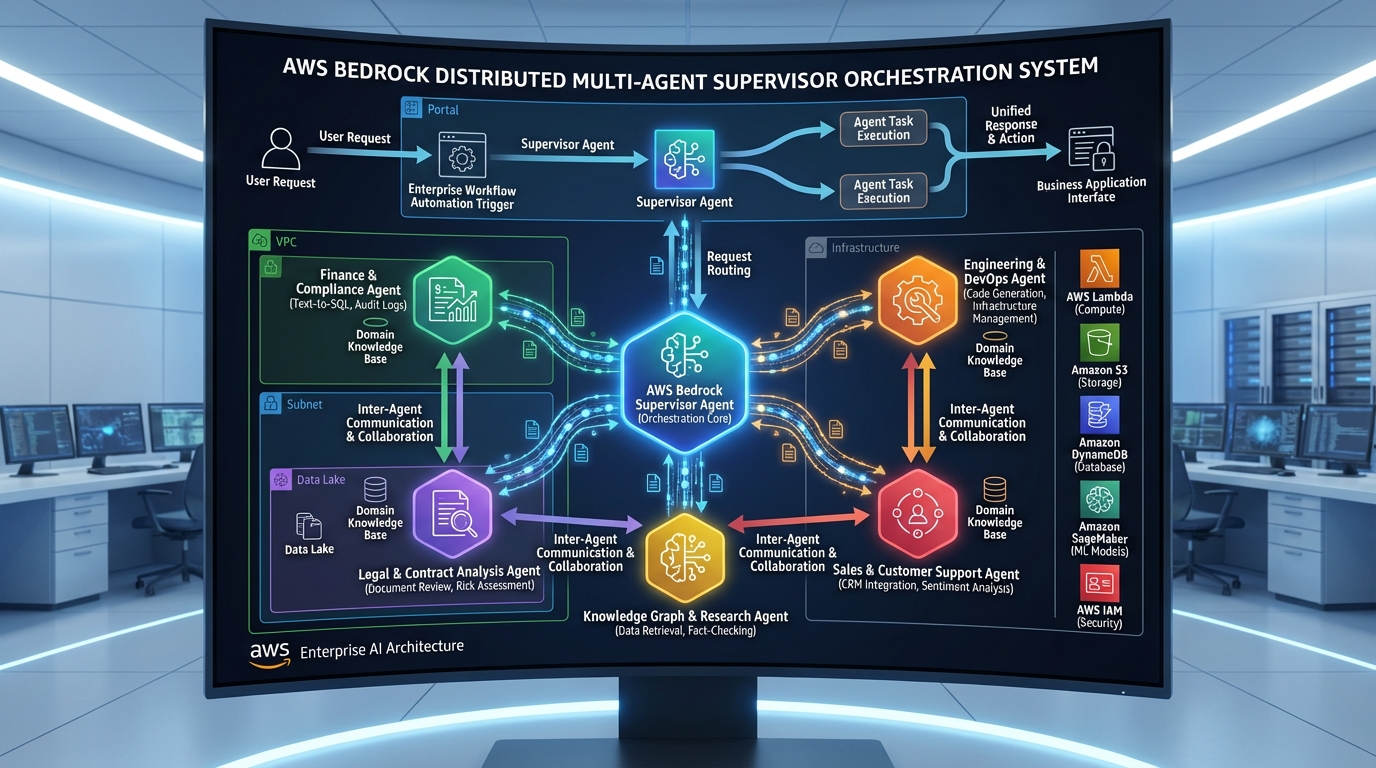
Table of Contents
Multi-Agent Supervisor Pattern: The Production Standard
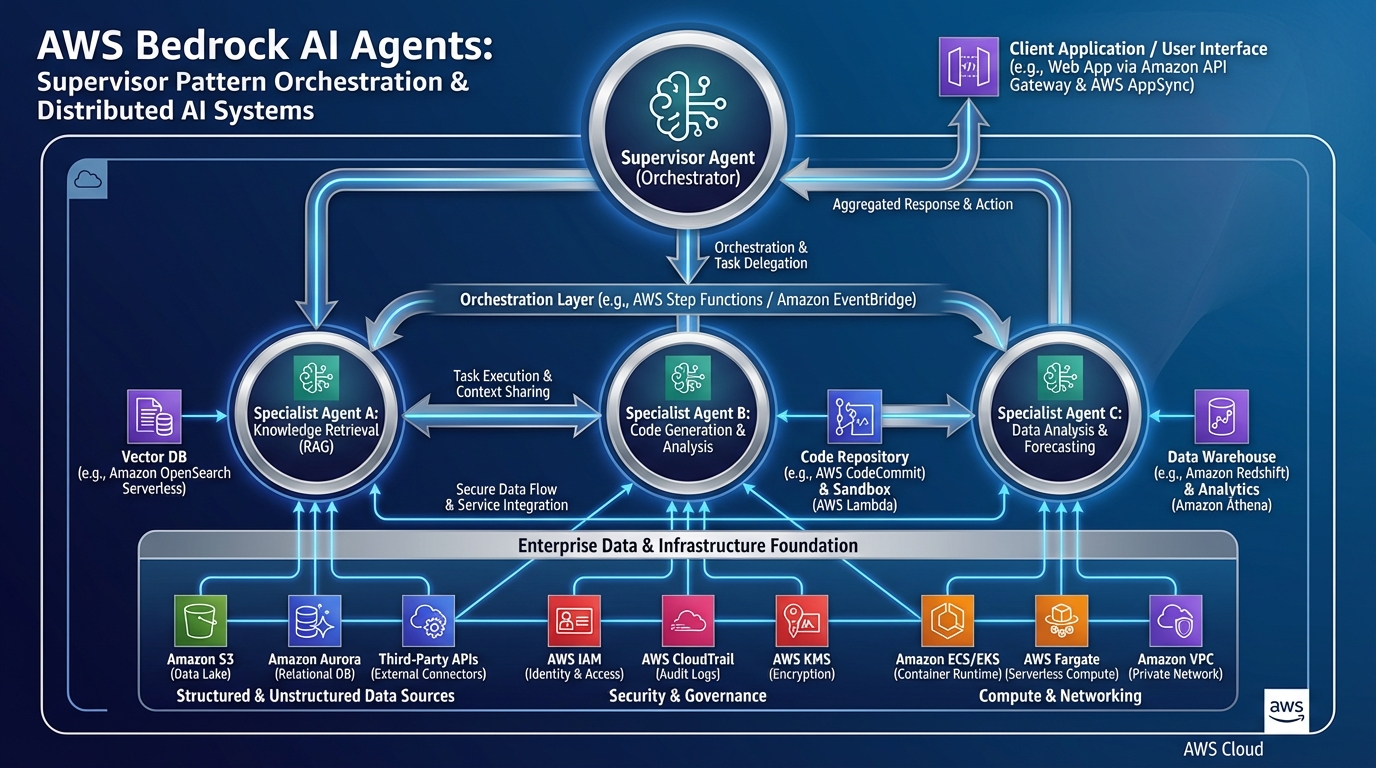
A single Bedrock Agent with 10+ tools becomes unwieldy. The multi-agent supervisor pattern is the production standard: a primary supervisor agent routes requests to specialized sub-agents.
Supervisor:
- Parses user request
- Classifies intent (billing, support, orders, technical)
- Routes to appropriate specialist agent
- Aggregates results
Specialists:
- Focus on one domain (billing agents handle refunds, invoices, etc.)
- Simpler instruction set
- Easier to test and update
- Can be deployed independently
Architecture: Supervisor + Specialists
User Input
    ↓
[Supervisor Agent]
    - Instruction: Classify intent, route to specialist
    - Tools: [InvokeSpecialistAgent]
    ↓
┌─────────────────────────────────────┐
│ Specialist Selection                │
├─────────────────────────────────────┤
│ "Refund" → Billing Agent            │
│ "Order status" → Orders Agent       │
│ "Tech issue" → Support Agent        │
│ "Unknown" → General Agent (fallback)│
└─────────────────────────────────────┘
    ↓
[Specialist Agent Invoked]
    - Tools: Domain-specific (refund, shipment, etc.)
    ↓
Result → Supervisor aggregates → User response
Implementation: Step-by-Step
Step 1: Define Specialist Agents
# Create Billing Agent
aws bedrock-agent create-agent \
  --agent-name "BillingAgent" \
  --instruction "Handle refunds, invoices, and billing disputes. Always verify customer identity."

# Create Orders Agent
aws bedrock-agent create-agent \
  --agent-name "OrdersAgent" \
  --instruction "Track orders, process returns, manage shipments."

# Create Support Agent
aws bedrock-agent create-agent \
  --agent-name "SupportAgent" \
  --instruction "Handle technical issues, troubleshooting, escalations."
Step 2: Create Supervisor Agent with Routing Tool
import json
import boto3

bedrock_agent = boto3.client('bedrock-agent')

# Supervisor agent with "InvokeSpecialist" tool
routing_tool_schema = {
    "name": "invoke_specialist_agent",
    "description": "Route request to the appropriate specialist agent based on intent",
    "inputSchema": {
        "type": "object",
        "properties": {
            "specialist_type": {
                "type": "string",
                "enum": ["billing", "orders", "support", "general"],
                "description": "Which specialist agent to invoke"
            },
            "request": {
                "type": "string",
                "description": "The user's request to pass to specialist"
            }
        },
        "required": ["specialist_type", "request"]
    }
}

supervisor_agent_id = bedrock_agent.create_agent(
    agentName="SupervisorAgent",
    instruction="""You are the primary routing agent. Classify incoming requests and route to specialists:
    - Billing/Payment/Refund issues → billing specialist
    - Order/Shipment/Return issues → orders specialist
    - Technical/Bug/Troubleshooting → support specialist
    - Unclear or general → general agent fallback

    Always verify customer identity before routing. Be concise in your classification."""
)['agentId']
Step 3: Lambda Handler for Routing
import boto3
import json

bedrock_agent_runtime = boto3.client('bedrock-agent-runtime')

SPECIALIST_AGENTS = {
    'billing': 'BillingAgentId',
    'orders': 'OrdersAgentId',
    'support': 'SupportAgentId',
    'general': 'GeneralAgentId'
}

def invoke_specialist_agent(specialist_type, request, session_id):
    """Invoke the appropriate specialist agent"""
    agent_id = SPECIALIST_AGENTS.get(specialist_type, SPECIALIST_AGENTS['general'])

    try:
        response = bedrock_agent_runtime.invoke_agent(
            agentId=agent_id,
            agentAliasId='PROD',
            sessionId=session_id,
            inputText=request
        )

        result = ""
        for event in response['body']:
            if 'chunk' in event:
                result += event['chunk']['bytes'].decode()

        return {
            'statusCode': 200,
            'specialist': specialist_type,
            'result': result,
            'success': True
        }
    except Exception as e:
        # Fallback: route to general agent
        if specialist_type != 'general':
            return invoke_specialist_agent('general', request, session_id)
        else:
            return {
                'statusCode': 500,
                'error': str(e),
                'success': False
            }

def lambda_handler(event, context):
    """Tool handler for supervisor agent"""
    tool_input = event.get('toolInput', {})
    specialist = tool_input.get('specialist_type', 'general')
    request = tool_input.get('request', '')

    result = invoke_specialist_agent(specialist, request, event.get('sessionId'))
    return json.dumps(result)
Step 4: Production Deployment
# SAM template
Resources:
  SupervisorAgent:
    Type: AWS::Bedrock::Agent
    Properties:
      AgentName: SupervisorAgent
      ActionGroups:
        - ActionGroupName: SpecialistRouting
          LambdaArn: !GetAtt RoutingLambda.Arn

  RoutingLambda:
    Type: AWS::Lambda::Function
    Properties:
      FunctionName: supervisor-routing-handler
      Runtime: python3.11
      Timeout: 30
      MemorySize: 512
      # ... code from Step 3

  SpecialistInvokeRole:
    Type: AWS::IAM::Role
    Properties:
      AssumeRolePolicyDocument:
        Statement:
          - Effect: Allow
            Principal:
              Service: lambda.amazonaws.com
            Action: sts:AssumeRole
      ManagedPolicyArns:
        - arn:aws:iam::aws:policy/service-role/AWSLambdaBasicExecutionRole
      Policies:
        - PolicyName: InvokeAgents
          PolicyDocument:
            Statement:
              - Effect: Allow
                Action: bedrock-agent-runtime:InvokeAgent
                Resource: "arn:aws:bedrock:*:*:agent/*"
Monitoring & Observability
CloudWatch Metrics
import boto3

cloudwatch = boto3.client('cloudwatch')

def log_routing_decision(user_id, intent_detected, specialist_routed, success):
    cloudwatch.put_metric_data(
        Namespace='BedrockSupervisor',
        MetricData=[
            {
                'MetricName': 'RoutingAccuracy',
                'Value': 1 if success else 0,
                'Dimensions': [
                    {'Name': 'IntentClass', 'Value': intent_detected},
                    {'Name': 'SpecialistRouted', 'Value': specialist_routed}
                ]
            },
            {
                'MetricName': 'SpecialistInvocations',
                'Value': 1,
                'Dimensions': [
                    {'Name': 'Specialist', 'Value': specialist_routed}
                ]
            }
        ]
    )
Alerts
# Alert if routing accuracy drops below 85%
cloudwatch.put_metric_alarm(
    AlarmName='SupervisorRoutingAccuracy',
    MetricName='RoutingAccuracy',
    Statistic='Average',
    Period=3600,
    EvaluationPeriods=2,
    Threshold=0.85,
    ComparisonOperator='LessThanThreshold',
    AlarmActions=['arn:aws:sns:region:account:alerts']
)
Deployment Strategy
Phase 1: Test in Staging (Week 1)
- Deploy supervisor + 2 specialists
- Run 1000 test requests
- Verify routing accuracy > 90%
- Check latency (less than 2s end-to-end)
Phase 2: Canary (Week 2)
- Route 5% of production traffic to supervisor
- Monitor error rates, latency
- Compare cost to current system
- If successful, increase to 25%
Phase 3: Full Rollout (Week 3-4)
- 100% traffic to supervisor
- Monitor for 2 weeks
- Decommission old system
Common Patterns
Pattern: Escalation Chain
Supervisor → Specialist Agent
  ↓ (if escalation needed)
Human Support (via escalation tool)
Pattern: Multi-Level Routing
Supervisor (intent: billing vs support)
  ↓ billing
Billing Router (refund vs invoice vs dispute)
  ↓ refund
Refund Specialist Agent
Pattern: Fallback with Logging
Try: Route to specialist
  ↓ failure
Fall back to general agent
  ↓
Log incident for training data
Cost Optimization
For 1M requests/month:
| Approach | Agent Invocations | Avg Tokens | Monthly Cost |
|---|---|---|---|
| Single large agent | 1M | 2000 | $3.2K |
| Supervisor + 3 specialists | 1M supervisor + 333K specialist | 1200 avg | $1.8K |
| Savings | - | - | $1.4K/month |
Specialist routing actually reduces costs by keeping context focused.
Related Resources
Ready to Scale Your Agents?
Multi-agent systems are complex to build correctly. Book a consultation to design the right supervisor architecture for your use case.
PP
Palaniappan P
AWS Cloud Architect & AI Expert
AWS-certified cloud architect and AI expert with deep expertise in cloud migrations, cost optimization, and generative AI on AWS.
AWS ArchitectureCloud MigrationGenAI on AWSCost OptimizationDevOps