AWS AI Agents: Building Production-Ready Agentic Workflows on Bedrock
Quick summary: Build production-ready AI agents on Bedrock with tool use, multi-step workflows, and supervisor patterns. From single agents to multi-agent orchestration.
Key Takeaways
- Build production-ready AI agents on Bedrock with tool use, multi-step workflows, and supervisor patterns
- Build production-ready AI agents on Bedrock with tool use, multi-step workflows, and supervisor patterns
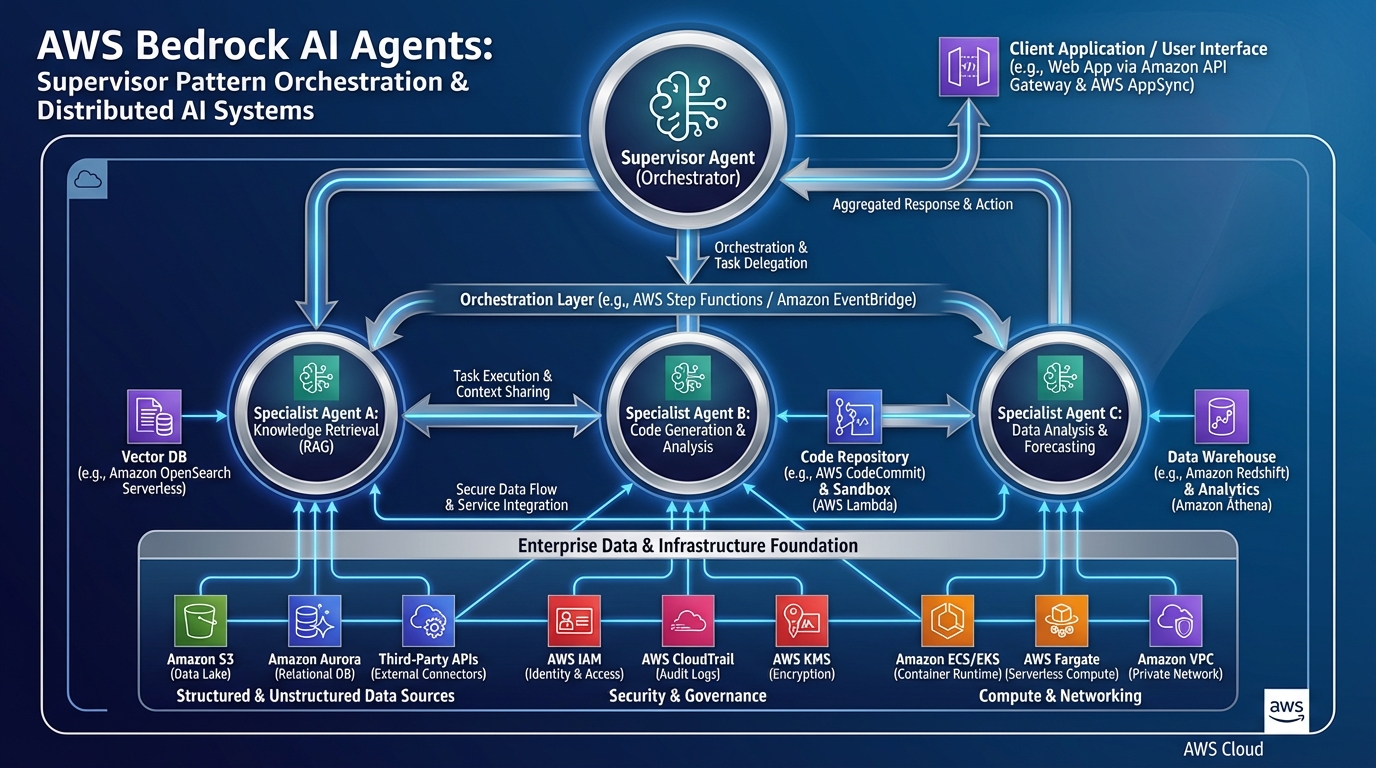
Table of Contents
The Age of AI Agents
In late 2024 and early 2025, the industry shifted. Simple chatbots that only respond to prompts are being replaced by AI agents — autonomous systems that can plan, use tools, and execute multi-step workflows without human intervention.
Amazon Bedrock’s Agents service (now GA) makes building enterprise AI agents as simple as defining your tools. No custom orchestration code. No manual agentic loop management. Just declare your tools, configure guardrails, and let Bedrock handle routing, retries, and memory.
This guide covers everything you need to build production-grade AI agents on Bedrock — from simple tool-calling agents to complex multi-agent supervisor patterns.
What Bedrock Agents Actually Are
An AI agent is fundamentally different from a chatbot:
Chatbot: User → Prompt → Model → Response → Done.
Agent: User → Goal → Model decides what tools to invoke → Invoke tools → Get results → Model re-evaluates → Invoke more tools → Final response → Done.
Bedrock Agents automate the entire loop. You define:
- Foundational model (Claude, Llama, Mistral, etc.)
- Tools — anything your agent can do (API calls, database lookups, file operations)
- Guardrails — limits on what the agent can do (spending caps, topic restrictions, hallucination filters)
- Instructions — the agent’s system prompt / role
Bedrock handles:
- Deciding when to invoke tools
- Parsing tool results
- Retrying failed tool calls
- Building context windows
- Memory management
- Stopping conditions (done? need more info?)
Bedrock Agents vs. Custom Agents (LangChain, LangGraph)
Bedrock Agents (Managed Service)
Pros:
- Zero orchestration boilerplate — 80% less code
- Built-in error handling and retries
- Integrated Bedrock Guardrails
- Automatic context window management
- Pay only for model invocations + tool calls (no management overhead)
Cons:
- Less flexibility — you work within Bedrock’s agent loop
- Tool invocation is synchronous (tools must return quickly)
- Limited visibility into agent decision-making
Custom Agents (LangChain, LangGraph, etc.)
Pros:
- Full control over agentic loop
- Can implement complex, domain-specific logic
- Support async tool calling (call 10 tools in parallel)
- Transparent decision-making (see exactly why agent chose each action)
- Framework-agnostic (run anywhere)
Cons:
- 5-10x more code to implement safely
- You own error handling, retries, context management
- Higher operational complexity
- Harder to debug production issues
Decision Rule:
- Use Bedrock Agents if you need to ship quickly, tools are simple, and you want AWS-managed reliability
- Use custom agents if you need control over the agentic loop, tool calling is complex, or you’re running on non-AWS infrastructure
For most enterprise teams, start with Bedrock Agents. Migrate to custom agents only if Bedrock’s constraints become a bottleneck.
How Bedrock Agents Work: The Agentic Loop
When you invoke a Bedrock Agent, the following sequence happens automatically:
1. User → Agent: "Find all invoices from Q1 2026 for Acme Corp that exceed $10K"

2. Agent reads instruction + tools → determines it needs:
   - Database tool: query invoices
   - Date filter tool: Q1 date range
   - Amount threshold tool: >$10K check

3. Agent invokes all three tools (parallel where possible):
   - ✓ Database tool returns 47 invoices
   - ✓ Date filter: 12 in Q1 2026
   - ✓ Amount threshold: 3 exceed $10K

4. Agent synthesizes results:
   - "Found 3 invoices matching your criteria:
      - Invoice #INV-2026-001: $12,500
      - Invoice #INV-2026-045: $11,200
      - Invoice #INV-2026-089: $15,800"

5. Responds to user with formatted result
Key insight: The agent thinks step-by-step, invokes tools to gather data, and synthesizes results. This is fundamentally different from a simple “what did you ask?” → response model.
Building Your First Bedrock Agent
Step 1: Define Your Tools (OpenAPI Schema)
Tools are described as OpenAPI 3.0 schemas. Here’s an example — a “Get Customer Info” tool:
{
  "name": "get_customer_info",
  "description": "Retrieve customer account information, including name, email, account status, and billing address.",
  "inputSchema": {
    "type": "object",
    "properties": {
      "customerId": {
        "type": "string",
        "description": "Unique customer ID (e.g., 'CUST-12345')"
      },
      "includeOrderHistory": {
        "type": "boolean",
        "description": "If true, also return the customer's order history for the past 12 months"
      }
    },
    "required": ["customerId"]
  },
  "outputSchema": {
    "type": "object",
    "properties": {
      "name": { "type": "string" },
      "email": { "type": "string" },
      "accountStatus": { "type": "string", "enum": ["active", "suspended", "closed"] },
      "billingAddress": { "type": "string" },
      "orderHistory": { "type": "array", "items": { "type": "object" } }
    }
  }
}
This schema tells the agent:
- What the tool does (
description) - What inputs it accepts (
inputSchema) - What outputs to expect (
outputSchema)
The agent can then reason: “User asked for customer info. I have a get_customer_info tool. The user said ‘customer CUST-12345’. I’ll invoke the tool with customerId: 'CUST-12345' and includeOrderHistory: true (since they might want recent orders).”
Step 2: Create a Lambda Function (Tool Handler)
Your Lambda receives the tool invocation and returns results:
import json
import boto3

def lambda_handler(event, context):
    tool_name = event['toolName']
    tool_input = event['toolInput']

    if tool_name == 'get_customer_info':
        customer_id = tool_input['customerId']
        include_history = tool_input.get('includeOrderHistory', False)

        # Query your database
        customer = db.query_customer(customer_id)

        result = {
            'name': customer['name'],
            'email': customer['email'],
            'accountStatus': customer['status'],
            'billingAddress': customer['address'],
        }

        if include_history:
            result['orderHistory'] = db.get_orders(customer_id, months=12)

        return {
            'statusCode': 200,
            'body': json.dumps(result)
        }
Step 3: Create the Agent in Bedrock
aws bedrock-agent create-agent \
  --agent-name "Customer Support Agent" \
  --agent-role-arn "arn:aws:iam::ACCOUNT:role/BedrockAgentRole" \
  --foundation-model-arn "arn:aws:bedrock:region::foundation-model/anthropic.claude-3-5-sonnet-20241022-v2:0" \
  --instruction "You are a customer support agent. Help customers with account inquiries, orders, and billing questions. Always verify the customer ID before providing sensitive information."
Step 4: Register Your Tools
aws bedrock-agent create-agent-action-group \
  --agent-id "AGENT_ID" \
  --agent-version "DRAFT" \
  --action-group-name "CustomerTools" \
  --api-schema "{
    \"tools\": [
      { tool schema from step 1 }
    ]
  }" \
  --action-group-executor \
    lambdaDetails='{ \"lambdaArn\": \"arn:aws:lambda:region:account:function:agent-tool-handler\" }'
Step 5: Invoke the Agent
bedrock_agent_runtime = boto3.client('bedrock-agent-runtime')

response = bedrock_agent_runtime.invoke_agent(
    agentId='AGENT_ID',
    agentAliasId='AIDX...',  # Production alias
    sessionId='user-session-123',
    inputText="What's the status of account CUST-12345? Include recent orders."
)

# Stream the response
for event in response['body']:
    if 'chunk' in event:
        print(event['chunk']['bytes'].decode())
Advanced Pattern: Multi-Agent Supervisor
As your agent workload grows, you’ll need specialized agents. The supervisor pattern solves this:
User Request
    ↓
┌──────────────────────────────────────┐
│  Supervisor Agent                    │
│  (Routes to specialists)             │
└──────────┬───────────────────────────┘
           ↓
   ┌───────┴────────────────┬──────────────────┐
   ↓                        ↓                   ↓
┌──────────┐           ┌─────────┐        ┌─────────────┐
│ Billing  │           │ Support │        │ Orders      │
│ Agent    │           │ Agent   │        │ Agent       │
└──────────┘           └─────────┘        └─────────────┘
   ↓                        ↓                   ↓
  DB                       KB                  API
Supervisor logic:
- Parse user request
- Classify intent (billing, support, orders, etc.)
- Route to appropriate specialist agent
- Collect specialist’s response
- Synthesize final answer
Example: User asks “I was charged twice for order #ORD-123. Can you refund me and explain what happened?”
- Supervisor recognizes: billing issue + order issue → needs both Orders Agent and Billing Agent
- Orders Agent: retrieves order details (finds duplicate charge)
- Billing Agent: initiates refund, documents reason
- Supervisor: “I found the duplicate charge on your account. I’ve initiated a refund for $X, which should appear in 3-5 business days. The issue was caused by a retry in our payment processor…”
This is dramatically more scalable than a single monolithic agent handling everything.
Production Guardrails: Keeping Agents Safe
1. Bedrock Guardrails (Built-in)
bedrock_agent.update_guardrails(
    guardrail_configurations={
        'content_filters': {
            'violence': 'BLOCK',
            'sexual_content': 'BLOCK',
            'hate_speech': 'BLOCK',
            'insults': 'BLOCK',
        },
        'pii_redaction': {
            'email': True,
            'phone': True,
            'credit_card': True,
            'ssn': True,
        },
        'topic_controls': {
            'blocked_topics': [
                'Competitor product recommendations',
                'Political opinions',
                'Medical advice',
            ]
        },
        'spending_limits': {
            'max_tokens_per_invocation': 4000,
            'max_cost_per_session': 10.00,  # $10 max per user session
        }
    }
)
2. Tool-Level Controls
Limit what agents can do in each tool:
# Tool: UpdateUserAccount
allowed_fields = ['email', 'phone', 'address']  # Can update these
forbidden_fields = ['accountStatus', 'creditLimit', 'role']  # Cannot

# Agent requests: UpdateUserAccount(customerId='CUST-123', accountStatus='suspended')
# → Tool rejects: "You don't have permission to modify accountStatus"
3. Monitoring & Alerts
# Log all agent invocations
cloudwatch.put_metric_data(
    Namespace='BedrockAgents',
    MetricData=[
        {
            'MetricName': 'AgentInvocations',
            'Value': 1,
            'Dimensions': [
                {'Name': 'AgentId', 'Value': agent_id},
                {'Name': 'IntentClass', 'Value': 'billing'},
                {'Name': 'Success', 'Value': 'true'},
            ]
        }
    ]
)

# Alert if error rate > 5%
cloudwatch.put_metric_alarm(
    AlarmName='BedrockAgentErrorRate',
    MetricName='AgentErrors',
    Statistic='Sum',
    Period=300,
    EvaluationPeriods=2,
    Threshold=0.05,
)
Real-World Example: Customer Support Agent
Here’s a complete multi-tool agent for customer support:
Tools:
get_customer_info— Look up account detailsget_order_status— Track shipmentsinitiate_return— Process returnsrequest_refund— Handle refundsescalate_to_human— Hand off to support team
Instructions:
You are a helpful customer support agent. Your goal is to resolve customer issues quickly.

Rules:
- Always verify the customer ID before helping (ask for it if not provided)
- For refunds > $500, always escalate to a human agent
- For simple returns, process immediately
- Never refund without customer consent
- If you can't help, escalate

Tone: Professional, empathetic, solution-oriented.
Workflow when customer says: “I want to return my order”
1. Agent: Which order? (if not provided)
2. Agent invokes: get_order_status(orderId='ORD-12345')
3. Tool returns: Order shipped 5 days ago, eligible for return
4. Agent: Your order is eligible. I can process the return.
   You'll receive a prepaid label, and the refund will happen
   within 5 days of us receiving it back.
5. Agent invokes: initiate_return(orderId='ORD-12345')
6. Tool returns: Return label sent to your email
7. Agent: Done! Label is in your email. Ship it back whenever ready.
Performance & Cost Optimization
Latency Reduction
Problem: Agent making 10 sequential tool calls takes 10x longer.
Solution: Parallel tool invocation.
# Sequential (slow)
customer = get_customer(id)
orders = get_orders(customerId=id)
refunds = get_refunds(customerId=id)
# Total latency: ~3 seconds

# Parallel (fast)
customer, orders, refunds = await asyncio.gather(
    get_customer(id),
    get_orders(customerId=id),
    get_refunds(customerId=id),
)
# Total latency: ~1 second
Bedrock Agents support parallel tool invocation automatically for independent tools.
Cost Optimization
Agent invocation costs:
- Base: Claude 3.5 Sonnet pricing (input + output tokens)
- Tool invocation: $0 (part of your Lambda costs)
- Guardrails: ~$0.01 per request
To reduce costs:
- Use cheaper models (Claude Haiku, Llama 2) for simple tasks
- Limit max_tokens (e.g., agent responses capped at 1000 tokens)
- Batch-process agent requests (daily digest vs. per-request)
- Cache common tool outputs (if customer info doesn’t change hourly, cache it)
When to Build AI Agents vs. Keep Simple Chatbots
| Scenario | Chatbot | Agent |
|---|---|---|
| Multi-step workflows | ❌ | ✅ |
| Tool/API integration | ❌ | ✅ |
| Autonomous decision-making | ❌ | ✅ |
| Customer support (escalations) | ❌ | ✅ |
| Content generation | ✅ | ❌ |
| FAQs/knowledge lookup | ✅ | ❌ |
| Real-time market data | ❌ | ✅ |
| Coding assistants | ✅ | ✅ (complex cases) |
Decision: If you need the agent to do anything beyond generate text, consider Bedrock Agents.
Moving Forward
Next Steps:
- Define 3–5 core tools for your use case
- Create OpenAPI schemas for each
- Build Lambda handlers (30 minutes per tool)
- Test in Bedrock Agent console
- Deploy aliases for dev/staging/prod
- Monitor error rates and user feedback
- Iterate on instructions based on failures
Related Reading:
- AWS Bedrock Agents Documentation
- Amazon Bedrock Pricing
- How to Build a RAG Pipeline with Bedrock Knowledge Bases
- AWS Bedrock Cost Optimization
Ready to Build Production AI Agents?
If you’re ready to deploy AI agents but unsure about architecture, tool design, or integration patterns, book a free GenAI discovery call. We’ll assess your use cases and recommend the right approach — whether that’s Bedrock Agents, custom multi-agent patterns, or a hybrid approach.
We’ve deployed agents for: customer support automation, sales qualification, incident triage, data processing pipelines, and financial document analysis. Whatever your workflow, we can help architect it.
AWS Cloud Architect & AI Expert
AWS-certified cloud architect and AI expert with deep expertise in cloud migrations, cost optimization, and generative AI on AWS.