AWS Verified Access in Production: A Zero-Trust Network Access (ZTNA) Replacement for Legacy VPN
Quick summary: Verified Access ZTNA: Cedar policies, Identity Center, TCP endpoints (GA). July 2026 Client VPN migration checklist.
Key Takeaways
- July 2026 Client VPN migration checklist
- First-party benchmark (illustrative): a ~30-app / ~300-user Client VPN estate often lands in an 8–12 week staged migration if Identity Center is ready — longer when thick clients remain
- Verified Access trust providers — identity sources (IAM Identity Center, OIDC, SAML 2.0) and device-posture providers (Jamf, CrowdStrike, Jumpcloud)
- Each endpoint maps to a target (an Application Load Balancer, a Network Load Balancer, an EC2 instance via the new TCP support, or a private domain)
- The request flow: 1
Table of Contents
As of July 2026, AWS Verified Access remains the AWS-native ZTNA path for workforce apps: per-request Cedar evaluation at the edge, IAM Identity Center / OIDC trust providers, optional device posture (Jamf, CrowdStrike, JumpCloud, …), no client for HTTP, and TCP/non-HTTP GA with the Verified Access client (SSH, RDP, RDS targets, CIDR endpoints).
First-party benchmark (illustrative): a ~30-app / ~300-user Client VPN estate often lands in an 8–12 week staged migration if Identity Center is ready — longer when thick clients remain.
Reproduce this: Verified Access migration checklist
Counter-case: shipping a forever-permissive Cedar policy without WAF on public endpoints is worse than a locked-down VPN ACL.
Why ZTNA, not VPN
The “perimeter VPN” pattern — user authenticates once, gets a routable IP on the private network, accesses everything that IP can reach — has been the standard for 25 years and the source of most lateral-movement incidents in that window. Once an attacker compromises a user device, the VPN is the door into the entire internal estate.
ZTNA inverts the model:
- No flat network. Every application has its own endpoint.
- No broad trust. Every request is evaluated against a policy that considers principal, device posture, network, time, and request attributes.
- No persistent session privilege. The session is short-lived; the policy re-evaluates on connection and on context change.
- Application-aware. The endpoint understands HTTP and can apply WAF, rate limiting, and per-path policy.
AWS Verified Access implements this model AWS-natively: integrates with IAM Identity Center for workforce identity, with generic OIDC and SAML 2.0 for non-AWS IdPs, with device-posture providers (Jamf, CrowdStrike, Jumpcloud) for device verification, and with Cedar — the same open-source policy language that powers Amazon Verified Permissions — for the request-evaluation logic.
Architecture overview
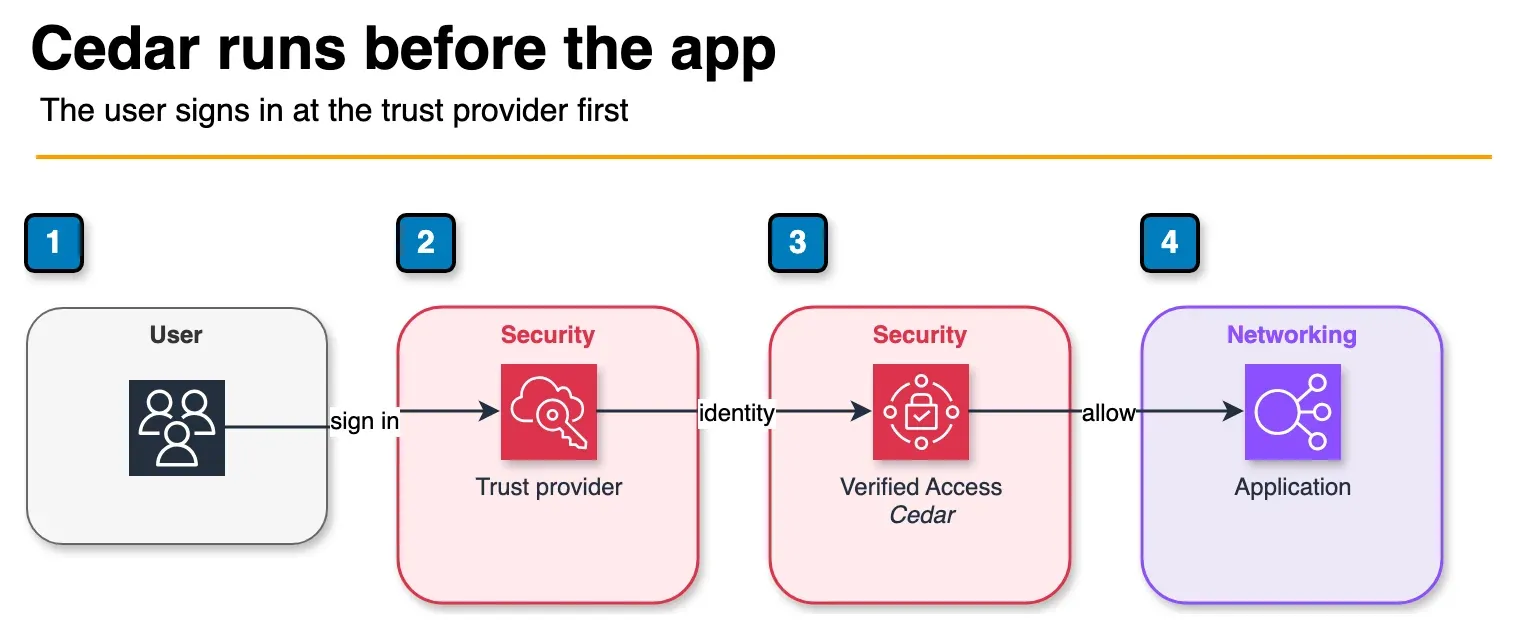
Figure: the request flow in the article. The user opens the Verified Access endpoint. The trust provider authenticates them. Cedar runs with that context, and only an allow is forwarded to the application. Open the draw.io source.
Verified Access components:
- Verified Access instance — a tenant-level resource that hosts one or more groups.
- Verified Access trust providers — identity sources (IAM Identity Center, OIDC, SAML 2.0) and device-posture providers (Jamf, CrowdStrike, Jumpcloud).
- Verified Access groups — logical groupings of endpoints that share a Cedar policy.
- Verified Access endpoints — per-application entry points. Each endpoint maps to a target (an Application Load Balancer, a Network Load Balancer, an EC2 instance via the new TCP support, or a private domain).
The request flow:
- User opens https://app.internal.example.com (the Verified Access endpoint URL).
- Verified Access redirects to the trust provider for authentication.
- User authenticates (IAM Identity Center → Okta/Entra ID/Identity Center directory, plus MFA).
- Verified Access collects device-posture signals from the configured device-posture trust provider.
- Verified Access evaluates the Cedar policy with a context containing principal, request, device, and trust-provider data.
- If the policy permits, the request is forwarded to the target application.
- Every decision is logged to CloudWatch Logs / S3 / Kinesis Firehose for audit.
Step 1: Set up trust providers
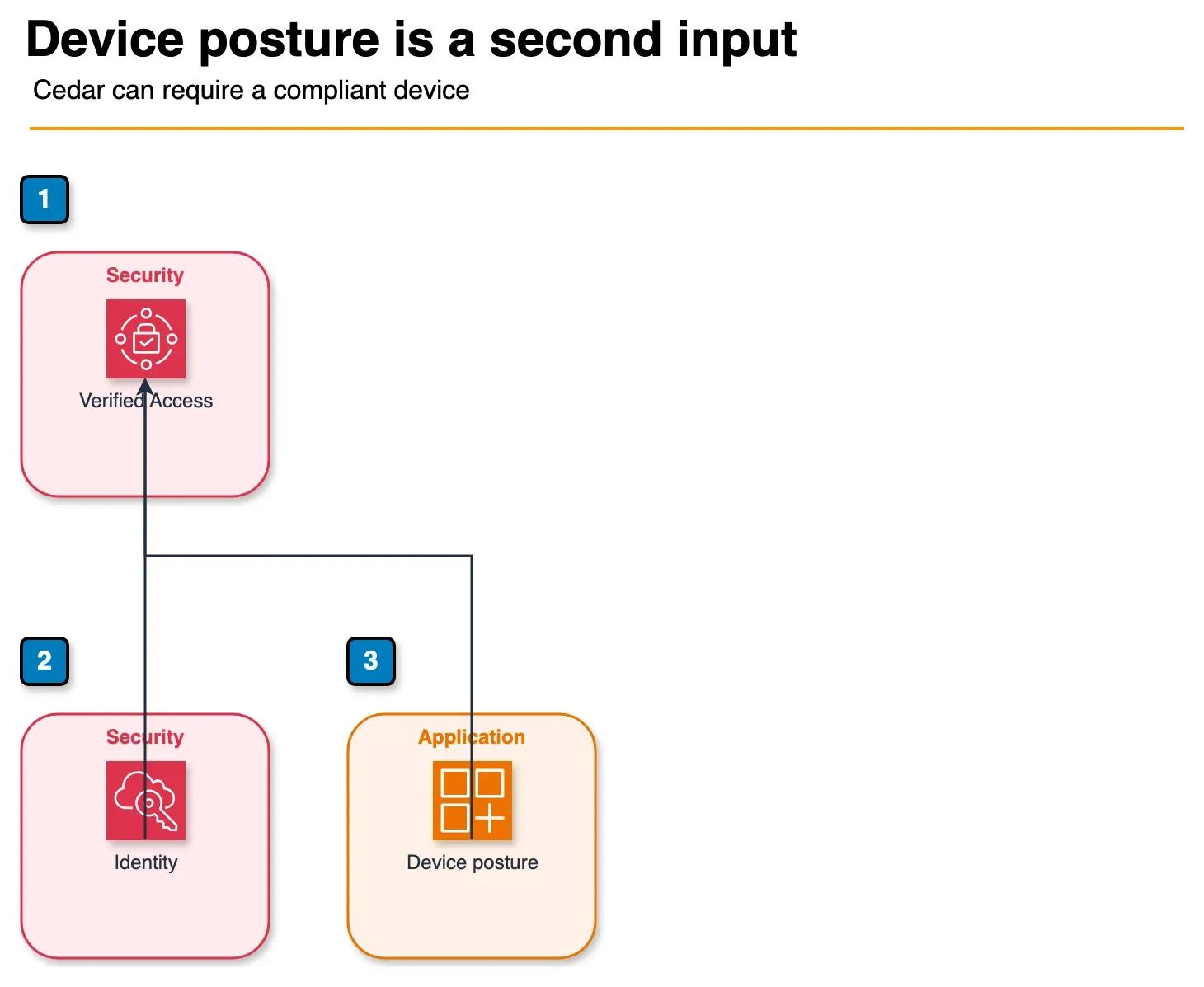
Figure: the two trust providers in the article. Identity answers who the user is. A device provider, such as Jamf or CrowdStrike, answers whether the device is compliant. Cedar sees both before the app does. Open the draw.io source.
Two categories — identity and device.
Identity provider. For workforce, IAM Identity Center is the right choice — it centralizes the federation to your IdP (Okta, Microsoft Entra ID, Google Workspace, or its own directory), propagates the user identity through to the Verified Access policy context, and is the same Identity Center you use for AWS Console / CLI access. Configure once:
aws verifiedaccess create-verified-access-trust-provider \
    --type user \
    --user-trust-provider-type iam-identity-center \
    --policy-reference-name "iam-idc"
For non-AWS workforces or third-party tools, use generic OIDC pointing at your IdP’s OIDC discovery URL.
Device-posture provider. Optional but recommended for high-sensitivity apps. Verified Access integrates with Jamf (macOS), CrowdStrike (Windows/macOS/Linux endpoint protection), and Jumpcloud (cross-platform). The provider returns a posture document on every request (compliance status, OS version, encryption status, last-known-good check-in time) which is exposed to the Cedar policy as device.is_compliant, device.last_seen, etc.
aws verifiedaccess create-verified-access-trust-provider \
    --type device \
    --device-trust-provider-type jamf \
    --device-options TenantId=jamf-tenant-id \
    --policy-reference-name "device-jamf"
Step 2: Create groups and write Cedar policies
A group bundles endpoints that share a policy. Typical layout: engineering-internal-tools, finance-back-office, executive-only.
A simple Cedar policy:
permit (
  principal,
  action,
  resource
)
when {
  principal in IAMIdentityCenterUser::"engineering-group" &&
  context.http_request.method in ["GET", "POST", "PUT", "DELETE"] &&
  context.device.is_compliant == true &&
  context.geo.country in ["US", "UK", "DE", "IN"]
};
A more advanced policy that escalates MFA for sensitive paths:
permit (
  principal,
  action,
  resource
)
when {
  principal in IAMIdentityCenterUser::"finance-group" &&
  context.device.is_compliant == true
}
unless {
  context.http_request.path like "/admin/*" &&
  context.identity_center.amr.contains("mfa") == false
};
Cedar is type-checked on save; a typo in device.is_complient (sic) fails validation rather than silently denying.
Step 3: Create Verified Access endpoints
For an Application Load Balancer target:
aws verifiedaccess create-verified-access-endpoint \
    --verified-access-group-id vagrp-1234567890abcdef0 \
    --endpoint-type load-balancer \
    --attachment-type vpc \
    --domain-certificate-arn arn:aws:acm:us-east-1:111122223333:certificate/abc \
    --application-domain app.internal.example.com \
    --endpoint-domain-prefix app \
    --load-balancer-options '{"Protocol":"HTTPS","Port":443,"LoadBalancerArn":"arn:aws:elasticloadbalancing:..."}'
The endpoint exposes a public DNS name (under *.vae.amazonaws.com); CNAME your app.internal.example.com record to that DNS name. For the TCP-endpoint variant added in 2025, the target is a Network Load Balancer or specific EC2 ENIs and users connect via the AWS Verified Access client.
Step 4: Wire WAF and Shield
Verified Access endpoints can sit behind AWS WAF. The pattern: a single Verified Access WAF Web ACL with managed rule groups (AWS-AWSManagedRulesCommonRuleSet, AWS-AWSManagedRulesKnownBadInputsRuleSet, AWS-AWSManagedRulesIpReputationList) attached to every Verified Access endpoint. AWS Shield Standard is automatically applied; for high-value endpoints, AWS Shield Advanced provides DDoS mitigation reporting and emergency response.
Step 5: Enable logging
Verified Access logging exports per-request decisions:
aws verifiedaccess update-verified-access-instance-logging-configuration \
    --verified-access-instance-id vai-1234567890abcdef0 \
    --access-logs CloudWatchLogs={Enabled=true,LogGroup=/aws/verified-access/instance-1}
Each log entry includes the principal, request attributes, evaluated policy, decision, and trust-provider data — gold for incident investigation and audit. Route to Security Lake (OCSF format) for SIEM ingestion.
Migration playbook from Client VPN
For a mid-size deployment (say, 30 internal apps, 300 users currently on Client VPN):
- Inventory. List every internal application reachable through Client VPN. Classify HTTPS-front (Verified Access target), TCP/UDP-only legacy (TCP endpoint or remain on Client VPN), thick-client legacy (likely remain on Client VPN until app modernization).
- Identity backbone. Confirm IAM Identity Center is configured and federated to your workforce IdP. If not, set up Identity Center first — it is a prerequisite for the workforce identity story.
- First wave (web apps, lowest risk). Pick 3-5 internal HTTPS apps that are not business-critical (internal docs, internal status dashboards). Set up Verified Access endpoints with a permissive Cedar policy (group membership + MFA only). Pilot with the IT and security teams for two weeks.
- Tighten policy. Add device-posture, add geo-restrictions, add path-based MFA escalation. Confirm legitimate workflows still work; fix any false-positive denies in the policy.
- Second wave (developer tools, higher risk). Migrate Jenkins, ArgoCD, internal Grafana, internal Confluence/Jira. Engage the engineering team in policy design — they know which paths are sensitive.
- Third wave (back-office and finance). Migrate finance-team and HR-tool access. Tighter device-posture requirements, stricter geo-restrictions, time-of-day controls if relevant.
- TCP endpoints (if needed). For SSH bastion access, internal Postgres consoles, RDP fleets — set up Verified Access TCP endpoints with the AWS Verified Access client.
- Decommission. Once 90% of traffic has moved to Verified Access, sunset Client VPN endpoints. Keep one fallback Client VPN for legacy thick-client apps until they are modernized or replaced.
Typical timeline for a 30-app / 300-user migration: 8-12 weeks if you do not hit unexpected app-specific weirdness; 16-20 weeks with the typical real-world surprises.
Common pitfalls
- Skipping IAM Identity Center. Verified Access works without Identity Center (using generic OIDC) but the integration loses workforce-identity propagation. Set up Identity Center first.
- Permissive Cedar policies that never tighten. Most teams ship a wide-open policy for the first wave and never come back. Schedule a 30-day review where the policy is tightened to the minimum that keeps legitimate workflows working.
- Forgetting WAF. Verified Access endpoints are public; a misconfigured Cedar policy plus no WAF is the worst-case scenario. Default-attach a WAF ACL to every endpoint.
- Logging not routed to Security Lake. Verified Access logs are gold for investigation. If they only go to a CloudWatch log group nobody reads, you lose the audit value.
- Mixing identity providers in one group. A group with both an IAM Identity Center trust provider and an OIDC trust provider creates ambiguous policy semantics. Use one identity trust provider per group; create separate groups for separate populations.
What to Do This Week
- Inventory Client VPN destinations; tag HTTPS vs TCP vs thick-client.
- Stand up Identity Center + one pilot Verified Access HTTPS endpoint with MFA Cedar.
- Attach WAF; follow the migration checklist.
What This Post Doesn’t Cover
Zscaler/Cloudflare Access feature parity matrices and VDI/WorkSpaces alternatives.
Where to go next
- Verified Access UG · Cedar
- Identity Center · Network Firewall + FMS
- Security & Compliance · Network & App Security
Frequently asked questions
What workloads should we migrate from Client VPN to Verified Access?
How does Verified Access differ from third-party ZTNA (Zscaler, Cloudflare Access, Twingate)?
Do users need to install a client for Verified Access?
How do Cedar policies work in Verified Access?
What does Verified Access cost compared to Client VPN?

Agentic AI & Cloud Security
Works on making teams more productive with agentic AI. Writes the FactualMinds guides on AWS security and compliance: identity, threat detection, data protection, and audit readiness, the controls AI agents need before they touch production systems.