AWS IAM Identity Center: Workforce SSO and Identity Propagation in Production
Quick summary: AWS IAM Identity Center is the AWS-native workforce SSO and identity-propagation service. This guide covers federation from Okta / Microsoft Entra ID, permission-set design, attribute-based access control (ABAC), identity propagation to Q Business / Redshift / QuickSight / S3 Access Grants, and the migration off long-lived IAM users.
Key Takeaways
- AWS IAM Identity Center is the AWS-native workforce SSO and identity-propagation service
- AWS lifecycle notice (June 30, 2026) — Amazon Q Business is in maintenance for new customers after July 30, 2026
- Net-new evaluators should use Amazon Quick Suite
- AWS IAM Identity Center is the AWS-native workforce identity service
- This guide is for security architects, platform engineers, and IT teams responsible for AWS access
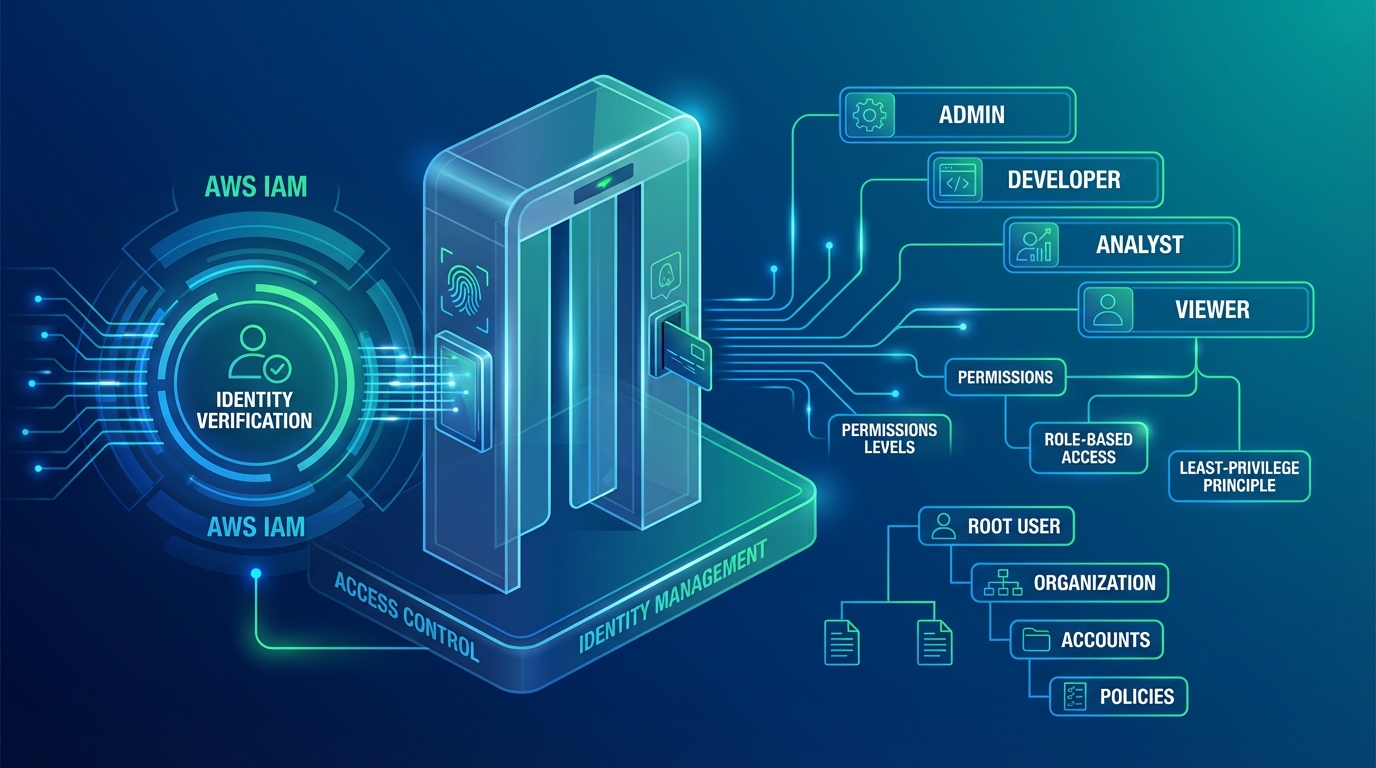
Table of Contents
AWS lifecycle notice (June 30, 2026) — Amazon Q Business is in maintenance for new customers after July 30, 2026. Net-new evaluators should use Amazon Quick Suite. Existing deployments remain supported. Full matrix: lifecycle roundup.
AWS IAM Identity Center is the AWS-native workforce identity service. It centralizes federation from Okta, Microsoft Entra ID, Google Workspace, or its own directory; provisions AWS account access through reusable permission sets; and — critically since 2023-2025 — propagates the workforce identity through to identity-aware AWS services so audit logs, row-level security, and per-user data-lake access work against the actual human, not a service role.
This guide is for security architects, platform engineers, and IT teams responsible for AWS access. It covers federation setup, permission-set design, attribute-based access control (ABAC) at AWS Organization scale, identity propagation into Q Business / Redshift / QuickSight / S3 Access Grants, and the migration playbook off long-lived IAM users.
Need help replacing IAM users with Identity Center across an Organization? FactualMinds runs IAM modernization engagements alongside Control Tower, ABAC tag governance, and the propagation rollout. See our cloud security service or talk to our team.
Why Identity Center is the workforce-identity baseline
The “long-lived IAM user with an access key” pattern is the most common AWS security finding in 2026 audits. The reasons:
- Long-lived credentials accumulate. People change roles, leave the company, share keys with contractors. The keys outlive the access need.
- IAM users do not federate. There is no clean way to enforce MFA, password rotation, or termination-time revocation through your existing IdP.
- Audit logs show the IAM user. There is no propagated human identity downstream — Redshift queries appear under the BI tool’s service role, S3 access shows the application role, GuardDuty findings are anonymous.
- Compliance frameworks demand identity provenance. SOC 2 CC6.1, HIPAA §164.312(d) “person or entity authentication”, PCI DSS Requirement 8 “identify users”, DORA Article 9, ISO 27001:2022 A.5.16 — all expect the audit trail to identify who, not what.
Identity Center fixes all four. The IdP owns the workforce-identity lifecycle (joiners, movers, leavers); Identity Center issues short-lived AWS credentials on every session; session-tagged identity propagates through to data-aware services so audit logs show the human; deprovisioning is automatic on IdP departure.
Architecture overview
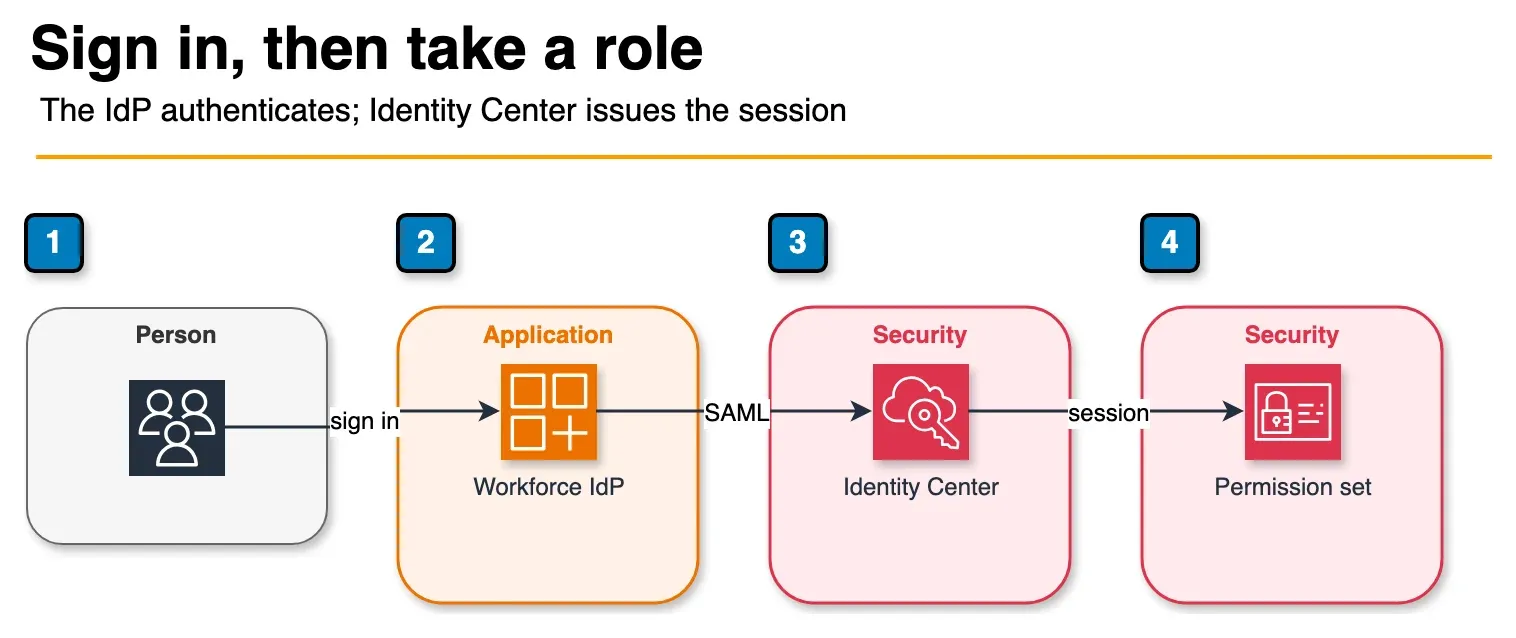
Figure: console access in the article. The person authenticates at the workforce IdP. Identity Center accepts that assertion and the person picks an account and permission set. The session is short-lived. Open the draw.io source.
Identity Center components:
- Instance — your AWS Organization-level Identity Center deployment. One per Organization; can be account-scoped (the AWS Organizations “delegated admin” pattern) or Organization-wide.
- Identity source — where Identity Center reads users and groups from. Three options: an external SAML 2.0 IdP with SCIM (Okta, Entra ID, Google Workspace, OneLogin, JumpCloud), AWS Managed Microsoft AD, or the Identity Center’s own directory.
- Permission sets — reusable AWS access definitions. Each permission set bundles AWS-managed and customer-managed policies, an optional inline policy, a session duration (up to 12 hours), and optional permissions boundary.
- Account assignments — the mapping of (group or user) × permission set × AWS account.
- Application assignments — Identity Center can also federate into AWS-managed applications (Q Business, IAM-aware applications) and arbitrary SAML 2.0 applications.
Request flow for AWS Console access:
- User opens the AWS access portal (https://your-org.awsapps.com/start).
- Identity Center redirects to the IdP for authentication.
- IdP authenticates the user (password + MFA) and returns a SAML assertion.
- Identity Center validates the assertion and shows the user the AWS accounts and permission sets they have access to.
- User clicks an account/permission-set tile.
- Identity Center calls STS:AssumeRoleWithSAML to issue short-lived credentials and either redirects to the AWS Console or returns a CLI access string (
aws sso loginflow). - CloudTrail logs the AssumeRole event with the user’s principal name, IdP, and session tags.
Step 1: Configure the identity source
Pick the IdP that matches your workforce identity strategy. For most enterprises this is Okta or Entra ID.
For Okta:
# Identity Center accepts the SAML 2.0 metadata XML from Okta
aws sso-admin update-instance-access-control-attribute-configuration ...
# Then on the Okta side, add the AWS IAM Identity Center app from the Okta catalog and configure SCIM
The two-side dance — SAML for authentication, SCIM for provisioning — is well-documented for both Okta and Entra ID and takes a few hours end-to-end. Test with a non-production Identity Center instance first.
For Entra ID:
The configuration uses the “AWS IAM Identity Center” enterprise application from the Entra ID gallery. Enable user and group provisioning via SCIM; map the Entra ID groups you want to use for AWS access; assign users to those groups.
Avoid the Identity Center directory for production. It works but offers a worse identity lifecycle than a real IdP. Use it only for proof-of-concept environments.
Step 2: Design permission sets
Permission sets are the AWS-side primitive for “what can this user do.” Best practices:
- One permission set per role, not per person. Reuse permission sets across many account assignments.
- Layer AWS-managed policies first, customer-managed policies second. AWS-managed policies (like
ReadOnlyAccess,PowerUserAccess,AdministratorAccess) are versioned and updated by AWS for new services; customer-managed policies fill the gaps. - Cap session duration aggressively. 12 hours is the maximum; 4-8 hours is appropriate for production; 1 hour for sensitive break-glass roles.
- Use permissions boundaries for elevated permission sets. A permission set that includes
iam:*should always carry a permissions boundary preventing self-escalation. - Inline policies sparingly. They drift; prefer customer-managed policies.
A typical permission-set library:
| Permission set | AWS-managed | Customer-managed | Session |
|---|---|---|---|
ReadOnlyAccess | ReadOnlyAccess | n/a | 8h |
PowerUser | PowerUserAccess | n/a | 4h |
Engineer | n/a | engineer-policy (workload-scoped) | 4h |
DataEngineer | n/a | data-engineer-policy (lake + Redshift) | 4h |
BillingViewer | AWSBillingReadOnlyAccess | n/a | 8h |
Admin | AdministratorAccess | + permissions boundary | 1h |
Assign permission sets to (group, account) tuples. Avoid (user, account) — group-based assignments survive personnel changes cleanly.
Step 3: Implement ABAC with session tags
Permission sets carry session tags propagated from IdP attributes through SCIM. Map the IdP attribute (e.g. costCenter, team, environment_access) to a session tag, and write Condition statements in policies that reference aws:PrincipalTag/<tag>.
Example policy granting access to resources tagged with the same Environment as the principal:
{
  "Effect": "Allow",
  "Action": ["s3:GetObject", "s3:PutObject"],
  "Resource": "arn:aws:s3:::data-lake/*",
  "Condition": {
    "StringEquals": {
      "aws:ResourceTag/Environment": "${aws:PrincipalTag/Environment}"
    }
  }
}
A user with Environment=prod session tag can access resources tagged Environment=prod only. A user with Environment=dev accesses dev resources only. New environments get their own tag — no policy change needed.
Step 4: Enable identity propagation
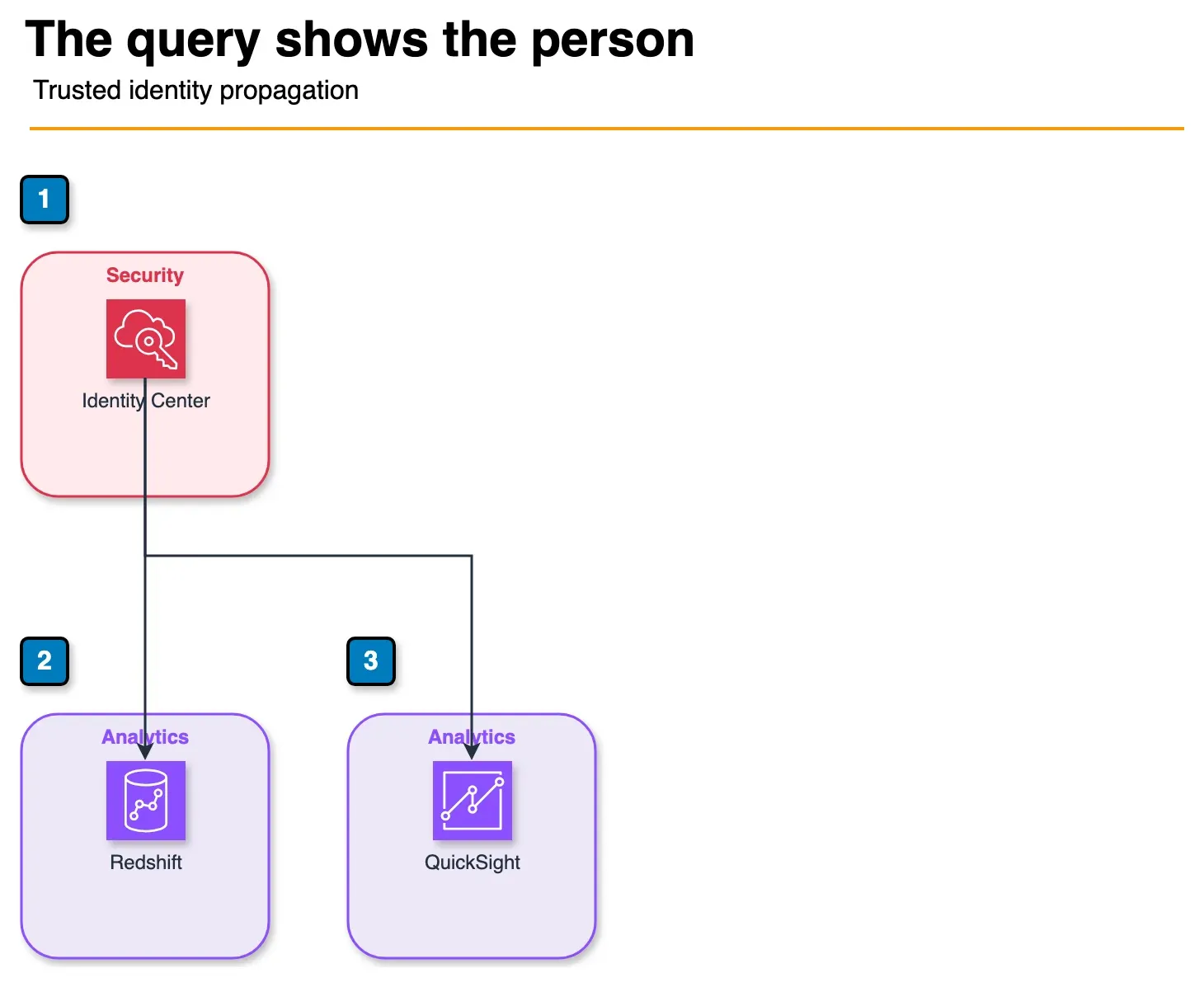
Figure: identity propagation in the article. Identity Center is the trusted issuer. Redshift and QuickSight can evaluate the person, not only a service role. The article also names S3 Access Grants, Glue, and Amazon Q. Open the draw.io source.
Identity propagation is the high-value 2024-2026 feature. Configure Identity Center as a “trusted token issuer” for the downstream AWS-aware service:
- Amazon Q Business — Identity Center identity is the unit of access; document permissions evaluate against the user, RAG retrieval scopes to documents the user can read.
- Amazon Redshift — federated identity-aware queries; row-level security policies evaluate against the user; CloudTrail and Redshift audit logs show the user.
- Amazon QuickSight — Enterprise edition supports IAM Identity Center authentication; row-level security uses the user identity.
- Amazon S3 Access Grants — per-user S3 prefix permissions enforced at the data-plane via STS:AssumeRoleWithIdentityContext; no per-user IAM role per user.
- AWS Glue — interactive sessions and jobs run with the propagated user identity.
- Amazon Q Developer — propagated identity for line-of-business attribution.
The configuration pattern:
- Confirm Identity Center is the identity source for the downstream service (in the service console: “Connect to IAM Identity Center”).
- Enable “Trusted Identity Propagation” on the connection.
- Configure the application-side mapping (e.g. Redshift database user mapped to Identity Center user; QuickSight namespace mapped to Identity Center group).
- Verify CloudTrail logs show the user-name, not just the assumed-role ARN.
The audit-log delta is large: a Redshift query that previously appeared as arn:aws:sts::111122223333:assumed-role/QuickSightServiceRole/QuickSightSessionId now appears with the user name, the Identity Center session ID, and the permission set used.
Step 5: Migrate off long-lived IAM users
For an existing AWS Organization with established IAM users:
- Inventory. List every IAM user. Tag with
human / programmatic / unknown. - Replace human IAM users. Each human gets an IdP account → Identity Center group → permission set assignment. Once the human can do their work through Identity Center, delete the IAM user.
- Replace programmatic IAM users with OIDC federation. GitHub Actions, GitLab CI, Bitbucket Pipelines, CircleCI, Buildkite — all support OIDC federation into AWS. Configure an IAM role with a trust policy that accepts the OIDC token; the CI workflow assumes the role with no long-lived key.
- Replace programmatic IAM users for AWS-internal services with IAM roles. Lambda, ECS task, EC2 instance roles — they should never be a long-lived IAM user.
- Replace third-party SaaS IAM users where possible. Many third-party tools now support OIDC or IAM cross-account-role assumption. Where they do not, the IAM user is the rare legitimate case — keep it, rotate its access key on a tight schedule (90 days), and document why.
- IAM Access Analyzer. Run the external access analyzer at the Organization level. It surfaces remaining IAM users with broad permissions — drive each to remediation.
Typical outcome at the end of a 6-12 month migration: zero human IAM users, single-digit programmatic IAM users (legacy SaaS), and 100% workforce access through Identity Center.
Common pitfalls
- Treating Identity Center as just a console login portal. The real value since 2023 is identity propagation; if you stop at the Console SSO experience, you miss the bigger story — per-user audit trails, row-level security, and S3 Access Grants all depend on it.
- Permission-set explosion. Some teams end up with 50+ permission sets for trivial differences. Consolidate around RBAC roles and use ABAC for the per-team / per-environment differentiation.
- Not enforcing MFA at the IdP. Identity Center honors the IdP’s MFA — make sure the IdP requires MFA for AWS access. AWS-side, the new “MFA for root” requirement is unrelated and applies separately.
- Skipping SCIM. Manual user sync is the source of most “the IT team forgot to deprovision” findings. SCIM-provisioned groups and users sync automatically on the IdP-side change.
- Not propagating session tags. Identity Center session tags only flow downstream if you grant
sts:TagSessionin the assumed-role trust policy. Forgetting this breaks ABAC silently.
Where to go next
- Read the AWS IAM Identity Center User Guide and the trusted identity propagation guide.
- Pair with AWS Verified Access for workforce app access using the same Identity Center identity.
- Pair with AWS IAM best practices for the cross-cutting IAM patterns.
- Browse the AWS Security & Compliance hub and the IAM & Access Control subtopic.
Identity Center is the workforce-identity backbone for the next decade of AWS work. The migration is a multi-month effort but pays back continuously through reduced audit findings, cleaner deprovisioning, and the per-user audit trail that compliance frameworks now expect by default.
Frequently asked questions
When do we need IAM Identity Center vs Amazon Cognito?
What is identity propagation and why does it matter?
How does Identity Center federation from Okta or Entra ID actually work?
Can ABAC actually work in production with Identity Center?
What about long-lived IAM users — should we delete them all?

Agentic AI & Cloud Security
Works on making teams more productive with agentic AI. Writes the FactualMinds guides on AWS security and compliance: identity, threat detection, data protection, and audit readiness, the controls AI agents need before they touch production systems.