AWS EBS Encryption and Snapshot Hygiene: Default Encryption, Public Snapshot Prevention, and KMS Key Lifecycle
Quick summary: EBS default encryption per Region, CMK lifecycle, block public snapshots. July 2026 baseline checklist — retrofit is expensive.
Key Takeaways
- EBS default encryption per Region, CMK lifecycle, block public snapshots
- July 2026 baseline checklist — retrofit is expensive
- EBS encryption is cheap to enable and expensive to retrofit
- First-party benchmark (illustrative): a SaaS with 200 unencrypted volumes discovers the gap in a Security Hub finding — cutover is measured in maintenance windows, not minutes
- Reproduce this: EBS + KMS baseline checklist Counter-case: enabling default encryption in only leaves every other Region open
Table of Contents
EBS encryption is cheap to enable and expensive to retrofit. As of July 2026, the baseline is still: encryption by default in every Region, a customer-managed CMK as the default key, block public access for EBS snapshots, and a KMS deletion window you will not regret (prefer 30 days). Existing unencrypted volumes are not fixed by flipping the default — they need snapshot → encrypted copy → restore/swap.
First-party benchmark (illustrative): a SaaS with 200 unencrypted volumes discovers the gap in a Security Hub finding — cutover is measured in maintenance windows, not minutes.
Reproduce this: EBS + KMS baseline checklist
Counter-case: enabling default encryption in us-east-1 only leaves every other Region open.
EBS Encryption by Default: The One-Click Control
Every AWS account in every region has an account-level setting: EBSEncryptionByDefault. When enabled, every new EBS volume and every new snapshot is automatically encrypted with the KMS key you designate — no per-volume configuration, no developer remembering to tick a box, no Terraform parameter that someone forgot.
# Check the current state
aws ec2 get-ebs-encryption-by-default --region us-east-1

# Enable
aws ec2 enable-ebs-encryption-by-default --region us-east-1

# Set the default key (CMK recommended for production)
aws ec2 modify-ebs-default-kms-key-id \
    --kms-key-id alias/ebs-default-cmk \
    --region us-east-1
Enable in every region, every account. Use a stack set or a Terraform module so this is part of the account-baseline you apply at provisioning time, not a setting you remember to flip later. The setting is per-region — enabling it in us-east-1 does nothing for a workload in eu-west-1.
Lock it on with an SCP so a misguided cost-saving experiment cannot turn it off:
{
  "Effect": "Deny",
  "Action": ["ec2:DisableEbsEncryptionByDefault"],
  "Resource": "*"
}
A single cleanup script that flips this setting across an organization closes one of the most common compliance findings in a single afternoon — and unlike most security work, every existing workload keeps running unchanged because the setting only affects new volumes.
Re-encrypting Legacy Unencrypted Volumes
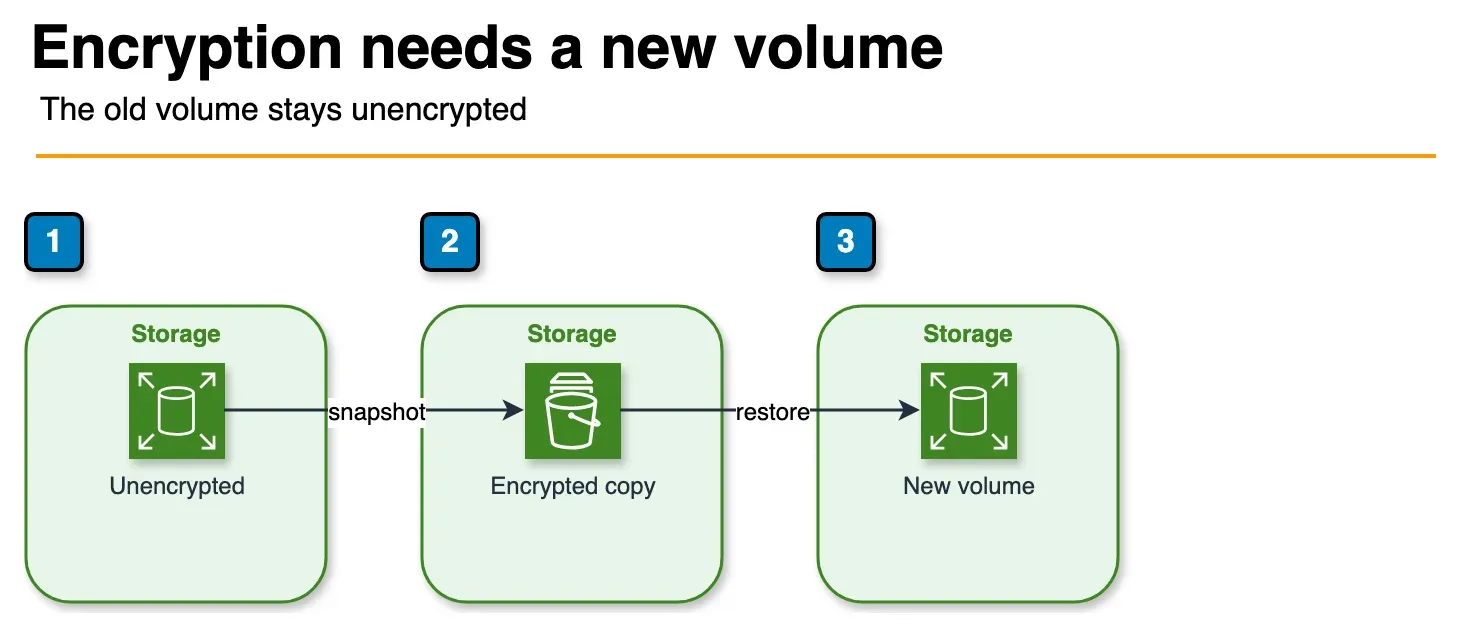
Figure: re-encryption in the article. Snapshot the unencrypted volume, copy that snapshot with a KMS key, and create a new volume. Swap it while the instance is stopped. The sample snapshot id is not shown. Open the draw.io source.
EBS encryption cannot be added to an existing volume in place. If you have an unencrypted volume in production today, the only way to fix it is the snapshot-copy-restore dance:
- Take a snapshot of the unencrypted volume.
- Copy the snapshot with
--encryptedand the destination KMS key — this produces an encrypted snapshot. - Create a new volume from the encrypted snapshot.
- Stop the instance, detach the unencrypted volume, attach the encrypted volume, restart.
# Step 2: encrypted snapshot copy
aws ec2 copy-snapshot \
    --source-snapshot-id snap-old-unencrypted \
    --source-region us-east-1 \
    --destination-region us-east-1 \
    --encrypted \
    --kms-key-id alias/ebs-default-cmk \
    --description "Encrypted copy of snap-old-unencrypted"
Plan for downtime. Step 4 requires stopping the instance. For Multi-AZ workloads (RDS, Aurora, ECS with rolling deployments), the downtime is per-instance, not per-service. For single-instance workloads, schedule a maintenance window.
Track legacy volumes with Config. The Config rule encrypted-volumes flags unencrypted EBS volumes. Pair it with an EventBridge target that opens a Jira ticket so you have a backlog rather than a spreadsheet.
Default Key vs Customer-Managed Key
The EBS default encryption setting accepts either the AWS-managed aws/ebs key or a customer-managed CMK. The choice mirrors the SSE-S3 vs SSE-KMS decision for S3 — same trade-offs, different service.
| Feature | AWS-managed aws/ebs | Customer-managed CMK |
|---|---|---|
| Configuration | Zero | Create key + alias |
| Cost | Free | $1/month per key + API calls |
| Key policy | AWS-controlled | You author it |
| Cross-account snapshot sharing | Not supported | Supported |
| CloudTrail records every use | Yes | Yes |
| Granular access control | No | Yes (per-grant, per-condition) |
| Required for some compliance frameworks | No | Yes (FedRAMP High, some HIPAA architectures) |
Recommendation: for any account that holds regulated data or that ever needs to share snapshots cross-account, use a CMK from day one. The cost is trivial and migrating later means re-encrypting every volume.
Snapshot Sharing Safety: Block Public Snapshots
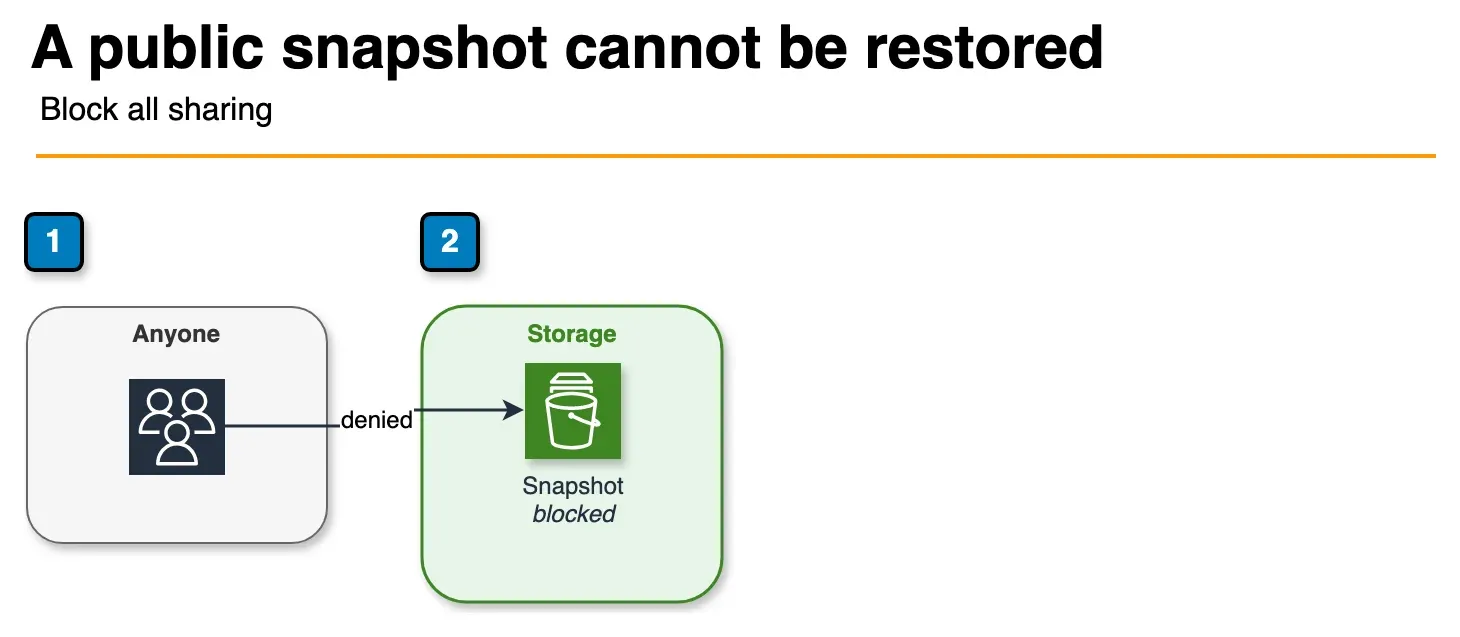
Figure: snapshot block public access in the article. block-all-sharing stops a new public share and restore of a snapshot that is already public. A Config rule flags a snapshot shared with everyone. The sample region is not shown. Open the draw.io source.
EBS snapshots can be shared with specific AWS accounts or, dangerously, with all — making them publicly restorable by any AWS account in the world. Public snapshots have leaked customer databases, source code, and secrets every year for the past decade.
AWS provides a single account-level switch to make this structurally impossible: block public access for snapshots.
aws ec2 enable-snapshot-block-public-access \
    --state block-all-sharing \
    --region us-east-1
The block-all-sharing mode prevents any new public sharing and blocks existing public snapshots from being restored — the strongest setting. Two weaker modes exist (block-new-sharing, unblocked) but there is no production reason to choose them.
Detection and remediation:
- Config rule:
ebs-snapshot-public-restorable-checkflags any snapshot currently shared withall. - SCP: deny
ec2:ModifySnapshotAttributewhen the modification addsGroup: all:
{
  "Effect": "Deny",
  "Action": ["ec2:ModifySnapshotAttribute"],
  "Resource": "*",
  "Condition": {
    "StringEquals": {
      "ec2:Add/group": "all"
    }
  }
}- EventBridge auto-remediation: when the rule flags a public snapshot, run a Lambda that calls
modify-snapshot-attributeto remove the public group within seconds, before an attacker can clone it.
KMS Key Lifecycle and Deletion Safety
The KMS key that encrypts your EBS volumes (and CloudTrail logs, and S3 objects, and RDS storage) is the single most important key in the account — losing it means losing access to every encrypted artifact it ever protected. AWS deliberately makes deletion difficult, but operators routinely defeat the safeguards by accident.
The 7–30 Day Waiting Period
Calling kms:ScheduleKeyDeletion does not delete the key. It puts the key in PendingDeletion state for a configurable waiting period (7 to 30 days, default 30). During the waiting period:
- The key is unusable — encrypt and decrypt operations fail
- Any service that depends on the key (EBS, CloudTrail, S3, RDS) starts failing
- An operator with
kms:CancelKeyDeletioncan restore the key and resume normal operation
# If you discover the deletion in time:
aws kms cancel-key-deletion --key-id alias/critical-cmk
Always set the waiting period to 30 days, not 7. The marginal “cost” is zero — keys in PendingDeletion do not bill — and the marginal benefit is three extra weeks of recovery window. Most accidental schedules are caught within days, but a key scheduled the morning of an extended team holiday at 7 days is a real incident.
Automatic Key Rotation
Every CMK should have automatic rotation enabled. AWS rotates the key material on a configurable schedule between 90 days and 7 years (default: annually) without changing the key ID — every existing reference, every encrypted artifact, every IAM policy keeps working. There is no operational reason not to enable rotation.
aws kms enable-key-rotation --key-id alias/ebs-default-cmk
aws kms put-key-rotation-policy --key-id alias/ebs-default-cmk \
    --rotation-period-in-days 365
Rotation does not re-encrypt existing data — that would be impossible at scale. It rotates the key material so that new encryptions use the new material and old encryptions remain decryptable with the historical material AWS continues to hold. The benefit is forward security: a key material compromise affects only the data encrypted in the rotation window before the next rotation.
Deletion Safety SCPs
The most common cause of catastrophic key deletion is a privileged user who runs the wrong command on the wrong key. SCPs prevent this regardless of IAM policies in member accounts:
{
  "Sid": "DenyKeyDeletionExceptBreakGlass",
  "Effect": "Deny",
  "Action": ["kms:ScheduleKeyDeletion", "kms:DisableKey"],
  "Resource": "arn:aws:kms:*:*:key/*",
  "Condition": {
    "StringNotEquals": {
      "aws:PrincipalArn": "arn:aws:iam::111122223333:role/KmsBreakGlass"
    }
  }
}
Pair this with a CloudWatch alarm on ScheduleKeyDeletion and DisableKey API calls — the alarm should page the on-call rotation, not just open a ticket. If a break-glass action triggers it, that is by design; investigate every page.
Key Aliases as Indirection
Reference keys by alias (alias/ebs-default-cmk), not by key ID, in your application code, IaC, and policies. The alias is a stable pointer; the key ID behind it can change. If a key is compromised, you can create a new key, repoint the alias, and your applications keep working without redeployment.
Multi-Region Keys
For workloads that span regions and need cross-region disaster recovery for encrypted snapshots, use multi-region KMS keys. A multi-region primary in us-east-1 and a replica in us-west-2 share the same key material — you can decrypt in either region without a cross-region copy of the underlying ciphertext. Pre-2021 architectures required a snapshot copy with re-encryption to move encrypted data; multi-region keys eliminate that step.
Putting It Together: A Production Baseline
Account-level baseline (apply via stack set, every region):
  ✓ EBS encryption by default = enabled
  ✓ Default key = customer-managed CMK
  ✓ Block public access for snapshots = block-all-sharing
  ✓ Config rules: encrypted-volumes, ebs-snapshot-public-restorable-check
  ✓ SCPs: deny disable-default-encryption, deny modify-snapshot-attribute Group=all
  ✓ SCPs: deny ScheduleKeyDeletion outside break-glass

Every CMK:
  ✓ Automatic key rotation enabled (365 days)
  ✓ Key alias used in IaC and policies
  ✓ Key policy grants minimum required principals
  ✓ Multi-region key if cross-region DR is required
  ✓ CloudWatch alarm on ScheduleKeyDeletion / DisableKey

Every legacy unencrypted volume:
  ✓ Tracked in a backlog (Config rule + EventBridge → Jira)
  ✓ Re-encrypted via snapshot-copy-restore in a scheduled window
For deeper KMS topics — including post-quantum cryptography with ML-KEM and ML-DSA for hybrid TLS and signatures — see the post-quantum KMS guide. The lifecycle and deletion safety patterns in this post apply to PQC keys as well.
Common Mistakes
Mistake 1: Encrypting in us-east-1 Only
Default encryption is per-region. The setting in your home region does nothing for the workload your team launched in eu-central-1 last quarter. Enable in every region, lock with an SCP.
Mistake 2: Forgetting Snapshots Inherit Source Encryption
Copying an unencrypted snapshot to a region with default encryption enabled does not encrypt it unless you pass --encrypted explicitly to copy-snapshot. Default encryption applies to new snapshots from encrypted volumes, not to copy operations on existing unencrypted snapshots. Always pass --encrypted on cross-region snapshot copies.
Mistake 3: Using the AWS-Managed Key for Production
aws/ebs works fine until you need to share a snapshot cross-account, change who can decrypt, or audit access. By then, every existing snapshot is locked to a key you don’t control. Use a CMK from day one.
Mistake 4: 7-Day Deletion Window
The default for ScheduleKeyDeletion is 30 days; some teams shorten it to 7 to “clean up faster.” A 7-day window over a holiday period is a 5-business-day window. Use 30 days, always.
Mistake 5: No Automated Detection of Public Snapshots
Block public access for snapshots is one switch. The Config rule that detects existing public snapshots is one rule. Skipping either is the difference between a non-incident and a press release. Both, in every account, every region.
What to Do This Week
- Enable EBS encryption by default + CMK in every Region you use; SCP-lock disable.
- Turn on block public access for EBS snapshots (prefer block all).
- Inventory unencrypted volumes; backlog the checklist.
What This Post Doesn’t Cover
Cross-account snapshot sharing key policies in depth and PQC — see ML-KEM / ML-DSA.
Security assessments · Contact us
Frequently asked questions
How do I enable EBS encryption by default in AWS?
How do I re-encrypt existing unencrypted EBS volumes?
How do I prevent public EBS snapshots account-wide?
What waiting period should I set when scheduling a KMS key for deletion?
How often should AWS KMS keys rotate?

Agentic AI & Cloud Security
Works on making teams more productive with agentic AI. Writes the FactualMinds guides on AWS security and compliance: identity, threat detection, data protection, and audit readiness, the controls AI agents need before they touch production systems.