AWS CloudTrail Production Setup: Multi-Region Trails, Log File Validation, and CloudTrail Lake
Quick summary: Production CloudTrail: multi-region org trails, log validation, CMK, Lake + Athena. July 2026 checklist — Event History is not enough.
Key Takeaways
- July 2026 checklist — Event History is not enough
- CloudTrail is the API audit system of record
- As of July 2026, Event History (≈90 days of management events) is still not a production audit trail — no integrity digests, no long retention you control, no reliable export/SIEM path
- First-party benchmark (illustrative): an org with 20+ accounts that only had Event History typically cannot answer “who ’d this PHI bucket six months ago
- Why Event History Is Not Your Audit Trail Every AWS account has CloudTrail Event History on by default — 90 days of management events viewable in the console
Table of Contents
CloudTrail is the API audit system of record. As of July 2026, Event History (≈90 days of management events) is still not a production audit trail — no integrity digests, no long retention you control, no reliable export/SIEM path. Production means a multi-region organization trail (or Lake event data store), log file validation, SSE-KMS with a CMK, and a query path (Lake SQL and/or Athena on Lake).
First-party benchmark (illustrative): an org with 20+ accounts that only had Event History typically cannot answer “who GetObject’d this PHI bucket six months ago?” — data events + durable storage close that gap.
Reproduce this: CloudTrail production checklist
Counter-case: management-only trails miss object-level exfiltration — enable data events where it matters.
Why Event History Is Not Your Audit Trail
Every AWS account has CloudTrail Event History on by default — 90 days of management events viewable in the console. Reading this and thinking you have audit logging is the first mistake.
Event History limitations:
- Only management events (no S3 data events, no Lambda invocation events)
- Only 90 days of retention
- No log file integrity validation
- No export to S3, no integration with SIEM, no long-term storage
- Per-account, per-region — no organization-wide view
A production deployment requires a configured trail (or a CloudTrail Lake event data store, covered later) that persists logs to your control, with retention measured in years, not weeks.
Trail Architecture
Multi-Region by Default
A trail can be single-region or multi-region. There is no good reason to deploy a single-region trail in production.
A single-region trail captures events only for that region. Global service events (IAM, STS, CloudFront, Route 53) go to the trail’s home region — but if an attacker pivots into a region you don’t operate in, you’ll see nothing. Reconnaissance against unused regions is a documented attack pattern: the attacker gets a free survey of your account because nobody is watching.
A multi-region trail captures events for every region, including future regions AWS adds after the trail is created. Set IsMultiRegionTrail: true and IsLogging: true and you’re covered for both today’s regions and tomorrow’s.
Organization Trails for Multi-Account Estates
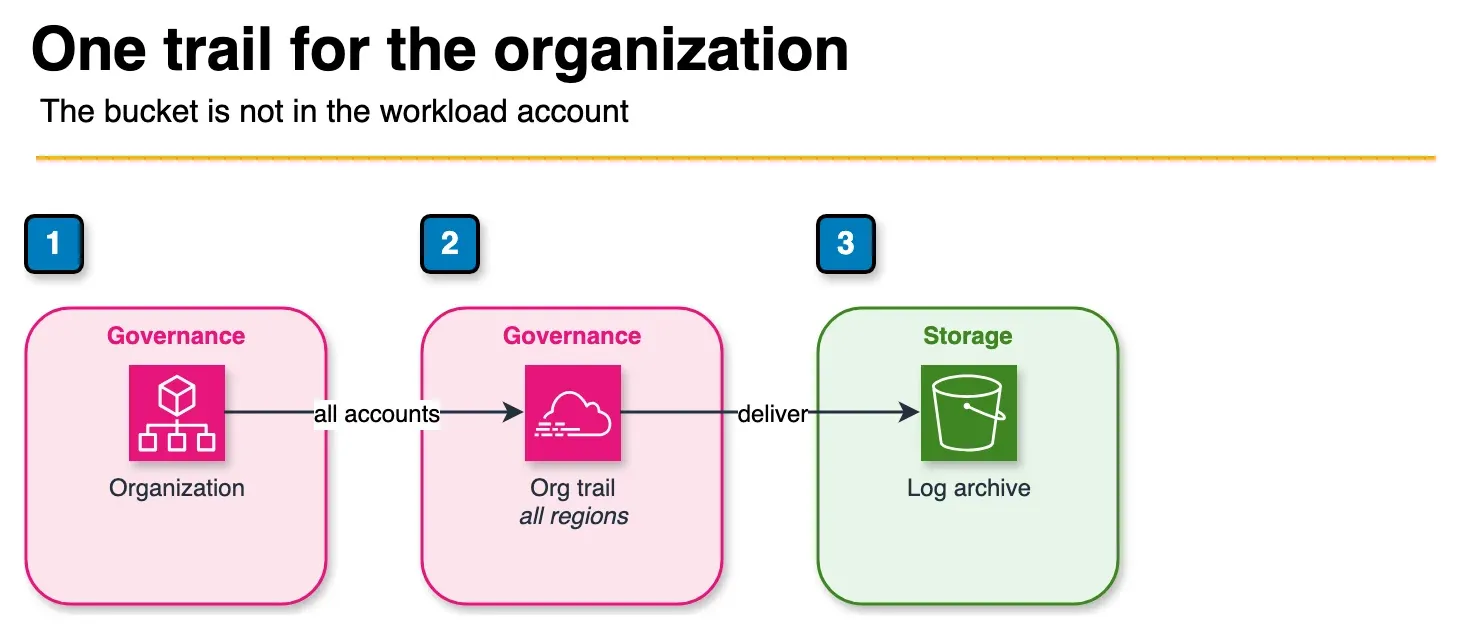
Figure: the organization trail in the article. One multi-region trail records every account and writes to a bucket in the log archive account. Member accounts cannot change that trail. No account id or bucket name is shown. Open the draw.io source.
If you run a multi-account organization, an organization trail is the cleanest pattern: one trail in the management account that captures events from every member account, delivered to a central S3 bucket in your Log Archive account.
Management Account → Organization Trail (multi-region, all accounts)
   └── Log Archive Account → S3 Bucket (centralized, immutable)
Benefits over per-account trails:
- One control point for the entire organization — disable a trail in 100 accounts with one API call (or, more importantly, prevent disablement with one SCP)
- Member accounts cannot see or modify the trail itself, only the events they generate
- New accounts added to the organization are automatically included
- Forensic queries cross account boundaries without federated authentication gymnastics
Per-account trails are still appropriate for small estates (≤3 accounts) or when an account has compliance reasons to manage its own audit trail (e.g., a regulated workload that requires the customer to control logging keys). For everyone else, the org trail is the default.
S3 Bucket Isolation
The S3 bucket that receives CloudTrail logs should not live in the account whose activity it records. If an attacker compromises an account, they should not also be able to delete the evidence of the compromise.
Production Account (workload activity)
   ──events──→ Log Archive Account (trail destination bucket, write-only from prod)
Apply a bucket policy that:
- Allows
cloudtrail.amazonaws.comto write - Denies all
s3:Delete*actions to anyone except a tightly scoped break-glass role - Requires
aws:SecureTransport: true(TLS only) - Requires
s3:x-amz-server-side-encryption: aws:kmsfor puts
The detailed bucket-hardening pattern lives in our S3 security guide — apply it here and reference it in your runbooks.
Encryption at Rest
By default, CloudTrail logs are encrypted with SSE-S3 (AES-256). For production, upgrade to SSE-KMS with a customer-managed key (CMK) — not because the default is weak, but because the CMK gives you three things SSE-S3 cannot:
- An independent access control plane. Even an IAM principal with
s3:GetObjecton the log bucket cannot decrypt the logs withoutkms:Decrypton the key. You can revoke read access to historical logs by revoking key access — without changing a single bucket policy. - CloudTrail records every key use. When the auditor asks “who read the audit logs in March,” the answer is in the CloudTrail logs of the key itself.
- Cross-account read access via key policy. Your SOC analysts can query logs from a tooling account without needing IAM roles in every workload account.
Minimal CMK key policy for a CloudTrail log key:
{
  "Version": "2012-10-17",
  "Statement": [
    {
      "Sid": "AllowCloudTrailEncryption",
      "Effect": "Allow",
      "Principal": { "Service": "cloudtrail.amazonaws.com" },
      "Action": ["kms:GenerateDataKey*", "kms:DescribeKey"],
      "Resource": "*",
      "Condition": {
        "StringEquals": {
          "AWS:SourceArn": "arn:aws:cloudtrail:us-east-1:111122223333:trail/org-trail",
          "AWS:SourceAccount": "111122223333"
        }
      }
    },
    {
      "Sid": "AllowSecurityTeamRead",
      "Effect": "Allow",
      "Principal": { "AWS": "arn:aws:iam::444455556666:role/SecurityAnalyst" },
      "Action": ["kms:Decrypt"],
      "Resource": "*"
    }
  ]
}
Enable automatic key rotation (annual). Set kms:ScheduleKeyDeletion to denied via SCP for everyone except a break-glass role — losing this key means losing the ability to read every log it ever encrypted.
Log File Integrity Validation
A trail with EnableLogFileValidation: true produces, in addition to the log files themselves, a digest file every hour containing SHA-256 hashes of the log files written in that period, signed with a private key held by AWS. The digest file is delivered to the same S3 bucket.
This lets you cryptographically verify, after the fact, that:
- No log file has been deleted (the digest references it)
- No log file has been modified (the hash matches)
- No digest has been tampered with (the signature validates)
This is not optional for compliance. SOC 2, PCI DSS, ISO 27001, HIPAA, and CIS Benchmark all expect tamper-evident audit logs. Without log file validation, you have logs that an attacker with bucket-write access could quietly modify before you noticed.
Automate verification. A signed digest sitting in S3 that nobody validates is theatre. Run the AWS CLI verification command on a schedule:
aws cloudtrail validate-logs \
    --trail-arn arn:aws:cloudtrail:us-east-1:111122223333:trail/org-trail \
    --start-time 2026-04-27T00:00:00Z \
    --end-time   2026-04-28T00:00:00Z
Wrap this in a daily Lambda function that pages the on-call rotation if any file fails to validate. The first time you find out validation is broken should not be the day you need it.
CloudTrail Lake: The Modern Queryable Layer
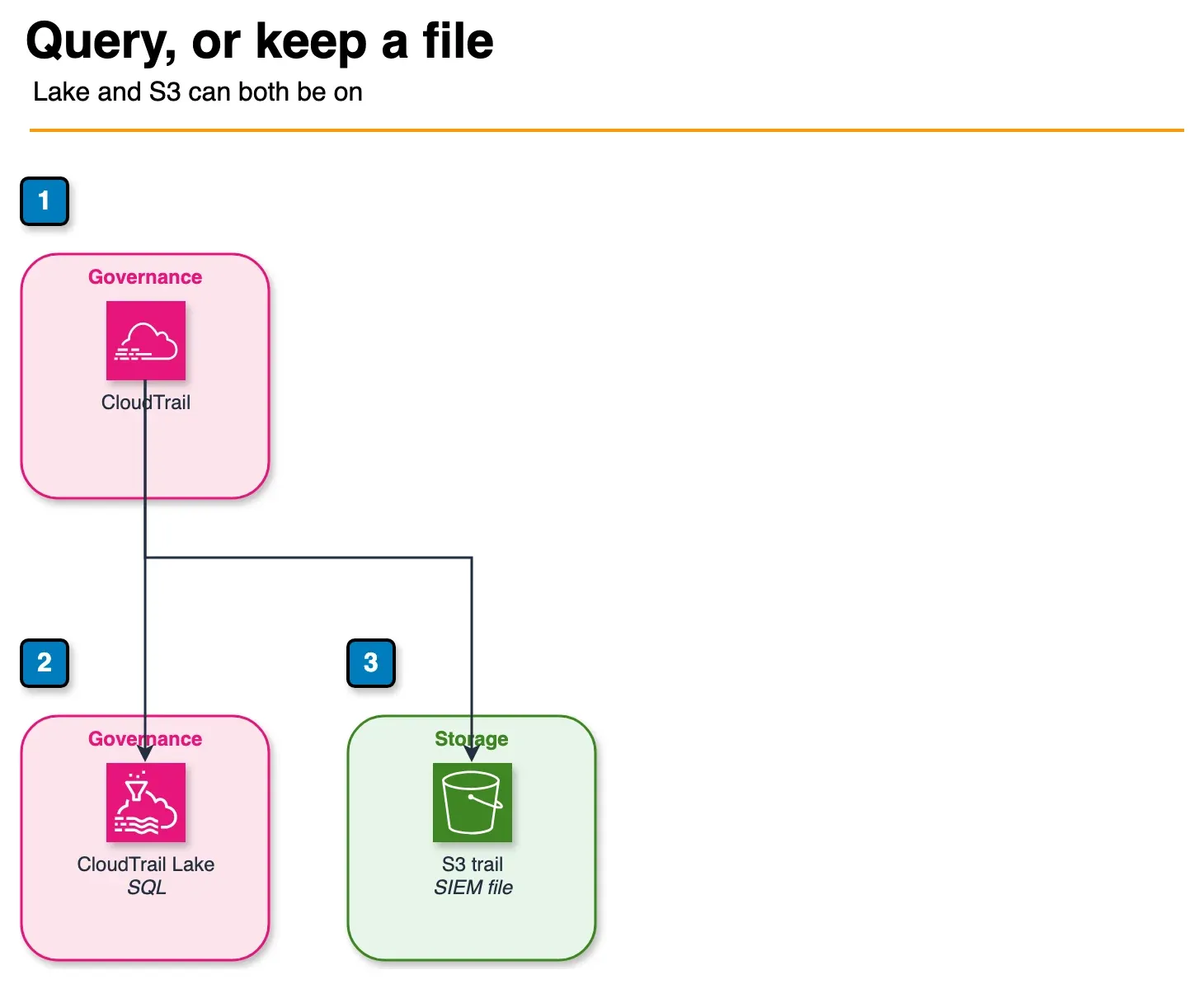
Figure: the choice in the article. CloudTrail Lake is the SQL store. Add an S3 delivery when a SIEM or a customer-controlled bucket needs the object. New deployments can start with Lake and add S3 later. They are not exclusive. Open the draw.io source.
CloudTrail Lake is a managed audit data lake built on Apache ORC. Instead of (or alongside) delivering events to S3, you create an event data store that captures the events directly into a queryable, schema-on-write store. You query it with SQL.
-- All console logins from outside our corporate IP range, last 7 days
SELECT eventTime, userIdentity.principalId, sourceIPAddress, userAgent
FROM event_data_store_id
WHERE eventName = 'ConsoleLogin'
  AND eventTime > now() - interval '7' day
  AND NOT (sourceIPAddress IN ('203.0.113.0/24', '198.51.100.0/24'));
What CloudTrail Lake gives you over S3-delivery trails:
- Up to 10 years of retention in a single store, queryable in seconds
- Federated queries across multiple AWS accounts and CloudTrail Lake stores in different regions
- No infrastructure to manage — no Athena tables to register, no Glue catalog, no partition projection
- Native cost mode — choose one-year extendable pricing for hot data or seven-year for compliance archives
- Identity-aware queries — automatic enrichment with AWS Identity and Access Management context
When to use Lake vs. an S3-delivery trail:
| Use case | Trail to S3 | CloudTrail Lake |
|---|---|---|
| Long-term forensic queries | Possible via Athena, friction | Native, fast |
| SIEM ingestion (Splunk, Datadog, Sumo) | Required pattern | Use both — Lake for analyst queries, S3 for SIEM |
| Compliance evidence (years of archives) | Yes (Glacier tiering) | Yes (7-year retention) |
| Cross-account, cross-region investigations | Federated Athena setup | One SQL query |
| Regulator-required customer-controlled bucket | Yes (S3 is the artifact) | Use both |
For new deployments, start with CloudTrail Lake as the default and add an S3-delivery trail only when a downstream system (SIEM, customer audit obligation) requires the S3 artifact. For existing S3-delivery trails, add a Lake event data store alongside — they are not exclusive, and the marginal cost is small for the operational uplift.
Preventing Disablement: Service Control Policies
A trail you can disable is a trail an attacker can disable. The first move after credential compromise is often to silence logging before the activity that triggered the alarm. SCPs at the organization level make disablement structurally impossible — even for an admin in a member account.
{
  "Version": "2012-10-17",
  "Statement": [
    {
      "Sid": "ProtectAuditTrail",
      "Effect": "Deny",
      "Action": [
        "cloudtrail:StopLogging",
        "cloudtrail:DeleteTrail",
        "cloudtrail:UpdateTrail",
        "cloudtrail:PutEventSelectors",
        "cloudtrail:DeleteEventDataStore",
        "cloudtrail:UpdateEventDataStore"
      ],
      "Resource": "*",
      "Condition": {
        "StringNotEquals": {
          "aws:PrincipalArn": "arn:aws:iam::111122223333:role/CloudTrailBreakGlass"
        }
      }
    }
  ]
}
The break-glass role lives in the management or security tooling account, has MFA-required policies, and triggers a high-severity alert every time it is assumed. The combination — denied for everyone, allowed only for an audited break-glass role — gives you both safety and operability.
Common Mistakes
Mistake 1: Single-Region Trails
The trail captures events only in us-east-1. The intern launches an EC2 instance in us-west-2 to test something. The instance is compromised. There is no record of any of it. Always set IsMultiRegionTrail: true.
Mistake 2: Log Bucket in the Same Account as the Trail
The bucket is in the production account. The same credentials that compromised production now have s3:DeleteObject on the audit log bucket. Put the bucket in a Log Archive account with isolated credentials.
Mistake 3: No Automated Digest Verification
Log file validation is enabled, digest files arrive every hour, and nobody runs the verifier. The first time it would have caught tampering is the day you discover the breach by other means. Schedule verification daily; alert on failure.
Mistake 4: Encrypting with the AWS-Managed Key
Encryption is on, but it’s the AWS-managed aws/cloudtrail key. You cannot grant cross-account read, you cannot revoke read, and the key’s events appear in a different log. Use a customer-managed CMK in your security tooling account.
Mistake 5: Trail Without Data Events
Management events tell you someone called s3:CreateBucket. Data events tell you someone called s3:GetObject on customer-data/q1.csv. For sensitive S3 buckets, KMS keys, and Lambda functions, enable data events — it costs more, but management-only logging is forensically blind to data exfiltration.
Production Checklist
- Multi-region organization trail in the management account
- S3 destination bucket in a dedicated Log Archive account
- SSE-KMS encryption with a customer-managed CMK
- Log file validation enabled
- Daily automated digest verification (Lambda + alarm on failure)
- CloudTrail Lake event data store for analyst queries
- SCPs deny
StopLogging/DeleteTrail/UpdateTrailoutside break-glass - Data events enabled for sensitive S3 buckets, KMS keys, Lambda functions
- Bucket policy denies non-TLS access, requires SSE-KMS on put
- GuardDuty ingests the trail in every region
What to Do This Week
- Confirm a multi-region org trail lands in Log Archive with validation + CMK.
- Add data events for one sensitive bucket; prove a Lake/Athena query returns them.
- Walk the production checklist and SCP-lock StopLogging.
What This Post Doesn’t Cover
Security Lake OCSF pipelines (see that post) and third-party SIEM parser packs.
GuardDuty, Security Hub, and remediation all assume a real trail exists. Security assessments · Contact us
Frequently asked questions
Why is CloudTrail Event History not enough for production audit logging?
Should a production CloudTrail be single-region or multi-region?
What is CloudTrail Lake and when should I use it?
How does CloudTrail log file integrity validation work?
Should CloudTrail logs be encrypted with a customer-managed KMS key?

Agentic AI & Cloud Security
Works on making teams more productive with agentic AI. Writes the FactualMinds guides on AWS security and compliance: identity, threat detection, data protection, and audit readiness, the controls AI agents need before they touch production systems.