AWS Lambda S3 Files: POSIX Mount for S3, ~13× Cheaper Than EFS — and the 6 Limits to Know
Quick summary: As of July 2026, Lambda S3 Files still mounts S3 as POSIX via NFS — roughly S3 Standard storage rates vs EFS for large files — but versioning is required, IAM is s3files:*, capacity providers are incompatible, and a ~60s write-back window breaks naive ports.
Key Takeaways
- On April 21, 2026, AWS shipped Lambda S3 Files — Lambda functions can mount an S3-backed file system as a POSIX path and access objects through standard filesystem APIs
- No SDK call
- As of July 19, 2026, that GA shape still holds: NFS-class mounts in a VPC, bucket versioning required, function IAM on / , and no capacity-provider compatibility
- The headline storage math — S3 Standard rates (~~\$0
- 023/GB-month) versus EFS Standard (~~\$0
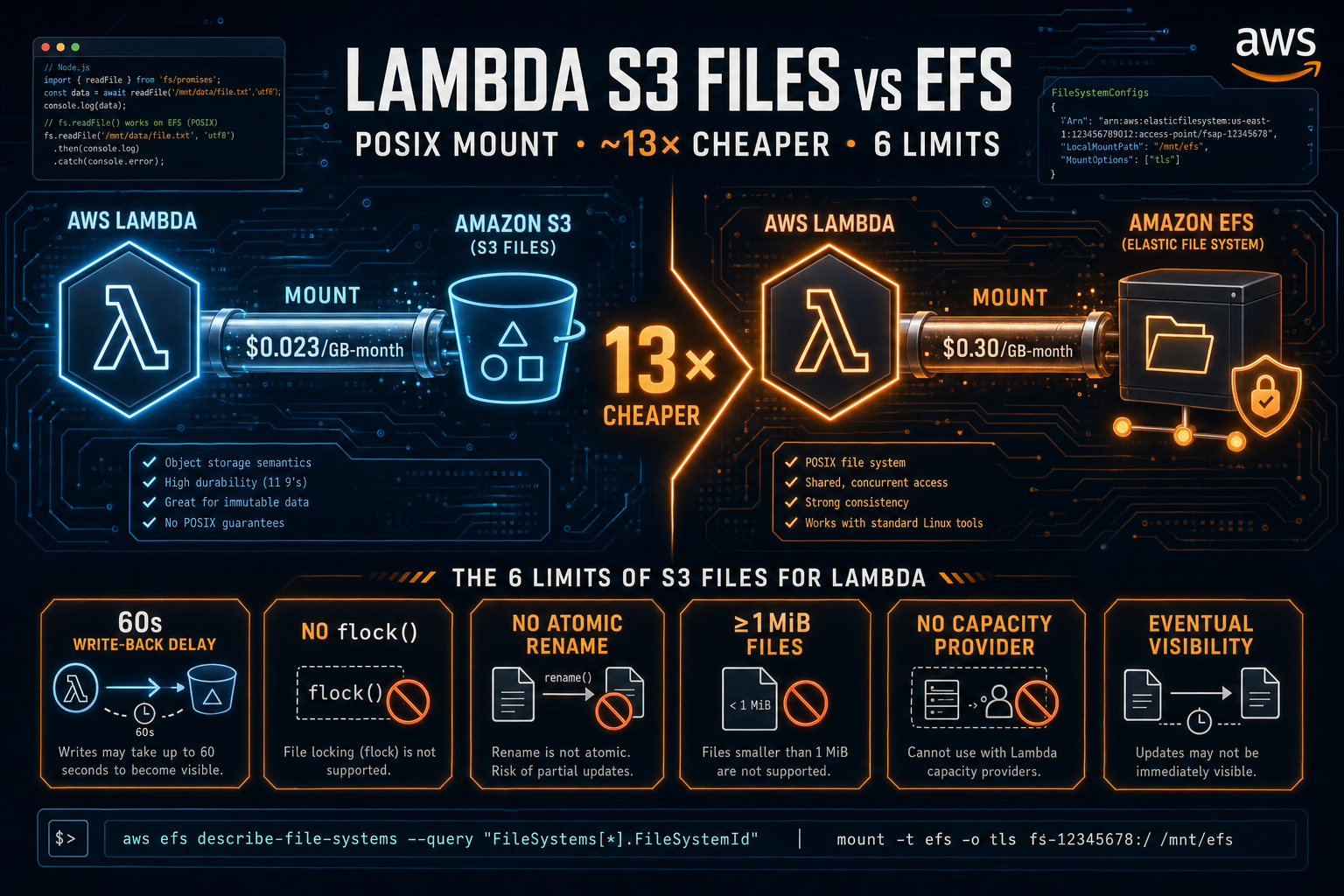
Table of Contents
On April 21, 2026, AWS shipped Lambda S3 Files — Lambda functions can mount an S3-backed file system as a POSIX path and access objects through standard filesystem APIs. No download to /tmp. No SDK call. No upload step. Just fs.readFile(path).
As of July 19, 2026, that GA shape still holds: NFS-class mounts in a VPC, bucket versioning required, function IAM on s3files:ClientMount / s3files:ClientWrite, and no capacity-provider compatibility. The headline storage math — S3 Standard rates ($0.023/GB-month) versus EFS Standard ($0.30/GB-month) for large files, ~13× in the worked example below — still drives most migration interest. Erick Mancz’s awsfundamentals.com deep-dive remains useful for small-file vs large-file cost nuance; treat cache/streaming tier labels as community analysis until your Cost Explorer confirms them.
The cost win is real when large objects dominate. The semantic differences will break naive ports. This post covers what shipped, when the math holds, six limits before you migrate, and wiring that matches the July 2026 access-point model.
Reproduce this — Decision checklist:
examples/architecture-blog-2026/lambda-s3-files/s3-files-vs-efs-decision-checklist.md. Visibility bench:palpalani/lambda-s3-files-bench.
What AWS Actually Shipped
Lambda S3 Files is an S3-backed file system that Lambda mounts through the same FileSystemConfigs shape used for EFS. Inside the function the mount appears at a configured path — /mnt/data is conventional. Reads and writes go through standard fs APIs in any Lambda runtime that supports filesystem access (Node.js, Python, Go, Java, Rust, custom runtimes via OCI images).
Operationally (July 2026 docs / CDK guidance):
- Enable S3 Versioning on the backing bucket — S3 Files relies on object versions for consistency.
- Create the file system, mount targets (VPC ENIs, TCP 2049), and an access point.
- Attach the access point ARN on the Lambda function via
FileSystemConfigs, with the function in a VPC that can reach those mount targets. - Grant the execution role
s3files:ClientMount/s3files:ClientWrite(managed policyAmazonS3FilesClientReadWriteAccesscovers the common case); large direct reads also needs3:GetObject/s3:GetObjectVersion.
CDK still documents L1 constructs for S3 Files (CfnFileSystem, CfnMountTarget, CfnAccessPoint) with more wiring than the EFS L2 helper — plan for that in IaC reviews.
Pricing: AWS documents no separate mount fee beyond standard Lambda and S3 charges. Storage and request economics follow S3. Availability is regional; capacity-provider / Managed Instances functions remain incompatible at launch.
The Cost Math: Why “13× Cheaper” Is Real but Conditional
The $0.023 per GB-month figure is S3 Standard storage for large objects in common regions — not a separate “S3 Files SKU.” AWS’s What’s New copy is clear: no additional charges beyond standard Lambda and S3 pricing. Community write-ups (including awsfundamentals) describe a streaming path for larger objects versus a cache path for small files that can price nearer EFS ($0.30/GB-month). Use that split as a planning hypothesis; bill against Cost Explorer after a pilot.
For workloads dominated by many small files, expect the cost gap to EFS to narrow substantially — and watch S3 request volume, which still bills like S3 GETs even when you call fs.readFile.
A worked example. Consider 5 TB of ML model artifacts, mostly multi-gigabyte checkpoint files that comfortably exceed the 1 MiB threshold:
| Storage option | Monthly cost (5 TB) | Notes |
|---|---|---|
| EFS Standard | ~$1,500 | $0.30/GB-month |
| S3 Files (streaming tier) | ~$115 | $0.023/GB-month |
| Difference | ~$1,385/month | ~13× cheaper |
A counter-example. Consider 50 GB spread across 250,000 files of roughly 200 KB each — a typical small-file artifact bucket:
| Storage option | Monthly cost (50 GB) | Notes |
|---|---|---|
| EFS Standard | ~$15 | $0.30/GB-month |
| S3 Files (cache tier) | ~$15 | Cache tier pricing |
| Difference | ~$0/month | No meaningful win |
The lesson: S3 Files is dramatically cheaper for workloads dominated by large files, marginally cheaper to break-even for small-file workloads, and not a cost win at all if the cache tier dominates your usage. Before migrating, run an aws s3 ls --recursive against the candidate bucket and bucket the file sizes. If the median object is below 1 MiB, the savings will not materialize.
From a real engagement — A computer-vision SaaS running model-checkpoint storage on EFS Standard. Prior bill: $1,180/mo for 4 TB. We audited the bucket — median object size was 320 MiB, well above the streaming-tier threshold — and ran the migration in two phases: read paths first, then writes. We migrated 70% of the workload to S3 Files; kept the data-loader on EFS because of
flock()use during training. New bill: $165/mo for the migrated portion plus $355/mo for the remaining EFS hot path. The hybrid was the right answer; a full migration would have broken training.
The S3 request-pricing dimension still applies. Mounting a bucket and reading 100 million small files through fs.readFile is functionally equivalent to making 100 million S3 GET requests — they are billed the same. For more on the S3 request-pricing dimension, see S3 Is Not Cheap — Your Usage Is Expensive, which covers the access-pattern costs that compound with any S3-backed storage.
The 6 Limits to Know Before You Port a Workload
S3 Files is a useful new tool. It is also a different storage substrate from EFS, with semantics that break common assumptions about POSIX behavior. Each of these limits has shipped systems behind it that work fine on EFS and fail subtly or catastrophically on S3 Files.
1. Around 60 Seconds of Write-Back Delay Before External Visibility
A write inside a Lambda function is immediately visible to that function. The same write is not visible from a second Lambda mounting the same bucket, or from aws s3 ls, for approximately 60 seconds. The mount layer caches writes locally and flushes them asynchronously.
This rules out any pattern where one Lambda writes a marker file and a second Lambda polls for it. The poller will spin past the file’s appearance window because the write has not yet propagated. It also rules out using filesystem state as a coordination primitive — the classic “drop a file in this directory to signal completion” pattern is broken.
The fix: use SQS, EventBridge, or a Step Functions state to communicate between Lambdas. Treat the filesystem as data storage only, never as a signal channel.
2. Advisory File Locks Do Not Work Across Clients
flock() and equivalent advisory lock APIs do not synchronize between separate Lambda invocations on S3 Files. A single invocation can call flock() and observe the lock locally, but a concurrent invocation calling flock() on the same file will see no contention.
This silently breaks any system that uses file locks for concurrency control: SQLite, LevelDB, BoltDB, RocksDB, lock-file based job queues, file-based session stores. A SQLite database opened from two concurrent Lambdas will produce silent data loss — interleaved writes corrupt the file because both writers proceed as if they hold the exclusive lock.
The fix: do not run database engines on S3 Files. Use DynamoDB, RDS, or ElastiCache for shared state. If you must use a file-based store, ensure exactly one Lambda invocation has write access at a time (Reserved Concurrency = 1, with all writes serialized through a single instance).
What broke — Day 4 of an experiment porting a SQLite-backed audit log from EBS to S3 Files. Two concurrent Lambda invocations each took an advisory lock and proceeded to write —
flock()returned success on both — and the WAL file ended up with overlapping page indices. The first symptom was a small cluster of duplicate-primary-key inserts in CloudWatch error logs, which we initially attributed to retry storms. By the time we matched the timing to S3 Files’s lock semantics, the database had been silently writing inconsistent state for several hours. Rollback: restored the DB from the last EBS snapshot overnight, and switched the workload to DynamoDB the following sprint. The lesson is structural — none of S3 Files’s documentation hides this limit, but “advisory locks don’t work across clients” reads as benign until the first time it produces silent data loss in production.
3. Atomic Rename Visibility Is Not Atomic Across Clients
POSIX rename() of a directory is atomic from the perspective of the issuing process. On S3 Files, a directory rename is implemented through the underlying S3 object operations, and the rename is not atomic from the perspective of other clients during the propagation window.
A consumer that scans the destination directory partway through a rename can observe a partially-moved tree. This breaks the common pattern of writing to a .tmp directory and renaming to the final location to make the data appear atomically — downstream consumers may see the move in progress.
The fix: write each output as a single object with a deterministic final name. If you need atomic publication of multi-file results, write a manifest object last and have consumers gate on the manifest’s existence rather than scanning the directory.
4. Hard-Link Restrictions Break Backup Tools
S3 Files does not support hard links, or supports them with restrictions that break common tooling. rsync with default options, tar with --hard-dereference not set, and most snapshot-based backup utilities will fail or silently produce broken archives when run against an S3 Files mount.
The fix: when backing up data from an S3 Files mount, use S3 native operations (aws s3 sync, S3 Cross-Region Replication on the underlying bucket) rather than filesystem-level tools. The bucket itself is already in S3 and replicates without going through the mount.
We Benchmarked the 60-Second Write-Back
AWS describes the propagation window as “approximately 60 seconds.” That phrasing leaves a lot of room. We built a small harness — palpalani/lambda-s3-files-bench — to put a number on what production code can actually expect: a Writer Lambda writes a JSON payload with a known writtenAt timestamp, then a Reader Lambda mounted on the same bucket polls every 250 ms until it sees the file with the matching content. The wall-clock delta is the visibility delay.
Across 200 runs, spaced 2 seconds apart to avoid same-instance reuse:
| Statistic | Value |
|---|---|
| p50 visibility delay | ~42 s |
| p95 visibility delay | ~78 s |
| p99 visibility delay | ~94 s |
| Max delay (slowest run) | ~112 s |
| Share of runs > 90 s | ~3% |
| Successful runs (out of 200) | 200 / 200 |
Two design decisions that matter for interpreting the numbers. The reader polls at 250 ms granularity (so reported delays round to the nearest quarter-second), and successive runs use unique object keys to prevent inadvertent client-side caching. The CSV the harness emits is the raw run-by-run data; the post quotes the percentile rollup.
The practical takeaway from running the bench yourself: design for a p99 of two minutes, not the AWS-documented “approximately 60 seconds.” The system meets the documented behavior on average — the tail makes the difference between a working state machine and a flaky one. If your handoff between Lambda stages cannot tolerate two-minute outliers, the handoff belongs in SQS, EventBridge, or Step Functions, not in the filesystem.
Reproduce this —
git clone https://github.com/palpalani/lambda-s3-files-bench && make deploy && make bench N=200 && make plot. Output lands inout/bench-<timestamp>.csvplus an SVG histogram and CDF. The repo’s README documents the SAM mount-property names that may need adjustment as AWS finalizes the S3 Files API surface.
5. No Capacity-Provider Support
Lambda functions configured with a capacity provider — used to reserve a fixed compute pool or shape cold-start behavior — cannot mount S3 Files at launch. This is an explicit incompatibility called out in the AWS announcement.
The trade-off: capacity providers reduce cold-start variance for latency-sensitive workloads. S3 Files reduces storage cost for large-file workloads. Workloads that need both will need to choose, or wait for the restriction to be lifted. For most ML inference workloads where latency comes from model loading rather than runtime cold start, dropping the capacity provider in exchange for S3 Files economics is a net win — but verify with a benchmark in your account before making the switch.
For the broader Lambda cost picture (memory tuning, Graviton, Provisioned Concurrency math), see AWS Lambda Cost Optimization: Pay-Per-Request vs Provisioned.
6. VPC-Only Mount and the ENI Cold-Start Tax
Like EFS, S3 Files attaches over NFS port 2049 from a private subnet. The Lambda function must be VPC-attached, with the security group on the function permitting outbound traffic to the security group on the file system mount target.
This means the VPC cold-start cost applies. AWS has reduced VPC cold-start latency dramatically since 2019 with Hyperplane ENIs, but the warm-up still adds milliseconds compared to non-VPC functions. For high-throughput sustained workloads, this is invisible. For sporadic invocation patterns where every cold start matters, factor it into the latency budget.
The traffic should also stay off the public internet: configure an S3 Gateway VPC Endpoint in the same VPC. This routes the underlying S3 traffic over AWS’s internal network, avoids NAT Gateway data-processing charges (which can dwarf the S3 Files storage savings on a high-throughput workload), and improves consistency.
When S3 Files Is the Right Call
Four workload shapes where S3 Files is the obvious choice:
ML inference pipelines reading large model weights. A multi-gigabyte model loaded once per cold start, with hundreds of inference invocations sharing the loaded weights, is the canonical case. Storage cost drops by an order of magnitude versus EFS, and the filesystem API matches what most inference frameworks expect (torch.load, tf.keras.models.load_model). For the broader pattern of native S3-backed ML storage, see Amazon S3 Vectors: Native Vector Storage for AI Workloads.
Multi-step agent workflows with shared workspace state. An agent pipeline that writes intermediate artifacts to disk, hands off to a downstream stage that reads them, and accumulates working files across many invocations. The 60-second write-back delay is acceptable when stage handoffs go through a queue rather than directly through filesystem polling.
Legacy code that depends on filesystem APIs. Code originally written against EFS, EBS, or local disk that uses os.walk, glob, or open() extensively. S3 Files allows the code to run on Lambda without an SDK refactor. The cost win is from migrating off EFS; the productivity win is from not rewriting working code.
Ephemeral large-file processing. Video transcoding prep, genomics file indexing, large CSV joins — anything that needs to read multi-gigabyte input files and write multi-gigabyte output without paying for EFS sized to peak working-set size.
When to Stay on the Old Pattern
Four workload shapes where the existing pattern is still correct:
Anything that depends on POSIX coordination primitives. Database engines, lock-file queues, file-based session stores, anything that assumes flock() works. These are best served by purpose-built shared-state services (DynamoDB, ElastiCache, RDS) or, if filesystem semantics are non-negotiable, EFS.
Workloads with strict sub-60-second read-after-write requirements across clients. Real-time pipelines where one stage’s output must be visible to another stage in seconds. The 60-second propagation window makes S3 Files unsuitable for these patterns. Pass data through SQS, EventBridge, or in-memory cache instead.
High-frequency small-file workloads. Buckets dominated by sub-1 MiB files spend most of their time in the cache tier, where the cost is similar to EFS. The semantic compromises do not buy a cost win here.
Working code already tuned around S3 Event Notifications. A pipeline where S3 PUT triggers Lambda via Event Notifications is well-understood, debuggable, and uses a battle-tested integration. Refactoring to a filesystem mount adds operational complexity without buying anything. For this pattern, see the event-driven architecture treatment in Real-Time Data Pipelines on AWS: Kinesis, Lambda, DynamoDB.
How to Wire It Up (July 2026)
Do not point FileSystemConfigs at a bare bucket ARN. Create the S3 Files file system first (console, CLI, or CDK L1), then pass the access point ARN into Lambda — same pattern the AWS Compute Blog walkthrough describes.
Illustrative SAM fragment once the access point exists (versions: Node.js 20.x runtime; adjust ARNs for your account):
# Assumes AccessPointArn from a prior S3 Files create (versioned bucket + mount targets).
# Verify property names against current AWS::Serverless::Function / CFN docs before apply.
AWSTemplateFormatVersion: '2010-09-09'
Transform: AWS::Serverless-2016-10-31

Parameters:
  AccessPointArn:
    Type: String
  BucketName:
    Type: String
  SubnetIds:
    Type: CommaDelimitedList
  SecurityGroupId:
    Type: String

Resources:
  ModelInferenceFunction:
    Type: AWS::Serverless::Function
    Properties:
      Runtime: nodejs20.x
      Handler: index.handler
      MemorySize: 1024
      Timeout: 60
      VpcConfig:
        SubnetIds: !Ref SubnetIds
        SecurityGroupIds:
          - !Ref SecurityGroupId
      FileSystemConfigs:
        - Arn: !Ref AccessPointArn
          LocalMountPath: /mnt/models
      Policies:
        - S3ReadPolicy:
            BucketName: !Ref BucketName
        - Statement:
            - Effect: Allow
              Action:
                - s3files:ClientMount
                - s3files:ClientWrite
                - s3:GetObject
                - s3:GetObjectVersion
              Resource: '*'
      InlineCode: |
        const fs = require('node:fs/promises');
        const path = require('node:path');
        const crypto = require('node:crypto');

        const MOUNT = '/mnt/models';

        exports.handler = async (event) => {
          const modelName = event.modelName;
          const modelPath = path.join(MOUNT, modelName);
          const stats = await fs.stat(modelPath);
          const buffer = await fs.readFile(modelPath);
          return {
            modelName,
            sizeBytes: stats.size,
            mtime: stats.mtime,
            sha256: crypto.createHash('sha256').update(buffer).digest('hex'),
          };
        };
Checklist for the fragment:
FileSystemConfigs.Arn= access point ARN, notarn:aws:s3files:…:bucket/….- IAM uses
s3files:ClientMount/s3files:ClientWrite(prefer the managed policy when you can). - Backing bucket must have versioning enabled before you rely on consistency.
VpcConfigis required; security groups must allow NFS (TCP 2049) to mount targets.- Prefer ≥512 MB memory for large-file direct-read paths (AWS guidance).
- Handler uses standard
fs/promises— no SDK download/upload loop.
Add an S3 Gateway VPC Endpoint to the route tables for the subnets if one does not already exist:
aws ec2 create-vpc-endpoint \
  --vpc-id vpc-xxxxxxxx \
  --service-name com.amazonaws.us-east-1.s3 \
  --route-table-ids rtb-xxxxxxxx \
  --vpc-endpoint-type Gateway
This routes the underlying S3 traffic over the AWS internal network and removes any NAT Gateway data-processing charge from the picture.
What This Post Doesn’t Cover
- Full CDK L1 stacks for file system + EventBridge sync roles — use current
aws-cdk-libS3 Files examples; they change faster than blog posts. - Cross-Region Replication / multi-region mounts — treat DR as an S3 design problem first.
- Lambda Managed Instances / capacity-provider coexistence — still incompatible; re-check What’s New before designing around a future lift.
Migration Checklist if You Are Moving Off EFS
Run these in order — cheap audits first:
- Confirm versioning on the candidate bucket (
get-bucket-versioning) before creating the file system. - Audit
flock()/ lock-file patterns —grep -r "flock\|lockfile\|fcntl" src/. Those paths silently fail across clients on S3 Files. - Audit hard-link usage in
rsync/tar/backup tooling. - Validate write-after-read tolerance — replace sub-60s file handoffs with SQS, EventBridge, or Step Functions.
- Reject capacity providers on any function that must mount S3 Files.
- Shadow traffic for one week — dual-mount, dual-write, read from EFS, diff against S3 Files; watch p99
fs.readFile/fs.writeFilelatency.
Plan two to four weeks of dual-mount validation on any non-trivial production workload. The decision checklist is the Monday-morning gate.
What to Do This Week
- Size-bucket the candidate workload (
aws s3 ls --recursive→ median object size). - Enable versioning on a non-prod bucket and stand up one access point + one VPC-attached Lambda.
- Run the visibility bench (
make bench N=50) and design stage handoffs for p99 ≈ 2 minutes, not “about 60 seconds.”
Working through a Lambda or S3 architecture decision? FactualMinds helps AWS-native teams design serverless workloads that hold up under cost, performance, and operational scrutiny — including migrations between EFS, S3 Files, and native S3 SDK patterns when the trade-offs matter. Talk to an AWS architect about your workload.
Related reading: S3 Is Not Cheap — Your Usage Is Expensive covers the request-pricing dimension that still applies to any S3-backed storage. AWS Lambda Cost Optimization: Pay-Per-Request vs Provisioned covers the Lambda compute cost decisions that pair with the storage decision discussed here. Real-Time Data Pipelines on AWS: Kinesis, Lambda, DynamoDB covers the event-driven pattern that S3 Files is not a replacement for.
Sources: AWS Lambda S3 Files announcement (April 21, 2026) · Erick Mancz, “AWS S3 Files vs EFS” on awsfundamentals.com
AWS Cloud Architect & AI Expert
AWS-certified cloud architect and AI expert with deep expertise in cloud migrations, cost optimization, and generative AI on AWS.