AWS EventBridge: Event-Driven Architecture Patterns for Production
Quick summary: A practical guide to AWS EventBridge for event-driven architectures — event buses, rules, schema discovery, cross-account patterns, and the design principles that make event-driven systems reliable.
Key Takeaways
- A practical guide to AWS EventBridge for event-driven architectures — event buses, rules, schema discovery, cross-account patterns, and the design principles that make event-driven systems reliable
- A practical guide to AWS EventBridge for event-driven architectures — event buses, rules, schema discovery, cross-account patterns, and the design principles that make event-driven systems reliable
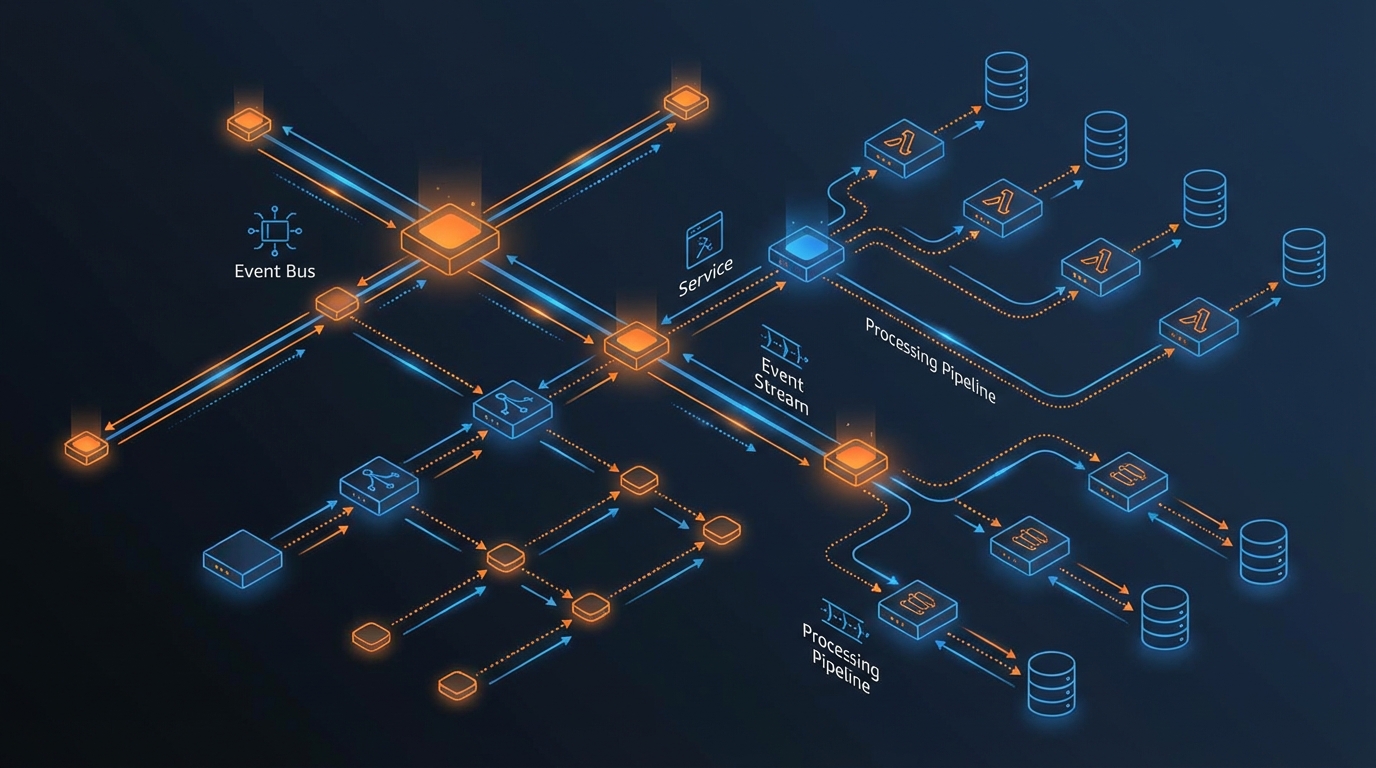
Table of Contents
When your payment service is slow, your order service times out — and so does checkout. When your notification service has a bug, it takes down the API that calls it. When you need to deploy a new version of your inventory service, you have to coordinate with every team that calls it synchronously. Tightly coupled services do not just create technical debt; they create failure modes that cascade across your system at the worst possible moment.
Event-driven architecture decouples producers from consumers — services publish events without knowing who consumes them, and consumers process events without knowing who produced them. This decoupling enables independent scaling, independent deployment, and system designs that are naturally resilient to individual component failures.
AWS EventBridge is the serverless event bus that makes event-driven architecture practical on AWS. It routes events between AWS services, SaaS applications, and your custom applications without any infrastructure to manage. Combined with Lambda and Step Functions, EventBridge forms the backbone of modern serverless systems.
Why EventBridge Over SQS or SNS
AWS offers three messaging services. Each serves a different purpose:
| Service | Model | Best For |
|---|---|---|
| SQS | Queue (point-to-point) | Decoupling producers from consumers, buffering, rate limiting |
| SNS | Pub/sub (fan-out) | Broadcasting notifications to multiple subscribers |
| EventBridge | Event bus (content-based routing) | Complex routing, filtering, transformation, cross-account events |
Choose EventBridge when:
- Events need content-based routing (route based on event fields, not just topic)
- Multiple consumers need different subsets of the same event stream
- You need built-in schema discovery and evolution
- Events come from AWS services or SaaS integrations (100+ sources supported natively)
- Cross-account or cross-Region event routing is required
Choose SQS when:
- You need guaranteed ordering (FIFO queues) or exactly-once processing
- The consumer needs to control processing rate (pull-based consumption)
- Simple point-to-point messaging without content-based routing
Choose SNS when:
- Simple fan-out to multiple subscribers (all subscribers get every message)
- You need SMS or email delivery alongside application consumers
In practice, these services complement each other. A common pattern: EventBridge routes events to different SQS queues based on content, and Lambda consumers process each queue independently.
Core Concepts
Event Buses
An event bus receives events and routes them to targets based on rules. EventBridge provides three types:
Default event bus — Receives events from AWS services automatically. CloudTrail API calls, EC2 state changes, S3 notifications, and dozens of other AWS service events arrive on the default bus without any configuration.
Custom event buses — Created for your application’s events. Isolate your application events from AWS service events for cleaner rule management and access control.
Partner event buses — Receive events from SaaS partners (Auth0, Datadog, Zendesk, PagerDuty, Stripe, Twilio, and others) without custom integration.
Best practice: Create a custom event bus per domain or bounded context in your application. This provides isolation, independent access control, and cleaner event catalogs.
Event Structure
Every EventBridge event follows a standard envelope:
{
  "version": "0",
  "id": "12345678-1234-1234-1234-123456789012",
  "source": "com.myapp.orders",
  "detail-type": "OrderPlaced",
  "account": "123456789012",
  "time": "2026-07-05T14:30:00Z",
  "region": "us-east-1",
  "resources": [],
  "detail": {
    "orderId": "ord-001",
    "customerId": "cust-123",
    "total": 99.99,
    "items": [{ "productId": "prod-001", "quantity": 2 }]
  }
}
Naming conventions:
source— Reverse domain notation identifying the producer (com.myapp.orders)detail-type— Past-tense event name describing what happened (OrderPlaced,PaymentProcessed,UserRegistered)detail— The event payload with business data
Rules and Targets
Rules match events and route them to targets. Each rule has an event pattern (what to match) and one or more targets (where to send matching events).
Event pattern examples:
Match all order events:
{
  "source": ["com.myapp.orders"]
}
Match only high-value orders:
{
  "source": ["com.myapp.orders"],
  "detail-type": ["OrderPlaced"],
  "detail": {
    "total": [{ "numeric": [">", 1000] }]
  }
}
Match orders for specific products:
{
  "detail": {
    "items": {
      "productId": ["prod-001", "prod-002"]
    }
  }
}
Supported targets (28+):
- Lambda functions
- Step Functions state machines
- SQS queues
- SNS topics
- Kinesis Data Streams
- API Gateway endpoints
- EventBridge buses (cross-account/Region)
- CloudWatch Logs
- ECS tasks
- CodePipeline
Each rule can have up to 5 targets, enabling fan-out from a single event pattern.
Production Patterns
Pattern 1: Event-Driven Microservices
Decouple microservices by communicating through events instead of synchronous API calls:
Order Service → EventBridge → Inventory Service
                            → Payment Service
                            → Notification Service
                            → Analytics Service
The Order Service publishes an OrderPlaced event. Each downstream service has a rule matching that event and processes it independently. Adding a new consumer (e.g., a Loyalty Points Service) requires only a new rule — no changes to the Order Service.
Benefits:
- Services deploy and scale independently
- Adding consumers does not require producer changes
- Temporary consumer downtime does not affect producers — your order service keeps publishing
OrderPlacedevents whether the notification service is up or not; when the notification service recovers, it processes the backlog - Natural audit trail of all business events
Pattern 2: Event Replay and Archive
EventBridge Archives store events for replay — essential for debugging, testing, and recovery:
Events → EventBridge → Archive (retain 90 days)
                     → Normal targets

Replay: Archive → EventBridge → Specific target (with replay filter)
Use cases:
- Replay events through a new or fixed consumer
- Populate a new service with historical events
- Debug production issues by replaying the event sequence that caused them
- Disaster recovery — replay events to rebuild state
Configuration: Create an archive with a retention period and an optional event pattern filter. Replay specific time ranges to specific targets.
Disaster recovery value: Without archive replay, a consumer that goes down for two hours loses two hours of events — permanently. Reconstructing that state requires a complex reconciliation process against upstream systems, if it is even possible. With archive replay, you point the consumer at the archive, specify the two-hour window, and the events flow again. This is particularly valuable for compliance and audit workloads where every event must be processed, not just most of them.
Pattern 3: Cross-Account Event Routing
In a multi-account AWS organization, events often need to flow between accounts:
Workload Account A → EventBridge → Central Event Bus (Shared Services Account)
Workload Account B → EventBridge ↗                    ↓
                                          → Security Account (audit events)
                                          → Analytics Account (business events)
Implementation:
- Create a central custom event bus in the shared services account
- Add a resource policy allowing workload accounts to
PutEvents - Create rules in workload accounts with the central bus as the target
- Create rules in the central bus to route events to consumer accounts
This pattern centralizes event routing while keeping event producers and consumers in their own accounts.
Pattern 4: API Destination (Webhook)
EventBridge API Destinations send events to external HTTP endpoints — webhooks for SaaS tools, partner APIs, or on-premises systems:
Application Events → EventBridge → API Destination → Slack webhook
                                 → API Destination → Partner API
                                 → API Destination → On-premises system
Features:
- Built-in rate limiting (requests per second)
- Connection management (API keys, OAuth, Basic auth)
- Automatic retries with exponential backoff
- Dead-letter queue for failed deliveries
Pattern 5: Scheduled Events
EventBridge Scheduler replaces CloudWatch Events for time-based triggers:
Schedule (cron/rate) → EventBridge → Lambda → Cleanup old data
                                   → Step Functions → Generate reports
                                   → ECS Task → Run batch job
EventBridge Scheduler advantages over CloudWatch Events:
- One-time schedules (not just recurring)
- Time zones support
- Flexible time windows for distributed execution
- Higher throughput (millions of schedules)
Input Transformation
EventBridge can transform events before delivering them to targets — reducing the need for Lambda functions that simply reformat data:
Original event:
{
  "detail": {
    "orderId": "ord-001",
    "customerId": "cust-123",
    "total": 99.99
  }
}
Input transformer:
{
  "inputPathsMap": {
    "orderId": "$.detail.orderId",
    "total": "$.detail.total"
  },
  "inputTemplate": "\"Order <orderId> placed for $<total>\""
}
Delivered to target:
"Order ord-001 placed for $99.99"This is useful for sending formatted messages to SNS, Slack, or other notification targets without a Lambda function in between.
Schema Registry and Discovery
EventBridge Schema Registry automatically discovers event schemas from events flowing through your event buses:
- Auto-discovery — Enable on any event bus to automatically generate schemas from observed events
- Schema versions — Track schema evolution over time
- Code bindings — Generate TypeScript, Python, or Java classes from schemas for type-safe event handling
Best practice: Define schemas explicitly for your custom events and publish them to the registry. This serves as a contract between producers and consumers and enables code generation for consumer development.
Error Handling and Reliability
Dead-Letter Queues
Configure a dead-letter queue (SQS) on every EventBridge rule. Events that fail to deliver to the target after retries are sent to the DLQ for investigation:
EventBridge Rule → Target (Lambda) → Fails after retries → DLQ (SQS)Without a DLQ, failed events are silently dropped after retry exhaustion. Always configure DLQs on production rules.
Retry Policy
EventBridge retries failed target invocations with configurable settings:
- Maximum age — How long to retry (default 24 hours, configurable 1 minute to 24 hours)
- Maximum retries — How many times to retry (default 185, configurable 0-185)
For time-sensitive events, reduce the maximum age. For idempotent consumers, maximize retries.
Idempotency
EventBridge guarantees at-least-once delivery — events may be delivered more than once. Every consumer must be idempotent:
- Use the event
idfield as a deduplication key - Store processed event IDs in DynamoDB with a TTL
- Design operations to be safely repeatable (upsert instead of insert, set state instead of toggling)
Monitoring
Key CloudWatch Metrics
Invocations— Events matched and sent to targetsFailedInvocations— Events that failed to deliverTriggeredRules— Rules that matched at least one eventThrottledRules— Rules throttled due to target limits
Alarms
Set CloudWatch alarms for:
FailedInvocations > 0— Any delivery failure requires investigationInvocationRateanomaly — Unusual event volume may indicate a producer bug or attack- DLQ message count > 0 — Events are being dropped
Cost Optimization
EventBridge pricing is simple: $1.00 per million events published to custom event buses. AWS service events on the default bus are free.
Cost reduction strategies:
- Use the default bus for AWS service events (free)
- Filter events at the source — publish only events that consumers need, not every state change
- Batch related data into fewer events where possible
- Use event patterns to filter precisely — avoid catch-all rules that invoke Lambda functions just to discard events
For a typical application publishing 10 million custom events per month, EventBridge costs $10 — far less than the operational cost of managing a self-hosted message broker.
Common Mistakes
Mistake 1: Using EventBridge for Synchronous Communication
EventBridge is asynchronous by design. If a service needs an immediate response from another service, use a direct API call. EventBridge is for workflows where the producer does not need to wait for the consumer’s result.
Mistake 2: Overly Broad Event Patterns
A rule that matches all events ({}) routes everything to a single target. This defeats the purpose of content-based routing and creates a processing bottleneck. Write precise event patterns that match only the events each consumer needs.
Mistake 3: No Schema Governance
Without schema governance, producers change event structures without coordinating with consumers, breaking downstream processing. Define event schemas, version them, and treat schema changes as API contract changes.
Mistake 4: Missing DLQs
Events that fail delivery with no DLQ are lost forever. Every production rule should have a dead-letter queue configured, and every DLQ should have a CloudWatch alarm monitoring its message count.
Getting Started
EventBridge is the natural evolution from point-to-point service communication to event-driven architecture. For serverless applications on AWS, it provides the routing, filtering, and reliability that production event-driven systems require — without any infrastructure to manage.
As an AWS Select Tier Consulting Partner, FactualMinds designs and implements event-driven architectures that stay reliable in production — domain event modeling, schema governance, cross-account routing, DLQ strategy, and observability built in from day one. Common entry points: teams migrating off synchronous service calls that cause cascading failures, and systems with reliability gaps where failed events disappear without a trace.
For event-driven architecture design and implementation, see our AWS Architecture Review or book a no-obligation consultation about serverless application development.
Book a no-obligation event-driven architecture consultation →
AWS Cloud Architect & AI Expert
AWS-certified cloud architect and AI expert with deep expertise in cloud migrations, cost optimization, and generative AI on AWS.