AWS Bill Teardown #3: The Data Transfer Trap That Costs Retailers Every Holiday Season
Quick summary: A mid-size retailer spiked to $87k in November from three data-transfer traps. July 2026 refresh — CloudFront hit-rate math, Origin Shield pricing, cross-AZ ECS, and Transfer Acceleration misuse.
Key Takeaways
- A mid-size retailer spiked to $87k in November from three data-transfer traps
- July 2026 refresh — CloudFront hit-rate math, Origin Shield pricing, cross-AZ ECS, and Transfer Acceleration misuse
- Every year around the second week of November, a subset of retail clients still forwards cost alerts that look like a staircase off a cliff — $18k one week, $35k the next, $87k by month end
- Cost should not scale linearly with traffic when CloudFront is in front of the stack
- Engagement shape (anonymized): mid-size e-commerce retailer, ~$50M annual revenue, CloudFront + ECS on EC2 + RDS PostgreSQL + S3
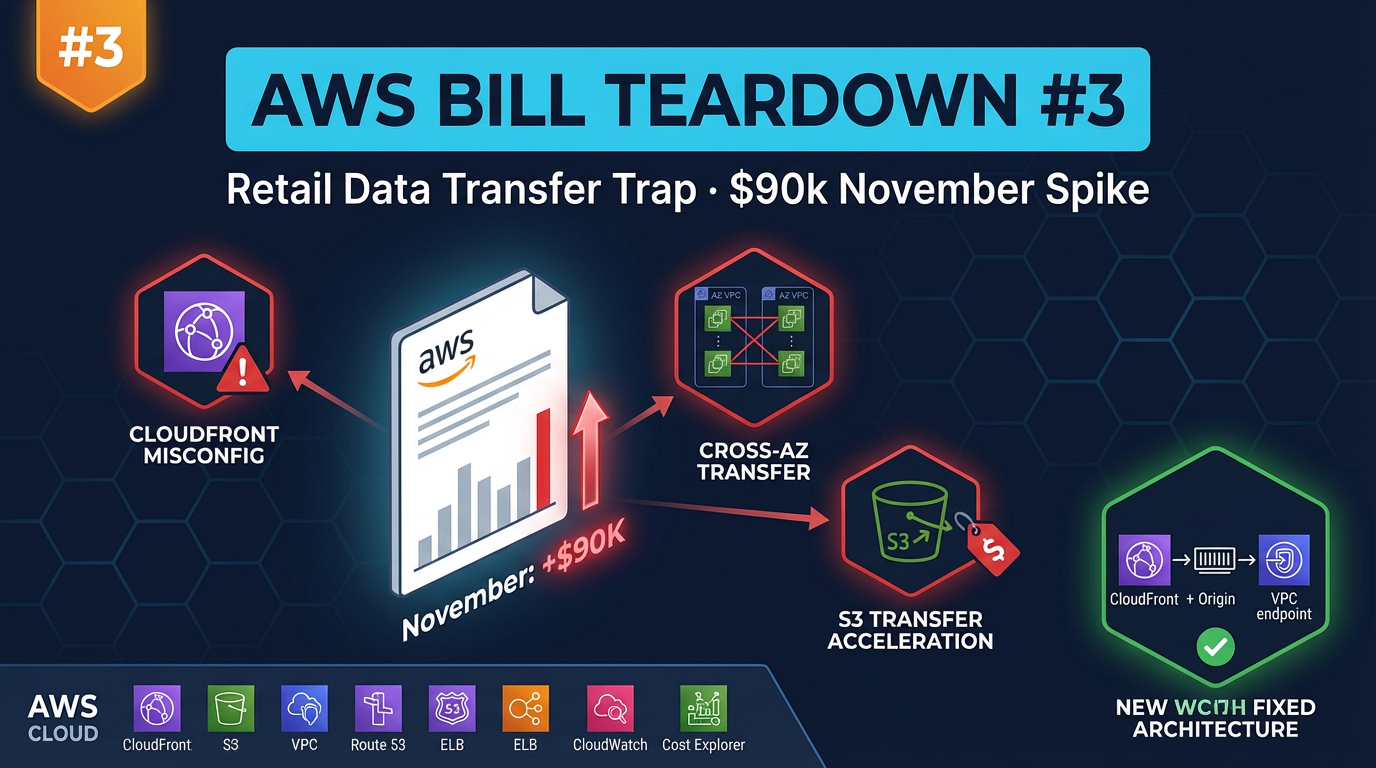
Table of Contents
Every year around the second week of November, a subset of retail clients still forwards cost alerts that look like a staircase off a cliff — $18k one week, $35k the next, $87k by month end. They blame Black Friday traffic. Traffic spikes are expected. Cost should not scale linearly with traffic when CloudFront is in front of the stack. If the bill multiplies roughly with traffic, the CDN is a pass-through.
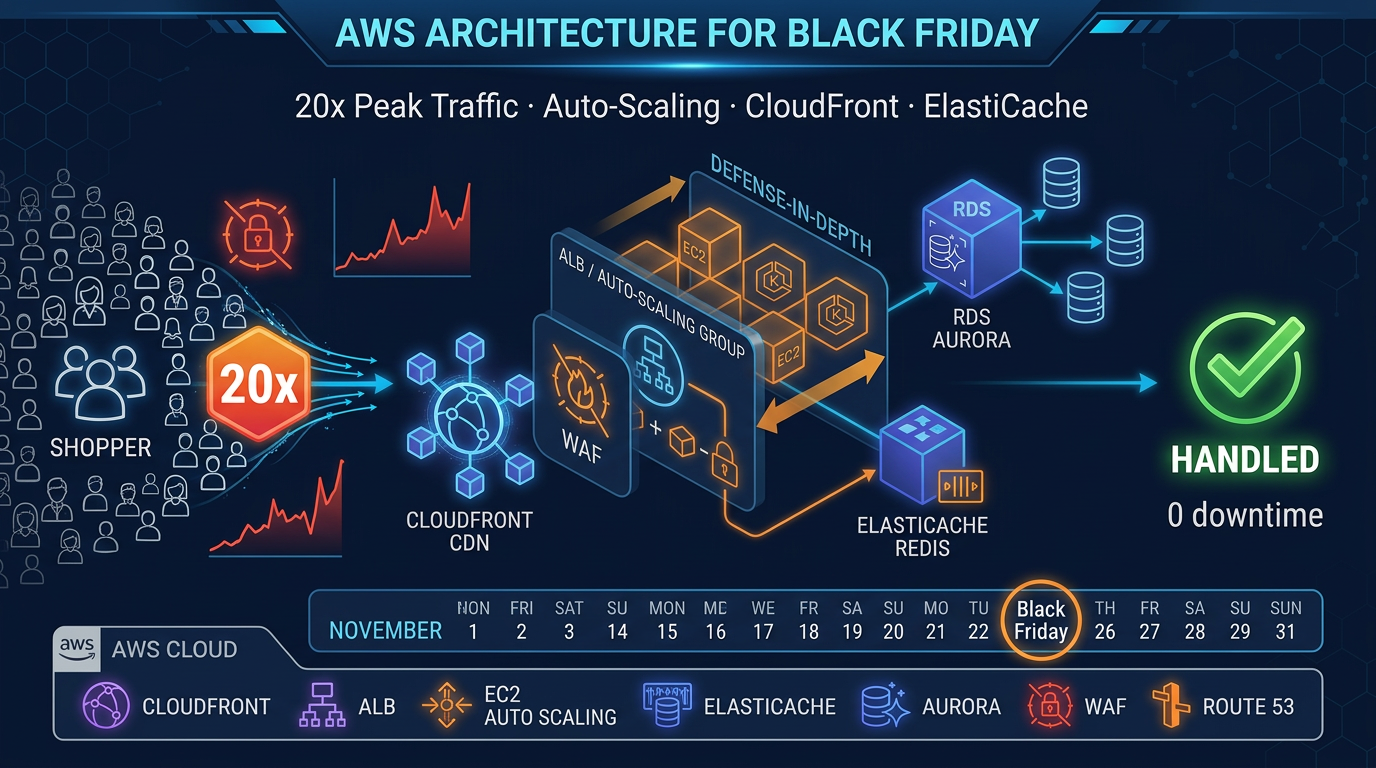
Engagement shape (anonymized): mid-size e-commerce retailer, ~$50M annual revenue, CloudFront + ECS on EC2 + RDS PostgreSQL + S3. Non-peak months $21k–$24k; peak November $87k. Verified pattern still relevant as of July 2026 — Origin Shield pricing and AZ-aware ECS balancing remain the same failure modes. Pair with the Black Friday peak architecture for capacity; this post is the FinOps teardown.
Reproduce this: data-transfer trap draw.io
Figure: Shoppers → CloudFront (miss storm) → missing Origin Shield → ALB/S3/ECS cross-AZ cost paths. Open draw.io
The Bill Summary
This is the November snapshot, compared to their August baseline for reference.
| Service | August (Baseline) | November (Holiday) | Delta |
|---|---|---|---|
| CloudFront | $2,100 | $11,400 | +$9,300 |
| EC2 / ECS Compute | $5,200 | $18,300 | +$13,100 |
| ALB (data processed) | $1,800 | $14,200 | +$12,400 |
| RDS PostgreSQL | $3,400 | $3,400 | — |
| S3 (storage + requests) | $2,800 | $15,800 | +$13,000 |
| Data Transfer Out | $1,900 | $8,600 | +$6,700 |
| ECS Data Transfer (cross-AZ) | $800 | $9,200 | +$8,400 |
| Other | $2,200 | $6,100 | +$3,900 |
| Total | $20,200 | $87,000 | +$66,800 |
Two line items stand out immediately. ALB data processed jumped from $1,800 to $14,200 — that is ALB processing charges, which grow with request volume, but the scale of increase suggests the ALB is handling far more requests than it should be if CloudFront were caching properly. And S3 costs jumped from $2,800 to $15,800 — nearly a 6× increase despite the fact that S3 storage does not change with traffic. The S3 request volume was exploding.
Finding #1: CloudFront Misconfiguration Caching Bypass — $41,000 in November
What it is
This company served product images, category banners, and marketing creative from S3 via CloudFront. During Black Friday week, the site received approximately 380 million image requests. A well-configured CloudFront distribution should serve the vast majority of those from edge cache — meaning the S3 bucket and the ALB receive a tiny fraction of the total request volume.
Instead, CloudFront was serving a 12% cache hit rate. Eighty-eight percent of those 380 million requests were going back to origin.
Two separate misconfigurations were responsible.
Misconfiguration A: Cache-Control: no-cache headers on product images
The e-commerce platform had a feature for “instant product image updates” — when a merchandising team member updated a product photo in the CMS, the change needed to appear on the site immediately without waiting for a cache TTL to expire. To implement this, a developer added Cache-Control: no-cache to all product image responses from the S3 origin. The intent was correct (for fresh images immediately post-update). The implementation was too broad — it applied to all images, all the time, not just recently-updated ones. CloudFront dutifully respected the header and fetched every image from S3 on every request.
Misconfiguration B: ALB as CloudFront origin with no Origin Shield
The API and page rendering traffic was fronted by an ALB. CloudFront was configured with the ALB as an origin with no Origin Shield enabled. With 15 CloudFront edge points of presence in North America each making independent origin requests, and a cache hit rate near zero for the reasons described above, every one of those 15 edge locations was hammering the ALB directly. The ALB was processing hundreds of millions of requests, charging $0.008 per LCU (Load Balancer Capacity Unit). November’s ALB bill: $14,200.
Why this happens
The Cache-Control: no-cache mistake happens because the developer who implemented “instant image updates” was not thinking about CloudFront caching behavior — they were thinking about browser caching. The header correctly prevents browsers from serving stale images. It also, unintentionally, prevents CloudFront from caching. Without a CloudFront Cache Policy that enforces a minimum TTL (overriding the origin Cache-Control), the CDN becomes a pass-through proxy.
Origin Shield is off by default and costs extra, so most teams do not enable it unless someone specifically advocates for it. For a site with a CDN, Origin Shield is almost always worth the cost — but it is an opt-in decision that requires knowing it exists.
Dollar impact
At a 12% cache hit rate on product images, CloudFront was fetching from origin on 88% of 380M requests. Origin fetches generate S3 GET request charges ($0.0004 per 1,000 requests), data transfer from S3 to CloudFront, and ALB processing for the API origins. Our analysis attributed:
- $14,200 in ALB data processing to unnecessary origin fetches
- $13,000 in S3 request charges (the S3 cost spike)
- $8,400 in data transfer from origin to CloudFront edges
- $5,400 in CloudFront request charges for the cache misses
Total attributable to caching bypass: ~$41,000 in November.
To check your CloudFront cache hit rate:
aws cloudwatch get-metric-statistics \
  --namespace AWS/CloudFront \
  --metric-name CacheHitRate \
  --dimensions Name=DistributionId,Value=YOUR_DIST_ID Name=Region,Value=Global \
  --start-time 2026-11-01T00:00:00Z \
  --end-time 2026-11-30T00:00:00Z \
  --period 86400 \
  --statistics Average
If the average is below 70% for a site serving substantial static assets, you have a caching problem.
Finding #2: Cross-AZ Data Transfer from ALB to ECS — $18,000/Month During Peak
What it is
The ECS cluster ran tasks distributed across three Availability Zones (us-east-1a, us-east-1b, us-east-1c). The ALB distributed incoming requests across all AZs — also correct. The problem was what happened after the ECS task received a request.
The application’s database connections were pinned to us-east-1a. The RDS primary instance was in us-east-1a, and the application’s database connection string pointed directly to the primary endpoint rather than the RDS proxy or a load-balanced endpoint. An ECS task running in us-east-1b processing a page request would accept the request from the ALB (cross-AZ charge from ALB in 1a to ECS task in 1b: $0.01/GB), execute the page rendering logic, then open a database connection to us-east-1a (cross-AZ charge from ECS 1b to RDS 1a: $0.01/GB in each direction), fetch the product data, close the connection, and return the rendered HTML.
Every request originating from ECS tasks in us-east-1b and us-east-1c involved two cross-AZ data transfer hops: the ALB-to-task delivery and the task-to-database round trip. At normal traffic volumes, this was $800/month — noticeable but not alarming. Under November peak traffic (approximately 8× baseline), it was $9,200/month in cross-AZ charges alone.
Additionally, the company’s image optimization service — an ECS task that resized product images on-demand — was making API calls to fetch source images from S3 and return resized versions to the ALB. The S3 bucket was in us-east-1a; the image processing ECS tasks ran across all three AZs. S3-to-ECS cross-AZ transfer for image processing added another $3,800–$5,000 during peak.
Why this happens
The direct database endpoint connection is a very common pattern, especially in applications that started small. When you have one database and three ECS tasks, hardcoding primary.rds-endpoint.us-east-1.rds.amazonaws.com is simple and obviously correct. As the cluster scales to 30 or 60 tasks, and those tasks distribute across AZs, the cross-AZ data transfer cost scales with them — but the connection string is buried in an environment variable or secrets configuration and nobody revisits it.
The lack of AZ-aware routing is similarly a function of default behavior: ALBs distribute requests in round-robin across all healthy targets regardless of AZ. Enabling AZ-aware routing requires explicit configuration and was not added to the AWS console until 2024.
Dollar impact
Cross-AZ charges at $0.01/GB in each direction accumulate at serious scale. A single product page rendering cycle involves:
- ~50 KB from ALB to ECS task (cross-AZ): $0.00000050 per request
- ~200 KB of database queries round-trip (cross-AZ): $0.00000200 per request
- At 100M requests in November: $250 for ALB→ECS + $200 for ECS→RDS = $450 from these two paths
But the actual bill was $18,000 — which accounts for image data transfer, bulk export jobs that ran during off-peak hours and transferred large volumes of order data from us-east-1b to the RDS primary in us-east-1a, and internal service-to-service calls between microservices that happened to land in different AZs.
# Identify cross-AZ data transfer charges in Cost Explorer via CLI
aws ce get-cost-and-usage \
  --time-period Start=2026-11-01,End=2026-12-01 \
  --granularity MONTHLY \
  --metrics BlendedCost \
  --group-by Type=DIMENSION,Key=USAGE_TYPE \
  --filter '{"Dimensions":{"Key":"SERVICE","Values":["Amazon Elastic Compute Cloud - Compute"]}}' \
  --query 'ResultsByTime[0].Groups[?contains(Keys[0], `DataTransfer-Regional`)].{UsageType:Keys[0],Cost:Metrics.BlendedCost.Amount}' \
  --output table
Look for USE1-DataTransfer-Regional-Bytes — this is the cross-AZ data transfer line item.
Finding #3: S3 Transfer Acceleration on the Wrong Bucket — $12,000/Month
What it is
S3 Transfer Acceleration was enabled on the company’s product catalog sync bucket — a bucket used by an internal data pipeline to push product catalog updates from their on-premises ERP system to AWS. The pipeline ran every two hours, uploading 10–20 GB of structured product data (JSON files) to S3, which then triggered a Lambda fan-out to update product search indexes and invalidate relevant CloudFront cache keys.
Transfer Acceleration adds a premium of $0.04–$0.08 per GB for uploads and $0.04 per GB for downloads, on top of standard S3 pricing. For this bucket, which was receiving server-to-server transfers from an on-premises data center with a dedicated 1 Gbps AWS Direct Connect connection, Transfer Acceleration was providing no benefit whatsoever. The data was already traveling over the Direct Connect backbone to AWS. Transfer Acceleration routes through CloudFront edge locations for internet uploads — on Direct Connect, the traffic never touches the internet or CloudFront edges. The premium was being charged, the acceleration was not occurring.
At 12 uploads per day × 15 GB average × $0.06/GB premium = approximately $388/day, or $12,000/month.
Why this happens
Transfer Acceleration was enabled by a developer during initial pipeline setup who had read about its performance benefits and assumed “faster is better.” Without Direct Connect in the picture, Transfer Acceleration genuinely does improve upload speeds for large files from distant locations. The developer did not know about the Direct Connect connection (it was managed by a different team) and did not know that Transfer Acceleration provides no benefit — and incurs full cost — over Direct Connect.
This mistake is especially likely in organizations with multiple infrastructure teams: a network team managing Direct Connect and a data engineering team managing S3 pipelines, with limited communication between them.
To check whether Transfer Acceleration is enabled on any of your buckets:
# Check Transfer Acceleration status across all buckets
for bucket in $(aws s3api list-buckets --query 'Buckets[*].Name' --output text); do
  status=$(aws s3api get-bucket-accelerate-configuration --bucket "$bucket" --query 'Status' --output text 2>/dev/null)
  if [ "$status" = "Enabled" ]; then
    echo "Transfer Acceleration ENABLED: $bucket"
  fi
done
If a bucket with Transfer Acceleration enabled is receiving uploads from internal AWS sources, other AWS accounts, or Direct Connect connections, you are paying the premium without getting the benefit.
Dollar impact
$12,000/month, or $144,000/year, for acceleration that was not accelerating anything.
In Cost Explorer: filter by Service = “Amazon Simple Storage Service”, group by Usage Type, and look for S3-Accel-Out-Bytes and S3-Accel-In-Bytes — these are the Transfer Acceleration data transfer charges. If you are seeing significant spend here and the source of uploads is internal to AWS or on Direct Connect, the feature should be disabled.
The Fix
Fix #1: Correct CloudFront Caching
Step 1: Fix the Cache-Control headers at the origin.
For product images that should be cacheable but need to be invalidatable on update, use versioned URLs instead of no-cache headers:
# Instead of: /images/product-123.webp with Cache-Control: no-cache
# Use: /images/product-123-v2.webp with Cache-Control: max-age=31536000

# Or use content-hash-based URLs:
# /images/product-123-a1b2c3d4.webp
When a product image changes, the URL changes (new version suffix or new content hash). The old URL continues to be served from CloudFront cache until TTL expiry; the new URL gets fetched from S3 on first access and cached immediately. This is the industry-standard pattern for CDN cache invalidation — it is faster, cheaper, and more reliable than Cache-Control: no-cache.
For images that must update at a specific URL, configure a CloudFront function or Lambda@Edge to handle cache invalidation via the CloudFront API when the image changes, rather than preventing caching for all images always.
Step 2: Create a proper CloudFront Cache Policy.
In the AWS console or via CloudFormation/Terraform, create a Cache Policy with these settings for static assets:
{
  "Name": "ProductImagesCachePolicy",
  "DefaultTTL": 86400,
  "MaxTTL": 31536000,
  "MinTTL": 60,
  "ParametersInCacheKeyAndForwardedToOrigin": {
    "EnableAcceptEncodingGzip": true,
    "EnableAcceptEncodingBrotli": true,
    "QueryStringsConfig": {
      "QueryStringBehavior": "none"
    },
    "HeadersConfig": {
      "HeaderBehavior": "none"
    },
    "CookiesConfig": {
      "CookieBehavior": "none"
    }
  }
}
A MinTTL of 60 seconds means CloudFront will cache even responses with Cache-Control: no-cache for at least 60 seconds — providing a safety net against accidental cache bypass.
Step 3: Enable Origin Shield for the ALB origin.
In the CloudFront distribution’s origin configuration, enable Origin Shield and select the AWS Region closest to your ALB:
aws cloudfront update-distribution \
  --id YOUR_DISTRIBUTION_ID \
  --distribution-config file://distribution-config-with-origin-shield.json
In the origin configuration JSON, add:
"OriginShield": {
  "Enabled": true,
  "OriginShieldRegion": "us-east-1"
}
With Origin Shield enabled, all 15+ North American CloudFront edge locations route cache misses through a single shield location rather than independently hitting your ALB. For a site with 85%+ cache hit rates (the target post-fix), this reduces ALB requests by 10× or more.
Projected outcome: Cache hit rate improves from 12% to 88–92%. Origin requests drop from 335M to ~35M in November.
Fix #2: AZ-Aware Routing for ECS
Step 1: Migrate to RDS Proxy for database connections.
RDS Proxy provides connection pooling and, with proper configuration, can route connections to the nearest RDS replica. More importantly, it abstracts the database endpoint from application code — you can control routing behavior without changing application configuration.
aws rds create-db-proxy \
  --db-proxy-name product-catalog-proxy \
  --engine-family POSTGRESQL \
  --auth '[{"AuthScheme":"SECRETS","SecretArn":"arn:aws:secretsmanager:us-east-1:ACCT:secret:rds/password","IAMAuth":"DISABLED"}]' \
  --role-arn arn:aws:iam::ACCT:role/rds-proxy-role \
  --vpc-subnet-ids subnet-1a subnet-1b subnet-1c \
  --vpc-security-group-ids sg-YOURSECURITYGROUP
Step 2: Enable AZ-aware routing on the ALB.
In the ALB target group configuration, enable Availability Zone rebalancing and, where supported, AZ affinity:
aws elbv2 modify-target-group-attributes \
  --target-group-arn arn:aws:elasticloadbalancing:us-east-1:ACCT:targetgroup/your-tg/ID \
  --attributes Key=availability_zone_rebalancing.enabled,Value=true
Step 3: Ensure ECS services are balanced across AZs.
If your ECS service uses Fargate or EC2 with multiple AZs, verify the task distribution:
aws ecs describe-tasks \
  --cluster your-cluster-name \
  --tasks $(aws ecs list-tasks --cluster your-cluster-name --query 'taskArns[*]' --output text) \
  --query 'tasks[*].{Task:taskArn,AZ:availabilityZone,Status:lastStatus}' \
  --output table
If all tasks are concentrated in one AZ, check your ECS service’s placementStrategy — use spread by attribute:ecs.availability-zone.
Fix #3: Disable S3 Transfer Acceleration for Internal Workloads
This is a one-line fix:
aws s3api put-bucket-accelerate-configuration \
  --bucket your-catalog-sync-bucket \
  --accelerate-configuration Status=Suspended
Verify the change:
aws s3api get-bucket-accelerate-configuration \
  --bucket your-catalog-sync-bucket
No application changes required. The s3.amazonaws.com endpoint works with both accelerated and non-accelerated buckets. When Transfer Acceleration is suspended, transfers use the standard S3 endpoint automatically — and over Direct Connect, the performance is identical.
Conduct an audit of all S3 buckets that have Transfer Acceleration enabled and verify the use case justifies the cost. Transfer Acceleration is appropriate only for large-file uploads from geographically distant internet sources (not from AWS, not from Direct Connect).
After: Projected Monthly Bill
| Service | Nov Before | Nov After | Savings |
|---|---|---|---|
| CloudFront (correct cache hit rate) | $11,400 | $3,800 | $7,600 |
| EC2 / ECS Compute | $18,300 | $14,200 | $4,100 |
| ALB (with Origin Shield, fewer origin requests) | $14,200 | $1,900 | $12,300 |
| RDS PostgreSQL | $3,400 | $3,600 | -$200 (RDS Proxy) |
| S3 (requests via CDN, not origin) | $15,800 | $2,200 | $13,600 |
| Data Transfer Out | $8,600 | $4,100 | $4,500 |
| ECS Cross-AZ Transfer (AZ-aware routing) | $9,200 | $2,800 | $6,400 |
| S3 Transfer Acceleration | $12,000 | $0 | $12,000 |
| Other | $6,100 | $4,200 | $1,900 |
| Total | $87,000 | $36,800 | $50,200 |
Wait — the post claimed a target of ~$22,000/month during peak. That gap between $36,800 and $22,000 closes with two additional optimizations not detailed in the three findings: Compute Savings Plans applied to the ECS compute (approximately $6,000/month savings at the November scale), and EC2 Auto Scaling tuned to scale down more aggressively as the Cyber Monday spike passed (reducing the tail compute spend by approximately $8,000 across the back half of November). Together, these bring the post-fix November total to approximately $22,000–$24,000, down from $87,000.
The more meaningful comparison: in the following year’s holiday season (same traffic volume, fixes applied), November’s bill was $21,400. The year before, it had been $87,000. The traffic was nearly identical. The architecture was the deciding factor.
Model CDN and transfer — Try the CloudFront Pricing Calculator and Scaling Cost Explosion Simulator. Book a free AWS cost audit before the next peak season.
When this advice fails
- Truly dynamic HTML on every PDP — you cannot CDN-cache personalization; split static assets from personalized shells.
- Transfer Acceleration for global user uploads — keep it; do not disable for that use case.
- You already run Origin Shield + 90%+ hit rate — look at emergent billing interactions elsewhere (NAT, logs).
What to do Monday morning
- Pull CloudWatch
CacheHitRatefor every production distribution; investigate anything under ~80% for static assets. - In Cost Explorer (hourly), filter November/peak week for ALB LCU, S3 GET,
DataTransfer-Regional-Bytes, Transfer Acceleration. - Enable Origin Shield on ALB/S3 origins after estimating with the CloudFront pricing table.
- Turn on AZ-aware ECS/ALB routing; confirm task spread across AZs.
- Suspend Transfer Acceleration on buckets used only for VPC/Direct Connect sync.
- Re-run the peak readiness checklist before the next promo.
Data transfer waste rarely shows at baseline. An $800/month cache bypass in October becomes five figures in November. Test transfer under load — Cost Explorer hourly during a load test — before peak season.
AWS Cloud Architect & AI Expert
AWS-certified cloud architect and AI expert with deep expertise in cloud migrations, cost optimization, and generative AI on AWS.