Amazon Macie + Detective on AWS: Data Security Posture Management and Forensic Investigation in Production
Quick summary: Macie + Detective: S3 DSPM and forensic graphs. July 2026 — scope costs, KMS decrypt, paired Security Hub pipeline.
Key Takeaways
- Macie + Detective: S3 DSPM and forensic graphs
- July 2026 — scope costs, KMS decrypt, paired Security Hub pipeline
- New accounts get a 30-day free trial for monitoring dimensions — discovery jobs still bill
- First-party benchmark (illustrative): when GuardDuty triage exceeds ~5 minutes/finding or you face HIPAA/PCI “where is PII
- Reproduce this: Macie–Detective paired pipeline Counter-case: Macie does not classify RDS/DynamoDB columns natively — multi-store DSPM may still need a third party
Table of Contents
As of July 2026, Amazon Macie (S3 DSPM / sensitive-data discovery) and Amazon Detective (entity-graph investigations over GuardDuty + logs) still close the gap between “we have findings” and “we know where regulated data lives and how the incident unfolded.”
Pricing reality: Macie bills bucket/security monitoring, automated-discovery object monitoring, and per-GB analysis (jobs + automated). New accounts get a 30-day free trial for monitoring dimensions — discovery jobs still bill. Scope prefixes and accounts.
First-party benchmark (illustrative): when GuardDuty triage exceeds ~5 minutes/finding or you face HIPAA/PCI “where is PII?” questions, Macie-scoped + Detective usually pays for analyst time — not for scanning every sandbox petabyte.
Reproduce this: Macie–Detective paired pipeline
Counter-case: Macie does not classify RDS/DynamoDB columns natively — multi-store DSPM may still need a third party.
Why pair Macie and Detective
Most AWS security tooling answers one of two questions: what is happening? (GuardDuty, Security Hub) or what data is at risk? (S3 Block Public Access, IAM Access Analyzer). The gap is between them — the investigation question (“how did this finding actually unfold across our estate?”) and the data-discovery question (“does the affected bucket contain regulated data?”).
- Macie fills the data-discovery gap. It continuously classifies S3 contents, surfaces unencrypted or publicly accessible buckets that contain sensitive data, monitors policy changes that could expose data, and produces findings that Security Hub aggregates alongside GuardDuty.
- Detective fills the investigation gap. It ingests GuardDuty, VPC Flow Logs, CloudTrail, EKS audit logs, and Route 53 logs into a pre-built entity graph that lets an analyst click from a finding to every linked behaviour over the prior 30 days.
Together they give a regulated workload the standard “where is the data + what happened to it” story that auditors, regulators, and post-incident reviewers expect.
Part 1: Amazon Macie in production
Step 1: Enable Macie at the Organization level
Designate a delegated administrator account (usually your security/audit account):
aws macie2 enable-organization-admin-account \
    --admin-account-id 111122223333
Then enable Macie across member accounts. The Macie console offers click-through enablement; for IaC, use the Terraform aws_macie2_member resource or the AWS CDK aws-macie construct.
Step 2: Configure the discovery scope
Macie has two modes:
- Automated sensitive-data discovery — continuously samples a small percentage of objects across all buckets and surfaces statistical findings (“this bucket contains 12% objects with PII identifiers”). Low cost, broad coverage.
- Sensitive data discovery jobs — full scan of specified buckets/prefixes on a schedule or one-off. Per-GB pricing; precise findings.
Production pattern: enable automated discovery at the org level for broad visibility, plus targeted jobs against known-sensitive prefixes (production application data, backups, data-lake landing zones, log archives, ML training data) on a weekly or monthly cadence.
Step 3: Define managed and custom data identifiers
Macie ships ~140 managed identifiers covering common PII, PHI, PCI, financial, credentials, and identifiers (national IDs, passport numbers, IBANs, etc.). For workload-specific identifiers, define custom data identifiers using regex with optional keyword and proximity rules:
# Custom: internal customer ID format
Pattern: 'CUST-[0-9]{8}-[A-Z]{2}'
Keywords: ['customer_id', 'cust_id']
MaximumMatchDistance: 50
Combine identifiers into “managed data identifier selectors” and attach them to discovery jobs.
Step 4: KMS key policy for encrypted buckets
For SSE-KMS-encrypted buckets to be scannable, the customer-managed CMK key policy must grant decrypt to the Macie service-linked role:
{
  "Sid": "AllowMacieDecrypt",
  "Effect": "Allow",
  "Principal": {
    "Service": "macie.amazonaws.com"
  },
  "Action": ["kms:Decrypt", "kms:DescribeKey"],
  "Resource": "*",
  "Condition": {
    "StringEquals": {
      "aws:SourceAccount": "111122223333"
    }
  }
}
Without this entry Macie produces a “could not analyse” finding for the encrypted objects. For highly regulated workloads where Macie must never decrypt, use SSE-C — and accept the loss of automated discovery.
Step 5: Route findings to Security Hub and downstream
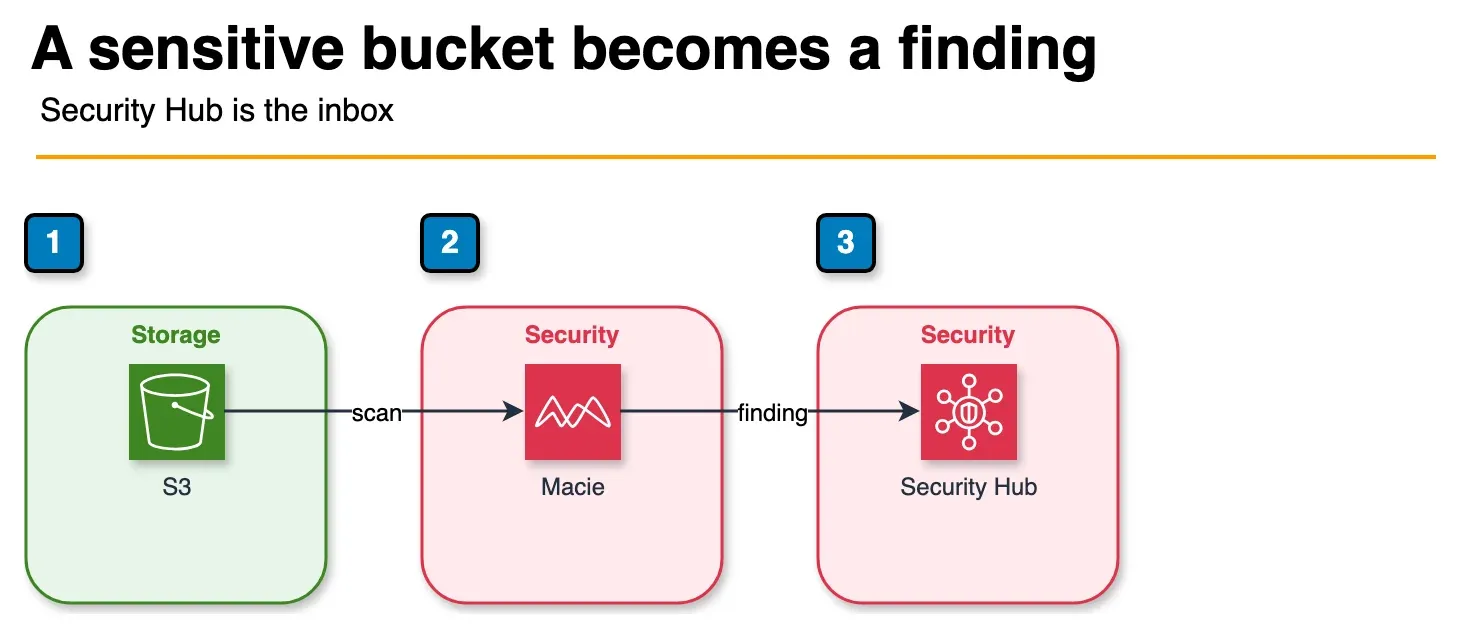
Figure: the Macie route in the article. Discovery and policy findings go to Security Hub when both services are on. A public-bucket finding can start EventBridge containment. That function is a separate rule, not the next hop on this path. Open the draw.io source.
Macie findings flow automatically to Security Hub when both are enabled. From Security Hub, route critical findings to:
- EventBridge for automated containment (block bucket access, page on-call, file ticket).
- Amazon Detective for investigation (when sensitive data exposure correlates with suspicious access patterns).
- AWS Audit Manager / Config conformance pack evidence for compliance documentation.
A common containment pattern: an EventBridge rule on Macie finding type Policy:IAMUser/S3BucketPublic triggers a Lambda that adds a deny statement to the bucket policy, snapshots the bucket inventory, and notifies the bucket owner.
Cost management
Macie pricing has two components — bucket evaluation (flat per bucket per month for the inventory and automated discovery) and job-based discovery (per GB of S3 data scanned). Cost-control patterns:
- Scope discovery jobs to known-sensitive prefixes, not full buckets.
- Use object filtering (S3 Storage Class, file extension, last-modified date) to skip ephemeral data.
- Run full scans monthly or quarterly; rely on automated discovery between full scans.
- For multi-PB data lakes, scope to landing/raw and ingestion-buffer prefixes; downstream curated layers usually do not need re-scanning.
Part 2: Amazon Detective in production
Step 1: Enable Detective with delegated administration
Detective also supports Organizations delegated administration. The pattern matches Macie:
aws organizations register-delegated-administrator \
    --account-id 111122223333 \
    --service-principal detective.amazonaws.com
Then enable Detective in the administrator account and add member accounts. Detective will start ingesting CloudTrail, VPC Flow Logs, GuardDuty findings, EKS audit logs, and Route 53 query logs from each enabled member.
Step 2: Configure data sources
Detective auto-ingests:
- CloudTrail management and data events.
- VPC Flow Logs.
- GuardDuty findings (every detector type).
- EKS audit logs.
- Route 53 Resolver query logs.
You do not enable each separately — Detective reads from the AWS-side log infrastructure. The single configuration step is enabling the source services in each member account (CloudTrail organization trail, GuardDuty per-account, VPC Flow Logs per VPC, EKS audit logging per cluster).
Step 3: Investigate from a finding
The standard workflow:
- A GuardDuty finding fires (e.g.
UnauthorizedAccess:IAMUser/MaliciousIPCaller). - Click “Investigate in Detective” from the finding details.
- Detective opens the entity graph centered on the principal that triggered the finding.
- Look at: the principal’s behavior over the prior 30 days, every API call (volume, type, timing), every resource accessed, every linked finding, every IP the principal connected from, every Service Control Policy that allowed the action.
- Pivot to related entities (the IP address, the affected S3 bucket, the EKS pod) and see the same graph from their perspective.
The value compared to writing CloudTrail Lake queries: investigation that took 4 hours of SQL takes 15 minutes of clicking. Multi-entity correlation (this principal accessed this bucket from this IP at this time) is built in.
Step 4: Use Detective findings groups
Findings groups bundle related findings into a single investigation thread — useful when a single attack chain produces 5-15 GuardDuty findings across multiple resources. The group view shows the chain as a timeline rather than a flat list and lets the analyst document the full investigation in one place.
Step 5: Integrate with the SOC tooling
Detective integrations:
- AWS Security Hub — Detective links from any Security Hub finding for AWS-source findings.
- SIEM / SOAR — Detective findings export to Security Lake (OCSF 1.1 format) for downstream Splunk, Sentinel, Chronicle, or Elastic ingestion.
- Ticketing — EventBridge rules on Detective finding-group changes file Jira/ServiceNow tickets with the investigation URL.
Cost management
Detective pricing is per-account-per-region-per-month plus log-volume-based ingestion. Cost-control patterns:
- Scope which accounts are enabled — production and shared-services first; sandbox accounts last.
- Use the 30-day rolling graph rather than longer retention unless your investigation cadence demands it.
- Disable in regions you do not deploy to.
Operational pattern: paired pipeline
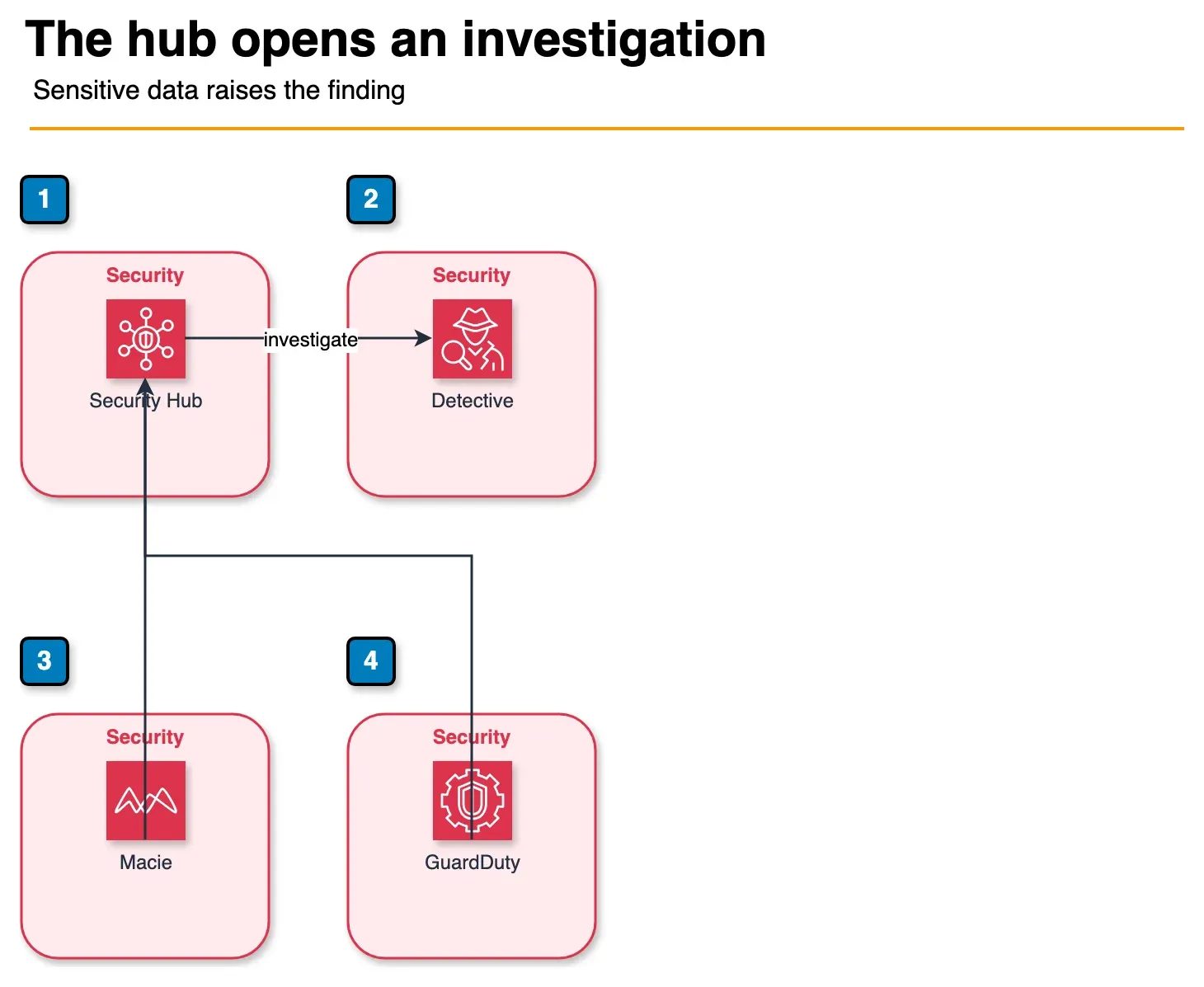
Figure: the paired pipeline in the article. Macie and GuardDuty both land in Security Hub. When a GuardDuty finding names a bucket Macie has marked as sensitive, severity goes up and Detective opens. Containment runbooks are a separate EventBridge path. Open the draw.io source.
The mature pattern runs Macie and Detective as a paired pipeline:
- Continuous discovery — Macie automated discovery surfaces new sensitive data. Findings flow to Security Hub.
- Posture monitoring — Macie policy findings (public bucket, unencrypted bucket containing PII) trigger immediate containment via EventBridge.
- Threat detection — GuardDuty produces behavioural findings; Security Hub aggregates them with Macie posture findings.
- Correlation — when a GuardDuty finding involves an S3 bucket Macie has flagged as containing sensitive data, the severity is auto-elevated and an investigation is auto-opened in Detective.
- Investigation — analyst opens Detective from the elevated finding, reconstructs the chain, documents the timeline.
- Containment — pre-built runbooks (EventBridge → Step Functions → Lambda) execute the standard containment steps; the analyst overrides only when novel.
- Documentation — investigation notes, Detective screenshots, and Macie scan results form the audit evidence; export to S3 with Object Lock for the regulator-required retention period.
Common pitfalls
- Over-scoping Macie. Running full-bucket scans across petabyte data lakes is expensive and produces low-signal findings. Scope to known-sensitive prefixes and rely on automated discovery for the rest.
- Forgetting KMS key policy entries. Macie cannot scan SSE-KMS buckets without decrypt permission on the customer-managed CMK. Add the policy entry when designing the encryption scheme.
- Enabling Detective in dev/sandbox accounts. The cost-vs-value ratio is poor for ephemeral environments. Enable in security-relevant accounts first.
- Treating Macie findings as alerts. Macie produces both posture findings (which are actionable alerts) and discovery findings (which are inventory data). Build different EventBridge routing for each.
- Skipping the integration step. A Macie finding sitting in the Macie console alongside a GuardDuty finding sitting in the GuardDuty console is two-thirds of the value. Route both to Security Hub Essentials and pivot to Detective from there.
What to Do This Week
- Enable Macie automated discovery on prod prefixes; fix CMK decrypt for Macie.
- Turn on Detective in the security account; open one GuardDuty finding in the graph.
- Wire Security Hub + EventBridge using the paired pipeline.
What This Post Doesn’t Cover
Third-party multi-cloud DSPM feature matrices and Detective custom data-source onboarding.
Where to go next
- Macie docs · Detective docs
- GuardDuty · Security Hub
- Security & Compliance · Data Security · Threat Detection
Frequently asked questions
When is Amazon Macie worth the cost vs S3 Block Public Access alone?
When should we add Amazon Detective on top of GuardDuty?
Macie vs third-party DSPM tools (Wiz, Cyera, Varonis) — when does each win?
Can Macie scan inside encrypted S3 objects?
How does Detective handle multi-account AWS Organizations setups?

Agentic AI & Cloud Security
Works on making teams more productive with agentic AI. Writes the FactualMinds guides on AWS security and compliance: identity, threat detection, data protection, and audit readiness, the controls AI agents need before they touch production systems.