The AWS CLI Bug That Broke /dev/null Across Your Entire System
Quick summary: AWS CLI v2 #10196 chmod'd streaming outputs to 0600 — including /dev/null. July 2026 retrospective: #10215 revert, host repair, pin-and-canary checklist.
Key Takeaways
- AWS CLI v2 #10196 chmod'd streaming outputs to 0600 — including /dev/null
- July 2026 retrospective: #10215 revert, host repair, pin-and-canary checklist
- On 2026-04-09, AWS CLI v2 merged PR #10196 (“Tighten output file permissions”), applying to streaming/S3 Select output paths
- On 2026-04-10, PR #10215 reverted that change (commit )
- As of July 2026, treat this as a closed incident with lasting pipeline hygiene lessons — not a live CVE
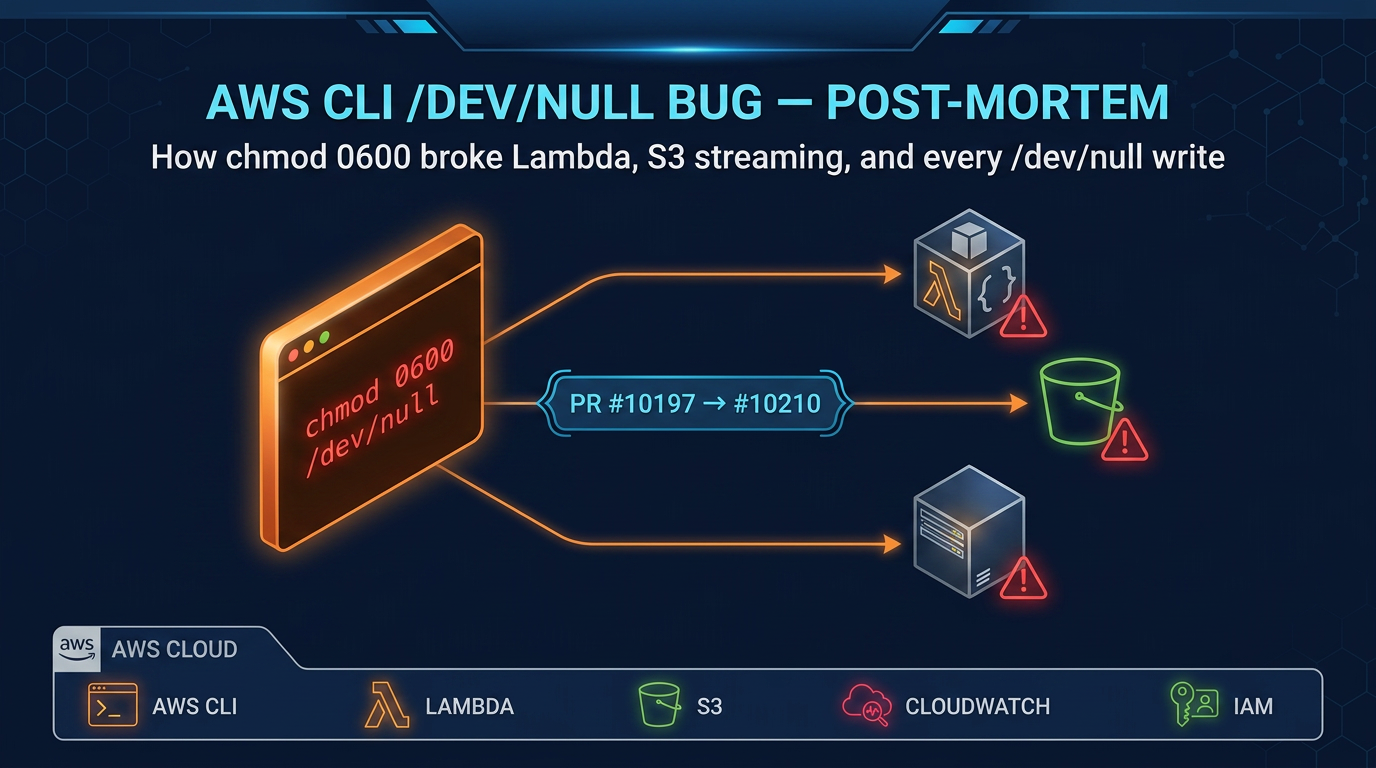
Table of Contents
On 2026-04-09, AWS CLI v2 merged PR #10196 (“Tighten output file permissions”), applying 0600 to streaming/S3 Select output paths. Passing /dev/null as a file argument chmod’d the character device system-wide. On 2026-04-10, PR #10215 reverted that change (commit 12c807c). As of July 2026, treat this as a closed incident with lasting pipeline hygiene lessons — not a live CVE.
Engagement shape (anonymized): SaaS CI fleet, ~80 GitHub Actions runners on shared AMIs; ~2 hours of failed aws lambda invoke … /dev/null jobs until hosts were repaired and CLI pinned past the revert.
Reproduce this: CLI pin + /dev/null checklist · upstream revert commit
What Happened: A Security Hardening PR With Unintended Blast Radius
The Intent Behind PR #10196
On April 9, 2026, the AWS CLI team merged PR #10196 to tighten output file security. The goal was sound: whenever commands like aws s3 cp, aws s3 select, or aws lambda invoke write output to a file path, restrict that file to owner-only read/write permissions (0600) via os.chmod(). This is a legitimate security improvement — output files containing presigned URLs, Lambda response payloads, or S3 object metadata should not be world-readable on a shared system.
The implementation was straightforward: after writing output, call os.chmod(output_path, 0o600). Simple, direct, and — as it turned out — incomplete.
The Bug: chmod Applied to Every Output Path
The os.chmod() call was applied unconditionally to whatever path string the caller provided. No type checking. No validation. If you passed /dev/null, the CLI would dutifully call os.chmod("/dev/null", 0o600).
And that’s where the explosion happened.
/dev/null is a character device, not a regular file. But os.chmod() works perfectly fine on device nodes — it just changes the permission bits on the device’s filesystem entry. Before the bug, /dev/null had permissions crw-rw-rw- (readable and writable by everyone). After the bug, it became crw------- (readable and writable by root only).
Every process on the system that tried to write to /dev/null after that point received EACCES: Permission denied. For a system utility that literally exists to discard data, this was catastrophic.
Which Commands Were Affected
aws lambda invoke
This is the most common pattern hitting the bug: discarding Lambda function output in scripts or CI/CD pipelines.
aws lambda invoke \
  --function-name my-function \
  --payload '{"key": "value"}' \
  /dev/null
This command invokes a Lambda function and writes the response JSON to /dev/null to suppress output. Before the bug, this worked fine. After PR #10196 merged, the CLI would write the response and then call os.chmod("/dev/null", 0o600), breaking the device node for every subsequent process on the host.
aws s3 cp and aws s3 select
Less common, but following the same code path:
# Test if an S3 object exists without saving it locally
aws s3 cp s3://bucket/key /dev/null

# Stream query results without persisting to disk
aws s3 select --expression "SELECT * FROM S3Object" /dev/null
Both trigger the same vulnerability.
What Was Never Affected: Shell-Level Redirection
Here’s the critical distinction: shell redirection was never vulnerable.
# These patterns are immune — shell controls the file descriptor
aws lambda invoke --function-name fn /dev/stdout > /dev/null
aws s3 cp s3://bucket/key - > /dev/null
aws lambda invoke --function-name fn /dev/stdout 2>&1 | cat > /dev/null
When you use shell redirection, the shell opens the file descriptor and hands it to the CLI process. The CLI never sees /dev/null as a string path — it only writes to the file descriptor. The chmod() call cannot reach it.
This is why the bug went unnoticed in codebases where engineers followed shell best practices. Only codebases passing /dev/null as a direct argument to the CLI were affected.
How to Know If Your System Was Hit
Symptom Pattern
If your infrastructure was running an affected AWS CLI version during the window of April 9–10, 2026, watch for these symptoms:
- Lambda invocations in CI/CD suddenly fail with permission errors or hanging indefinitely
- Shell scripts that write to /dev/null start returning permission denied errors, even for unrelated commands like
curl,git, orsystemctl - Any process on the host attempting to redirect output to /dev/null fails
- The failure appears within minutes of an AWS CLI auto-update, making it disorienting to diagnose
The common thread: all these failures happen after the first AWS CLI command that targeted /dev/null as an output path. It cascades outward from that initial breakage.
Check /dev/null Permissions Now
# Check current permissions
$ ls -la /dev/null
crw-rw-rw- 1 root root 1, 3 Apr  9 12:00 /dev/null

# If you see crw------- or any restricted form, it was affected:
$ ls -la /dev/null
crw------- 1 root root 1, 3 Apr  9 14:32 /dev/null

# Restore immediately if broken
$ sudo chmod 0666 /dev/null

# Verify restoration
$ ls -la /dev/null
crw-rw-rw- 1 root root 1, 3 Apr  9 15:00 /dev/null
On Amazon EC2 instances, you can also restart the instance — the device node is recreated from the initramfs at boot. For containerized workloads, restarting containers fixes the problem; the host’s device permissions do not propagate into fresh container namespaces (they use their own device mounts).
Trace It to an AWS CLI Version
# Check your current version
$ aws --version
aws-cli/2.x.x Python/3.x.x Linux/5.x.x ...
Compare the version number against the official AWS CLI GitHub releases at github.com/aws/aws-cli/releases. Any v2 build from April 9, 2026 forward (until the fix on April 10) is in the danger zone. AWS CLI v1 was never affected.
The Fix: Before and After
The Broken Code Path (PR #10196)
# Pattern from #10196 era — BROKEN: chmod on any path (including devices)
def _set_output_file_permissions(output_path):
    # No stat check — works on device files, symlinks, sockets, etc.
    os.chmod(output_path, 0o600)
This is the problem in its entirety. No defensive coding. No awareness of what filesystem object the caller actually provided.
What #10215 actually did (revert — not a type-check patch)
PR #10215 removed the #10196 hardening entirely (aws-cli commit 12c807c). Streaming output went back to ordinary open(..., 'wb') without a post-write chmod on the caller path.
If you re-introduce output hardening in your own tools, use a regular-file guard:
# Recommended pattern for *future* hardening — not what #10215 shipped
import os, stat

def _set_output_file_permissions(output_path):
    file_stat = os.stat(output_path)
    if not stat.S_ISREG(file_stat.st_mode):
        return
    os.chmod(output_path, 0o600)
Upgrade and Remediation Steps
# Step 1: Check your AWS CLI version
$ aws --version

# Step 2: Upgrade past the #10196 window (any build that includes the #10215 revert)
$ pip install --upgrade awscli
# Then pin the exact verified version in CI — do not float on "latest" alone

# Step 3: Verify the upgrade
$ aws --version

# Step 4: If /dev/null was already affected, restore permissions
$ sudo chmod 0666 /dev/null

# Step 5: Verify restoration
$ ls -la /dev/null
crw-rw-rw- 1 root root 1, 3 ...
Lessons for DevOps and CI/CD Teams
Never Pass Special Files as CLI Output Arguments
The fundamental issue: scripts sometimes use /dev/null as a convenient “discard this output” pattern. But when any tool — not just the AWS CLI — calls chmod() or chown() on user-supplied paths without type-checking, you create this vulnerability.
The correct approach is to let the shell handle the redirection:
# AFFECTED PATTERN — /dev/null passed as file argument
aws lambda invoke --function-name fn /dev/null

# SAFE PATTERN — shell redirection at the terminal level
aws lambda invoke --function-name fn /dev/stdout > /dev/null

# ALSO SAFE — temp file with cleanup
TMPFILE=$(mktemp)
trap "rm -f $TMPFILE" EXIT
aws lambda invoke --function-name fn "$TMPFILE"
This pattern is immune to chmod() bugs because the CLI never sees /dev/null as a string path.
Pin Your CLI Version in Production Pipelines
This is the same principle as pinning GitHub Actions versions or Docker image tags: never install “latest” of a critical tool in production automation.
# pip — pin to an exact version
pip install awscli==2.15.30

# Docker — specify an exact tag
FROM python:3.12-slim
RUN pip install awscli==2.15.30

# GitHub Actions — pin the CLI in setup steps
- name: Install AWS CLI (pinned)
  run: pip install awscli==2.15.30

# AWS CodeBuild — override the managed image's CLI version in buildspec.yml
phases:
  install:
    commands:
      - pip install awscli==2.15.30
      - aws --version
Pinning gives you control over when you update, not reactive updates triggered by an auto-upgrade in the middle of a production run.
Validate Toolchain Updates Before Rolling Out
Treat AWS CLI updates like dependency upgrades. When a new CLI version is released:
- Test in staging first. Run your Lambda invocations, S3 operations, and other CLI commands in a staging CI/CD pipeline for 24 hours.
- Use a canary runner. Update the CLI on one CI runner, monitor it for failures, then roll out to the full fleet if it is stable.
- Check the changelog. AWS publishes release notes on the GitHub releases page. Permission changes, behavior changes, and deprecations are flagged there.
This is especially important for tools that interact with production infrastructure. The ~24-hour window between #10196 and the #10215 revert was short — and still long enough to break many shared CI hosts.
What actually shipped as the fix
AWS did not land a stat.S_ISREG() patch in #10215. They reverted #10196 wholesale, restoring the previous open/write behavior for streaming outputs. That was the right incident response: remove the blast radius immediately.
If output hardening returns, the correct implementation is still: open with safe modes and chmod only after confirming a regular file — never trust a caller path to be a file you created.
When this advice fails
- You never pass device paths to CLIs — still pin versions; the next hardening PR may touch credentials files differently.
- Immutable distroless runners rebuilt every job —
/dev/nulldamage is ephemeral; pinning still matters for reproducibility. - Windows runners — chmod semantics differ; the Linux device-node failure mode was the acute outage.
What this post doesn’t cover
Every AWS CLI release after April 2026 — always read the changelog for your pinned minor.
What to do Monday morning
ls -la /dev/nullon shared CI/bastion hosts; repair if needed.- Pin
awscliin every pipeline; ban floatingpip install awscli. - Grep pipelines for
/dev/nullas a positional CLI argument; switch to> /dev/null. - Canary the next CLI bump for 24h.
- Walk the checklist.
- Need a toolchain audit? Contact us / DevOps pipeline services.
Frequently asked questions
Which AWS CLI versions are affected by the /dev/null chmod bug?
Why did piping to /dev/null work but passing it as a file argument broke things?
What did PR #10215 actually do?
How do I check if /dev/null was damaged and how do I fix it?
How do I prevent this class of breakage in my CI/CD pipelines going forward?

AWS Cloud Architect & AI Expert
AWS-certified cloud architect and AI expert with deep expertise in cloud migrations, cost optimization, and generative AI on AWS.