AWS CodePipeline: CI/CD Pipeline Patterns for Production
Quick summary: A practical guide to AWS CodePipeline — pipeline architecture, CodeBuild configuration, deployment strategies, cross-account pipelines, and the CI/CD patterns that ship code safely to production.
Key Takeaways
- A practical guide to AWS CodePipeline — pipeline architecture, CodeBuild configuration, deployment strategies, cross-account pipelines, and the CI/CD patterns that ship code safely to production
- A practical guide to AWS CodePipeline — pipeline architecture, CodeBuild configuration, deployment strategies, cross-account pipelines, and the CI/CD patterns that ship code safely to production
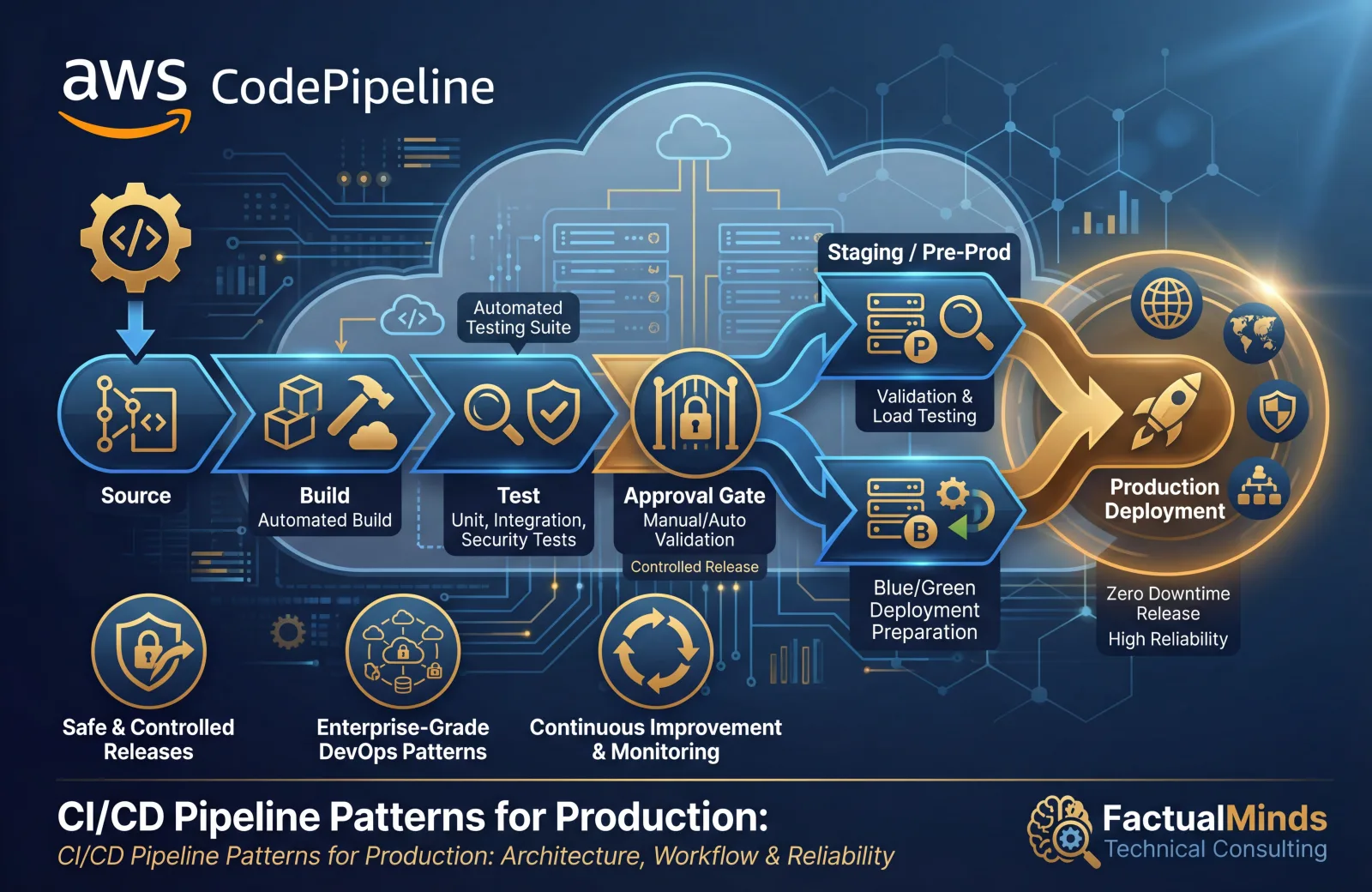
Table of Contents
CI/CD pipelines are the mechanism that turns code changes into running software — automatically, reliably, and safely. Without CI/CD, deployments are manual processes that vary between team members, skip tests under time pressure, and introduce human error at the most critical point in the software lifecycle. With CI/CD, every deployment follows the same path: build, test, stage, approve, deploy.
AWS CodePipeline orchestrates this flow using AWS-native services — CodeCommit or GitHub for source, CodeBuild for build and test, CodeDeploy for deployment, and CloudFormation for infrastructure changes. This guide covers the pipeline patterns that work in production.
Pipeline Architecture
Basic Pipeline Structure
Every pipeline follows the same fundamental stages:
Source → Build → Test → Stage Deploy → Approval → Production DeployMinimum viable pipeline:
Source (GitHub)
  → Build (CodeBuild: compile, unit test, lint)
    → Deploy (CodeDeploy/ECS: deploy to staging)
      → Manual Approval
        → Deploy (CodeDeploy/ECS: deploy to production)
Production pipeline with quality gates:
Source (GitHub)
  → Build (CodeBuild: compile, unit test, lint, SAST)
    → Deploy to Staging (ECS/CodeDeploy)
      → Integration Tests (CodeBuild: API tests, E2E tests)
        → Performance Tests (CodeBuild: load testing)
          → Manual Approval (with test results link)
            → Deploy to Production (ECS/CodeDeploy: blue-green)
              → Post-Deploy Validation (CodeBuild: smoke tests)
CodePipeline V2
CodePipeline V2 introduces pipeline-level variables, triggers, and improved execution modes:
Trigger types:
- Push — Trigger on code push to specific branches
- Pull request — Trigger on PR creation or update
- Tag — Trigger on tag creation (release workflow)
- Scheduled — Trigger on a cron schedule (nightly builds)
Execution modes:
- SUPERSEDED — New execution cancels in-progress execution (default)
- QUEUED — Executions run in order, one at a time
- PARALLEL — Multiple executions run simultaneously (for independent branches)
Recommendation: Use QUEUED mode for production pipelines. SUPERSEDED can cancel a valid deployment mid-flight. PARALLEL is for feature branch pipelines where executions are independent.
CodeBuild
Build Project Configuration
CodeBuild runs your build commands in a managed container:
# buildspec.yml
version: 0.2
phases:
  install:
    runtime-versions:
      nodejs: 20
    commands:
      - npm ci
  pre_build:
    commands:
      - npm run lint
      - npm run type-check
  build:
    commands:
      - npm run build
      - npm test -- --coverage
  post_build:
    commands:
      - docker build -t $ECR_REPO:$CODEBUILD_RESOLVED_SOURCE_VERSION .
      - docker push $ECR_REPO:$CODEBUILD_RESOLVED_SOURCE_VERSION
artifacts:
  files:
    - '**/*'
  base-directory: dist
reports:
  coverage:
    files:
      - coverage/clover.xml
    file-format: CLOVERXML
  tests:
    files:
      - junit.xml
    file-format: JUNITXML
cache:
  paths:
    - 'node_modules/**/*'
Build Environment
| Compute Type | vCPU | Memory | Best For |
|---|---|---|---|
| BUILD_GENERAL1_SMALL | 2 | 3 GB | Simple builds, linting |
| BUILD_GENERAL1_MEDIUM | 4 | 7 GB | Standard builds, unit tests |
| BUILD_GENERAL1_LARGE | 8 | 15 GB | Large builds, Docker, integration tests |
| BUILD_GENERAL1_2XLARGE | 72 | 145 GB | Massive parallel tests, ML model builds |
| BUILD_LAMBDA_1GB | 2 | 1 GB | Fast, lightweight builds (Lambda compute) |
Lambda compute mode: For builds that complete in under 15 minutes without Docker, Lambda compute starts faster (no container provisioning) and costs less. Use for lint, test, and simple build steps.
Build caching: Enable S3 or local caching for node_modules, .m2, .gradle, or other dependency directories. Caching reduces build times by 50-80% for dependency-heavy projects.
Environment Variables and Secrets
environment:
  variables:
    NODE_ENV: production
    AWS_DEFAULT_REGION: us-east-1
  parameter-store:
    DB_HOST: /myapp/prod/database/host
  secrets-manager:
    DB_PASSWORD: myapp/prod/db-password:password
Never hardcode secrets in buildspec.yml. Use Parameter Store or Secrets Manager references — CodeBuild resolves them at build time.
Deployment Strategies
Rolling Deployment
Replace instances/tasks in batches:
Batch 1 (25%): Deploy new version → Health check → Proceed
Batch 2 (25%): Deploy new version → Health check → Proceed
Batch 3 (25%): Deploy new version → Health check → Proceed
Batch 4 (25%): Deploy new version → Health check → Complete
Pros: No additional infrastructure cost, gradual rollout. Cons: Mixed versions during deployment, rollback requires another deployment.
Best for: Internal applications, non-critical services where brief mixed-version state is acceptable.
Blue-Green Deployment
Run two identical environments — deploy to the inactive one, then switch traffic:
Before: Traffic → Blue (v1.0) [active]    Green (idle)
Deploy: Traffic → Blue (v1.0) [active]    Green (v1.1) [deploying]
Switch: Traffic → Blue (v1.0) [standby]   Green (v1.1) [active]
ECS blue-green with CodeDeploy:
1. CodeDeploy creates new task set (green) with new task definition
2. Green tasks start and pass health checks
3. CodeDeploy shifts traffic: 10% to green (canary)
4. Wait 5 minutes, monitor alarms
5. Shift remaining 90% to green
6. Terminate blue task set after 1 hour (rollback window)
Pros: Zero-downtime, instant rollback (shift traffic back to blue). Cons: Double infrastructure during deployment.
Best for: Production workloads where zero-downtime and fast rollback are requirements.
Canary Deployment
Route a small percentage of traffic to the new version, then gradually increase:
Step 1: 5% → new version, 95% → current version  (10 minutes)
Step 2: 25% → new version, 75% → current version  (10 minutes)
Step 3: 50% → new version, 50% → current version  (10 minutes)
Step 4: 100% → new version                         (complete)
Automatic rollback: If CloudWatch alarms trigger during any step (error rate increase, latency spike), CodeDeploy automatically rolls back to the previous version.
CodeDeploy deployment configuration:
CodeDeployDefault.ECSCanary10Percent5Minutes
  → 10% traffic shift, wait 5 minutes, then 100%

CodeDeployDefault.ECSLinear10PercentEvery3Minutes
  → 10% every 3 minutes until 100%

Custom:
  → 5% for 10 minutes, then 25% for 10 minutes, then 100%
ECS Deployments
For ECS workloads, the pipeline builds a Docker image, pushes to ECR, and updates the task definition:
Source → CodeBuild (build + push to ECR)
  → Create new task definition revision
    → CodeDeploy: Blue-green deployment to ECS service
      → CloudWatch alarms monitor error rate
        → Auto-rollback if alarms trigger
Image tagging strategy:
ECR image tags:
  latest         ← don't use in production (mutable)
  v1.2.3         ← semantic version (for releases)
  abc123def      ← git commit SHA (for traceability, recommended)
Tag images with the git commit SHA. This creates a direct link from the running container back to the exact source code — essential for debugging production issues.
Cross-Account Pipelines
In a multi-account organization, the pipeline runs in a tools account and deploys to workload accounts:
Tools Account (pipeline + build):
  CodePipeline → CodeBuild
    → Assume role in Staging Account → Deploy to staging
      → Manual Approval
        → Assume role in Production Account → Deploy to production
Cross-Account Setup
1. Pipeline account (tools): KMS key, S3 artifact bucket, CodePipeline, CodeBuild.
2. Target accounts (staging, production): IAM role that the pipeline assumes, with permissions to deploy (ECS, CodeDeploy, CloudFormation).
3. KMS key policy: Grant the target account roles access to decrypt pipeline artifacts.
Key principle: The pipeline account has no direct access to workload resources. It assumes a deployment role in each target account, and that role has only the permissions needed for deployment — not administrative access.
Pipeline Security
IAM Best Practices
Apply least privilege to every pipeline component:
- CodePipeline service role — Access to source (CodeStar Connections), build (CodeBuild), deploy (CodeDeploy/ECS), and artifact bucket only
- CodeBuild service role — Access to ECR, artifact bucket, Parameter Store/Secrets Manager, CloudWatch Logs
- CodeDeploy service role — Access to ECS, ALB target groups, Auto Scaling
- Artifact bucket policy — Encrypted with KMS, access limited to pipeline roles
Artifact Encryption
All pipeline artifacts should be encrypted:
S3 artifact bucket:
  Encryption: AWS KMS (customer-managed key)
  Bucket policy: Deny unencrypted uploads
  Versioning: Enabled
  Lifecycle: Delete artifacts after 30 days
Source Authentication
GitHub (via CodeStar Connections): OAuth-based connection — no access tokens stored in AWS. CodeStar Connections is the recommended way to connect GitHub to CodePipeline.
CodeCommit: IAM-based authentication. Use git-remote-codecommit for HTTPS (no SSH keys to manage).
Testing in Pipelines
Test Stages
| Stage | Test Type | Runs On | Purpose |
|---|---|---|---|
| Build | Unit tests | CodeBuild | Verify code logic |
| Build | Lint + type check | CodeBuild | Code quality |
| Build | SAST (static analysis) | CodeBuild | Security vulnerabilities |
| Post-staging | Integration tests | CodeBuild | API contract verification |
| Post-staging | E2E tests | CodeBuild | User workflow verification |
| Post-staging | Load tests | CodeBuild | Performance verification |
| Post-production | Smoke tests | CodeBuild | Production health verification |
Test Reports
CodeBuild supports test report groups that display results in the console:
- JUnit XML — Test results with pass/fail/skip counts
- Clover/Cobertura XML — Code coverage reports
- Cucumber JSON — BDD test results
Configure test reports in buildspec.yml to track test results and coverage trends over time.
Monitoring
Pipeline Metrics
Set CloudWatch alarms for pipeline health:
| Metric | Alarm Condition | Indicates |
|---|---|---|
| Pipeline execution time | > 30 minutes | Build performance degradation |
| Failed executions | > 0 | Build or deployment failure |
| Manual approval pending | > 4 hours | Approval bottleneck |
Notifications
Configure pipeline notifications via SNS:
Events to notify:
  - Pipeline execution started
  - Pipeline execution failed (critical — page on-call)
  - Manual approval needed (notify approvers)
  - Deployment succeeded (notify team)
  - Deployment rolled back (critical — page on-call)
Deployment Tracking
Tag deployments with metadata for traceability:
Deployment:
  Commit: abc123def
  Author: jane@example.com
  Pipeline: my-app-pipeline
  Execution: 12345678-abcd-efgh
  Timestamp: 2026-10-05T14:30:00Z
Every production issue should be traceable to a specific deployment, commit, and author.
Cost Optimization
Pricing
| Service | Cost |
|---|---|
| CodePipeline V2 | $0.002/minute of action execution |
| CodeBuild (general1.medium) | $0.005/minute |
| CodeBuild (Lambda, 1 GB) | $0.00003/second |
| CodeDeploy (ECS/Lambda) | Free |
| CodeDeploy (EC2) | Free for on-premises → AWS |
Reducing Costs
- Use Lambda compute for CodeBuild steps that do not need Docker — 10x cheaper than general compute
- Cache dependencies — Avoid downloading
node_modulesor Maven dependencies on every build - Optimize build steps — Parallelize independent steps (lint + type-check + test simultaneously)
- Right-size compute — Do not use LARGE for a build that needs SMALL
- Skip unnecessary stages — Use pipeline variables and conditions to skip stages for non-critical changes
Common Mistakes
Mistake 1: No Rollback Strategy
Deploying to production without automatic rollback on failure. Configure CloudWatch alarms that trigger automatic rollback when error rate or latency exceeds thresholds during deployment.
Mistake 2: Secrets in Source Control
Storing database passwords, API keys, or credentials in buildspec.yml or application config files. Use Parameter Store and Secrets Manager references — never embed secrets in source control.
Mistake 3: No Manual Approval for Production
Automated deployment straight to production without a manual approval gate. Even with extensive testing, production deployments should require human approval — at least until the team has high confidence in the test suite.
Mistake 4: Oversized Build Environments
Using BUILD_GENERAL1_LARGE for every CodeBuild step. Most lint, test, and simple build steps run fine on SMALL or MEDIUM. Reserve LARGE for Docker builds and integration tests.
Mistake 5: No Artifact Retention Policy
Pipeline artifacts accumulate in S3 indefinitely. Configure lifecycle rules to delete artifacts after 30 days — you rarely need build artifacts from months ago.
Getting Started
CI/CD pipelines are the operational practice that turns code changes into reliable, repeatable deployments. Combined with infrastructure as code for environment consistency, container orchestration for application deployment, and monitoring for deployment validation, CodePipeline provides the deployment automation that production workloads require.
For CI/CD pipeline design, DevOps implementation, and managed infrastructure services, talk to our team.
AWS Cloud Architect & AI Expert
AWS-certified cloud architect and AI expert with deep expertise in cloud migrations, cost optimization, and generative AI on AWS.