Amazon DataZone: Enterprise Data Governance and Catalog for Modern AWS Data Platforms
Quick summary: July 2026: Amazon DataZone domain/project subscriptions on Glue + Lake Formation — pricing is requests/metadata/compute/tokens (not per-asset monthly), with a subscription pilot checklist.
Key Takeaways
- July 2026: Amazon DataZone domain/project subscriptions on Glue + Lake Formation — pricing is requests/metadata/compute/tokens (not per-asset monthly), with a subscription pilot checklist
- Most AWS data platforms have a metadata problem that nobody talks about in architecture reviews
- AWS Glue Data Catalog holds your table schemas, partition locations, and S3 paths
- And who approved the last 12 access requests
- Treat blueprint text below as architectural guidance and reconcile IAM, Glue/Redshift/S3 integrations against current DataZone docs and pricing
Table of Contents
Most AWS data platforms have a metadata problem that nobody talks about in architecture reviews. AWS Glue Data Catalog holds your table schemas, partition locations, and S3 paths. Lake Formation enforces who can query what. But neither answers the questions that block actual data usage in a large organization: What does this table actually represent? Who owns it? Is the data fresh? How do I get access to it? And who approved the last 12 access requests?
As of July 19, 2026, Amazon DataZone remains the governance + business catalog surface for governed sharing across accounts and projects—domain units and authorization policies (GA path since 2024) included. Treat blueprint text below as architectural guidance and reconcile IAM, Glue/Redshift/S3 integrations against current DataZone docs and pricing.
These are governance questions, not technical questions. And they are exactly what Amazon DataZone was built to answer.
DataZone (GA October 2023, expanded through 2024–2026) layers on top of your existing AWS data infrastructure. It does not replace Glue Data Catalog or Lake Formation — it orchestrates and enriches them with the business context and access workflow enterprise data teams need.
Reproduce this — Subscription pilot checklist:
examples/architecture-blog-2026/datazone/subscription-pilot-checklist.md
DataZone vs. Glue Data Catalog vs. Lake Formation
Before going deeper, it is worth being precise about what each service is, because the three are commonly conflated.
| Dimension | Glue Data Catalog | AWS Lake Formation | Amazon DataZone |
|---|---|---|---|
| Primary purpose | Technical metadata store | Fine-grained access control | Governance workflow + business catalog |
| What it stores | Table schemas, partitions, S3 locations, Glue job definitions | IAM policies scoped to tables/columns/rows | Business descriptions, glossary terms, owners, quality scores, lineage, subscription history |
| Who manages it | Data engineers | Data platform/security teams | Data governance teams, data owners |
| Access model | IAM role-based (no workflow) | Column/row-level permissions via grants | Request → Approval → Automatic provisioning workflow |
| Data discovery | None (technical catalog only) | None | Full-text search across all registered assets with business context |
| Replaces the other? | No | No | No — uses both as underlying infrastructure |
The important takeaway: DataZone sits above Glue Data Catalog and Lake Formation in the stack. When a DataZone subscription is approved, DataZone calls Lake Formation APIs automatically to provision the actual permission grant. The Glue Data Catalog remains the authoritative technical metadata store; DataZone imports from it and adds business metadata on top.
Here is what the layered stack looks like in practice:
┌─────────────────────────────────────────┐
│          Amazon DataZone                │
│   (business catalog, governance,        │
│    subscription workflow, lineage)      │
├─────────────────────────────────────────┤
│          AWS Lake Formation             │
│   (column/row-level access control,     │
│    permission grants to Glue tables)    │
├─────────────────────────────────────────┤
│       AWS Glue Data Catalog             │
│   (table schemas, S3 locations,         │
│    partitions, Glue job definitions)    │
├─────────────────────────────────────────┤
│   Storage + Compute                     │
│   (S3, Glue ETL, Athena, Redshift,      │
│    RDS, EMR)                            │
└─────────────────────────────────────────┘
Domain, Project, and Environment Model
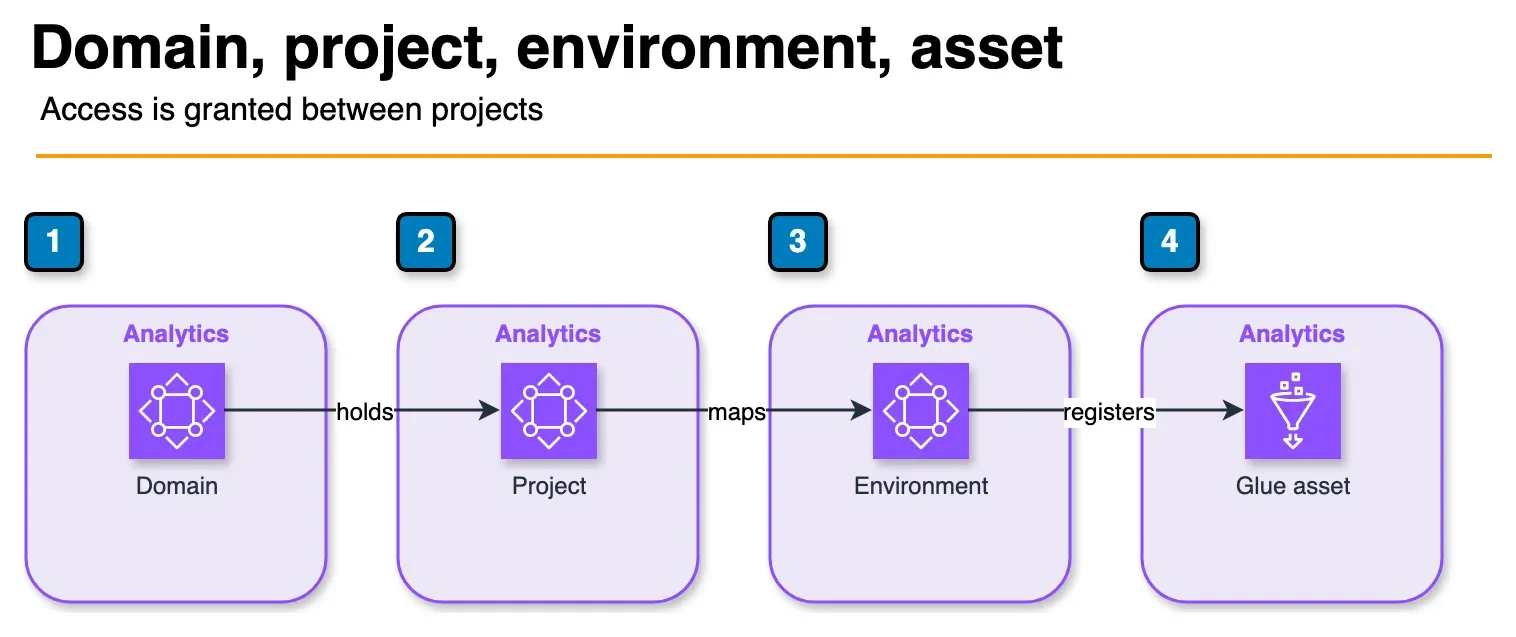
Figure: the hierarchy in the article. A domain holds projects. An environment maps a project to an account and Region. The asset is the registered table. Arrows here mean containment, not a request. Open the draw.io source.
DataZone’s organizational hierarchy has four levels. Understanding these before setting up your first domain saves significant rework later.
Domain is the top-level organizational boundary — typically mapped to a company, a major business unit, or a regulatory boundary that requires separate data governance. All assets, projects, and business glossary terms live within a domain. Domains are isolated from each other; there is no cross-domain asset discovery by default.
Project is a team or initiative workspace within a domain. Projects are the unit of data ownership and access control. A Data Engineering team might have one project for raw data ingestion pipelines; a Finance Analytics team has a separate project to consume that data. Asset access is granted between projects, not between individual users.
Environment maps a project to a specific AWS account and region. A project can have multiple environments (e.g., a dev environment in account 123456789012 us-east-1, and a prod environment in account 987654321098 us-east-1). Environments are where the actual data assets live — S3 buckets, Glue tables, Redshift schemas.
Asset is any registered data resource: an S3-backed Glue table, a Redshift schema, an RDS table, or a SageMaker ML model artifact. Assets have both technical metadata (imported from Glue Data Catalog or Redshift) and business metadata (descriptions, glossary terms, owners, quality scores) you add in DataZone.
Here is a realistic enterprise domain setup for a financial services company:
FinServCo Domain
│
├── Data Engineering Project
│   ├── Production Environment (AWS Account: data-platform-prod)
│   │   ├── raw_transactions (Glue table asset)
│   │   ├── enriched_customer_360 (Glue table asset)
│   │   └── settlements_daily (Redshift schema asset)
│   └── Dev Environment (AWS Account: data-platform-dev)
│
├── Risk Analytics Project
│   └── Production Environment (AWS Account: risk-analytics-prod)
│       └── (consumes enriched_customer_360 via subscription)
│
└── ML Fraud Team Project
    └── Production Environment (AWS Account: ml-platform-prod)
        └── (consumes raw_transactions via subscription for model training)
Each project gets an IAM execution role that DataZone uses to provision and manage access. The critical design decision is whether to map projects to AWS accounts (strong isolation, more overhead) or to use account-level environments within a single account (simpler, but relies on IAM boundaries). For regulated industries, one AWS account per project environment is strongly recommended.
Data Subscription Workflow
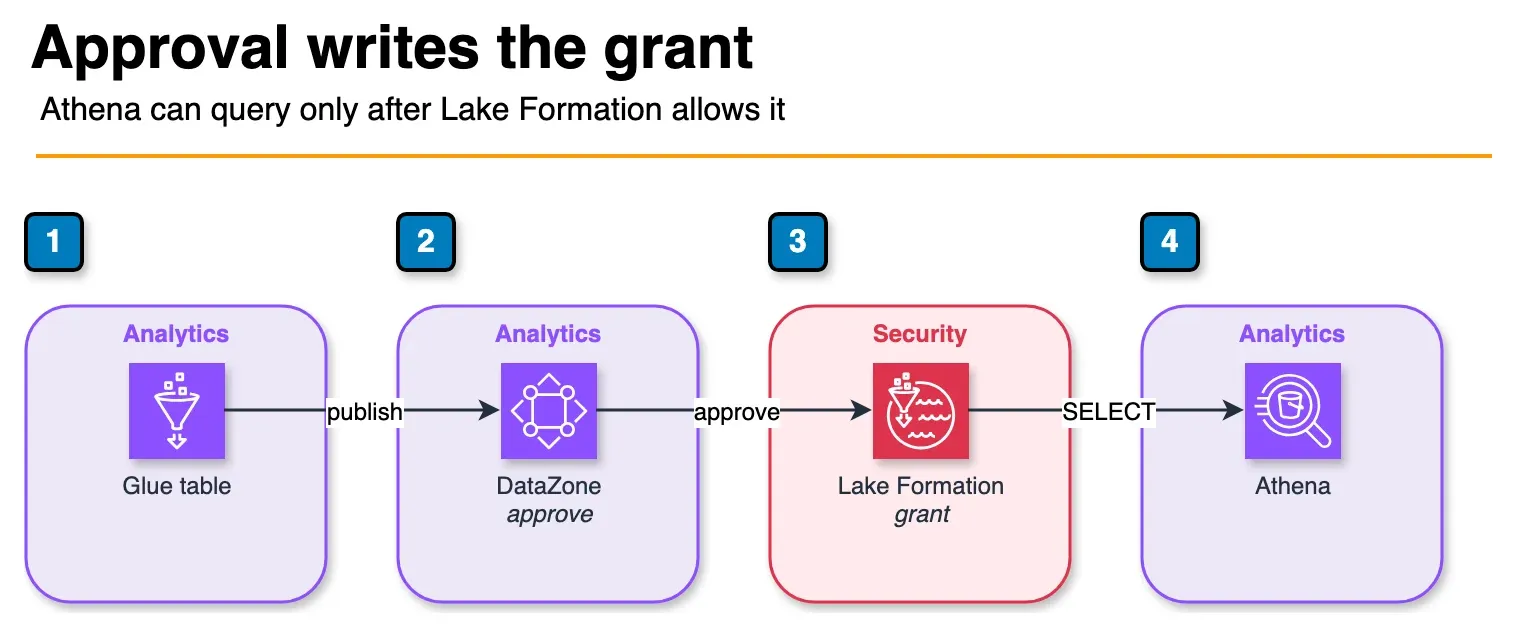
Figure: the subscription path in the article. Publishing makes the Glue table discoverable. Approval is what calls Lake Formation. The consumer project then queries with Athena. Revoke removes that grant. No account or table name is shown. Open the draw.io source.
The subscription workflow is where DataZone delivers its most concrete value. Before DataZone, data access in most AWS environments involved a Jira ticket, a Slack message to the data platform team, a manual Lake Formation grant, and zero audit trail. DataZone replaces this with a structured, auditable workflow.
Here is the end-to-end flow:
Step 1: Publish an asset
A Data Engineering project member registers a Glue table as a DataZone asset:
import boto3

datazone = boto3.client('datazone', region_name='us-east-1')

# Create an asset in DataZone from a Glue table
response = datazone.create_asset(
    domainIdentifier='dzd_abc123',
    owningProjectIdentifier='proj_dataeng_001',
    name='enriched_customer_360',
    typeIdentifier='amazon.datazone.GlueTableAssetType',
    typeRevision='1',
    description='Customer 360 view combining CRM, transaction, and behavioral data. Updated daily at 02:00 UTC.',
    formsInput=[
        {
            'formName': 'GlueTableForm',
            'typeIdentifier': 'amazon.datazone.GlueTableForm',
            'content': '{"databaseName": "analytics_prod", "tableName": "enriched_customer_360"}'
        }
    ]
)

asset_id = response['id']

# Publish the asset to make it discoverable
datazone.create_asset_revision(
    domainIdentifier='dzd_abc123',
    identifier=asset_id,
    name='enriched_customer_360',
    description='Customer 360 view combining CRM, transaction, and behavioral data. Updated daily at 02:00 UTC.',
    formsInput=[...]
)
Step 2: Business enrichment
Before publishing, data owners add business context in the DataZone console: glossary term assignments (e.g., “Customer”, “Transaction”), data quality score thresholds, owner contacts, and update frequency. This is what makes the asset useful for discovery.
Step 3: Consumer requests access
A Risk Analytics team member finds the asset via DataZone’s search interface, reviews the description and quality scores, and submits a subscription request with a business justification. The request appears in the owning project’s approval queue.
Step 4: Producer approves
The Data Engineering project owner reviews the request and approves it. At approval time, DataZone automatically calls the Lake Formation GrantPermissions API on behalf of the Risk Analytics project’s IAM execution role:
# DataZone does this automatically on approval — shown for illustration
lakeformation = boto3.client('lakeformation', region_name='us-east-1')

lakeformation.grant_permissions(
    Principal={'DataLakePrincipalIdentifier': 'arn:aws:iam::RISK_ACCOUNT:role/DataZone-RiskAnalytics-ExecutionRole'},
    Resource={
        'Table': {
            'DatabaseName': 'analytics_prod',
            'Name': 'enriched_customer_360'
        }
    },
    Permissions=['SELECT'],
    PermissionsWithGrantOption=[]
)
Step 5: Consumer queries the data
The Risk Analytics project’s IAM role can now query the table via Athena, Glue, or EMR — whichever is configured in their DataZone environment. No additional manual steps required.
Audit trail: every subscription request, approval, rejection, and revocation is logged in DataZone’s subscription history. This is what compliance teams need for data access audits.
To revoke access, a producer revokes the subscription in DataZone, which calls RevokePermissions in Lake Formation automatically.
Integration with SageMaker Unified Studio
The relationship between DataZone and SageMaker Unified Studio is tighter than most teams realize: they share the same domain model. A SageMaker Unified Studio domain is a DataZone domain — the same entity, accessible from both consoles.
This means that when your ML team creates a project in SageMaker Unified Studio, that project appears in DataZone as a project with the same governance capabilities. ML engineers can discover and subscribe to governed data assets directly from within the SageMaker Unified Studio IDE without switching to a separate governance console.
The workflow looks like this in practice:
- A data engineer publishes a training dataset (S3/Glue table) as a DataZone asset in the “Data Engineering” project
- An ML engineer opens SageMaker Unified Studio, opens the Data Catalog panel in the IDE
- The ML engineer searches for “customer churn” and finds the registered asset
- If the ML project does not have an active subscription, the IDE shows a “Request Access” button
- The ML engineer submits a subscription request with justification (“Needed for Q2 churn prediction model training”)
- The data owner approves in the DataZone console (or SageMaker Unified Studio — same UI)
- The dataset is immediately available in the ML engineer’s notebook environment via Athena or S3 direct access
To configure this integration, the SageMaker domain and DataZone domain must be in the same AWS account and region, or connected via DataZone’s cross-account feature. The SageMaker execution role must have datazone:* permissions scoped to the domain ARN.
# Verify the SageMaker domain is linked to DataZone
sagemaker = boto3.client('sagemaker')

domain = sagemaker.describe_domain(DomainId='d-abc123')
print(domain['DefaultUserSettings']['CustomPosixUserConfig'])
# DataZone domain ARN appears in domain metadata when linked
The practical benefit: ML teams no longer maintain their own shadow copies of datasets in S3 buckets that the governance team does not know about. DataZone subscriptions make the access visible, auditable, and revocable.
Data Quality and Lineage
Data quality integration: DataZone integrates with AWS Glue Data Quality (powered by DeeQu) to surface quality scores on assets. When you configure Glue Data Quality rules on a table and publish that table as a DataZone asset, the latest quality score and rule pass/fail status appear in the asset’s DataZone catalog entry.
This is significant for consumers making access decisions: they can see that enriched_customer_360 has a 94% quality score (completeness, uniqueness, consistency) before requesting access, rather than discovering data problems after they have built a pipeline on top of it.
Lineage tracking: DataZone tracks lineage for AWS Glue ETL jobs that are registered in the same domain. If a Glue job reads from raw_transactions and writes to enriched_customer_360, DataZone surfaces this dependency chain in the asset’s lineage view. This is valuable for impact analysis (“if I change the schema of raw_transactions, which downstream assets are affected?”) and for audit requirements in regulated industries.
Lineage is automatically captured for Glue ETL jobs — no code changes required. For Spark jobs on EMR or custom Python transformations, you can emit lineage events via the DataZone API’s OpenLineage-compatible endpoint.
Implementation Roadmap
The teams that get the most value from DataZone treat it as a phased rollout rather than a big-bang deployment. The governance workflow is only useful once data producers are publishing assets and consumers are using it for access requests.
Phase 1: Foundation (Weeks 1–3)
- Create the DataZone domain and map it to your organizational structure
- Define the project hierarchy: identify your main data producer teams and consumer teams
- Connect existing Glue Data Catalog: link your production AWS accounts as DataZone environments
- Import existing Glue databases and tables as DataZone assets (technical metadata imports automatically)
- Configure IAM execution roles for each project environment
Phase 2: Business Enrichment (Weeks 4–8)
- Work with data owners to add business descriptions to the top 20 most-used datasets
- Build the business glossary: define your organization’s key data terms (what does “customer” mean in your context? what counts as a “completed transaction”?)
- Assign glossary terms to assets
- Identify data owners for each published asset — this is often the hardest organizational step
Phase 3: Subscription Workflow Adoption (Weeks 9–14)
- Pilot the subscription workflow with one high-traffic dataset (e.g., the analytics team’s most-requested table)
- Migrate ad-hoc Slack/Jira data access requests to DataZone subscription requests for that dataset
- Train both producers (approving requests, writing asset descriptions) and consumers (searching catalog, submitting requests)
- Measure time-to-access before and after: this is your primary success metric
- Expand to all production datasets once the pilot is stable
Phase 4: Quality and Lineage (Weeks 15–20)
- Add Glue Data Quality rules to critical datasets and surface scores in DataZone
- Configure lineage tracking for key Glue ETL pipelines
- Set up EventBridge alerts for quality score degradation on governed assets
- Review subscription history reports with your compliance team to validate the audit trail meets regulatory requirements
The most common failure mode in DataZone rollouts is skipping Phase 2 — importing technical metadata without adding business context. A catalog full of Glue tables with no descriptions is not more useful than just searching the Glue console directly. Business enrichment is what makes DataZone worth adopting.
Connecting DataZone to Your Existing AWS Data Lake
If you have an existing data lake built on S3, Glue, and Athena, DataZone slots in above it without requiring any changes to your storage layout or ETL pipelines. The connection is through the DataZone environment, which maps to your existing Glue Data Catalog.
The one infrastructure change you will need: ensure Lake Formation is enabled on the Glue Data Catalog in your data lake accounts. DataZone uses Lake Formation for permission provisioning, so if your data lake is still using IAM-only S3 bucket policies for access control (without Lake Formation), you will need to migrate before DataZone’s automated subscription provisioning works.
For IAM least-privilege design within the DataZone context, each project’s execution role should be scoped to only the S3 paths and Glue databases relevant to that project’s data, with Lake Formation managing the table-level grants on top.
For the people and process layer — steward RACI, council cadence, and SageMaker Catalog in 2026 — see the data governance operating model guide.
What This Post Doesn’t Cover
- SageMaker Catalog / Unified Studio org redesigns — see the data governance operating model for people/process.
- Exact OpenLineage payload schemas for non-Glue emitters — verify current DataZone API docs.
- Per-region feature parity for Redshift Serverless vs provisioned grant fulfillment.
If You Only Do One Thing
Pilot one high-traffic Glue table through publish → subscribe → Lake Formation grant → revoke, and measure median time-to-access against your Slack/Jira baseline.
What to Do This Week
- Confirm Lake Formation is enabled on the Glue Catalog in the producer account.
- Create a domain + one producer / one consumer project; enrich the pilot asset with a business description and owner.
- Run the subscription pilot checklist and budget from the four pricing dimensions — not a per-asset monthly guess.
Need help with domain hierarchy or Glue catalog migration? Contact FactualMinds.
Frequently asked questions
Does DataZone replace AWS Lake Formation?
Can DataZone work with on-premises data sources?
How does DataZone handle PII classification?
Can I import my existing AWS Glue Data Catalog into DataZone?
What is the latency for automatic permission provisioning after a subscription is approved?
How does DataZone pricing scale at enterprise volume?

AWS Cloud Architect & AI Expert
AWS-certified cloud architect and AI expert with deep expertise in cloud migrations, cost optimization, and generative AI on AWS.