How to Host n8n on AWS EKS: A Production-Ready Deployment Guide
Quick summary: n8n on EKS: queue mode, RDS Postgres, Redis/Valkey, ALB+WAF, IRSA. July 2026 production checklist.
Key Takeaways
- n8n on EKS: queue mode, RDS Postgres, Redis/Valkey, ALB+WAF, IRSA
- July 2026 production checklist
- Most n8n guides stop at
- First-party benchmark (illustrative cost table later): light/medium self-host often lands ~$500+/month in us-east-1 vs n8n Cloud until execution volume is high — re-quote Spot/RDS rates
- Reproduce this: n8n EKS production checklist Counter-case: scaling main replicas without queue mode duplicates workflow runs
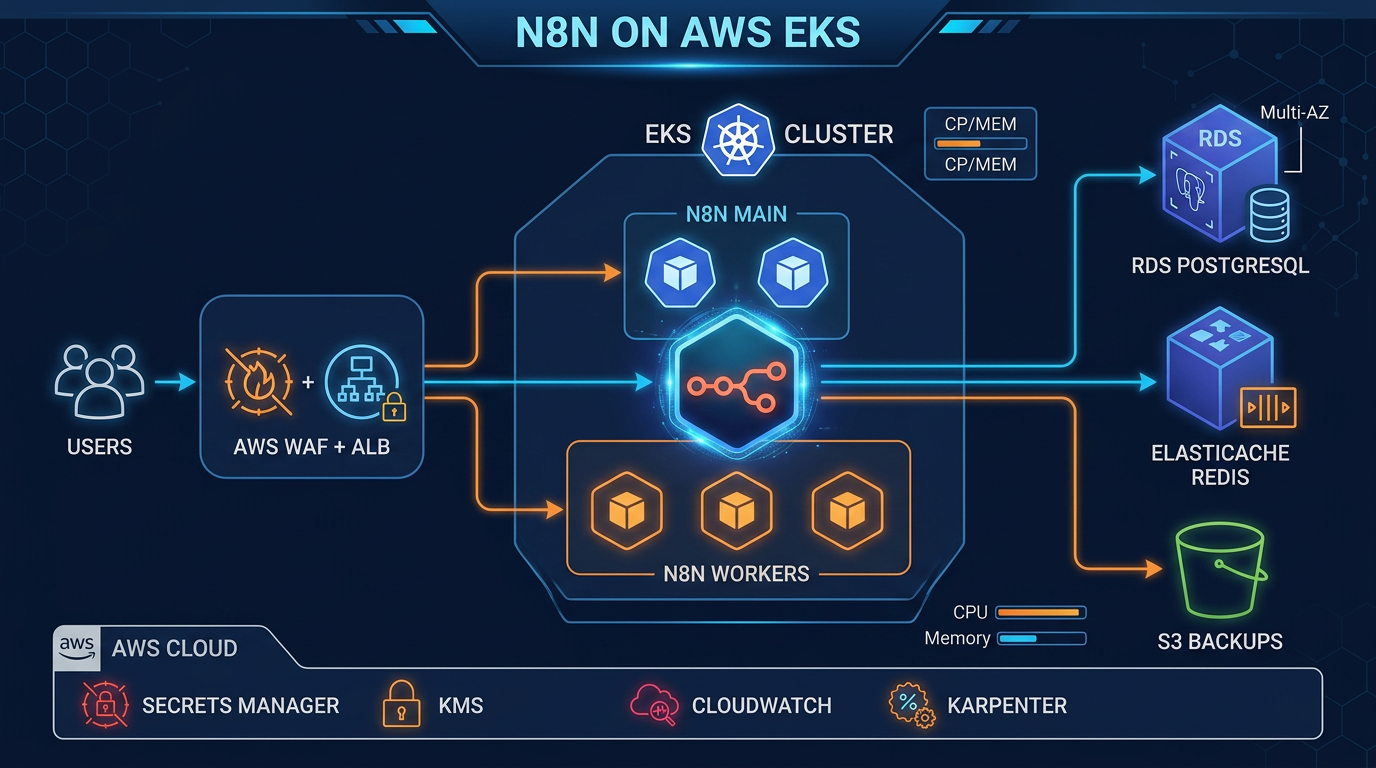
Table of Contents
Most n8n guides stop at docker run. As of July 2026, production on EKS still means: RDS PostgreSQL Multi-AZ (not SQLite), EXECUTIONS_MODE=queue with Redis/Valkey workers, IRSA, Secrets Manager for N8N_ENCRYPTION_KEY, ALB + ACM + WAF, CloudWatch, S3 workflow exports, and Karpenter/HPA — or you lose history on every pod move and risk duplicate executions.
First-party benchmark (illustrative cost table later): light/medium self-host often lands ~$500+/month in us-east-1 vs n8n Cloud until execution volume is high — re-quote Spot/RDS rates.
Reproduce this: n8n EKS production checklist
Counter-case: scaling main replicas without queue mode duplicates workflow runs.
Contact for EKS/n8n production architecture.
Architecture Overview
What You Are Building
A horizontally scalable n8n cluster where the main service handles the UI and API, worker pods process workflow executions from a Redis queue, and all state lives in RDS PostgreSQL. The ALB terminates TLS, WAF screens requests, and External Secrets Operator syncs credentials from Secrets Manager so your Kubernetes cluster never stores raw secrets.
AWS Services Used
| AWS Service | Role |
|---|---|
| Amazon EKS 1.36 | Kubernetes control plane and worker nodes |
| Amazon RDS PostgreSQL 16 (Multi-AZ) | n8n application database |
| Amazon ElastiCache Serverless Redis | Queue broker for n8n queue mode |
| Amazon ECR | Private registry for the n8n container image |
| AWS Application Load Balancer | Layer-7 ingress with SSL termination |
| AWS Certificate Manager (ACM) | TLS certificate, DNS-validated via Route 53 |
| Amazon Route 53 | DNS alias record pointing to the ALB |
| AWS Secrets Manager + KMS | DB password and N8N_ENCRYPTION_KEY storage |
| AWS WAF v2 | Managed rule sets protecting the ALB |
| Amazon CloudWatch + Container Insights | Metrics, logs, and alarms |
| Amazon S3 | Daily workflow JSON exports and alarm log archive |
| AWS IAM / IRSA | Pod-level AWS API credentials via ServiceAccount |
| Karpenter | Cost-optimized autoscaling for n8n worker nodes |
| Amazon VPC | Network isolation with private subnets |
Traffic and Data Flow
Internet
  │
  ▼
AWS WAF v2 (Regional)
  │
  ▼
Application Load Balancer  ←── ACM TLS (HTTPS 443)
  │
  ▼
n8n Service (ClusterIP, port 5678)
  │
  ├─► n8n Main Pods (UI + API + webhook receiver)
  │         │
  │         ├─► RDS PostgreSQL (Multi-AZ, private subnet)
  │         └─► ElastiCache Redis (queue)
  │
  └─► n8n Worker Pods (execution engine)
            │
            ├─► RDS PostgreSQL
            ├─► ElastiCache Redis
            └─► AWS APIs via IRSA (SES, S3, etc.)

External Secrets Operator ──► Secrets Manager ──► Kubernetes Secrets
CloudWatch Agent (Fluent Bit) ──► CloudWatch Logs + Metrics
S3 Backup CronJob ──► S3 (workflow exports)
Prerequisites
- AWS CLI v2 configured with admin-level credentials
eksctlv0.180+ installedkubectlv1.36+helmv3.14+- A registered domain in Route 53
- SES identity verified (for the sample workflow)
Step 1: Provision the VPC and EKS Cluster
VPC Design: Multi-AZ, Private Subnets
Run n8n pods in private subnets across three AZs. Only the ALB lives in public subnets. RDS and ElastiCache are in isolated subnets with no internet route.
eksctl ClusterConfig
# cluster.yaml
apiVersion: eksctl.io/v1alpha5
kind: ClusterConfig

metadata:
  name: n8n-prod
  region: us-east-1
  version: '1.36'

vpc:
  cidr: 10.0.0.0/16
  nat:
    gateway: HighlyAvailable
  clusterEndpoints:
    privateAccess: true
    publicAccess: true

managedNodeGroups:
  - name: system
    instanceType: m6i.large
    minSize: 2
    maxSize: 4
    desiredCapacity: 2
    privateNetworking: true
    amiFamily: AmazonLinux2023
    iam:
      withAddonPolicies:
        externalDNS: true
        awsLoadBalancerController: true
        cloudWatch: true

addons:
  - name: vpc-cni
    version: latest
    configurationValues: '{"env":{"ENABLE_POD_ENI":"true"}}'
  - name: coredns
    version: latest
  - name: kube-proxy
    version: latest
  - name: aws-ebs-csi-driver
    version: latest
  - name: amazon-cloudwatch-observability
    version: latest

iam:
  withOIDC: true
eksctl create cluster -f cluster.yamlEnable OIDC Provider for IRSA
eksctl enables OIDC automatically when iam.withOIDC: true is set. Verify:
aws eks describe-cluster --name n8n-prod \
  --query "cluster.identity.oidc.issuer" --output text
Step 2: Install the AWS Load Balancer Controller
IRSA Role for the Controller
eksctl create iamserviceaccount \
  --cluster n8n-prod \
  --namespace kube-system \
  --name aws-load-balancer-controller \
  --role-name AmazonEKSLoadBalancerControllerRole \
  --attach-policy-arn arn:aws:iam::aws:policy/AWSLoadBalancerControllerIAMPolicy \
  --approve
Install via Helm
helm repo add eks https://aws.github.io/eks-charts
helm repo update

helm install aws-load-balancer-controller eks/aws-load-balancer-controller \
  --namespace kube-system \
  --set clusterName=n8n-prod \
  --set serviceAccount.create=false \
  --set serviceAccount.name=aws-load-balancer-controller \
  --set region=us-east-1 \
  --set vpcId=$(aws eks describe-cluster --name n8n-prod \
    --query "cluster.resourcesVpcConfig.vpcId" --output text)
Step 3: Provision RDS PostgreSQL (Multi-AZ)
Security Group
# Allow only EKS worker nodes to reach RDS on 5432
aws ec2 create-security-group \
  --group-name n8n-rds-sg \
  --description "n8n RDS access" \
  --vpc-id $VPC_ID

aws ec2 authorize-security-group-ingress \
  --group-id $RDS_SG_ID \
  --protocol tcp \
  --port 5432 \
  --source-group $EKS_NODE_SG_ID
Create the RDS Instance
aws rds create-db-instance \
  --db-instance-identifier n8n-prod \
  --db-instance-class db.t4g.medium \
  --engine postgres \
  --engine-version 16.4 \
  --master-username n8nadmin \
  --master-user-password "$(openssl rand -base64 32)" \
  --db-name n8n \
  --allocated-storage 100 \
  --storage-type gp3 \
  --storage-encrypted \
  --kms-key-id alias/aws/rds \
  --multi-az \
  --no-publicly-accessible \
  --vpc-security-group-ids $RDS_SG_ID \
  --db-subnet-group-name n8n-db-subnet-group \
  --backup-retention-period 14 \
  --deletion-protection \
  --tags Key=Project,Value=n8n Key=Env,Value=prod
AWS Backup Policy
aws backup create-backup-plan --backup-plan '{
  "BackupPlanName": "n8n-rds-daily",
  "Rules": [{
    "RuleName": "DailyBackup",
    "TargetBackupVaultName": "Default",
    "ScheduleExpression": "cron(0 3 * * ? *)",
    "StartWindowMinutes": 60,
    "CompletionWindowMinutes": 180,
    "Lifecycle": {
      "MoveToColdStorageAfterDays": 30,
      "DeleteAfterDays": 90
    },
    "CopyActions": [{
      "DestinationBackupVaultArn": "arn:aws:backup:us-west-2:123456789012:backup-vault:Default",
      "Lifecycle": { "DeleteAfterDays": 30 }
    }]
  }]
}'
Step 4: Store Secrets in AWS Secrets Manager
Create the Secrets
# DB credentials
aws secretsmanager create-secret \
  --name n8n/prod/db \
  --description "n8n RDS credentials" \
  --kms-key-id alias/n8n-secrets \
  --secret-string '{
    "password": "YOUR_STRONG_PASSWORD",
    "username": "n8nadmin",
    "host": "n8n-prod.cluster-xyz.us-east-1.rds.amazonaws.com"
  }'

# n8n encryption key (32 random bytes, base64)
aws secretsmanager create-secret \
  --name n8n/prod/encryption \
  --description "n8n credential encryption key" \
  --kms-key-id alias/n8n-secrets \
  --secret-string "{\"key\": \"$(openssl rand -base64 32)\"}"
Install External Secrets Operator
helm repo add external-secrets https://charts.external-secrets.io
helm install external-secrets external-secrets/external-secrets \
  --namespace external-secrets \
  --create-namespace \
  --set installCRDs=true
SecretStore and ExternalSecret Manifests
# external-secrets.yaml
apiVersion: v1
kind: Namespace
metadata:
  name: n8n
---
apiVersion: external-secrets.io/v1beta1
kind: SecretStore
metadata:
  name: aws-secrets-manager
  namespace: n8n
spec:
  provider:
    aws:
      service: SecretsManager
      region: us-east-1
      auth:
        jwt:
          serviceAccountRef:
            name: external-secrets-sa
---
apiVersion: external-secrets.io/v1beta1
kind: ExternalSecret
metadata:
  name: n8n-secrets
  namespace: n8n
spec:
  refreshInterval: 1h
  secretStoreRef:
    name: aws-secrets-manager
    kind: SecretStore
  target:
    name: n8n-secrets
    creationPolicy: Owner
  data:
    - secretKey: DB_POSTGRESDB_PASSWORD
      remoteRef:
        key: n8n/prod/db
        property: password
    - secretKey: DB_POSTGRESDB_HOST
      remoteRef:
        key: n8n/prod/db
        property: host
    - secretKey: N8N_ENCRYPTION_KEY
      remoteRef:
        key: n8n/prod/encryption
        property: key
kubectl apply -f external-secrets.yamlStep 5: Push the n8n Image to ECR
ACCOUNT_ID=$(aws sts get-caller-identity --query Account --output text)
REGION=us-east-1
N8N_VERSION=1.35.0
ECR_REPO="${ACCOUNT_ID}.dkr.ecr.${REGION}.amazonaws.com/n8n"

# Create the repository
aws ecr create-repository \
  --repository-name n8n \
  --image-scanning-configuration scanOnPush=true \
  --encryption-configuration encryptionType=AES256

# Pull, tag, and push
aws ecr get-login-password --region $REGION \
  | docker login --username AWS --password-stdin "${ACCOUNT_ID}.dkr.ecr.${REGION}.amazonaws.com"

docker pull n8nio/n8n:${N8N_VERSION}
docker tag n8nio/n8n:${N8N_VERSION} "${ECR_REPO}:${N8N_VERSION}"
docker push "${ECR_REPO}:${N8N_VERSION}"
Step 6: Deploy n8n with Helm
IRSA Role for n8n Pods
eksctl create iamserviceaccount \
  --cluster n8n-prod \
  --namespace n8n \
  --name n8n \
  --role-name N8nIRSARole \
  --attach-policy-arn arn:aws:iam::$ACCOUNT_ID:policy/N8nWorkflowPolicy \
  --approve
Helm values.yaml
# helm/n8n-values.yaml
image:
  repository: 123456789012.dkr.ecr.us-east-1.amazonaws.com/n8n
  tag: '1.35.0'
  pullPolicy: IfNotPresent

replicaCount: 2

serviceAccount:
  create: false # managed by eksctl above
  name: n8n
  annotations:
    eks.amazonaws.com/role-arn: arn:aws:iam::123456789012:role/N8nIRSARole

env:
  - name: N8N_HOST
    value: 'n8n.example.com'
  - name: N8N_PROTOCOL
    value: 'https'
  - name: N8N_PORT
    value: '5678'
  - name: N8N_EDITOR_BASE_URL
    value: 'https://n8n.example.com'
  - name: WEBHOOK_URL
    value: 'https://n8n.example.com'
  # Queue mode — required for >1 replica
  - name: EXECUTIONS_MODE
    value: 'queue'
  - name: QUEUE_BULL_REDIS_HOST
    value: 'n8n-redis.serverless.use1.cache.amazonaws.com'
  - name: QUEUE_BULL_REDIS_PORT
    value: '6379'
  - name: QUEUE_BULL_REDIS_TLS
    value: 'true'
  # Database
  - name: DB_TYPE
    value: 'postgresdb'
  - name: DB_POSTGRESDB_PORT
    value: '5432'
  - name: DB_POSTGRESDB_DATABASE
    value: 'n8n'
  - name: DB_POSTGRESDB_USER
    value: 'n8nadmin'
  - name: DB_POSTGRESDB_SSL_REJECT_UNAUTHORIZED
    value: 'true'
  # Telemetry off for air-gapped / privacy-conscious setups
  - name: N8N_DIAGNOSTICS_ENABLED
    value: 'false'

envFrom:
  - secretRef:
      name: n8n-secrets # injected by External Secrets Operator

resources:
  requests:
    cpu: '500m'
    memory: '512Mi'
  limits:
    cpu: '2000m'
    memory: '2Gi'

worker:
  enabled: true
  replicaCount: 2
  resources:
    requests:
      cpu: '500m'
      memory: '512Mi'
    limits:
      cpu: '4000m'
      memory: '4Gi'
  tolerations:
    - key: 'n8n-worker'
      operator: 'Equal'
      value: 'true'
      effect: 'NoSchedule'
  nodeSelector:
    workload: n8n-worker

persistence:
  enabled: false # all state in RDS; no PVC needed

ingress:
  enabled: true
  className: alb
  annotations:
    kubernetes.io/ingress.class: alb
    alb.ingress.kubernetes.io/scheme: internet-facing
    alb.ingress.kubernetes.io/target-type: ip
    alb.ingress.kubernetes.io/certificate-arn: 'arn:aws:acm:us-east-1:123456789012:certificate/abc-123'
    alb.ingress.kubernetes.io/listen-ports: '[{"HTTPS":443},{"HTTP":80}]'
    alb.ingress.kubernetes.io/ssl-redirect: '443'
    alb.ingress.kubernetes.io/wafv2-acl-arn: 'arn:aws:wafv2:us-east-1:123456789012:regional/webacl/n8n-waf/xyz'
    alb.ingress.kubernetes.io/healthcheck-path: /healthz
    alb.ingress.kubernetes.io/healthcheck-interval-seconds: '30'
    alb.ingress.kubernetes.io/healthy-threshold-count: '2'
    alb.ingress.kubernetes.io/unhealthy-threshold-count: '3'
    alb.ingress.kubernetes.io/load-balancer-attributes: 'idle_timeout.timeout_seconds=300'
  hosts:
    - host: n8n.example.com
      paths:
        - path: /
          pathType: Prefix

topologySpreadConstraints:
  - maxSkew: 1
    topologyKey: topology.kubernetes.io/zone
    whenUnsatisfiable: DoNotSchedule
    labelSelector:
      matchLabels:
        app.kubernetes.io/name: n8n

podDisruptionBudget:
  enabled: true
  minAvailable: 1
helm repo add n8n <your-vetted-n8n-chart-repo> # e.g. official n8n-io/n8n-hosting charts
helm repo update
helm install n8n n8n/n8n \
--namespace n8n \
--version 0.13.0 \
--values helm/n8n-values.yamlHorizontalPodAutoscaler
# hpa.yaml
apiVersion: autoscaling/v2
kind: HorizontalPodAutoscaler
metadata:
  name: n8n-worker
  namespace: n8n
spec:
  scaleTargetRef:
    apiVersion: apps/v1
    kind: Deployment
    name: n8n-worker
  minReplicas: 2
  maxReplicas: 20
  metrics:
    - type: Resource
      resource:
        name: cpu
        target:
          type: Utilization
          averageUtilization: 70
    - type: Resource
      resource:
        name: memory
        target:
          type: Utilization
          averageUtilization: 80
  behavior:
    scaleUp:
      stabilizationWindowSeconds: 60
      policies:
        - type: Pods
          value: 4
          periodSeconds: 60
    scaleDown:
      stabilizationWindowSeconds: 300
Step 7: Configure ALB Ingress with ACM TLS
Request an ACM Certificate
aws acm request-certificate \
  --domain-name n8n.example.com \
  --validation-method DNS \
  --region us-east-1
Add the CNAME record that ACM returns to your Route 53 hosted zone, then wait for the status to become ISSUED (usually under 5 minutes).
Route 53 Alias Record
After the ALB is provisioned by the Load Balancer Controller:
ALB_DNS=$(kubectl get ingress n8n -n n8n \
  -o jsonpath='{.status.loadBalancer.ingress[0].hostname}')

aws route53 change-resource-record-sets \
  --hosted-zone-id $HOSTED_ZONE_ID \
  --change-batch "{
    \"Changes\": [{
      \"Action\": \"CREATE\",
      \"ResourceRecordSet\": {
        \"Name\": \"n8n.example.com\",
        \"Type\": \"CNAME\",
        \"TTL\": 300,
        \"ResourceRecords\": [{\"Value\": \"${ALB_DNS}\"}]
      }
    }]
  }"
Step 8: Attach WAF to the ALB
# Create WAF WebACL with AWS managed rules
WEB_ACL_ARN=$(aws wafv2 create-web-acl \
  --name n8n-waf \
  --scope REGIONAL \
  --default-action Allow={} \
  --rules '[
    {
      "Name": "AWSManagedRulesCommonRuleSet",
      "Priority": 1,
      "OverrideAction": {"None": {}},
      "Statement": {
        "ManagedRuleGroupStatement": {
          "VendorName": "AWS",
          "Name": "AWSManagedRulesCommonRuleSet"
        }
      },
      "VisibilityConfig": {
        "SampledRequestsEnabled": true,
        "CloudWatchMetricsEnabled": true,
        "MetricName": "CommonRuleSet"
      }
    },
    {
      "Name": "AWSManagedRulesKnownBadInputsRuleSet",
      "Priority": 2,
      "OverrideAction": {"None": {}},
      "Statement": {
        "ManagedRuleGroupStatement": {
          "VendorName": "AWS",
          "Name": "AWSManagedRulesKnownBadInputsRuleSet"
        }
      },
      "VisibilityConfig": {
        "SampledRequestsEnabled": true,
        "CloudWatchMetricsEnabled": true,
        "MetricName": "KnownBadInputs"
      }
    }
  ]' \
  --visibility-config SampledRequestsEnabled=true,CloudWatchMetricsEnabled=true,MetricName=n8n-waf \
  --region us-east-1 \
  --query "Summary.ARN" --output text)
The WAF ARN is referenced in the Ingress annotation alb.ingress.kubernetes.io/wafv2-acl-arn set in Step 6.
Step 9: CloudWatch Observability
The amazon-cloudwatch-observability EKS add-on (installed in Step 1) deploys the CloudWatch Agent and Fluent Bit DaemonSet automatically. Container Insights metrics appear in CloudWatch under /aws/containerinsights/n8n-prod/performance within a few minutes.
Create n8n Alarms
# Alarm: n8n main pod CPU > 80% for 5 minutes
aws cloudwatch put-metric-alarm \
  --alarm-name "n8n-main-high-cpu" \
  --alarm-description "n8n main pods sustained high CPU" \
  --namespace ContainerInsights \
  --metric-name pod_cpu_utilization \
  --dimensions Name=ClusterName,Value=n8n-prod Name=Namespace,Value=n8n Name=PodName,Value=n8n \
  --statistic Average \
  --period 60 \
  --evaluation-periods 5 \
  --threshold 80 \
  --comparison-operator GreaterThanThreshold \
  --alarm-actions arn:aws:sns:us-east-1:123456789012:n8n-ops

# Alarm: failed executions (requires n8n to push custom metrics via CloudWatch EMF)
aws cloudwatch put-metric-alarm \
  --alarm-name "n8n-failed-executions" \
  --namespace N8N/Executions \
  --metric-name FailedExecutions \
  --statistic Sum \
  --period 300 \
  --evaluation-periods 2 \
  --threshold 10 \
  --comparison-operator GreaterThanThreshold \
  --alarm-actions arn:aws:sns:us-east-1:123456789012:n8n-ops
Log Groups
Fluent Bit routes container logs to /aws/containerinsights/n8n-prod/application. Use CloudWatch Insights to query n8n logs:
fields @timestamp, log
| filter kubernetes.namespace_name = "n8n"
| filter log like /ERROR|error/
| sort @timestamp desc
| limit 50
Step 10: S3 Backup Strategy
Workflow JSON Export CronJob
# workflow-backup-cronjob.yaml
apiVersion: batch/v1
kind: CronJob
metadata:
  name: n8n-workflow-backup
  namespace: n8n
spec:
  schedule: '0 2 * * *' # 02:00 UTC daily
  concurrencyPolicy: Forbid
  jobTemplate:
    spec:
      template:
        spec:
          serviceAccountName: n8n-backup-sa # IRSA with s3:PutObject
          restartPolicy: OnFailure
          containers:
            - name: backup
              image: amazon/aws-cli:2.15.0
              command:
                - sh
                - -c
                - |
                  set -euo pipefail
                  DATE=$(date +%Y-%m-%d)
                  WORKFLOWS=$(curl -sf \
                    -H "X-N8N-API-KEY: ${N8N_API_KEY}" \
                    "http://n8n.n8n.svc.cluster.local:5678/api/v1/workflows?limit=250")
                  echo "$WORKFLOWS" | aws s3 cp - \
                    "s3://n8n-backups-prod/workflows/${DATE}/all-workflows.json" \
                    --sse aws:kms --sse-kms-key-id alias/n8n-backups
                  echo "Backup complete: workflows/${DATE}/all-workflows.json"
              env:
                - name: AWS_REGION
                  value: us-east-1
              envFrom:
                - secretRef:
                    name: n8n-backup-secrets
S3 Bucket Policy
aws s3api create-bucket \
  --bucket n8n-backups-prod \
  --region us-east-1

aws s3api put-bucket-versioning \
  --bucket n8n-backups-prod \
  --versioning-configuration Status=Enabled

aws s3api put-bucket-encryption \
  --bucket n8n-backups-prod \
  --server-side-encryption-configuration '{
    "Rules": [{
      "ApplyServerSideEncryptionByDefault": {
        "SSEAlgorithm": "aws:kms",
        "KMSMasterKeyID": "alias/n8n-backups"
      },
      "BucketKeyEnabled": true
    }]
  }'

aws s3api put-public-access-block \
  --bucket n8n-backups-prod \
  --public-access-block-configuration \
    BlockPublicAcls=true,IgnorePublicAcls=true,\
BlockPublicPolicy=true,RestrictPublicBuckets=true
Step 11: Karpenter for Worker Autoscaling
Karpenter provisions nodes on demand as n8n worker pods become unschedulable. Workers are tainted so only n8n workloads land on them.
# karpenter-nodepool.yaml
apiVersion: karpenter.sh/v1
kind: NodePool
metadata:
  name: n8n-workers
spec:
  template:
    metadata:
      labels:
        workload: n8n-worker
    spec:
      taints:
        - key: n8n-worker
          value: 'true'
          effect: NoSchedule
      nodeClassRef:
        apiVersion: karpenter.k8s.aws/v1
        kind: EC2NodeClass
        name: n8n-workers
      requirements:
        - key: node.kubernetes.io/instance-family
          operator: In
          values: ['m6i', 'm7i', 'c6i', 'c7i']
        - key: node.kubernetes.io/instance-size
          operator: In
          values: ['large', 'xlarge', '2xlarge']
        - key: karpenter.sh/capacity-type
          operator: In
          values: ['spot', 'on-demand']
        - key: topology.kubernetes.io/zone
          operator: In
          values: ['us-east-1a', 'us-east-1b', 'us-east-1c']
  limits:
    cpu: '200'
    memory: '400Gi'
  disruption:
    consolidationPolicy: WhenEmptyOrUnderutilized
    consolidateAfter: 2m
    expireAfter: 168h # rotate nodes weekly
---
apiVersion: karpenter.k8s.aws/v1
kind: EC2NodeClass
metadata:
  name: n8n-workers
spec:
  amiFamily: AL2023
  role: KarpenterNodeRole-n8n-prod
  subnetSelectorTerms:
    - tags:
        karpenter.sh/discovery: n8n-prod
  securityGroupSelectorTerms:
    - tags:
        karpenter.sh/discovery: n8n-prod
For a deep dive on Karpenter NodePool configuration and Spot consolidation strategy, see our EKS Karpenter autoscaling guide.
Network Policies for Zero-Trust Pod Communication
# network-policy.yaml
apiVersion: networking.k8s.io/v1
kind: NetworkPolicy
metadata:
  name: n8n-egress
  namespace: n8n
spec:
  podSelector:
    matchLabels:
      app.kubernetes.io/name: n8n
  policyTypes:
    - Ingress
    - Egress
  ingress:
    - from:
        - namespaceSelector:
            matchLabels:
              kubernetes.io/metadata.name: kube-system
          podSelector:
            matchLabels:
              app.kubernetes.io/name: aws-load-balancer-controller
      ports:
        - port: 5678
  egress:
    - ports:
        - port: 5432 # RDS PostgreSQL
          protocol: TCP
        - port: 6379 # ElastiCache Redis
          protocol: TCP
        - port: 443 # AWS APIs (SES, S3, Secrets Manager) and external webhooks
          protocol: TCP
        - port: 53 # CoreDNS
          protocol: UDP
        - port: 53
          protocol: TCP
High Availability and Failover Patterns
Multi-AZ Pod Spread
The topologySpreadConstraints in the Helm values ensure n8n main pods spread across AZs. For workers, the Karpenter NodePool already requires three AZ zones. Add this annotation to the worker deployment if you manage it directly:
topologySpreadConstraints:
  - maxSkew: 1
    topologyKey: topology.kubernetes.io/zone
    whenUnsatisfiable: DoNotSchedule
    labelSelector:
      matchLabels:
        app.kubernetes.io/name: n8n-worker
RDS Multi-AZ Failover Behavior
When the primary RDS instance fails, AWS promotes the standby in roughly 60–120 seconds. During this window n8n pods will log connection errors. n8n’s database client retries connections automatically — active webhook-triggered executions that started before the failover will complete (they hold a connection), but any execution that tries to start during the failover window will be queued in Redis and retried once the DB is reachable again. No workflow data is lost.
PodDisruptionBudgets
The Helm chart’s podDisruptionBudget.minAvailable: 1 ensures at least one n8n main pod survives node drain events (EKS upgrades, Karpenter consolidation). For workers, apply a separate PDB:
apiVersion: policy/v1
kind: PodDisruptionBudget
metadata:
  name: n8n-worker-pdb
  namespace: n8n
spec:
  minAvailable: 1
  selector:
    matchLabels:
      app.kubernetes.io/name: n8n-worker
Production Hardening Checklist
| Area | Check | Implementation |
|---|---|---|
| Secrets | No credentials in env vars or ConfigMaps | External Secrets Operator + Secrets Manager |
| Encryption in transit | TLS on all connections | ACM on ALB, SSL_REJECT_UNAUTHORIZED=true for RDS, TLS on Redis |
| Encryption at rest | KMS on all storage | RDS + S3 + Secrets Manager all use CMK |
| Identity | No static AWS credentials in pods | IRSA on n8n ServiceAccount |
| Network | Least-privilege pod communication | NetworkPolicy for ingress + egress |
| Availability | No single points of failure | RDS Multi-AZ, HPA, topologySpreadConstraints, PDB |
| Ingress protection | WAF + DDoS baseline | WAF WebACL with AWSManagedRulesCommonRuleSet |
| Image supply chain | Scan on push, no latest tags | ECR scan on push, pinned semver tag |
| Backups | Tested restore procedure | RDS automated backups + S3 workflow exports |
| Observability | Alerts fire before users notice | CloudWatch Container Insights + custom alarms |
For additional practices aligned with AWS Well-Architected, see our 10 AWS DevOps practices for production 2026.
Sample n8n Workflow: CloudWatch Alarm → SES + S3
This workflow shows n8n acting as a smart integration layer between AWS CloudWatch and your operations team. When an alarm fires, n8n emails the team via SES and archives the full alarm payload to S3 for audit.
Workflow Architecture
CloudWatch Alarm
  └── SNS Topic (HTTPS subscription)
        └── n8n Webhook (POST /webhook/cloudwatch-alarm)
              └── IF NewStateValue == "ALARM"
                    ├── AWS SES: Send email to ops team
                    └── AWS S3: Archive full payload as JSON
SNS → n8n Webhook Setup
# Create SNS topic
SNS_ARN=$(aws sns create-topic --name n8n-cloudwatch-alarms \
  --query TopicArn --output text)

# Subscribe n8n webhook (confirm the subscription in n8n UI after creation)
aws sns subscribe \
  --topic-arn $SNS_ARN \
  --protocol https \
  --notification-endpoint "https://n8n.example.com/webhook/cloudwatch-alarm"

# Attach topic to an existing alarm
aws cloudwatch put-metric-alarm \
  --alarm-name "rds-high-cpu" \
  --alarm-actions $SNS_ARN \
  --ok-actions $SNS_ARN
SNS HTTP subscription confirmation: When you subscribe, SNS sends a POST with
Type: SubscriptionConfirmation. n8n receives this at the webhook node. Add a pre-workflow step that checks forSubscribeURLin the body and uses an HTTP Request node to confirm it, or use the n8n SNS trigger node which handles confirmation automatically.
Workflow JSON
Import this directly into n8n via Settings → Import Workflow:
{
  "name": "CloudWatch Alarm → SES + S3",
  "nodes": [
    {
      "id": "node-webhook",
      "name": "CloudWatch Webhook",
      "type": "n8n-nodes-base.webhook",
      "typeVersion": 2,
      "parameters": {
        "path": "cloudwatch-alarm",
        "httpMethod": "POST",
        "responseMode": "lastNode",
        "responseData": "firstEntryJson"
      },
      "position": [240, 300]
    },
    {
      "id": "node-parse",
      "name": "Parse SNS Message",
      "type": "n8n-nodes-base.set",
      "typeVersion": 3.4,
      "parameters": {
        "mode": "manual",
        "fields": {
          "values": [
            {
              "name": "alarm",
              "type": "object",
              "objectValue": "={{ JSON.parse($json.body.Message) }}"
            }
          ]
        }
      },
      "position": [460, 300]
    },
    {
      "id": "node-if",
      "name": "Is ALARM State?",
      "type": "n8n-nodes-base.if",
      "typeVersion": 2,
      "parameters": {
        "conditions": {
          "options": { "caseSensitive": true },
          "conditions": [
            {
              "leftValue": "={{ $json.alarm.NewStateValue }}",
              "rightValue": "ALARM",
              "operator": { "type": "string", "operation": "equals" }
            }
          ]
        }
      },
      "position": [680, 300]
    },
    {
      "id": "node-ses",
      "name": "Send SES Alert",
      "type": "n8n-nodes-base.awsSes",
      "typeVersion": 1,
      "parameters": {
        "operation": "sendEmail",
        "toAddresses": "ops@example.com",
        "fromAddress": "alerts@example.com",
        "subject": "=[ALARM] {{ $json.alarm.AlarmName }} in {{ $json.alarm.Region }}",
        "body": "=**Alarm:** {{ $json.alarm.AlarmName }}\n**Region:** {{ $json.alarm.Region }}\n**Description:** {{ $json.alarm.AlarmDescription }}\n**Metric:** {{ $json.alarm.Trigger.MetricName }}\n**Namespace:** {{ $json.alarm.Trigger.Namespace }}\n**Threshold:** {{ $json.alarm.Trigger.Threshold }}\n**Current value:** {{ $json.alarm.Trigger.StatisticType }} {{ $json.alarm.Trigger.Statistic }}\n**State change time:** {{ $json.alarm.StateChangeTime }}\n**New state:** {{ $json.alarm.NewStateValue }}\n**Reason:** {{ $json.alarm.NewStateReason }}"
      },
      "position": [900, 200]
    },
    {
      "id": "node-s3",
      "name": "Archive to S3",
      "type": "n8n-nodes-base.awsS3",
      "typeVersion": 1,
      "parameters": {
        "operation": "upload",
        "bucketName": "n8n-alarm-logs",
        "fileName": "={{ $now.format('YYYY/MM/DD') }}/{{ $json.alarm.AlarmName }}-{{ $now.toISO() }}.json",
        "binaryData": false,
        "fileContent": "={{ JSON.stringify($json.alarm, null, 2) }}"
      },
      "position": [900, 420]
    }
  ],
  "connections": {
    "CloudWatch Webhook": {
      "main": [[{ "node": "Parse SNS Message", "type": "main", "index": 0 }]]
    },
    "Parse SNS Message": {
      "main": [[{ "node": "Is ALARM State?", "type": "main", "index": 0 }]]
    },
    "Is ALARM State?": {
      "main": [
        [
          { "node": "Send SES Alert", "type": "main", "index": 0 },
          { "node": "Archive to S3", "type": "main", "index": 0 }
        ],
        []
      ]
    }
  }
}
IRSA Policy for SES + S3
Attach this to the N8nIRSARole created in Step 6:
{
  "Version": "2012-10-17",
  "Statement": [
    {
      "Sid": "AllowSESSend",
      "Effect": "Allow",
      "Action": ["ses:SendEmail", "ses:SendRawEmail"],
      "Resource": "arn:aws:ses:us-east-1:123456789012:identity/example.com"
    },
    {
      "Sid": "AllowS3AlarmArchive",
      "Effect": "Allow",
      "Action": ["s3:PutObject"],
      "Resource": "arn:aws:s3:::n8n-alarm-logs/*"
    }
  ]
}
Testing End-to-End
# Manually trigger the SNS notification to test the workflow
aws sns publish \
  --topic-arn $SNS_ARN \
  --message '{
    "AlarmName": "test-alarm",
    "AlarmDescription": "Manual test",
    "Region": "US East (N. Virginia)",
    "NewStateValue": "ALARM",
    "NewStateReason": "Threshold Crossed: 1 datapoint",
    "StateChangeTime": "2026-04-22T10:00:00.000Z",
    "Trigger": {
      "MetricName": "CPUUtilization",
      "Namespace": "AWS/RDS",
      "Statistic": "Average",
      "StatisticType": "Statistic",
      "Threshold": 80
    }
  }'
Check the n8n execution log, confirm the SES email arrives, and verify the JSON file appears in s3://n8n-alarm-logs/.
Cost Estimate
Estimates are for us-east-1, light-to-medium workload (50–200 workflow executions/hour).
| Service | Configuration | Estimated Monthly Cost |
|---|---|---|
| Amazon EKS | Cluster fee | ~$73 |
| EC2 (system nodes) | 2× m6i.large On-Demand | ~$140 |
| EC2 (Karpenter workers) | 2–4× c6i.large Spot avg | ~$50–100 |
| RDS PostgreSQL | db.t4g.medium Multi-AZ, 100 GB gp3 | ~$150 |
| ElastiCache Serverless Redis | ~0.5 GB cache, light throughput | ~$30 |
| ALB | Per-hour + LCU charges | ~$25 |
| ACM | Public certificate | Free |
| Secrets Manager | 2 secrets | ~$1 |
| CloudWatch | Container Insights + logs + alarms | ~$20–40 |
| S3 (backups + alarm logs) | <5 GB | ~$1 |
| WAF | WebACL + request charges | ~$10 |
| Total | ~$500–570/month |
Compare this to n8n Cloud Business at ~$50/month for 10,000 executions: once you exceed ~80,000–100,000 executions/month, self-hosting on EKS is cheaper. Below that threshold, n8n Cloud is simpler.
What to Do This Week
- Deploy staging with queue mode + RDS + Redis/Valkey; prove one worker executes without duplicates.
- Pin image digest + Helm chart version; IRSA-only AWS access.
- Walk the production checklist before prod DNS.
What This Post Doesn’t Cover
n8n Enterprise multi-main licensing details and ECS/Fargate-only topologies.
Next Steps
- Staging namespace + queue-mode soak test
- ACM/WAF on ALB; NetworkPolicy + PDB drain test
- Karpenter guide · ECS vs EKS
Contact FactualMinds for production n8n/EKS help.
AWS Cloud Architect & AI Expert
AWS-certified cloud architect and AI expert with deep expertise in cloud migrations, cost optimization, and generative AI on AWS.