The Right Way to Learn AWS in 2026 — A 6-Phase Field Path That Skips the Tutorial Loop
Quick summary: July 2026: opinionated 6-phase AWS learning path — 3-month full-time benchmark, skip Cloud Practitioner, ship projects before SAA, with phase exit criteria you can print.
Key Takeaways
- July 2026: opinionated 6-phase AWS learning path — 3-month full-time benchmark, skip Cloud Practitioner, ship projects before SAA, with phase exit criteria you can print
- The conventional AWS learning roadmap optimises for cert pass rates, not for shipping production value
- That misalignment is years old; in 2026 it still backfires
- YouTube “five-cert ladders” written for 2022 syllabi remain stale
- I passed my first AWS certification three months after first logging into the console, full-time focus
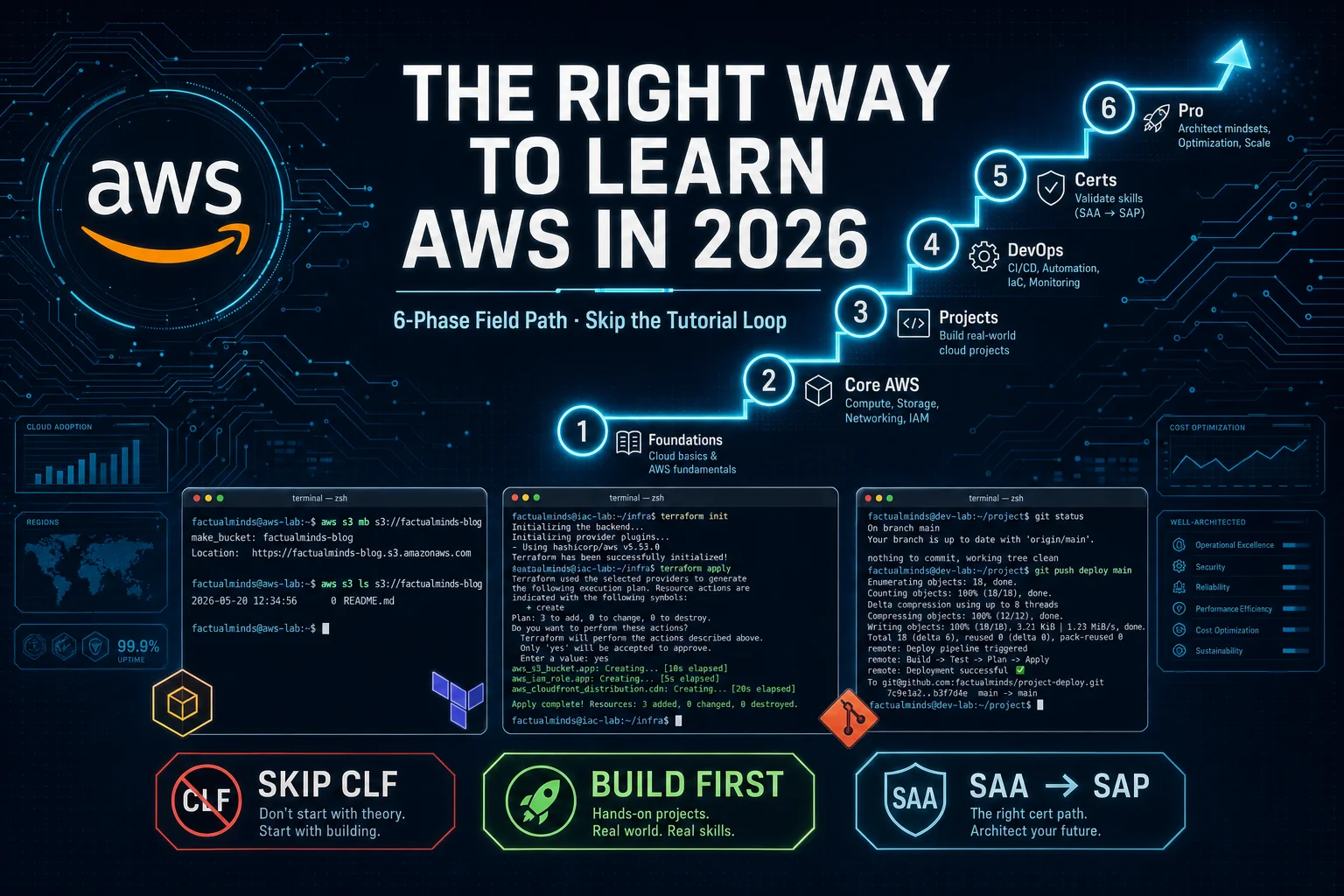
Table of Contents
The conventional AWS learning roadmap optimises for cert pass rates, not for shipping production value. That misalignment is years old; in 2026 it still backfires.
As of July 19, 2026, the syllabus reality from late 2024–2025 still holds: AIF-C01 sits beside CLF-C02 at foundational tier; Amazon Q Developer shows up in Skill Builder labs; DEA-C01 replaced the old Data Analytics Specialty track. YouTube “five-cert ladders” written for 2022 syllabi remain stale.
I passed my first AWS certification three months after first logging into the console, full-time focus. Looking back, that path aimed at the wrong target. What got me hired was not the badge; it was the broken Lambda I had already debugged at 2am the week before the exam.
This is the path I would take today. Six phases. The first three are load-bearing; the last three are confirmation, not initiation.
Heads up — this is career advice, not a Terraform module. There is no
git clone && make deployat the end. I name projects and stacks; you build them.
Reproduce this — Phase exit criteria:
examples/architecture-blog-2026/learning/aws-6-phase-exit-criteria.md
| Phase | What you build | Typical time-on-task | When to move on |
|---|---|---|---|
| 1. Foundations | Comfortable shell, Git workflow, mental model of the internet | 40–80 hours | You can SSH into a box, push a feature branch, and explain why your laptop’s IP is different from your router’s |
| 2. Core AWS | First IAM user, first S3 bucket, first EC2, first Lambda | 60–120 hours | You can wire S3 → Lambda → CloudWatch without copy-pasting |
| 3. Build projects (load-bearing) | 5 reference projects, static site through 3-tier app | 80–160 hours | At least one runs publicly on your own AWS account with a real domain |
| 4. DevOps & automation | Dockerised app, Terraform module, GitHub Actions deploy | 60–100 hours | Your deploys happen on git push, not from your laptop |
| 5. Architect thinking | Well-Architected review of your own project | 40–80 hours | You can defend trade-offs in an interview without flinching |
| 6. Certifications | SAA (or AIF if GenAI track), optionally DVA | 80–160 hours | One cert plus one shipped, publicly running project |
Full arc: roughly 360–700 hours. At 10 hrs/week that is 9–18 months. At full-time pace it is the 3–6 month sprint I did. Either is fine. Compressing it below 3 months means you skipped phase 3.
Phase 1 — Foundations
What the syllabus says. Learn how the internet works, get comfortable on Linux, learn Git, understand networking basics.
What that actually means in 2026. You can read a curl -v output and explain every line. You can ssh, tmux, and rsync without a tutorial open. You understand the difference between TCP and HTTP well enough to know why your S3-fronted CloudFront returns 403 from one region and 200 from another. You can rebase, force-push to a feature branch (never to main), and explain why git pull --rebase exists.
How to ramp.
- Networking: Beej’s Guide to Network Programming if you want the deep version, Julia Evans’ zines if you want it in a weekend. The CompTIA Network+ syllabus is also a decent checklist — you do not need to take the exam.
- Linux: install Ubuntu in a VM (or just rent a $5/mo Hetzner box), live in the shell for two weeks.
tldrovermanfor daily commands. Spend an afternoon onawk,sed, andjq— you will use them for the next twenty years. - Git: the free Pro Git book is still the best resource. Skip the GUI clients on principle for the first six months.
Opinionated take. Do not start AWS until this phase is comfortable. AWS without shell comfort is button-clicking inside a web console, and that is the trap most beginners fall into. Phase 2 will feel impossible if your terminal makes you nervous.
Phase 2 — Core AWS
What the syllabus says. IAM, EC2, S3, VPC, RDS, Lambda, CloudWatch.
What I would learn in this order, and why.
- IAM first. Every security mistake you will ever make in AWS lives here. Spend a week creating users, roles, and policies by hand from the console — feel the friction. Then learn the JSON policy language. By day three you should be able to write a policy that lets one specific Lambda read from one specific S3 prefix.
- S3 next. Cheap, hard to break, and it teaches you the AWS resource-naming pattern (ARNs) and the AWS encryption model (SSE-S3, SSE-KMS, client-side). Upload a static site to a bucket; flip the public-access block back on; learn the difference between bucket policies and IAM policies.
- EC2 third. One
t4g.nanois enough. SSH in. Install nginx. Open a security group. Break the security group. Fix it. Now you have felt a VPC without being told what one is. - Lambda fourth. Wire S3 → Lambda → CloudWatch Logs. The “object uploaded → thumbnail generated” lab is canonical for a reason. Skip the Lambda Functions URL feature for now; use API Gateway, it forces you to learn IAM auth.
- RDS fifth. One Aurora Serverless v2 cluster on its smallest setting. Connect from your EC2. Now you have a real two-tier app.
- VPC last. Subnets, CIDR math, route tables, NAT Gateways. Counterintuitive ordering on purpose: VPC concepts make sense only after you have hit a connectivity wall and traced it back. Reading about route tables before you have ever debugged a Lambda that cannot reach RDS is memorisation, not understanding.
- CloudWatch throughout. Not as a separate topic — as the place you look every time something does not work.
Opinionated take. Learn IAM first and VPC last. The conventional curriculum reverses this and people remember none of it.
Where this fails. People binge ten hours of EC2 video and never touch IAM. Then they spend six months in production wondering why every breach post-mortem starts with “the access key was committed to a public repo.” Run through this phase with the security console open — every resource you create, audit who can touch it.
The free-tier trap — AWS Free Tier is generous for EC2 and S3, brutal for NAT Gateway, CloudWatch Logs ingestion, and anything in
us-east-1that touches the internet through a managed service. Set a $10 monthly Budget alarm before you start phase 2 — to email and to an SNS topic you actually check. The first surprise bill is a rite of passage I would rather you skip.
Phase 3 — Build Projects (the load-bearing phase)
This is the phase that decides whether you have learned AWS or memorised it. The five projects below are deliberately in increasing-architectural-complexity order. Build them on the same AWS account. Use a different Application tag for each. Tear nothing down — let them accumulate. The cumulative bill should stay under $20/month if you are disciplined about NAT Gateways and CloudWatch retention.
Project 1 — Static site on S3 + CloudFront + ACM
Stack pick. S3 (private bucket, OAC), CloudFront, ACM certificate in us-east-1, Route 53 hosted zone. Not Amplify Hosting for your first attempt — Amplify hides the OAC config, the cache invalidation, and the certificate validation flow, which are the parts you are here to learn.
Common failure mode. ACM certificate stuck in PENDING_VALIDATION because you put the validation CNAME in the wrong hosted zone. Read the CloudFront → OAC → bucket-policy chain at least twice before assuming it is broken.
You have shipped it when. https://yourname.dev returns a 200, the certificate is yours, the bucket is private, and the cache invalidation only fires on the files that changed.
Project 2 — Serverless API
Stack pick. API Gateway (HTTP API, not REST API), Lambda, DynamoDB (on-demand). Write the Lambda in whatever language your day job uses. Use SAM, not the Serverless Framework — SAM is AWS-native and your CloudFormation skills transfer directly.
Common failure mode. Lambda timeout default is 3 seconds. Your first request to DynamoDB after a cold start takes longer than that. You will think the API is broken; it is the timeout.
You have shipped it when. curl https://yourapi.example.com/items returns JSON, the underlying CloudWatch Logs show structured logging, and you have a one-line sam deploy --guided command in your README.
Project 3 — File upload system
Stack pick. S3 pre-signed POST URLs (not pre-signed PUT — POST is the modern pattern with form fields), Lambda for upload-completion notification, EventBridge for downstream processing, Step Functions if you want to chain anything. Skip API Gateway entirely if you can — go browser → S3 directly.
Common failure mode. CORS. Your S3 bucket CORS policy and your CloudFront response-headers policy will fight. Test in an incognito window every time; Chrome caches CORS preflight responses for ages.
You have shipped it when. A user can upload a 50 MB file from a browser, your Lambda gets the EventBridge notification, and your CloudWatch dashboard shows the latency P95.
Project 4 — Three-tier architecture
Stack pick. ALB → ECS Fargate (small task, 0.5 vCPU / 1 GB) → RDS Aurora Serverless v2. Put the ECS task in private subnets. Use VPC endpoints for S3 and ECR so you can avoid a NAT Gateway (save yourself $32/month). Use AWS Copilot CLI for first deploy — it scaffolds the IAM, the task definition, and the autoscaling sensibly, then prints the underlying CloudFormation for you to read.
Common failure mode. You forget the VPC endpoints and discover the NAT Gateway charge a week later. Or you provision a 3-AZ Aurora cluster because the wizard suggested it; that one is $200/month, not $20.
You have shipped it when. A public load-balancer URL serves your app, the database is unreachable from the internet, and your bill for this project specifically is under $5/month at zero traffic.
Project 5 — Monitoring dashboard
Stack pick. CloudWatch Dashboard (the JSON-defined kind, version-controlled in your repo), CloudWatch Alarms, SNS to email and to a private Slack webhook (via a Lambda). Add one custom metric using EMF (Embedded Metric Format) from one of the earlier projects.
Common failure mode. You build a “pretty” dashboard with twenty widgets and look at it once. The right number of widgets is four: traffic, errors, latency P95, cost-this-month. Add anything else only after an incident forces you to.
You have shipped it when. Killing the ECS task from project 4 triggers a Slack alert within 60 seconds. If it does not, your alarm threshold or your evaluation period is wrong.
What broke — my own tutorial loop — Between projects 2 and 3 I lost about six weeks to what I now call the tutorial-loop trap. I had finished the serverless API, watched maybe forty hours of follow-up YouTube on “advanced Lambda patterns,” cloned three different file-upload tutorial repos, and shipped none of them. Every video gave me a new idea for what the project “should” look like before I started. The fix was crude: I deleted every cloned repo, blocked YouTube on the laptop for two weeks, and gave myself a Saturday-to-Saturday deadline to ship a working uploader. It shipped. It was uglier than any of the tutorials. It taught me more than the previous six weeks combined. The lesson: once you understand a service well enough to describe it in two sentences, every additional tutorial is a procrastination tax. Build, then watch the next video.
Phase 4 — DevOps & Automation
What the syllabus says. Docker, Terraform, GitHub Actions, CI/CD pipelines.
Stack picks.
- Docker over plain EC2 AMIs. No exceptions in 2026. Even if your final target is Lambda, the discipline of writing a Dockerfile makes you think about dependencies and surface area.
- Terraform over CDK for your first IaC tool. HCL is uglier than TypeScript, but it forces you to read the AWS provider documentation, which forces you to learn the actual API. CDK is a fantastic second IaC tool because by then you have intuition; as a first tool it lets you cargo-cult the L2 constructs without understanding what they generate.
- GitHub Actions over CodePipeline. Honest opinion against the AWS-native default. GitHub Actions has the contributor ecosystem and you already use it for everything else; CodePipeline’s UI is from 2018 and the YAML is no cleaner than Actions YAML. Use OIDC federation between Actions and an IAM role — never long-lived access keys in GitHub Secrets.
Where this fails. People learn Terraform from a 10-hour video, write a single main.tf with 200 resources, and call it done. The DevOps discipline is in modules, state management (S3 backend with DynamoDB lock), and terraform plan discipline in PRs. If you have never had a terraform plan reviewer say “no, that destroys prod,” you have not learned Terraform.
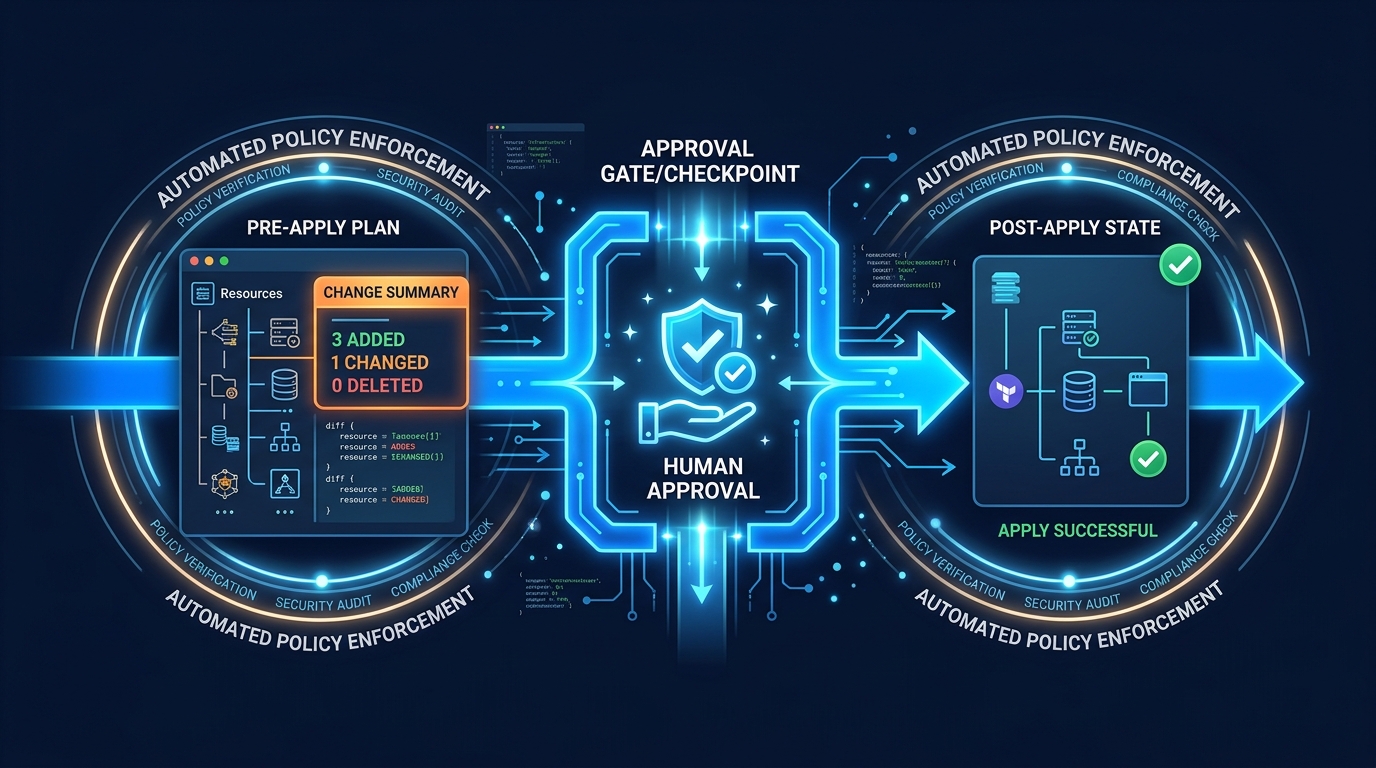
Opinionated take. Wire a CI pipeline that runs terraform plan on every PR and posts the plan as a PR comment. That single workflow taught me more about safe AWS work than any course did.
Phase 5 — Architect Thinking
What the syllabus says. Security, cost optimisation, scalability, high availability, monitoring & logging.
How to actually learn this. Use AWS’s own Well-Architected Framework as the syllabus — the free Well-Architected Tool in the console walks you through a review of an existing workload. Run it against project 4 from phase 3. The output will be embarrassing. Fix the top three findings; rerun. That cycle, repeated three times, is the architect-thinking phase.
The six pillars map directly:
- Security — Run AWS Config rules and IAM Access Analyzer against your account. Treat every “non-compliant” finding as a PR.
- Reliability — Multi-AZ as default, multi-region as exception. Practice a failover drill on your Aurora cluster.
- Performance Efficiency — Right-size before you scale. Compute Optimizer recommendations are free; read them.
- Cost Optimisation — Cost Explorer + Budgets + tagging discipline. Build a tag policy (in AWS Organisations if you have it, in a wiki page if not) and enforce it via IaC.
- Operational Excellence — Runbooks for the top five alarms in your monitoring dashboard. If you cannot write the runbook, you do not understand the alarm.
- Sustainability — Genuinely worth understanding by 2026. Graviton over x86 for almost everything; Spot for batch workloads.
Opinionated take. Most learning resources separate “security” and “cost” as different topics. They are the same topic — both are about knowing exactly what you have running and who can touch it. Tag everything. Then alarm on anything untagged.
Phase 6 — Certifications
Skip the Cloud Practitioner (CLF-C02) exam. This is the single sharpest recommendation in the post. Here is why.
CLF tests AWS trivia — service names, billing models, the shared-responsibility model in flashcard form. The 80–120 hours you would spend on CLF prep are 80–120 hours not spent on phase 3. Hiring managers in 2026 read CLF as “they have one cert” — exactly the same signal as no cert at all. The only valid reason to take CLF is if your employer reimburses it and not SAA. Otherwise route around it.
Take SAA first. Solutions Architect Associate (SAA-C03 is current; SAA-C04 was announced for late-2026 release) is the cert that actually maps to interview signal. Study with hands-on labs, not just slides. AWS Skill Builder is the resource I most stand behind — the official labs run in real AWS console environments instead of read-only screenshots, and the AI Practitioner Learning Plan and SAA Learning Plan got significant 2025 refreshes. Pair Skill Builder with Tutorials Dojo’s practice exams (not as a replacement — as a calibration tool for whether you are ready to sit).
If you are targeting GenAI / ML platform roles, take AI Practitioner (AIF-C01) instead of CLF. It is a more honest foundational signal for that track. Then SAA after. Do not take both foundational exams — diminishing returns.
Do NOT take Developer Associate (DVA-C02) after SAA. Or at least: do not take it next. The overlap with SAA is enormous and the marginal signal is small. If you want a second cert, the better picks are:
- Security Specialty if you are headed toward security or platform work
- Data Engineer Associate (DEA-C01) if you are headed toward data / analytics
- AI Practitioner if you skipped it earlier and are now leaning into GenAI
The DVA gives you “two associate-tier certs”; the alternatives give you a story.
Do NOT take Solutions Architect Professional (SAP-C02) before two years of real production AWS work. SAP scenarios assume scars you have not earned yet. Grinding it early is the cert-collector anti-pattern that 2026 hiring panels have learned to discount.
| Cert (2026) | Code | When to take it | When to skip |
|---|---|---|---|
| Cloud Practitioner | CLF-C02 | Employer reimbursement only | Default: skip |
| AI Practitioner | AIF-C01 | GenAI / ML platform track | Backend / DevOps track |
| Solutions Architect Associate | SAA-C03 / C04 | After phase 3 (one shipped project) | Before any real build |
| Developer Associate | DVA-C02 | Niche second cert; rarely worth it after SAA | If you have SAA already |
| SysOps Associate | SOA-C02 | If your role is genuinely ops / incident response | General SWE / backend |
| Security Specialty | SCS-C02 | After SAA + 1 year prod | Before SAA |
| Data Engineer Associate | DEA-C01 | Data / analytics track | General backend |
| Solutions Architect Professional | SAP-C02 | After 2+ years production AWS | Anyone earlier |
From a real engagement — my own 3-month sprint — I went from first console login to my first AWS certification in three months of full-time focus. The cert opened doors. The two months of full-time project work that came after the cert is what kept those doors open. If I were starting over in 2026, I would still do the three-month sprint, but I would invert it: phase 3 first, sit the exam in month three. The exam is a useful forcing function — a deadline I had to pay $150 to keep — but only when there is a shipped project sitting next to it on my GitHub.
If You Only Do One Thing
Ship a static site this week. S3 + CloudFront + ACM, on your own domain, deployed by a GitHub Actions workflow that runs on git push to main.
Not a Hugo blog from a tutorial. Not a Next.js app on Amplify. The five-resource raw stack, in your own AWS account, costing you about $0.50/month. If you cannot complete that in seven days, you do not yet have the phase-1 foundations and that is where to spend the next month — not on more AWS content.
If you can complete it, you have proof to yourself that the rest of the path is reachable. That proof is the only thing the tutorial loop is engineered to prevent you from getting.
What This Post Doesn’t Cover
A short, honest list of what I deliberately left out:
- Multi-cloud (Azure, GCP). Different post. The “learn cloud” framing is a recruiter abstraction; real engineers go deep on one and read the others.
- AWS Partner pathway. If you are joining a consultancy, the AWS Partner Network has its own learning tracks (Partner Accreditation, Partner Specialist). Worth doing inside that context, not before.
- University CS degrees vs bootcamps vs self-study. I am writing for someone who has decided AWS is a useful next skill. The “should I do AWS at all” question is a different conversation.
- Paid bootcamps. I have not done one. I will not opine on whether they are worth it for AWS specifically; I suspect the answer is “rarely,” but I do not have the data.
- Specialty exams beyond SCS and DEA. Advanced Networking, ML Engineer Associate, etc. Most readers will never need these; the few who do already know who they are.
- The “AI-native engineer” pitch. Q Developer in the Skill Builder labs changes the texture of how you learn AWS in 2026 but not the order of phases above. A future post will get into prompting patterns, hallucination guardrails, and where Q is genuinely faster than docs vs. where it is dangerously confident.
If you want one of those covered, the contact form is the fastest way to request it.
Related reading on this site
- 10 AWS DevOps Practices We Actually Use in Production in 2026 — what the destination looks like once you finish phase 4.
- 5 AWS Cost Optimization & FinOps Strategies Most Teams Overlook — phase 5’s cost pillar, at a working-engineer level.
- Hire an AWS Consultant: What to Look For — the flip side: what the post you just read looks like from the hiring desk.
- Hire an AWS expert (on-demand) — when self-study is the wrong forcing function and you need to apprentice on a live engagement.
Frequently asked questions
How long does the full 6-phase path actually take?
When should you NOT start with AWS at all?
What goes wrong if you take Solutions Architect Associate before shipping a real project?
Is the AI Practitioner exam (AIF-C01) worth it in 2026?
Why skip Cloud Practitioner (CLF-C02) entirely?
When should you take Solutions Architect Professional (SAP-C02)?

AWS Cloud Architect & AI Expert
AWS-certified cloud architect and AI expert with deep expertise in cloud migrations, cost optimization, and generative AI on AWS.