Blue/Green vs Canary on AWS (2026): ECS, Lambda, and When Rolling Is Enough
Quick summary: ECS CodeDeploy and Lambda aliases support both instant cutover and gradual shifts, but picking wrong costs you double Fargate spend or 21-day MTTR on muted alarms. This decision guide scores blue/green, canary, and rolling with a matrix and names App Mesh (EOL Sept 30, 2026) replacements.
Key Takeaways
- ECS CodeDeploy and Lambda aliases support both instant cutover and gradual shifts, but picking wrong costs you double Fargate spend or 21-day MTTR on muted alarms
- This decision guide scores blue/green, canary, and rolling with a matrix and names App Mesh (EOL Sept 30, 2026) replacements
- May 2026
- AWS documents progressive delivery through CodeDeploy on ECS (blue/green and canary traffic hooks) and Lambda (weighted aliases with canary/linear deployment configs in SAM and CDK)
- For ECS click-path, read How to implement blue/green on ECS with CodeDeploy
Table of Contents
May 2026. AWS documents progressive delivery through CodeDeploy on ECS (blue/green and canary traffic hooks) and Lambda (weighted aliases with canary/linear deployment configs in SAM and CDK). Teams still confuse instant cutover with gradual shift, and ship both in the same release as a database migration, then blame CodeDeploy when rollback cannot revert schema.
Symptom → mechanism → AWS control
| Production symptom | Mechanism | AWS control |
|---|---|---|
| Bad deploy affects 100% traffic | Big-bang rolling update | CodeDeploy blue/green, Lambda alias canary |
| Rollback takes longer than deploy | No parallel environment | ECS blue/green target groups, Lambda weighted aliases |
| Canary never promotes | Missing automatic rollback alarm | CloudWatch alarm → CodeDeploy auto-rollback |
Opinionated take: Blue/green for schema-breaking changes, canary for behavior validation. Rolling updates are for dev clusters, not customer-facing prod.
Benchmark pattern (hypothetical workload): ECS blue/green via CodeDeploy, instant cutover, rollback 35s; Lambda canary 10% to 50% to 100% over 30 min catches bad deploy at 10% with 0.3% error budget burn; rolling update on EKS without PDB causes 12s blip.
This is a decision guide, not a tutorial. For ECS click-path, read How to implement blue/green on ECS with CodeDeploy. For org-wide DevOps patterns, see 10 AWS DevOps practices for production.
Reference benchmark: API on ECS Fargate (6 tasks × 1 vCPU, 2 GiB), ~420 RPS peak, deploy window 25 minutes. Blue/green added ~$0.14 extra Fargate spend per deploy (double task count × half window), negligible vs $9k/month steady state. A canary without alarms on the same service let 10% traffic hit a bad build for 5 minutes (~12,600 requests at peak) before support escalated; after wiring p95 latency + 5xx alarms, automatic rollback fired in under 90 seconds on the next bad release.
Definitions (AWS-native)
| Strategy | Traffic shape | Rollback speed | Typical AWS surface |
|---|---|---|---|
| Blue/green | 0% → 100% cutover (optional short bake) | Seconds (re-weight ALB / alias) | ECS CodeDeploy blue/green; Lambda alias swap |
| Canary / linear | 5–10% → stair-step to 100% | Automatic if alarms configured | CodeDeploy canary/linear configs; SAM DeploymentPreference |
| Rolling | Replace tasks incrementally | Slow (redeploy old task def) | ECS minimumHealthyPercent / K8s rolling update |
Opinionated take: Default revenue-facing APIs to canary with alarms; use blue/green when you need sub-minute rollback and can absorb 2× capacity during deploy; reserve rolling for internal tools with maintenance windows.
ECS on Fargate/EC2
Blue/green uses a second target group (green), health checks, then traffic shift. CodeDeploy can run PreTraffic / PostTraffic hooks. Use them for synthetic checks, not manual Slack approval.
Canary on ECS uses CodeDeploy deployment configurations (Canary10Percent5Minutes, linear ramps, etc.) with optional CloudWatch alarms, same controller family as blue/green, different traffic schedule.
When NOT to combine strategies: Do not run blue/green task sets and a breaking Alembic/Flyway migration in one pipeline stage. Expand schema first, deploy backward-compatible code on canary, then contract schema in a later release.
Context line for snippets below: AWS CLI v2, ECS service with deploymentController: CODE_DEPLOY, Region us-east-1.
# List CodeDeploy deployment configs (ECS compute platform)
aws deploy list-deployment-configs --query "deploymentConfigsList[?contains(name, 'CodeDeployDefault')]"
Lambda
Production functions should use a published alias (live, prod), never $LATEST for customer traffic.
| Need | Choose |
|---|---|
| Fastest safe automation | SAM/CDK DeploymentPreference → CodeDeploy canary/linear |
| Manual validation gate | Weighted alias 5% → 100% with runbook |
| Instant revert | Point alias back to previous version ARN |
AWS documents first-time gradual deploy as two steps: deploy with AutoPublishAlias, then add DeploymentPreference on subsequent releases (SAM gradual deployments guide).
Example SAM fragment (versions as of AWS SAM 1.x, May 2026):
# Functions must use an alias — not $LATEST — in production
MyApi:
  Type: AWS::Serverless::Function
  Properties:
    AutoPublishAlias: live
    DeploymentPreference:
      Type: Canary10Percent5Minutes
      Alarms:
        - !Ref ApiErrorRateAlarm
        - !Ref ApiLatencyAlarm
Rolling: when it is enough
Rolling ECS updates are valid when:
- The service is internal (no customer SLA).
- Changes are backward compatible and rehearsed in staging.
- You accept minutes to roll forward/back, not seconds.
Rolling is not a substitute for observability on external APIs.
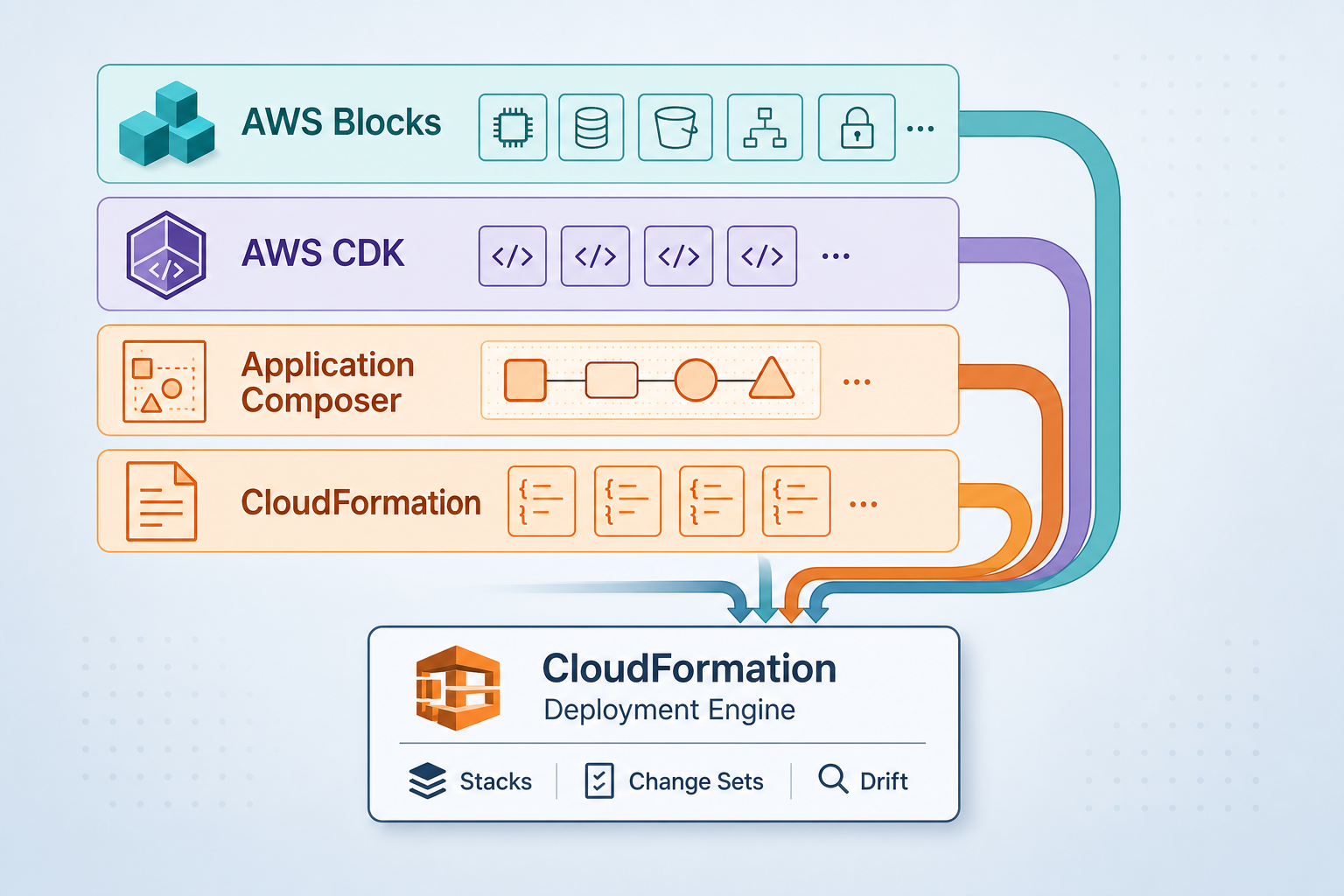
App Mesh deprecation (do not plan new mesh shifts)
AWS App Mesh was discontinued on September 30, 2026; new customers cannot onboard after September 24, 2024 (migration blog). If you used App Mesh for traffic shifting:
- ECS-only → Amazon ECS Service Connect
- EKS / cross-VPC / cross-account → Amazon VPC Lattice
An ECS service cannot be in App Mesh and Service Connect simultaneously. Plan blue/green cutover to a parallel service definition, not an in-place mesh toggle.
Decision workflow
- Score workloads in
examples/architecture-blog-2026/deployment-strategies/decision-matrix.md. - Confirm alarms exist on the traffic-bearing metric (ALB 5xx, Lambda alias errors, p95 latency).
- Split schema changes from code changes in the pipeline.
- Pick ECS CodeDeploy config or SAM
DeploymentPreferenceto match the matrix winner.
What broke: Team ran Canary10Percent5Minutes on Lambda without alias-scoped alarms (only
$LATESTmetrics). CloudWatch showed elevated errors on the alias dimension, but the alarm watched the wrong namespace; CodeDeploy completed the shift. Rollback required manual alias repoint: 14 minutes customer impact. Fix: recreate alarms onFunctionName+Resource= alias; enableAutoRollbackConfigurationwithSTOP_ON_ALARM.
Reproduce this: Copy
decision-matrix.mdand validate against your last 5 incidents (deploy-related?). Cross-check SAM/CDK configs with CodeDeploy deployment configs.
AWS services map
| Need | Service | Skip when |
|---|---|---|
| Zero-downtime cutover | ECS CodeDeploy blue/green | Dev environment with tolerated downtime |
| Gradual traffic shift | Lambda alias + CodeDeploy canary | Internal batch jobs with no user traffic |
| K8s progressive delivery | Argo Rollouts / Flagger on EKS | Single-replica stateless service |
What to do this week
- Inventory production deploys: % on alias vs
$LATESTfor Lambda. - Add error + latency alarms wired to CodeDeploy rollback.
- Move breaking DB migrations out of the same stage as traffic shift.
- If still on App Mesh, open a migration epic to Service Connect / VPC Lattice now; App Mesh is past end of life.
What this post does not cover
- Full appspec.yaml and target-group wiring (ECS guide).
- EKS/Argo/Flagger install paths (see DevOps practices post).
- API Gateway canary settings (separate from compute canary, see API versioning guide).
- Elastic Beanstalk rolling deploys (legacy pattern).
Related: Monolith to ECS zero-downtime migration · Production Laravel/Django/Node on ECS · AWS migration consulting
If you only do one thing: Wire rollback alarms to the alias or target group that actually receives customer traffic, then choose canary vs blue/green.
More in This Track
Part of the Engineering Guides library (June 2026).
- Next: Part 2
- Browse tracks: Engineering Guides hub
Frequently asked questions
When should we NOT use blue/green on ECS?
When should we NOT use canary?
What goes wrong if canary runs without alarms?
How is Lambda blue/green different from canary?
Does this replace the ECS CodeDeploy how-to?
We still use App Mesh for traffic shifting—what now?

Enterprise AI Transformation
Enterprise AI transformation and implementation leader focused on pilot-to-production playbooks, with a background in financial services. Writes the FactualMinds guides on serverless, CI/CD, and DevOps on AWS, the delivery plumbing production AI depends on.