EC2 Spot Instance Selection: A Data-Driven Approach to 60–90% Cost Reduction
Quick summary: Cheapest Spot pool is often the unstable one. July 2026: price-capacity-optimized + attribute-based selection, stability scoring, interruption hygiene — before you chase $/hr.
Key Takeaways
- July 2026: price-capacity-optimized + attribute-based selection, stability scoring, interruption hygiene — before you chase $/hr
- AWS has 500+ instance types across many regions and AZs — thousands of Spot capacity pools, each with its own price and interruption behavior
- Consider a simplified scenario: you're filtering for 2 vCPU / 4 GB memory instances in us-east-1
- medium | us-east-1a | $0.0142/hr | $0.0024 | $0.0089 | $0.0201 | 2–3/week | | t3
- medium | us-east-1b | $0.0091/hr | $0.0031 | $0.0042 | $0.0248 | 8–12/week | | t3
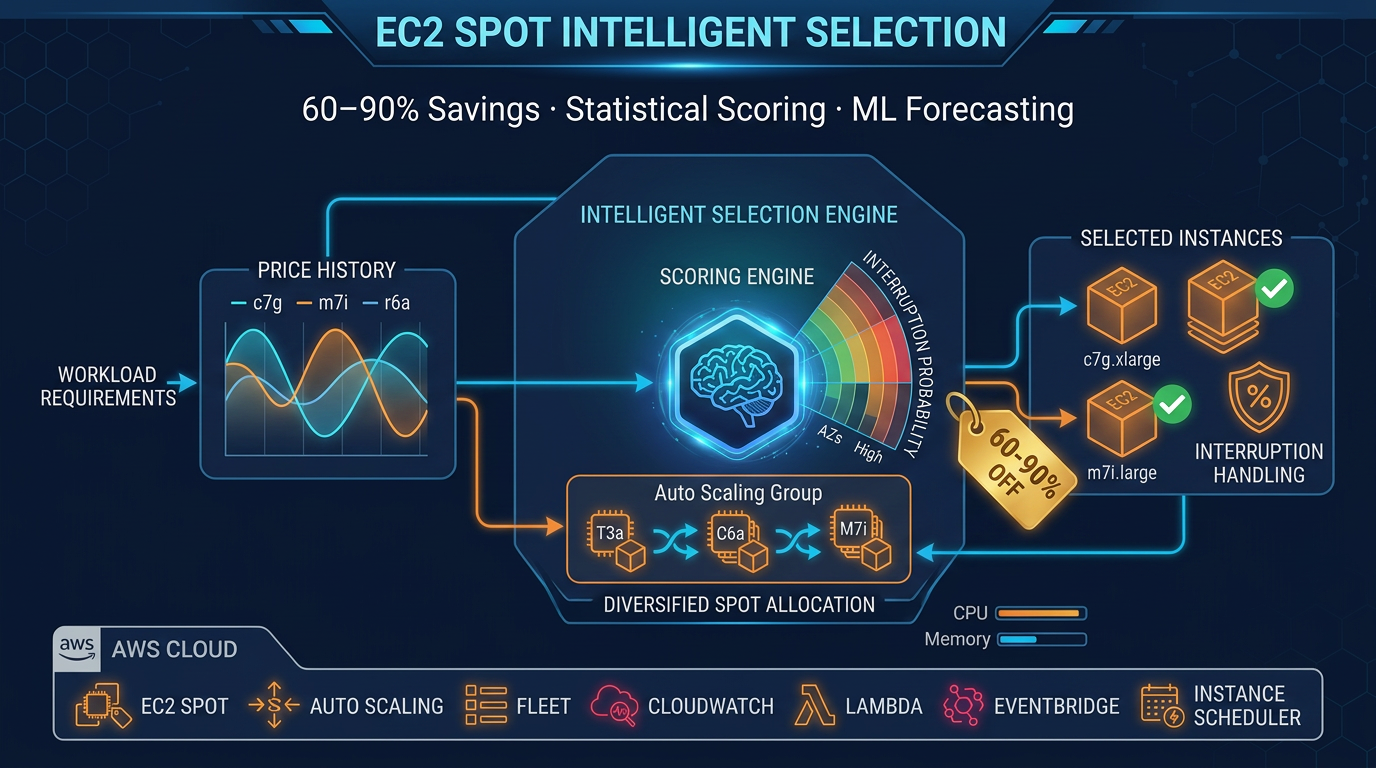
Table of Contents
AWS has 500+ instance types across many regions and AZs — thousands of Spot capacity pools, each with its own price and interruption behavior. As of July 2026, production defaults should be: price-capacity-optimized allocation, attribute-based instance requirements (vCPU/memory/arch — not one hard-coded type), and a stability-weighted score so you do not pick the cheapest unstable pool.
First-party benchmark (illustrative table below): same t3.medium shape can show ~$0.009/hr in a volatile AZ vs ~$0.014/hr in a stabler one — the “cheap” pool’s interruption churn often erases the $/hr win on multi-hour jobs.
Reproduce this: Spot pool scoring checklist
Opinionated default: prefer price-capacity-optimized over lowest-price for anything longer than short batch; keep On-Demand for write/consensus roles.
Why Spot Instance Selection Is Harder Than It Looks
The core problem is that price alone is a misleading signal. Consider a simplified scenario: you’re filtering for 2 vCPU / 4 GB memory instances in us-east-1. AWS returns candidates:
| Instance Type | AZ | Price (90-day avg) | Std Dev | Min Price | Max Price | Interruption Rate |
|---|---|---|---|---|---|---|
| t3.medium | us-east-1a | $0.0142/hr | $0.0024 | $0.0089 | $0.0201 | 2–3/week |
| t3.medium | us-east-1b | $0.0091/hr | $0.0031 | $0.0042 | $0.0248 | 8–12/week |
| t3.small | us-east-1a | $0.0076/hr | $0.0009 | $0.0067 | $0.0089 | < 1/week |
| m6i.large | us-east-1a | $0.0245/hr | $0.0018 | $0.0210 | $0.0281 | 1–2/week |
The lowest absolute price is t3.small, but it doesn’t meet your memory requirement. Among qualifying candidates, t3.medium in us-east-1b is cheapest at $0.0091/hr — but notice the standard deviation: $0.0031. That volatility means prices swing between $0.0042 and $0.0248, a 490% variance. Your workload will experience constant re-pricing surprises and frequent interruptions (8–12 per week).
Compare that to t3.medium in us-east-1a: slightly higher average price ($0.0142), but much lower volatility ($0.0024 std dev) and interruption rate (2–3 per week). Over a 720-hour month, the low-price pool will interrupt 64–96 times; the stable pool, 8–24 times. Each interruption triggers a replacement instance launch, health check warmup, and potentially lost work — the cost of constant churn often exceeds the per-hour savings.
This is the fundamental trade-off that scoring systems must capture.
Building a Value Score: Price + Stability
Rather than picking the lowest price, rank pools by a weighted composite score that balances cost with reliability. Here’s the two-factor framework:
1. Price Score
Normalize the instance’s average price relative to the pool of candidates:
price_score = 1 - ((avg_price - min_price) / (max_price - min_price))This scales price to a 0–1 range, where 1.0 = cheapest and 0.0 = most expensive. In the t3.medium example:
- us-east-1a:
1 - ((0.0142 - 0.0091) / (0.0245 - 0.0091))=1 - (0.0051 / 0.0154)= 0.67 - us-east-1b:
1 - ((0.0091 - 0.0091) / (0.0245 - 0.0091))= 1.0 (lowest price)
2. Stability Score
Measure price predictability using the coefficient of variation (std dev ÷ mean). Lower variance = higher stability = lower interruption overhead:
stability_score = 1 - (std_dev / avg_price)For the t3.medium candidates:
- us-east-1a:
1 - (0.0024 / 0.0142)=1 - 0.169= 0.83 (stable) - us-east-1b:
1 - (0.0031 / 0.0091)=1 - 0.341= 0.66 (volatile)
3. Weighted Composite
Combine price and stability into a single score. The weight distribution depends on your workload profile:
Cost-sensitive batch jobs (hourly cron, stateless):
value_score = (0.7 × price_score) + (0.3 × stability_score)Latency-sensitive services (request-driven, where interruption = customer impact):
value_score = (0.4 × price_score) + (0.6 × stability_score)Balanced workloads (default):
value_score = (0.5 × price_score) + (0.5 × stability_score)Applying the cost-sensitive weights to our t3.medium example:
- us-east-1a:
(0.7 × 0.67) + (0.3 × 0.83)=0.469 + 0.249= 0.718 ✓ Recommended - us-east-1b:
(0.7 × 1.0) + (0.3 × 0.66)=0.7 + 0.198= 0.898 — but churn cost erases savings
For a concrete example: t3.medium Spot in us-east-1a at $0.0147/hr vs. on-demand at $0.0416/hr = 65% cost reduction, with interruption rates low enough that the operational overhead is manageable.
Filtering the Candidate Pool Before Scoring
Before you score, narrow the pool to instances that actually match your workload. Oversights here will sabotage your scoring and lead to production incidents.
vCPU and Memory Constraints
Filter by CPU and RAM first. This is table-stakes — no point scoring an instance that can’t run your workload.
Architecture: x86 vs ARM (Graviton)
Do not assume x86 and ARM are interchangeable. Graviton instances (t4g, m7g, c7g families) require your container image to include an ARM build. If your image is x86-only (or you haven’t tested it on ARM), Graviton will fail at runtime.
That said: current-generation Graviton Spot (e.g. c7g/m7g and newer where available) is often meaningfully cheaper than equivalent x86 for the same vCPU/RAM — verify live Spot prices. If your workload supports ARM, build multi-arch images (docker buildx build --platform linux/amd64,linux/arm64) and let attribute-based selection include arm64.
Burstable vs. Fixed Compute
t3, t4g, and t2 instances have CPU credits. They are meant for workloads with spiky, below-baseline CPU usage. If your application runs at 100% CPU sustained, a t3.medium will be throttled after the credit burst expires. For sustained compute, use c6i, c7i, m6i, or m7i families instead.
Network Performance Tiers
The t3.medium is rated “Up to 5 Gbps” — this is a burst limit, not a guarantee. If your workload requires sustained high throughput (multi-gigabit data pipelines), choose c, m, or r family instances which offer “Up to 25 Gbps” or higher, with more predictable network performance.
EBS Optimization
Not all instance types are EBS-optimized by default. If your workload is I/O-heavy (database engines, Elasticsearch indexing), verify that your candidate instances support EBS optimization — or enable it explicitly and accept the cost delta.
Nitro vs. Xen Hypervisor
Older instances (t2, c4, r4, m4) run on Xen. Newer instances (t3+, c6i+, m6i+, r6i+) run on Nitro. For most workloads, the difference is transparent. However, if you use SR-IOV networking or direct NVMe access, Nitro is required. Also, Xen instances have slower EBS and network performance; never score them if newer families are available.
Generation Currency
Phased out, end-of-life, or preview instance families should be filtered out entirely:
- Avoid: t2 (end-of-life in most regions), c4, c5, m4, m5, r4, r5, a1
- Prefer: c6i/c7i, m6i/m7i, r6i/r7i, t3/t4g, x2iedn, u-series
AWS regularly retires older generations. Using them locks you into migrations later.
Implementation: Filtering with boto3
import boto3

ec2 = boto3.client('ec2')

# Get instance type offerings in your region
offerings = ec2.describe_instance_types(
    Filters=[
        {'Name': 'supported-architecture', 'Values': ['x86_64']},  # or 'arm64'
        {'Name': 'memory-info.size-in-mib', 'Values': ['4096']},  # 4 GB
        {'Name': 'vcpu-info.default-vcpus', 'Values': ['2']},     # 2 vCPU
        {'Name': 'burstable-performance-supported', 'Values': ['false']},  # Fixed compute
    ]
)

candidate_types = [t['InstanceType'] for t in offerings['InstanceTypes']]
# Then fetch spot prices for these types
ML Price Forecasting — Knowing When to Buy
Once you’ve scored pools, the next question is timing: when should you launch instances? Spot prices fluctuate minute-by-minute. A pool scoring 0.85 might drop to 0.70 equivalent on-demand cost in 6 hours. Or it might spike 40% due to a capacity event.
Machine learning can forecast these movements using time-series features:
Feature Engineering
- Hour of day (0–23 UTC): Spot prices dip during off-peak US business hours (midnight–6am ET, weekends)
- Day of week (0–6): Lower demand Saturdays and Sundays in many regions
- Lagged prices (t-1h, t-6h, t-24h): Spot prices exhibit autocorrelation; yesterday’s price is informative about today’s
- Rolling averages (6h, 24h windows): Smooth intra-hour noise and capture short-term trends
- Instance family (one-hot encoded): Different families have different demand patterns
- Region and AZ (encoded): Supply constraints vary regionally
A Random Forest Regressor is well-suited for this task:
- Handles non-linearity: capacity events cause sudden discontinuities (a forest captures decision boundaries better than linear models)
- Requires no stationarity assumption: unlike ARIMA, which assumes mean-reversion
- Feature importance is interpretable: you learn which signals matter (hour-of-day, lagged price, etc.)
Edge Cases in Forecasting
Cold Start (< 7 days history)
New instance families (c7g, m7g) or AZs with thin capacity sometimes have < 7 days of price data. Fall back to a cross-AZ mean comparison: if us-east-1a has stable pricing and us-east-1b is new, use us-east-1a’s historical stats as a proxy.
AWS Capacity Events
When AWS launches a new instance generation (e.g., Graviton3) or rolls out a new region, historical patterns break. A model trained on 90 days of c7i Spot data in us-east-1 becomes unreliable on day 91 when AWS launches new capacity and prices crash 30%. Implement a recency weight: recent observations (last 7 days) carry 2x the weight of older data (60+ days old).
Re-Pricing Floods
If a pool re-prices multiple times within 5 minutes, it signals a capacity crunch or AWS’s re-pricing algorithm spiking due to sudden demand. Emit an “avoid” signal and deprioritize that pool for 1–2 hours.
Instance Retirement Notices
AWS occasionally announces end-of-life dates for instance families (e.g., t2 in select regions). If a pool has a public retirement date < 30 days away, exclude it regardless of price.
Practical Output: Binary Decisions, Not Point Estimates
Instead of trying to predict exact prices (which is brittle), classify each pool into a signal state:
BUY_NOW     → Price is 5%+ below 7-day mean; stable forecast
WAIT        → Price is near mean; fair but no urgency
AVOID       → Price is 10%+ above mean or volatility spiking
Binary decisions are far more robust than point estimates. They’re also easier to automate and operationalize.
Interruption Handling — The Edge Cases That Break Production
Spot instances can be interrupted with a 2-minute warning. If your application isn’t designed to gracefully handle that, Spot will be unreliable — and “unreliable” costs more than on-demand premium through lost work and customer impact.
Spot Interruption Notice (2-Minute Warning)
The EC2 instance metadata service exposes a /latest/meta-data/spot/termination-time endpoint. When AWS plans to interrupt, this endpoint returns a timestamp ~2 minutes before termination.
import requests
import json

def check_spot_termination():
    """Poll for Spot interruption notice."""
    try:
        response = requests.get(
            'http://169.254.169.254/latest/meta-data/spot/termination-time',
            timeout=1
        )
        if response.status_code == 200:
            print(f"Spot termination scheduled: {response.text}")
            return True
    except requests.exceptions.RequestException:
        pass
    return False
Wire this into your application startup: spawn a background thread that polls every 5 seconds. When the endpoint becomes available, trigger graceful shutdown.
Separately, Rebalance Recommendation events come as CloudWatch/EventBridge signals 10–15 minutes before interruption — an earlier warning if you’re subscribed.
Application-Level Graceful Shutdown
Two minutes is tight. Plan accordingly:
For systemd services:
[Unit]
Description=My App
After=network.target

[Service]
ExecStart=/usr/bin/myapp
ExecStop=/bin/bash -c 'curl http://localhost:8080/health/shutdown && sleep 90'
TimeoutStopSec=120

[Install]
WantedBy=multi-user.target
The ExecStop hook gives your app 90 seconds to drain requests, flush buffers, and exit cleanly. systemd will SIGKILL after 120 seconds total.
For ECS tasks: Set stopTimeout: 90 in your task definition. This gives your container 90 seconds from the SIGTERM signal to exit before ECS force-kills it.
For Kubernetes pods:
spec:
  terminationGracePeriodSeconds: 90
  containers:
    - name: myapp
      lifecycle:
        preStop:
          exec:
            command: ['/bin/sh', '-c', 'sleep 15 && /app/graceful-shutdown.sh']
The preStop hook runs before the SIGTERM signal; it gives you extra time to drain load balancers and finish in-flight requests.
Checkpointing for Batch Workloads
If your workload is a long-running batch job (data processing, model training), interruption mid-job is catastrophic without checkpointing. Implement periodic snapshots:
import json
import boto3

s3 = boto3.client('s3')

def process_job_with_checkpoints(job_id, items):
    """Process items, checkpoint progress every 100."""
    checkpoint_key = f"checkpoints/{job_id}.json"

    # Load last checkpoint
    try:
        obj = s3.get_object(Bucket='my-bucket', Key=checkpoint_key)
        checkpoint = json.loads(obj['Body'].read())
        start_idx = checkpoint['last_processed_idx']
    except s3.exceptions.NoSuchKey:
        start_idx = 0

    # Process from checkpoint
    for i, item in enumerate(items[start_idx:], start=start_idx):
        process(item)

        # Checkpoint every 100 items
        if (i + 1) % 100 == 0:
            checkpoint = {'job_id': job_id, 'last_processed_idx': i + 1}
            s3.put_object(
                Bucket='my-bucket',
                Key=checkpoint_key,
                Body=json.dumps(checkpoint)
            )

    # Cleanup checkpoint on success
    s3.delete_object(Bucket='my-bucket', Key=checkpoint_key)
On interruption, a new instance resumes from the last checkpoint instead of reprocessing everything.
Mixed Instance Type Policies (Spot Fleet / ASG)
Never request a single instance type. If that type becomes capacity-constrained across all AZs, your fleet can’t scale.
Use Auto Scaling Groups or Spot Fleet with multiple capacity pools:
For Auto Scaling Groups:
import boto3

asg = boto3.client('autoscaling')

asg.create_auto_scaling_group(
    AutoScalingGroupName='my-asg',
    VPCZoneIdentifier='subnet-1a,subnet-1b,subnet-1c',
    MixedInstancesPolicy={
        'LaunchTemplate': {
            'LaunchTemplateSpecification': {
                'LaunchTemplateName': 'my-template',
                'Version': '$Latest'
            },
            'Overrides': [
                {'InstanceType': 't3.medium', 'WeightedCapacity': '2'},
                {'InstanceType': 't4g.medium', 'WeightedCapacity': '2'},
                {'InstanceType': 'm6i.large', 'WeightedCapacity': '4'},
                {'InstanceType': 'm7i.large', 'WeightedCapacity': '4'},
                {'InstanceType': 'c6i.xlarge', 'WeightedCapacity': '4'},
            ]
        },
        'InstancesDistribution': {
            'OnDemandBaseCapacity': 1,  # Minimum on-demand
            'OnDemandPercentageAboveBaseCapacity': 20,  # 80% Spot above baseline
            'SpotAllocationStrategy': 'price-capacity-optimized',  # Default for most fleets
        }
    },
    MinSize=2,
    MaxSize=10,
    DesiredCapacity=5,
)
Key parameters:
- OnDemandBaseCapacity: Minimum on-demand instances (stability floor)
- OnDemandPercentageAboveBaseCapacity: Percentage of additional capacity as on-demand (typically 10–30%)
- SpotAllocationStrategy: Prefer
price-capacity-optimized(recommended for most workloads). Usecapacity-optimizedwhen availability matters more than price; avoidlowest-pricefor long-running fleets
Stateful Workloads: When Spot Is Inappropriate
Spot is not suitable for:
- Primary database instances (RDS, DynamoDB): Interruption = immediate data loss (no backup)
- Kafka brokers and ZooKeeper quorum nodes: Consensus requires stability
- ElasticSearch master-eligible nodes: Leader election failure = cluster restart
- Redis primary nodes (no replication): Data loss on interruption
Spot is suitable for:
- Aurora read replicas: Interruption triggers automatic failover; no data loss
- ElasticSearch data nodes (non-master): Can rejoin cluster and re-shard
- Redis cluster nodes in cluster mode: Slot rebalancing absorbs interruption
- Kafka consumer instances (not brokers): Rebalance to other consumers
The pattern: Spot handles stateless read/compute traffic; on-demand handles consensus and writes.
EKS / Karpenter Interruption Handling
Kubernetes on EC2 requires special care. Spot interruption means pod eviction, which must be graceful.
Option 1: AWS Node Termination Handler
helm repo add aws https://aws.github.io/eks-charts
helm install aws-node-termination-handler \
  aws/aws-node-termination-handler \
  --namespace karpenter
This daemon listens for EC2 Spot interruption warnings and gracefully cordons + drains the node before termination.
Option 2: Karpenter (recommended) Karpenter is a purpose-built Spot scheduler for Kubernetes. It:
- Watches EC2 Spot interruption events natively
- Automatically drains pods before interruption
- Quickly provisions replacement nodes
apiVersion: karpenter.sh/v1alpha5
kind: NodePool
metadata:
  name: spot-pool
spec:
  weight: 100
  template:
    metadata:
      labels:
        capacity-type: spot
    spec:
      nodeClassRef:
        name: default
      requirements:
        - key: karpenter.sh/capacity-type
          operator: In
          values: ['spot']
        - key: node.kubernetes.io/instance-type
          operator: In
          values: ['t3.medium', 't4g.medium', 'm6i.large', 'm7i.large']
  limits:
    cpu: 1000
    memory: 1000Gi
Then, annotate latency-sensitive workloads to avoid Spot:
apiVersion: v1
kind: Pod
metadata:
  name: critical-service
spec:
  affinity:
    nodeAffinity:
      requiredDuringSchedulingIgnoredDuringExecution:
        nodeSelectorTerms:
          - matchExpressions:
              - key: karpenter.sh/capacity-type
                operator: NotIn
                values: ['spot']
  containers:
    - name: app
      image: myapp:latest
Multi-AZ Interruption Correlation
Capacity events sometimes hit a whole instance family across all AZs. For example: AWS launches a new feature in us-east-1, and Spot prices for c5 drop 30% across all three AZs. Or, a data center incident drops capacity, spiking prices 2x across us-east-1a and us-east-1b while us-east-1c remains stable.
Defense: Diversify across instance families, not just AZs.
If you score only t3 and m6i across three AZs, a capacity event affecting t3 will interrupt 50% of your fleet simultaneously. Instead, use 5–6 diverse families (t3, t4g, m6i, m7i, c6i, c7i) spread across AZs. If one family spikes, you lose < 20% of capacity.
Also, implement an instance-family-flexibility score: prefer pools where multiple distinct families (not just AZs) qualify for your workload. This decouples interruption risk from any single family’s supply constraints.
Data Collection Strategy for Accurate Scoring
Accurate scoring and forecasting require historical price data. Here’s how to collect it reliably:
AWS describe_spot_price_history API
This API returns up to 90 days of historical Spot prices. Calls are free (no charge per invocation).
import boto3
from datetime import datetime, timedelta

ec2 = boto3.client('ec2', region_name='us-east-1')

end_time = datetime.utcnow()
start_time = end_time - timedelta(days=7)

response = ec2.describe_spot_price_history(
    StartTime=start_time,
    EndTime=end_time,
    InstanceTypes=['t3.medium', 'm6i.large'],
    ProductDescriptions=['Linux/UNIX'],
)

for price_point in response['SpotPriceHistory']:
    print(f"{price_point['InstanceType']} in {price_point['AvailabilityZone']}: ${price_point['SpotPrice']}")
Sampling Strategy
Collect hourly (not per-second). One data point per instance type per AZ per hour is sufficient for scoring and trend detection. Collecting more frequently (minute-level) adds noise without improving signal.
Schedule: EventBridge rule to trigger a Lambda function every hour.
# Triggered hourly by EventBridge

def lambda_handler(event, context):
    ec2 = boto3.client('ec2')
    s3 = boto3.client('s3')

    # Collect prices for all instance types
    instances = ['t3.medium', 't3.large', 'm6i.large', 'm7i.large', 'c6i.xlarge']
    prices = []

    for instance_type in instances:
        response = ec2.describe_spot_price_history(
            StartTime=datetime.utcnow() - timedelta(hours=1),
            EndTime=datetime.utcnow(),
            InstanceTypes=[instance_type],
            ProductDescriptions=['Linux/UNIX'],
        )
        prices.extend(response['SpotPriceHistory'])

    # Write to S3 partitioned by date and region
    partition = datetime.utcnow().strftime('%Y/%m/%d/%H')
    s3.put_object(
        Bucket='spot-price-data',
        Key=f'region=us-east-1/date={partition}/prices.parquet',
        Body=parquet_encode(prices),
    )

    return {'statusCode': 200}
Storage: Partitioned Parquet
Store data as partitioned Parquet files (date, region, instance-type). Parquet is columnar, compressed, and queryable without loading entire datasets into memory. Partition by date so you can easily expire old data (> 90 days).
API Rate Limits
The describe_spot_price_history API allows 100 requests/second per account. For typical deployments (collecting < 100 instance types), hourly collection is well under the limit. If you’re collecting thousands of instance types, batch requests or use pagination tokens.
Why Not EC2?
Don’t schedule data collection on an EC2 instance. If you launch a Spot instance to collect Spot data, and that instance is interrupted, you lose the collection. Use Lambda or a reliable on-demand baseline instance instead.
Cost Model — Full Picture Before You Commit
Spot instance pricing is only one component of total cost. Understand these factors before committing:
Partial-Hour Billing and Per-Second Charging
On-demand and Spot for Linux are billed per-second (not per-hour). A 90-minute job costs the same as a 2-hour job (120 seconds billed at hourly rate ÷ 3,600).
Windows instances are billed per-hour, even for 1-minute usage. If your workload is Windows, minimize instance count and maximize utilization to amortize the hourly overhead.
Data Transfer Costs
Spot pricing does not include data transfer. Cross-AZ data transfer costs $0.01/GB in each direction (egress from one AZ, ingress to another). If your application frequently shuffles data across AZs (distributed job workflow, multi-AZ replication), this cost can exceed the Spot savings.
Example: Launching t3.medium Spot in us-east-1a at $0.0147/hr saves 65% on compute, but if your workload transfers 1 TB between AZs hourly, that’s 1,000 GB × $0.01 × 2 directions = $20/hour in data transfer, far exceeding the compute savings.
EBS Volume Persistence After Interruption
When a Spot instance is interrupted, the root EBS volume is not deleted by default. It persists and you continue to be billed for storage. If you launch 100 short-lived Spot instances per day without cleaning up EBS, costs accumulate.
Set DeleteOnTermination: true in your launch template:
launch_template_data = {
    'ImageId': 'ami-12345',
    'InstanceType': 't3.medium',
    'BlockDeviceMappings': [
        {
            'DeviceName': '/dev/xvda',
            'Ebs': {
                'VolumeSize': 20,
                'VolumeType': 'gp3',
                'DeleteOnTermination': True,  # Clean up on interruption
            }
        }
    ]
}
Savings Plans Interaction
Compute Savings Plans apply to Spot usage:
- You commit to $X/hour for any combination of instance families, regions, and OSes
- Spot usage is discounted at your commitment rate (on top of Spot discount)
EC2 Instance Savings Plans do NOT apply to Spot:
- Instance Savings Plans lock to a specific instance family (e.g., t3.medium in us-east-1)
- Spot usage is not eligible
Recommendation: If you run mixed on-demand + Spot, use Compute Savings Plans to cover your minimum on-demand baseline, then layer Spot on top for burst. This avoids unused reservation capacity.
Reserved + Spot Mix
A typical production architecture:
- Reserved Instances (1–3 year term): cover minimum baseline capacity. Stable, cost predictable.
- Spot Instances: cover variable demand above baseline. Cheap but interruptible.
- On-Demand (minimal): fallback for spikes if Spot is unavailable.
Example: Website with baseline 10 concurrent users, peaks to 50.
- Reserve 10 on-demand: $X/month, guaranteed
- Launch Spot up to 40: additional capacity at 60% discount
- On-demand fallback: if no Spot available, spin up 1–2 on-demand instances
This avoids over-provisioning Reserved (paying for unused capacity) and over-relying on Spot (missing spikes).
Spot vs. Fargate: The Often-Overlooked Trade-Off
For small workloads (< 4 vCPU, < 8 GB memory), ECS Fargate Spot is competitive with EC2 Spot when you factor in interruption overhead:
| Workload | EC2 On-Demand | EC2 Spot | Fargate On-Demand | Fargate Spot |
|---|---|---|---|---|
| 2 vCPU / 4 GB / hour | $0.0738 | $0.0235 (68% savings) | $0.0455 | $0.0136 (70% savings) |
| Interruption recovery time | 90–120s | 90–120s | 15–30s (less orchestration) | 15–30s |
| Effective monthly cost (10 interruptions/month) | - | ~$0.032 (including recovery) | - | ~0.019 |
Fargate’s faster startup (no instance provisioning) makes interruption recovery cheaper. However, Fargate has less flexibility (no custom AMI, limited security groups, no auto-scaling at sub-second granularity).
Operationalizing This at Scale
Scoring, forecasting, and interruption handling are useless without operationalization. Here’s how to automate the end-to-end workflow:
CloudWatch Metrics for Spot Health
Track SpotInterruptionRate per instance family in CloudWatch:
import boto3

cloudwatch = boto3.client('cloudwatch')

# Count interruptions per hour per family
cloudwatch.put_metric_data(
    Namespace='Spot/Health',
    MetricData=[
        {
            'MetricName': 'InterruptionRate',
            'Value': 5,  # 5 interruptions in last hour
            'Unit': 'Count',
            'Dimensions': [
                {'Name': 'InstanceFamily', 'Value': 't3'},
                {'Name': 'Region', 'Value': 'us-east-1'},
            ]
        }
    ]
)

# Alarm if rate > 3/hour for a family
cloudwatch.put_metric_alarm(
    AlarmName='SpotInterruptionRateHigh-t3',
    MetricName='InterruptionRate',
    Namespace='Spot/Health',
    Statistic='Average',
    Period=3600,
    EvaluationPeriods=1,
    Threshold=3,
    ComparisonOperator='GreaterThanThreshold',
    Dimensions=[{'Name': 'InstanceFamily', 'Value': 't3'}],
)
Tagging for Cost Allocation
Tag all Spot instances with their computed score and stability band:
ec2 = boto3.client('ec2')

ec2.create_tags(
    Resources=[instance_id],
    Tags=[
        {'Key': 'SpotScore', 'Value': '0.718'},
        {'Key': 'StabilityBand', 'Value': 'high'},  # low/medium/high
        {'Key': 'ScoredDate', 'Value': '2026-04-14'},
    ]
)
In AWS Cost Explorer, filter costs by these tags to see cost-per-stability-band. Validate that your higher-stability instances are delivering the expected reliability.
Automation Loop: Collect → Score → Update → Apply
- Collect (hourly): Lambda fetches spot prices, stores in S3 Parquet
- Score (daily): Batch job reads 7-day rolling window, computes value scores, outputs candidate rankings
- Update (daily): Lambda reads rankings, updates Auto Scaling Group launch template with top 5 instance families and AZs
- Apply (continuous): ASG terminates older instances, launches new ones using updated template
# Simplified scoring → update loop

def daily_score_and_update():
    """Runs daily to update ASG launch template."""

    # Read 7-day price history
    prices = read_parquet_s3('s3://spot-price-data/region=us-east-1/')

    # Score instances
    scores = score_instances(prices)
    top_5 = scores.nlargest(5, 'value_score')

    # Update ASG
    asg = boto3.client('autoscaling')

    overrides = [
        {'InstanceType': row['instance_type'], 'WeightedCapacity': '2'}
        for _, row in top_5.iterrows()
    ]

    asg.update_auto_scaling_group(
        AutoScalingGroupName='my-asg',
        MixedInstancesPolicy={
            'LaunchTemplate': {
                'Overrides': overrides,
            },
            'InstancesDistribution': {
                'SpotAllocationStrategy': 'price-capacity-optimized',
            }
        }
    )
Re-Scoring Frequency
- Stable workloads: re-score weekly. Spot prices mean-revert over 7–14 days; weekly updates capture real shifts without excessive churn.
- Volatile workloads: re-score daily or every 6 hours.
- Do NOT re-score more frequently than every 6 hours: intra-hour price movements are noise. Chasing them triggers unnecessary instance replacements and wastes money on termination/startup overhead.
What this post doesn’t cover
Karpenter consolidation math and Savings Plan commitment sizing — see EKS and FinOps companions. Spot savings of “60–90%” are vs On-Demand list price in favorable pools, not a guaranteed invoice outcome.
What to do Monday morning
- Set ASG/fleet Spot strategy to
price-capacity-optimizedwith attribute-based overrides. - Diversify ≥4 instance families × ≥2 AZs; keep On-Demand for non-interruptible roles.
- Score pools on price and interruption variance — not min $/hr alone.
- Walk the Spot checklist.
- Next: Karpenter vs Cluster Autoscaler · cost prediction playbook.
- Cost optimization services · contact.
Frequently asked questions
How many days of Spot price history do I need to reliably score instances?
Can I use Spot instances for databases?
Is the lowest-price Spot instance always the best choice?
How does Spot interact with Compute Savings Plans?

AWS Cloud Architect & AI Expert
AWS-certified cloud architect and AI expert with deep expertise in cloud migrations, cost optimization, and generative AI on AWS.