AWS Backup Strategies: Automated Data Protection
Quick summary: A practical guide to AWS Backup — backup plans, vault policies, cross-Region and cross-account copies, RPO/RTO alignment, and the data protection patterns that keep production workloads recoverable.
Key Takeaways
- A practical guide to AWS Backup — backup plans, vault policies, cross-Region and cross-account copies, RPO/RTO alignment, and the data protection patterns that keep production workloads recoverable
- A practical guide to AWS Backup — backup plans, vault policies, cross-Region and cross-account copies, RPO/RTO alignment, and the data protection patterns that keep production workloads recoverable
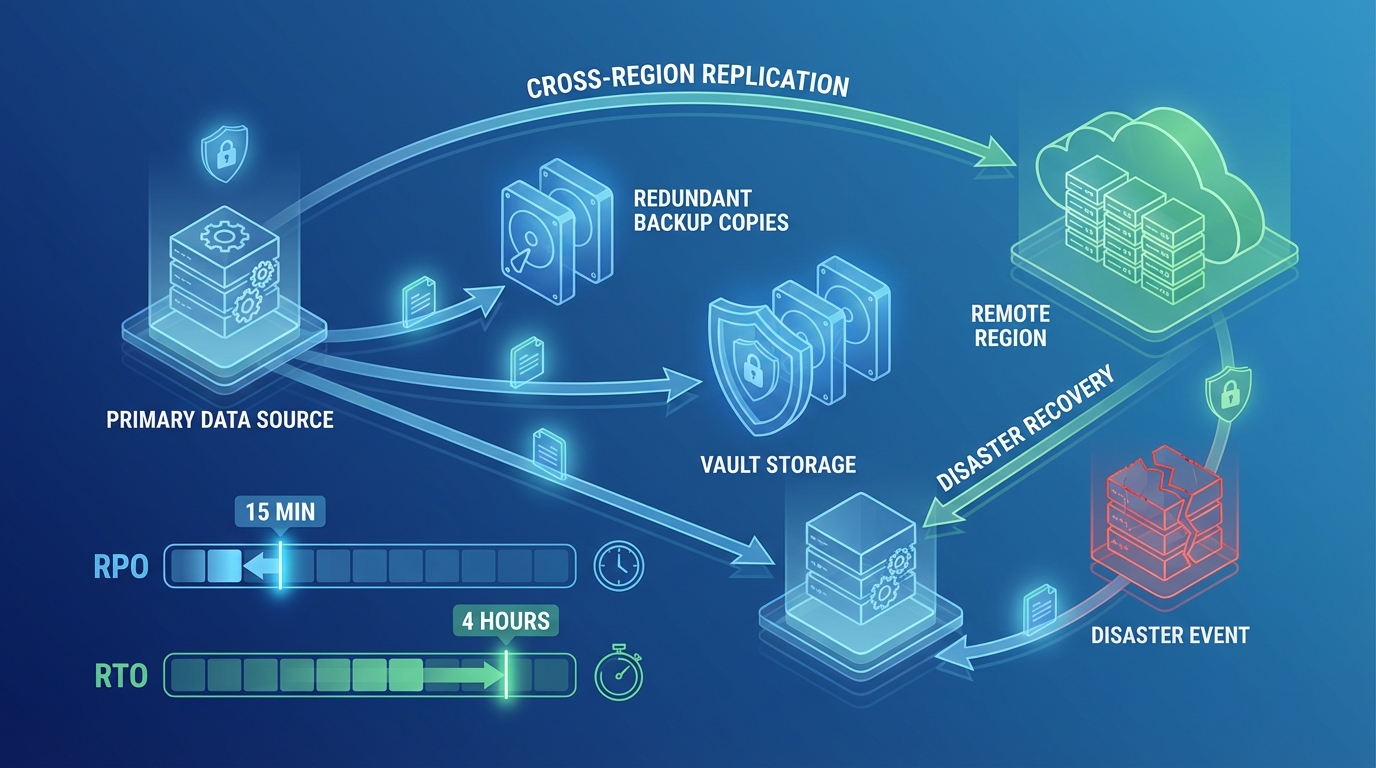
Table of Contents
Data loss is permanent. A deleted database, a corrupted S3 bucket, a ransomware attack — without backups, recovery is impossible. AWS provides native backup capabilities for individual services (RDS snapshots, EBS snapshots, DynamoDB point-in-time recovery), but managing these independently across dozens of resources leads to inconsistent backup policies, missed resources, and untested recovery procedures.
AWS Backup centralizes backup management across services — one policy, one console, one audit trail. This guide covers the backup architecture that makes production data recoverable.
AWS Backup Overview
Supported Services
AWS Backup supports centralized backup for:
| Service | Backup Type | Recovery Granularity |
|---|---|---|
| EBS | Volume snapshots | Full volume |
| RDS | Automated snapshots | Full database or point-in-time |
| Aurora | Cluster snapshots | Full cluster or point-in-time |
| DynamoDB | On-demand backups, PITR | Full table or point-in-time (35 days) |
| EFS | File system backups | Full or individual files |
| S3 | Object-level backups | Full bucket or individual objects |
| FSx | File system backups | Full file system |
| EC2 (AMI) | Instance images | Full instance |
| DocumentDB | Cluster snapshots | Full cluster |
| Neptune | Cluster snapshots | Full cluster |
How AWS Backup Works
Backup Plan (schedule + retention + lifecycle)
  → Backup Rule (frequency, time window)
    → Resource Assignment (tags, ARNs, or all resources)
      → Backup Vault (encrypted storage for backups)
        → Optional: Cross-Region copy
        → Optional: Cross-account copy
A backup plan defines what, when, and how long. Resource assignments determine which resources are backed up. Backup vaults store the backups with encryption and access policies.
Backup Plans
Designing Backup Plans
Create backup plans based on data criticality and recovery requirements:
Tier 1 — Critical (databases, financial data):
Backup Plan: Critical-Data
  Rule 1: Hourly backup (every 1 hour)
    Retention: 24 hours
    Start window: 1 hour
    Completion window: 2 hours
  Rule 2: Daily backup (1:00 AM UTC)
    Retention: 30 days
    Lifecycle: Move to cold storage after 7 days
  Rule 3: Monthly backup (1st of each month)
    Retention: 1 year
    Lifecycle: Move to cold storage after 30 days
  Cross-Region copy: us-west-2 (retention: 30 days)
Tier 2 — Important (application state, user uploads):
Backup Plan: Important-Data
  Rule 1: Daily backup (2:00 AM UTC)
    Retention: 14 days
  Rule 2: Weekly backup (Sunday)
    Retention: 90 days
    Lifecycle: Move to cold storage after 14 days
Tier 3 — Standard (development, non-critical):
Backup Plan: Standard-Data
  Rule 1: Daily backup (3:00 AM UTC)
    Retention: 7 days
Resource Assignment
Assign resources to backup plans using tags — not individual ARNs:
Resource Assignment:
  Selection: Tag-based
  Tag key: BackupTier
  Tag values: ["critical", "important", "standard"]
Tag-based assignment means new resources automatically get the right backup plan when tagged correctly. ARN-based assignment requires manual updates every time a resource is created or replaced.
Tagging standard:
| Tag Key | Values | Purpose |
|---|---|---|
BackupTier | critical, important, standard | Determines backup plan |
BackupExclude | true | Explicitly exclude from backups |
Environment | production, staging, development | Filter reports by environment |
RPO and RTO Alignment
Backup frequency determines your RPO (Recovery Point Objective) — the maximum data loss you accept:
| Backup Frequency | RPO | Data Loss (Worst Case) |
|---|---|---|
| Continuous (PITR) | Minutes | Up to 5 minutes |
| Hourly | 1 hour | Up to 1 hour |
| Daily | 24 hours | Up to 24 hours |
| Weekly | 7 days | Up to 7 days |
RTO (Recovery Time Objective) — How quickly you can restore from backup:
| Resource Type | Typical Restore Time | Factors |
|---|---|---|
| EBS snapshot | 5-30 minutes | Volume size, snapshot age |
| RDS snapshot | 15-60 minutes | Database size, instance class |
| DynamoDB restore | 10-60 minutes | Table size |
| S3 restore | Minutes to hours | Number of objects, storage class |
| EC2 AMI | 5-15 minutes | AMI size, instance type |
Match backup strategy to business requirements. A financial application with a 1-hour RPO needs hourly backups. A development environment with a 24-hour RPO needs only daily backups.
Backup Vaults
Vault Architecture
Backup vaults are encrypted containers for backup data:
Primary Vault (us-east-1)
  Encryption: AWS KMS (customer-managed key)
  Access policy: Production account only
  Lock: Compliance mode (retention cannot be shortened)

DR Vault (us-west-2)
  Encryption: AWS KMS (separate key in us-west-2)
  Access policy: Production account only
  Receives: Cross-Region copies from primary vault

Audit Vault (Audit Account)
  Encryption: AWS KMS (audit account key)
  Access policy: Audit account only (immutable)
  Receives: Cross-account copies for compliance
Vault Lock
Vault lock prevents backup deletion — even by administrators or root users:
Governance mode: Prevents deletion by most users but allows authorized administrators to override. Good for operational protection.
Compliance mode: Prevents deletion by anyone, including root. Once set, the retention period cannot be shortened. The vault lock itself cannot be removed. Good for regulatory compliance (HIPAA, SEC 17a-4, FINRA).
Vault Lock (Compliance mode):
  Minimum retention: 365 days
  Maximum retention: 2555 days (7 years)
  Changeable lock: After 72-hour cooling-off period, lock becomes immutable
Ransomware protection: Vault lock in compliance mode ensures backups survive ransomware attacks. Even if an attacker gains administrative access, they cannot delete or modify locked backups.
Encryption
Every backup vault is encrypted with KMS:
- AWS managed key — Simplest, no key management overhead
- Customer managed key — Required for cross-account access, compliance, and independent access control
Cross-Region copies use a KMS key in the destination Region. You must create a key in each target Region.
Cross-Region and Cross-Account Backup
Cross-Region Copies
Protect against Regional failures:
Primary (us-east-1) → Backup → Copy to us-west-2
  → Primary Region failure
    → Restore from us-west-2 backup
      → Application runs in us-west-2
Configure in the backup plan:
Backup Rule: Daily
  Copy action:
    Destination vault: arn:aws:backup:us-west-2:123456789:backup-vault:dr-vault
    Lifecycle: Delete after 30 days
Cross-Region copies complete asynchronously. For large databases, the initial copy may take hours. Subsequent incremental copies are faster.
Cross-Account Copies
Protect against account compromise:
Workload Account (123456789)
  → Backup vault → Copy to Backup Account (987654321)
    → Account 123456789 compromised
      → Backups in 987654321 are unaffected
        → Restore to a clean account
AWS Organizations integration: Use AWS Backup with Organizations to manage backup policies across all accounts from a central management account.
Delegated administrator: Designate a backup account as the delegated administrator. This account manages backup policies for the organization without requiring management account access.
Service-Specific Patterns
RDS and Aurora
RDS automated backups (managed by RDS, not AWS Backup):
- Retention: 1-35 days
- Point-in-time recovery: Any second within the retention window
- Cross-Region read replicas for DR
AWS Backup for RDS:
- Longer retention (beyond 35 days)
- Cross-account copies
- Centralized management with other services
- Vault lock for compliance
Recommendation: Use RDS automated backups for operational recovery (point-in-time restore within 35 days). Use AWS Backup for compliance retention and cross-account protection.
DynamoDB
DynamoDB PITR (Point-in-Time Recovery):
- Continuous backups retained for 35 days
- Restore to any second within the 35-day window
- No performance impact during backup
AWS Backup for DynamoDB:
- On-demand backups for longer retention
- Cross-Region and cross-account copies
- Tag-based resource assignment
Enable PITR on every production DynamoDB table. It costs $0.20/GB/month and provides second-level recovery granularity.
S3
S3 versioning is the first line of defense — deleted or overwritten objects are retained as non-current versions. Combined with lifecycle rules, versioning provides built-in object-level recovery.
AWS Backup for S3:
- Continuous backups (PITR for S3)
- Point-in-time restore to any second
- Cross-Region and cross-account copies
- Granular restore (individual objects or full bucket)
S3 Object Lock prevents deletion for a specified retention period — similar to vault lock but at the object level. Use for compliance data that must be retained unmodified.
EBS
EBS snapshots are incremental — each snapshot stores only changed blocks since the previous snapshot. First snapshot captures the full volume; subsequent snapshots are fast and cost-efficient.
AWS Backup for EBS:
- Scheduled snapshots via backup plans
- Cross-Region copies for DR
- Tag-based lifecycle management
- Automated cleanup of expired snapshots
Testing Backups
Restore Testing
Backups that have not been tested are not backups. AWS Backup provides automated restore testing:
Restore Test Plan:
  Schedule: Monthly
  Resources: All critical-tier backups
  Validation:
    - Restore completes successfully
    - Restored resource is accessible
    - Data integrity check (row count, checksum)
  Cleanup: Delete restored resources after validation
Testing Cadence
| Backup Tier | Restore Test Frequency | Full DR Test |
|---|---|---|
| Critical | Monthly | Quarterly |
| Important | Quarterly | Annually |
| Standard | Annually | N/A |
Document restore procedures. When a disaster occurs, the team should follow a documented runbook — not figure out the restore process under pressure. Include specific commands, expected durations, and validation steps.
Monitoring
Backup Monitoring
Set CloudWatch alarms for backup health:
| Event | Alert | Indicates |
|---|---|---|
| Backup job failed | Page on-call | Resource not being backed up |
| Backup job expired (not completed in window) | Notify team | Backup taking too long, possible issue |
| Copy job failed | Notify team | Cross-Region/account copy not completing |
| Restore test failed | Notify team | Backup may not be recoverable |
AWS Backup Audit Manager
Audit Manager generates compliance reports for backup policies:
- Backup frequency compliance — Are all resources being backed up per policy?
- Retention compliance — Are backups retained for the required duration?
- Cross-Region compliance — Are backups copied to the required Regions?
- Encryption compliance — Are all vaults encrypted with the required key type?
- Vault lock compliance — Are compliance vaults properly locked?
Generate reports for auditors — Audit Manager creates evidence that your backup practices meet regulatory requirements (HIPAA, SOC 2, PCI DSS).
Cost Optimization
Backup Pricing
| Component | Cost (us-east-1) |
|---|---|
| EBS snapshot storage | $0.05/GB/month |
| RDS backup storage (beyond free) | $0.095/GB/month |
| DynamoDB backup storage | $0.10/GB/month |
| DynamoDB PITR | $0.20/GB/month |
| S3 backup storage | $0.05/GB/month |
| Cross-Region data transfer | $0.02/GB |
| Warm storage | Standard pricing above |
| Cold storage | ~50% of warm storage |
Reducing Costs
- Lifecycle to cold storage — Move backups older than 7-30 days to cold storage (50% cheaper). Cold storage has a minimum 90-day retention.
- Right-size retention — Do not retain daily backups for a year when weekly backups suffice. Use the tiered approach: frequent short-term + infrequent long-term.
- Exclude non-critical resources — Development databases, temporary volumes, and test environments may not need backup. Use the
BackupExclude: truetag. - Clean up orphaned snapshots — Snapshots from deleted resources continue incurring charges. Use AWS Backup lifecycle rules or manual cleanup.
Cost Example
Production environment with 10 RDS databases (500 GB total), 20 EBS volumes (1 TB total), 5 DynamoDB tables (200 GB total):
Daily backups, 30-day retention, cold storage after 7 days:
  EBS: 1,000 GB × $0.05 = $50/month (warm) + cold storage
  RDS: 500 GB × $0.095 = $47.50/month
  DynamoDB: 200 GB × $0.10 = $20/month
  DynamoDB PITR: 200 GB × $0.20 = $40/month
  Cross-Region copy: ~$34/month (data transfer)
  Total: ~$190/month for complete data protection
Common Mistakes
Mistake 1: No Backup Testing
Creating backup plans but never testing restores. When a disaster occurs, the team discovers that backups are corrupted, incomplete, or the restore process takes longer than the RTO allows. Test restores monthly for critical data.
Mistake 2: Same-Account Backups Only
Storing backups in the same account as production data. If the account is compromised (ransomware, credential theft), both the data and its backups are at risk. Copy backups to a separate account with vault lock.
Mistake 3: No Vault Lock for Compliance
Relying on IAM policies to prevent backup deletion. IAM policies can be modified by administrators. Vault lock in compliance mode provides immutable retention that cannot be overridden by anyone — required for regulatory compliance.
Mistake 4: Missing Resources
Resources without the backup tag are not backed up. Use AWS Config rules to detect untagged resources and AWS Backup Audit Manager to verify all required resources have backup coverage.
Mistake 5: Ignoring Backup Job Failures
Backup jobs fail silently without monitoring. A database that has not been backed up for weeks is a disaster waiting to happen. Set CloudWatch alarms on backup job failures — every failure requires investigation.
Getting Started
Data protection is not optional for production workloads. AWS Backup provides the centralized, automated, auditable backup infrastructure that replaces manual snapshot scripts and ad-hoc procedures. Combined with disaster recovery architecture, security controls, and infrastructure monitoring, it provides the data protection layer that production workloads require.
For backup architecture design, disaster recovery planning, and managed operations, talk to our team.
AWS Cloud Architect & AI Expert
AWS-certified cloud architect and AI expert with deep expertise in cloud migrations, cost optimization, and generative AI on AWS.