AWS VPC Networking Best Practices for Production
Quick summary: A VPC misdesign at month two becomes a multi-quarter migration at year two. CIDR planning, subnet strategies, NAT gateways, VPC endpoints, Transit Gateway, and the network architecture patterns that scale without forcing a re-IP.
Key Takeaways
- A VPC misdesign at month two becomes a multi-quarter migration at year two
- CIDR planning, subnet strategies, NAT gateways, VPC endpoints, Transit Gateway, and the network architecture patterns that scale without forcing a re-IP
- Networking is the foundation that every other AWS service runs on
- A well-designed VPC provides security isolation, predictable routing, and the flexibility to grow without re-architecting
- A poorly designed VPC leads to overlapping IP ranges that prevent connectivity, public-facing resources that should be private, and networking costs that grow faster than the workloads they support
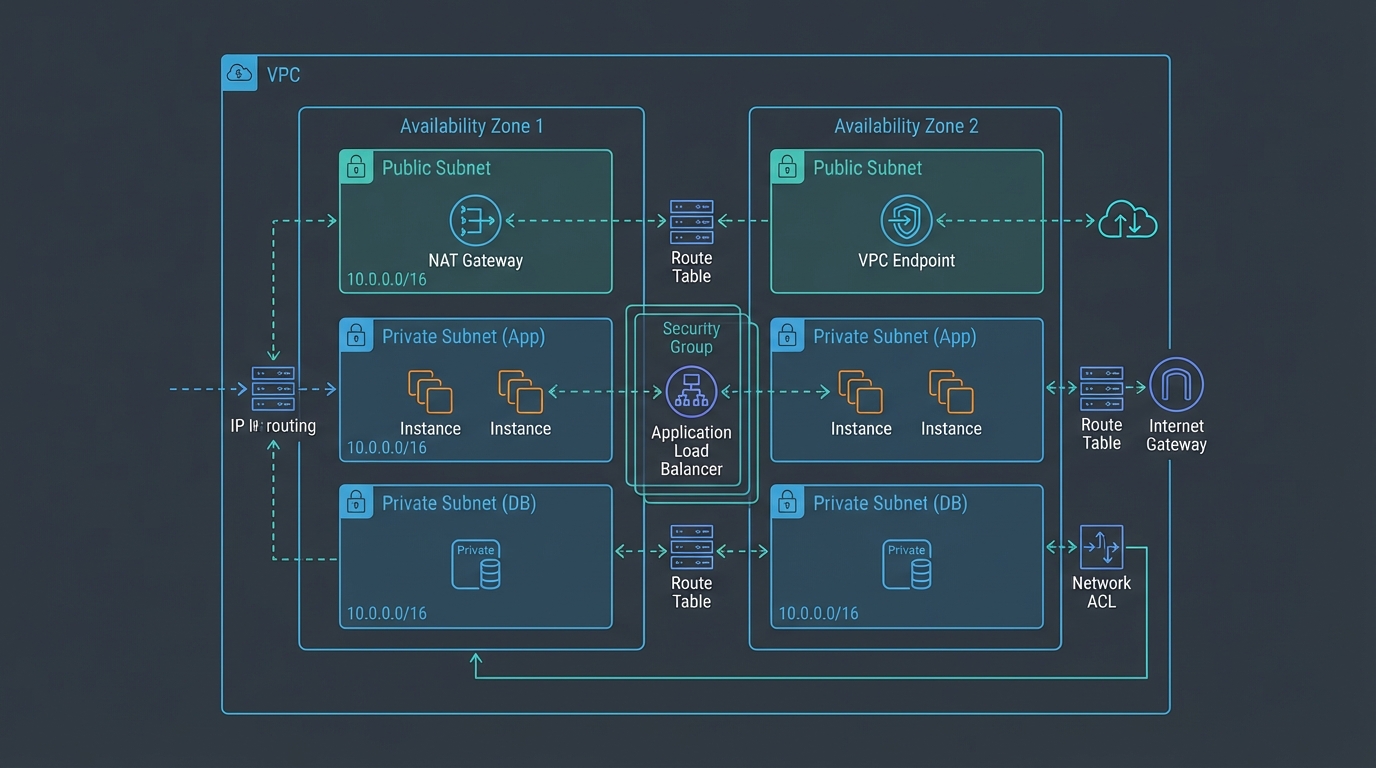
Table of Contents
Networking is the foundation that every other AWS service runs on. A well-designed VPC provides security isolation, predictable routing, and the flexibility to grow without re-architecting. A poorly designed VPC leads to overlapping IP ranges that prevent connectivity, public-facing resources that should be private, and networking costs that grow faster than the workloads they support.
Most networking mistakes are made during initial setup and are expensive to fix later. This guide covers the decisions that matter — CIDR planning, subnet strategy, connectivity patterns, and cost optimization — so you get the network right the first time.
May 2026 refresh: AWS publishes a maintained VPC security best practices checklist (multi-AZ subnets, layered security groups and NACLs, IAM access, Flow Logs, and optional AWS Network Firewall / GuardDuty integration). Use it as the service-truth companion to this architecture-focused walkthrough: Security best practices for your VPC.
VPC Design
CIDR Planning
CIDR (Classless Inter-Domain Routing) defines your VPC’s IP address range. Getting this right is critical because VPC CIDRs cannot overlap if you need to connect VPCs together, and expanding a VPC CIDR after creation has limitations.
Recommended CIDR ranges:
| Environment | CIDR | Usable IPs | Rationale |
|---|---|---|---|
| Production | 10.0.0.0/16 | 65,536 | Room for growth, many subnets |
| Staging | 10.1.0.0/16 | 65,536 | Mirrors production for testing |
| Development | 10.2.0.0/16 | 65,536 | Developer workloads |
| Shared Services | 10.10.0.0/16 | 65,536 | CI/CD, DNS, shared tools |
Rules:
- Use /16 for production VPCs — smaller ranges limit future growth
- Never overlap CIDRs across VPCs that might need to communicate
- Reserve ranges for on-premises connectivity (avoid 10.0.0.0/8 if your data center uses it)
- Document your CIDR allocation in a central registry
In a multi-account organization, plan CIDRs centrally to prevent overlaps across accounts.
Subnet Strategy
Three-tier architecture:
VPC: 10.0.0.0/16
├── Public Subnets (internet-facing)
│   ├── 10.0.1.0/24 (AZ-a) — ALB, NAT Gateway, bastion hosts
│   ├── 10.0.2.0/24 (AZ-b)
│   └── 10.0.3.0/24 (AZ-c)
├── Private Subnets (application tier)
│   ├── 10.0.11.0/24 (AZ-a) — ECS tasks, Lambda, EC2 instances
│   ├── 10.0.12.0/24 (AZ-b)
│   └── 10.0.13.0/24 (AZ-c)
└── Data Subnets (database tier)
    ├── 10.0.21.0/24 (AZ-a) — RDS, ElastiCache, OpenSearch
    ├── 10.0.22.0/24 (AZ-b)
    └── 10.0.23.0/24 (AZ-c)
Three Availability Zones — Always deploy across at least 2 AZs for high availability. Three AZs provide better fault tolerance and are required for some services (e.g., Amazon MSK, Aurora Multi-AZ with 2 readers).
Public subnets have a route to the Internet Gateway. Only resources that must receive inbound traffic from the internet should be here — ALBs, NAT Gateways, and (rarely) bastion hosts.
Private subnets have a route to a NAT Gateway (for outbound internet access) but no inbound internet route. Application workloads live here.
Data subnets have no internet access at all — no NAT Gateway route. Databases should never initiate outbound internet connections. AWS service access uses VPC endpoints.
Security Groups vs NACLs
Security Groups — Stateful, instance-level firewall. The primary access control mechanism:
| Rule | Source | Port | Purpose |
|---|---|---|---|
| ALB → Application | ALB security group | 8080 | Application traffic |
| Application → Database | Application security group | 5432 | Database queries |
| Application → Redis | Application security group | 6379 | Cache access |
Best practice: Reference security groups by ID (not CIDR) whenever possible. sg-abc123 is self-documenting and adapts automatically when instances are added or removed.
NACLs (Network ACLs) — Stateless, subnet-level firewall. Use as a secondary defense layer:
- Default NACLs allow all traffic — do not rely on them for security
- Custom NACLs block known malicious IP ranges or restrict traffic between subnet tiers
- NACLs require explicit allow rules for both inbound and outbound (stateless)
Recommendation: Use security groups as the primary control. Add NACLs only for specific requirements (blocking IP ranges, enforcing subnet-level restrictions for compliance).
Internet Connectivity
NAT Gateways
NAT Gateways provide outbound internet access for private subnet resources (package updates, API calls, SaaS integrations):
Cost:
- $0.045/hour per NAT Gateway = $32.85/month (730 hours)
- $0.045/GB data processed, in both directions
- $0.005/hour public IPv4 = $3.65/month per address, so one idle gateway in us-east-1 is $36.50
High availability: Deploy one NAT Gateway per AZ. If AZ-a’s NAT Gateway fails, resources in AZ-a lose internet access — but resources in AZ-b and AZ-c continue normally.
Cost optimization:
- A single NAT Gateway in one AZ works for development environments ($36.50/month idle vs $109.50/month for three, including the public IPv4). A Regional NAT Gateway still bills one hour per active AZ. See NAT Gateway billing.
- Use VPC endpoints for AWS service traffic to reduce NAT Gateway data processing charges
- S3 and DynamoDB Gateway endpoints are free — always deploy them
VPC Endpoints
VPC endpoints provide private connectivity to AWS services without traversing the internet or NAT Gateway:
Gateway endpoints (free):
- S3
- DynamoDB
Always deploy these. They are free and reduce NAT Gateway costs.
Interface endpoints ($0.01/hour per AZ + $0.01/GB):
- ECR (for container image pulls)
- CloudWatch Logs (for log shipping)
- STS (for IAM role assumption)
- Secrets Manager / SSM Parameter Store
- KMS
- SQS, SNS, EventBridge
- Lambda, Step Functions
Cost analysis: An interface endpoint in 3 AZs costs ~$21.60/month. If your workload processes more than 480 GB/month through NAT Gateway to reach that service, the endpoint is cheaper. For high-traffic services (ECR, CloudWatch Logs), endpoints almost always save money.
Security benefit: VPC endpoints keep traffic within the AWS network. Data never traverses the public internet, reducing the attack surface.
Multi-VPC Connectivity
VPC Peering
Point-to-point connectivity between two VPCs:
VPC A ←→ VPC B (peering connection)Advantages: Simple, no additional cost (data transfer charges only), low latency.
Limitations: Not transitive (VPC A ↔ B and VPC B ↔ C does not mean VPC A ↔ C). For more than 3-4 VPCs, peering creates an unmanageable mesh.
Best for: Connecting 2-3 VPCs in simple architectures.
Transit Gateway
Hub-and-spoke connectivity for multiple VPCs and on-premises networks:
VPC A ───┐
VPC B ───┤
VPC C ───┼─── Transit Gateway ─── On-premises (VPN / Direct Connect)
VPC D ───┤
VPC E ───┘
Advantages:
- Centralized routing — one hub connects all VPCs
- Transitive routing — any VPC can reach any other VPC through the hub
- VPN and Direct Connect integration
- Route tables for segmentation (production VPCs cannot reach development VPCs)
- Cross-Region peering for multi-Region architectures
Cost: $0.05/hour per attachment + $0.02/GB data processed. A Transit Gateway with 5 VPC attachments costs ~$180/month before data transfer.
Best for: Multi-account organizations with 4+ VPCs, hybrid connectivity, or network segmentation requirements.
PrivateLink
Expose a service from one VPC to another without VPC peering:
Consumer VPC → VPC Endpoint (Interface) → PrivateLink → NLB → Provider VPCBest for: Sharing specific services (APIs, databases) across accounts without full network connectivity. The consumer only accesses the specific service endpoint — not the provider’s entire VPC.
Hybrid Connectivity
AWS VPN
Encrypted tunnels over the public internet:
| Option | Bandwidth | Latency | Cost |
|---|---|---|---|
| Site-to-Site VPN | Up to 1.25 Gbps per tunnel | Variable (internet) | $0.05/hour + data transfer |
| Client VPN | Per-connection | Variable | $0.10/hour + $0.05/connection-hour |
Best for: Quick connectivity setup, backup for Direct Connect, remote developer access.
AWS Direct Connect
Dedicated network connection from your data center to AWS:
| Option | Bandwidth | Latency | Cost |
|---|---|---|---|
| Dedicated (1 Gbps, 10 Gbps, 100 Gbps) | Dedicated | Consistent, low | Port fee + data transfer |
| Hosted (50 Mbps - 10 Gbps) | Shared | Consistent, low | Partner pricing + data transfer |
Best for: Production hybrid workloads requiring consistent latency and high throughput. Financial services, healthcare, and any workload with data residency requirements.
High availability: Deploy Direct Connect connections in two different Direct Connect locations. Use VPN as a backup for Direct Connect.
Network Cost Optimization
Data Transfer Costs
Data transfer is often the largest hidden cost in AWS networking:
| Transfer Type | Cost |
|---|---|
| Inbound (internet → AWS) | Free |
| Same AZ | Free |
| Cross-AZ (same Region) | $0.01/GB each direction |
| Cross-Region | $0.02/GB |
| Internet outbound | $0.09/GB (first 10 TB) |
| NAT Gateway processing | $0.045/GB |
| VPC endpoint processing | $0.01/GB |
Cost reduction strategies:
- Keep communicating services in the same AZ when possible (free vs $0.02/GB cross-AZ)
- Use CloudFront for content delivery (cheaper outbound rates: $0.085/GB vs $0.09/GB, and cached content eliminates origin transfer)
- Deploy S3 and DynamoDB gateway endpoints (free, eliminates NAT Gateway charges)
- Use VPC endpoints for high-traffic AWS services
- Compress data in transit to reduce GB transferred
NAT Gateway Cost Reduction
NAT Gateways charge $0.045/GB for data processing. For workloads making heavy use of AWS services:
- Deploy S3 and DynamoDB gateway endpoints — Free, eliminates NAT charges for the two highest-volume services
- Deploy interface endpoints for ECR — Container image pulls from ECR through NAT are expensive; endpoint is cheaper for most workloads
- Deploy CloudWatch Logs endpoint — Log shipping volume can be significant
- Consolidate internet access — If multiple VPCs need internet access, route through a centralized NAT in a shared VPC via Transit Gateway
Monitoring
VPC Flow Logs
Enable VPC Flow Logs in every VPC, every region, every account — not only the production VPCs you remember to configure. Most network-based attacks target the regions and VPCs nobody is watching.
- Accepted traffic — Useful for understanding communication patterns and traffic volume
- Rejected traffic — Security monitoring (port scans, unauthorized access attempts)
- All traffic — Complete visibility (highest cost)
Send flow logs to S3 for long-term analysis or CloudWatch Logs for real-time alerting. Use Athena to query flow logs in S3 for network forensics. For cost-sensitive environments, enable sampling (1-in-N records) on dev/staging VPCs while keeping full logging on production. Enforce coverage organization-wide with the AWS Config rule vpc-flow-logs-enabled plus an EventBridge rule that auto-remediates any VPC created without flow logs.
Network Monitoring
Set CloudWatch alarms for:
- NAT Gateway
ErrorPortAllocation— NAT Gateway running out of ports (scale or split traffic) - NAT Gateway
BytesOutToDestination— Unexpected data transfer volume - Transit Gateway
BytesIn/BytesOut— Traffic volume anomalies - VPN
TunnelState— VPN tunnel down
Common Mistakes
Mistake 1: Insufficient CIDR Planning
Starting with a /24 VPC (256 IPs) and discovering you need more IPs after deploying 50 services. While you can add secondary CIDRs, the expanded range may overlap with other VPCs. Plan for growth with /16 VPCs from the start.
Mistake 2: Everything in Public Subnets
Placing application servers and databases in public subnets because “it is easier to access.” Every resource that does not need inbound internet traffic should be in a private subnet. Use ALBs for inbound traffic and NAT Gateways for outbound.
Mistake 3: No VPC Endpoints
Routing all AWS service traffic through NAT Gateways when gateway endpoints (S3, DynamoDB) are free. Deploy gateway endpoints in every VPC — they cost nothing and save significant NAT Gateway data processing fees.
Mistake 4: Single-AZ Deployment
Deploying all resources in a single Availability Zone. When that AZ has an incident (hardware failure, network issue), your entire application goes down. Always deploy across at least 2 AZs for production workloads.
Mistake 5: Leaving the Default Security Group Permissive
Every VPC ships with a default security group that cannot be deleted. Out of the box it allows all traffic between resources that share it — and any resource launched without an explicit security group association inherits it. The result is an accidental flat network where forgotten EC2 instances, Lambda functions, and RDS endpoints can all talk to each other.
Harden the default security group on every VPC:
- Remove every inbound rule and every outbound rule, leaving the security group with zero rules. The group still exists (it must), but it grants no access.
- Always launch resources with an explicit, purpose-built security group — never rely on the default.
- Enforce the closed state with the AWS Config rule
vpc-default-security-group-closedso any drift triggers an alert. - Add an SCP that denies
ec2:AuthorizeSecurityGroupIngressandec2:AuthorizeSecurityGroupEgressagainst any security group nameddefault, so even an admin cannot accidentally open it.
Getting Started
VPC networking is the foundation that determines the security, connectivity, and cost characteristics of everything you build on AWS. Getting the network right during initial setup prevents expensive re-architecture later.
For network architecture design as part of your AWS architecture review, multi-account networking with Transit Gateway, or hybrid connectivity planning, talk to our team.
Contact us to design your network architecture →
Encryption keys for cross-account workloads belong in a deliberate KMS CMK strategy.
Related reading
- AWS Cloud Center of Excellence (CCoE): Operating Model, RFCs, and How WAR + FinOps Connect
- AWS for Retail: The Complete Guide for eCommerce Teams
- AWS Global Accelerator vs CloudFront & Route 53 (2026)
- AWS IoT Greengrass v2: Edge Computing for Factory Floors
- AWS IoT SiteWise Native Anomaly Detection for Predictive Maintenance
- AWS IoT Solutions: Architecture Patterns for Connected Devices
- AWS IoT TwinMaker: Digital Twin Architecture for Manufacturing
- AWS Managed Services vs AWS Support Plans: What
- AWS Architecture for Black Friday: How Retail Teams Prepare for Peak Traffic
- 12 Benefits of Hiring a Certified AWS Consultant — With Real ROI
- Custom AWS Development for Retail: When Off-the-Shelf Is Not Enough
- How to Optimize EC2 for High-Performance APIs
- Microservices Design Patterns on AWS: 10 Patterns That Actually Matter in 2026
- How to Choose Between Nginx, FrankenPHP, and Modern Web Runtimes (2026)
- OPC-UA on AWS: SiteWise Edge Gateway Setup and Best Practices
- OT/IT Convergence on AWS: Architecture Patterns for Smart Manufacturing
- How to Build Reliable Queue Systems on AWS (SQS, Kafka, Redis)
- How to Tune PHP, Node.js, Python, and Go for High Concurrency on AWS
For operator console access from no-internet VPCs, see AWS Management Console Private Access (June 2026).
Frequently asked questions
What CIDR range should I use for an AWS VPC?
How many subnets should a production VPC have per Availability Zone?
When should I use security groups vs NACLs?
When should I use Transit Gateway vs VPC peering?
How do VPC endpoints reduce NAT Gateway costs?

AWS Cloud Architect & AI Expert
AWS-certified cloud architect and AI expert with deep expertise in cloud migrations, cost optimization, and generative AI on AWS.