Amazon Security Lake: Centralized OCSF Security Data Lake for Enterprise Threat Intelligence
Quick summary: Amazon Security Lake normalizes security logs to OCSF format in a centralized S3 data lake. Here's how to build a cost-effective security data platform without a $500K SIEM contract.
Key Takeaways
- Amazon Security Lake normalizes security logs to OCSF format in a centralized S3 data lake
- Here's how to build a cost-effective security data platform without a $500K SIEM contract
- Amazon Security Lake normalizes security logs to OCSF format in a centralized S3 data lake
- Here's how to build a cost-effective security data platform without a $500K SIEM contract
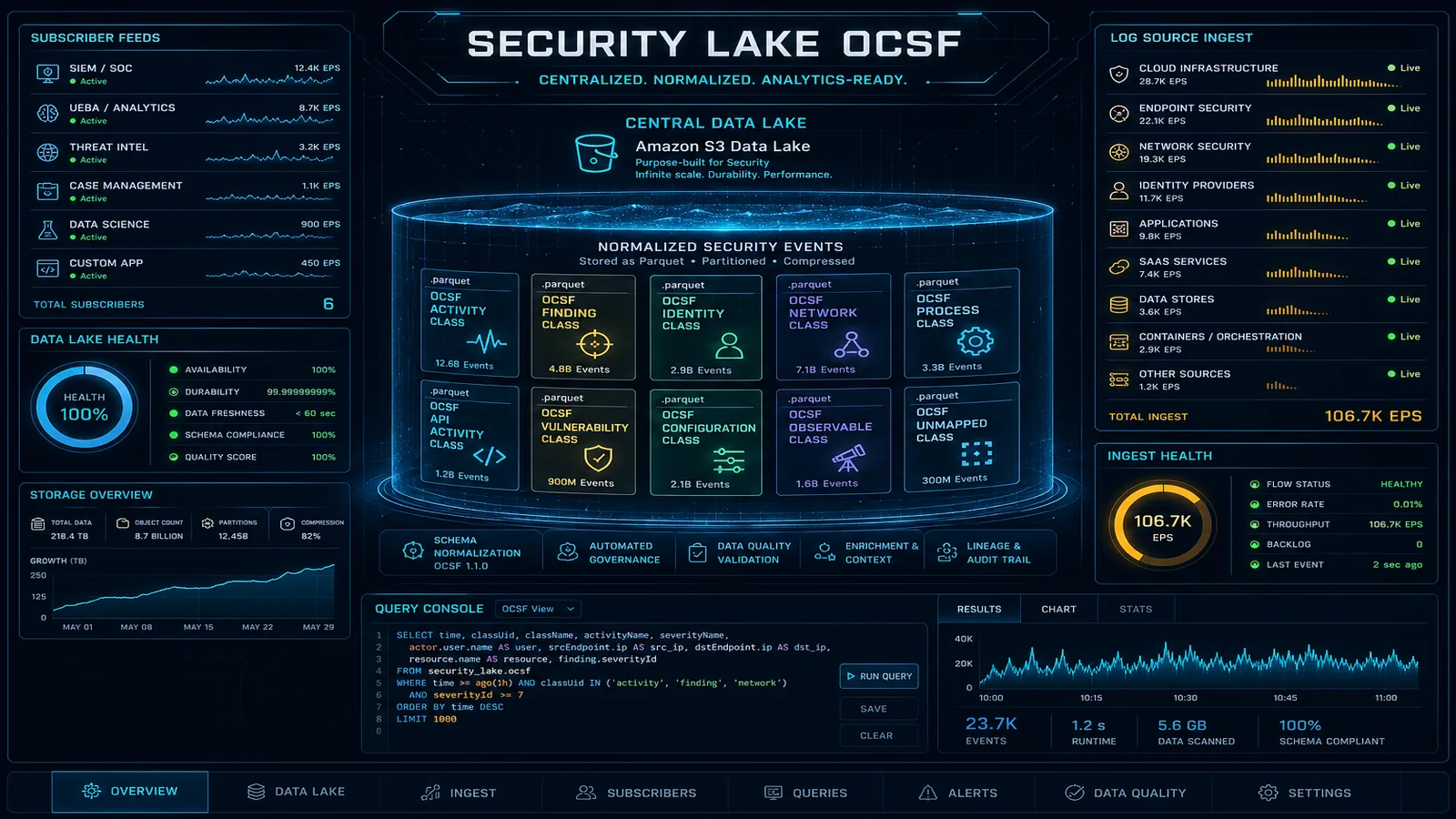
Table of Contents
Traditional SIEM contracts are expensive. Splunk Cloud, Microsoft Sentinel, and IBM QRadar all charge per GB of data ingested — and for a mid-sized enterprise running CloudTrail across 50 AWS accounts, VPC Flow Logs for 200 VPCs, and WAF logs for 30 application load balancers, you’re looking at terabytes per day. At $1–3 per GB for SIEM ingestion, that math produces six-figure monthly invoices before you’ve written a single detection rule.
Amazon Security Lake, which reached general availability in May 2023, inverts this cost model. Instead of shipping raw logs to a vendor’s platform, Security Lake normalizes your security telemetry to the Open Cybersecurity Schema Framework (OCSF) and stores it as Parquet files in an S3 bucket in your own account. You own the data. You pay S3 storage rates (roughly $0.023/GB/month) instead of SIEM ingestion rates. Athena queries against Parquet are fast, cheap, and use familiar SQL. And if you still need a SIEM for specific correlation use cases, you connect it as a subscriber — feeding only the events that actually need real-time rule evaluation, not everything.
This guide covers the architecture, OCSF normalization, multi-account deployment, practical Athena queries, and the subscriber model for connecting existing SIEM investments.
Security Lake vs. Security Hub vs. SIEM
These three services solve adjacent but distinct problems. Senior engineers frequently conflate them, and conflating them leads to either over-spending (sending raw logs to a SIEM when Athena queries would suffice) or under-investing (relying on Security Hub findings alone for threat hunting when raw event data is needed).
| Dimension | Amazon Security Hub | Amazon Security Lake | SIEM (Splunk/Sentinel) |
|---|---|---|---|
| Data type | Security findings (alerts, check results) | Raw security events (every CloudTrail call, every flow record) | Both findings and raw events |
| Ingestion model | Pull from services + partner integrations | Normalize + store natively in your S3 | Agent-based or API-based ingest |
| Retention | 90 days (findings) | Years via S3 lifecycle | License-dependent (typically 90 days hot) |
| Storage location | AWS-managed | Your S3 bucket | Vendor-managed (SaaS) or your infra |
| Query interface | Console filters, EventBridge, Security Hub API | Athena SQL, any S3-compatible analytics tool | Vendor query language (SPL, KQL) |
| Real-time alerting | Yes (EventBridge rules on findings) | No (5–15 min lag) | Yes |
| Cost model | Per finding/check | Per GB normalized + S3 storage | Per GB ingested (typically $1–3/GB) |
| Primary use case | Alert management, compliance posture | Threat hunting, long-term log analysis | Correlation rules, SOC workflows |
The correct deployment pattern for most enterprises: Security Hub for SOC alert management (ACTIVE/RESOLVED workflows), Security Lake for threat hunting and forensic investigation, and a SIEM only for the workloads that genuinely require real-time correlation rules or analyst tooling that depends on SPL/KQL.
OCSF: Why Normalization Matters
The OCSF (Open Cybersecurity Schema Framework) is an open standard co-developed by AWS, Splunk, and 18 other vendors. It defines a common event schema so that a CloudTrail management event, a Palo Alto firewall log, and an Okta authentication event all expose the same field names for equivalent concepts.
Consider a CloudTrail record for an IAM role assumption:
{
  "eventVersion": "1.08",
  "userIdentity": {
    "type": "AssumedRole",
    "principalId": "AROAEXAMPLE:session",
    "arn": "arn:aws:iam::123456789012:assumed-role/MyRole/session"
  },
  "eventTime": "2026-08-11T14:32:01Z",
  "eventSource": "sts.amazonaws.com",
  "eventName": "AssumeRole",
  "requestParameters": {
    "roleArn": "arn:aws:iam::999999999999:role/CrossAccountRole",
    "roleSessionName": "automation-session"
  },
  "sourceIPAddress": "10.0.1.45",
  "responseElements": {
    "assumedRoleUser": {
      "assumedRoleId": "AROAEXAMPLE:automation-session"
    }
  }
}
Now compare the OCSF-normalized version of the same event:
{
  "class_uid": 3005,
  "class_name": "Account Change",
  "category_uid": 3,
  "time": 1754926321000,
  "severity_id": 1,
  "actor": {
    "user": {
      "uid": "AROAEXAMPLE:session",
      "type_id": 4,
      "type": "AssumedRole"
    },
    "session": {
      "uid": "automation-session",
      "issuer": "arn:aws:iam::123456789012:assumed-role/MyRole"
    }
  },
  "src_endpoint": {
    "ip": "10.0.1.45"
  },
  "dst_endpoint": {
    "uid": "arn:aws:iam::999999999999:role/CrossAccountRole"
  },
  "activity_id": 1,
  "activity_name": "Assume",
  "cloud": {
    "account": { "uid": "123456789012" },
    "provider": "AWS",
    "region": "us-east-1"
  },
  "metadata": {
    "product": { "name": "CloudTrail", "vendor_name": "AWS" },
    "version": "1.0.0"
  }
}
An Okta authentication failure normalized to OCSF uses the same actor.user.uid, src_endpoint.ip, and time field paths. This means a single Athena query written against OCSF schema finds cross-source patterns without source-specific field mapping logic in the query itself.
Security Lake uses OCSF version 1.x and stores data as Parquet files partitioned by account_id/region/eventDay/source_location_uri. The Glue Data Catalog tables created by Security Lake expose these OCSF fields directly.
Setting Up Security Lake for Multi-Account Organizations
For enterprise deployments, you designate a Security Lake delegated administrator account (typically your security tooling account in AWS Organizations) and enable member accounts as log contributors.
Step 1: Designate the delegated administrator
aws organizations enable-aws-service-access \
  --service-principal securitylake.amazonaws.com

aws securitylake register-data-lake-delegated-administrator \
  --account-id 111122223333
Step 2: Enable Security Lake in the delegated admin account, then onboard member accounts
The following Terraform snippet creates Security Lake in the delegated admin account with reasonable source selection and a retention lifecycle:
resource "aws_securitylake_aws_log_source" "org_sources" {
  source {
    accounts    = []  # empty = all org accounts
    regions     = ["us-east-1", "us-west-2", "eu-west-1"]
    source_name = "CLOUD_TRAIL_MGMT"
    source_version = "2"
  }
}

resource "aws_securitylake_aws_log_source" "vpc_flow" {
  source {
    accounts    = []
    regions     = ["us-east-1", "us-west-2", "eu-west-1"]
    source_name = "VPC_FLOW"
    source_version = "2"
  }
}

resource "aws_securitylake_aws_log_source" "security_hub" {
  source {
    accounts    = []
    regions     = ["us-east-1"]  # Security Hub aggregation region only
    source_name = "SH_FINDINGS"
    source_version = "2"
  }
}

resource "aws_securitylake_aws_log_source" "route53" {
  source {
    accounts    = []
    regions     = ["us-east-1", "us-west-2"]
    source_name = "ROUTE53"
    source_version = "2"
  }
}

resource "aws_securitylake_data_lake" "primary" {
  meta_store_manager_role_arn = aws_iam_role.securitylake_meta.arn

  configuration {
    region = "us-east-1"

    lifecycle_configuration {
      # Hot tier: 90 days in Standard
      expiration { days = 365 }

      transitions {
        days          = 90
        storage_class = "INTELLIGENT_TIERING"
      }
    }

    replication_configuration {
      regions  = ["us-west-2"]  # DR replica
      role_arn = aws_iam_role.securitylake_replication.arn
    }

    encryption_configuration {
      kms_key_id = aws_kms_key.security_lake.arn
    }
  }
}
Step 3: Onboard member accounts via Organizations
aws securitylake create-aws-log-source \
  --sources '[{"accounts":[],"regions":["us-east-1","us-west-2"],"sourceName":"CLOUD_TRAIL_MGMT","sourceVersion":"2"}]'
Security Lake automatically creates an S3 bucket in the delegated admin account with the path structure:
s3://aws-security-data-lake-{region}-{accountId}/
  aws/AMAZON_SECURITY_LAKE_OCSF_1_0/
    region={region}/
      accountId={accountId}/
        eventDay={YYYY-MM-DD}/
          source_location_uri={sourceType}/
            *.parquet
Querying Security Lake with Athena
Security Lake automatically creates Glue tables for each source. The table names follow the pattern amazon_security_lake_glue_db_{region}.amazon_security_lake_table_{region}_{source}.
Query 1: All cross-account IAM role assumptions in the last 7 days
SELECT
  time,
  actor.user.uid        AS source_principal,
  actor.session.issuer  AS source_role,
  dst_endpoint.uid      AS target_role_arn,
  src_endpoint.ip       AS source_ip,
  cloud.account.uid     AS source_account,
  SPLIT_PART(dst_endpoint.uid, '::', 2) AS target_account
FROM amazon_security_lake_glue_db_us_east_1.amazon_security_lake_table_us_east_1_cloud_trail_mgmt_2_0
WHERE
  class_name = 'Account Change'
  AND activity_name = 'Assume'
  AND eventday >= DATE_FORMAT(DATE_ADD('day', -7, CURRENT_DATE), '%Y%m%d')
  AND cloud.account.uid <> SPLIT_PART(dst_endpoint.uid, '::', 2)  -- cross-account only
ORDER BY time DESC
LIMIT 1000;
Query 2: IP addresses with more than 100 failed authentication attempts (VPC Flow + Route53 correlation)
WITH failed_flows AS (
  SELECT
    src_endpoint.ip AS src_ip,
    COUNT(*) AS flow_count
  FROM amazon_security_lake_glue_db_us_east_1.amazon_security_lake_table_us_east_1_vpc_flow_2_0
  WHERE
    disposition = 'Blocked'
    AND eventday >= DATE_FORMAT(DATE_ADD('day', -1, CURRENT_DATE), '%Y%m%d')
  GROUP BY src_endpoint.ip
  HAVING COUNT(*) > 100
),
dns_queries AS (
  SELECT
    src_endpoint.ip AS src_ip,
    COUNT(*) AS query_count,
    ARRAY_AGG(DISTINCT query.hostname) AS queried_domains
  FROM amazon_security_lake_glue_db_us_east_1.amazon_security_lake_table_us_east_1_route53_2_0
  WHERE eventday >= DATE_FORMAT(DATE_ADD('day', -1, CURRENT_DATE), '%Y%m%d')
  GROUP BY src_endpoint.ip
)
SELECT
  f.src_ip,
  f.flow_count     AS blocked_flows,
  d.query_count    AS dns_queries,
  d.queried_domains
FROM failed_flows f
LEFT JOIN dns_queries d ON f.src_ip = d.src_ip
ORDER BY f.flow_count DESC;
Query 3: All S3 data events on a specific bucket (last 24 hours)
SELECT
  time,
  actor.user.uid       AS principal,
  actor.session.issuer AS assumed_role,
  api.operation        AS operation,
  api.request.uid      AS request_id,
  src_endpoint.ip      AS source_ip,
  cloud.account.uid    AS account_id
FROM amazon_security_lake_glue_db_us_east_1.amazon_security_lake_table_us_east_1_cloud_trail_mgmt_2_0
WHERE
  class_name IN ('API Activity')
  AND api.service.name = 's3.amazonaws.com'
  AND resources[1].uid LIKE '%arn:aws:s3:::my-sensitive-bucket%'
  AND eventday = DATE_FORMAT(CURRENT_DATE, '%Y%m%d')
ORDER BY time DESC;
These queries return results in seconds to minutes depending on the date range and data volume. For repeated threat hunting queries, you can save them as Athena named queries and invoke them from Lambda or Step Functions as part of an automated investigation workflow.
Connecting Security Lake to Existing Tools
Security Lake uses a subscriber model to grant access to the normalized data. There are two subscriber types:
S3 subscriber: Security Lake sends an SQS notification every time new Parquet files land in S3. The subscriber polls SQS and downloads new files. Appropriate for SIEM tools that ingest files (Splunk S3 inputs).
Query-based subscriber: the subscriber gets a Lake Formation grant to query the Glue tables directly via Athena or AWS Lake Formation. Appropriate for BI tools, custom dashboards, or security orchestration tools.
Splunk Integration (S3 Subscriber)
# Create the subscriber
aws securitylake create-subscriber \
  --subscriber-name "splunk-prod" \
  --sources '[{"awsLogSource":{"sourceName":"CLOUD_TRAIL_MGMT","sourceVersion":"2"}},
              {"awsLogSource":{"sourceName":"VPC_FLOW","sourceVersion":"2"}}]' \
  --subscriber-identity '{"principal":"arn:aws:iam::SPLUNK_ACCOUNT_ID:role/SplunkRole","externalId":"splunk-subscriber-001"}' \
  --access-types S3

# The response includes the SQS queue ARN and S3 bucket ARN for the Splunk S3 input
In Splunk, configure the AWS S3 input using the SQS-based S3 input type. Point it at the SQS queue returned by the subscriber creation. Splunk will process only new files as they arrive — no need to backfill since Security Lake maintains the complete archive in S3.
When to feed the SIEM vs. query directly: Use the SIEM subscriber selectively. Feeding all CloudTrail + VPC Flow to Splunk at $2/GB defeats the cost optimization purpose. A better pattern is: (1) use Athena queries for threat hunting and investigation, (2) configure the SIEM subscriber only for sources that feed active correlation rules (e.g., SH_FINDINGS for alert enrichment), (3) keep the SIEM data retention short (7–30 days) since Security Lake is the long-term archive.
Microsoft Sentinel Integration
Sentinel supports Security Lake via the AWS S3 connector in Sentinel Data Connectors. The connector uses SQS notifications from the Security Lake subscriber and writes OCSF-formatted events to Sentinel Log Analytics workspace. Note that Sentinel transforms OCSF fields to its own CommonSecurityLog / ASimAuthentication schemas on ingestion, so Sentinel KQL queries use Sentinel normalized field names, not OCSF directly.
Cost Comparison: Security Lake vs. Full SIEM Ingestion
For a 1,000-account organization generating 500 GB/day of CloudTrail + VPC Flow:
| Component | Security Lake | SIEM-only |
|---|---|---|
| Ingestion cost | ~$0.50/GB × 500 GB = $250/day | $2/GB × 500 GB = $1,000/day |
| Storage (1 year) | 500 GB × 365 × $0.023 = ~$4,200 | License-bundled (usually 90 days) |
| Query cost | $5/TB scanned (Athena) | Included in license |
| Annual total | ~$100K | ~$365K–$730K |
The security lake approach cuts raw log costs by 65–85% compared to full SIEM ingestion. The SIEM remains valuable for real-time correlation and SOC workflows — you just stop feeding it everything.
Production Considerations
Lake Formation permissions: by default, Security Lake grants the delegated admin account access to the Glue tables. Analysts need explicit Lake Formation grants to query. Use column-level security to restrict sensitive fields (IP addresses, usernames) for analysts without elevated privileges.
Cost optimization: enable S3 Intelligent-Tiering on the Security Lake bucket from day one. CloudTrail management events for a large organization can grow to hundreds of GBs per day. Objects more than 30 days old rarely get accessed except during forensic investigations — Intelligent-Tiering moves them to lower-cost tiers automatically.
Alert on new subscriber access: use CloudTrail to monitor securitylake:CreateSubscriber and securitylake:UpdateSubscriber API calls. Unauthorized subscriber creation would give an attacker access to your entire security telemetry.
Cross-region replication: Security Lake supports replication to a second region for DR. Enable this if your compliance requirements mandate geographic redundancy for security logs.
Need help deploying Amazon Security Lake across your AWS organization, configuring OCSF-normalized queries, or evaluating whether to reduce your SIEM footprint? FactualMinds specializes in AWS security architecture and can design a cost-optimized security data platform tailored to your compliance requirements.
Related reading:
AWS Cloud Architect & AI Expert
AWS-certified cloud architect and AI expert with deep expertise in cloud migrations, cost optimization, and generative AI on AWS.