Amazon MemoryDB with Vector Search: Durable Redis-Compatible Storage for AI Workloads
Quick summary: ElastiCache loses your AI chatbot's session memory at every node replacement. MemoryDB doesn't. A decision framework for when to pick MemoryDB over ElastiCache, OpenSearch Serverless, and S3 Vectors for AI workloads — with the latency math and the failure mode that forces the switch.
Key Takeaways
- A decision framework for when to pick MemoryDB over ElastiCache, OpenSearch Serverless, and S3 Vectors for AI workloads — with the latency math and the failure mode that forces the switch
- Amazon MemoryDB for Redis exists precisely to close this gap
- This post is for architects who need to make an informed choice between MemoryDB, ElastiCache, OpenSearch Serverless, and S3 Vectors for AI workloads
- Write latency is ~1–3ms higher than ElastiCache
- If you need the Redis API with database-grade durability, MemoryDB is the only AWS-native option
Table of Contents
The pattern shows up constantly in AI architecture reviews: a team builds a session-aware AI assistant, chooses ElastiCache Redis as their primary data store because “Redis is fast and we already know it,” and deploys to production. Three months later, after an ElastiCache node replacement during a maintenance window, they discover that all session data and cached embeddings are gone. The chatbot has no memory of any user conversation. On-call engineers scramble. The post-mortem conclusion is always the same — ElastiCache is a cache, not a database.
Amazon MemoryDB for Redis exists precisely to close this gap. It provides full Redis API compatibility — your existing redis-py, Jedis, or ioredis clients work without modification — while delivering durability guarantees that ElastiCache was never designed to provide. More recently, MemoryDB added native vector search, making it possible to serve both session data and embedding similarity queries from a single, durable, low-latency data layer.
This post is for architects who need to make an informed choice between MemoryDB, ElastiCache, OpenSearch Serverless, and S3 Vectors for AI workloads. The right answer depends on your latency requirements, cost tolerance, and whether you actually need Redis as a primary database or just a cache.
MemoryDB vs. ElastiCache Redis: The Durability Difference
The architectural difference is in the write path. When you write to ElastiCache Redis, the data is acknowledged as soon as it lands in the primary node’s in-memory store. Replication to replicas is asynchronous. If the primary node fails before replication completes, that write is lost. ElastiCache is designed for this trade-off — it prioritizes write throughput and latency over durability.
MemoryDB introduces a Multi-AZ transaction log between the client and the in-memory engine. Every write is persisted to this transaction log before the client receives an acknowledgment. The transaction log is replicated across multiple Availability Zones synchronously. Only after the log write succeeds does the operation commit.
This has two concrete consequences:
RPO is effectively zero. If a MemoryDB node fails, the transaction log contains every committed write. A replacement node replays the log and reaches the same state. No committed data is lost. For AI session data where losing a user’s conversation history damages the product experience, this guarantee matters.
Write latency is ~1–3ms higher than ElastiCache. The synchronous log write to multi-AZ storage is not free. For most AI workloads — where writes are session updates and embedding ingestion, not microsecond financial transactions — this overhead is acceptable. If you need sub-millisecond write acknowledgment and can tolerate data loss on failure, ElastiCache is still the right choice. If you need the Redis API with database-grade durability, MemoryDB is the only AWS-native option.
Availability: MemoryDB is rated for 99.99% availability (4 nines), compared to ElastiCache’s 99.99% SLA for Multi-AZ configurations. In practice, MemoryDB’s architecture is more resilient to primary node failures because recovery is log replay rather than promotion of a potentially out-of-sync replica.
TCO for durability: Teams that use ElastiCache Redis as a primary store and add a separate RDS or DynamoDB instance to handle persistence are paying for two services. MemoryDB consolidates session state, real-time data, and vector embeddings into one service that is itself durable — potentially reducing architecture complexity and cross-service data transfer costs.
Vector Search in MemoryDB: HNSW Index Configuration
MemoryDB’s vector search capability is built on the same RediSearch module that powers RedisSearch, using the HNSW (Hierarchical Navigable Small World) algorithm. If you have used vector search in OpenSearch or Pinecone, the algorithm is identical — MemoryDB is not a second-class implementation.
Creating a vector index uses the FT.CREATE command:
FT.CREATE idx:embeddings
  ON HASH
  PREFIX 1 doc:
  SCHEMA
    content TEXT
    source TAG
    embedding VECTOR HNSW 10
      TYPE FLOAT32
      DIM 1536
      DISTANCE_METRIC COSINE
      M 16
      EF_CONSTRUCTION 200
Breaking down the key parameters:
- TYPE FLOAT32 — the numeric type for vector components. FLOAT32 is the correct choice for OpenAI
text-embedding-3-smallandtext-embedding-ada-002outputs, as well as Amazon Titan Embeddings. FLOAT64 doubles memory usage with negligible quality improvement for text embeddings. - DIM 1536 — the number of dimensions. OpenAI
text-embedding-3-smallproduces 1536 dimensions. Amazon Titan Embeddings v2 supports configurable dimensions (256, 512, or 1024). Set this to match your embedding model’s output exactly. - DISTANCE_METRIC COSINE — cosine similarity is standard for text embeddings. L2 (Euclidean) is appropriate for image embeddings or cases where magnitude carries semantic meaning.
- M 16 — the number of bidirectional links per node in the HNSW graph. Higher M values improve recall at the cost of memory and index build time. M=16 is a solid default; increase to 32 for high-recall requirements.
- EF_CONSTRUCTION 200 — the size of the candidate list during index construction. Higher values produce a better quality index at the cost of build time. EF_CONSTRUCTION=200 is appropriate for production; EF_CONSTRUCTION=100 is acceptable for development.
Running a KNN vector similarity query combines metadata filtering with vector search:
FT.SEARCH idx:embeddings
  "@source:{aws_docs}"
  RETURN 3 content source __vector_score
  SORTBY __vector_score ASC
  LIMIT 0 5
  DIALECT 2
  PARAMS 6
    EF_RUNTIME 64
    K 5
    query_vector <binary_float32_array>
EF_RUNTIME controls the query-time candidate list size. Higher values improve recall at the cost of latency. EF_RUNTIME=64 is a good starting point; profile your recall vs. latency trade-off with your specific data and adjust.
The @source:{aws_docs} filter runs before the vector search, reducing the candidate set. Metadata filtering in MemoryDB vector search is executed as a pre-filter — it narrows the HNSW search space rather than post-filtering results. This means selective metadata filters significantly improve query performance.
Hybrid Patterns: Session Store + Vector Store in One Cluster
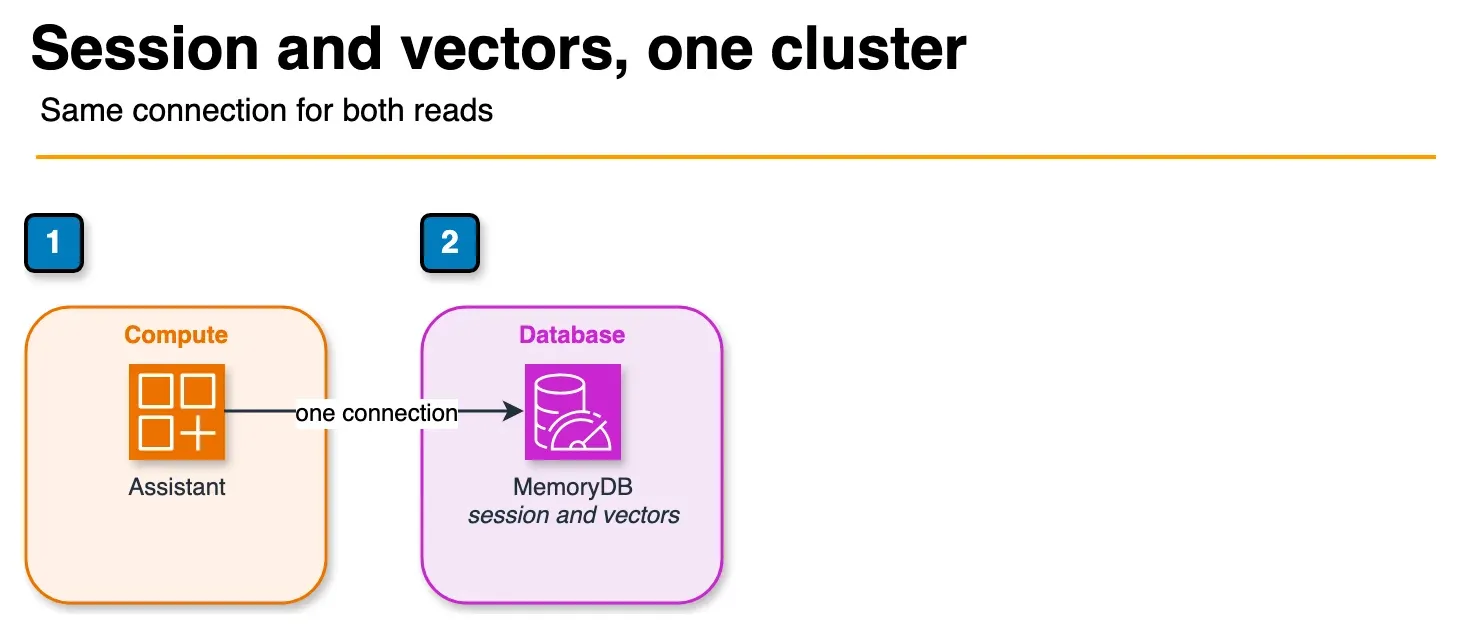
Figure: the hybrid pattern in the article. One MemoryDB cluster holds the session and the preference embedding. The request reads the session hash and runs a KNN search on that same connection. No hostname is shown. Open the draw.io source.
This is where MemoryDB’s architecture creates real value that neither ElastiCache nor a standalone vector database provides: a single cluster that durably stores both session state and embeddings, with each serving a different role in the same AI application.
Consider a session-aware AI assistant. Each user interaction needs two pieces of data: the conversation history (session state) and the user’s long-term preference embeddings (personalization). Here is how both coexist in one MemoryDB cluster:
Session data (hash keys with TTL):
import redis
import json

r = redis.Redis(host='clustercfg.my-memorydb.abc123.memorydb.us-east-1.amazonaws.com',
                port=6379, ssl=True)

# Store session history
session_id = "sess_user123_abc"
session_data = {
    "user_id": "user123",
    "history": json.dumps([
        {"role": "user", "content": "What EC2 instance type should I use?"},
        {"role": "assistant", "content": "For web APIs, start with t4g.medium..."}
    ]),
    "context": "aws_infrastructure",
    "created_at": "2026-07-14T10:30:00Z"
}

r.hset(f"session:{session_id}", mapping=session_data)
r.expire(f"session:{session_id}", 1800)  # 30 minute TTL
Preference embeddings (vector-indexed hash keys):
import numpy as np

# Store user preference embedding alongside session data
user_embedding = get_embedding("prefers serverless, cost-conscious, startup context")

# Key pattern: user:{user_id} for preference vectors
r.hset(f"user:user123", mapping={
    "company_size": "startup",
    "primary_interest": "cost_optimization",
    "embedding": np.array(user_embedding, dtype=np.float32).tobytes()
})
Querying both in a single request flow:
def get_personalized_context(user_id: str, session_id: str, query: str):
    # 1. Retrieve session history (O(1) hash lookup)
    session = r.hgetall(f"session:{session_id}")
    history = json.loads(session[b'history'])

    # 2. Retrieve user preference vector for personalized retrieval
    user_data = r.hgetall(f"user:{user_id}")

    # 3. Run KNN search for relevant documents, biased by user context
    query_embedding = get_embedding(query)
    results = r.ft("idx:embeddings").search(
        Query("*=>[KNN 5 @embedding $vec AS score]")
        .sort_by("score")
        .return_fields("content", "source", "score")
        .dialect(2),
        query_params={"vec": np.array(query_embedding, dtype=np.float32).tobytes()}
    )

    return history, results.docs
The session lookup is a direct hash get — microsecond latency. The vector KNN query runs in 2–8ms for a well-tuned HNSW index. Both operations use the same Redis connection, the same authentication, and the same VPC endpoints. No cross-service hops, no eventual consistency issues between a separate cache and vector database.
MemoryDB vs. S3 Vectors vs. OpenSearch Serverless
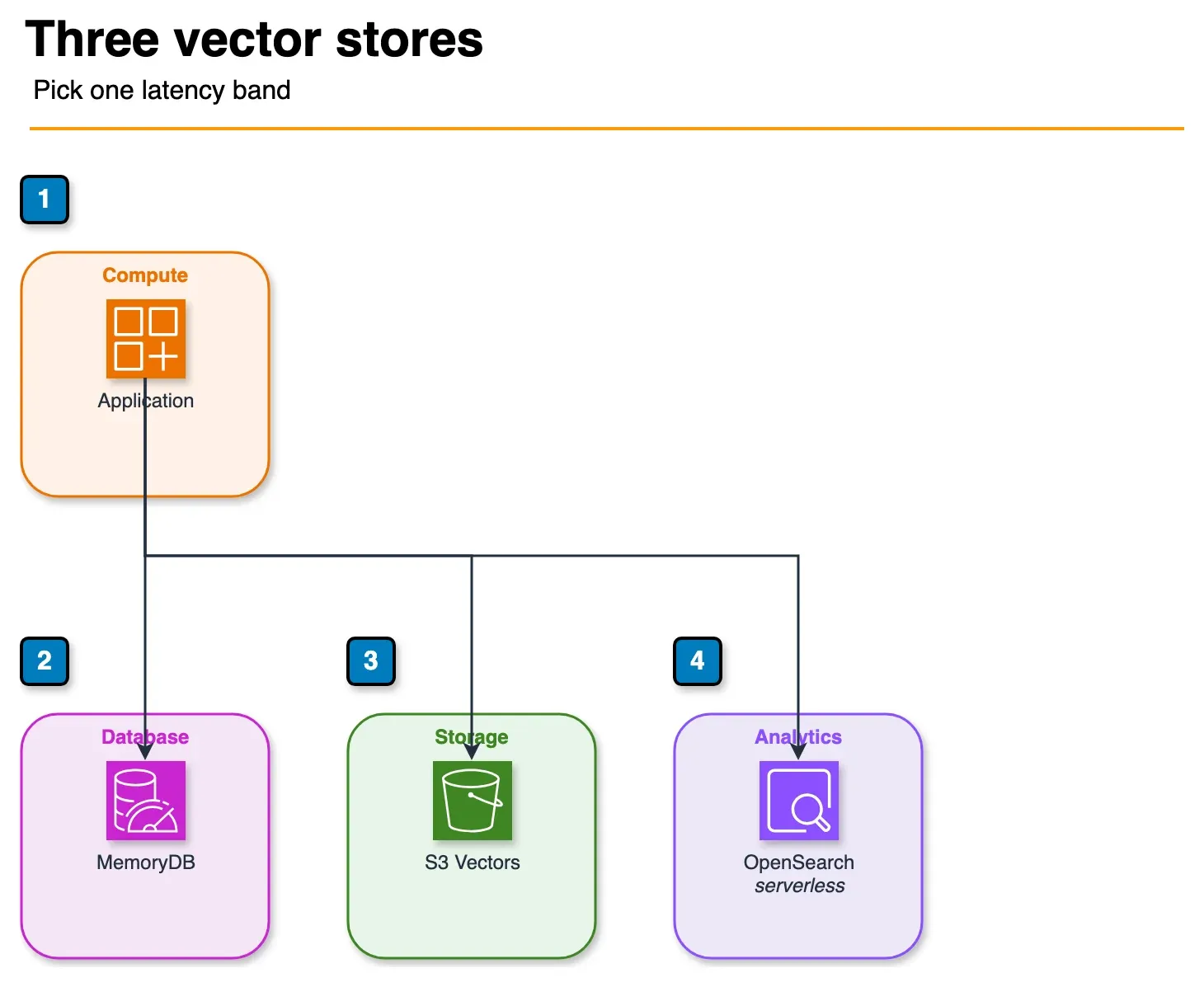
Figure: the comparison in the article. MemoryDB, S3 Vectors, and OpenSearch Serverless are alternatives. The article’s p99 bands are about 2–10 ms, 50–200 ms, and 10–50 ms. Open the draw.io source.
The three main options for vector storage in AWS each target different points on the cost/latency/complexity spectrum:
| Dimension | MemoryDB | S3 Vectors | OpenSearch Serverless |
|---|---|---|---|
| Query latency (p99) | 2–10ms | 50–200ms | 10–50ms |
| Cost at 10M vectors (monthly est.) | ~$800–1,200 (r6g.large cluster) | ~$50–80 (storage + queries) | ~$400–800 (OCU-based) |
| Hybrid search (vector + BM25 text) | No (vector + metadata filter only) | No | Yes — native |
| Real-time updates | Yes — in-memory, immediate | Yes — S3 writes propagate within seconds | Near-real-time (ingestion lag ~seconds) |
| Durability | Database-grade (multi-AZ transaction log) | Object storage durability (11 nines) | Serverless — managed by AWS |
| Existing Redis workloads | Yes — drop-in compatible | No | No |
| Operational complexity | Low (managed service) | Very low (no cluster to manage) | Low (serverless) |
| Max dimensions | 32,768 | 4,096 (as of 2026) | 16,000 |
Choose MemoryDB when:
- You already need Redis as a primary data store (session, real-time counters, leaderboards)
- Query latency under 10ms is a hard requirement
- You want to consolidate session state and vector search into one service
- Your team already operates Redis — no new operational paradigm to learn
Choose S3 Vectors when:
- QPS is low (under 50 vector queries/sec)
- Cost is the primary constraint — S3 Vectors is dramatically cheaper at rest
- Workload is batch retrieval or low-frequency lookups (archival RAG, weekly batch analytics)
- You do not already need a Redis primary database
Choose OpenSearch Serverless when:
- You need hybrid search (BM25 keyword + vector similarity) — critical for many production RAG implementations
- Your corpus is predominantly text and you want the full OpenSearch query DSL
- You need faceted search, aggregations, or full-text relevance alongside vector similarity
Production Sizing
Memory planning for vector workloads:
A 1536-dimension float32 vector requires 1536 × 4 bytes = 6,144 bytes ≈ 6 KB of raw storage. HNSW graph structures add 30–50% overhead. With metadata fields, plan for approximately 9–10 KB per vector in MemoryDB:
| Vector Count | Raw Embedding Memory | HNSW Overhead | Metadata (~1KB/doc) | Total Memory |
|---|---|---|---|---|
| 1M vectors | 6 GB | 2–3 GB | 1 GB | ~10 GB |
| 10M vectors | 60 GB | 20–30 GB | 10 GB | ~95 GB |
| 50M vectors | 300 GB | 100 GB | 50 GB | ~450 GB |
Recommended instance types for combined session + vector workloads:
| Workload Scale | Instance | RAM | Notes |
|---|---|---|---|
| Development / small RAG | r6g.large | 16 GB | Up to ~1.5M vectors + session data |
| Production API (under 10M vectors) | r6g.xlarge or r6g.2xlarge | 32–64 GB | 2–3 node Multi-AZ cluster |
| High-scale production (10–50M vectors) | r6g.4xlarge cluster mode | 128 GB × N shards | Enable cluster mode, 3+ shards |
| Maximum scale | r6gd.16xlarge cluster | 512 GB × N shards | NVMe local storage available for snapshot offload |
Multi-AZ deployment configuration:
Always deploy with at least 2 replicas per shard in production. MemoryDB’s transaction log provides RPO=0, but for RTO optimization you want standby replicas that can be promoted immediately:
Cluster configuration:
- Primary: 1 writer per shard
- Replicas: 2 per shard (Multi-AZ — different AZs)
- Shards: 1–N based on memory requirements
- TLS: enabled (required for HIPAA, recommended always)
- Encryption at rest: enabled (AWS KMS CMK)
- Automatic snapshots: daily, 7-day retention
- Maintenance window: Sunday 03:00–05:00 UTC (low traffic)
Snapshot and recovery strategy:
MemoryDB snapshots export cluster data to S3. For AI workloads, snapshots serve two purposes: disaster recovery (restore entire cluster) and data portability (export vectors for offline analysis or migration). Snapshots of large vector clusters (10M+ vectors) can take 15–30 minutes to complete — schedule them during off-peak windows and verify restore times periodically.
Monitor these CloudWatch metrics in production:
FreeableMemory— alert at under 25% free memoryCurrConnections— watch for connection pool exhaustionVectorIndexBuiltPercent— during re-index operations, queries may have degraded recallCPUUtilization— HNSW queries are CPU-intensive; alert at > 70% sustained
Need help designing a durable, low-latency AI data layer on AWS? FactualMinds implements production MemoryDB architectures for session-aware AI assistants, RAG pipelines, and real-time personalization systems — with proper sizing, security controls, and operational runbooks from day one.
Related reading: ElastiCache Redis Caching Strategies for Production · Redis / Valkey as a Cost-Saving Layer on AWS · Amazon S3 Vectors: Native Vector Storage on AWS · Top 20 AWS AI & Modern Services in 2026
Related reading
Frequently asked questions
Does MemoryDB support Redis Cluster mode for vector search?
Can I import existing vectors from Pinecone or OpenSearch into MemoryDB?
What is the maximum vector count per MemoryDB cluster?
Does MemoryDB support approximate versus exact KNN search?
Is MemoryDB HIPAA-eligible?

AWS Cloud Architect & AI Expert
AWS-certified cloud architect and AI expert with deep expertise in cloud migrations, cost optimization, and generative AI on AWS.