AWS API Gateway Patterns: REST, HTTP, and WebSocket APIs
Quick summary: A practical guide to AWS API Gateway — choosing between REST, HTTP, and WebSocket APIs, authentication patterns, throttling, caching, and the architecture decisions that determine API performance and cost.
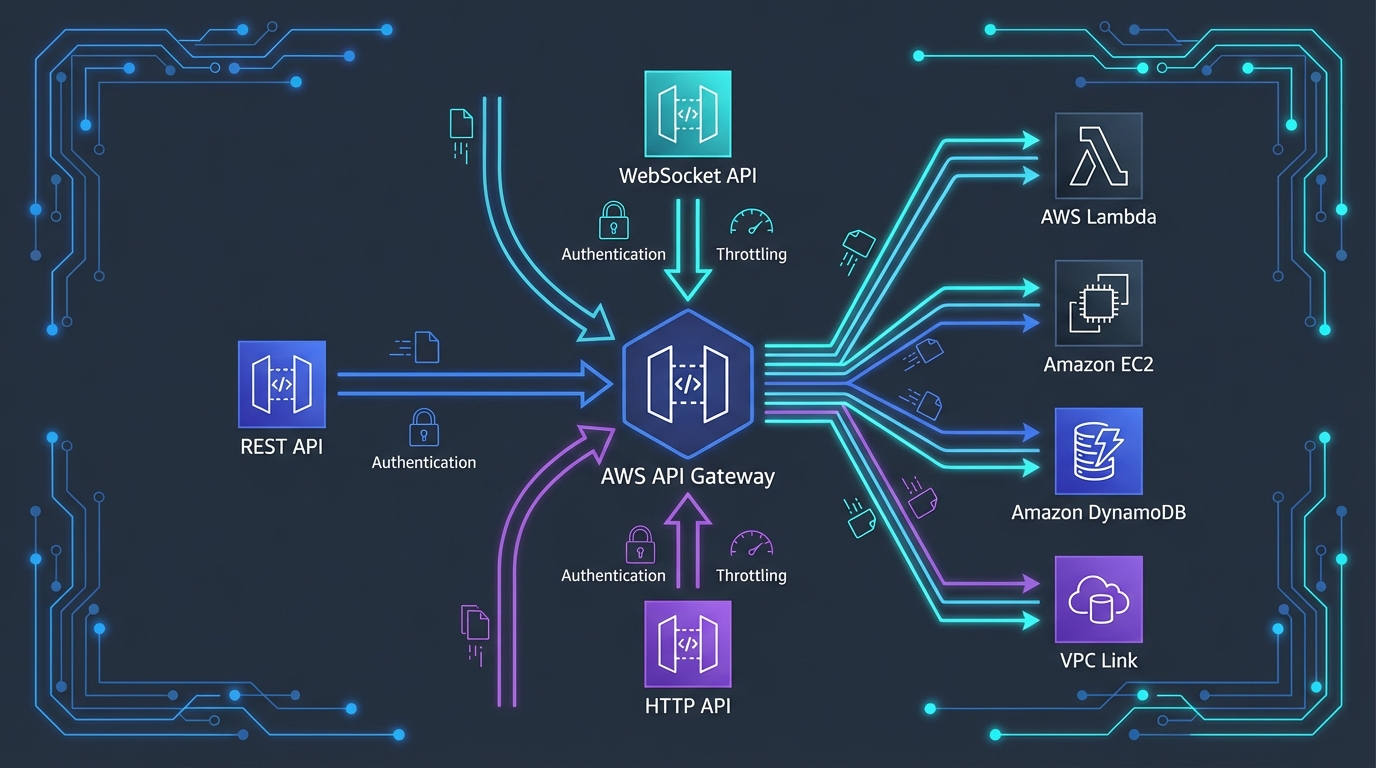
Table of Contents
API Gateway is the front door of every serverless application on AWS. It receives HTTP requests, authenticates callers, throttles traffic, transforms payloads, and routes requests to backend services — all without any servers to manage. For most AWS applications, API Gateway is the first service a client request touches and the last service before the response returns.
But API Gateway offers three distinct API types — REST, HTTP, and WebSocket — each with different capabilities, pricing, and trade-offs. Choosing the wrong type leads to either overpaying for features you do not need or missing features you require in production.
REST vs HTTP vs WebSocket APIs
HTTP API
HTTP API is the newer, simpler, and cheaper option. It covers the most common API patterns:
Capabilities:
- Lambda and HTTP backend integrations
- JWT authorizers (Cognito, Auth0, Okta)
- CORS configuration
- Auto-deploy and stage management
- OpenID Connect and OAuth 2.0 support
- Parameter mapping (header, query string, path)
Pricing: $1.00 per million requests + data transfer
Best for: Most new APIs. If you need a Lambda-backed API with JWT authentication, HTTP API is the default choice.
REST API
REST API is the original, feature-rich option with capabilities HTTP API does not support:
Unique capabilities (not in HTTP API):
- API keys and usage plans (per-client throttling and quotas)
- Request/response transformation (mapping templates with VTL)
- Response caching (built-in, per-stage)
- AWS WAF integration
- Mutual TLS (mTLS)
- Resource policies (cross-account access control)
- Client certificates for backend authentication
- Request validation (model schemas)
- Canary deployments (percentage-based traffic splitting)
Pricing: $3.50 per million requests + data transfer + cache costs
Best for: APIs that need caching, WAF protection, usage plans, request validation, or VTL transformations.
WebSocket API
WebSocket API maintains persistent, bidirectional connections:
Capabilities:
- Persistent connections (client ↔ server)
- Server-initiated messages (push notifications)
- Route-based message handling ($connect, $disconnect, $default, custom routes)
- Lambda, HTTP, and AWS service integrations
Pricing: $1.00 per million connection minutes + $1.00 per million messages
Best for: Chat applications, live dashboards, real-time notifications, multiplayer games, financial tickers.
Decision Matrix
| Feature | HTTP API | REST API | WebSocket |
|---|---|---|---|
| Price (per million requests) | $1.00 | $3.50 | $1.00 (messages) |
| Lambda integration | Yes | Yes | Yes |
| JWT authorizer | Yes | No (use Lambda/Cognito authorizer) | No (use Lambda authorizer) |
| Cognito authorizer | Via JWT | Native | No |
| Lambda authorizer | Yes | Yes | Yes |
| API keys / usage plans | No | Yes | No |
| Response caching | No | Yes | N/A |
| WAF integration | No | Yes | No |
| Request validation | No | Yes | No |
| VTL transformation | No | Yes | Yes |
| Private integrations (VPC Link) | Yes | Yes | No |
| Bidirectional communication | No | No | Yes |
Authentication Patterns
Pattern 1: JWT Authorizer (HTTP API)
The simplest authentication — API Gateway validates JWT tokens from any OIDC-compliant provider:
Client → HTTP API (JWT Authorizer) → Lambda
                 ↓
         Validates JWT signature
         Checks issuer and audience
         Verifies expiration
Configuration requires only the issuer URL and audience. No Lambda function needed. Works with Cognito, Auth0, Okta, and any OIDC provider.
Latency impact: Near-zero — JWT validation happens in-memory at the API Gateway layer.
Pattern 2: Cognito Authorizer (REST API)
REST API provides a native Cognito authorizer:
Client → REST API (Cognito Authorizer) → Lambda
                  ↓
          Validates Cognito JWT
          Extracts user claims
          Passes claims to Lambda
Similar to JWT authorizer but specific to Cognito. Returns user claims (sub, email, groups) in the request context.
Pattern 3: Lambda Authorizer
For custom authorization logic — tenant isolation, role-based access, API key validation:
Client → API Gateway (Lambda Authorizer) → Lambda Handler
                  ↓
          Lambda validates token
          Looks up permissions
          Returns IAM policy
          Result cached (optional)
Caching: Lambda authorizer results can be cached for up to 1 hour. A 5-minute cache TTL reduces authorizer invocations by 95%+ for repeated requests from the same client.
Cost consideration: Each Lambda authorizer invocation costs a Lambda invocation. Without caching, a high-traffic API doubles its Lambda costs (one invocation for auth, one for the handler). Always enable caching.
Pattern 4: API Keys (REST API)
API keys identify callers and enforce usage plans — quotas and throttling per client:
Client → REST API (API Key required) → Usage Plan → Lambda
                                          ↓
                                   Quota: 10,000/month
                                   Throttle: 100 RPS
Important: API keys are not a security mechanism. They identify callers for throttling and billing but do not authenticate identity. Always combine API keys with an authorizer for security.
Throttling and Rate Limiting
Account-Level Limits
API Gateway enforces account-level limits per Region:
| Limit | REST API | HTTP API |
|---|---|---|
| Requests per second (steady) | 10,000 | 10,000 |
| Requests per second (burst) | 5,000 | 10,000 |
These are soft limits — request increases via AWS Support for high-traffic APIs.
Stage and Route Throttling
Configure per-stage and per-route throttling to protect backend services:
/api/v1/search  → 1,000 RPS (search is resource-intensive)
/api/v1/status  → 5,000 RPS (status is lightweight)
/api/v1/upload  → 100 RPS (upload triggers heavy processing)
Route-level throttling prevents a single endpoint from consuming the entire API’s capacity.
Usage Plans (REST API)
Usage plans apply per-client throttling and quotas:
| Client | Throttle (RPS) | Burst | Monthly Quota |
|---|---|---|---|
| Free tier | 10 | 20 | 1,000 requests |
| Standard | 100 | 200 | 100,000 requests |
| Enterprise | 1,000 | 2,000 | Unlimited |
Usage plans are essential for public APIs and API-as-a-product businesses.
Caching (REST API)
REST API caching stores responses in an in-memory cache at the API Gateway layer:
Benefits:
- Reduces Lambda invocations (cost savings)
- Reduces backend latency (cached response returned in ~1ms)
- Protects backend services from traffic spikes
Configuration:
- Cache sizes: 0.5 GB to 237 GB
- TTL: 0 to 3600 seconds (default 300)
- Per-method cache invalidation
- Cache key parameters (query strings, headers)
Cost: $0.020/hour for 0.5 GB cache = ~$14.60/month. Pays for itself if it eliminates even modest Lambda invocations.
When to cache:
- GET requests that return the same data for the same parameters
- Reference data (product catalogs, configuration)
- Aggregate data (dashboard summaries, statistics)
When not to cache:
- POST/PUT/DELETE requests (mutations)
- User-specific data (unless cache key includes user ID)
- Real-time data that must reflect the latest state
Performance Optimization
Reducing Latency
- Regional endpoint — Default. Client connects to the API Gateway in the deployed Region.
- Edge-optimized endpoint — Routes through CloudFront edge locations. Reduces latency for geographically distributed clients.
- Private endpoint — Only accessible from within your VPC.
For global APIs: Use CloudFront in front of a regional API Gateway instead of edge-optimized endpoints. CloudFront provides more caching control, WAF integration, and custom domain flexibility.
Payload Optimization
- Compression — Enable GZIP compression on REST API to reduce response size (and data transfer costs)
- Pagination — Return paginated results instead of full datasets. Reduces response size and Lambda execution time
- Projection — Accept query parameters that specify which fields to return, reducing payload size
Connection Reuse
API Gateway maintains connection pools to backend services. For HTTP backend integrations, enable HTTP keep-alive to reuse connections and reduce latency.
Cost Optimization
HTTP API vs REST API Savings
If you do not need REST API-exclusive features (caching, WAF, usage plans), HTTP API saves 71%:
| Monthly Requests | REST API Cost | HTTP API Cost | Savings |
|---|---|---|---|
| 10 million | $35 | $10 | $25 (71%) |
| 100 million | $350 | $100 | $250 (71%) |
| 1 billion | $3,500 | $1,000 | $2,500 (71%) |
Reducing API Gateway Costs
- Caching (REST API) — Cache responses to eliminate Lambda invocations for repeated requests
- CloudFront caching — Cache API responses at the edge for even greater Lambda reduction
- Request validation (REST API) — Reject invalid requests before they invoke Lambda (free validation vs paid Lambda invocation)
- Direct integrations — Route API Gateway directly to DynamoDB, SQS, or Step Functions without Lambda (saves Lambda invocation cost)
Direct Service Integrations
API Gateway can integrate directly with AWS services, bypassing Lambda entirely:
Client → API Gateway → DynamoDB GetItem (no Lambda)
Client → API Gateway → SQS SendMessage (no Lambda)
Client → API Gateway → Step Functions StartExecution (no Lambda)
Client → API Gateway → Kinesis PutRecord (no Lambda)
For simple CRUD operations, direct integrations eliminate Lambda costs and cold start latency. Use VTL mapping templates (REST API) to transform requests and responses.
Common Mistakes
Mistake 1: Using REST API When HTTP API Suffices
REST API costs 3.5x more than HTTP API. If you are not using caching, WAF, usage plans, or VTL transformations, you are paying a premium for features you do not use. Start with HTTP API and migrate to REST API only when you need its exclusive features.
Mistake 2: No Lambda Authorizer Caching
A Lambda authorizer invoked on every request doubles your Lambda costs and adds latency. Enable authorizer result caching with a reasonable TTL (5-15 minutes) unless your authorization logic must evaluate every request independently.
Mistake 3: Oversized Lambda Responses
API Gateway has a 10 MB response size limit (REST) and 6 MB (HTTP). Returning large datasets through API Gateway is expensive (data transfer costs) and slow. For large responses, return a pre-signed S3 URL instead and let the client download directly from S3.
Mistake 4: Not Using Custom Domains
API Gateway default URLs (https://abc123.execute-api.region.amazonaws.com) change if you recreate the API. Custom domains provide stable URLs, proper SSL certificates, and path-based routing across API versions.
Getting Started
API Gateway is the entry point for serverless applications on AWS. Combined with Lambda for compute, DynamoDB for data, and Cognito for authentication, it provides a complete serverless API stack that scales from zero to millions of requests without infrastructure management.
For API architecture design and implementation, including authentication, throttling, and DevOps pipeline integration, talk to our team.
AWS Cloud Architect & AI Expert
AWS-certified cloud architect and AI expert with deep expertise in cloud migrations, cost optimization, and generative AI on AWS.