Building a Data Lake on AWS: S3 + Glue + Athena Architecture
Quick summary: A practical guide to building a modern data lake on AWS using S3 for storage, Glue for ETL, and Athena for serverless SQL analytics — with architecture patterns and cost optimization.
Key Takeaways
- A practical guide to building a modern data lake on AWS using S3 for storage, Glue for ETL, and Athena for serverless SQL analytics — with architecture patterns and cost optimization
- A practical guide to building a modern data lake on AWS using S3 for storage, Glue for ETL, and Athena for serverless SQL analytics — with architecture patterns and cost optimization
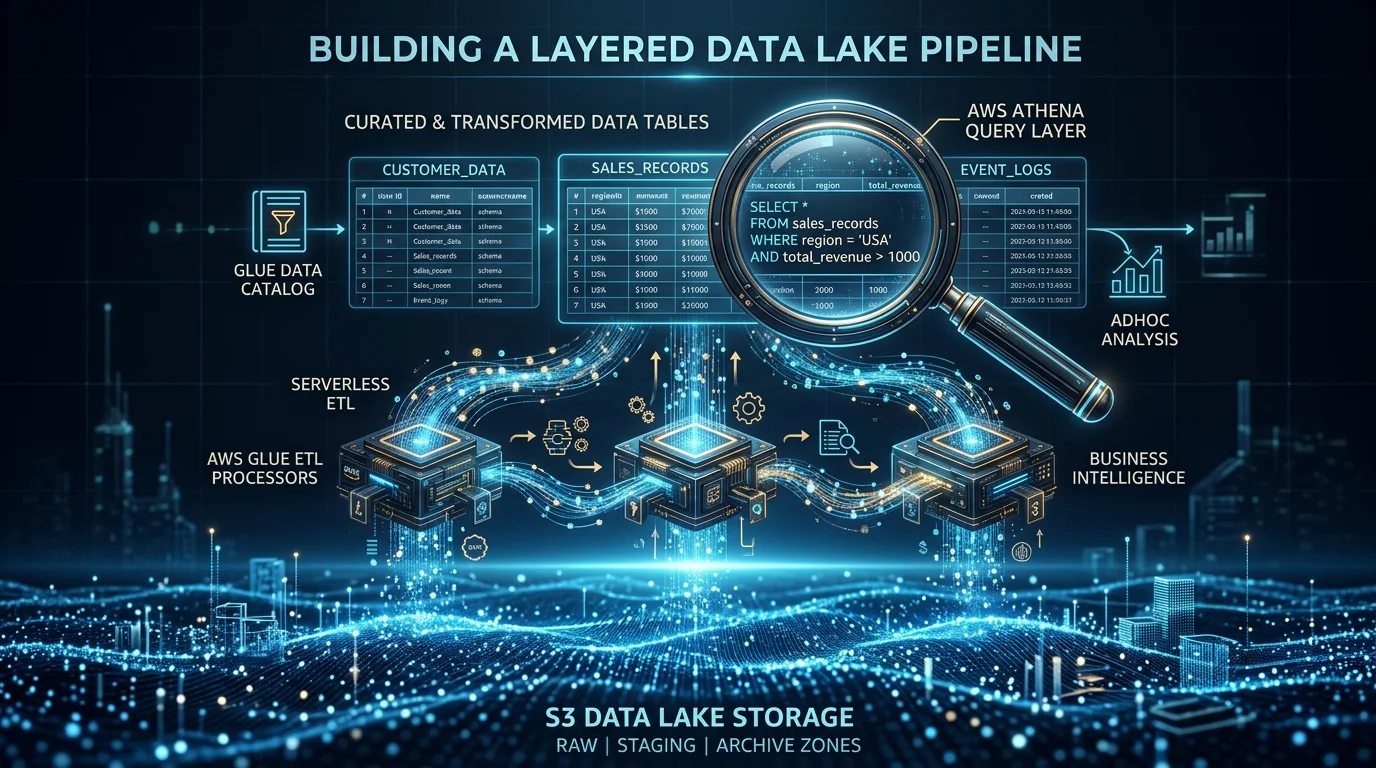
Table of Contents
A data lake is the foundation of any modern analytics platform. Unlike a data warehouse that requires data to be structured and loaded before analysis, a data lake stores data in its raw format and applies structure when you query it. This schema-on-read approach provides flexibility, lower storage costs, and the ability to run diverse analytics workloads — from SQL queries to machine learning — on the same data.
On AWS, the canonical data lake architecture uses S3 for storage, Glue for ETL processing and cataloging, and Athena for serverless SQL analytics. This combination is cost-effective, scales to petabytes, and requires zero infrastructure management.
Architecture Overview
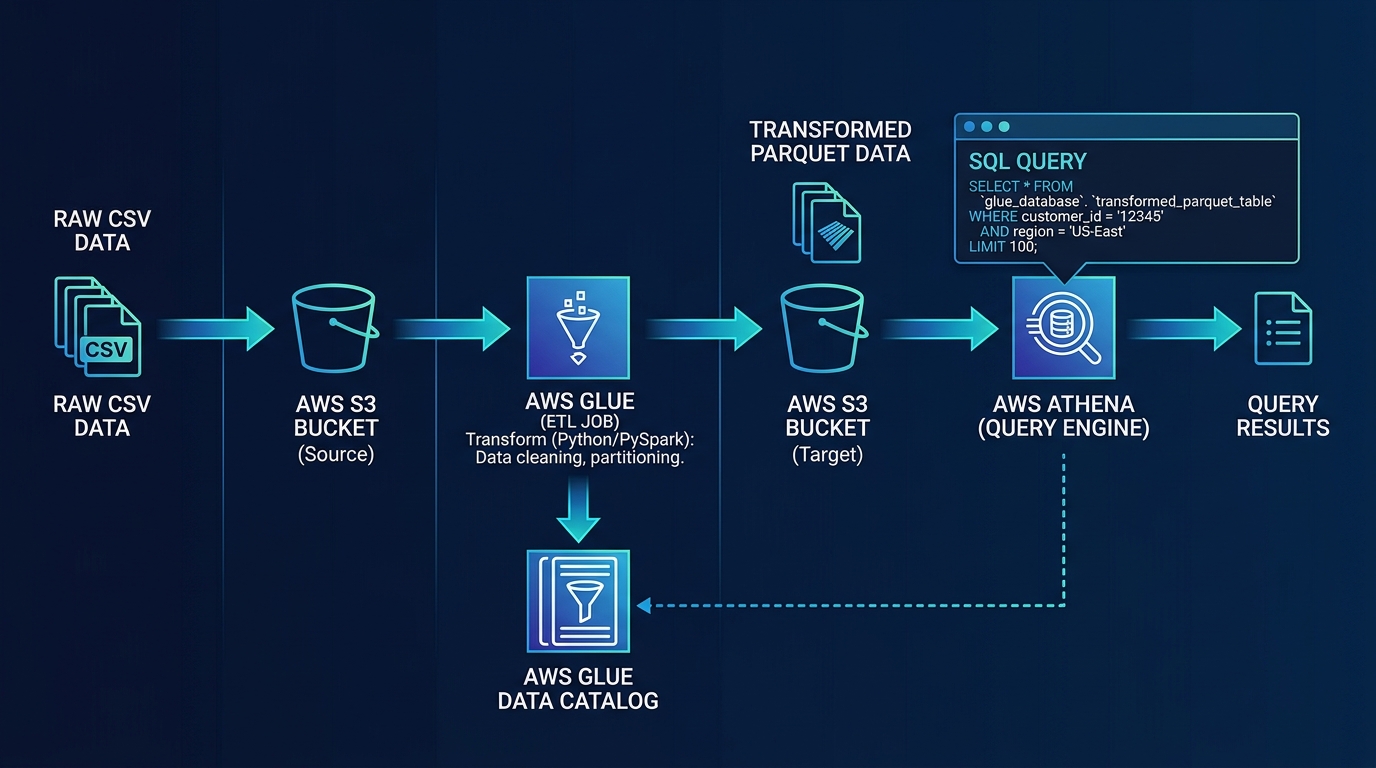
Data Sources → Ingestion (Glue/DMS/Kinesis) → S3 Data Lake → Glue ETL → Athena (SQL)
                                                              ↓                ↓
                                                    Glue Data Catalog    QuickSight (BI)
Why S3 as the Storage Layer
S3 is the only storage service on AWS that combines:
- Virtually unlimited capacity — No provisioning, scales to exabytes
- 11 nines of durability — Data loss is essentially impossible
- Storage tiers — Standard, Intelligent-Tiering, Infrequent Access, Glacier ($0.023 to $0.004 per GB/month)
- Native integration — Every AWS analytics service reads from S3 directly
- Pay for what you store — No over-provisioning, no minimum commitment
Step 1: Design Your S3 Data Lake Structure
A well-organized S3 bucket structure makes data discoverable, queryable, and manageable.
Zone-Based Architecture
s3://company-data-lake/
├── raw/                    # Original data, untransformed
│   ├── orders/
│   │   └── year=2026/month=03/day=20/
│   ├── customers/
│   └── events/
├── processed/              # Cleaned, validated, Parquet format
│   ├── orders/
│   │   └── year=2026/month=03/day=20/
│   ├── customers/
│   └── events/
├── curated/                # Business-ready, aggregated datasets
│   ├── daily_revenue/
│   ├── customer_segments/
│   └── product_analytics/
└── archive/                # Historical data, Glacier tier
Raw zone: Data lands here exactly as produced — JSON, CSV, XML, logs. Never modified. This is your immutable source of truth.
Processed zone: Glue ETL jobs clean, validate, and convert data to Parquet (columnar format) with proper partitioning. This is where most queries run.
Curated zone: Pre-aggregated, joined, and enriched datasets ready for specific business use cases — dashboards, reports, ML training.
Archive zone: Data moved to Glacier or Glacier Deep Archive via lifecycle policies after retention thresholds.
Partitioning Strategy
Partitioning is the single most impactful optimization for query performance and cost. Athena charges per terabyte scanned — partitioning limits the data scanned per query.
Hive-style partitioning — Name your S3 prefixes with key=value patterns:
s3://data-lake/processed/orders/year=2026/month=03/day=20/data.parquetAthena automatically recognizes these partitions. A query filtering WHERE year = 2026 AND month = 3 scans only that month’s data instead of the entire dataset.
Choose partition keys based on query patterns:
- Date-based (year/month/day) — Best for time-series data queried by date range
- Category-based (region, product_type) — Best when queries filter by category
- Avoid over-partitioning — Too many small partitions (millions of tiny files) degrade performance. Aim for partitions with at least 128 MB of data each
Step 2: Set Up the Glue Data Catalog
The Glue Data Catalog is the metadata layer that makes your S3 data queryable:
Glue Crawlers
Crawlers scan your S3 data and automatically infer schema:
- Point a crawler at an S3 path
- It discovers file formats, column names, data types, and partition structure
- Results populate the Data Catalog as databases and tables
- Schedule crawlers to run after new data arrives
Manual Table Definitions
For production workloads, we prefer defining tables manually (via CloudFormation, CDK, or Terraform) rather than relying on crawlers:
- Explicit column names and types prevent schema drift
- Version-controlled table definitions track changes over time
- No risk of crawler misidentifying data types
Data Catalog Best Practices
- One database per data zone —
raw_db,processed_db,curated_db - Consistent naming — Snake_case for database and table names
- Descriptions — Add business descriptions to tables and columns for discoverability
- Partition indexes — Add partition indexes for frequently filtered partition keys
Step 3: Build Glue ETL Pipelines
Glue ETL jobs transform data from the raw zone to the processed zone.
Glue Job Types
| Type | Best For | Pricing |
|---|---|---|
| Spark (PySpark/Scala) | Large-scale transformations, joins, aggregations | Per DPU-hour ($0.44) |
| Python Shell | Simple transformations, API calls, small datasets | Per DPU-hour ($0.044) |
| Ray | ML workloads, distributed Python processing | Per DPU-hour ($0.44) |
Typical ETL Pipeline
# Pseudocode for a Glue ETL job
# 1. Read raw JSON from S3
raw_data = read_from_s3("s3://data-lake/raw/orders/")

# 2. Clean and validate
cleaned = raw_data.filter(valid_records).drop_duplicates()

# 3. Transform and enrich
transformed = cleaned.with_column("revenue", col("quantity") * col("price"))

# 4. Write as partitioned Parquet
transformed.write.parquet(
    "s3://data-lake/processed/orders/",
    partitionBy=["year", "month", "day"]
)
Glue Job Best Practices
- Job bookmarks — Track processed data so jobs only process new files on each run
- Auto-scaling — Let Glue scale DPUs based on workload size
- Error handling — Write failed records to a dead-letter path for investigation
- Data quality rules — Validate row counts, null percentages, and value ranges after each run
Orchestration with Step Functions
For multi-step pipelines:
EventBridge (schedule) → Step Functions:
    1. Run Glue Crawler (discover new raw data)
    2. Run Glue ETL Job (raw → processed)
    3. Run Data Quality Check (validate output)
    4. Update Glue Catalog (add new partitions)
    5. Notify team (SNS on success or failure)
Step Functions provide retry logic, parallel processing, error handling, and visual monitoring — critical for production data pipelines.
Step 4: Query with Amazon Athena
Athena lets you run standard SQL against your S3 data lake with zero infrastructure.
How Athena Works
- You submit a SQL query through the Athena console, API, or JDBC/ODBC driver
- Athena reads the table schema from the Glue Data Catalog
- Athena scans the relevant S3 objects (respecting partitions)
- Results are returned and stored in an S3 output bucket
Pricing: $5.00 per terabyte scanned. With proper optimization, most queries scan megabytes, not terabytes.
Athena Cost Optimization
The difference between an optimized and unoptimized Athena setup can be 100x in cost:
| Optimization | Impact on Scan Cost |
|---|---|
| Parquet instead of JSON/CSV | 90-95% reduction |
| Partitioning by date | 90%+ reduction (for date-filtered queries) |
| Columnar selection (SELECT specific columns) | Proportional reduction |
| Compression (Snappy, ZSTD) | 50-75% reduction |
| Bucketing | Significant for join-heavy queries |
Before optimization: Scanning 1 TB of raw JSON = $5.00 per query After optimization: Scanning 10 GB of partitioned, compressed Parquet = $0.05 per query
Athena Workgroups
Create separate workgroups for different teams or use cases:
- Per-query cost limits — Prevent expensive queries from running
- Monthly spending limits — Cap Athena costs per workgroup
- Query result encryption — Enforce encryption on query output
- Separate output buckets — Isolate query results by team
Step 5: Visualize with QuickSight
Amazon QuickSight connects to Athena for interactive dashboards:
- SPICE engine — Import data into QuickSight’s in-memory cache for fast dashboard rendering
- Direct query mode — Query Athena live for real-time data (slower but always current)
- Embedded analytics — Embed dashboards into your SaaS product
- QuickSight Q — Natural language queries powered by Amazon Q for QuickSight
Dashboard Architecture
For production dashboards, we recommend the SPICE approach:
S3 Data Lake → Athena (scheduled query) → SPICE (cached) → QuickSight DashboardSPICE refreshes on a schedule (hourly, daily) so dashboards load instantly. Direct query mode is reserved for ad-hoc analysis where real-time accuracy matters more than speed.
Data Lake Security
AWS Lake Formation
Lake Formation provides centralized security for your data lake:
- Fine-grained access control — Table, column, and row-level permissions
- Tag-based policies — Define access rules based on data classification
- Cross-account sharing — Share specific tables with other AWS accounts securely
- Audit logging — Track who accessed what data and when
Encryption
- S3 SSE-KMS with customer-managed keys for all data lake buckets
- Glue job encryption for data in transit during ETL processing
- Athena query result encryption in the output bucket
- KMS key policies restricting access to authorized roles only
For comprehensive data security, see our AWS Cloud Security and Compliance services.
Common Data Lake Mistakes
Mistake 1: Storing Everything as JSON/CSV
JSON and CSV are row-oriented formats — Athena must read entire rows even when you only need a few columns. Convert to Parquet or ORC in the processed zone. The conversion cost is trivial compared to the ongoing query cost savings.
Mistake 2: No Partitioning
Without partitioning, every Athena query scans the entire dataset. For a 1 TB dataset queried 100 times per day, that is $500/day. With date partitioning, the same queries might scan 10 GB, costing $5/day.
Mistake 3: Too Many Small Files
Thousands of tiny files (under 128 MB each) cause excessive S3 API calls and slow Athena queries. Use Glue ETL to compact small files into larger ones during processing.
Mistake 4: No Data Lifecycle
Data accumulates indefinitely without lifecycle policies. Move data to S3 Infrequent Access after 30 days, to Glacier after 90 days, and delete after your retention period expires.
Getting Started
Building a data lake is a foundational investment in your organization’s analytical capabilities. Whether you are starting from scratch or modernizing an existing analytics stack, our team designs data platforms that deliver insights at scale without runaway costs.
For end-to-end data platform design and implementation, see our AWS Data Analytics Services.
AWS Cloud Architect & AI Expert
AWS-certified cloud architect and AI expert with deep expertise in cloud migrations, cost optimization, and generative AI on AWS.