Laravel with Docker Compose: 10 Infrastructure Mistakes, Benchmarked (2026)
Quick summary: We built the same Laravel 13 app twice on 26 October 2026. The naive image was 1,938 MB with the .env file inside it; the hardened one was 203 MB. Turning OPcache off cut throughput from 540 to 102 requests per second. Here are the 10 Compose mistakes and the fix for each.
Key Takeaways
- We built the same Laravel 13 app twice on 26 October 2026
- The naive image was 1,938 MB with the
- env file inside it; the hardened one was 203 MB
- Turning OPcache off cut throughput from 540 to 102 requests per second
- Here are the 10 Compose mistakes and the fix for each
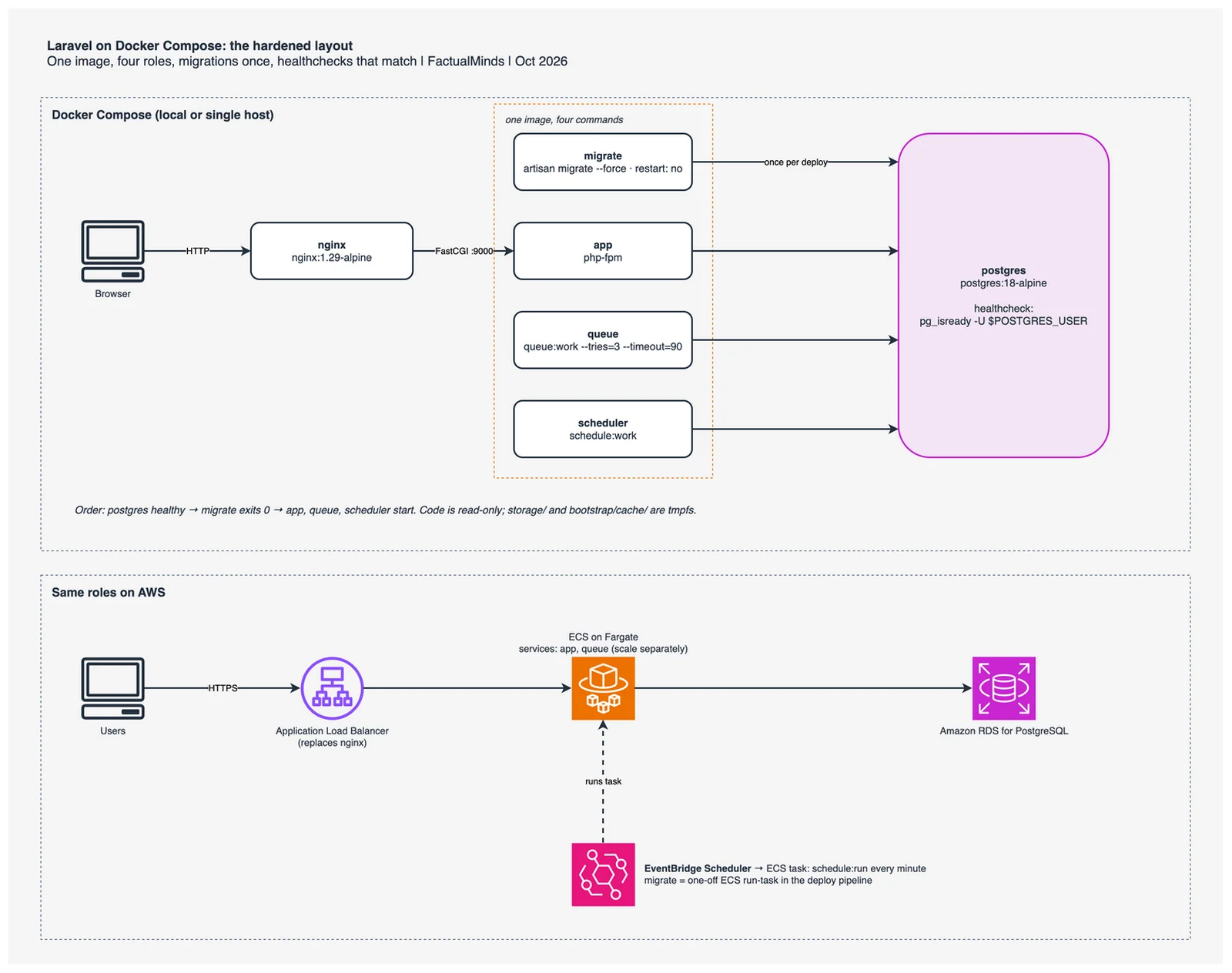
Table of Contents
On 22 October 2026, Ivan Firestone published five Docker Compose mistakes that break Laravel apps. His list covers the runtime wiring: hostnames, healthchecks, the cache table, process layout, and migrations. A second group of mistakes lives in the image itself: how big it is, what it carries, who it runs as, and how PHP is tuned inside it. Those are the ones that follow a Laravel app when it moves from Compose to ECS.
So we measured it. On 26 October 2026 we created a fresh Laravel 13.38.0 app on PHP 8.5, Docker 29.9.2 and Compose v5.6.1 (Apple M4, Docker Desktop), and built it twice: once the way it usually starts out, once with all ten fixes below.
| Metric | Naive | Hardened |
|---|---|---|
| Image size | 1,938 MB | 203 MB |
| Build context sent to Docker | 113.39 MB | 7.98 kB |
Cold build (--no-cache) | 73.0 s | 45.9 s |
| Rebuild after a one-line route change | 10.2 s | 4.3 s |
.env, .git, node_modules, tests in the image | all four | none |
| Runs as | root | www-data |
| Composer, Node, npm, git, gcc in the image | yes | no |
Build times need one caveat. --no-cache does not clear BuildKit cache mounts, so the hardened build reused Composer and npm downloads from earlier runs of the script. The naive build had a head start of its own: it copied the developer’s existing vendor/ and node_modules/. Treat the build times as indicative and the sizes and contents as exact.
Then we ran the hardened stack three times with different PHP settings: GET / through nginx (the welcome view, database-backed sessions), 3,000 requests at concurrency 20 with ab:
| PHP settings | Requests/s | p50 | p95 |
|---|---|---|---|
| OPcache off, no Laravel caches | 102.08 | 193 ms | 217 ms |
| OPcache tuned, no Laravel caches | 543.11 | 35 ms | 42 ms |
| OPcache tuned + config, route and view caches | 539.53 | 35 ms | 47 ms |
Reproduce this — The Dockerfiles, Compose files and script are in
examples/architecture-blog-2026/laravel-docker-compose-10-mistakes/. Run./bench.sh. It creates a fresh Laravel app in a temp directory, builds both images, starts both stacks, and writesout/results-<timestamp>.csvplus a full transcript. About ten minutes on a laptop, no AWS account needed. Your absolute numbers will differ; compare the ratios.
Mistakes 1 to 5 extend Ivan’s list. Mistakes 6 to 10 are the image-level ones.
1. DB_HOST doesn’t match the Compose service name
Compose gives every service a DNS name equal to its key in services:. Laravel only finds Postgres if DB_HOST is that exact key. It breaks after someone renames the service, copies an .env from another project, or leaves DB_HOST=127.0.0.1 from local development. Inside a container, localhost is the container itself.
Our naive Compose file names the service postgres and sets DB_HOST: db. The app container exited with:
SQLSTATE[08006] [7] could not translate host name "db" to address: Name or service not known (Connection: pgsql, Host: db, Port: 5432, ...)The fix is one line, and it is easier to keep right when the app’s database settings and the database’s own settings read from the same variables:
# compose.yaml (Compose v2+)
services:
  app:
    environment:
      DB_HOST: postgres          # the key under services:, not "db", not localhost
      DB_DATABASE: ${DB_DATABASE:-laravel}
  postgres:
    image: postgres:18-alpine
    environment:
      POSTGRES_DB: ${DB_DATABASE:-laravel}
2. The healthcheck checks a different user, and depends_on doesn’t wait for it
This mistake has two parts. The healthcheck runs pg_isready -U postgres while the database was created with POSTGRES_USER=laravel, and the app declares depends_on: [postgres] with no condition, which waits only until the container exists.
The naive stack logged this every five seconds:
postgres-1 | FATAL: role "postgres" does not existpg_isready counts a rejected login as “accepting connections”, so in our run the container still showed healthy and the bad role only appeared as log noise. A stricter check such as psql -U postgres -c 'select 1' fails outright, and then every service gated on service_healthy never starts. Either way the healthcheck is not testing the user the app connects as.
Use the same variables, escape $ so the container expands them rather than Compose, and gate the dependants on health:
# compose.yaml (Compose v2+, postgres:18-alpine)
services:
  postgres:
    healthcheck:
      test: ["CMD-SHELL", "pg_isready -U $${POSTGRES_USER} -d $${POSTGRES_DB}"]
      interval: 3s
      timeout: 3s
      retries: 20
  migrate:
    depends_on:
      postgres:
        condition: service_healthy
3. The scheduler fails because the cache tables don’t exist
With CACHE_STORE=database, Laravel keeps cache entries and atomic locks in the cache and cache_locks tables. withoutOverlapping() and onOneServer() take a lock, so a scheduled task fails with a missing-table error when those tables don’t exist.
A new Laravel 11, 12 or 13 app ships the migration (0001_01_01_000001_create_cache_table.php was in our fresh skeleton), so this mostly hits apps upgraded from Laravel 10 or earlier, or apps where someone deleted “unused” default migrations. Check with php artisan migrate:status. If the migration is missing:
# Laravel 11+ (on Laravel 10 and earlier the command is cache:table)
php artisan make:cache-table
php artisan migrate
For more than one app server, we recommend Redis or Valkey (Amazon ElastiCache on AWS) as the lock store over the database: locks are what onOneServer() depends on, and a lock table in the same Postgres your app is hammering adds load where you least want it. The database store is fine for a single host.
4. Web server, queue worker and scheduler in one container
Laravel’s composer run dev uses concurrently to start the web server, a queue listener, log tailing and Vite in one terminal. That habit, plus the scheduler, ends up in production as one container. Our naive CMD does it:
# naive/Dockerfile: three processes, Docker watches only the last one
CMD ["sh", "-c", "php artisan migrate --force && (php artisan queue:work &) && (php artisan schedule:work &) && php-fpm"]
Docker monitors PID 1. If the queue worker dies, php-fpm is still running, the container stays “Up”, and jobs pile up without an alert. You also can’t scale workers without scaling web. And docker stop sends SIGTERM to PID 1, which here is the sh wrapper; it doesn’t pass the signal on, so after 10 seconds Docker kills every process, including a job halfway through.
Run one process per container, all from the same image:
# compose.yaml: same image, different commands
x-app: &app
  image: laravel-bench:hardened
services:
  app:
    <<: *app
    command: ["php-fpm"]
  queue:
    <<: *app
    command: ["php", "artisan", "queue:work", "--tries=3", "--timeout=90", "--max-time=3600"]
    stop_grace_period: 100s   # longer than --timeout so the running job can finish
    restart: unless-stopped
  scheduler:
    <<: *app
    command: ["php", "artisan", "schedule:work"]
    restart: unless-stopped
One detail the official PHP images leave to you: queue:work needs the pcntl extension to enforce --timeout and to finish the current job on SIGTERM. Neither php:8.5-fpm nor php:8.5-fpm-alpine includes it. Add pcntl to docker-php-ext-install.
What broke — Our own first hardened build, on 26 October 2026, shipped without
pcntl. The stack passed the benchmark with 0 failed requests, so nothing looked wrong. We caught it while writing up this section, by listing the image’s extensions withphp -m: withoutpcntl,--timeout=90is ignored andSIGTERMstops the worker mid-job. We addedpcntlto the Dockerfile, reran the full benchmark, and the script now prints whether each image has it. A green load test says nothing about how a worker shuts down.
5. Every replica runs migrations when it starts
php artisan migrate --force in the entrypoint means every container, on every start and restart, tries to change the schema. With several replicas they race, and a slow migration holds locks while new containers keep joining in.
We tried to reproduce the race and could not. With DB_HOST fixed, we started three naive replicas at once against an empty database: all three ran migrate --force and the transcript shows 0 SQL errors. A fresh skeleton has three fast migrations, which leaves little window for a collision. That is why this one survives staging: the failure needs a long migration, several replicas, and a restart loop at the same time. We did not measure that case, so treat this fix as a design rule rather than a benchmark result.
Make migrations a deploy step that runs once, and make everything else wait for it:
# compose.yaml: one-shot migrate service
services:
  migrate:
    <<: *app
    command: ["php", "artisan", "migrate", "--force"]
    restart: "no"
    depends_on:
      postgres:
        condition: service_healthy
  app:
    depends_on:
      migrate:
        condition: service_completed_successfully
On ECS the same idea is a one-off run-task with the new task definition in the pipeline, before the service update. If you cannot avoid migrating from replicas, php artisan migrate --isolated takes an atomic cache lock so only one runs (it needs a lock-capable cache store, which takes you back to mistake 3).
6. A fat runtime image: not using slim builds
This is the largest number in the benchmark: 1,938 MB down to 203 MB. The naive Dockerfile starts from php:8.5-fpm (Debian), runs apt-get install git unzip nodejs npm plus the -dev headers, copies Composer in, and runs composer install and npm run build in the same stage. Everything used to build the app ships with it: Node, npm, Composer, git, gcc, PHPUnit and the rest of the dev dependencies.
There is no php:8.5-fpm-slim tag. The official PHP images come in Debian (trixie, bookworm) and Alpine variants. For PHP, “slim” is a set of techniques:
- Multi-stage build. Composer runs in
composer:2, Vite runs innode:24-alpine, and the runtime stage receives onlyvendor/, the app code andpublic/build. - Runtime-only packages. Install
-devheaders as a virtual package, compile the extensions, then delete the headers in the same layer. composer install --no-devwith an optimized, authoritative classmap.- A smaller base.
php:8.5-fpm-alpine, orphp:8.5-fpm-trixiewith only runtime libraries if musl causes trouble (see the FAQ).
# syntax=docker/dockerfile:1   (BuildKit, Docker 23+)
FROM composer:2 AS vendor
WORKDIR /app
COPY composer.json composer.lock ./
RUN --mount=type=cache,target=/tmp/cache \
    composer install --no-dev --no-scripts --no-autoloader --prefer-dist --no-interaction
COPY . .
RUN composer dump-autoload --optimize --classmap-authoritative --no-dev

FROM node:24-alpine AS assets
WORKDIR /app
COPY package.json package-lock.json* ./
RUN --mount=type=cache,target=/root/.npm npm install --no-audit --no-fund
COPY vite.config.js ./
COPY resources ./resources
RUN npm run build

FROM php:8.5-fpm-alpine AS runtime
RUN apk add --no-cache libpq libzip \
    && apk add --no-cache --virtual .build-deps $PHPIZE_DEPS postgresql-dev libzip-dev \
    && docker-php-ext-install pdo_pgsql zip pcntl \
    && apk del .build-deps \
    && mv "$PHP_INI_DIR/php.ini-production" "$PHP_INI_DIR/php.ini"
WORKDIR /var/www/html
COPY --from=vendor /app ./
COPY --from=assets /app/public/build ./public/build
RUN chown -R www-data:www-data storage bootstrap/cache
USER www-data
Past this point, Mint (formerly DockerSlim) can shrink an image further by running it, tracing which files it touches, and dropping the rest. We left it out of the benchmark on purpose. PHP loads classes and config lazily, so any path the probe didn’t exercise (an artisan command, a queue job, a rare route) can fail later with a missing file. Use it only with a test run that covers those paths.
Size is not only disk. A 1,938 MB image is slower to pull on every new ECS task or autoscaled node, costs more in ECR storage and transfer, and gives a vulnerability scanner more to report on: the naive image has 744 Debian packages installed, the hardened one 43 Alpine packages.
7. No .dockerignore
Without one, COPY . . sends whatever is on the developer’s disk. In our run the build context was 113.39 MB for the naive build and 7.98 kB with a .dockerignore. Size aside, the naive image contained:
.env(51 lines, withAPP_KEYand whatever database and API credentials a developer keeps there).git, the whole history, including any secret that was committed once and later deletednode_modulesandtests
Anyone who can pull the image can read the .env. Production values belong in the runtime environment: Compose environment: or an env file that is not in the image, and on ECS, Secrets Manager or SSM Parameter Store references in the task definition.
# .dockerignore (repo root)
.git
.env
.env.*
!.env.example
node_modules
vendor
public/build
storage/logs/*
storage/framework/cache/*
storage/framework/sessions/*
storage/framework/views/*
bootstrap/cache/*.php
tests
vendor and public/build are excluded because the build stages produce them. Copying the host’s versions in would ship dev dependencies and artifacts built for a different platform.
8. Layer order that throws away the build cache
Docker reuses a layer only if everything before it is unchanged. Put COPY . . before composer install and any code change invalidates the dependency install. Copy composer.json and composer.lock first, install, then copy the code. The same goes for package.json before npm install. BuildKit cache mounts (--mount=type=cache) keep the package downloads between builds even when the layer does rerun.
In our run a one-line change to routes/web.php rebuilt in 10.2 s naive and 4.3 s hardened. The gap would be wider on CI, for this reason: the naive build copies the developer’s existing vendor/ and node_modules/ from the host, so composer install and npm install find little to do. On a CI runner with a clean checkout they reinstall everything on every commit, while the hardened build reinstalls only when composer.lock or package.json changes.
9. Running as root with a writable app directory
The naive container runs as root, and the whole app directory is writable. If an attacker gets code execution through a vulnerable package or an upload handler, they can rewrite your PHP files and install tools with the package manager that is still in the image.
The hardened image makes root the owner of the code, runs as www-data, and Compose mounts the root filesystem read-only. The only writable paths are the ones Laravel needs, as tmpfs:
# compose.yaml (Alpine: www-data is uid 82)
x-app: &app
  read_only: true
  tmpfs:
    - /var/www/html/storage/framework/cache:uid=82,gid=82
    - /var/www/html/storage/framework/sessions:uid=82,gid=82
    - /var/www/html/storage/framework/views:uid=82,gid=82
    - /var/www/html/storage/logs:uid=82,gid=82
    - /var/www/html/bootstrap/cache:uid=82,gid=82
    - /tmp
All four roles ran with this setup and the benchmark returned 0 failed requests. Two things to plan for: send logs to stderr (LOG_CHANNEL=stderr) so they reach docker logs or CloudWatch, and keep user uploads in S3, because anything written to a tmpfs is gone when the container restarts. On ECS Fargate the equivalent is readonlyRootFilesystem: true in the container definition.
10. Development PHP settings in production
On PHP 8.5 the official image already has OPcache built in and enabled; our naive image reported opcache.enable=1. What it lacks is a php.ini (none was loaded), OPcache settings sized for a framework, and Laravel’s own caches. The throughput table at the top separates the pieces:
- With OPcache off (
opcache.enable=0) the stack served 102.08 requests/s at a 193 ms median. - Tuned OPcache with
validate_timestamps=0gave 543.11 requests/s, about 5.3x more, and cut the median from 193 ms to 35 ms. - Adding
config:cache,route:cacheandview:cachegave 539.53 requests/s. That is no measurable gain over OPcache alone; the difference is within run-to-run noise. A welcome page with one route and the default config files leaves little for those caches to save. They pay off as the route table and config grow, andconfig:cachealso stops.envbeing read on every request. We still run them, but we can’t show a number for them from this test.
; docker/php/opcache.ini (PHP 8.5)
opcache.enable=1
opcache.memory_consumption=128
opcache.interned_strings_buffer=16
opcache.max_accelerated_files=20000
opcache.validate_timestamps=0   ; code never changes inside an immutable image
Build the Laravel caches when the container starts, not during docker build. config:cache writes the resolved environment, including DB_PASSWORD and APP_KEY, into bootstrap/cache/config.php. Run it at build time and the secrets are baked into an image layer, which brings back mistake 7.
#!/bin/sh
# docker/entrypoint.sh: runs as www-data before the role's command
set -e
php artisan config:cache
php artisan route:cache
php artisan view:cache
exec "$@"
Two smaller habits belong here. Pin base images to a version (php:8.5-fpm-alpine, postgres:18-alpine, or a digest for full reproducibility) and never latest, so a rebuild next month doesn’t silently change PHP or Postgres major versions. And set CPU and memory limits per role, so a runaway queue job cannot starve the web container.
From Compose to ECS
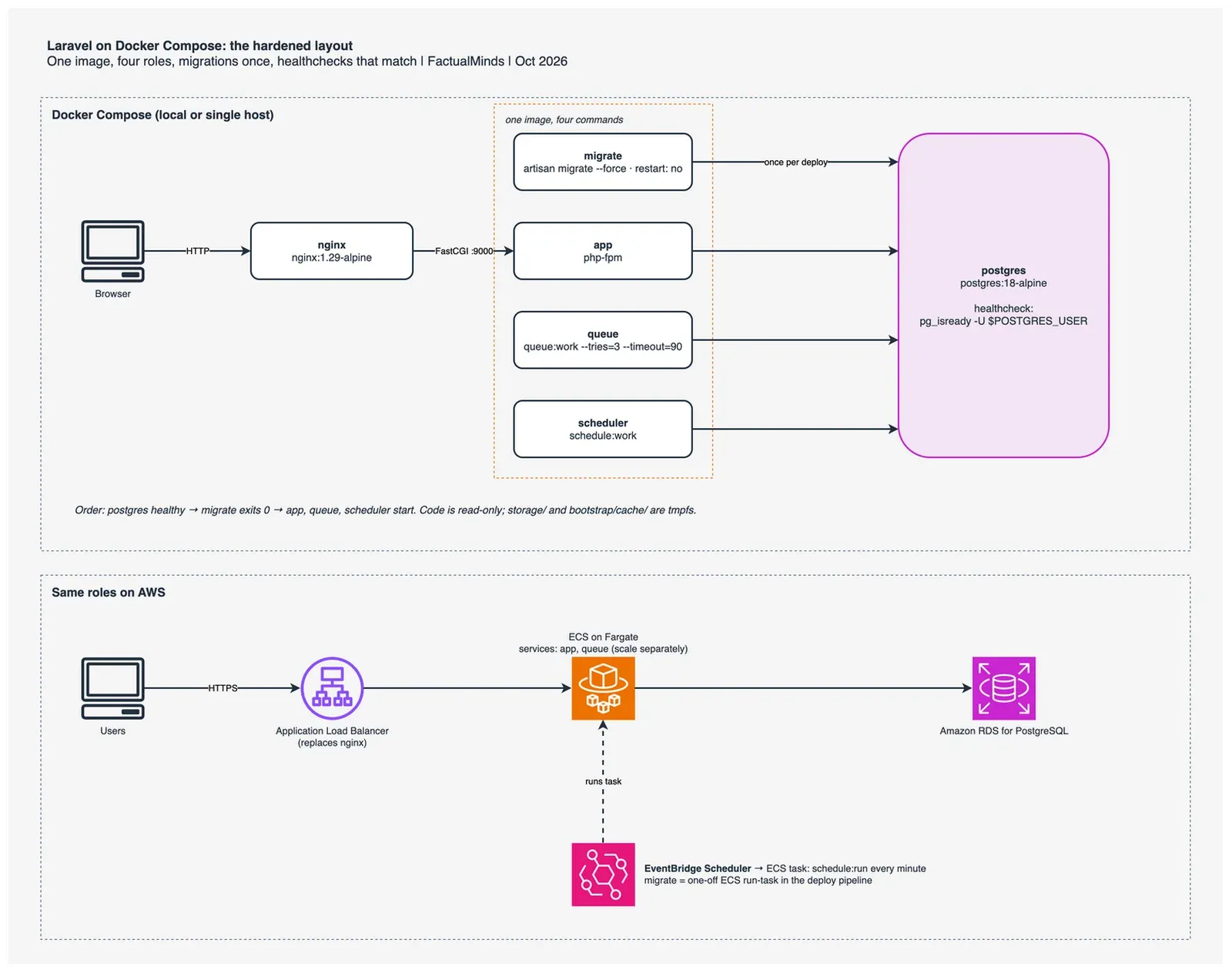
The hardened Compose file maps one to one onto AWS, which is the main reason to get it right locally. nginx becomes an Application Load Balancer (or stays as a sidecar container if you need its rewrites). app and queue become two ECS services from the same image in ECR, scaled on different signals: request count for web, queue depth for workers. scheduler becomes an EventBridge Scheduler schedule that runs schedule:run as an ECS task every minute, so nothing sits idle between runs. migrate becomes a one-off task in the deploy pipeline. Postgres becomes Amazon RDS for PostgreSQL. Our guide to running Laravel, Django and Node on ECS covers the task definitions, deployment strategy and observability.
What to Do This Week
- Run
docker image lson your production image. If it is over 500 MB, start with mistake 6. - Run
docker run --rm --entrypoint sh your-image -c 'ls -a; id'. If you see.envor.git, oruid=0, fix mistakes 7 and 9 before anything else, and rotate theAPP_KEYand any credentials that were in that.env. - Check
DB_HOST, the healthcheck role, and that everydepends_onhas acondition. - Move migrations out of the entrypoint into a one-shot service or pipeline step.
- Split web, queue and scheduler into separate containers from one image, and add
pcntl. - Clone the benchmark, drop your app in place of the skeleton, and compare your image to the hardened one.
What This Post Doesn’t Cover
- Laravel Octane, FrankenPHP worker mode, Swoole or RoadRunner. They keep the app booted between requests and change the throughput picture entirely. Our Nginx vs FrankenPHP comparison covers that choice.
- Kubernetes. The one-process-per-container and run-migrations-once rules carry over; the manifests don’t.
- Laravel Sail and local development ergonomics. This post is about the image you ship, and Sail is built for local work.
- Vulnerability scanning. We did not get CVE counts in this run. Scan both images with Amazon ECR enhanced scanning, Trivy or Docker Scout in your own pipeline.
- A migration race under load. Three replicas on a fresh schema did not collide in our run. A test with slow migrations and restart loops is still on our list.
Frequently asked questions
How much smaller does a multi-stage Alpine image make a Laravel app?
Is there a php:8.5-fpm-slim image?
When is Alpine the wrong base image for Laravel?
What breaks when you run the Laravel container with a read-only root filesystem?
Can Mint (DockerSlim) shrink a Laravel image safely?
Should migrations run in the container entrypoint?

AWS Cloud Architect & AI Expert
AWS-certified cloud architect and AI expert with deep expertise in cloud migrations, cost optimization, and generative AI on AWS.
 Manoj V.