How to Build a Serverless Data Pipeline with AWS Glue and Athena
Quick summary: Glue ETL + Athena SQL without servers — still the default lake path. July 2026: Glue 5.x jobs, Parquet partitions, ~$0.44/DPU-hour + $5/TB scan math, pipeline checklist.
Key Takeaways
- July 2026: Glue 5
- x jobs, Parquet partitions, ~$0
- 44/DPU-hour + $5/TB scan math, pipeline checklist
- AWS Glue still owns the serverless ETL path: extract raw data (logs, CSVs, databases), transform (clean, enrich, aggregate), land curated files for analysis
- Athena is the serverless SQL engine over S3 (+ Glue Data Catalog)
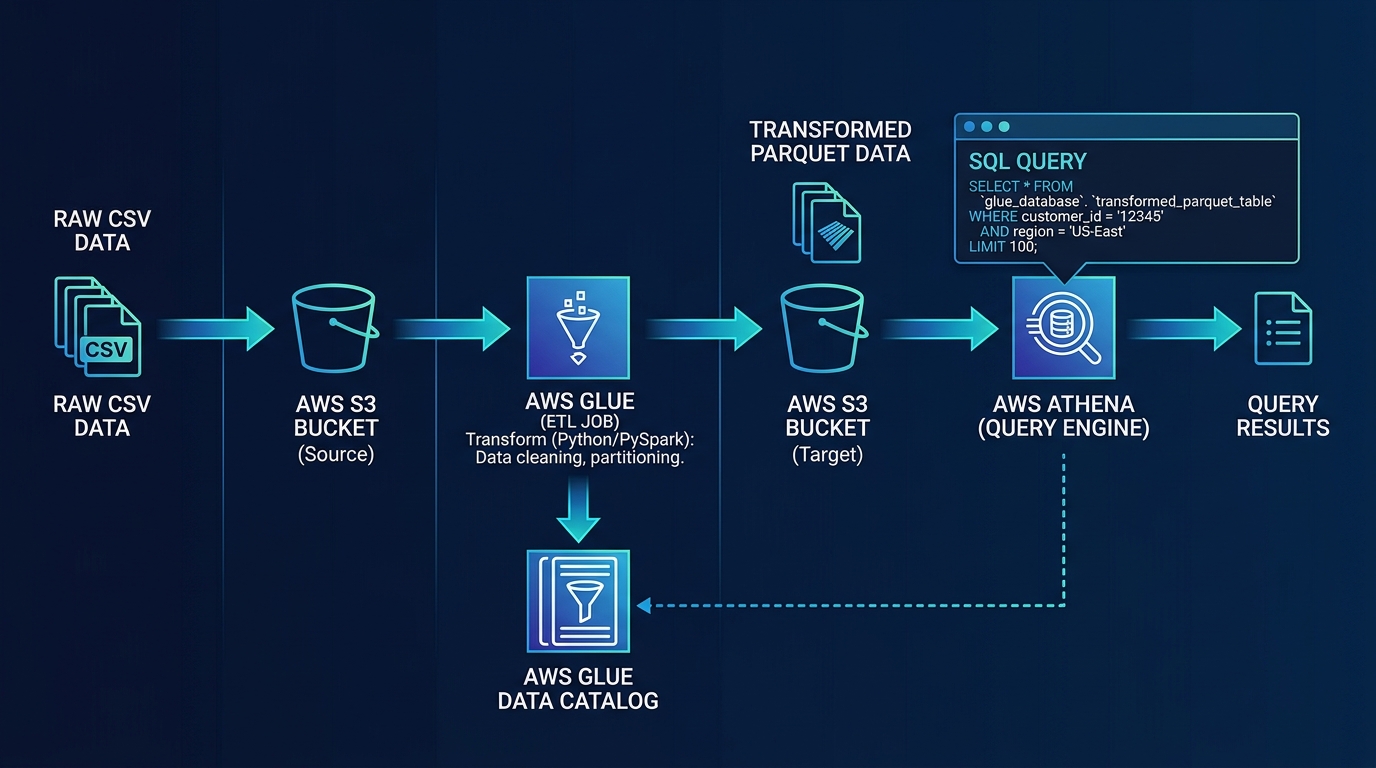
Table of Contents
AWS Glue still owns the serverless ETL path: extract raw data (logs, CSVs, databases), transform (clean, enrich, aggregate), land curated files for analysis. Athena is the serverless SQL engine over S3 (+ Glue Data Catalog). As of July 2026, prefer a current Glue 5.x Spark job line where available, write Parquet with partitions, and treat Athena cost as bytes scanned ($5/TB list — verify region) — not row count.
First-party benchmark (illustrative, us-east-1 list rates): Glue ~$0.44/DPU-hour; a 2-DPU × 30 min/day job ≈ ~$8/mo; Athena at 50 × 100MB-effective scans ≈ tens of dollars unless you partition and stop SELECT *.
Reproduce this: Glue + Athena pipeline checklist
Building Data Pipelines on AWS? AWS data services · contact.
Step 1: Understand the Glue + Athena Architecture
Raw Data (S3, RDS, APIs)
  ↓
AWS Glue Job (scheduled ETL)
  → Extract (read from source)
  → Transform (clean, dedupe, enrich)
  → Load (write to S3 in Parquet format)
  ↓
Athena (SQL queries on S3 data)
  → Run analytics
  → Generate reports
Key components:
- Glue Crawler: Auto-discovers schema from raw data
- Glue Job: Executes PySpark ETL code
- Glue Data Catalog: Metadata about your tables
- Athena: SQL engine for querying S3 data
- Partitioning: Organize S3 data by date/region for fast queries
Step 2: Set Up S3 and Data Catalog
Create S3 buckets for raw data, transformed data, and Athena results:
# Raw data (source)
aws s3api create-bucket --bucket raw-data-bucket --region us-east-1

# Transformed data (processed)
aws s3api create-bucket --bucket transformed-data-bucket --region us-east-1

# Athena results (query output)
aws s3api create-bucket --bucket athena-results-bucket --region us-east-1

# Enable versioning (optional but recommended)
aws s3api put-bucket-versioning --bucket raw-data-bucket --versioning-configuration Status=Enabled
Step 3: Crawl Raw Data with Glue Crawler
A Glue Crawler automatically discovers schema from your raw data:
- Go to AWS Glue → Crawlers
- Click Create crawler
- Crawler name:
raw-data-crawler - Data sources:
- Type: S3
- S3 path:
s3://raw-data-bucket/logs/
- IAM role: Create or select a role with S3 access
- Output configuration:
- Database: Create new database
raw_data - Table prefix:
raw_(tables will be namedraw_logs, etc.)
- Database: Create new database
- Scheduling:
- Frequency: Daily at 2 AM
- (or manual for testing)
- Click Create crawler
Run the crawler:
aws glue start-crawler --name raw-data-crawlerCheck results in Glue → Databases → raw_data → Tables. The crawler will have created a table with schema inferred from your data.
Step 4: Create a Glue ETL Job
Create a Glue job to transform raw data:
- Go to AWS Glue → Jobs
- Click Create job
- Job name:
transform-logs - Type: Spark (for large datasets) or Python Shell (for small ones)
- IAM role: Select the role with S3 access
- Script path:
s3://glue-scripts/transform-logs.py - Click Create job
Write the ETL script:
# transform-logs.py
import sys
from awsglue.context import GlueContext
from awsglue.job import Job
from awsglue.transforms import *
from pyspark.sql.functions import col, to_timestamp, year, month, day

args = sys.argv[1:]
sc = SparkContext()
glueContext = GlueContext(sc)
spark = glueContext.spark_session
job = Job(glueContext)
job.init(args[0], args)

# Read raw data from Glue Data Catalog
raw_logs = glueContext.create_dynamic_frame.from_table(
    database="raw_data",
    table_name="raw_logs"
)

# Convert to DataFrame for transformations
df = raw_logs.toDF()

# Transformations
df = df.filter(col("event_type").isNotNull())  # Remove nulls
df = df.withColumn("timestamp", to_timestamp(col("timestamp")))  # Parse date
df = df.dropDuplicates()  # Dedupe
df = df.withColumn("year", year(col("timestamp")))
df = df.withColumn("month", month(col("timestamp")))
df = df.withColumn("day", day(col("timestamp")))

# Write transformed data to S3 partitioned by date
df.repartition(col("year"), col("month"), col("day")).write \
    .mode("overwrite") \
    .parquet("s3://transformed-data-bucket/logs/")

job.commit()
Upload the script to S3:
aws s3 cp transform-logs.py s3://glue-scripts/Step 5: Run Glue Job on Schedule
- In the Glue job, go to Job details
- Trigger: Set to trigger daily at 3 AM (after crawler runs at 2 AM)
- Max retries: 1
- Click Save
Or trigger manually:
aws glue start-job-run --job-name transform-logsMonitor the job:
aws glue get-job-run --job-name transform-logs --run-id xxxxxStep 6: Create Athena Table from Transformed Data
Once Glue writes transformed data to S3, create an Athena table to query it.
Option A: Glue Crawler (auto-detect schema)
Run a second crawler on the transformed data bucket:
aws glue start-crawler --name transformed-data-crawlerOption B: Manual Athena SQL
CREATE EXTERNAL TABLE IF NOT EXISTS transformed_logs (
    event_type STRING,
    user_id STRING,
    timestamp BIGINT,
    message STRING
)
PARTITIONED BY (
    year INT,
    month INT,
    day INT
)
STORED AS PARQUET
LOCATION 's3://transformed-data-bucket/logs/'
Add partitions:
ALTER TABLE transformed_logs ADD IF NOT EXISTS
    PARTITION (year=2026, month=4, day=3)
        LOCATION 's3://transformed-data-bucket/logs/year=2026/month=4/day=3/'
Step 7: Query Data with Athena
Go to Amazon Athena → Query editor:
-- Count events by type
SELECT event_type, COUNT(*) as count
FROM transformed_logs
WHERE year = 2026 AND month = 4
GROUP BY event_type
ORDER BY count DESC
-- Find events for a specific user
SELECT timestamp, event_type, message
FROM transformed_logs
WHERE user_id = 'user-12345' AND year = 2026
ORDER BY timestamp DESC-- Daily aggregation
SELECT year, month, day, COUNT(*) as total_events
FROM transformed_logs
WHERE year = 2026
GROUP BY year, month, day
ORDER BY year, month, dayStep 8: Optimize for Cost and Performance
Partition Strategy
Organize data in S3 with partitions so Athena only scans relevant data:
s3://transformed-data-bucket/logs/
├── year=2026/
│   ├── month=1/
│   │   ├── day=1/
│   │   ├── day=2/
│   │   └── ...
│   ├── month=2/
│   └── ...
└── year=2026/
Query with partition filters to reduce scans:
-- Scans ONLY April 2026 data
SELECT COUNT(*) FROM transformed_logs
WHERE year = 2026 AND month = 4

-- Scans ALL data (100x more expensive!)
SELECT COUNT(*) FROM transformed_logs
Compress Data
Use Parquet format with compression:
# In Glue job
df.write.mode("overwrite").option("compression", "snappy").parquet("s3://bucket/data/")
Parquet + Snappy compression = 50-80% smaller than CSV/JSON.
Use Columnar Format
Query only required columns:
-- Efficient: scans only 3 columns
SELECT user_id, event_type, timestamp FROM logs

-- Inefficient: scans all columns
SELECT * FROM logs
Step 9: Automate Reporting
Create a scheduled Athena query that runs daily and saves results:
# lambda_function.py
import boto3
from datetime import datetime

athena = boto3.client('athena')

def run_daily_report():
    query = """
    SELECT event_type, COUNT(*) as count
    FROM transformed_logs
    WHERE year = 2026 AND month = 4 AND day = 3
    GROUP BY event_type
    """

    response = athena.start_query_execution(
        QueryString=query,
        QueryExecutionContext={'Database': 'default'},
        ResultConfiguration={'OutputLocation': 's3://athena-results-bucket/'}
    )

    print(f"Query started: {response['QueryExecutionId']}")

def lambda_handler(event, context):
    run_daily_report()
    return {'statusCode': 200}
Schedule via CloudWatch Events:
aws events put-rule --name daily-athena-report --schedule-expression "cron(0 8 * * ? *)"
aws events put-targets --rule daily-athena-report --targets "Id"="1","Arn"="arn:aws:lambda:us-east-1:123456789012:function:daily-report"
Step 10: Production Patterns
Pattern 1: Multi-Stage Pipeline
Raw → Staging (light transformation)
    ↓
Staging → Curated (business logic)
    ↓
Curated → Analytics (final queries)
Each stage has its own Glue job and S3 location. This allows:
- Reusing staging data for multiple downstream jobs
- Easy debugging (inspect data at each stage)
- Auditing transformation steps
Pattern 2: Quality Checks
Add data quality validation in Glue jobs:
# Count nulls
null_count = df.filter(col("user_id").isNull()).count()
if null_count > 0:
    print(f"WARNING: {null_count} rows with null user_id")
    # Send SNS alert

# Check for unexpected values
invalid_types = df.filter(~df.event_type.isin(['login', 'logout', 'click'])).count()
if invalid_types > 0:
    print(f"ERROR: {invalid_types} rows with invalid event_type")
    # Fail job
    sys.exit(1)

# If we reach here, data is valid
df.write.mode("overwrite").parquet("s3://bucket/data/")
Pattern 3: Incremental Processing
Avoid reprocessing the same data:
# Only process data from last 24 hours
from datetime import datetime, timedelta

cutoff_time = (datetime.now() - timedelta(days=1)).timestamp()
df = df.filter(col("timestamp") > cutoff_time)
This reduces processing time and cost on large datasets.
Common Mistakes to Avoid
Not partitioning data
- Unpartitioned: Every query scans all data (expensive)
- Partitioned: Queries scan only relevant data (cheap)
- Always partition by date, region, or other common filters
Using CSV instead of Parquet
- CSV: Slow, uncompressed, row-oriented
- Parquet: Fast, compressed, columnar
- Convert to Parquet in Glue jobs
Not adding partition metadata
- Athena needs partition info to optimize queries
- Use
MSCK REPAIR TABLEto add partitions:MSCK REPAIR TABLE my_table
Querying without WHERE clauses
SELECT * FROM logsscans all data- Always add partition filters:
WHERE year=2026 AND month=4
Ignoring job failures
- Set up SNS alerts for failed Glue jobs
- Monitor job logs in CloudWatch
Cost Estimation
For 1GB of raw data ingested daily:
| Component | Cost |
|---|---|
| Glue (2 DPUs, 30 mins/day) | ~$8/month |
| S3 storage (30GB/month retention) | ~$0.69/month |
| Athena (50 queries/month, 100MB scanned each) | ~$31/month |
| Total | ~$40/month |
What this post doesn’t cover
Iceberg/S3 Tables lakehouse evolution and dbt-vs-Glue ownership — see lakehouse and Glue-vs-dbt companions. Athena Capacity Reservations for steady BI are optional cost controls beyond this how-to.
What to do Monday morning
- Stand up raw / curated / athena-results buckets + one Glue Catalog database.
- Convert a sample day to Parquet with partition keys matching your filters.
- Run an Athena query with partition predicates; note data scanned in query stats.
- Walk the pipeline checklist.
- Next: building a data lake · Glue vs dbt.
- Talk to FactualMinds · data analytics services.
Frequently asked questions
What is the difference between AWS Glue and Lambda for ETL?
Lambda is compute — you write code and it runs. Glue is a fully managed ETL service with built-in job scheduling, error handling, and data catalog features. For simple transformations (1-2 scripts), Lambda is faster to implement. For complex ETL pipelines (10+ transformations, scheduling, data lineage), Glue is easier: you define jobs in the console, Glue handles retries and logging. Glue also includes the Data Catalog (metadata about your data), which Lambda doesn't provide.
How much does Glue cost?
Glue charges about $0.44 per DPU-hour in us-east-1 (verify region). A 10-minute job using 2 DPUs ≈ 0.33 hours × 2 × $0.44 ≈ $0.29. Athena list pricing is about $5 per TB scanned (verify region). A 100GB effective scan ≈ $0.50. Partitioning + Parquet usually dominate the bill more than the list rate.
How do I partition data for better Athena performance?
Partition Athena tables by date, region, or other common filters. Instead of one table with 1M rows, partition by year/month so Athena only scans relevant partitions. Example: logs/year=2026/month=04/day=03/data.parquet. Athena scans only data matching your query (e.g., "WHERE year=2026 AND month=04"). Without partitioning, Athena must scan all 1M rows. With partitioning, it scans 10K rows. Cost savings: 100x.
Can I use Glue with data in real-time?
Classic Glue Spark jobs are batch (hourly/daily schedules). For sub-minute paths use Kinesis/Firehose/Flink/Lambda, or evaluate Glue streaming ETL where it fits — do not force a nightly batch job into a real-time SLA. DMS remains the usual CDC path into the lake.
What format should I use for Athena queries — Parquet, CSV, or JSON?
Parquet is best for analytics: (1) Columnar format (Athena only reads relevant columns), (2) Compressed (50-80% smaller than CSV), (3) Schema-aware (data types preserved). CSV/JSON are row-based and less efficient. For 1GB of data: CSV = 1GB scanned, Parquet = 200-400MB scanned. Glue can convert CSV to Parquet as a transformation step, so raw data can be CSV and Glue converts to Parquet for analytics.
AWS Cloud Architect & AI Expert
AWS-certified cloud architect and AI expert with deep expertise in cloud migrations, cost optimization, and generative AI on AWS.