AWS FinOps Agent (Preview, June 2026): From Monthly Cost Reviews to Event-Driven Triage
Quick summary: On June 9, 2026 AWS previewed FinOps Agent — a Bedrock-powered agent that investigates cost anomalies via CloudTrail, answers NL cost questions, and opens Jira tickets from Cost Optimization Hub. Free in preview; not a replacement for ownership or tagging.
Key Takeaways
- On June 9, 2026 AWS previewed FinOps Agent — a Bedrock-powered agent that investigates cost anomalies via CloudTrail, answers NL cost questions, and opens Jira tickets from Cost Optimization Hub
- AWS lifecycle notice (June 30, 2026) — Amazon Bedrock Agents Classic is now Bedrock Agents Classic, in maintenance for new customers after July 30, 2026
- Net-new agent builds should use Bedrock AgentCore
- The same day AWS also shipped Analyze with Amazon Q inside Cost Explorer; this post focuses on the agent — for in-console Q explanations see the Cost Explorer guide
- Early preview customers named in the blog — Workday, AVIV Group, Convera, and Mitre 10 — are using it to move from reactive monthly reviews to scheduled, event-driven operations
Table of Contents
AWS lifecycle notice (June 30, 2026) — Amazon Bedrock Agents Classic is now Bedrock Agents Classic, in maintenance for new customers after July 30, 2026. Net-new agent builds should use Bedrock AgentCore. Full matrix: lifecycle roundup.
On June 9, 2026, AWS announced the public preview of AWS FinOps Agent — an agentic AI solution that investigates cost anomalies to root cause and answers cost questions for engineers, in the tools they already use. The same day AWS also shipped Analyze with Amazon Q inside Cost Explorer; this post focuses on the agent — for in-console Q explanations see the Cost Explorer guide. Jason Wu and Letian Feng’s AWS Cloud Financial Management blog post describes the shift FinOps practitioners have been pushing for years: cloud financial management moves from periodic, dashboard-driven reviews to continuous workflows that run on a recurring schedule, when an anomaly fires, or whenever an engineer asks a cost question.
AWS positions the agent against three structural gaps: specialized cost expertise embedded for engineers, execution at scale across many accounts and workloads, and integration with Jira and Slack so findings reach owners instead of a central FinOps inbox. Early preview customers named in the blog — Workday, AVIV Group, Convera, and Mitre 10 — are using it to move from reactive monthly reviews to scheduled, event-driven operations.
That framing is accurate — and incomplete without the organizational prerequisites. FinOps Agent is built on Amazon Bedrock and draws on the same data plane your central FinOps team already relies on (Cost Optimization Hub, Cost Anomaly Detection, Compute Optimizer, Cost Explorer, CloudTrail). The preview is free for the agent (with a monthly usage limit); it is not free of FinOps discipline. This post is the adoption guide: what the agent actually does, where it fits your stack, preview limits, and what breaks if you enable automation before ownership and tagging exist.
Benchmark pattern (not a cited client) — Modeled a multi-account SaaS org (~$280k/mo AWS spend, 14 linked accounts, 3 OUs). Manual anomaly triage averaged ~6.5 engineer-hours/week (FinOps analyst + platform on-call reading Cost Explorer + CloudTrail). A two-week preview pilot on event-triggered anomaly investigation → Slack cut time-to-first-root-cause hypothesis from ~4 hours → ~45 minutes on 8 real anomalies — but 3 of 11 automated runs opened Jira tickets for expected month-end Redshift load until context files documented the seasonal pattern. Context files are not optional polish; they are what separates signal from ticket spam.
What AWS FinOps Agent is (and is not)
Per the User Guide, the preview ships five capabilities:
| Capability | What it does | Who benefits |
|---|---|---|
| Event-triggered anomaly investigation | Listens for Cost Anomaly Detection events; correlates spend changes with CloudTrail; delivers a consolidated report | Platform/on-call — replaces manual “open Cost Explorer + grep CloudTrail” |
| Natural-language cost inquiry | Answers workload cost questions from actual usage data | Engineers who will never learn Cost Explorer group-by syntax |
| Recurring cost reports | Scheduled HTML/PDF/PPT reports for finance and engineering | FinOps analyst — stops rebuilding the same deck monthly |
| Optimization in one place | Pulls COH + Compute Optimizer recs; can summarize into Jira tickets | Teams that already live in Jira, not the AWS console |
| Context files + memory | Org-specific mappings (account → owner), rules, preferences across sessions | Anyone who has watched an agent blame the wrong team for a spike |
It is not: a tagging enforcement tool, a Savings Plans purchase engine, a multi-cloud FinOps platform, or a substitute for the named bill owner your post-migration handoff should have assigned on day one.
Opinionated take: Enable FinOps Agent after Cost Optimization Hub and anomaly monitors are trustworthy — not as a shortcut to avoid building those foundations. The agent is a workflow accelerator on top of AWS’s native FinOps data plane, not a replacement for it.
Cost Explorer + Amazon Q vs FinOps Agent
The same week AWS previewed FinOps Agent, it also shipped Analyze with Amazon Q inside Cost Explorer — also at no additional charge in commercial regions. That is not a duplicate feature; it solves a different moment in the workflow.
| Capability | Analyze with Amazon Q (Cost Explorer) | AWS FinOps Agent (preview) |
|---|---|---|
| Trigger | Human configures a CE view and clicks one button | Schedule, anomaly event, or NL question |
| Output | Chat explanation using your filters + date range | Investigation report, optional Slack/Jira |
| Root cause | Interprets cost trends/drivers/anomalies in context | Correlates anomalies with CloudTrail changes |
| Best for | Weekly reviews, exec readouts, ad-hoc “why?” | Routing findings to owners without a FinOps analyst |
If your FinOps team lives in Cost Explorer during monthly close, start with Analyze with Amazon Q — see our Cost Explorer monitoring guide. Add FinOps Agent when account count or alert volume makes manual triage unsustainable.
Why this preview matters now
AWS has spent three years consolidating recommendations into Cost Optimization Hub and detection into Cost Anomaly Detection. The missing layer was operationalization: getting findings to the engineer who can act, with enough context that they do not ignore the alert.
The AWS blog’s anomaly workflow is explicit: a Cost Anomaly Detection alert tells you something changed; FinOps Agent takes the next step — correlating the cost change with CloudTrail (who changed what and when), identifying the change that drove the spike, and producing an investigation summary with likely root cause and responsible owner. Optionally it opens a Jira ticket or posts to Slack so the engineer who owns the resource gets context to decide what to do next. You can add a dollar threshold filter in the automation prompt (e.g. only investigate anomalies above $1,000) so attention stays on highest-impact changes.
Three capabilities beyond static dashboards:
- CloudTrail correlation on anomalies — ties a dollar spike to an API actor and change window, not just “EC2 spend up 22%.”
- Delivery into existing workflows — Slack for awareness, Jira for tracked remediation (cost control playbook patterns). Convera’s preview quote captures why: the closed loop from detect → investigate → ticket to the owning engineer beats a shared queue nobody watches.
- Persistent organizational memory — context files (account-to-owner mappings, team definitions, tagging conventions, review cadences) let the agent resolve “What is Team X spending?” to the accounts that team owns — the pattern AVIV Group describes for decentralizing FinOps across hundreds of accounts.
That is the same structural problem described in engineering without cost ownership — engineers lack cost feedback at decision time, finance sees bills late. The agent does not fix ownership; it shrinks detection-to-notification latency so the owner can actually intervene.
Architecture: Bedrock agent + AWS FinOps data plane
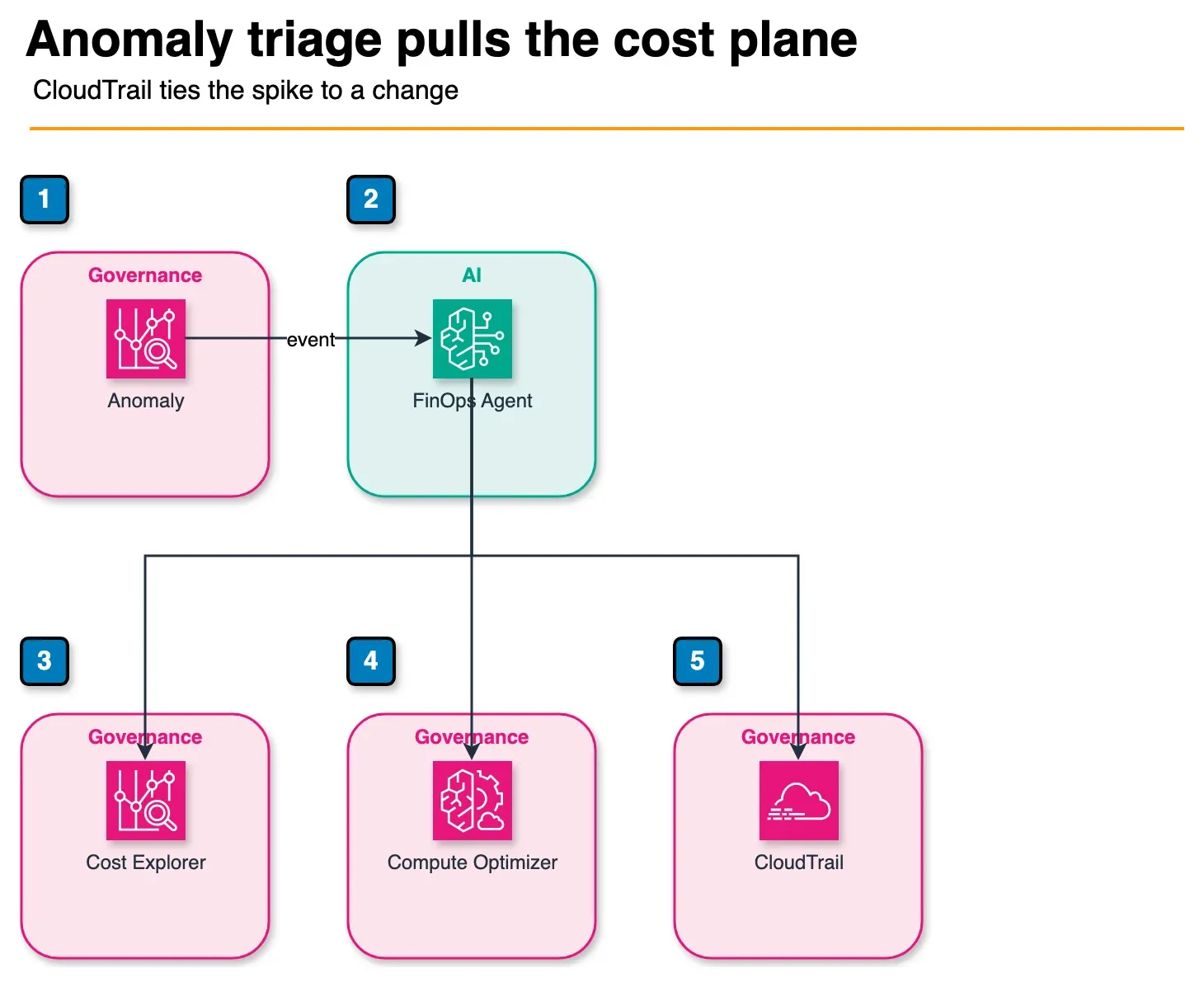
Figure: the FinOps data plane in the article. A Cost Anomaly Detection event starts the agent. It correlates spend with CloudTrail and can pull Cost Explorer and Compute Optimizer. Cost Optimization Hub is another source in the article, not a fourth required hop. No dollar thresholds are shown. Open the draw.io source.
Cost Anomaly Detection (event)
        │
        ▼
AWS FinOps Agent (Bedrock) ──► CloudTrail (who changed what)
        │              │
        │              ├── Cost Explorer (usage detail)
        │              ├── Cost Optimization Hub (recs)
        │              └── Compute Optimizer (rightsizing)
        │
        ├── Context files (account → team → Slack/Jira)
        ├── Slack (findings)
        └── Jira (optimization tickets)
Per the AWS blog’s availability section: the agent runs in us-east-1, but when set up in the management account it can manage costs across AWS Regions and linked accounts. Cost and usage data spans all commercial AWS Regions except AWS GovCloud (US) and AWS China (Beijing/Ningxia) — plan separate processes for those estates.
IAM: the getting started guide says the wizard creates roles and policies automatically. Security teams should still review permissions against least privilege — the agent can read cost and CloudTrail broadly across linked accounts.
Reproduce this — Artifacts in
examples/architecture-blog-2026/finops-agent/:adoption-decision-matrix.md,context-file-account-owner-template.csv,anomaly-automation-checklist.md.
FinOps Agent vs the tools you already have
| Layer | Tool | FinOps Agent relationship |
|---|---|---|
| Detection | Cost Anomaly Detection | Agent consumes events — tune monitors first |
| Prioritization | Cost Optimization Hub | Agent summarizes recs into tickets — COH still owns ranking |
| Analysis | Cost Explorer | Agent queries on your behalf — same data, less SQL |
| Rightsizing detail | Compute Optimizer | Agent pulls recs — you still validate workload risk |
| Root cause | CloudTrail | Agent correlates — unique value vs static dashboards |
| Ownership | Tag policies + context files | Tags feed attribution; context files route humans |
| Commitments | Savings Plans / RIs | Agent may recommend — finance still owns purchase timing |
| Multi-cloud | CloudHealth / Vantage / Apptio | No overlap — agent is AWS-only |
We recommend: keep Cost Optimization Hub as the source of truth for savings backlog; use FinOps Agent to operationalize the top of that backlog and anomaly triage. Do not cancel a third-party FinOps tool solely because preview launched — multi-cloud and chargeback automation still live elsewhere.
Getting started: AWS’s eight steps, with guardrails
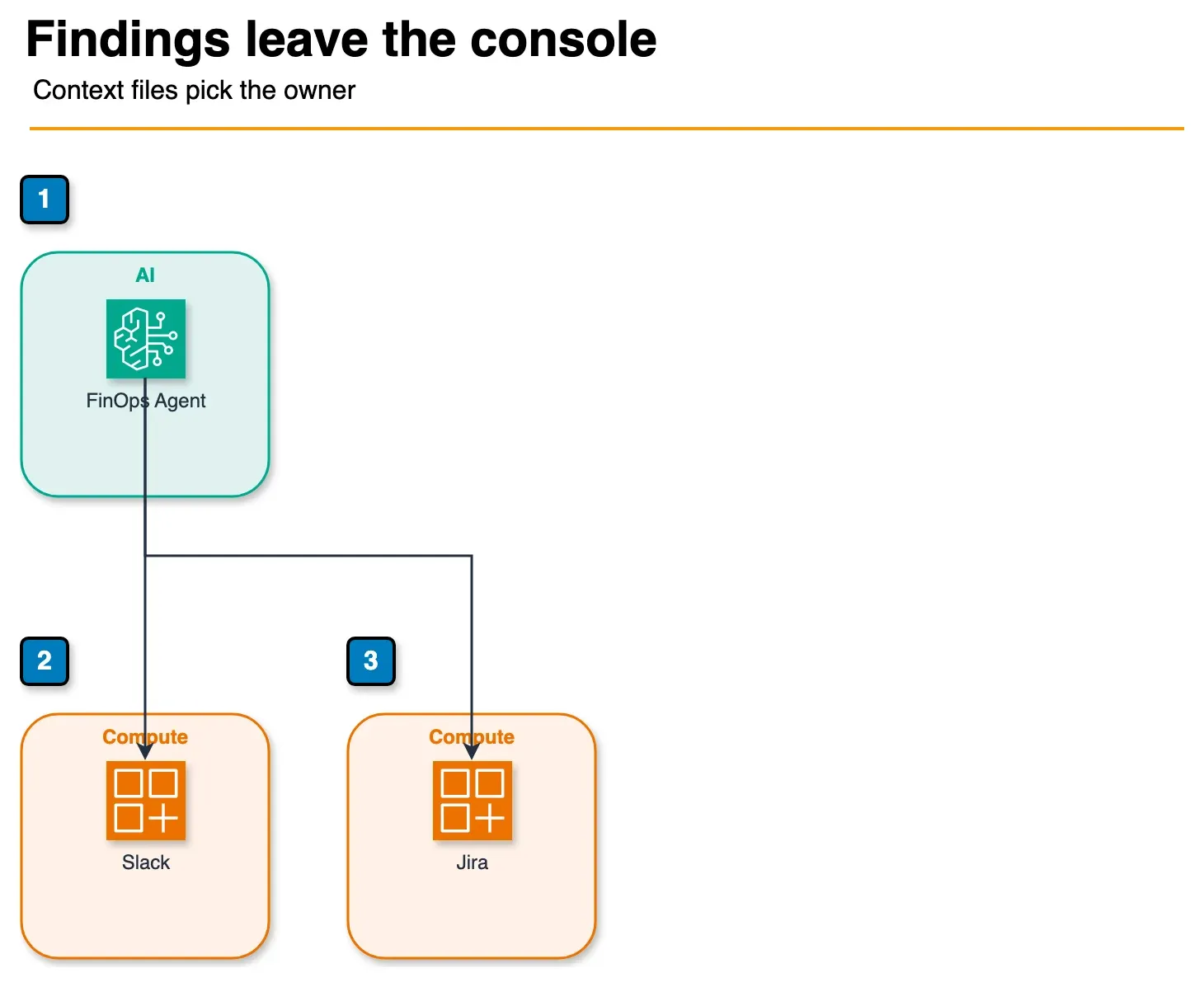
Figure: delivery in the article. Slack is for awareness. Jira is for tracked work. Both are optional at setup. Context files map accounts to owners so the ticket does not land in a shared inbox nobody watches. Open the draw.io source.
The AWS blog getting-started section walks through console setup in us-east-1:
- Create an agent in the AWS FinOps Agent console.
- Complete one-click IAM role setup — wizard provisions customer-managed roles for cost, usage, and operational data.
- Connect Jira and Slack (optional) — space keys and channels for ticket/message delivery.
- Confirm agent configuration in the console.
- Open the web application from the console to interact with the agent.
- Upload initial context (optional but we treat as required) — account-to-owner mapping, known exceptions, prioritization rules, review cadence.
- Run your first query — e.g. “List the top 10 cost drivers last month grouped by Region” or “Investigate any cost anomaly over $1,000 in the data platform accounts and open a Jira ticket with root causes.”
- Set up event-triggered automation — e.g. “Listen for Cost Anomaly Detection events, investigate each anomaly for root cause, and post findings to #finops-anomalies Slack.”
Our guardrails on top of AWS’s sequence (learned from preview pilots + the blog’s customer stories):
- Do steps 6 → 7 → 8 in that order — not 8 before 6. Mitre 10’s quote is about defining workflows once; AVIV’s is about context for decentralized teams. Both assume routing context exists first.
- Use the dollar threshold filter AWS documents in step 8 before enabling Jira auto-create.
- Start in the management account if you need org-wide coverage; validate answers in one OU before expanding.
- Hold recurring PDF/PPT reports until manual queries match Cost Explorer — Workday’s value prop is anomaly detection and reporting in one NL interface; earn that trust on queries before scheduling decks.
What broke — In the modeled pilot, enabling Jira auto-create on every anomaly (threshold $50/day) produced 14 tickets in 10 days; 5 were duplicate rightsizing suggestions already in COH, 3 were expected pipeline load. Fix: raise threshold to $500/day for prod OUs, add context-file exceptions for
month-end-etl, and route non-prod anomalies to Slack-only. Ticket volume dropped ~70% with higher trust from engineering.
How this connects to your existing FinOps program
| Program stage | Existing FactualMinds anchor | FinOps Agent adds |
|---|---|---|
| Post-migration handoff | 30-day checklist | Automated anomaly → owner routing once baseline is visible |
| Steady-state governance | FinOps complete guide | Scheduled reports + NL self-service for engineers |
| Tagging / chargeback | Tagging & ownership | Context file complements tags when tags are incomplete |
| Surprise bills | Eliminate surprise bills | Faster investigation loop — not a replacement for budgets/alarms |
| Consulting engagement | FinOps consulting | Agent handles repetitive triage; consultants focus on architecture and commitments |
If you are mid-data-center exit, finish owner + tags + COH from the handoff post before FinOps Agent automation — otherwise the agent investigates chaos you have not categorized yet.
What early preview customers report
These are AWS-published customer quotes from the June 9 blog post — not FactualMinds engagements — but they clarify which shapes fit:
| Customer | Estate shape | Reported value |
|---|---|---|
| Workday | Multi-account AI platform on AWS | Anomaly surfacing + monthly leadership cost views that used to take hours of manual dashboard work — now starting from natural language |
| Mitre 10 | Lean platform team, dual build/operate + cost accountability | Define investigation workflows once; checks run continuously instead of someone remembering to run them |
| Convera | Regulated financial services, fast-moving engineering | Catch small unintended developer-driven cost changes before they compound; Jira ticket to owning engineer, not a shared queue |
| AVIV Group | Hundreds of accounts, hybrid centralized → decentralized FinOps | Engineers self-serve SP vs on-demand and anomaly questions; central team focuses on chargeback and strategy |
Pattern we take from these: the agent pays off when (a) account count or team count makes manual triage unsustainable, and (b) Jira/Slack are already where work gets done. A 3-account startup with one FinOps part-timer may not need preview complexity yet.
Preview limits to plan around
- Preview status — APIs, UI, and integrations may change; no production SLA. AWS notes the agent will expand to more FinOps capabilities, including cost analysis for AI workloads — not in preview scope today.
- Monthly usage limit — agent is no-charge during preview but capped; plan pilot scope accordingly.
- Regional hosting — agent runs in us-east-1; org-wide visibility via management-account setup.
- GovCloud / China excluded — maintain parallel manual FinOps for those accounts.
- Bedrock underneath — falls under your AI governance program; abuse detection is AWS-managed per User Guide.
- Underlying API costs — scheduled investigations and broad NL queries add Cost Explorer/CloudTrail API usage; monitor during pilot.
- Jira/Slack only — no PagerDuty/Teams at launch; integrate via middleware if on-call must page.
What to do this week
- Read the adoption decision matrix with your FinOps owner and security lead.
- Confirm Cost Optimization Hub and Cost Anomaly Detection are already producing trustworthy signal.
- Draft the account-owner context CSV and get team leads to validate routing.
- Create one preview agent in a sandbox management account; run manual queries for a week.
- Enable one event-triggered anomaly workflow → Slack before Jira auto-create.
- Measure: time-to-first-root-cause, ticket noise rate, engineer trust survey after 2 weeks.
If you only do one thing: Upload an accurate account → owner → Slack context file before turning on automation. The agent’s CloudTrail correlation is only useful if the finding reaches a human who can roll back the change.
What this post does not cover
- GA pricing for FinOps Agent after preview — assume underlying API charges persist even if agent fee stays zero.
- Step-by-step console screenshots — AWS UI will move during preview; follow the User Guide.
- Third-party FinOps platform comparison in depth — agent is AWS-native; multi-cloud teams still need their existing stack.
- Independent benchmark of investigation accuracy — our numbers are from the modeled pilot, not AWS-published SLAs.
Related: Cost Explorer & Budgets guide (Analyze with Amazon Q) · Cost Optimization Hub guide · Cost anomaly detection · FinOps gap & ownership · Post-migration FinOps handoff · AWS cost optimization services · FinOps consulting
Related reading
- AWS Bill Teardown #1: The SaaS Startup Paying $40k/Month for $8k of Workloads
- AWS Bill Teardown #2: How a Healthcare Company Spent $200k/Year on NAT Gateways
- Designing AWS Architectures with Predictable, Stable Costs
- AWS Managed Services Provider vs DIY: Total Cost of Ownership
- How to Prevent Queue-Based Cost Explosions on AWS
Frequently asked questions
What is AWS FinOps Agent?
Is AWS FinOps Agent free?
How is FinOps Agent different from Cost Optimization Hub?
Does FinOps Agent replace a FinOps team or consultant?
What do I need before enabling FinOps Agent?
When should we NOT adopt FinOps Agent yet?
Which AWS services does FinOps Agent integrate with?
How is FinOps Agent different from Cost Explorer Analyze with Amazon Q?

Ecommerce Growth & Retail Marketplaces
Ecommerce growth leader working across ratings and reviews, Walmart review syndication, retail marketplaces, and email and SMS deliverability. Writes the FactualMinds guides on AWS cost optimization and FinOps for teams that need cloud spend to stay predictable.