AWS Cognito Authentication for SaaS Applications
Quick summary: July 2026: Cognito user pools for SaaS — managed login vs classic hosted UI, pool vs silo tenancy, federation limits, and a checklist before you outgrow Cognito into Auth0/Okta.
Key Takeaways
- July 2026: Cognito user pools for SaaS — managed login vs classic hosted UI, pool vs silo tenancy, federation limits, and a checklist before you outgrow Cognito into Auth0/Okta
- Authentication is the front door of every SaaS application
- As of July 19, 2026, Cognito still distinguishes managed login (branding editor, passkeys on supported feature plans) from the classic hosted UI
- Managed login does not support custom authentication challenge Lambda triggers; keep classic hosted UI or a custom UI for those flows
- For serverless SaaS on AWS, Cognito + API Gateway remains the default until authorization complexity, Organizations-style tenancy UX, or multi-Region active-active identity force Auth0/Okta
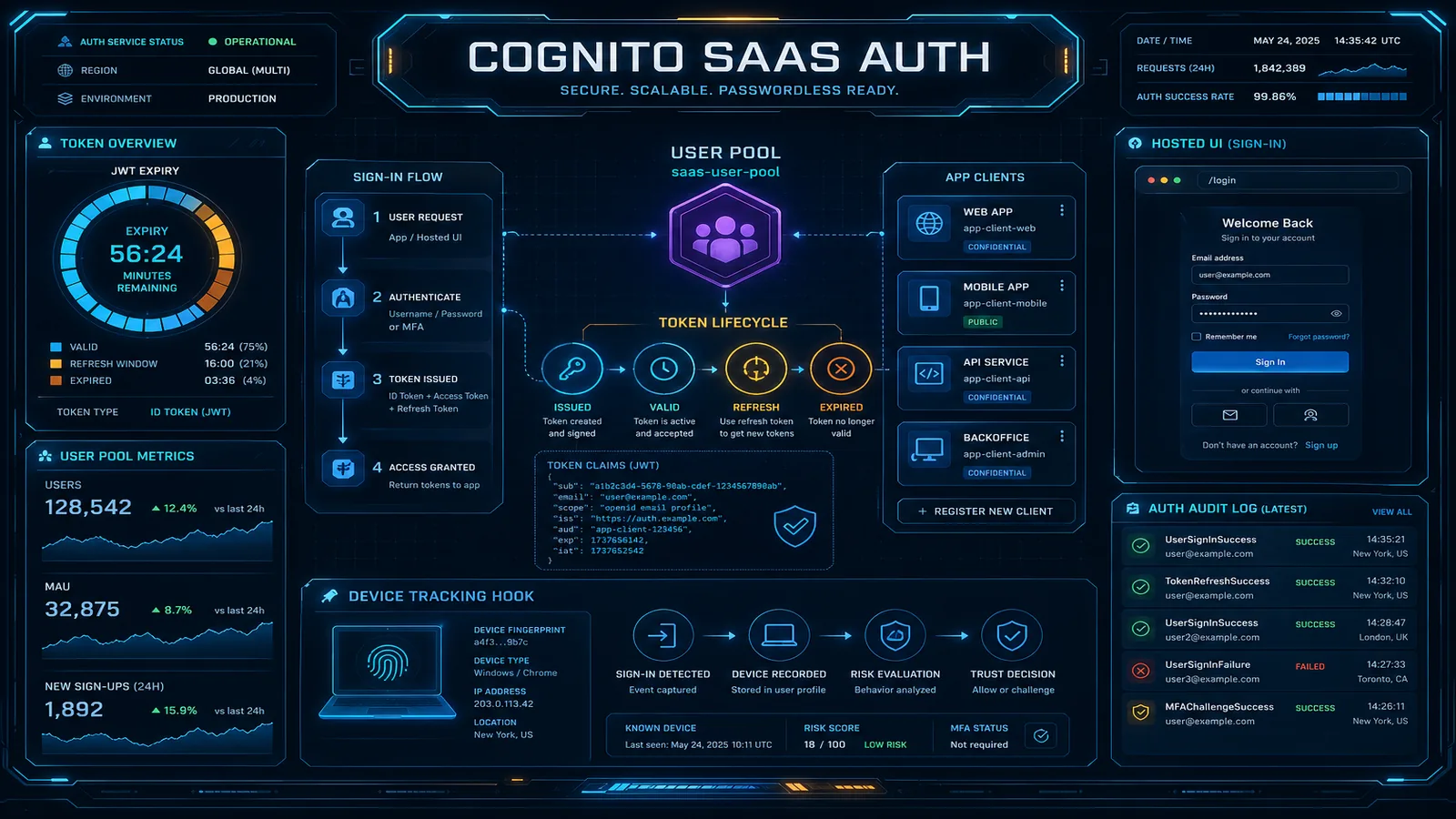
Table of Contents
Authentication is the front door of every SaaS application. Get Cognito’s multi-tenant and UX constraints wrong and you buy a multi-quarter rewrite.
As of July 19, 2026, Cognito still distinguishes managed login (branding editor, passkeys on supported feature plans) from the classic hosted UI. Lite feature plans may only expose classic hosted UI — confirm the managed login matrix before promising passkeys. Managed login does not support custom authentication challenge Lambda triggers; keep classic hosted UI or a custom UI for those flows.
For serverless SaaS on AWS, Cognito + API Gateway remains the default until authorization complexity, Organizations-style tenancy UX, or multi-Region active-active identity force Auth0/Okta.
Reproduce this — Tenancy + login checklist:
examples/architecture-blog-2026/cognito/saas-tenancy-auth-checklist.md
Cognito Architecture
User Pools
A User Pool is a user directory — it stores user attributes, handles authentication flows, and issues tokens. Think of it as a managed identity provider.
What User Pools provide:
- User registration with email/phone verification
- Sign-in with username, email, or phone number
- Password policies and account recovery
- Multi-factor authentication (SMS, TOTP, email)
- Social / enterprise federation (Google, Facebook, Apple, SAML, OIDC)
- Managed login pages (or classic hosted UI) for sign-up/sign-in
- JWT issuance (ID, access, refresh)
- Lambda triggers for custom logic (respect managed-login exclusions)
Identity Pools (Federated Identities)
Identity Pools exchange Cognito tokens (or third-party tokens) for temporary AWS credentials. This enables direct access to AWS services from client applications:
User → Cognito User Pool (authenticate) → ID Token
     → Cognito Identity Pool (exchange) → Temporary AWS Credentials
     → Direct access to S3, DynamoDB, etc.
When to use Identity Pools:
- Mobile apps that access AWS services directly (S3 uploads, DynamoDB queries)
- Web applications that need temporary AWS credentials for client-side operations
- Applications using third-party identity providers without Cognito User Pools
When to skip Identity Pools:
- API-based applications where all AWS access goes through your backend (API Gateway + Lambda)
- Applications that only need JWT-based authentication (User Pool tokens are sufficient)
Most SaaS applications use User Pools for authentication and API Gateway authorizers for API access — Identity Pools add complexity that is rarely needed for typical web applications.
Authentication Flows
Hosted UI
Cognito’s Hosted UI provides a pre-built sign-up/sign-in interface:
Your App → Redirect to Cognito Hosted UI → User signs in → Redirect back with authorization code → Exchange for tokensAdvantages:
- Zero authentication UI development
- Social federation (Google, Facebook, Apple) works out of the box
- SAML/OIDC enterprise federation with no custom code
- Automatic compliance with OAuth 2.0 and OIDC standards
Disadvantages:
- Limited customization (colors, logo, CSS — but not layout or UX flow)
- Users leave your domain for authentication (cognito-idp.region.amazoncognito.com)
- Custom domain requires an ACM certificate in us-east-1
Recommendation: Use the Hosted UI for MVPs, internal tools, and applications where custom authentication UI is not a priority. Build a custom UI for consumer-facing SaaS where brand consistency and user experience are critical.
Custom UI with Amplify or SDK
For full control over the authentication experience, use the AWS Amplify libraries or Cognito SDK:
Your App (custom UI) → Cognito SDK → User Pool → Tokens returned to appThis gives you complete control over the sign-up/sign-in experience while Cognito handles the backend authentication logic, user storage, and token management.
Multi-Tenant Patterns
For SaaS applications, the most important design decision is how to map tenants to Cognito resources.
Pattern 1: Shared User Pool with Custom Attributes
All tenants share a single User Pool. A custom attribute (custom:tenant_id) identifies the tenant:
User Pool: MyApp-Users
├── User: alice@acme.com (custom:tenant_id = "acme")
├── User: bob@acme.com (custom:tenant_id = "acme")
├── User: carol@globex.com (custom:tenant_id = "globex")
└── User: dave@initech.com (custom:tenant_id = "initech")
How it works:
- User signs up → Lambda trigger (Pre Sign-Up) extracts tenant from email domain or registration form
- Custom attribute
custom:tenant_idis set on the user - Token issued includes the tenant_id claim
- API Gateway or Lambda authorizer reads the claim and enforces tenant isolation
Advantages:
- Simple — one User Pool to manage
- Cost-effective — no per-tenant overhead
- Works for hundreds or thousands of tenants
Disadvantages:
- All tenants share the same password policy, MFA settings, and branding
- User Pool limits apply across all tenants (40 million users per pool — rarely a constraint)
- Cannot customize authentication flows per tenant
Best for: SaaS applications where all tenants use the same authentication experience (most B2B SaaS startups).
Pattern 2: User Pool Per Tenant
Each tenant gets a dedicated User Pool:
User Pool: MyApp-Acme
├── alice@acme.com
└── bob@acme.com

User Pool: MyApp-Globex
└── carol@globex.com

User Pool: MyApp-Initech
└── dave@initech.com
How it works:
- Tenant onboarding provisions a new User Pool via CloudFormation/CDK
- Your application resolves the tenant’s User Pool from the request (subdomain, custom domain, or tenant header)
- Authentication directs to the tenant-specific User Pool
- Each tenant can have custom password policies, MFA requirements, and federation
Advantages:
- Per-tenant customization (password policy, MFA, social federation, SAML)
- Strongest isolation — tenant data in separate User Pools
- Enterprise tenants can federate with their own IdP via SAML/OIDC
Disadvantages:
- Operational complexity — managing hundreds of User Pools
- Higher cost — each User Pool with advanced security features incurs charges
- Routing complexity — your application must resolve the correct User Pool per request
Best for: Enterprise SaaS with per-tenant customization requirements. See our SaaS multi-tenancy analysis for the full silo vs pool comparison.
Pattern 3: User Pool Groups for Tenant Roles
Cognito Groups provide role-based access within a User Pool:
User Pool: MyApp-Users
├── Group: acme-admins → IAM Role: AcmeAdminRole
├── Group: acme-members → IAM Role: AcmeMemberRole
├── Group: globex-admins → IAM Role: GlobexAdminRole
└── Group: globex-members → IAM Role: GlobexMemberRole
Users belong to tenant-specific groups that map to IAM roles. The group membership is included in the ID token, and your application uses it for authorization decisions.
Token Customization
Pre Token Generation Lambda Trigger
Customize the claims in Cognito tokens before they are issued:
User authenticates → Cognito → Pre Token Generation Lambda → Modified token → UserUse cases:
- Add tenant-specific claims (subscription tier, feature flags)
- Add role/permission claims from an external authorization service
- Remove unnecessary claims to reduce token size
- Add claims needed by downstream services
exports.handler = async (event) => {
  const tenantId = event.request.userAttributes['custom:tenant_id'];

  // Look up tenant's subscription tier
  const tenant = await getTenantDetails(tenantId);

  event.response = {
    claimsAndScopeOverrideDetails: {
      idTokenGeneration: {
        claimsToAddOrOverride: {
          tenant_id: tenantId,
          subscription_tier: tenant.tier,
          features: JSON.stringify(tenant.features),
        },
      },
    },
  };

  return event;
};
Token Lifetimes
Configure token lifetimes based on your security requirements:
| Token | Default | Recommended (SaaS) | Purpose |
|---|---|---|---|
| ID Token | 1 hour | 1 hour | User identity claims for your application |
| Access Token | 1 hour | 1 hour | API authorization (sent to API Gateway) |
| Refresh Token | 30 days | 7-30 days | Silent token refresh without re-authentication |
Security consideration: Shorter refresh token lifetimes force more frequent re-authentication. Balance security (shorter is safer) with user experience (longer means fewer login prompts).
API Gateway Integration
Cognito Authorizer
The simplest integration — API Gateway validates Cognito tokens automatically:
Client → API Gateway (Cognito Authorizer) → Lambda
                ↓
        Validates JWT token
        Checks token expiry
        Verifies token signature
Advantages: Zero code, automatic token validation, low latency. Limitation: Cannot add custom authorization logic (tenant isolation, permission checks).
Lambda Authorizer
For custom authorization logic beyond token validation:
Client → API Gateway (Lambda Authorizer) → Lambda
                ↓
        Validates JWT token
        Checks tenant_id claim
        Looks up permissions
        Generates IAM policy
Use cases:
- Tenant isolation — verify the requested resource belongs to the user’s tenant
- Role-based access — check user’s role against the requested operation
- Feature flags — verify the tenant’s subscription tier allows the requested feature
- Rate limiting — apply tenant-specific rate limits
Advanced Features
Adaptive Authentication
Cognito Advanced Security analyzes sign-in attempts and assigns risk scores:
- Low risk — Normal sign-in pattern, no additional verification
- Medium risk — Unusual location or device, prompt for MFA
- High risk — Compromised credentials detected, block sign-in
Cost: $0.050 per MAU (monthly active user) for advanced security features. Worth enabling for applications handling sensitive data or financial transactions.
Custom Authentication Challenges
Cognito Custom Auth flow supports arbitrary authentication challenges:
Define Auth Challenge → Create Auth Challenge → Verify Auth ChallengeUse cases:
- Passwordless authentication (email magic links, SMS OTP)
- Hardware security key (FIDO2/WebAuthn via custom challenge)
- Step-up authentication for sensitive operations
- Custom CAPTCHA or knowledge-based challenges
User Migration Lambda
Migrate users from an existing identity provider to Cognito on-demand:
User signs in → Cognito (user not found) → User Migration Lambda → Verify against old system → Create Cognito user → Return credentialsThis enables zero-downtime migration — users migrate to Cognito the first time they sign in, with no bulk import needed.
Cognito Limits and When to Use Alternatives
Cognito Limits
| Limit | Value | Impact |
|---|---|---|
| Users per pool | 40 million | Sufficient for most applications |
| Custom attributes | 50 per pool | Plan attribute schema carefully |
| Groups per pool | 10,000 | Limits tenant-per-group patterns at scale |
| Lambda trigger timeout | 5 seconds | Custom auth logic must be fast |
| Token customization | Claims only (no custom scopes on ID token) | Limited authorization model |
When Cognito Is Not the Right Choice
- Complex authorization — If you need fine-grained permissions beyond groups/claims, consider Auth0 or a custom authorization service
- Multi-region active-active — Cognito User Pools are regional. For multi-Region applications, you need a custom replication strategy
- Advanced SSO — If enterprise customers require advanced SAML/OIDC federation with custom attribute mapping, Auth0 or Okta may provide a better experience
- Passwordless-first on Lite / classic-only plans — Passkeys ship with managed login on supported plans; custom-auth challenge Lambdas still need classic hosted UI or a custom UI. Dedicated passwordless IdPs can still be simpler for passwordless-only products.
Cognito vs Alternatives
| Factor | Cognito | Auth0 | Firebase Auth |
|---|---|---|---|
| AWS integration | Native | SDK-based | SDK-based |
| Cost (10K MAU) | $55/month (with advanced security) | $228/month (Professional) | Free |
| Cost (100K MAU) | $550/month | $2,280/month | $0 (Spark) or custom |
| Customization | Moderate (Lambda triggers) | Extensive (Actions, Forms) | Moderate |
| Enterprise SSO | SAML, OIDC | SAML, OIDC, WS-Fed | SAML, OIDC |
| Multi-tenant support | Custom attribute or per-pool | Built-in Organizations | Custom |
For AWS-native serverless applications, Cognito’s cost advantage and seamless API Gateway integration make it the default choice unless you need features it does not provide.
Common Mistakes
Mistake 1: Storing Authorization in Cognito
Cognito handles authentication (who is this user?) well. It handles authorization (what can this user do?) poorly. Do not try to encode complex permissions in Cognito groups or custom attributes. Use Cognito for identity, and build or use a separate authorization service for permissions.
Mistake 2: Not Validating Tokens Server-Side
Client-side token validation (checking expiry in JavaScript) is insufficient. Your API must validate the token signature, issuer, audience, and expiry on every request. API Gateway Cognito authorizers handle this automatically. If using Lambda authorizers, use a JWT verification library.
Mistake 3: Hardcoding User Pool IDs
Your application should read the User Pool ID and App Client ID from environment variables or SSM Parameter Store — not hardcoded in source code. This enables multi-environment deployments (dev, staging, production) without code changes.
Mistake 4: Ignoring User Migration Strategy
If you launch with Cognito and later need to migrate away, extracting users is difficult — Cognito does not export password hashes. Plan for this possibility by keeping user profiles in your own database alongside Cognito, using Cognito as the authentication layer but not the sole user data store.
What This Post Doesn’t Cover
- Amazon Verified Permissions / Cedar fine-grained authZ — pair separately.
- Exact Cognito feature-plan SKUs and MAU price cards — verify current pricing.
- Global user-pool replication products — User Pools remain regional; design your own strategy.
What to Do This Week
- Choose pool vs silo; write the tenant-routing rule down.
- Confirm managed login vs classic hosted UI against your Lambda trigger needs.
- Prove API-side JWT validation and tenant enforcement on one critical route.
See multi-tenant SaaS patterns. Contact us.
Frequently asked questions
What is the difference between a Cognito User Pool and an Identity Pool?
When should I use the Cognito Hosted UI vs a custom UI?
How do I implement multi-tenant authentication with Cognito?
How does Cognito handle social and enterprise federation?
What are the main limitations of Cognito for SaaS?

AWS Cloud Architect & AI Expert
AWS-certified cloud architect and AI expert with deep expertise in cloud migrations, cost optimization, and generative AI on AWS.