Amazon SES isBotEvent on Open and Click events (August 7, 2026)
Quick summary: On August 7, 2026 SES added isBotEvent with two values, Likely and Unlikely, on Open and Click notifications. That is 2 of the 10 published event types, and existing configuration-set destinations pick the field up with no new setting.
Key Takeaways
- On August 7, 2026 SES added isBotEvent with two values, Likely and Unlikely, on Open and Click notifications
- That is 2 of the 10 published event types, and existing configuration-set destinations pick the field up with no new setting
- On August 7, 2026, Amazon SES started adding to Open and Click event notifications
- AWS calls it a signal for how much recorded engagement came from a human recipient versus an automated system, and it is on in every Region where SES runs (What's New, August 7, 2026)
- Two of the ten event types SES publishes carry the field

Table of Contents
On August 7, 2026, Amazon SES started adding isBotEvent to Open and Click event notifications. The value is Likely or Unlikely. If a configuration set already publishes those events to an event destination, the field is included with no new setting. AWS calls it a signal for how much recorded engagement came from a human recipient versus an automated system, and it is on in every Region where SES runs (What’s New, August 7, 2026).
Two of the ten event types SES publishes carry the field. The other eight do not. A dashboard that still counts every Open as a person does not change until the query changes.
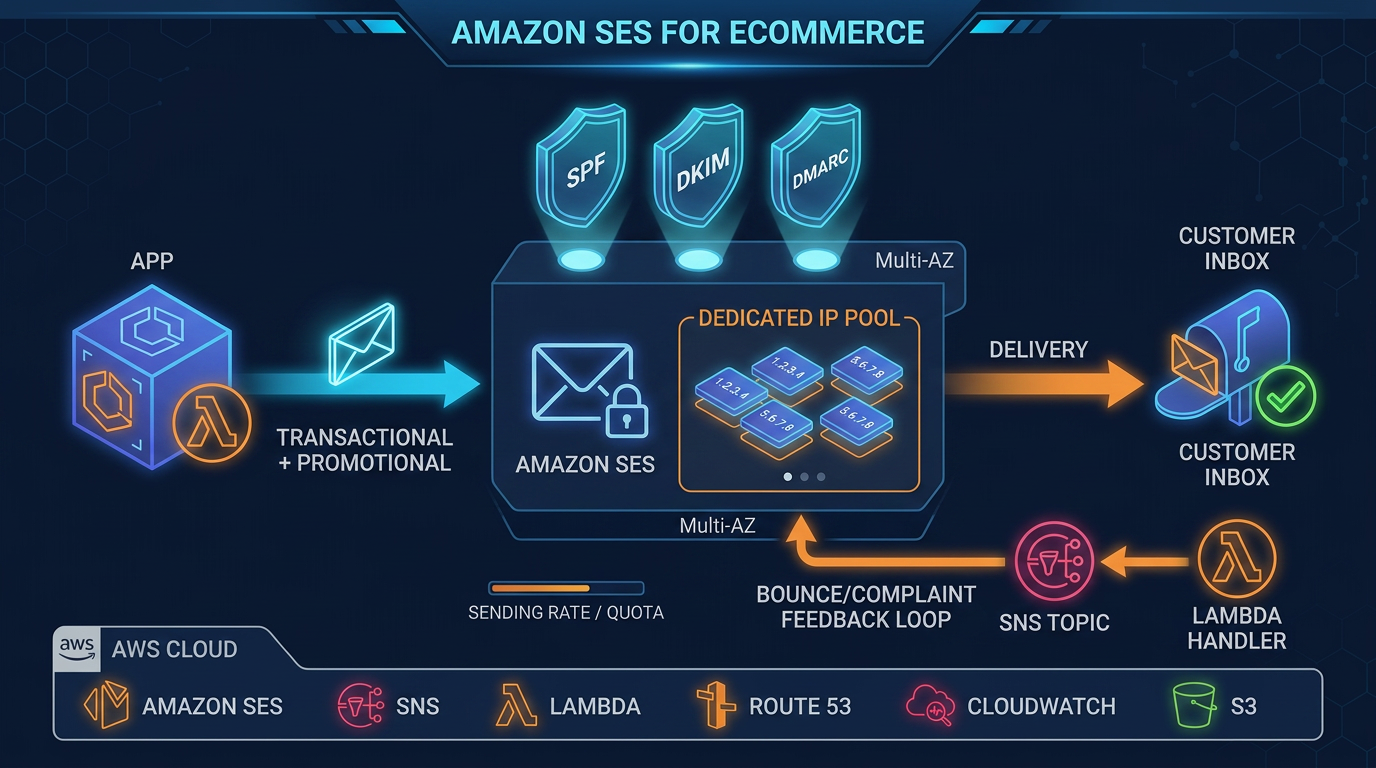
Retail teams using open rate next to inbox placement can see where this field sits in the wider send path in Amazon SES for eCommerce.
Where the field sits
isBotEvent is a property of the open object and the click object. It is not on mail, and it is not a message tag.
| Open | Click | The other 8 event types | |
|---|---|---|---|
| JSON location | open.isBotEvent | click.isBotEvent | Field absent |
| Values | Likely, Unlikely | Likely, Unlikely | |
| Also on the object | ipAddress, timestamp, userAgent | those three, plus link and linkTags |
The Developer Guide’s wording, on both the SNS contents page and the Firehose contents page: the likelihood that the event was generated by an automated system rather than a human. Possible values are Likely and Unlikely.
The JSON eventType strings are Open and Click. The SESv2 API lists the same events as OPEN and CLICK inside MatchingEventTypes. The other published types are Bounce, Complaint, Delivery, Send, Reject, Rendering Failure, DeliveryDelay, and Subscription.
You only receive an Open or Click record when three things are already true: the configuration set destination includes that event type, the message was sent with that configuration set, and open tracking or click tracking was on for the send. Identity-level bounce and complaint feedback is a different channel. When event publishing through a configuration set is not in use, the top-level field is named notificationType rather than eventType, and that channel does not publish Open or Click.
Official Open sample
The record below is the Open example from Examples of event data that Amazon SES publishes to Amazon SNS. Firehose uses the same Open object (Firehose examples). The timestamps are the original 2017 sample dates. AWS added isBotEvent to the example in place. In this sample the value is Unlikely.
{
  "eventType": "Open",
  "mail": {
    "commonHeaders": {
      "from": ["sender@example.com"],
      "messageId": "EXAMPLE7c191be45-e9aedb9a-02f9-4d12-a87d-dd0099a07f8a-000000",
      "subject": "Message sent from Amazon SES",
      "to": ["recipient@example.com"]
    },
    "destination": ["recipient@example.com"],
    "headers": [
      {
        "name": "X-SES-CONFIGURATION-SET",
        "value": "ConfigSet"
      },
      {
        "name": "X-SES-MESSAGE-TAGS",
        "value": "myCustomTag1=myCustomValue1, myCustomTag2=myCustomValue2"
      },
      {
        "name": "From",
        "value": "sender@example.com"
      },
      {
        "name": "To",
        "value": "recipient@example.com"
      },
      {
        "name": "Subject",
        "value": "Message sent from Amazon SES"
      },
      {
        "name": "MIME-Version",
        "value": "1.0"
      },
      {
        "name": "Content-Type",
        "value": "multipart/alternative; boundary=\"XBoundary\""
      }
    ],
    "headersTruncated": false,
    "messageId": "EXAMPLE7c191be45-e9aedb9a-02f9-4d12-a87d-dd0099a07f8a-000000",
    "sendingAccountId": "123456789012",
    "source": "sender@example.com",
    "tags": {
      "myCustomTag1": ["myCustomValue1"],
      "myCustomTag2": ["myCustomValue2"],
      "ses:caller-identity": ["IAM_user_or_role_name"],
      "ses:configuration-set": ["ConfigSet"],
      "ses:from-domain": ["example.com"],
      "ses:source-ip": ["192.0.2.0"]
    },
    "timestamp": "2017-08-09T21:59:49.927Z"
  },
  "open": {
    "ipAddress": "192.0.2.1",
    "timestamp": "2017-08-09T22:00:19.652Z",
    "userAgent": "Mozilla/5.0 (iPhone; CPU iPhone OS 10_3_3 like Mac OS X) AppleWebKit/603.3.8 (KHTML, like Gecko) Mobile/14G60",
    "isBotEvent": "Unlikely"
  }
}
mail.tags are the tags on the message, including ses:configuration-set. They are not the bot flag. The bot flag is only inside open.
When the destination is SNS, this object is the event record. SNS delivers it as the Message string inside the SNS notification envelope. The examples page shows the event record, not the SNS envelope. Firehose writes the same object, one JSON record per line, to the delivery stream you configured.
Official Click sample
Same examples page. The Click object adds link (the URL the recipient clicked) and linkTags (tags from the ses:tags attribute on the link). In AWS’s published sample, isBotEvent is Likely.
Those two sample labels are the values AWS wrote into the documented examples. The iPhone string on the Open record and the Chrome string on the Click record are the 2017 sample user agents, left in place when AWS added the field. Read isBotEvent from the object. The user agent string is context for the event, and it is the wrong place to recompute the label.
{
  "eventType": "Click",
  "click": {
    "ipAddress": "192.0.2.1",
    "link": "http://docs.aws.amazon.com/ses/latest/DeveloperGuide/send-email-smtp.html",
    "linkTags": {
      "samplekey0": ["samplevalue0"],
      "samplekey1": ["samplevalue1"]
    },
    "timestamp": "2017-08-09T23:51:25.570Z",
    "userAgent": "Mozilla/5.0 (Windows NT 10.0; Win64; x64) AppleWebKit/537.36 (KHTML, like Gecko) Chrome/60.0.3112.90 Safari/537.36",
    "isBotEvent": "Likely"
  },
  "mail": {
    "commonHeaders": {
      "from": ["sender@example.com"],
      "messageId": "EXAMPLE7c191be45-e9aedb9a-02f9-4d12-a87d-dd0099a07f8a-000000",
      "subject": "Message sent from Amazon SES",
      "to": ["recipient@example.com"]
    },
    "destination": ["recipient@example.com"],
    "headers": [
      {
        "name": "X-SES-CONFIGURATION-SET",
        "value": "ConfigSet"
      },
      {
        "name": "X-SES-MESSAGE-TAGS",
        "value": "myCustomTag1=myCustomValue1, myCustomTag2=myCustomValue2"
      },
      {
        "name": "From",
        "value": "sender@example.com"
      },
      {
        "name": "To",
        "value": "recipient@example.com"
      },
      {
        "name": "Subject",
        "value": "Message sent from Amazon SES"
      },
      {
        "name": "MIME-Version",
        "value": "1.0"
      },
      {
        "name": "Content-Type",
        "value": "multipart/alternative; boundary=\"XBoundary\""
      },
      {
        "name": "Message-ID",
        "value": "EXAMPLE7c191be45-e9aedb9a-02f9-4d12-a87d-dd0099a07f8a-000000"
      }
    ],
    "headersTruncated": false,
    "messageId": "EXAMPLE7c191be45-e9aedb9a-02f9-4d12-a87d-dd0099a07f8a-000000",
    "sendingAccountId": "123456789012",
    "source": "sender@example.com",
    "tags": {
      "myCustomTag1": ["myCustomValue1"],
      "myCustomTag2": ["myCustomValue2"],
      "ses:caller-identity": ["ses_user"],
      "ses:configuration-set": ["ConfigSet"],
      "ses:from-domain": ["example.com"],
      "ses:source-ip": ["192.0.2.0"]
    },
    "timestamp": "2017-08-09T23:50:05.795Z"
  }
}
The Click mail block matches the Open mail block except for three documented differences: an extra Message-ID header, ses:caller-identity of ses_user instead of IAM_user_or_role_name, and a later mail.timestamp.
Which destination actually has the field
AWS documents isBotEvent on the SNS and Firehose content pages linked above. Both pages describe the same Open and Click objects.
CloudWatch is also a configuration-set event destination, and it publishes metrics. Dimensions come from a message tag, an email header, or a link tag. CloudWatch does not receive this JSON object, so the SES open-count metric does not split on isBotEvent. There is no new CloudWatch dimension to select.
EventBridge can receive the same OPEN and CLICK event types on the account’s default event bus. The published field reference for isBotEvent is the SNS and Firehose pages. Confirm one record on your bus before you lock a parser to it. Expect the same open and click objects.
Keep the row, change the rate
Keep every raw Open and Click event. Exclude Likely from the human open rate and the human click rate.
The trade-off is undercount. Security scanners and privacy proxies can both be labeled Likely, so some people who did open the mail will sit in the bot bucket. A human rate built this way runs lower than the old “every Open is a person” rate. That lower number is the one to put in front of a marketer who is steering a list from open rate. Keep a separate count of Likely so the split stays visible.
A single Likely event leaves the recipient on the list. Suppression stays tied to complaints and unsubscribes. Consent stays on ConfigurationOverrides for SendEmail and SendBulkEmail, shipped August 21, 2026, and summarized in the eCommerce SES post.
Inbox placement stays a Virtual Deliverability Manager question. isBotEvent answers a narrower one: of the opens and clicks SES recorded, which ones look automated.
What broke — The week the field appeared, open-rate tiles that count every
eventType == "Open"kept the old number, because the query never readisBotEvent. The other break is a consumer that dropsLikelybefore the row lands in S3. The user agent and IP are gone, so you cannot check a bad label, and you cannot rebuild the pre-August rate.
Reproduce this — Save the Open example from the SNS examples page as
open.jsonand the Click example asclick.json. The input is that documented JSON on your machine. With jq 1.7,jq '.open.isBotEvent' open.jsonprints"Unlikely".jq '.click.isBotEvent' click.jsonprints"Likely".
jq 1.7, reading the official sample files, or a Firehose object file that is one JSON event per line:
jq -c 'select(.eventType == "Open" or .eventType == "Click") | {eventType, bot: (.open.isBotEvent // .click.isBotEvent)}'On the two official samples the Open line’s bot is Unlikely and the Click line’s bot is Likely.
What to Do This Week
- Open the configuration set destination and check
MatchingEventTypes. If it lists onlySEND,DELIVERY,BOUNCE, andCOMPLAINT,isBotEventwill never show up. AddOPENandCLICKonly when tracking is already on and you want the events stored. - On one day of Firehose output or one SNS subscription sample, count
LikelyandUnlikelyseparately for Open and for Click. Write the four counts down. That is your baseline. This post does not publish one. - Change the human open-rate query and the human click-rate query to exclude
Likely. Leave the raw rows in place. - Leave CloudWatch open-count alarms as they are until that query split is live. The metric did not grow a bot dimension.
- If a weekly deck still has one open-rate tile, label it
SES Open eventsorhuman opens (isBotEvent Unlikely)so the two figures cannot be swapped.
What This Post Doesn’t Cover
- A measured share of
Likelyevents on a production list. We have not published a first-party benchmark for that split. Use your own four counts from the steps above. - How Apple Mail Privacy Protection, a corporate secure email gateway, or any specific user agent is classified. AWS does not publish the classifier.
- Send-time tracking consent (
ConfigurationOverrides, August 21, 2026) andses:custom-pathfor app deep links (August 14, 2026). Both are summarized in Amazon SES for eCommerce. - Turning tracking off. With open tracking off there is no Open event, and there is no field to read.
Services: Amazon SES.
Talk through your SES event pipeline
Frequently asked questions
What does Amazon SES isBotEvent mean?
Do I have to enable isBotEvent?
When should I not exclude Likely events from an open rate?
What could go wrong if I delete Likely events?
Does the CloudWatch SES open metric exclude bots?
Which SES event types include isBotEvent?

AWS Cloud Architect & AI Expert
AWS-certified cloud architect and AI expert with deep expertise in cloud migrations, cost optimization, and generative AI on AWS.