Connect + Shopify (Oct 2026): Look Up Orders Inside 8 Seconds
Quick summary: As of October 27, 2026, a Connect flow can wait at most 8 seconds for a synchronous Lambda, and Shopify caps one GraphQL query at 1,000 points. Here is a phone and order-number lookup that fits both, with a tested fallback.
Key Takeaways
- As of October 27, 2026, a Connect flow can wait at most 8 seconds for a synchronous Lambda, and Shopify caps one GraphQL query at 1,000 points
- As of October 27, 2026, the hard limit in a Connect flow that calls Shopify is 8 seconds
- That is the maximum timeout on a synchronous Invoke AWS Lambda function block
- Shopify's side has its own ceiling: a single GraphQL query can cost at most 1,000 points, and a Standard plan restores 100 points per second
- A Connect flow passes the caller's phone number or a spoken order number to a Lambda
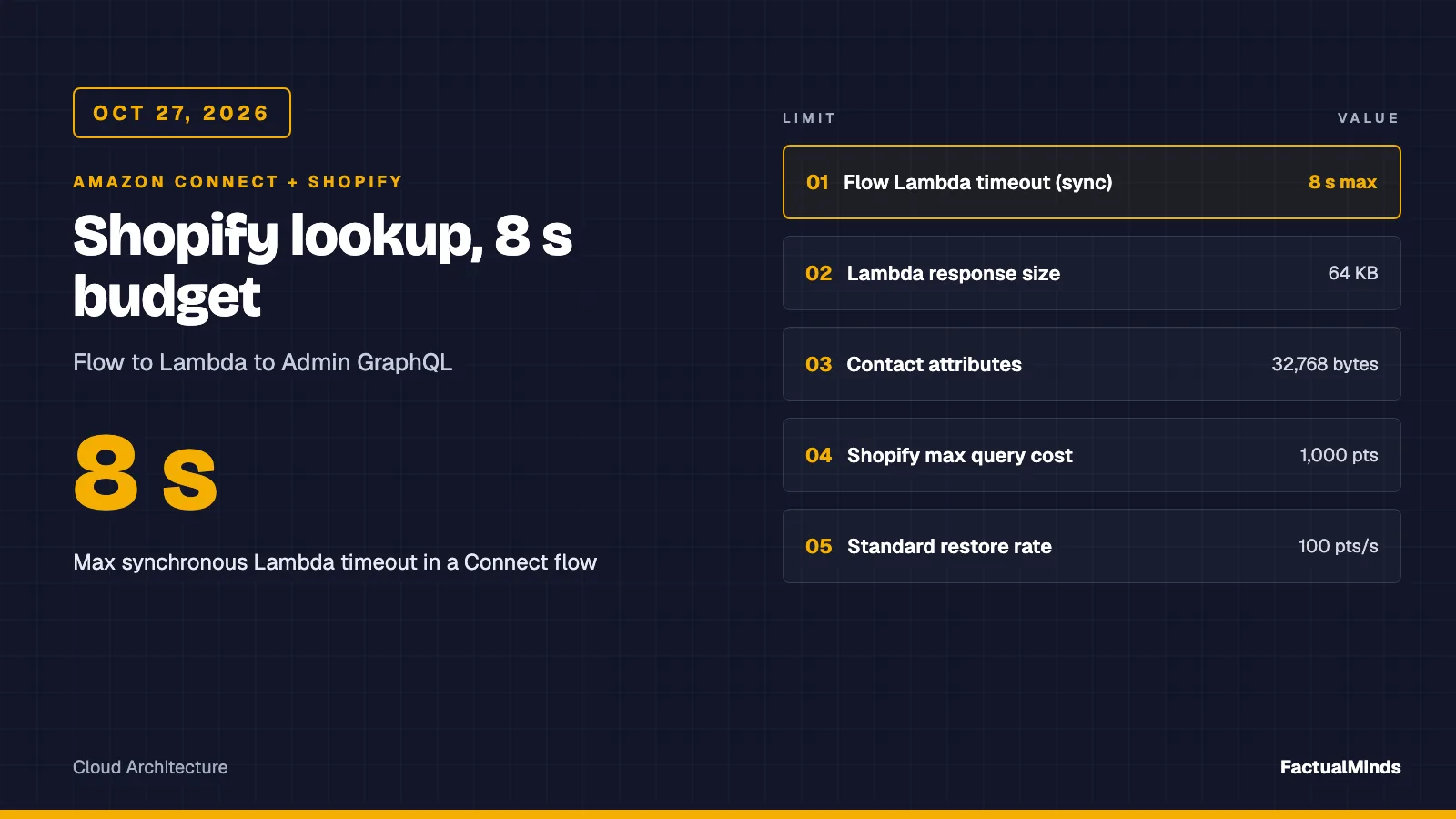
Table of Contents
As of October 27, 2026, the hard limit in a Connect flow that calls Shopify is 8 seconds. That is the maximum timeout on a synchronous Invoke AWS Lambda function block. Shopify’s side has its own ceiling: a single GraphQL query can cost at most 1,000 points, and a Standard plan restores 100 points per second. A lookup that fits both is small: one customer, their latest order, one fulfillment.
This post builds that lookup. A Connect flow passes the caller’s phone number or a spoken order number to a Lambda. The Lambda queries the Shopify Admin GraphQL API under a hard timeout and returns a flat map of strings. If Shopify is slow, throttled, or wrong, the flow gets a safe answer instead of silence.
Every capability is labeled. Native means built into Connect or AWS. Supported integration means a connector AWS documents. Custom engineering means code you write and run. The Lambda handler and its test are in the artifact folder. The wider eCommerce picture is on Amazon Connect for eCommerce and the Shopify and Bedrock side is in Shopify on AWS and Bedrock + Shopify.
Modeled design (not a cited client): FactualMinds has no published Connect plus Shopify engagement. The numbers below are AWS and Shopify documented limits and arithmetic on published prices. The one measurement is the mocked timeout test in the artifact, which shows the fallback returns in about 50 ms against a 50 ms budget. It does not measure Shopify.
Architecture and what is native
| Piece | Label | Role |
|---|---|---|
| Invoke AWS Lambda function block | Native (Connect) | Sync call, max 8 s, STRING_MAP response validation |
| Lambda handler | Custom engineering | Parse event, query Shopify, return flat map |
| Shopify Admin GraphQL API | Vendor API | Customer and order data |
| Secrets Manager | Native (AWS) | Holds the Shopify credential |
| Customer Profiles Shopify connector | Supported integration (AWS docs) | Optional cache of customers and orders |
| Shopify webhooks to EventBridge | Vendor feature + custom rules | Optional change events |
| Agent workspace Detail view | Native (Connect) | Shows attributes to the agent |
The live path is flow, Lambda, Shopify, back. The optional second path is Shopify, webhooks, Customer Profiles, so a profile already exists when the call lands. You can run either path or both. Most teams need only the first on day one.
Start with the live lookup. It is one function, one secret, and no sync job to debug. Add Customer Profiles when the agent needs history across contacts, not when you only need “where is my order”.
Shopify access: what changed and what to use
Shopify’s current model, from its developer docs:
- Dev Dashboard apps get a token through the client credentials grant. You POST
grant_type=client_credentials,client_idandclient_secrettohttps://{shop}.myshopify.com/admin/oauth/access_token. Do not send ascope. Shopify says it ignores it. The token carries the scopes the store granted to your installation, andexpires_inis always 86399 seconds (24 hours). - The grant works only when the app and the store are in the same Shopify organization. For a store outside it, such as a client’s store, Shopify points to custom distribution with token exchange or the authorization code grant.
- Legacy custom apps created in the store admin: Shopify staff stated on the developer community forum that new legacy custom apps cannot be created from January 1, 2026, and that existing ones keep working. We read that as a community post, not a Shopify docs page, so confirm in your store admin before you plan around it.
The AWS Shopify connector page for Customer Profiles still describes the older authorization-code flow with an API version of 2021-04 in its webhook example. That page predates the Dev Dashboard model. Treat its steps as the shape of the work, not as the current click path.
Request the minimum scopes:
| Scope | Why | Catch |
|---|---|---|
read_orders | Order name, financial and fulfillment status | Orders from the last 60 days only |
read_all_orders | Orders older than 60 days | Declared alongside read_orders. Partner-organization apps request it in the Partner Dashboard. Apps under a merchant organization in the Dev Dashboard do not need Shopify approval |
read_customers | Look up a customer by phone | Customer name, email and phone are protected customer data |
By default apps have no access to protected customer data. You can declare scopes early, but on a non-development store the API will not return that data until Shopify approves your app. Start the approval request before you plan a go-live date.
Put the credential in Secrets Manager and give the Lambda role secretsmanager:GetSecretValue on that one secret ARN. The artifact reads a JSON secret with either accessToken or clientId and clientSecret. With client credentials it caches the 24-hour token in module scope and refreshes it a minute before expiry. Never put the token in a Lambda environment variable or in a contact attribute.
The Lambda contract with Connect
Verified against the Connect admin guide:
- The response is a flat object of string key and value pairs when response validation is
STRING_MAP.JSONallows nesting. Arrays cannot be referenced in a flow. - Size is under 64 KB of UTF-8. The admin guide says values include only alphanumeric, dash and underscore characters. We did not test whether the service rejects other characters. The artifact sanitizes to that set, so
O'NeilbecomesO-Neil. - A synchronous block times out at 8 seconds. The Error branch fires on a timeout, a thrown exception, or a response Connect cannot parse.
- On a sync error Connect retries up to 3 times within the 8 seconds. A function that throws on a Shopify 500 can use most of the budget on retries.
- Total contact attributes are capped at 32,768 UTF-8 bytes. A chain of Lambdas is limited to 20 seconds in total.
The handler never throws. It catches everything and returns {found: "false", lookupStatus: "timeout"} and similar. The statuses are ok, not_found, ambiguous, no_identifier, timeout, throttled, auth, not_configured and error. The flow routes on lookupStatus, so “we could not check” is never spoken as “you have no order”. A revoked token returns auth, not not_found, for the same reason.
The one time budget covers the token fetch as well as the query: the Secrets Manager read and the OAuth call both receive the same abort signal.
The input is the standard Connect event. The caller’s number is Details.ContactData.CustomerEndpoint.Address, and any flow parameter arrives under Details.Parameters. Sample events are in the artifact folder.
Customer and order lookup
Context: Admin GraphQL API version 2026-10 (the version label on Shopify’s reference at the time of writing). Pin the version in an environment variable and re-test when you change it.
By phone, returning the customer’s latest order. This is the query the artifact sends. It asks for two customers on purpose: if two share the number, the handler returns ambiguous instead of reading out whichever one Shopify listed first.
query($q: String!) {
  customers(first: 2, query: $q) {
    nodes {
      firstName
      orders(first: 1, sortKey: PROCESSED_AT, reverse: true) {
        nodes { ...O }
      }
    }
  }
}
fragment O on Order {
  name
  displayFinancialStatus
  displayFulfillmentStatus
  fulfillments(first: 1) { trackingInfo(first: 1) { company } }
}
Variables: {"q": "phone:+15555550100"}. Shopify’s customers reference lists phone and email as searchable filters and notes that email is a tokenized field, so quote an exact address as a phrase. Connect gives you E.164 for a caller, so the handler rejects anything else without calling Shopify.
By order number, from a prompt the caller answered:
query($q: String!) {
  orders(first: 1, query: $q) {
    nodes { ...O customer { firstName } }
  }
}
Variables: {"q": "name:#1001"}. The handler strips everything except letters, digits and dashes from the spoken value before it builds the filter.
What we verified and what we did not: from Shopify’s reference pages we confirmed Order.name, displayFinancialStatus, displayFulfillmentStatus, fulfillments(first), Order.customer, and Fulfillment.trackingInfo. We confirmed the orders query takes query, first, sortKey and reverse. We could not confirm from the pages we read the Customer.orders arguments, Customer.firstName, the sub-fields of FulfillmentTrackingInfo, or the exact enum spellings. Run both queries in your store’s GraphiQL before you trust the artifact. The test uses a mocked response and cannot catch a wrong field name.
Rate limits
Shopify’s GraphQL Admin limits, from its rate-limits page:
| Limit | Value |
|---|---|
| Max cost of a single query | 1,000 points |
| Restore rate, Standard | 100 points per second |
| Advanced | 200 |
| Shopify Plus | 1,000 |
| Commerce Components | 2,000 |
| Array input arguments | max 250 items |
| Pagination | paginated arrays cap at 25,000 objects |
Cost is calculated from the fields you request, before and after execution. Objects cost 1, scalars and enums cost 0, mutations cost 10. Every response carries extensions.cost.throttleStatus with maximumAvailable, currentlyAvailable and restoreRate. The page does not state a bucket size for each plan, so read it from a live response instead of assuming one.
Our lookup asks for one customer, one order and one fulfillment. We did not calculate its point cost. Read requestedQueryCost from a real response and write it down. If a store on the Standard plan takes bursts of calls after a marketing email, the 100 per second restore rate is the number to divide by. Shopify’s backoff guidance is to wait at least one second after a throttle. In an 8-second flow that means one retry at most, so the handler does not retry. It returns throttled and the flow falls back.
Two throttle signals exist in what we read: a 429 response and the cost block. A GraphQL throttle can also arrive as HTTP 200 with an errors array. The handler maps HTTP 429, and any error whose extensions.code is THROTTLED, to throttled; every other errors array becomes error. We did not confirm THROTTLED against a live overflow, so check the code your API version returns.
Customer Profiles: cache or 360 layer
Customer Profiles has a Shopify connector. AWS documents it as a featured application using Amazon AppIntegrations. The steps:
- In the Connect console, Customer profiles, Add integration, choose Shopify.
- Create the connection. It needs your Shopify Partner app URL and the source name of an EventBridge event source created in the Partner dashboard.
- Pick object types for ingestion. Ingestion starts with records created after the integration is added. For history, AWS says to use Amazon S3 as a source.
- Create webhook subscriptions yourself. The documented topics are
customers/create,customers/enable,customers/update,draft_orders/create,draft_orders/update,orders/cancelled,orders/create,orders/fulfilled,orders/paid,orders/partially_fulfilledandorders/updated.
The scopes AWS lists are read_customers, read_orders and read_draft_orders. AWS says the connector needs a customer managed KMS key. We did not verify which Regions support the Shopify connector today. The 2022 launch post lists 8 Regions, so check the current availability page.
The connector is a supported integration. A flow that reads the profile is native. A custom ingestion with AppFlow or the Customer Profiles API is custom engineering. We found no AppFlow Shopify connector in the sources we read, so we would not plan around one.
Live versus cached:
| Live Lambda lookup | Customer Profiles cache | |
|---|---|---|
| Freshness | Current at call time | As of the last event delivered |
| Failure mode | Timeout, throttle on the call | Silent staleness, no health signal |
| Extra setup | One Lambda, one secret | Partner app, event source, subscriptions, KMS key |
| Cost shape | Per call | Profile and ingestion charges (not quoted here) |
| Best for | Order status in a flow | Agent history across contacts |
AWS’s page says Last run and Integration health are not available for this integration type, and that if the connection stops you delete and re-establish it. Plan a daily check: create a test customer in Shopify and confirm the profile appears. That check is exactly the one AWS’s verify step uses.
Use live lookup for the IVR and chat order-status question. Use the profile for the agent screen. The cost is two sources that can disagree. When they do, trust the live lookup.
Webhooks
Shopify delivers webhooks over HTTPS or to Amazon EventBridge. The EventBridge route in Shopify’s docs creates an event source for your AWS account ID and Region in the dashboard, you associate it with an event bus, and rules route to Lambda or SQS. The subscription URI has the form arn:aws:events:<REGION>::event-source/aws.partner/shopify.com/<APP-ID>/<SOURCE-NAME>. We did not verify Region coverage.
Use HTTPS delivery only if you need your own endpoint. Then verify the X-Shopify-Hmac-SHA256 header, a base64 HMAC-SHA256 of the raw request body with your client secret. Verify before any JSON parsing. Respond 200 fast. Shopify has a one-second connection timeout and a five-second timeout for the whole request, retries 8 times over 4 hours, and deletes an Admin API subscription after 8 consecutive failures. Dedupe on X-Shopify-Webhook-Id.
Agent workspace: show the order to the agent
Keep this short. Set the Lambda results as contact attributes with a Set contact attributes block, then show them in the agent workspace. A step-by-step guide with an AWS managed Detail view can display attributes when the contact starts. Its AttributeBar takes a label and value per item. For the legacy CCP, a screen pop needs the Streams API and a custom application.
Show lastOrderName, lastOrderStatus, fulfillmentStatus and carrier. Do not show anything the agent does not need. The deeper build is in custom agent UI and Customer Profiles.
Security and PII
- Least privilege:
read_ordersandread_customersonly. No write scopes. Addread_all_ordersonly if agents really need orders older than 60 days. - Minimize attributes: attributes are stored with the contact and counted against 32,768 bytes. The artifact returns the first name only, an order name, two statuses and a carrier. It does not return email, address, phone or line items.
- Do not log the response: the handler writes one JSON line per call with
lookupStatus, duration, and the HTTP status or GraphQL error codes on failure. It never logs the query variables or the data. Add the request cost fromextensions.costif you track it. Because the handler never throws, Lambda’sErrorsmetric stays at zero: alarm on a CloudWatch metric filter overlookupStatusinstead. - The caller ID is not authentication, and neither is an order number (see the FAQ). The artifact does not verify identity; add a second-factor check in the flow before reading anything out.
- Shared responsibility: using Secrets Manager and Connect does not make a design compliant on its own. Your PII and retention rules still apply to attributes and recordings.
What broke
What broke: modeled, not a cited client. The flow’s Lambda block has an 8-second timeout. The first version of a handler threw on any non-200 from Shopify. Connect retries a thrown error up to 3 times inside the 8 seconds. A Shopify 500 or a throttle then consumes the window with retries and the caller hears silence before the Error branch. Detection: a flow test where the mock returns 500. Fix: catch everything, return
lookupStatus: errorimmediately, and route that to a message that offers an agent. The artifact test covers 429, 500, GraphQL errors, no-match and a hung request. The second trap is spoken as truth:found = falseafter a timeout reads as “no order”. Route onlookupStatus.
Reproduce this: Run
node --testin the Shopify artifact folder. It mocksfetchand checks the flat string map, the query variables, each fallback status includingambiguousandauth, that a hung query or a hung token fetch aborts at the budget and returns instead of throwing, and that the log line never contains the phone number. It does not call Shopify.
Deployment validation
- Unit:
node --testpasses. - GraphiQL: run both queries against a development store. Record
requestedQueryCostandthrottleStatus. - Lambda test event: invoke with the sample event and with a bad phone. Confirm a flat string map both times.
- Flow test: use Connect’s testing and simulation, which as of October 26, 2026 also validates the data a Lambda action returns. See the evaluation checks post for that launch. Test the Error branch by pointing the secret at a bad token.
- Test call: call from a number on a test customer. Then from a number with no customer. Then block egress to Shopify and confirm the fallback message within the timeout.
- Rollback: keep the previous flow version published. If the lookup misbehaves, remove the Lambda block from the entry flow, not the function. Rotating the secret is the fix for a leaked token.
Troubleshooting:
| Symptom | Check |
|---|---|
Always not_found | Phone stored without +, or protected customer data not approved |
error on every call | Token expired, scope missing, wrong API version, GraphQL field renamed |
timeout under load | Throttle or slow API. Read throttleStatus, lower field count |
| Error branch fires, no fallback | Handler threw. Check CloudWatch for an uncaught exception or a response over 64 KB |
| Profile missing in the agent view | EventBridge event source not Active, or subscription deleted after failures |
Costs (published prices, checked October 27, 2026)
- Connect voice: the Connect pricing page lists $0.038 per voice minute and $0.010 per chat message. It says pricing varies by region and communication type, and did not break out phone number or Customer Profiles charges on that page.
- Lambda, US East (N. Virginia): $0.20 per 1M requests and $0.0000166667 per GB-second, with a free tier of 1M requests and 400,000 GB-seconds a month.
Arithmetic, not a measurement: 100,000 lookups a month at 512 MB and 1 second each is 50,000 GB-seconds. That is about $0.83 of compute plus $0.02 of requests at list price before the free tier. The Connect minutes the callers already use cost far more than the lookup.
What to do this week
- Decide which identifier you will trust: the order number the caller says, not the caller ID alone.
- Create a development store and a Dev Dashboard app with
read_ordersandread_customers. Start the protected customer data request. - Run both GraphQL queries in GraphiQL and record
requestedQueryCost. - Deploy the artifact handler with a 4.5 s budget under a 6 s function timeout and a 7 s flow block timeout.
- Route the flow on
lookupStatus. Write the timeout message before the happy-path message. - Test the 429 and 500 paths with the mock, then with a bad secret in the dev store.
FactualMinds is an AWS Select Tier Services Partner. If you want this wired into your flows end to end, start at Amazon Connect consulting or contact us.
What this post doesn’t cover
- Live Shopify measurements: no latency, query cost, or deflection numbers. We did not run against a store.
- BigCommerce and WooCommerce: see the BigCommerce and WooCommerce post.
- Writes: cancelling, refunding or editing an order from a flow. That needs write scopes and a separate risk review.
- Connect AI agents answering order questions: see Connect AI agents for FAQ and self-service.
- Pricing for Customer Profiles, telephony and AppIntegrations: use the current price pages for your Region.
- Shopify Plus checkout and B2B specifics, and Shopify’s Region coverage for EventBridge.
Related reading
- Amazon Connect Consulting
- Amazon Connect for eCommerce
- Shopify on AWS
- Bedrock + Shopify Integration
- AI Customer Support Agent for eCommerce (2026)
Frequently asked questions
Does Amazon Connect have a native Shopify integration?
How long can a Connect flow wait for the Shopify lookup?
Which Shopify scopes does an order lookup need?
Can I use the client credentials grant for a client's store?
When should we not call Shopify live from the flow?
What could go wrong with phone-number matching?
Is the order status stale if I use Customer Profiles?
Does this post prove a result for our store?

AWS Cloud Architect & AI Expert
AWS-certified cloud architect and AI expert with deep expertise in cloud migrations, cost optimization, and generative AI on AWS.