Connect Evaluation Checks (Oct 2026): Warnings Don't Stop Activation
Quick summary: On October 9, 2026 Amazon Connect Customer added Save and validate in 8 Regions. Structural errors block activation. Gen AI warnings do not. The Gen AI check is capped at 3 in parallel and 30 per hour.
Key Takeaways
- On October 9, 2026 Amazon Connect Customer added Save and validate in 8 Regions
- The Gen AI check is capped at 3 in parallel and 30 per hour
- On October 9, 2026, AWS added automated checks that suggest edits to Amazon Connect Customer performance evaluation forms
- The generative AI stage allows 3 validations in parallel and 30 per hour on each instance
- The check is in 8 Regions

Table of Contents
On October 9, 2026, AWS added automated checks that suggest edits to Amazon Connect Customer performance evaluation forms. In the admin website, Save and validate runs two stages. Structural problems return as Errors and block activation. If the form has generative AI questions and no structural errors, those questions are checked against 11 best practices and return as Warnings. Warnings do not block activation. The generative AI stage allows 3 validations in parallel and 30 per hour on each instance. The check is in 8 Regions.
AWS’s own example is the question “Did the agent provide a sales disclosure?” The check asks the manager to name the exact disclosure. Activate with that warning still open, and the model can mark the question Yes because the transcript contains the word “disclosure.”
Cases CSV export, shipped August 4, 2026 in 10 Regions, is a different control. See Connect Cases CSV export. Broader design (flows, workspace, Cases) stays on Amazon Connect consulting.
Modeled comparison (not a cited client) — One sales form, two gates. Gate A is structural: section and question limits, weights, scoring consistency, unique IDs. An error stops Activate. Gate B is the 11 generative AI checks. A warning does not stop Activate. The numbers here are AWS’s 8 Regions, 11 checks, and the 3 / 30 rate limit from the evaluation form admin guide, Step 9. We have not published a before-and-after accuracy figure for a live queue.
What shipped on October 9, 2026
| Piece | What AWS documents |
|---|---|
| Entry | Evaluation form → Save → Save and validate |
| Stage 1 | Structural and configuration rules. Findings are Errors. They block activation. |
| Stage 2 | Runs only when stage 1 is clean and the form has Gen AI questions. Findings are Warnings. |
| Rate limit | 3 Gen AI validations in parallel, 30 per hour, per instance. Structural checks are outside that cap. |
| Resolved | Hides a finding in the side panel. Does not re-run validation and does not change activation state. |
| Regions | 8, listed in the FAQ. Seoul and Cape Town are absent. |
| Permission | Analytics and Optimization → Evaluation forms → manage form definitions → Create |
A green banner means the pass found no recommendations. Findings reopen from the Findings control beside a question, or from Save and validate again.
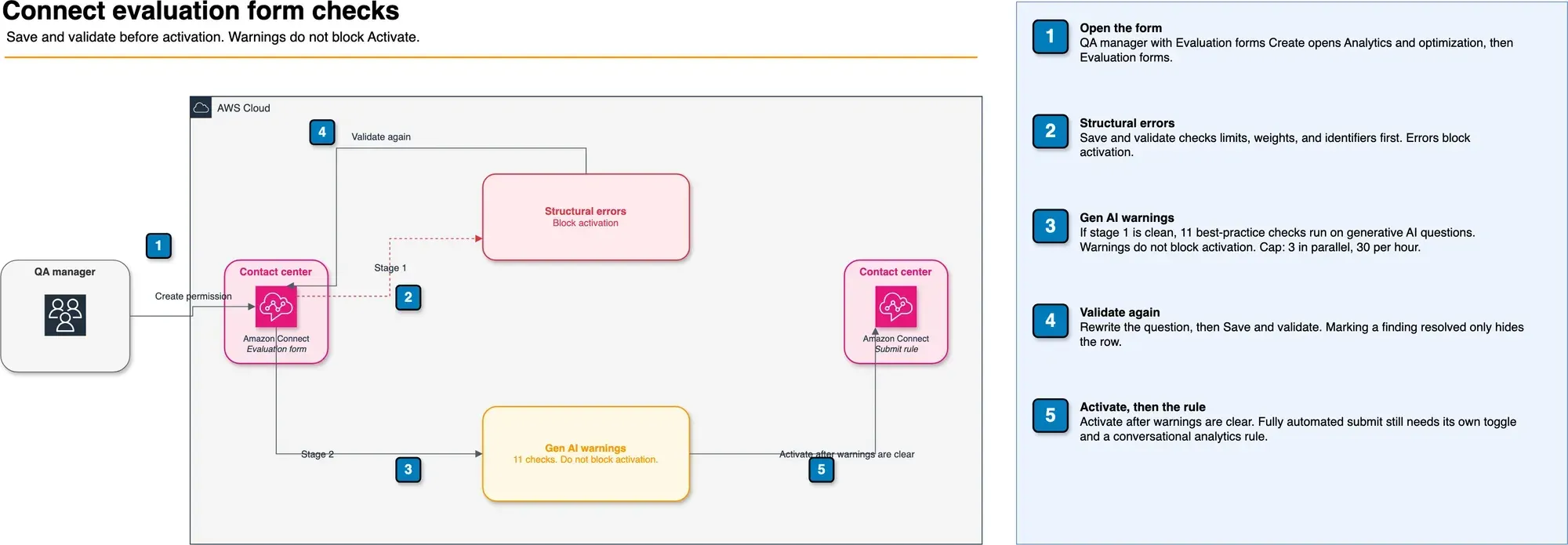
Figure: Save and validate, then Activate. Open the draw.io.
The 11 checks on a Gen AI question
AWS lists these for every question automated with generative AI. Warnings from this list do not block activation. Treat them as the quality bar anyway.
| Check | What fails it |
|---|---|
| Question phrasing | Title is a heading or a statement, not a full question ending in a question mark |
| Instructions present | No instructions telling the model how to answer |
| Answer option language | Acronyms or abbreviations in the options |
| Answer option conciseness | Options carry commentary or conditions instead of a short label |
| Transcript answerability | The answer needs data outside the transcript and the instructions |
| Positive action framing | The question asks the model to detect that something did not happen |
| Plain language | Instructions use abbreviations, acronyms, or in-house jargon |
| Spelling | Misspellings in the title, instructions, or options |
| External systems | Instructions mention a screen or state the transcript cannot show |
| Non-textual cues | Volume, pitch, speaking speed, or vocal tone. Professionalism and empathy are allowed |
| PII values | A specific personal-data value appears in the question or instructions. Scoring whether the agent handled PII correctly is allowed |
Clear Warnings before Activate
Clear every Warning, then Activate. AWS still lets you activate with Warnings open. Another validation pass shares the 3-parallel and 30-per-hour cap, so a bulk cleanup of many forms can stall. Shipping the vague question costs a score you cannot explain to a supervisor.
Split the work the way the admin guide already splits automation:
- Metrics for numbers the contact already stores: longest hold, hold count, interaction duration, interruptions, sentiment score.
- Contact categories when the phrase is a rule. The greeting example in the docs is “Thank you for calling” in the first 30 seconds, labeled
ProperGreeting. - Generative AI for single-select and text questions a person could answer from the transcript plus the instructions. On fully automated submit, that path is capped at 10 questions per contact. The cap is the existing conversational-analytics quota, not a limit introduced on October 9.
What broke — Modeled on the October 9 sales-disclosure example, not a cited client. Structural validation passes. The warning asks for the exact disclosure text. The manager marks the finding resolved and activates. Auto-scores mark Yes when the transcript says “disclosure” and the required sentence is absent. Detection: a supervisor opens the contact next to the auto-score. Fix: put the required sentence in the instructions, choose Save and validate again, and activate only after that warning is gone. Resolved hides the row. It does not re-check the form.
Reproduce this — Run
evaluation-form-validation-checklist.md. It covers the Region gate, the Create permission, one vague Gen AI question, one metric question, the rate-limit retry, and a check that Resolved did not re-run validation.
How answers get filled at runtime
Authoring checks and runtime scoring are different steps. Save and validate judges the form. After activation, conversational analytics fills answers on each contact.
| Automation | Question types | Use it when |
|---|---|---|
| Contact categories | Single select, multiple select | The expected words or call reason already exist as a rule |
| Generative AI | Single select, text | The transcript and your instructions are enough to decide |
| Metrics | Number | The fact is hold time, interruptions, sentiment, or a similar contact metric |
Fully automated submission is a separate toggle, Enable fully automated submission of evaluations, plus a conversational-analytics rule that chooses which contacts to score. Evaluators can still edit and resubmit. Self-service contacts (a Lex bot or an AI agent) use the contact interaction type under Additional settings. They are a different target from the human-agent form, with the same authoring check once a question is on generative AI.
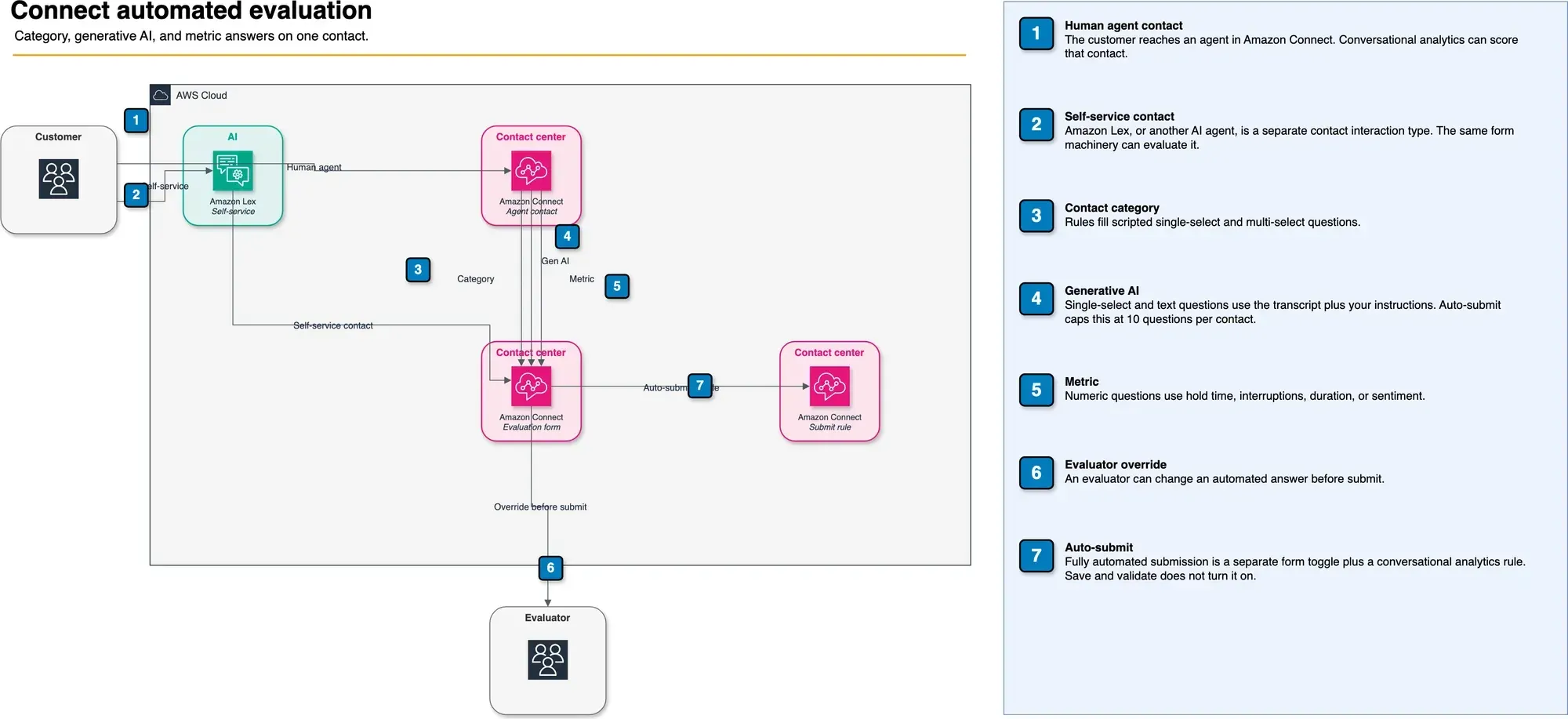
Figure: Three ways a contact gets an answer, plus override and auto-submit. Open the draw.io.
What to Do This Week
- Confirm the instance Region is one of the 8. Seoul and Cape Town can have Cases and still lack this check.
- Open one live generative AI form and choose Save and validate. You need the Evaluation forms Create permission.
- Rewrite warnings that fail transcript answerability, positive action framing, or external-system references. Put the exact sentence in the instructions.
- Validate again. Do not treat Resolved as a second pass. If the side panel says you hit 3 in parallel or 30 in the hour, wait and retry. Structural validation still runs.
- Leave fully automated submit off until a supervisor has compared auto-scores to recordings on the questions you rewrote.
Need the form model, the security profiles, and the rule design done as one pass? FactualMinds is an AWS Select Tier Services Partner. Start at Amazon Connect consulting or contact us.
What This Post Doesn’t Cover
- Connect Customer pricing for voice, chat, conversational analytics, or evaluations. Use the current pricing page for your Region.
- A calibration study. We have not scored a queue before and after these checks, and this post does not invent one.
- Scoring design. Percentage versus points, automatic fail, weights, and performance thresholds are in Steps 5 and 8 of the same admin guide.
- PDF import of a form from another quality tool (documented max 2 MB). Useful, and out of scope here.
- The validation API. Console path above is the one this post verified against the October 9 what’s new and Step 9 of the admin guide.
Related reading
- Amazon Connect Consulting
- Connect Cases CSV Export (Aug 2026)
- HIPAA-Compliant Architecture on AWS
- AWS for Retail: Complete Guide
Frequently asked questions
What did AWS ship for Connect evaluation forms on October 9, 2026?
When should we not rely on this check?
What could go wrong if we activate with warnings still open?
Which Regions include the October 9 check?
How many questions can generative AI answer on one contact?
Should every contact be auto-submitted on day one?

AWS Cloud Architect & AI Expert
AWS-certified cloud architect and AI expert with deep expertise in cloud migrations, cost optimization, and generative AI on AWS.