
Customer Profiles (Oct 2026): Keys Decide Who the Agent Sees
Quick summary: As of October 28, 2026, a Customer Profiles object type needs exactly 1 UNIQUE key, allows 10 keys by default, and merged profiles cannot be unmerged. This guide covers mapping, ingestion, matching, limits, deletion and cost.
Key Takeaways
- As of October 28, 2026, a Customer Profiles object type needs exactly 1 UNIQUE key, allows 10 keys by default, and merged profiles cannot be unmerged
- As of October 28, 2026, an Amazon Connect Customer Profiles object type needs exactly 1 key and at least one key, allows 10 keys by default, and any profile merge is permanent
- Naming note: AWS now writes "Amazon Connect Customer" in many docs
- Facts come from the AWS docs linked inline
- The code in the artifact folder is tested only locally: five cases, no AWS calls
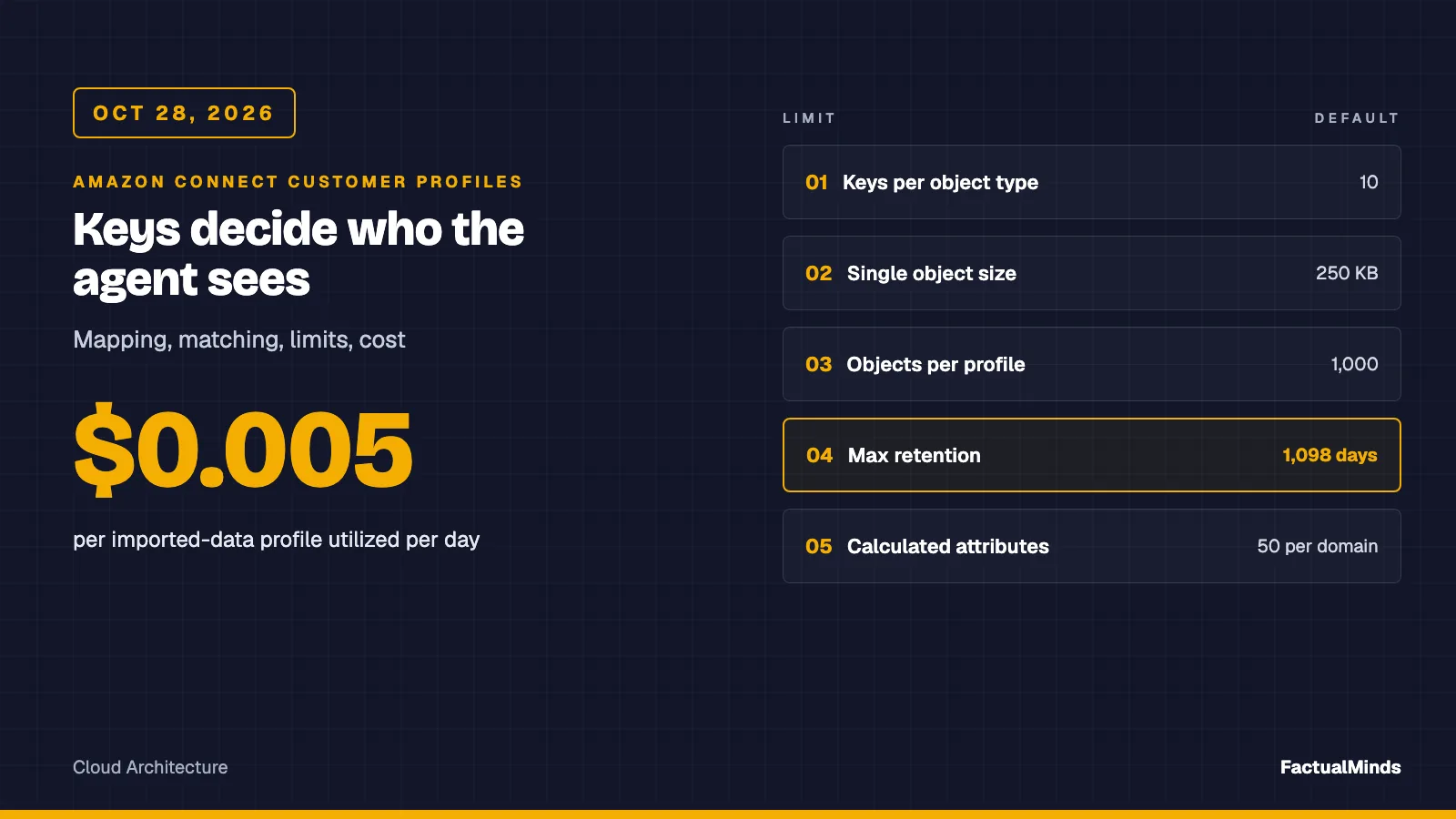
Table of Contents
As of October 28, 2026, an Amazon Connect Customer Profiles object type needs exactly 1 UNIQUE key and at least one PROFILE key, allows 10 keys by default, and any profile merge is permanent. Most of the pain in a profiles rollout traces back to those three facts: which keys you pick decides who an agent sees, and a wrong merge cannot be reverted.
This is the deep dive on Customer Profiles alone. The parent post, Connect agent UI options and Customer Profiles, compares the four agent UI paths and gives a short profiles overview. This one stays on the data layer: domains, mapping, ingestion, matching, calculated attributes, limits, deletion, and cost. Naming note: AWS now writes “Amazon Connect Customer” in many docs. The console and APIs are the same.
I have not run this against a production domain. Facts come from the AWS docs linked inline. The code in the artifact folder is tested only locally: five node --test cases, no AWS calls.
Domain and encryption
A domain is the container for profiles, object types, keys, and encryption. Each Connect instance associates with one domain, and several instances can share one. You cannot associate a domain with an instance through the API, so use the admin console for that step. CreateDomain requires DefaultExpirationDays (1 to 1,098) and takes an optional SQS dead-letter queue URL, a Matching block, a RuleBasedMatching block, and a DataStore flag.
Encryption has more consequences than it looks. AWS says all data at rest is encrypted under the KMS key you choose, and when you create a domain you supply a customer managed key. Callers of the profile APIs then need explicit kms:Decrypt and kms:GenerateDataKey on that key, or lookups fail with access errors that look like IAM problems. An object type can carry its own key and takes precedence over the domain key. If you enable the data store, you can no longer change the keys on that domain or its object types.
Two decisions to make before you click anything:
- Dead-letter queue: wire it on day one. It is where failed ingestion lands, including objects that match no profile when
AllowProfileCreationisfalse. The queue policy must allowSendMessagefrom the service. - Data store: it keeps Customer Profiles data for up to 10 years, is needed for Spark SQL segmentation and predictive insights, cannot be disabled once on, and does not compute calculated attributes or populate the agent workspace. Leave it off until you have a use for it, because it extends your deletion surface.
The standard profile and object types
Every record ends up in one of two places. The standard profile holds fixed fields (FirstName, PhoneNumber, EmailAddress, addresses, AccountNumber, and an Attributes map for custom values). A profile object is the full source record, stored as JSON up to 250 KB. A mapping can also write into other standard objects such as _order, _asset, or _case. A standard object accumulates fields from many records. A profile object is replaced wholesale when the same UNIQUE value arrives again.
An object type mapping is a set of Fields and a set of Keys. Fields pull values from _source.* and may carry a Target and a ContentType. Keys combine fields into identifiers. Field names are local to the mapping. Key names are global to the domain, which is where the trouble starts.
Key flags
The StandardIdentifiers array sets each key’s role. These are the documented values that matter for commerce:
| Flag | Meaning | Rule |
|---|---|---|
UNIQUE | Identifies this object instance. Same value replaces the old object | Exactly one per object type. Cannot combine with LOOKUP_ONLY or NEW_ONLY |
PROFILE | Used to find the profile. Key is stored and searchable | At least one per object type |
SECONDARY | Fallback match, consulted only when primary PROFILE keys give no unambiguous match. Stored | Always paired with PROFILE |
LOOKUP_ONLY | Matches during this ingestion, then is not stored | Reserved names _profileId, _orderId, _caseId, _assetId must use it |
NEW_ONLY | Stored only if this ingestion creates the profile, otherwise behaves like LOOKUP_ONLY | Needs another plain PROFILE key |
ORDER, ASSET, CASE, others | Ties the object to a standard record | Required if any field targets that standard object |
Two rules catch people. At least one PROFILE key must carry neither LOOKUP_ONLY nor NEW_ONLY, so every object can always attach durably. And a Target may not be a system-managed ID such as _order.OrderId. Put your own order number under Attributes instead.
Worked example: an eCommerce order
Context line: an excerpt of the example mapping in the artifact, which follows the Fields / Keys shape from AWS’s mapping examples. It is labelled an example and was not created in a live domain.
"Keys": {
  "storeOrderNumber": [{ "StandardIdentifiers": ["ORDER", "UNIQUE"], "FieldNames": ["orderNumber"] }],
  "_email": [{ "StandardIdentifiers": ["PROFILE"], "FieldNames": ["email"] }],
  "_phone": [{ "StandardIdentifiers": ["PROFILE", "SECONDARY"], "FieldNames": ["phone"] }]
}
The reasoning: the store order number is both the ORDER link and the UNIQUE key, so re-sending an order updates it. Email is the primary match key. Phone is SECONDARY, so a phone shared by two people in one household is consulted only when email did not resolve. The email and phone fields carry ContentType values of EMAIL_ADDRESS and PHONE_NUMBER. AWS documents that without a content type a value is matched as an exact string, and that the same number in another format will not match.
Context line: registering the mapping from a downloaded template, the command AWS’s S3-connector walkthrough uses.
aws customer-profiles put-profile-object-type --cli-input-json file://template.jsonCreating the object type proves only that it is structurally valid. AWS’s advice is to ingest a few representative records and check them with SearchProfiles before pointing a full integration at the type. The artifact’s test encodes the structural rules above as a local lint. That catches a missing UNIQUE key early but is not AWS validation.
Ingestion paths
| Path | Label | Notes |
|---|---|---|
| Salesforce, Zendesk, Marketo, ServiceNow, Amazon S3 | Supported integration (through Amazon AppFlow) | Pre-built. S3 means you define the mapping |
| Segment, Shopify | Supported integration | AWS describes near-real-time for the connectors launch. The current Shopify setup page is titled “periodic updates”, so measure the lag yourself |
PutProfileObject | Native API, your code calls it | Object is a serialized JSON string, up to 256,000 characters. Returns ProfileObjectUniqueKey |
| Connect contact records | Native | Contact data flows in by itself |
| NetSuite, Odoo, JD Edwards, BigCommerce, WooCommerce | Custom engineering | No documented pre-built connector. Use S3 or PutProfileObject |
For the commerce platforms, the connector choices and Lambda call patterns live in the existing posts: Connect and Shopify, BigCommerce and WooCommerce, and NetSuite, Odoo, JD Edwards. Per-platform deep dives are in NetSuite and Odoo. The Customer Profiles side of all of them is this post.
Two things the connector pages do not emphasise:
PutProfileObjectcan create a profile. Sending a contact record not mapped to an existing profile can create an inferred profile holding only a phone number. Every further record with that phone lands on the same inferred profile. That is convenient and also how junk accumulates.- Event streams go outward.
CreateEventStreamsubscribes to profile create and update events and delivers them to one Kinesis Data Stream per stream, in the same Region and account. The quota is 1 event stream per domain. It is an export path for syncing profiles to other systems, not an ingestion path.
Do not promise agents that an order placed seconds ago is on the profile unless you have measured your own path.
Phone normalisation
Context line: the artifact’s phone.mjs, custom engineering, run in the artifact’s tests only. It converts common formats to E.164 and returns null rather than guessing.
toE164('(206) 555-0150');        // '+12065550150'
toE164('020 7946 0958', '44');   // '+442079460958'
toE164('555-0150');              // null
AWS’s own example says PHONE_NUMBER ignores formatting, so +1 (206) 555-0150 matches 2065550150. I did not test how country codes are treated, so I normalise before sending and before SearchProfiles. The helper is deliberately small: a length check of 8 to 15 digits, North American and trunk-zero handling, and no per-country validity. Use libphonenumber if you need real validation.
Identity resolution
There are two systems, and they behave differently.
ML-based matching compares name, email, phone, address, and date of birth, and builds match groups with a match ID and a confidence score between 0 and 1. Turning Matching on starts a weekly batch Identity Resolution Job. By default it runs Saturdays at 12 AM UTC. Review results with GetMatches or an S3 export. Auto-merging uses up to 10 consolidation criteria, evaluated in priority order. Within one criterion, attributes are ANDed with exact comparison, and criteria are ORed against each other. Conflicts resolve by recency unless you name a source object type.
Rule-based matching uses up to 15 rule levels over attributes such as AccountNumber, PhoneNumber, EmailAddress, names, address parts, and custom Attributes.* fields. It evaluates as profiles are ingested rather than weekly. Enabling it on an existing domain starts in a PENDING state for an hour, and the rule is changeable one day after it goes ACTIVE. Review with ListRuleBasedMatches and GetSimilarProfiles.
Context line: the rule-based block of CreateDomain or UpdateDomain, with matching on and merging left unset. Field names are from the API reference. Values are illustrative.
"RuleBasedMatching": {
  "Enabled": true,
  "MatchingRules": [{ "Rule": ["PhoneNumber", "LastName"] }, { "Rule": ["EmailAddress"] }],
  "MaxAllowedRuleLevelForMatching": 2,
  "AttributeTypesSelector": { "AttributeMatchingModel": "ONE_TO_ONE", "PhoneNumber": ["PhoneNumber"] }
}
How to review, and why you cannot undo
AWS states in two places that consolidation cannot be undone, and the MergeProfiles reference says merged profiles cannot be separated. MergeProfiles moves keys and objects into the main profile and deletes the others, up to 20 profiles per call. On field conflicts the main profile wins, unless you name a source profile for that field, in which case the named profile wins even if its value is null. One more documented behaviour: a field entered by an agent or through the API is not overwritten by an ingested value when profiles merge.
So the review path is the only safety net:
- Enable matching only. Do not set
MaxAllowedRuleLevelForMerging. - Read the groups. For ML matching, filter by confidence score and sample the lower band by hand. Run
GetAutoMergingPreviewbefore the first job that merges. - Merge only the rule levels you trust, starting with a high-cardinality attribute such as an account number or email. Avoid rules built only from values many profiles share, such as city or state.
- For the grey zone, merge by hand through
MergeProfiles, or raise a Connect task for an agent to review, which is the pattern AWS’s own duplicate-removal post uses.
Calculated attributes
A calculated attribute is an aggregate over profile-object data, defined once per domain and available for all profiles. It references one object type and at most two of its fields. The statistics are AVERAGE, COUNT, SUM, FIRST_OCCURRENCE, LAST_OCCURRENCE, MINIMUM, MAXIMUM, MAX_OCCURRENCE, and RECENT_OCCURRENCES.
The limits that matter:
- 50 per domain, not adjustable.
- A time window of up to 366 days initially, in days, and an optional
ObjectCountof 1 to 100. - The
Expressioncannot be changed after creation. Updates are limited to display name, description, time range, object count, and threshold. - Increasing the window later does not pull in history older than the old range.
UseHistoricalDatais set at creation to include data ingested before the definition existed. - A
TimestampSourcelets the window follow a field in your JSON, such as an order date, instead of the ingestion time. It cannot be updated afterward. Set it at creation or the window follows ingestion time.
Context line: a definition for orders in the last 90 days, shaped from the API page. That page spells the range unit both Units and Unit and lists the value as Days, so confirm the exact field in your SDK’s model before use.
{
  "CalculatedAttributeName": "orders_90d",
  "AttributeDetails": { "Attributes": [{ "Name": "orderNumber" }], "Expression": "{StoreOrder.orderNumber}" },
  "Statistic": "COUNT",
  "Conditions": { "Range": { "Value": 90, "Unit": "DAYS" } },
  "UseHistoricalData": true
}
ListCalculatedAttributesForProfile triggers the calculation and returns the value with an IsDataPartial flag. Treat partial as partial in the agent view.
Segments
Segments are dynamic groups of profiles built from attributes, including calculated attributes, which you must create first. They update as data changes, can be exported to CSV, and feed Connect outbound campaigns. There is a quota of 200 segment snapshots per day, adjustable. Segmentation powered by Spark SQL needs the data store. I did not test segment behaviour for this post.
How the profile reaches the agent
- Agent workspace: agents see the profile of the contact in focus. Security profile permissions (
CustomerProfiles.View,.Edit,.Create) control access. Give agents View unless the job needs more. - Flow block: the Customer profiles block can get, create, and update a profile, search with up to five identifiers, retrieve profile objects and calculated attributes (with a profile ID), and associate the contact with an existing profile. Response fields are stored as contact attributes and can be referenced as
$.Customer.FirstNameor$.Customer.Asset.Status. - Custom desktops: see the parent post for embedding the native profile app and for the browser-to-backend pattern.
Quotas that bite
These are AWS defaults as read on October 28, 2026. Several are adjustable, so confirm in Service Quotas.
| Quota | Default | Adjustable |
|---|---|---|
| Keys per object type | 10 | Yes |
| Fields per object type | 250 | No |
| Single profile or object size | 250 KB | No |
| Total size of all objects for a profile | 51,200 KB | Yes |
| Objects per profile | 1,000 | Yes |
| Object types per domain | 100 | Yes |
| Domains per Region | 100 | Yes |
| Maximum expiration | 1,098 days | Yes |
| Calculated attributes per domain | 50 | No |
| Integrations per domain | 50 | Yes |
The one to plan around is objects per profile. When a profile hits its total, Connect evicts the oldest object of the type furthest over its configured limit, and if none is over it, the incoming object evicts the oldest of its own type. A type with no limit is never over, so an unbounded clickstream can occupy the whole budget. Set MaxProfileObjectCount per type. Eviction removes the object from the profile, not from the data store.
Retention and deletion
ExpirationDays on an object type is recorded on each object at ingestion, so changing it affects only newly ingested data. DeleteProfile deletes the standard profile and all data pertaining to it, and AWS names it as the way to remove data from the data store. DeleteProfileObject removes a single object by its unique key.
AWS states Customer Profiles can be used in compliance with GDPR. That is a statement about the service. Whether your deployment is compliant depends on your controls, and none of this is legal advice. For an erasure request, DeleteProfile is one step. These copies are outside it, and each needs its own owner:
- The source file in S3 or the row in the CRM or ERP that feeds the next sync, which would recreate the profile.
- Downstream consumers of the event stream, including any Firehose-to-S3 archive.
- Match-result exports you configured to S3.
- Contact records, transcripts, and recordings in Connect itself.
The first item matters most: if you delete a profile but leave its source record, the next ingestion rebuilds it.
Cost (published prices, October 28, 2026)
From the AWS Connect Customer pricing appendix, US list prices:
- Searching and reading profile objects that hold only Connect data: $0.00.
- Profiles with imported or merged data: $0.005 per profile utilized per day. “Utilized” means read, merged, searched, or exported, counted once per profile per 24 hours however often it is touched.
- Profiles over 100 objects add $0.005 per additional 100 per utilized day. A profile with 300 objects costs $0.015 on a day it is used.
- Daily charges in a domain are capped at 30% of total stored profiles.
- Storage, updates, and segment creation: no charge. KMS is billed by KMS.
Illustration with assumed volumes, not a measurement: if agents touch 2,000 imported-data profiles of 300 objects each on a given day, that is 2,000 × $0.015 = $30 for that day. Because a profile counts once per day however often it is touched, cost follows the number of distinct imported-data profiles used per day, not ingestion volume. Contact-channel charges (for example $0.038 per voice minute) are separate. Confirm your Region before you budget.
What could break
Modelled counter-case, not an incident. A store imports 40,000 historical orders through S3 with the customer phone typed as free text and no ContentType, and keys _phone as PROFILE. Some rows carry 206-555-0150, others +12065550150. The values match as exact strings, so the same person becomes two inferred profiles. Rule-based matching on phone then treats them as different. A household that shares one landline produces the opposite error: a PROFILE key value matching several profiles is discarded, and new inferred profiles appear. Detection: sample SearchProfiles by _phone and count items per value. Fix: tag the field, normalise upstream, move phone to SECONDARY, then let matching find the real duplicates. The worst version is turning on merging before that review.
A second modelled failure is easy to miss. A COUNT over 90 days is still correct on day 91 for the window, but an agent reads “3 orders” for a customer whose 4th order was 95 days ago, and offers a loyalty tier on that. The attribute did what it was told. The definition was the problem.
My recommendation
Treat Customer Profiles as the agent’s read model, fed from the system you already trust, with email or an account number as the primary key and phone as SECONDARY. Turn matching on early and merging on late, and merge only rule levels you have sampled by hand. Strict keys leave more duplicates for agents to resolve on the call, and loose keys merge strangers permanently. Because a merge cannot be reversed, I would accept the duplicates.
Do not use it when a CDP or MDM already owns identity, or when you need guaranteed sub-second write-through. Call the source system live from a flow Lambda for fresh order status, and keep identifiers plus a few agent-facing facts on the profile.
What to do this week
- Create a sandbox domain with a customer managed KMS key, a dead-letter queue, and the data store off.
- Register the example order mapping after adapting key names to your platform, and ingest 20 real records with
PutProfileObject. - Run
SearchProfilesby_phoneand_emailfor each, and count items per value. - Enable matching only. Read
GetMatchesorListRuleBasedMatchesbefore touching merging. - Set
MaxProfileObjectCounton any high-volume object type. - Write the erasure runbook across the four copy locations above.
- Clone the artifact and run
node --test.
Need a profiles design reviewed against your sources? FactualMinds is an AWS Select Tier Services Partner. Start at Amazon Connect consulting, the eCommerce page, or contact us.
What this post doesn’t cover
- A live-domain run: the mapping was linted locally only and not created in AWS.
- Measured ingestion latency for S3, AppFlow, Shopify, or
PutProfileObject. - Predictive insights, the profile explorer, and segment behaviour, beyond what is stated above.
- Regional availability: check that each feature you need exists in your Region.
- IAM policy JSON: confirm action names in the Service Authorization Reference.
- Legal or compliance advice: using these services does not make a deployment compliant.
Frequently asked questions
Can I undo a profile merge in Customer Profiles?
When should we not use Customer Profiles?
What could go wrong with phone-number keys?
Does DeleteProfile satisfy a GDPR erasure request?
Which sources can feed Customer Profiles without custom code?
Why does an agent sometimes see an old calculated attribute?
What does Customer Profiles cost?
What breaks when a profile reaches the object limit?

AWS Cloud Architect & AI Expert
AWS-certified cloud architect and AI expert with deep expertise in cloud migrations, cost optimization, and generative AI on AWS.



 Nash Ogden