Connect + BigCommerce & WooCommerce (Oct 2026): Different Failure Owners
Quick summary: As of October 27, 2026, an Amazon Connect flow waits at most 8 seconds for a Lambda. BigCommerce Core and Growth stores allow 150 API requests per 30 seconds. A WooCommerce store has no vendor limit, because the host is yours.
Key Takeaways
- As of October 27, 2026, an Amazon Connect flow waits at most 8 seconds for a Lambda
- BigCommerce Core and Growth stores allow 150 API requests per 30 seconds
- As of October 27, 2026, the Invoke AWS Lambda function block in an Amazon Connect flow waits for a synchronous Lambda for at most 8 seconds, then routes down the Error branch
- A BigCommerce Core or Growth store allows 150 REST requests per 30 seconds, shared with every other app on that store
- A WooCommerce store has no vendor-published limit at all, because the API runs on a WordPress host you or the merchant operate
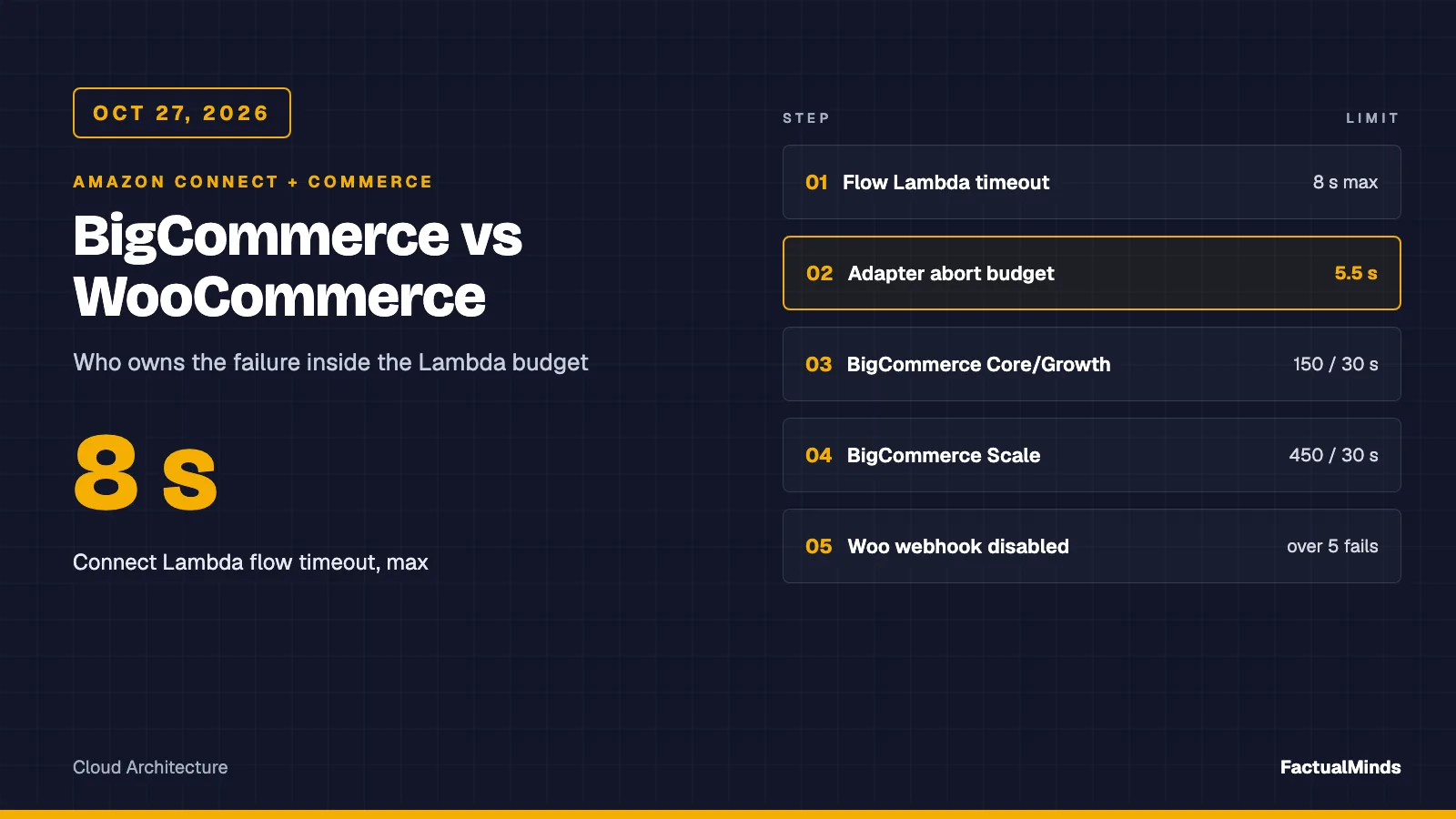
Table of Contents
As of October 27, 2026, the Invoke AWS Lambda function block in an Amazon Connect flow waits for a synchronous Lambda for at most 8 seconds, then routes down the Error branch. A BigCommerce Core or Growth store allows 150 REST requests per 30 seconds, shared with every other app on that store. A WooCommerce store has no vendor-published limit at all, because the API runs on a WordPress host you or the merchant operate.
Those three numbers decide the design of the commerce side of an order-status lookup for BigCommerce and WooCommerce. The Connect plumbing (the event shape, the flow block settings, Customer Profiles, agent workspace) is written up once in Amazon Connect + Shopify, and I do not repeat it here. The wider case is on Amazon Connect for eCommerce, the AI side of the same stores is in Bedrock + BigCommerce and Bedrock + WooCommerce, and broader design is on Amazon Connect consulting.
Labels used throughout: native is built into Connect or AWS, supported integration is a connector the vendor documents, third-party is a marketplace or iPaaS product, and custom engineering is code you write. Everything below is custom engineering unless it says otherwise.
Reproduce this: Run
node --testin the artifact folder. One handler and two adapters (BigCommerce, WooCommerce) return the same flat map. The test file mocksfetch. It does not call either platform.
Platform deep dives: step-by-step setup, troubleshooting and platform-specific failure modes are in Amazon Connect + BigCommerce and Amazon Connect + WooCommerce.
The Connect contract both adapters satisfy
From the AWS admin guide for the Lambda block: the timeout field is “max 8 seconds” for synchronous invocation, and when Lambda returns an error, Connect retries up to three times until the timeout, then takes the Error branch. The response validation setting is STRING_MAP (a flat object of string key/value pairs) or JSON (any valid JSON, including nested). We use STRING_MAP, so every adapter returns strings only. Sources: Invoke AWS Lambda function block and Grant access to your Lambda functions.
Two design consequences:
- A thrown error is expensive. It triggers retries inside the same 8 seconds. The handler catches everything and returns a
lookupStatusstring (found,not_found,ambiguous,timeout,throttled,auth,error,not_configured,bad_request) so the flow can branch deliberately. - Connect documents Lambda response values as alphanumeric, dash and underscore only. The adapters normalise to that: the total travels as
orderTotalCents("59.00"becomes"5900") and the date asplacedOn(2026-10-20). - The handler’s own abort budget is 5.5 seconds, not 8, and the code caps it at 6 seconds whatever
LOOKUP_BUDGET_MSsays. Cold start, Connect-to-Lambda overhead and a final response all need room.
BigCommerce: a SaaS API with a published ceiling
APIs (supported integration, vendor REST)
| Need | Endpoint | Version |
|---|---|---|
| Order by ID | GET /stores/{hash}/v2/orders/{id} | V2 |
| Orders by email, customer, status | GET /v2/orders?email=, customer_id=, status_id=, sort=date_created:desc | V2 |
| Customer by phone or email | GET /v3/customers?phone:in= or email:in= | V3 |
The Orders V2 list endpoint documents these filters: min_id, max_id, min_total, max_total, customer_id, email, status_id, cart_id, payment_method, date ranges, channel_id, sort, page and limit (default 50). There is no phone filter. Customers V3 documents phone:in, email:in, name:like, id:in and others. The consequence is a two-call phone lookup: customer first, then orders by customer_id. That is 2 of your 150 requests per window for every inbound call.
Order fields we read: id, status, total_inc_tax, currency_code, date_created and items_total. Line items and addresses are separate sub-resources; fetch them only when the flow needs them.
The GraphQL Storefront API is the wrong tool here. Its orders query is documented around fetching orders for a specific customer for display on a storefront. An IVR looking up an unknown caller is a server-to-server admin task. Use REST with a store-level API account.
Authentication
Create a store-level API account and send its token in the X-Auth-Token header. The token and its OAuth scopes are static: BigCommerce documents that you cannot change them, only delete the account. So create it read-only, with exactly two scopes: store_v2_orders_read_only and, only if you look up by phone or email via customers, store_v2_customers_read_only. Read-only scopes limit the account to GET and HEAD. Keep the token in Secrets Manager (see Security below).
Rate limits
BigCommerce publishes plan-based quotas that refresh every 30 seconds. Each request costs one unit:
| Plan | Quota |
|---|---|
| Growth and Core | 20,000 per hour (150 per 30 seconds) |
| Scale | 60,000 per hour (450 per 30 seconds) |
| Performance | Varies by plan and resource |
The quota is shared by all apps on the store. Responses carry X-Rate-Limit-Requests-Left and X-Rate-Limit-Time-Reset-Ms, and a rejected request returns 429; the documented advice is to wait the reset interval. A synchronous voice lookup cannot wait. On 429 the adapter does not retry: it returns error and the flow falls back. The page does not separate V2 from V3 limits.
Ceiling arithmetic: at 2 calls per phone lookup, a Core store absorbs roughly 75 lookups per 30 seconds before any other app takes a unit. That is plenty for most queues and not plenty during a sale.
Webhooks (supported integration)
Webhooks carry light payloads: store_id, producer, scope, and data (for example store/order/statusUpdated carries only the order ID, so you call Get Order afterwards). Authentication is a custom headers object you configure, such as basic auth. The page did not describe an HMAC signature. The hash field is documented for duplicate detection, not signature validation. Respond 200 immediately.
Anything other than HTTP 200 is a failure. Retries run from 60 seconds up to 86400 seconds; after the last attempt (about 48 hours) the webhook is deactivated and an email is sent. A destination whose success ratio falls below 90% over two minutes (after at least 100 requests) is blocklisted for three minutes.
Amazon EventBridge is a documented delivery option alongside HTTPS. You create an event source through the GraphQL Admin API, associate it with an event bus, and write a rule with a Lambda or SQS target. This is the cleanest path for a synced cache: no public endpoint to defend. Sources: Webhooks, EventBridge delivery.
Limitations
- Phone lookup needs two calls and misses guest checkouts (
customer_id0). The adapter asks for two customers and returnsambiguousif the number belongs to both, instead of guessing. If your callers often check out as guests, look up by email or order number instead, and ask for it in the flow. - V2 collection endpoints can return an empty or 204 response for no matches; the adapter treats both as
not_found. I handled this defensively and did not find it stated on the reference pages I read. A404is read asnot_foundonly on/orders/{id}; on a list endpoint it means a wrong store hash or path and returnserror. - Phone formats are whatever the shopper typed, and
phone:inis a filter on that stored value, so an E.164 caller ID can miss a differently formatted number. Expect misses.
WooCommerce: the API is the merchant’s own host
APIs
| Need | Endpoint |
|---|---|
| Order by ID | GET /wp-json/wc/v3/orders/{id} |
| Orders, free-text | GET /wp-json/wc/v3/orders?search=...&orderby=date&order=desc&per_page=5 |
| Orders by customer | GET /wp-json/wc/v3/orders?customer={user_id} |
| Customers | GET /wp-json/wc/v3/customers?email= or search= |
Documented order list parameters include search, customer, status (default any), product, after, before, page, per_page (default 10), orderby and order. Customers list supports email, search and role. I could not confirm a per_page maximum from the pages I read; keep it small anyway.
There is no phone filter. The search parameter is where phone and email lookups happen. In the WooCommerce source for the legacy post-table order store, the default search fields are the billing address index, shipping address index, billing last name, billing email and billing phone, matched with a substring LIKE, and a numeric term is also treated as an order ID. A plugin can change that list through the woocommerce_shop_order_search_fields filter. Two things follow: search is not an exact match, so the adapter confirms the hit (exact email, or the last 10 digits of the phone) before it trusts it; and I did not verify the same behaviour on the newer HPOS order tables, so test that on your own store.
Authentication
WooCommerce documents HTTP basic auth over HTTPS, with the consumer key as username and the consumer secret as password. A query-string fallback exists (consumer_key, consumer_secret); avoid it, because URLs land in access logs. Over plain HTTP, the REST docs describe one-legged OAuth 1.0a (HMAC-SHA1 or SHA256, timestamp within 15 minutes). The WooCommerce developer page says HTTPS is recommended rather than required. For a Connect Lambda there is no reason to be on HTTP: use HTTPS and basic auth. Generate a key with read permission only, owned by a dedicated low-privilege WordPress user.
Rate limits
None are published by WooCommerce, because there is no vendor in the path. The effective limit is the host: PHP workers, database, object cache, a CDN or WAF rule that treats a Lambda IP range as a bot. That is the risk, and it is not a number you can read from a doc.
Webhooks
Read from the WooCommerce source: each delivery carries X-WC-Webhook-Topic, -Resource, -Event, -ID, -Delivery-ID, and X-WC-Webhook-Signature, which is the base64-encoded HMAC-SHA256 of the raw body with the webhook secret. Verify it against the raw bytes with a constant-time compare, and dedupe on the delivery ID. A delivery is a failure on a non-2xx response, and a webhook goes to disabled after more than 5 consecutive failures unless a filter changes that. Nobody gets an email in the code I read; alarm on webhook status yourself. There is no AWS destination: put API Gateway or a Lambda function URL in front.
Limitations
- Plugins change the data. Subscriptions, custom order statuses, multi-vendor marketplaces, B2B pricing and shipment-tracking plugins add or rename statuses and keep tracking in order meta. The adapter returns the raw
statusslug (on-hold,processing), and your flow prompt must map slugs to words a caller understands. - Free-text search on a large order table is the query most likely to blow the budget.
Side by side
| BigCommerce | WooCommerce | |
|---|---|---|
| Hosting | SaaS, vendor-operated | Merchant’s WordPress host |
| API | REST V2 orders, V3 customers (supported integration) | REST API v3 on /wp-json/wc/v3 (supported integration) |
| Auth | Store API account, X-Auth-Token, static scopes | Consumer key/secret, basic auth over HTTPS (OAuth 1.0a over HTTP) |
| Phone lookup | Customers V3 phone:in, then orders by customer_id | search on orders, confirm client-side |
| Email lookup | email filter on orders | search, or customers email |
| Rate limit | 150 per 30 s (Growth, Core), 450 per 30 s (Scale), shared across apps | None published; the host decides |
| Webhook signature | Custom headers you set; no HMAC described | X-WC-Webhook-Signature, HMAC-SHA256 base64 |
| AWS destination | Amazon EventBridge documented | None; post to a URL |
| Webhook failure | Retries about 48 h, then deactivated and emailed | Disabled after more than 5 consecutive failures |
| Who owns uptime | BigCommerce | You or your hosting provider |
Where the platforms differ
- Who owns availability. On BigCommerce a slow lookup is mostly a vendor or quota problem you can read from rate-limit headers. On WooCommerce it is a host problem you must instrument yourself. If you operate the store, add an uptime check on the REST route and alarm on the lookup’s
timeoutrate. - Auth model. BigCommerce tokens are scoped and static, which is good for least privilege and bad for rotation (create new account, swap, delete old). WooCommerce keys are tied to a WordPress user, so a compromised host exposes key and secret together.
- What a call costs. BigCommerce charges shared quota. WooCommerce charges the merchant’s PHP capacity: a lookup storm during a sale slows checkout as well as the IVR.
- Data shape. BigCommerce has one canonical order schema per store. A WooCommerce order is whatever the installed plugins made of it.
Recommendation. BigCommerce: call live within the 5.5-second budget. WooCommerce: call live only if the host answers the order route well under 2 seconds under load; otherwise sync orders into DynamoDB by webhook and serve from that. The trade-off is staleness against availability: a cache cannot tell a caller about an order placed 40 seconds ago on a failed webhook.
Integration options
| Option | Label | Use when | Cost of choosing it |
|---|---|---|---|
| Live Lambda lookup | custom engineering | Fresh data matters and the API is fast | Every call spends vendor quota or host capacity |
| Synced cache (webhooks to DynamoDB) | custom engineering | Host is slow, or volume is high | Staleness, webhook monitoring, a replay path |
| Third-party connector or iPaaS | third-party | You want no code | Another vendor and per-task pricing; verify its Connect support yourself |
I did not verify a specific connector for either platform, so I name none.
Failure handling inside the 8-second budget
The handler sets AbortSignal.timeout to 5,500 ms by default (LOOKUP_BUDGET_MS), catches any error, and returns a status string. Design the flow around the statuses:
found: speak status and total.not_found: ask for an order number once, then route to an agent.ambiguous: two customers share the number. Ask for the order number; never read either order aloud.timeout,throttledorerror: do not apologise at length. Route to an agent with the contact attributes populated, so the agent opens the order from the workspace.authornot_configured: a revoked key or a missing setting. Every caller is affected; alarm on the first one.bad_request: a flow bug; alarm on it.
A 404 from a disabled WooCommerce REST API (rest_no_route) or a wrong site URL is error, not not_found, so a misconfiguration is never spoken as “you have no orders”.
The handler does not retry: Connect already retries a Lambda error up to three times inside the timeout, and a retry on a 429 spends more quota.
What broke (counter-case, by design): The obvious WooCommerce adapter takes the first row of the
searchresponse. Becausesearchis a substring match, a phone term can match another customer’s billing phone, and a numeric term can match an order ID. Returning the wrong customer’s order status to a caller is a privacy incident. The adapter confirms every hit, and the test feeds it a non-matching phone and assertsnot_found. This is a failure mode derived from the documented behaviour, not an incident from a client.
Security
- Secrets Manager holds the BigCommerce token and the WooCommerce key and secret; read once at init and cache for the container’s life. The artifact reads environment variables for brevity only.
- Least privilege: BigCommerce read-only scopes; WooCommerce read-only key under a dedicated user; Lambda role limited to
secretsmanager:GetSecretValueon those ARNs. - PII: the response returns order status, total, currency, date and item count only. No address, name or email. Do not log the event; the caller’s number is in
CustomerEndpoint.Address. - Verification before disclosure: a caller ID is not authentication. Ask for the order number or a second factor before reading details aloud.
- Webhook intake: verify the WooCommerce HMAC on the raw body; for BigCommerce HTTPS, require your configured header and dedupe on
hash; prefer EventBridge. - Using AWS does not make a flow compliant with PCI DSS or a privacy law. Keep card data out of this path altogether.
Testing and deployment validation
node --testin the artifact. Eight tests cover the two lookup paths, empty results, the 404 rules, client-side confirmation, ambiguous matches on both platforms, a timeout fallback, the status mapping, Connect’s value character set and a log line that never contains the phone number.- In the flow designer, use testing and simulation to confirm every branch and each
$.Externalkey. An October 26, 2026 Connect update added validation of data a flow action returns, such as a Lambda response. - Against a staging store, measure the lookup at your own p50 and p95 over at least 50 calls before choosing live versus cached. On October 28, 2026 we ran the unmodified WooCommerce adapter 200 times against a local WooCommerce 11.2.1 store: p50 24 ms, p95 33 ms on legacy storage and 39 ms on HPOS, over localhost with no TLS or network distance. The run also confirmed the phone-format miss: an E.164 caller ID returned
not_foundfor an order stored as(555) 555-0042. Full method in the WooCommerce guide and the benchmark folder. BigCommerce is SaaS and was not benchmarked. - Place a test call, then a call with a number that has no order, then a call with the commerce host blocked, and confirm all three paths.
- Alarm on the
lookupStatusdistribution, particularlytimeoutandauth. The handler writes one JSON log line per call (lookupStatus, duration, HTTP status on failure, never the phone or email); a CloudWatch metric filter on that field is the alarm source. It never throws, so Lambda’sErrorsmetric stays at zero.
Costs (published prices, checked October 27, 2026)
- Lambda (US East, N. Virginia, x86): $0.20 per 1 million requests and $0.0000166667 per GB-second; free tier 1 million requests and 400,000 GB-seconds a month.
- Secrets Manager: $0.40 per secret per month and $0.05 per 10,000 API calls.
- Modeled example: 100,000 lookups a month at 512 MB and 0.6 s is 30,000 GB-seconds, about $0.50 of compute plus $0.02 of requests before the free tier. This is arithmetic on published prices, not a measurement.
- Not included: Amazon Connect usage, the BigCommerce plan, WordPress hosting, DynamoDB.
What to do this week
- Decide per store: BigCommerce live, WooCommerce live-or-cache. Time your order route first.
- Create read-only credentials: BigCommerce store API account with two scopes; WooCommerce read-only key.
- Put them in Secrets Manager and run the artifact against a staging store.
- Build the branches:
found,not_found,ambiguous, a shared branch fortimeout/throttled/error, and an alarmed branch forauth/not_configured/bad_request. - Set the flow block timeout to 8 seconds and keep the handler’s budget under it.
What this post doesn’t cover
- Customer Profiles, agent workspace and the Connect-side setup (see the Shopify post).
- Writing back to either platform: refunds, cancellations, address changes.
- WooCommerce HPOS search behaviour,
per_pagelimits and key permission levels, which I did not verify. - Third-party connectors, B2B storefronts and multi-store setups.
- A BigCommerce latency benchmark, and any WooCommerce measurement over a real network. The WooCommerce run was local.
Frequently asked questions
Can a Connect flow look up a BigCommerce order by caller phone number?
Can it look up a WooCommerce order by phone?
Which platform is easier to put behind a Connect Lambda?
When should we not call the commerce API live from the flow?
What could go wrong with webhooks?
Does BigCommerce deliver webhooks to AWS natively?
Does the BigCommerce GraphQL Storefront API work for agent lookups?
Is this a tested production integration?

AWS Cloud Architect & AI Expert
AWS-certified cloud architect and AI expert with deep expertise in cloud migrations, cost optimization, and generative AI on AWS.