
Connect + BigCommerce Order Lookup (Oct 2026): Webhooks to EventBridge
Quick summary: As of October 28, 2026, a BigCommerce phone lookup from an Amazon Connect flow costs 2 API calls, and a failing webhook is retried 11 times over about 48 hours before BigCommerce deactivates it. Setup steps, scopes, EventBridge and a DynamoDB cache design.
Key Takeaways
- As of October 28, 2026, a BigCommerce phone lookup from an Amazon Connect flow costs 2 API calls, and a failing webhook is retried 11 times over about 48 hours before BigCommerce deactivates it
- Setup steps, scopes, EventBridge and a DynamoDB cache design
- As of October 28, 2026, a phone-number order lookup against BigCommerce takes 2 API calls, and a webhook that keeps failing is retried 11 times over about 48 hours before BigCommerce deactivates it
- This post goes deeper on BigCommerce only: account setup, exact query shapes, channels, EventBridge webhooks and a DynamoDB cache fed by them
- The Bedrock agent side is a different intent: Bedrock + BigCommerce
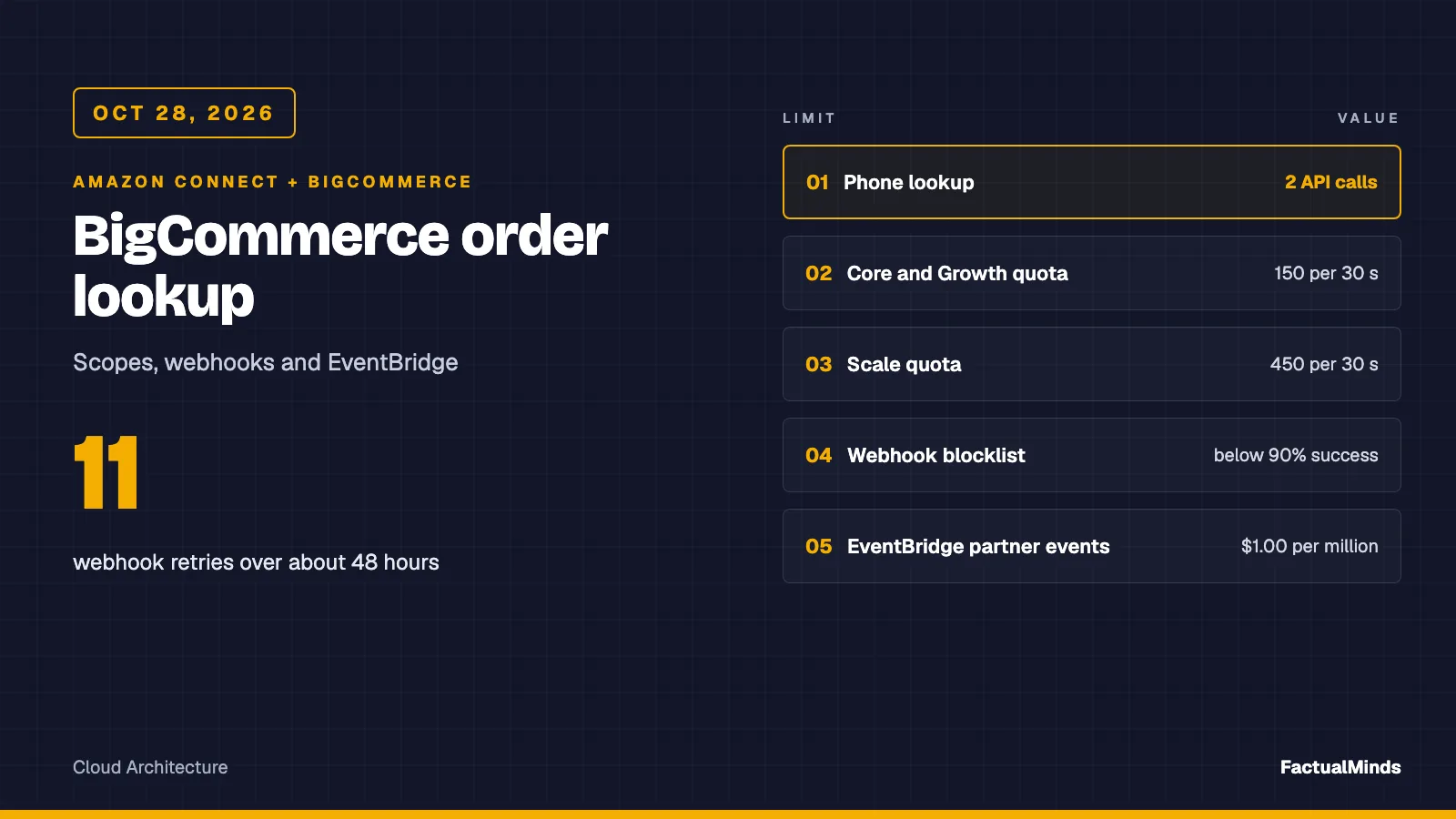
Table of Contents
As of October 28, 2026, a phone-number order lookup against BigCommerce takes 2 API calls, and a webhook that keeps failing is retried 11 times over about 48 hours before BigCommerce deactivates it. Those two numbers shape everything below: the first sets how many callers a store can serve live, and the second sets how fast you must notice that a cache has stopped updating.
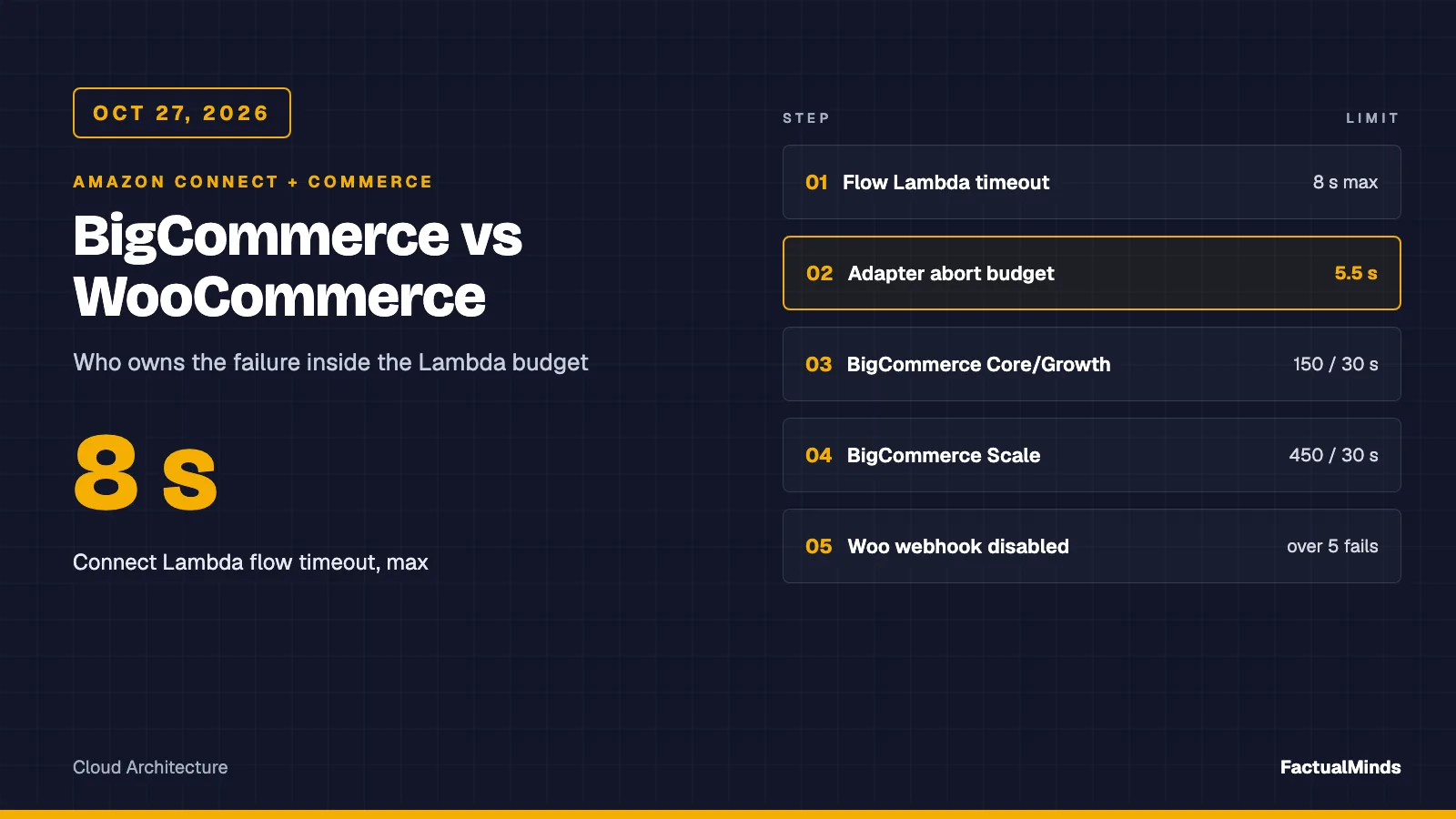
For the comparison across BigCommerce and WooCommerce, including the Connect Lambda contract and how the two platforms differ on hosting and rate limits, see Amazon Connect + BigCommerce and WooCommerce. This post goes deeper on BigCommerce only: account setup, exact query shapes, channels, EventBridge webhooks and a DynamoDB cache fed by them. The Bedrock agent side is a different intent: Bedrock + BigCommerce. Connect-side design is on Amazon Connect consulting and Connect for eCommerce.
Shared plumbing in three sentences: the Lambda block waits at most 8 seconds, the response is a flat map of strings, and the handler never throws. It returns a status such as found or throttled and the flow branches on it. Details are in the parent post.
Labels: supported integration means a vendor-documented API or delivery option, native means built into AWS, custom engineering means code you write.
Reproduce this: the lookup code is the existing BigCommerce adapter, handler and shared helpers; run
node --testin that folder. The webhook side is a new EventBridge README and rule file with a two-test check. None of it touched a live store or a deployed AWS resource.
Step 1: Create the read-only API account
- Sign in as a user allowed to create store-level API accounts. A search summary of BigCommerce’s support article names a dedicated permission for it; verify in your user settings.
- Open Settings, Store-level API accounts and choose Create API account. The docs page names this menu path.
- Choose the V2/V3 token type and give it a name that says what it is for, for example
connect-order-lookup. - Set OAuth scopes: everything None except Orders read-only (
store_v2_orders_read_only) and Customers read-only (store_v2_customers_read_only). Scopes cannot be changed later, so a mistake means a new account. - Save. A dialog shows the Client ID, Client Secret and access token, and a credentials file downloads. Sources disagree on whether the token can be shown again, so copy it into Secrets Manager first.
- Note the store hash. It is the segment in
https://api.bigcommerce.com/stores/{store_hash}/v2/orders. The docs page does not say where to find it; the form’s API path field contains it (per search summaries).
Every request carries X-Auth-Token: {token} and Accept: application/json, which is what the adapter sends. A missing storeHash or token returns not_configured, so a missing secret never reads as an empty order list.
Step 2: Know the two lookups you are choosing between
Orders V2 (supported integration)
GET /stores/{hash}/v2/orders documents these query parameters: email, customer_id, channel_id, sort, limit (default 50, no maximum stated), page (default 1) and min_date_created (RFC-2822 or ISO-8601). Sort fields are id, customer_id, date_created, date_modified, status_id, channel_id and external_id, with :asc or :desc. There is no phone filter. The order object documents customer_id (and says 0 means a guest checkout), channel_id (defaults to 1), status, total_inc_tax, currency_code, date_created and items_total.
Customers V3 (supported integration)
GET /stores/{hash}/v3/customers documents phone:in, email:in, id:in, name:like, company:in, customer_group_id:in, date filters, include, sort, page and limit, with cursor paging through before and after. The customer object carries phone. The reference does not say whether phone:in is an exact or a normalised match; its example is 555-55-5555. Treat it as a literal match on the stored string until you test it.
How the adapter combines them
| Caller gives | Calls the adapter makes | Notes |
|---|---|---|
| Order number | GET /v2/orders/{id} | 1 call. A 404 means no such order. |
GET /v2/orders?email=...&sort=date_created:desc&limit=1 | 1 call. Finds guest orders too. | |
| Phone | GET /v3/customers?phone:in=...&limit=2, then GET /v2/orders?customer_id=...&sort=date_created:desc&limit=1 | 2 calls. Skips the second if there is no customer. |
The phone branch asks for limit=2 on purpose. If two customer records share a number, the adapter returns ambiguous rather than guessing, and a test pins that. With exactly one customer, date_created:desc and limit=1 return the order the caller most likely means.
The adapter returns orderId, orderStatus, orderTotalCents (59.00 becomes 5900), currency, placedOn (YYYY-MM-DD) and itemCount. No phone, email, name or address.
Status rules decide what the caller hears. A 204 from a list is not_found; that is defensive, since the reference documents only 200 for the list. A 404 is not_found only on /orders/{id}; on a list path it means a wrong store hash and surfaces as error. A 401 or 403 becomes auth, a 429 becomes throttled.
Guest checkout, channels and B2B
Guest checkout. A guest order has customer_id 0 and no customer record, so the phone route cannot find it; the email route can. If the phone lookup returns not_found, ask for the order email once and retry with email, then hand to an agent.
Multiple storefronts. One store hash and one token cover every sales channel. Orders carry channel_id and Orders V2 can filter by it, but the adapter does not pass it, so today it returns the newest order across all channels. If Connect queues map to storefronts, add channel_id to the orders query and pass it as a flow parameter. The V3 customer object carries origin_channel_id and channel_ids, but the list documents no channel filter, so filter in code. Channel-specific webhook scopes look like store/channel/{channel_id}/order/statusUpdated.
B2B Edition. The B2B Server to Server Orders API is separate. It takes the standard BigCommerce order ID as bcOrderId, can assign existing orders to a Company, and leaves basic order data to Orders V2. A search summary of the B2B docs mentions a different base URL and an X-Store-Hash header; I did not open those pages, so treat that as unverified. Use the B2B API only when the agent needs company or PO data.
Rate limits and the headers worth reading
The quota refreshes every 30 seconds and every request costs one unit, shared across every app on the store.
| Plan | Quota |
|---|---|
| Growth and Core | 20,000 per hour (150 per 30 seconds) |
| Scale | 60,000 per hour (450 per 30 seconds) |
| Performance | Set by plan and resource; some plans have no request rate limit |
Four response headers describe the window, and the page says names are case-insensitive: X-Rate-Limit-Time-Window-Ms, X-Rate-Limit-Time-Reset-Ms, X-Rate-Limit-Requests-Quota and X-Rate-Limit-Requests-Left. A rejected request returns 429. The page’s step title mentions a Retry-After header but tells you to read X-Rate-Limit-Time-Reset-Ms, so read that one. If a 429 arrives without these headers, the page says the store is under high load.
At 2 calls per phone lookup a Core store has room for 75 lookups per 30 seconds, if no other app uses a unit. The adapter does not retry on 429, which is right for voice: waiting out Time-Reset-Ms can take up to 30 seconds, past the 8-second flow limit. Use the headers for a metric instead: log Requests-Left to see quota pressure early. The shipped adapter does not log it.
Step 3: Webhooks, and the EventBridge route
Plain HTTPS webhooks
POST https://api.bigcommerce.com/stores/{hash}/v3/hooks with scope, destination (port 443 only), is_active and an optional headers object. Order scopes include store/order/created, store/order/updated and store/order/statusUpdated. The payload is light: store_id, producer, scope, hash and data holding the order ID. A new webhook can take up to a minute to start working.
Anything other than HTTP 200 is retried at 60, 180, 300, 600, 900, 1800, 3600, 7200, 21600, 50400 and 86400 seconds: 11 retries that sum to 173,040 seconds, about 48 hours. After the last, the webhook is deactivated and an email goes to the app’s registered address; set is_active back to true to revive it. Separately, if a destination’s success ratio drops below 90 percent in a two-minute window (counted only after 100 requests), that destination is blocklisted for three minutes.
Amazon EventBridge delivery (supported integration)
BigCommerce documents EventBridge as a destination, and AWS lists BigCommerce among its SaaS partners. BigCommerce’s page does the AWS steps with raw API calls; AWS documents the console route separately. Together:
Create the event source (BigCommerce Admin GraphQL). Endpoint
https://{zone}/stores/{store_hash}/graphqlwithX-Auth-Token. The mutationcreateEventSourcesits under thewebhooknamespace; check the page for the nesting.Context: variables for
createEventSourceas the page names them. The account ID is a placeholder, andclientIdis the OAuth client ID.{ "input": { "awsAccount": "111122223333", "eventSourceName": "bc-orders-prod", "eventSourceRegion": "US_EAST_1", "clientId": "<oauth client id>" } }The response returns
arnandeventSourceNameamong other fields; save both. Their example response shows a different account ID than the one sent, so compare against your own account.Associate the partner source in AWS. The source sits in
Pendingin the EventBridge console under partner event sources in your account and Region. Associate it with an event bus (console, or the CLI below). The status moves toActive. AWS drops events sent to an unassociated source immediately, so do this before step 4.Context: AWS documents
create-event-buswith both names set to the partner source name. The name here is a placeholder; copy the real one from the console.aws events create-event-bus \ --name "<partner event source name>" \ --event-source-name "<partner event source name>" \ --region us-east-1Create a rule and a target. Without a rule, events are ignored. The BigCommerce page gives the event pattern
{"detail-type":["bigCommerceWebhook"]}and uses SQS as the example target. Use a Lambda function as the target, with an SQS dead-letter queue. The illustrative rule file holds that exact pattern.Create the EventBridge webhook (BigCommerce Admin GraphQL). The mutation
createEventBridgeWebhooktakesdestination(the event source ARN),isActive: trueandscope, for examplestore/order/statusUpdated. The response returnsid,scope,destination,isActiveandcreatedAt.Trigger an event and look at it. Change an order status in a staging store and read what reaches your target.
Unverified. The page documents only the detail-type, not the delivered event’s source or detail shape. It does not say whether a store-level account’s client ID works as clientId, or which token scope the GraphQL calls need. Log one real event before you write a handler or narrow the rule.
Recommendation and trade-off. If the receiver is on AWS, use EventBridge: no public endpoint, no authentication code to get wrong, failures land in a dead-letter queue you own. The trade-off is a four-step setup across two systems. For one webhook on a store that already has API Gateway, HTTPS plus a header check is less work.
A DynamoDB cache fed by those events (custom engineering, design only)
Nothing below is built. It is the shape I would test first, not a measured system.
- Handler flow. The event carries an order ID, not an order. The handler calls
GET /v2/orders/{id}, maps the result to the same six fields the adapter returns, and upserts one item. That is about one API call per event, so a store with heavy order traffic spends quota on its own cache. - Keys. Partition key
ORDER#{id}. Three global secondary indexes serve the three caller paths:CUST#{customer_id}sorted byplacedOn,EMAIL#{sha-256 of lowercased email}sorted byplacedOn, andPHONE#{last 10 digits}populated from customer events. Hashing the email keeps the raw address out of key names; store the minimum fields. - Phone. The order’s billing address has a phone field, so write it into the index on upsert. Subscribe to
store/customer/createdandstore/customer/updatedfor customer phones; the events page says address changes are not tracked there. - Order and duplicates. Do not assume ordered delivery. Write with a condition so an older
date_modifiednever overwrites a newer one; use the webhookhashas a cheap duplicate check. - Replay. Orders V2 accepts
min_date_created, so a scheduled job can re-list recent orders and repair gaps. - Alarm on silence. Zero order events in a window that normally has orders should page someone. A deactivated webhook produces quiet, not errors.
What could break (modelled, not an incident): the Lambda target throws on a schema surprise for hours. Events end up in the dead-letter queue, and BigCommerce sees only successful hand-offs to the bus, so it never reports a problem. The cache goes stale with no error and a caller who ordered an hour ago hears “no order found”. The defence is a dead-letter queue alarm plus a freshness check: if the newest cached order is older than your threshold, call the live API. Untested.
Troubleshooting
| Symptom | Likely cause | What to check |
|---|---|---|
lookupStatus = auth; HTTP 401 | Wrong or deleted token, or the token lacks the needed scope | Token in Secrets Manager; account still exists; both read-only scopes set. Scopes cannot be edited, so recreate the account. |
auth; HTTP 403 | Account scope missing for that path (customers vs orders) | Which of the two calls failed; the log line carries the HTTP status |
404 on a list call, returned as error | Wrong store hash or path | https://api.bigcommerce.com/stores/{hash}/...; the adapter deliberately does not call this “no order” |
404 on /orders/{id}, returned as not_found | Order number does not exist on this store | Right store? Right channel? |
throttled | 429: quota used up, often by another app | X-Rate-Limit-Requests-Left and Time-Reset-Ms in a manual call; plan quota |
Phone returns not_found for a known customer | Stored phone format differs, or guest checkout | Format in the customer record; fall back to email |
ambiguous | Two customer records share a number | Ask for the order number; never read either order aloud |
| No events reach the target | Source not associated with a bus, rule missing, or webhook inactive | Source state Active; rule on the right bus; isActive |
| Webhook was working, then silent | Deactivated after the retry window | Reactivate with is_active true; fix the target; run the replay job |
Security
- Secrets Manager holds the token and Client Secret; the Lambda role gets
secretsmanager:GetSecretValueon that ARN only. The artifact reads environment variables for brevity only. - Least privilege is the two read-only scopes. A leaked token cannot edit orders but can read customer data; rotate by creating a new account and deleting the old one.
- PII. The response carries no name, email, phone or address, and the log line holds status, timing and HTTP code only. A phone number in a DynamoDB index is personal data: encrypt, set retention, restrict queries.
- Verification before disclosure. A caller ID is not authentication. Ask for the order number or a second factor before reading details.
- Using AWS does not make the flow compliant with PCI DSS or a privacy law. Keep card data out of this path.
Test plan
node --testin the lookup folder: eight mocked-fetch tests covering both lookup paths, empty results, the 404 rule, ambiguity, timeout, status mapping and a log line without the phone.- On a staging store, call each path: order number, email, phone, guest email, a phone with no customer, a wrong store hash, a revoked token.
- Measure p50 and p95 over at least 50 calls before choosing live or cached. I did not run that benchmark.
- For webhooks, trigger a status change, read the event, then break the target and confirm the dead-letter queue and silence alarm fire.
Costs (published prices, checked October 28, 2026)
- Amazon EventBridge (classic bus): SaaS partner events ingested $1.00 per million.
- DynamoDB on-demand (US East, N. Virginia): $0.625 per million write request units, $0.125 per million reads, storage $0.25 per GB-month after the first 25 GB.
- Lambda (US East, x86): $0.20 per million requests and $0.0000166667 per GB-second, as checked October 27, 2026.
- Modelled example, not a measurement: 500,000 order events a month, items under 1 KB, 256 MB and 0.2 s per invocation. EventBridge $0.50, DynamoDB writes about $0.31, Lambda about $0.52 before the free tier. Total roughly $1.33 a month, plus 500,000 BigCommerce API calls (about 694 an hour on average) against the plan quota.
- Not included: Amazon Connect usage, the BigCommerce plan, CloudWatch, SQS, data transfer, reads. I did not find BigCommerce plan prices on the pages I read.
What to do this week
- Create the
connect-order-lookupstore-level account with the two read-only scopes, and store the token in Secrets Manager. - Run the existing adapter tests, then point it at a staging store and exercise the table above.
- Decide per queue: add
channel_idif queues map to storefronts. - If you want a cache, stand up the EventBridge path on staging and log one real event before building the handler.
- Add the silence alarm before the cache goes anywhere near production.
What this post doesn’t cover
- Connect flow, Customer Profiles and agent workspace setup (see the Shopify post).
- Writing back to BigCommerce: refunds, cancellations, address edits.
- The delivered EventBridge event body, B2B Edition authentication and listing details, and the exact token scope that GraphQL webhook mutations need. All unverified.
- BigCommerce plan pricing.
- A built DynamoDB cache. The design above is untested.
- A live latency benchmark. None was run.
Sources read
BigCommerce: API accounts, API rate limits, Webhooks, EventBridge delivery, webhook events, channel events, Orders V2 list, Customers V3 list, B2B orders. AWS: SaaS partner events, EventBridge pricing, DynamoDB on-demand pricing.
Frequently asked questions
Which BigCommerce scopes does an Amazon Connect order lookup need?
Can I find an order by the caller's phone number?
Is the BigCommerce EventBridge integration worth the setup compared with an HTTPS webhook?
When should I not use a webhook-fed cache for Connect lookups?
What could go wrong with the webhook path?
Does the webhook payload contain the order?
Does this work for B2B Edition?
Is this a tested production integration?

AWS Cloud Architect & AI Expert
AWS-certified cloud architect and AI expert with deep expertise in cloud migrations, cost optimization, and generative AI on AWS.

 Kevin W.