Connect AI Agents (Oct 2026): FAQ Self-Service in Three Tiers
Quick summary: As of October 27, 2026, a Connect AI agent MCP tool call times out at 30 seconds, and one knowledge base holds 5,000 content items. Treat FAQ answers, protected lookups, and transactions as three separate builds.
Key Takeaways
- As of October 27, 2026, a Connect AI agent MCP tool call times out at 30 seconds, and one knowledge base holds 5,000 content items
- As of October 27, 2026, a Connect AI agent can answer from your knowledge base, look up an order, and process a refund in a single conversation
- A single knowledge base holds up to 5,000 content items, and an MCP tool call is cut off at 30 seconds
- This is an AWS and Amazon Connect technical guide
- Capabilities below are labelled native (built into Connect or AWS), custom engineering (code you write), or supported integration
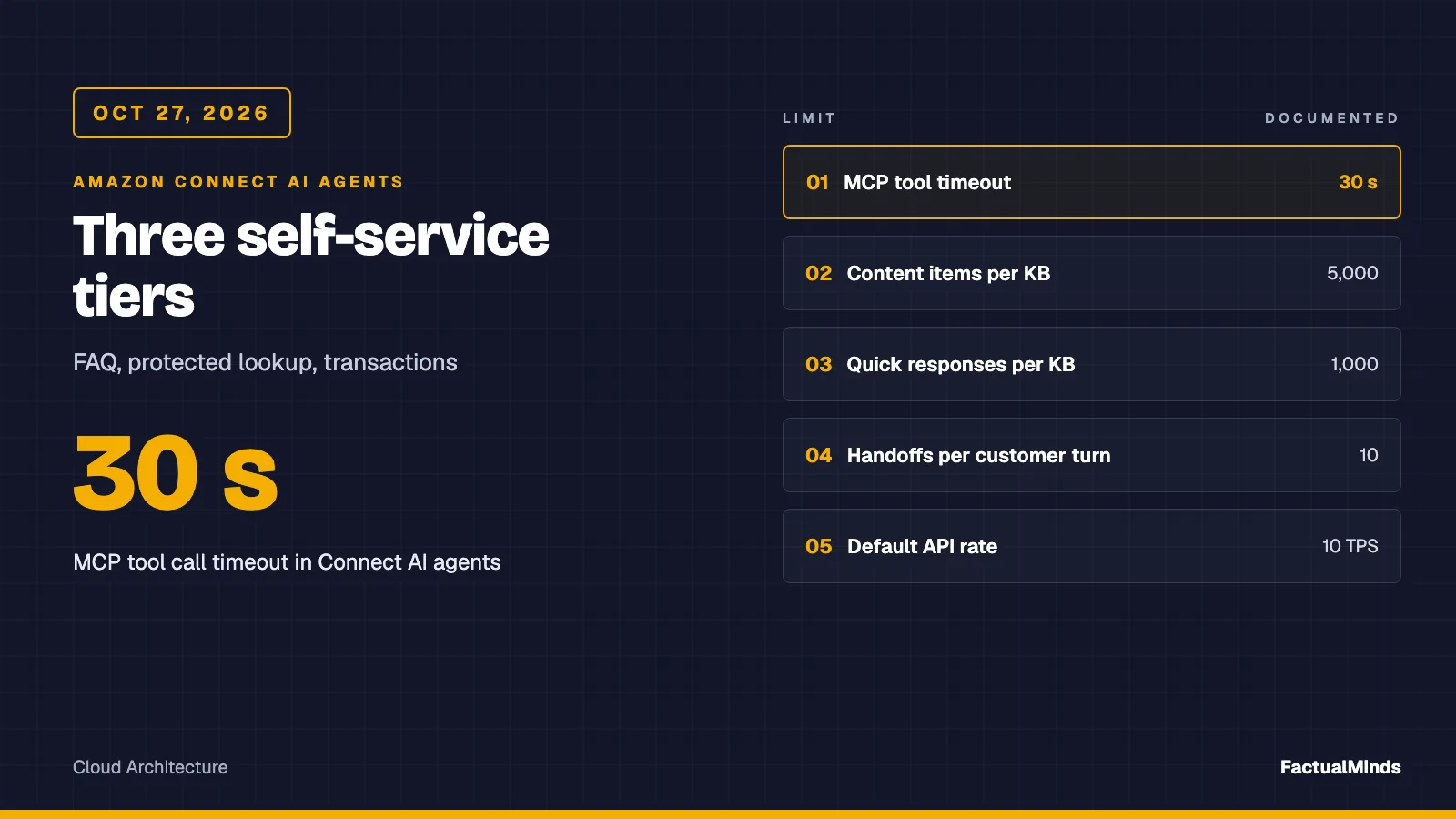
Table of Contents
As of October 27, 2026, a Connect AI agent can answer from your knowledge base, look up an order, and process a refund in a single conversation. Those are three different risk levels, and the same agent configuration should not cover all three on day one. A single knowledge base holds up to 5,000 content items, and an MCP tool call is cut off at 30 seconds. Everything else in this post follows from where you let the agent sit between those limits.
This is an AWS and Amazon Connect technical guide. The commercial argument for support agents on an eCommerce site, and the tool-access and audit model, are in AI customer support agent for eCommerce and the customer support agent solution page. What follows is the Connect-specific build: sources, guardrails, escalation, tests, and monitoring.
We have no published Connect self-service engagements and no accuracy measurement for this setup. Capabilities below are labelled native (built into Connect or AWS), custom engineering (code you write), or supported integration. Facts we could not confirm in AWS documentation are marked unverified.
Naming and what is native
AWS’s AI agents page says functionality previously called Amazon Q in Connect is now one of the AI agents, reached through the “Connect assistant.” Documentation now says “Connect Customer.” The API namespace still reads qconnect.
Self-service has two modes in the documentation:
- Agentic self-service (native, recommended): an orchestrator AI agent reasons across steps, calls MCP tools, and keeps the conversation going until resolution or escalation. Voice and chat.
- Legacy self-service (native): answers from a knowledge base and returns control to the flow when a custom tool is selected. AWS says it gets no new features.
For a new build, start with agentic self-service and restrict it. You restrict it by what you attach: the knowledge base, the tools, and the security profile. A Tier 1 FAQ agent should have a knowledge base and the default Complete and Escalate tools, and nothing else.
Tier 1: FAQ answers from approved knowledge
No customer data. The agent reads documents you published for the public and answers. It cannot leak what it cannot reach.
Sources (native). The setup guide documents prebuilt integrations for Amazon S3, Microsoft SharePoint Online, Salesforce, ServiceNow, and Zendesk, with sections for a web crawler and for an existing Amazon Bedrock knowledge base. Supported files are HTML, DOCX, PDF, and UTF-8 text. PDFs cannot be encrypted or password-protected. Word formatting is flattened to simple HTML.
Two limits to plan around:
- A domain consists of one knowledge base, and an instance associates with one domain. Integrations are set at the domain level.
- File size is inconsistent in AWS documentation. The setup guide and the Regional quota table say 1 MB per document. The Connect quotas page says 5 MB (adjustable). Design to 1 MB and chunk content by topic anyway.
The quotas page also lists 5,000 content items and 1,000 quick responses per knowledge base. Curate rather than crawl everything.
Answer quality is a content job.
- One question per document. “Returns, exchanges, and gift cards” in one page produces blended answers. Split it.
- Put the effective date and region in the document body, so a stale excerpt is visible to the model and to a reviewer.
- Delete superseded pages. Retrieval does not know which page you meant to retire.
- Name an owner per document. Freshness is an ownership problem.
Whether Connect’s retrieval shows citations to the customer, and how it chunks text internally, is not something we confirmed in documentation. Verify both in your own test instance before promising either to a stakeholder.
Lex V2 path (supported integration). If you already run a Lex bot, the built-in AMAZON.QnAIntent answers questions with a Bedrock model against an OpenSearch domain, a Kendra index, or a Bedrock knowledge base (Lex V2 docs). It fires when an utterance matches no other intent and does not fire while eliciting a slot. You cannot use it with AMAZON.KendraSearchIntent in the same bot locale. That is a good fit when your deterministic intents stay in charge and the FAQ is a fallback.
Custom build. If you need your own retrieval, a Bedrock knowledge base plus Bedrock Guardrails behind your own Lambda gives you control of chunking and ranking. You then own everything Connect would have managed. See RAG on Bedrock Knowledge Bases and Bedrock Guardrails in production.
Guardrails (native)
Connect has AI guardrails as a first-class resource. The create-ai-guardrail input (CLI reference) has five policy blocks:
- Topic policy: named topics with a definition and example prompts, type
DENY. - Content policy: filters for
SEXUAL,VIOLENCE,HATE,INSULTS,MISCONDUCT, andPROMPT_ATTACK, each with input and output strength (NONE,LOW,MEDIUM,HIGH). - Word policy: custom words and a managed
PROFANITYlist. - Sensitive information policy: PII entity types and custom regexes, each with action
BLOCKorANONYMIZE. - Contextual grounding:
GROUNDINGandRELEVANCEfilters with a numeric threshold.
You also set the message returned when input or output is blocked. Here is an illustrative guardrail input (placeholders, not recommendations, and not run against an account) from the artifact folder. This excerpt shows the topic and grounding blocks, for the AWS CLI --cli-input-json shape verified above:
{
  "name": "illustrative-store-faq-guardrail",
  "visibilityStatus": "SAVED",
  "topicPolicyConfig": {
    "topicsConfig": [
      { "name": "MedicalAdvice", "definition": "Diagnosis, treatment, or medication guidance.",
        "examples": ["Is this safe with my blood pressure medication?"], "type": "DENY" }
    ]
  },
  "contextualGroundingPolicyConfig": {
    "filtersConfig": [
      { "type": "GROUNDING", "threshold": 0.7 },
      { "type": "RELEVANCE", "threshold": 0.7 }
    ]
  }
}
Two cautions. First, AWS’s own restaurant example notes that overbroad PII filters can block the address or ZIP code a caller must give, so tune against your prompts. Second, a grounding threshold trades refusals against hallucinations: raise it and valid answers start getting blocked. You pick the point by running your eval set, not by copying a number.
Tier 2: authenticated retrieval of protected data
“Where is my order?” needs customer data. That makes it a different build.
Identity comes first, and not from the model. Verify the customer in the flow or in the authenticated channel before the AI agent runs. Documentation does not describe Connect itself deciding who a caller is, so treat identity as custom engineering: a signed-in chat session token, or a challenge in the flow, such as order number plus billing postcode. Store the verified customer ID as a contact attribute set by the flow.
Authorization lives in the tool. Tools reach your systems as one of three kinds (MCP tools): prebuilt tools, flow-module tools that can call Lambda, or third-party MCP tools through Amazon Bedrock AgentCore Gateway. AI agents use the same security profile framework as human agents, which controls which tools the agent can use. The documentation also lets you override input values for a tool. Use that to pin customerId rather than letting the model supply it. How to bind an override to a contact attribute is something we did not verify. Confirm it in your instance. If the override cannot do it, resolve the verified ID inside the Lambda from the contact ID.
Data minimisation. Return the three fields the answer needs, such as status, carrier, and estimated delivery date. Do not return the whole order record and trust the model to ignore the rest. The tool’s output filter option exists for this. Mask card data and full addresses in the Lambda, so they never enter the prompt.
Time budget. Treat 30 seconds as the ceiling for the whole tool call, including the backend call and any retries. Return a short, specific error string on timeout so the agent says it cannot check right now and offers a human, instead of inventing a status.
A Tier 2 tool should look like this. The context line: Node 24 Lambda behind a flow-module tool, fetch with an abort timer, authorization inside the function.
// Lambda behind a Connect flow-module tool. customerId comes from the verified contact, never from model text.
export const handler = async (event) => {
  const attrs = event.Details?.ContactData?.Attributes ?? {};
  const verifiedId = attrs.verifiedCustomerId;
  const orderId = event.Details?.Parameters?.orderId;
  if (!verifiedId) return { status: 'not_verified' };
  const res = await fetch(`${process.env.ORDERS_API}/orders/${encodeURIComponent(orderId)}`, {
    signal: AbortSignal.timeout(8000),
  }).catch(() => null);
  if (!res?.ok) return { status: 'unavailable' };
  const o = await res.json();
  if (o.customerId !== verifiedId) return { status: 'not_found' }; // same answer as missing: no existence leak
  return { status: o.status, carrier: o.carrier ?? '', eta: o.eta ?? '' }; // three fields, flat strings
};
Tier 3: agents that execute transactions
Refunds, address changes, cancellations, and payments change money and promises. Build these only after Tier 1 and 2 have run on real traffic.
- Confirmation step. Have the agent state exactly what it will do and require an explicit yes before the mutating tool runs. Use a Return to Control tool for a “confirm” branch so the flow, not the model, owns the yes/no.
- Idempotency. Key every write on contact ID plus action plus target, and make your backend reject the second attempt with the first result. Not optional. See the timeout scenario below.
- Limits and human approval. Cap the amount or action count the tool will accept. Over the cap, the tool returns “needs approval” and the agent escalates with context.
- Audit. Write who (contact ID, verified customer ID), what, when, and the tool result to your own log, in addition to AWS’s. Use the AI agent traces described under monitoring.
- Narrow security profile. Grant the agent profile only the tools it needs. A FAQ agent has no mutating tool in its profile at all.
What breaks, by design. Take a refund tool with the 30-second timeout. Your payments API takes 31 seconds, applies the refund at second 29, and the response arrives too late. The agent hears “failed,” apologises, and tries again, or the customer asks again. Without an idempotency key you refund twice. This is a design counter-case, not something we observed in a customer system. The fix is in the backend: look up the idempotency key first and return the stored outcome.
Human escalation (native, with custom context)
The default SelfServiceOrchestrator agent includes Complete and Escalate Return to Control tools (docs). You can replace Escalate with your own that captures context. AWS’s example schema carries customerIntent, sentiment, escalationSummary (max 500 characters), and an escalationReason enum: complex_request, technical_issue, customer_frustration, policy_exception, out_of_scope, other. The flow reads the tool name and inputs from session attributes with a Check contact attributes block and routes accordingly.
Write triggers in the tool instructions. Examples: the customer asks for a person, a tool fails twice, the topic is denied, a fraud claim, injury, or chargeback, or the grounding filter blocked the answer. Do not make the customer argue for a human. The handoff summary is what saves the human agent from asking everything again, so put attribute mapping into the flow test plan. Where the human agent works from, see Connect Cases CSV export and the agent workspace.
Testing: an eval set before launch
The linked eval set has 30 sample questions for a generic store: 12 answer, 6 requires-auth, 7 refuse, 5 escalate. It also has a runner that takes any ask(question) function and scores replies by keyword. A reply fails if it misses every must-include string or contains any must-not-include string. If ask() throws, the case is counted under errors, not as a wrong answer, so an endpoint outage never reads as a content problem.
// Node 24, no dependencies. ask() wraps your test chat endpoint.
import { loadCases, runEval } from './run-eval.mjs';
const report = await runEval(loadCases(), async (q) => (await myChat(q)).text);
if (report.errors) throw new Error(`${report.errors} ask() calls failed: fix the endpoint first`);
console.log(report.passed, '/', report.total, report.byExpected);
How we suggest you use it:
- Replace the 30 questions with your top real questions from ticket and chat history. Keep the four behaviours.
- For each, write the expected behaviour and one or two must-include and must-not-include strings from your approved content.
- Run it after any change to a prompt, a tool, a guardrail, or the source content. Treat each run as a regression test.
- Add every production miss as a new case.
It checks behaviour class, not wording quality, and it publishes no accuracy number. Keyword checks are blunt; a human should read a sample of passes.
Monitoring: containment and bad containment
Per AWS’s monitoring docs, you have these options:
- ListSpans API: the recommended starting point for orchestrator agents. It shows reasoning, LLM calls, and tool invocations per session.
- GetMetricDataV2 with AI agent metrics, plus an AI agent performance dashboard.
- Data lake tables for AI Agent, Knowledge Base, Prompt, Session, and Tool, refreshed every 15 minutes.
- CloudWatch Logs: agentic self-service writes
TRANSCRIPT_LARGE_LANGUAGE_MODEL_INVOCATIONevents, which include full prompts, so apply the same retention and access rules you apply to transcripts. Failures can be silent in the flow itself, so enable logging in the flow.
Containment is a bad headline number. A conversation that ends without a human handoff counts as contained, even if the customer gave up. Pair it with signals that catch the bad version: reopen within 24 hours on the same topic, a repeated question inside one session, guardrail blocks per 100 conversations, and escalation reason mix. The sibling outcome metrics shipped October 26, 2026, and score whether self-service resolved the need. Read both. Contact Lens conversational analytics for sentiment on bot contacts: we did not verify its coverage for AI agent sessions, so check it before building a dashboard on it.
Chat and voice
Agentic self-service covers voice and chat. Languages are listed per feature in the supported languages table, with separate columns for AI agents and agentic voice. The release notes say Nova Sonic voice launched in US East (N. Virginia) and US West (Oregon), fully for English and Spanish, with French, Italian, and German in preview. That statement is dated; confirm current Region and language support in the feature availability page before you commit to voice.
Voice raises the cost of a wrong answer, so start with chat.
Limits and costs
Documented limits (Connect quotas, checked October 27, 2026): 5 assistants per account, 10 knowledge bases, 100 AI agents, 100 AI prompts, 5,000 content items and 1,000 quick responses per knowledge base, 10 handoffs per customer turn, 10 TPS default API rate limit, and a 30 second MCP tool timeout.
Prices, as of October 28, 2026. The Connect pricing page lists chat at $0.010 per message sent or received and voice at $0.038 per minute, plus standard telephony. The Connect Customer admin page lists end-customer self-service with AI agents, real-time agent assistance and conversational analytics as included in Connect Customer, the default for all new instances. There is no separate per-AI-interaction charge on that plan; the lower-cost Connect Customer Basic tier excludes those features. The older Q in Connect add-on rates ($0.0015 per chat message, $0.008 per voice minute) no longer apply to Connect Customer, and our calculator now uses the per-channel rates. Confirm your Region’s rates before you budget. Separately billed pieces: KMS keys if you bring your own, Lambda, your backends, and Bedrock if you build custom.
Production readiness checklist
- Knowledge base holds only content you would publish; every document has an owner and an effective date.
- Security profile for the agent lists only needed tools; FAQ agent has no mutating tool.
- Identity verified in the flow; tools take the verified ID from the contact, not the model.
- Every mutating tool is idempotent, confirmed, capped, and logged.
- Guardrail attached, thresholds tuned against the eval set, blocked messages reviewed.
- Escalate tool captures reason and summary; flow routing tested for each reason.
- Eval set runs on every change; logs and traces retained under a defined policy.
- A named person reviews bad-containment signals weekly.
What we’d recommend
Launch Tier 1 on chat only, with a read-only knowledge base, the default tools, and a guardrail. Run it for a few weeks while you grow the eval set from real misses. Add Tier 2 tools one at a time. Delay Tier 3 until a human can approve above a cap. The trade-off is slower reach: some customers will be handed to a human for requests the agent could technically do.
What to do this week
- Export your 50 most common support questions and write the expected behaviour for each.
- Copy the eval folder, swap in your questions, and run it against a test bot.
- List every document you would put in the knowledge base. Delete or fix anything outdated.
- Check the pricing page and the quotas page yourself; the pricing is the least stable fact here.
What this post doesn’t cover
Prompt authoring for the orchestrator, Customer Profiles for identity, email and SMS agents, agent assist for human agents, Regional availability tables, and any measured accuracy or containment. Industry-specific compliance (healthcare, banking) is also out of scope, and using AWS services does not make your design compliant. Platform-side integration is in Amazon Connect consulting and the Amazon Connect for eCommerce page.
More questions
Is Amazon Q in Connect the same thing as Connect AI agents?
Which knowledge sources can a Connect AI agent use?
When should we not use a generative AI agent for FAQs?
What could go wrong when an agent can change orders?
Does a guardrail make answers correct?
Can the agent decide who the customer is?
How do we use Amazon Lex with Connect AI agents?
Do we have accuracy numbers for this setup?

AWS Cloud Architect & AI Expert
AWS-certified cloud architect and AI expert with deep expertise in cloud migrations, cost optimization, and generative AI on AWS.